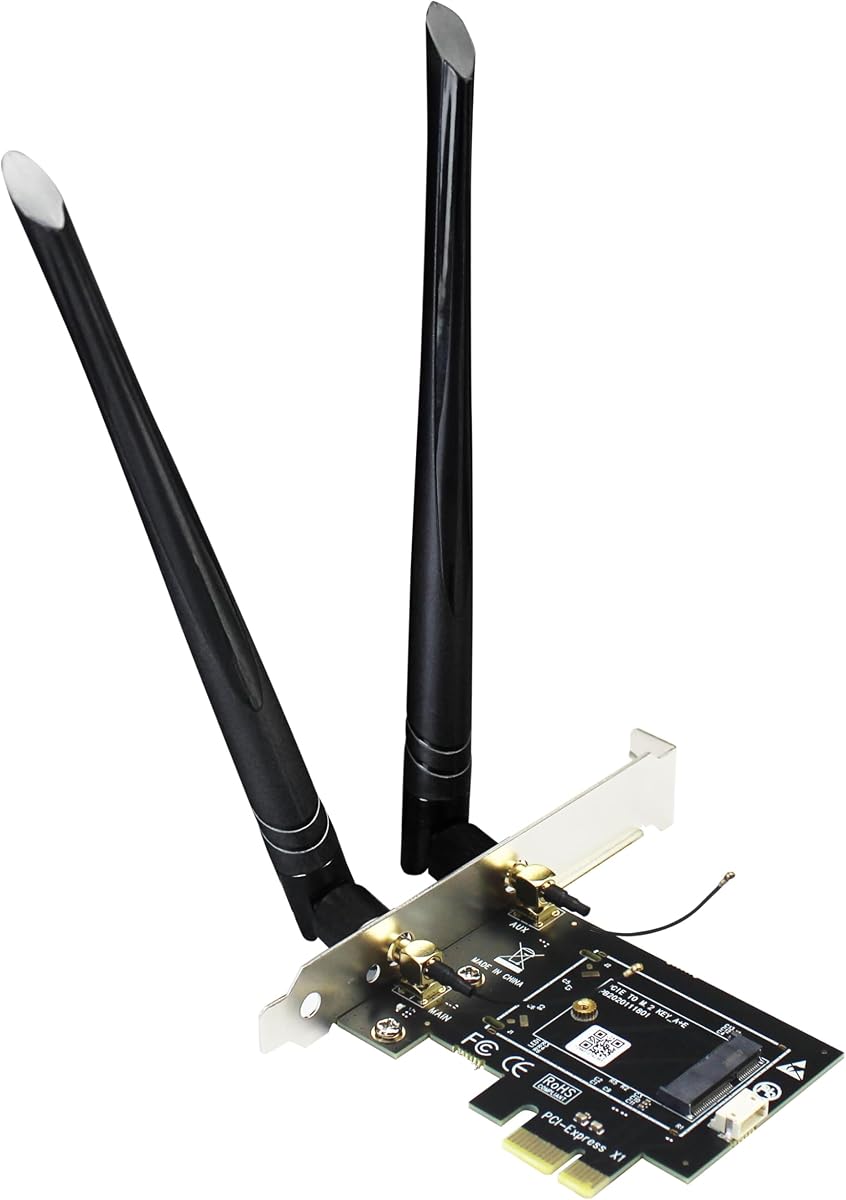
GLOTRENDS WA01 M.2 E Key to PCIe X1 WiFi Bluetooth Adapter
4.1Editor score
Converts M.2 E modules
Supports PCIe X1 installation
Includes dual 6dBi antennas
Works with broad module range
M2 Key E WiFi Cards compared for Wi-Fi generation, speed, Bluetooth, compatibility, antennas, and installation needs.
M2 Key E WiFi Cards give compatible laptops, desktops, and mini PCs a compact way to add modern wireless networking and Bluetooth. A capable card can improve access to faster 5GHz or 6GHz networks, reduce dependence on fragile external adapters, and support newer routers without replacing an entire computer. The right choice depends heavily on slot layout, operating system, antenna arrangement, and the Wi-Fi generation available from the router.
The products in this guide were compared using the supplied specifications, including wireless generation, supported frequency bands, Bluetooth version, module dimensions, interface support, included accessories, operating-system requirements, and installation considerations. The list covers complete cards, bare modules, adapter-only products, Wi-Fi 6 and Wi-Fi 6E options, and Wi-Fi 7 models for buyers with different hardware requirements.
Each review explains what distinguishes the card, where it fits best, and which limitations deserve attention. The top picks cover a practical budget conversion adapter, a well-equipped AX210 kit, and a high-end Wi-Fi 7 option. Ratings and product details reflect the supplied listings, while availability and prices can change, so shoppers should confirm current specifications and system compatibility before purchasing.
4.1Editor score

4.5Editor score

4.6Editor score
The table below compares all ten products by wireless standard, Bluetooth support, physical format, and practical use, making it easier to separate complete modules from desktop adapters and bare Wi-Fi 7 upgrades.


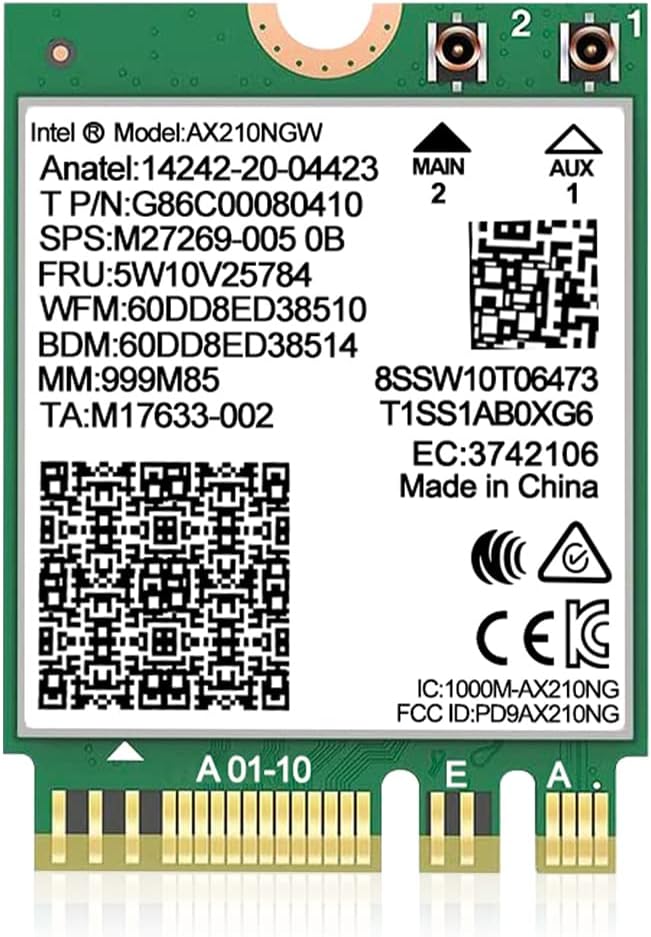



The AX210NGW DTK WiFi Card is a 4.5-rated, complete wireless upgrade centered on Intel's AX210 platform. It supports tri-band Wi-Fi 6E, Bluetooth 5.3, and the M.2 2230 E-key form factor. Unlike an adapter-only product, it combines the module, two 5dBi antennas, an 11-inch RF cable, and low-profile brackets, making it particularly useful for systems where the internal antenna placement needs improvement.
We may earn a commission when you buy through this link, at no additional cost to you.
Its headline capability is access to the 6GHz band alongside 2.4GHz and 5GHz. The supplied specifications list maximum speeds of 574Mbps at 2.4GHz and 2400Mbps on each of the 5GHz and 6GHz bands. OFDMA, MU-MIMO, Target Wake Time, and ultra-low-latency features make the card appropriate for gaming, high-resolution media, and busy wireless environments where congestion management matters.
Bluetooth 5.3 adds a convenient way to connect earbuds, keyboards, and other peripherals without a separate internal module. Compatibility is strongest with systems offering a standard M.2 2230 A/E wireless slot and a suitable antenna arrangement. The Intel AX210 driver must be installed separately, and CNVio2 or CNVio slots are not compatible because those platforms integrate wireless connectivity differently.
This is the strongest all-around choice in the list for a buyer who wants a recognizable Wi-Fi 6E module and all the physical pieces needed for a typical laptop or compact desktop installation. It is less suitable for CNVio2-equipped computers or a system that cannot accept full-size 2230 modules. For standard E-key hardware, however, the combination of performance, accessories, and flexibility is difficult to dismiss.
The included 5dBi antennas and RF cable give the installer more freedom than a card with permanently attached antenna leads. Positioning can be adjusted to reduce interference and improve reception, although actual results still depend on placement, chassis design, router configuration, and nearby wireless activity.
Adding 6GHz support can be valuable when a nearby Wi-Fi 6E router offers a clean, high-capacity channel. The 2.4GHz and 5GHz bands remain available for range, legacy networks, and crowded 6GHz environments, so the module remains versatile across different homes and offices.
We may earn a commission when you buy through this link, at no additional cost to you.
The GLOTRENDS WA01 is a 4.1-rated adapter for bringing an M.2 wireless module into a desktop with a PCIe X1 slot. It is not a complete Wi-Fi card: the buyer must provide a compatible M.2 module. In return, the adapter can support modules associated with Wi-Fi 4, 5, 6, 6E, and 7, as well as a Coral TPU, making it a flexible chassis for several wireless upgrades.
We may earn a commission when you buy through this link, at no additional cost to you.
The adapter routes Wi-Fi through PCIe and Bluetooth through USB, so the included internal USB connection must be attached to a compatible motherboard header. It includes a 6dBi RP-SMA antenna and two 15-centimeter U.FL to RP-SMA pigtail cables. This arrangement suits desktop builders who want a full-height internal card rather than a USB dongle.
The WA01 supports several Intel NGFF modules, including BE200NGW, AX210NGW, AX200NGW, 9260NGW, 8265NGW, 8260NGW, 7265NGW, and 7260NGW, along with listed Broadcom, Realtek, and Atheros alternatives. CNVio2 and CNVio modules such as AX211NGW and AX201NGW do not work, and mini PCIe modules are also unsupported.
For a budget-conscious desktop owner with a spare compatible module, this adapter is a practical way to install it cleanly. It is not the right purchase for someone expecting a turnkey card, and the separate Bluetooth wiring requires careful planning. Once those conditions are understood, it provides an inexpensive and broadly reusable upgrade path.
Because the adapter accepts a wide selection of NGFF modules, it can remain useful as wireless standards evolve. A user can begin with an available Wi-Fi 6 or 6E module and later move to a compatible Wi-Fi 7 card without replacing the PCIe adapter itself.
The external SMA antennas can be positioned near or outside a desktop case for better signal reception than a small internal module might provide. The supplied pigtails must connect correctly to the module, and the case should not obstruct the antennas or their cables.
We may earn a commission when you buy through this link, at no additional cost to you.
The 10Gtek PCIe x1 to M.2 adapter earns a 4.4 rating and offers a straightforward way to install an existing M.2 2230 wireless module in a desktop. It supports PCIe X1, X4, X8, and X16 physical slots, which makes it useful for compact builds as well as full-size systems. The product is an adapter only, and its title explicitly notes that the Wi-Fi card is not included.
We may earn a commission when you buy through this link, at no additional cost to you.
Its M.2/NGFF A+E Key interface can support the 3160, 3165, 7260, 7265, 8260, 8265, 9260, AX200, and AX210 families. The wireless portion uses the PCIe lane, while the supplied internal USB cable handles Bluetooth. Compatibility with both AMD and Intel motherboards broadens its appeal, provided the system has a suitable M.2 module and USB header.
Two 5dBi antennas support 2.4GHz and 5GHz, but they do not add 6GHz support to a dual-band module. The adapter also does not support hot swapping, so the system should be powered down before changing hardware. Its full-height baffle may require checking clearance in smaller cases, while the motherboard's internal USB header must be available for Bluetooth.
The 10Gtek adapter is best for a desktop builder who already owns a suitable module and wants an internal installation without buying another M.2 Wi-Fi card. It is less convenient than the AX210NGW DTW complete kit and less flexible in antenna bands than the GLOTRENDS option. Nevertheless, its broad slot and platform support make it a capable desktop conversion card.
Using a small PCIe X1 device with a full-height bracket can simplify installation in systems with limited expansion space. The adapter can fit larger x1, x4, x8, or x16 slots, subject to the case and motherboard layout.
The included 30-centimeter internal USB cable connects the adapter to a motherboard USB header. A 9-pin female connector attaches to the small 4-pin side, and the system should be fully powered off while either connection is installed.
We may earn a commission when you buy through this link, at no additional cost to you.
The QCNCM865 WiFi 7 M.2 Key E Card has a 4.1 rating and is aimed at modern Windows 11 systems that can benefit from next-generation wireless features. It uses an M.2 2230 E-key design, supports 2.4GHz, 5GHz, and 6GHz, and includes Bluetooth 5.3. Its stated maximum data rate is 5.8Gbps using 4K-QAM and a 320MHz channel.
We may earn a commission when you buy through this link, at no additional cost to you.
Multi-Link Operation is the card's defining feature. When paired with a compatible Wi-Fi 7 router, the system can use multiple bands and channels simultaneously, which can lower latency and improve reliability. The card can also operate with Wi-Fi 6 and 6E routers, though the supplied information caps that backward-compatible performance at 2.4Gbps.
The requirements are specific. A Wi-Fi 7 router with WPA3 and Windows 11 version 24H2 or newer is recommended for full Wi-Fi 7 capabilities. The product supports Intel and AMD platforms, including listed Intel Z890 and Z790 systems, AMD Ryzen 7000 and 9000 systems, Threadripper, and compatible mini PCs. Drivers are downloaded from the Fenvi website.
This card makes the most sense for a buyer who already owns suitable Wi-Fi 7 infrastructure and values MLO rather than simply seeking the highest headline number. It is a less natural choice for Windows 10 systems or owners of older routers. Within the stated platform requirements, though, it offers a forward-looking tri-band upgrade with strong gaming and high-transfer potential.
MLO can allow a compatible router and client to maintain connections across multiple links rather than relying on a single band or channel. The benefit depends on router firmware, network conditions, and the applications being used, so owning a Wi-Fi 7 router is essential for the full feature set.
The QCNCM865 can connect to Wi-Fi 6 and 6E infrastructure, allowing a buyer to upgrade the computer before replacing the router. Real-world throughput will be limited by the older router, its radio configuration, internet service, and the number of connected clients.
We may earn a commission when you buy through this link, at no additional cost to you.
The Intel AX210 NGW Wireless Card carries a 4.6 rating and offers a conventional internal upgrade for compatible laptops. Its 2230 M.2 A/E-key format, tri-band Wi-Fi 6E support, and Bluetooth 5.3 make it one of the most broadly relevant options for users seeking to add 6GHz connectivity to an older system.
We may earn a commission when you buy through this link, at no additional cost to you.
Maximum theoretical speed is listed as 5374Mbps, comprising 574Mbps at 2.4GHz and 2400Mbps on both the 5GHz and 6GHz bands. The AX210 platform is also recognized for lower power use, MU-MIMO, OFDMA, and other efficiencies. Bluetooth 5.3 adds lower-latency operation, stronger interference resistance, and potential battery-life improvements for connected devices.
Installation is straightforward only when the computer has the right slot. The card supports 64-bit Windows 10 and Windows 11 on motherboards with an Intel processor and an M.2 network slot, while the supplied information also notes compatibility with newer AMD CPUs. CNVio2 protocol slots and mini PCIe laptop slots are not supported.
A buyer must install the Wi-Fi and Bluetooth drivers by searching for AX210NGW on Intel's website. The listing does not identify antennas or mounting hardware as part of the package, so existing laptop antenna leads and factory brackets may need to be reused. This is an excellent choice for a standard E-key laptop or desktop that lacks newer wireless hardware but can host the module.
Using the AX210 means the operating system can work with drivers obtained directly from Intel. That familiarity helps when troubleshooting, replacing a failed module, or managing both Wi-Fi and Bluetooth functions from the same vendor-provided software package.
M.2 Wi-Fi cards depend on chassis antenna leads rather than transmitting effectively through the card housing alone. Users should confirm that the laptop or desktop has U.FL or equivalent antenna connections and that the original brackets and spacers fit the replacement card.
We may earn a commission when you buy through this link, at no additional cost to you.
The OKN AX210 NGW Wireless Card has a 4.6 rating and focuses on the capabilities of the AX210 chipset in a 2230 NGFF module. It provides tri-band Wi-Fi 6E, Bluetooth 5.3, and support for 64-bit Windows 10 and Windows 11, making it a solid internal option for many modern laptops and motherboards.
We may earn a commission when you buy through this link, at no additional cost to you.
The stated maximum link speed reaches 5374Mbps: 574Mbps at 2.4GHz plus 2400Mbps on both 5GHz and 6GHz. The card retains familiar AX210 features such as MU-MIMO, 1024-QAM, OFDMA, and 160MHz channel support. WPA3 is supported for newer secured networks, while the module also supports WPA and WPA2 for compatibility.
Bluetooth 5.3 is described as an upgrade over 5.2, with greater capacity, faster performance, low latency, and stronger battery behavior. The card can work with Intel CPUs and newer AMD CPUs, but the buyer must install the appropriate driver from Intel's website by searching for AX210. The listing does not explicitly identify a complete antenna kit, so installation depends on the computer's existing hardware.
This module is a particularly good fit for a compatible 2230 laptop that needs both tri-band Wi-Fi and modern Bluetooth without moving to a more restrictive Wi-Fi 7 platform. Its main drawback is the need to source or reuse antennas and ensure the case offers a real E-key slot. For conventional hardware, it delivers a well-rounded combination of standards and compatibility.
WPA3 support is valuable for users whose routers or wireless networks have moved to stronger security. Supporting WPA and WPA2 as well makes the card suitable for mixed environments where business, guest, and legacy networks use different configurations.
OFDMA and MU-MIMO can improve efficiency when several devices are active, while 160MHz channel support helps exploit compatible 5GHz and 6GHz networks. These benefits depend on the router, channel availability, signal quality, and internet connection rather than the card alone.
We may earn a commission when you buy through this link, at no additional cost to you.
The AX210 NGW Wireless Card with Antenna Kit offers a 4.4 rating and combines an AX210-based module with two 8dBi antennas, an IPEX cable, and mounting brackets. It is aimed at buyers who need more freedom in antenna placement, particularly when installing the card in a desktop or compact chassis that lacks factory antenna hardware.
We may earn a commission when you buy through this link, at no additional cost to you.
The module supports tri-band Wi-Fi 6E across 2.4GHz, 5GHz, and 6GHz, along with Bluetooth 5.3. Its security support includes WPA3 and backward compatibility with WPA2. As with other AX210 products, the radio's actual throughput depends on the access point, channel width, distance, interference, and the capabilities of the computer's other hardware.
The stated Bluetooth benefits include greater capacity, faster speed, extremely low latency, and stronger battery life. The card fits NGFF M.2 2230 A/E-key slots and supports 64-bit Windows 10 and Windows 11. Drivers must be downloaded from Intel, which is an important part of setup for a fresh installation or an operating-system upgrade.
The bundled hardware makes this package more installation-ready than a bare AX210 module, although 8dBi is a specification rather than a guarantee of faster internet access. Antenna choice should reflect the installation environment and local regulations. Subject to correct placement, this is a strong option for users who want tri-band Wi-Fi 6E and the flexibility to position external antennas.
External antennas can be moved away from dense motherboard components, metal chassis sections, and other sources of interference. A desktop with open space around the side or rear panel often has more placement options than a tightly packed laptop, although cable length and connector routing must be considered.
The stated 8dBi gain indicates the antenna's directional characteristics, not a guaranteed increase in application throughput. Placement, polarization, distance, obstructions, and regulatory limits all influence real results, so correctly installed and matched antennas matter more than the headline number alone.
We may earn a commission when you buy through this link, at no additional cost to you.
The QCNCM865 WiFi 7 Network Card has a 4.4 rating and targets Windows 11 users seeking a current tri-band module. It uses the M.2 Key E interface, supports 2.4GHz, 5GHz, and 6GHz, and includes Bluetooth 5.3. The listed maximum data rate of 5.8Gbps comes from 4K-QAM and 320MHz channel support.
We may earn a commission when you buy through this link, at no additional cost to you.
MLO allows a compatible Wi-Fi 7 router to use several wireless bands and channels at once. The listing also notes simultaneous operation on 2.4GHz with 5GHz or 6GHz. These capabilities can improve responsiveness, connection reliability, and aggregate throughput, but they require compatible infrastructure rather than appearing automatically with an older router.
This card is compatible with Intel and AMD motherboards, but only with Windows 11. The Wi-Fi and Bluetooth drivers are obtained from the Fenvi website by searching for QCNCM865. The supplied guidance also recommends disabling old wireless drivers in Device Manager to prevent conflicts, making a clean installation and careful troubleshooting important.
The QCNCM865 is a good fit for a newer Windows 11 laptop or desktop that supports the M.2 E-key format and will be paired with a Wi-Fi 7 router. It offers less value for a Windows 10 machine, a system with a CNVio2 slot, or a household that only has a Wi-Fi 6E router. Within that target environment, it is a capable and modern option.
A Wi-Fi 7 client card cannot create Wi-Fi 7 service on an older router. Maximum channel width, multi-link behavior, and other advanced features remain constrained by the access point, so matching the card to current or planned router hardware prevents an expensive compatibility mismatch.
Replacing an existing wireless module can leave older driver packages installed in Windows. Following the manufacturer's recommendation to disable previous Wi-Fi and Bluetooth drivers before installing the QCNCM865 drivers can reduce recognition and performance issues.
We may earn a commission when you buy through this link, at no additional cost to you.
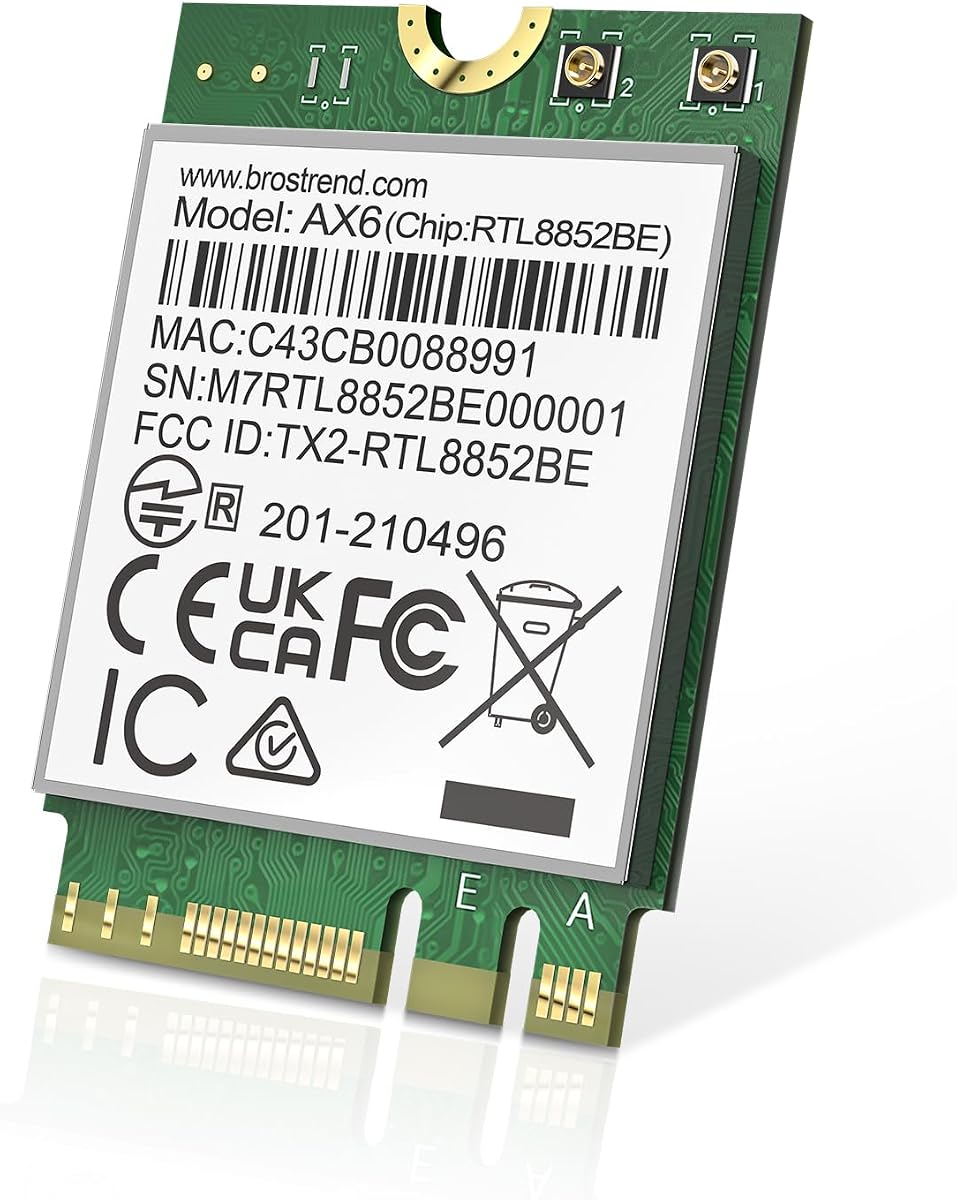
The BrosTrend WiFi 6 M.2 Wireless Card provides a 4.4-rated dual-band alternative for systems that do not need 6GHz. It uses the compact M.2 2230 form factor, fits Key A and Key E slots, and supports Windows 10 and Windows 11. This makes it a practical option for common laptop and motherboard upgrades where two legacy bands are sufficient.
We may earn a commission when you buy through this link, at no additional cost to you.
Its AX1800 classification reflects a maximum rate of 1201Mbps on 5GHz and 574Mbps on 2.4GHz. UL/DL MU-MIMO, OFDMA, and 1024-QAM support improve efficiency under compatible networks. Bluetooth 5.2 is included, with the listing describing it as offering twice the transmission speed and four times the range of Bluetooth 4.2.
The module is intended for M.2 2230 installations, measuring 22 millimeters wide by 30 millimeters long. The latest Wi-Fi driver should be downloaded from the BrosTrend website. Linux systems with kernel 6.5 or higher are also supported, although the manufacturer does not provide Linux expertise support, which matters for users who may need help with drivers or hardware quirks.
This card is best for a standard 2.4GHz and 5GHz home or office network, particularly when 6GHz coverage is unavailable. It lacks the Wi-Fi 6E and Wi-Fi 7 headroom of several higher-ranked models, and Bluetooth 5.2 is no longer the newest standard in the guide. Even so, it delivers a focused set of modern features for compatible Windows and Linux computers.
A 2.4GHz and 5GHz card remains useful in networks without a 6GHz access point. The 5GHz band can provide higher throughput over shorter distances, while 2.4GHz offers greater reach and can be a better choice for distant or weakly connected devices.
Windows users can obtain the current driver from BrosTrend, while Linux support applies to kernel 6.5 or higher. Because technical Linux support is not offered, buyers should be comfortable identifying the correct driver and checking hardware compatibility themselves.
We may earn a commission when you buy through this link, at no additional cost to you.
The Intel Killer BE200 Wi-Fi 7 Card has a 4.6 rating and represents the most premium-oriented module in the guide. It supports 802.11be Wi-Fi 7 across 2.4GHz, 5GHz, and 6GHz, offers Bluetooth 5.4, and is positioned for gaming systems that want low-latency wireless connectivity and a maximum stated data rate of 5.8Gbps.
We may earn a commission when you buy through this link, at no additional cost to you.
Tri-band operation gives the card access to more spectrum than a dual-band adapter, including the 6GHz band available with suitable Wi-Fi 7 routers. The maximum rate still depends on a compatible router, distance, equipment, and configuration, so buyers should not interpret 5.8Gbps as guaranteed application throughput. A matching high-speed internet service is also necessary for large downloads.
Compatibility is the main constraint. The product requires 64-bit Windows 11, an available M.2 PCIe Key E slot, and an Intel-based processor; AMD systems are explicitly unsupported. It is a single pack, and the listing does not identify antennas, RF cables, or brackets as included, so the computer's existing antenna system or separate accessories may be required.
The BE200 is best for an Intel gaming desktop or laptop that already has compatible Wi-Fi 7 infrastructure. It offers the highest wireless generation in the guide alongside newer Bluetooth 5.4 support, but it is not a general-purpose option for every M.2 E-key system. For a compatible enthusiast build, it provides a clear path to the newest standards in the roundup.
A compatible Wi-Fi 7 router can reduce latency and improve responsiveness when network conditions are favorable. The card itself does not guarantee a particular ping value; router placement, congestion, server distance, background traffic, and the game being played remain significant influences.
This card is not a generic Wi-Fi 7 upgrade for every computer. It requires 64-bit Windows 11, an Intel processor platform, and a suitable M.2 PCIe Key E slot. Checking these requirements before opening the case prevents an expensive and time-consuming incompatibility.
We may earn a commission when you buy through this link, at no additional cost to you.
Selecting an M.2 Key E WiFi card starts with the computer's slot and ends with the router's capabilities. Wireless generation, antenna hardware, operating-system support, and whether the package includes a complete module can affect the outcome as much as the advertised peak speed.
An M.2 Key E slot is not interchangeable with every M.2 connector. A card may physically fit an A/E-key slot while failing in a Key M slot, and some systems labeled as M.2 Wi-Fi slots use CNVio or CNVio2 protocols that cannot accept a standard AX210, AX211, or BE200 module. Verify the motherboard or laptop manual, identify the key, and check for CNVio warnings before purchasing.
A Wi-Fi 7 card can operate with older Wi-Fi 6 or 6E routers, but it cannot deliver Wi-Fi 7 capabilities until the access point supports them. Conversely, a Wi-Fi 6E card provides meaningful benefits only when a suitable 6GHz network is within range. Consider the router generation, available bands, security mode, and likely future network upgrade before choosing the module.
Some listings contain a complete wireless module, while others contain only a PCIe adapter. The GLOTRENDS WA01 and 10Gtek adapter are not usable without adding a compatible M.2 module. A complete AX210 card may still require the computer's existing antenna leads and brackets. Read the package contents carefully so the purchase includes every part required for the intended installation.
The QCNCM865 listings are limited to Windows 11, with version 24H2 or newer recommended for full functionality. The Intel Killer BE200 requires 64-bit Windows 11 and an Intel processor. AX210-based products generally support 64-bit Windows 10 and 11, while the BrosTrend card also lists Linux kernel 6.5 or higher. Driver availability and technical support should influence the decision.
A desktop card generally benefits from two external antennas positioned away from the motherboard and chassis metal. Laptop modules normally reuse the manufacturer's antenna leads and factory brackets. Kits with 5dBi or 8dBi antennas can improve installation flexibility, but gain does not guarantee faster throughput. Cable condition, connector type, placement, and the router's location remain equally important.
The 2.4GHz band typically provides greater range and better penetration, while 5GHz and 6GHz offer more bandwidth over shorter distances. A tri-band card is versatile because it can move between all three depending on network conditions. A dual-band card remains perfectly suitable for homes without 6GHz service, particularly when 2.4GHz and 5GHz already satisfy the user's coverage and speed needs.
A combined Wi-Fi and Bluetooth card can reduce internal component count and eliminate a separate Bluetooth adapter. Bluetooth 5.3 appears across most AX210 and QCNCM865 options, the BE200 offers Bluetooth 5.4, and the BrosTrend card provides Bluetooth 5.2. Newer versions can improve efficiency and connection handling, but peripheral compatibility depends on the devices being used.
Headline figures such as 5374Mbps or 5.8Gbps describe maximum radio link rates under ideal conditions. Real applications are constrained by router specifications, channel width, signal strength, interference, processing overhead, internet service, and the number of connected clients. For latency-sensitive gaming, network conditions can matter more than peak throughput. For large transfers, sustained link performance and storage speed become the limiting factors.
Before installation, confirm the computer supports the exact card and connector arrangement, create a Windows recovery point or back up important data, and shut the system down completely. Remove the power cable and battery where applicable. For a desktop adapter, plan the PCIe slot, antenna locations, and internal USB header connection before fitting the card so cables do not obstruct fans or expansion cards.
Install the module in the M.2 slot, secure it with the appropriate screw or bracket, and connect the chassis antenna leads to the card's U.FL or IPEX connectors. On adapter-based solutions, attach the pigtails to the module and screw the antennas to the bracket. Connect the internal USB cable for Bluetooth, keep the system powered off while making hardware changes, and avoid forcing connectors into the wrong orientation.
After booting Windows, install the current Wi-Fi and Bluetooth drivers from the chipset or card manufacturer's official website, then restart if requested. Use the operating system's network controls to join the desired SSID, configure the appropriate WPA security mode, and confirm that Bluetooth devices can pair. Position antennas carefully, keep them unobstructed, and periodically check for driver or firmware updates. If performance is poor, move the router, reduce channel congestion, and test with the system near the access point before assuming the card is faulty.
Both Key A and Key E slots can accept many compatible 2230 Wi-Fi modules, but the connectors differ in some electrical details. The safest approach is to check the motherboard or laptop manual rather than relying on physical fit alone. CNVio and CNVio2 slots may look similar but generally do not support standard removable AX210, AX211, or BE200 modules.
Yes, if the desktop motherboard has a compatible M.2 A/E-key slot with the necessary antenna connectors, or if you use a PCIe-to-M.2 adapter. Desktop installations often benefit from external SMA antennas and more flexible placement. Adapter-only products still require the buyer to purchase a separate compatible M.2 wireless module.
A Wi-Fi 7 card can generally connect to an older Wi-Fi 6 or 6E router, but it will only operate at the capabilities of that router. Full Wi-Fi 7 features such as 320MHz channels and Multi-Link Operation require compatible Wi-Fi 7 infrastructure and appropriate security settings. Buying the card first is reasonable if a router upgrade is already planned.
It depends on the listing. Some AX210 packages include antennas, RF cables, and brackets, while basic bare modules rely on the antennas already installed in the laptop or desktop. The GLOTRENDS WA01 and 10Gtek products are adapter-only solutions and do not include the M.2 wireless module itself. Check the package contents carefully before ordering.
They are not interchangeable across CNVio and standard M.2 systems. AX210 is a standard removable module designed for a conventional M.2 E-key slot, while AX211 uses the CNVio2 platform and is integrated with certain processor and motherboard designs. The GLOTRENDS listing explicitly excludes AX211NGW and similar CNVio2 or CNVio modules.
Usually, yes. Windows may recognize a standard card after installation, but the manufacturer or chipset vendor may still need to provide current Wi-Fi and Bluetooth drivers. AX210-based cards can use drivers obtained from Intel by searching for AX210, while QCNCM865 products use the Fenvi website. Installing matching Wi-Fi and Bluetooth drivers is important for full functionality.
It can if the current adapter is outdated, the connection uses an advanced band, or the computer was the limiting factor. It will not exceed the speed of the router, internet service, or nearby wireless conditions. A Wi-Fi 7 card paired with an older router may produce little visible improvement, so assess the complete network before upgrading.
No. Antenna gain describes directional radio characteristics rather than guaranteed application speed. Higher-gain antennas can help when correctly matched to the module and positioned with a clear path to the router, but poor placement, regulatory limits, polarization, and interference can negate the benefit. For most laptop upgrades, reusing the original antenna system is the safest approach.
The AX210NGW DTK WiFi Card stands out as the most complete general-purpose option because it combines a Wi-Fi 6E AX210 module, Bluetooth 5.3, 5dBi antennas, an RF cable, and mounting brackets. The GLOTRENDS WA01 is the best budget choice for reusing a compatible module in a desktop, while the Intel Killer BE200 is the premium selection for an Intel Windows 11 system that can take advantage of Wi-Fi 7.
Prioritize the slot type, operating system, antenna arrangement, and router before looking at maximum speed. A standard 2230 A/E-key solution such as AX210 offers broad relevance, but a CNVio-equipped laptop may not accept any standard card in this guide. Wi-Fi 7 makes sense for a compatible router and network upgrade, while dual-band Wi-Fi 6 can remain sensible for users who do not need 6GHz.
Finally, compare the package contents carefully because complete modules, bare cards, and adapter-only products are not interchangeable. Confirm included cables and antennas, install the correct drivers, and expect real-world performance to depend on the access point and local conditions. Product specifications and prices can change, so check the current listing and your computer's requirements before making the final purchase.