
Sisyphy Ergonomics Desk Extender Tray
4.3Editor score
Punch-free clamp installation
Folds beneath the desk
Supports keyboard and mouse
A clamp-on desk extender tray adds usable surface area without requiring a larger desk or permanent installation. The best models create a stable platform for keyboards, mice, monitors, printers, and everyday accessories while reducing the cramped feeling of a compact workstation.
We compared all ten products by examining clamp compatibility, surface dimensions, load capacity, folding mechanisms, ergonomic support, storage features, installation requirements, and compatibility limitations. The list includes compact arm rests, full keyboard trays, monitor shelves, and large multifunction extensions.
Each review identifies what the product does best and where buyers may need to measure or adjust their setup. Ratings and product details reflect the supplied information, while availability and prices can change, so readers should confirm current listing details before ordering.
4.3Editor score
4.7Editor score

5.0Editor score
As an Amazon Associate we earn from qualifying purchases.
The comparison chart highlights each tray's core design, approximate dimensions, load capacity, mounting requirements, and most useful storage or ergonomic feature. Buyers should use it as a quick filter before checking desk dimensions and edge compatibility.


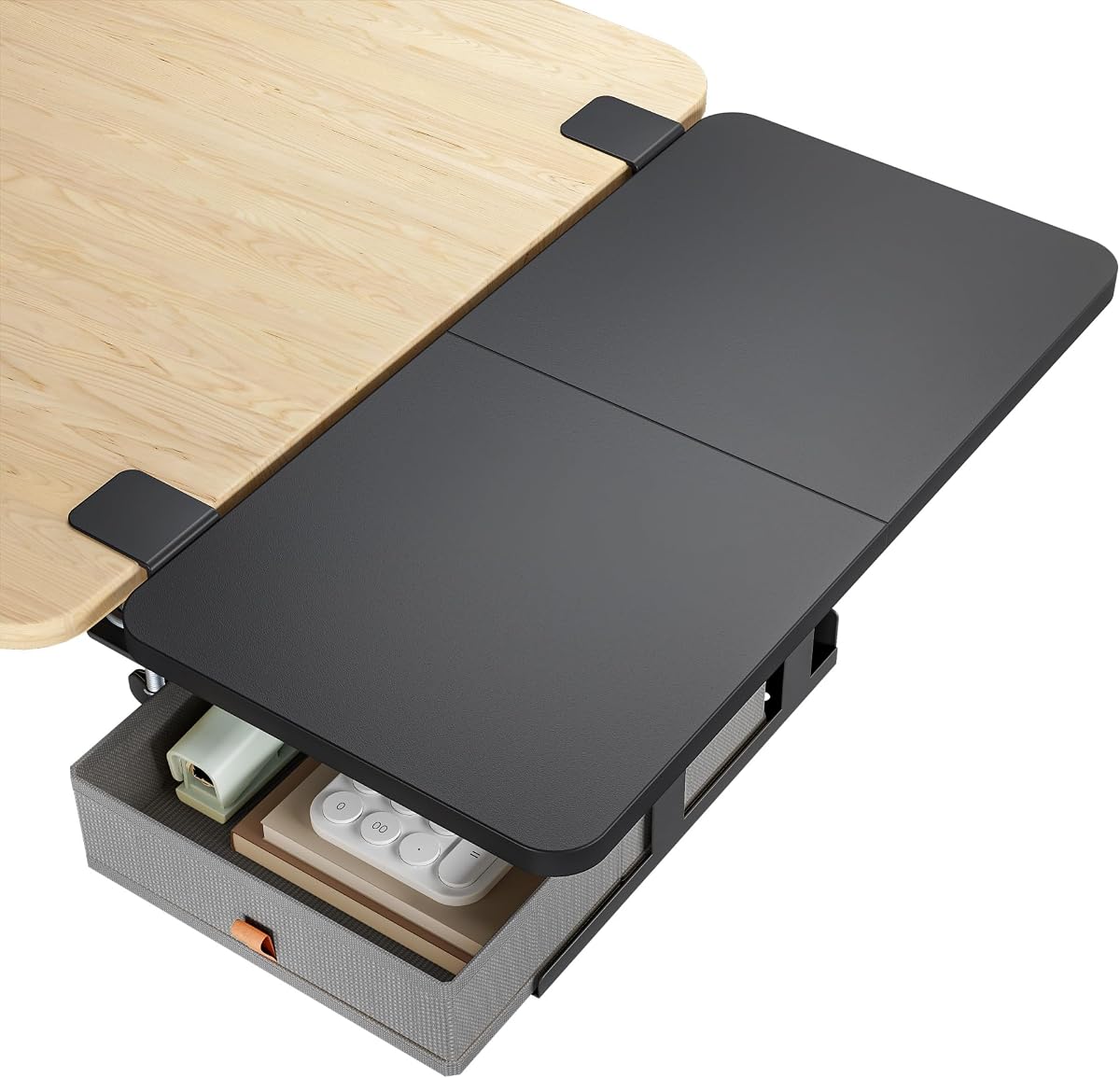
The PEGZONE Desk Extender Tray with Storage Drawer combines a broad 24-by-12-inch platform with a 4.7 rating, the highest among the listed products with multiple ratings. It is a full desk extension rather than a small wrist-rest shelf, giving buyers enough room for a keyboard, mouse, printer, laptop, or several accessories at once.
We may earn a commission when you buy through this link, at no additional cost to you.
Its most distinctive feature is the integrated drawer. Small office supplies, cables, pens, and other frequently used items can be kept within reach without adding clutter to the main work surface. The drawer is designed to keep objects from falling out, while the 55-pound load capacity provides ample strength for heavier equipment. Rounded edges also make the platform more comfortable around forearms and reduce the chance of accidental bumps.
There are trade-offs. The extension consists of two connected panels and needs assembly, so buyers should allow time for setup. Its clamp fits desktops between 0.6 and 2.4 inches thick that are at least 22 inches wide, and it cannot be used on raised, beveled, or irregular edges. Those restrictions make precise desk measurement important.
This is the strongest overall recommendation for buyers who want both expanded work area and integrated organization. It suits students, remote workers, creators, and gamers who want a broad surface without permanently altering the desk. The drawer is particularly valuable in compact setups where even a small amount of hidden storage can simplify the workspace.
The drawer turns the extension into more than a bare shelf. It gives cables, stationery, and small accessories a dedicated home while the upper surface remains available for active equipment.
A listed capacity of 55 pounds makes the tray suitable for printers, speakers, laptops, and heavier multi-device setups, provided the clamp is installed correctly and the desk meets the stated requirements.
We may earn a commission when you buy through this link, at no additional cost to you.
The BONTEC Ergonomic Desk Extender Tray is a compact 9.5-by-9.1-inch platform designed primarily to support a mouse hand, forearm, and wrist. Its 4.5 rating reflects positive reception, while the product description emphasizes reduced elbow pressure, improved positioning, and a wider usable area beside the main desktop.
We may earn a commission when you buy through this link, at no additional cost to you.
Installation is handled with a manual knob and a non-hole mounting method, allowing the tray to attach without drilling into the desktop. The platform holds up to 33 pounds and can accommodate a keyboard, mouse, notebook, or other compact accessories. Its textured black surface is described as anti-wear and waterproof, while MDF and anti-rust steel form the main construction.
The trade-off is size. A 9.5-by-9.1-inch tray is much smaller than the 24-inch-wide models in this list and may not accommodate a full-size keyboard alongside a mouse. It is therefore more accurately an arm-rest shelf than a complete desktop replacement. The supplied dimensions should also be checked against the available edge space.
This is a practical choice for people who primarily need mouse-side support and a little more landing space. It is well suited to compact home offices, hot-desking setups, and users who want the option to fold the extension away. Those seeking a broad shelf for multiple accessories should look toward a larger model.
The platform creates a dedicated area for the mouse and nearby items while giving the forearm a supported position. That makes it especially relevant for users who spend long periods working in a tight desktop area.
Its modest dimensions and 90-degree folding mechanism make the tray easy to deploy for focused work and remove when more conventional desk access is needed.
We may earn a commission when you buy through this link, at no additional cost to you.
The VIVO Black Clamp-on Desk Extender provides a broad surface for keyboards, printers, speakers, and general storage. Its 4.2 rating and reinforced frame make it a dependable option for larger desks, while the 90-degree folding design allows the platform to move out of the way when it is not needed.
We may earn a commission when you buy through this link, at no additional cost to you.
The C-clamp installation system uses hand tightening and is designed to avoid damaging the desktop. It accommodates desktops from 0.5 to 3.5 inches thick. Under the large platform, reinforced K-shaped brackets provide support for up to 44 pounds. Hardware and instructions are included, although assembly is still required before the product can be mounted.
Compatibility is the main limitation. VIVO explicitly states that the extender is not suitable for lipped or beveled edges. It also has a lower listed rating than several competitors, so buyers relying heavily on customer feedback may want to examine current reviews for details not included in the supplied product information.
The VIVO is a strong choice for a conventional rectangular desk that needs a substantial additional platform. It can function as a keyboard tray, equipment stand, or storage surface, giving it broader appeal than a dedicated wrist rest. Those wanting concealed storage would need to choose a different design.
The 24-by-12-inch area is large enough to support a full keyboard and mouse or heavier equipment such as printers and speakers, depending on the user's available space and the weight of the devices.
Releasing the folding levers allows the platform to be stored away, which is useful when alternating between focused keyboard work and other desk activities.
We may earn a commission when you buy through this link, at no additional cost to you.
The 20-by-7.8-inch Adjustable Ergonomic Clamp-On Desk Extender Tray uses a wood-grain laminate surface and a retractable design intended for highly compact workspaces. Its 2.6 rating is considerably lower than those of the other products, so this option should be evaluated carefully against the buyer's priorities and current customer feedback.
We may earn a commission when you buy through this link, at no additional cost to you.
The tray can hold a keyboard, mouse, coffee cup, phone, tablet, or notebook. An integrated cup holder keeps a drink within reach while reducing the chance of placing it directly against computer equipment. Its clamps attach without drilling and are described as compatible with most standard desk edges measuring approximately 1 to 5 centimeters thick.
The narrow compatibility range and lower rating warrant caution. Buyers should verify the thickness of their desk and make sure the sliding platform will not interfere with chair arms, desk legs, drawers, or other mounted equipment. The product information does not list a specific load capacity, so heavy printers and similar equipment are not the safest use case.
The product may still appeal to users in dorm rooms, student apartments, and very small offices who value the retractable footprint and cup holder more than a large work surface. Its installation is described as taking about three minutes. Because the listed rating is notably low, buyers should confirm recent feedback before making a final decision.
The platform can slide out when additional room is needed and retract when the user wants the normal desktop exposed, making it particularly appropriate for desks with limited usable area.
A dedicated drink recess separates the cup from the keyboard and other work essentials, which is useful in tight desks where a drink would otherwise occupy valuable working space.
We may earn a commission when you buy through this link, at no additional cost to you.
The Height-Adjustable Desk Shelf is designed as a monitor riser and equipment platform rather than a conventional full-width keyboard tray. It measures 15 by 9.5 inches, provides 6.5 inches of height, and holds up to 44 pounds. Its 4.4 rating indicates generally favorable reception for this specialized use.
We may earn a commission when you buy through this link, at no additional cost to you.
Four mounting options include top clamp, side clamp, bottom hang, and parallel placement. That flexibility allows the shelf to be positioned according to the desk structure, available legroom, and the equipment being supported. It can also function as an arm-support surface, helping align the user's forearms with the desktop.
The narrow 15-inch width means it is unlikely to hold a full-size keyboard and mouse together. The mounting options also require care: one configuration may work well on a solid desk, while another may be necessary where a modesty panel or other structural feature interferes. Compatibility extends to desktops between 0.4 and 2.1 inches thick.
This shelf is best for users who want to elevate a monitor, organize speakers and gaming accessories, or create a secondary equipment level. It is less appropriate for buyers whose main goal is a full keyboard-and-mouse platform. Measure the desk and available clearance before selecting among the four mounting positions.
The 6.5-inch elevation can bring a monitor closer to eye level, reducing the need to bend the neck downward while using the workstation.
The four mounting configurations make the shelf adaptable to different desk shapes, though buyers should identify the most suitable arrangement before tightening the hardware.
We may earn a commission when you buy through this link, at no additional cost to you.
The Suptek Clamp-on Desk Extender combines a 23.6-by-9.5-inch surface with a 4.6 rating, making it one of the stronger all-around choices in the group. Its proportions suit a keyboard and mouse or a pair of speakers, while the 90-degree folding design allows the platform to disappear beneath the desk when it is not needed.
We may earn a commission when you buy through this link, at no additional cost to you.
Two C-clamps and reinforced K-shaped brackets provide support for up to 44 pounds. The clamps can accommodate desktops from 0.5 to 4.17 inches thick, giving this model a broad range compared with many competitors. The supplied description also notes that all hardware and instructions are included for assembly.
Compatibility exclusions are significant. The product is not intended for lipped or beveled edges, curved or corner desks, or plastic desks. Those limitations rule out otherwise popular desk shapes, and buyers should not assume that every desktop within the thickness range will offer enough clearance for the clamp and folding arm.
The Suptek is well suited to conventional office desks where a keyboard tray, wrist-support surface, or printer platform is wanted. It combines a generous load rating, flexible clamp range, and reliable folding mechanism. A limited three-year manufacturer warranty and included support further distinguish it from many smaller desk accessories.
The 23.6-inch width accommodates typical full-size keyboards, while the 44-pound rating provides sufficient support for keyboards, mice, speakers, and other common office equipment.
With a stated fit for desktops up to 4.17 inches thick, the clamp offers useful flexibility, although lipped, beveled, curved, and plastic desks remain unsupported.
We may earn a commission when you buy through this link, at no additional cost to you.
The Sisyphy Ergonomics Desk Extender Tray is a compact extension designed to align with the desktop and provide more support for the forearms, elbows, and wrists. It carries a 4.3 rating and offers a useful combination of folding storage, punch-free installation, and flexible mounting for standard right-angle office desks.
We may earn a commission when you buy through this link, at no additional cost to you.
The tray is described as installing in about five minutes without drilling. It can be mounted on the front or side of a desk, and the 90-degree folding mechanism lets it fold down when not in use. Its surface can accommodate a keyboard, notebook, mouse, and other work essentials, although the compact 9.5-by-9.1-inch dimensions limit simultaneous equipment capacity.
The principal constraint is the stated maximum desktop thickness of 4.5 centimeters, which is approximately 1.77 inches. The product also appears optimized for standard right-angle desks, so unusual frames, raised edges, and curved surfaces may not allow secure mounting. Buyers should inspect the underside and edge clearance before installation.
This is the top budget pick for users whose main goal is inexpensive arm and wrist support in a small workspace. It delivers the essential functions of a clamp-on tray without introducing a more complicated design. Those needing a full-size keyboard platform should move up to one of the 23-to-25-inch models.
The extension creates a dedicated resting and input area close to the desktop, which can reduce awkward reaching and support a more natural arm position during extended computer work.
The clamp-on design avoids permanent modifications to the desktop and can be removed without leaving mounting holes, making the tray suitable for rentals and shared offices.
We may earn a commission when you buy through this link, at no additional cost to you.
The PEGZONE Desk Extender Tray with Laptop Holder is the white-finished counterpart to the drawer-equipped version in this guide. Its 24-by-12-inch platform provides ample space for keyboards, mice, laptops, printers, and accessories, while a 4.3 rating reflects a generally positive reception.
We may earn a commission when you buy through this link, at no additional cost to you.
Its defining feature is the integrated storage arrangement beneath the main surface. A built-in laptop stand keeps a portable computer from taking up the working area, and a headphone hook provides a dedicated hanging point. These additions are especially useful in gaming and creative setups where headsets, computers, and input devices compete for space.
Like the larger PEGZONE model, this product consists of two connected panels and requires assembly. It fits desktops between 0.6 and 2.4 inches thick that are at least 22 inches wide, and it does not support raised, beveled, or irregular edges. The 55-pound load capacity is generous for office equipment, but buyers should still distribute heavier items carefully.
Choose this version when laptop and headset storage matter more than a drawer. It is well suited to students, hybrid workers, and gamers who want one platform to handle input devices and equipment organization. The broad surface and high capacity make it more versatile than a small arm-rest shelf.
The lower stand and hook keep two common accessories visible and accessible while preserving the upper surface for active work.
A 24-by-12-inch platform can accommodate a full keyboard, mouse, and several smaller accessories, making it practical for both productivity and gaming configurations.
We may earn a commission when you buy through this link, at no additional cost to you.
The ETHU Foldable Desk Extender Tray offers the largest listed surface in the group at 25.6 by 11.4 inches. Its 4.3 rating and ergonomic positioning make it appealing to users who want to place a full-size keyboard, mouse, phone, and other daily objects within one organized area.
We may earn a commission when you buy through this link, at no additional cost to you.
The clamp installation avoids drilling, and the height and angle can be adjusted to suit the user's preferred position. That flexibility may help bring the keyboard closer while allowing the monitor to remain at an appropriate viewing distance. The frame and mounting hardware use metal with a rust-resistant powder coating, while the tray itself uses wood.
Load capacity is the main limitation. The listed maximum of 33 pounds is lower than the 44-to-55-pound capacities of several full-size competitors, so a heavy printer or multiple large pieces of equipment may be less suitable. The wide platform also needs sufficient side clearance, and users should check for interference with chair arms and desk legs.
The ETHU is a good option for keyboard-focused users who value a broad, adjustable, clean-looking surface over maximum carrying capacity. It suits home offices and shared workspaces where the white finish matches a light desk. Its combination of foldability, clamping, and dimensional adjustment makes it versatile for daily switching.
The 25.6-inch length fits a full-size keyboard and mouse with room for a phone or small accessory, reducing the crowding that commonly occurs on compact desks.
Height and angle adjustments allow users to bring the keyboard and mouse closer while maintaining a more comfortable relationship between the hands, forearms, and screen.
We may earn a commission when you buy through this link, at no additional cost to you.
The 16-by-12-inch Desk Extender Tray with Dual Clamp has a listed 5.0 rating and emphasizes stability, durable materials, and low-profile ergonomics. Its thick high-density particleboard platform and upgraded cold-rolled steel double clamp create a substantial arm-rest shelf for keyboards, mice, and office supplies.
We may earn a commission when you buy through this link, at no additional cost to you.
The stated load capacity reaches 50 pounds. According to the product information, the 1.6-centimeter board is 50 percent thicker than a standard 1-centimeter option, while the double-clamp arrangement is intended to resist wobbling and deformation. The tray folds 90 degrees beneath the desk when not in use, reclaiming most of the occupied space.
Installation differs from many clamp-on trays because the heavy-duty bracket mounts beneath the desktop with screws. It therefore suits owners who are comfortable with a small hardware installation, while renters may prefer a fully punch-free design. The desktop must be between 1 and 4.5 centimeters thick, and the mounting area should be checked for obstructions.
This is the premium recommendation for buyers prioritizing a stable, substantial platform over maximum width. The nearly flush surface supports the arms and wrists, while the foldable structure keeps the desk orderly. Its rating and 50-pound capacity are compelling, but proper screw mounting and desk-thickness compatibility are essential to achieving the intended stability.
The thick board and dual steel clamps are designed to minimize flex and wobble, producing a steadier place to type, move a mouse, or place office equipment.
The extension is designed to sit nearly flush with the main desktop, reducing the height mismatch that can contribute to awkward wrist, elbow, shoulder, and neck positioning during long sessions.
We may earn a commission when you buy through this link, at no additional cost to you.
Choosing a clamp-on desk extender involves balancing surface area, clamp fit, load requirements, storage, folding convenience, and compatibility with the shape of the desktop. Measuring the desk and understanding how the product will be used prevents most installation disappointments.
Every clamp has a stated desktop thickness range, and the correct range is essential for a secure installation. The options in this guide range from compact limits around 0.4 to 2.1 inches to broader ranges reaching 3.5 or 4.17 inches. Sisyphy accepts desktops up to 4.5 centimeters, while the dual-clamp premium model requires a thickness from 1 to 4.5 centimeters. Measure both the top and bottom of the desktop because thicker composite surfaces may not be uniform.
A suitable thickness is only one part of compatibility. VIVO and Suptek explicitly exclude lipped and beveled edges, and PEGZONE does not support raised, beveled, or irregular desktop edges. Suptek also lists curved desks, corner desks, and plastic desks as incompatible. Curved fronts, rounded corners, thick trim, crossbars, and modesty panels can prevent the clamp or folding arm from sitting correctly, so inspect the full underside and edge profile before selecting a design.
Compact trays measuring roughly 9.5 by 9.1 inches are designed primarily for mouse-side support, a notebook, and small accessories. Medium trays around 15 by 9.5 inches can elevate a monitor or hold selected office equipment. Large platforms measuring approximately 23 to 26 inches can accommodate a full-size keyboard, mouse, and other objects. The largest option does not automatically fit every desk, so check available width, chair movement, and nearby furniture as well as the stated surface dimensions.
Load capacity indicates the maximum weight the extension is designed to support. Most products in this guide fall between 33 and 55 pounds, enough for typical keyboards, mice, speakers, and many printers. The 33-pound models may be better suited to lighter office setups, while the PEGZONE models offer the highest listed capacity at 55 pounds. Capacity should not be confused with a guarantee that every clamp position on every desk will remain equally stable, so heavier equipment should be placed centrally and securely.
A foldable extension is useful when the desk must alternate between an expanded workstation and a normal writing or storage area. The BONTEC, VIVO, Suptek, Sisyphy, ETHU, and dual-clamp premium model all incorporate folding behavior, with most describing a 90-degree mechanism. The compact adjustable model instead slides into an under-desk position. Buyers should verify that the folded tray will not conflict with a modesty panel, cable organizer, drawer, chair arms, or the user's knees.
An effective extender should sit close to desk height so the forearms do not need to angle sharply upward or rest on an awkward ledge. BONTEC, Sisyphy, PEGZONE, ETHU, and the dual-clamp model specifically emphasize wrist, elbow, forearm, shoulder, or posture support. The best ergonomic result also depends on keyboard and mouse placement, chair height, monitor position, and how long the user works at the computer. An extender can improve positioning, but it cannot correct an otherwise poorly arranged workstation.
Storage can take several forms. The black PEGZONE includes a drawer for small supplies and cables, while the white PEGZONE provides a laptop stand and headphone hook. The adjustable compact model adds a cup holder. Larger generic platforms often leave storage to the buyer and are better suited to placing a printer, speakers, or equipment directly on top. Integrated storage is convenient, but the type of storage matters: a drawer is useful for loose supplies, while a laptop stand serves a very different organizational need.
Most products use hand-tightened C-clamps and avoid drilling, making them convenient for offices, rentals, and shared desks. The dual-clamp premium model instead mounts its heavy-duty bracket beneath the desktop with screws. Appearance may also influence the decision: the guide includes black, white, and wood-grain finishes. A neutral finish usually blends more easily with existing furniture, but buyers should consider the visual contrast with their desktop, frame, and other accessories.
Begin by measuring the desktop thickness, checking the edge shape, and identifying a level mounting area free of crossbars, drawers, and cables. Assemble any connected panels before attaching the tray, following the included instructions. Position the clamp over the desktop, engage the lower jaw, and tighten the knob gradually while checking that the tray remains level and the desktop does not flex.
Once secured, test the installation gradually by placing light objects first and checking for movement. Add a keyboard, mouse, or other intended equipment, then use the extension for the arm support, equipment platform, storage, or monitor elevation described in its instructions. For folding models, clear the area beneath the desk and release the mechanism only after moving equipment away from the pivot. Keep heavier items centered and within the stated load limit.
For care, wipe the surface with a soft, slightly damp cloth and dry it promptly, especially after drinks or spills. Avoid abrasive cleaners and excessive moisture around clamp hardware, drawer components, or electrical equipment. Check the fasteners periodically for looseness, particularly after moving the desk or changing the tray position. Do not exceed the stated capacity, and replace a tray if its board, clamp, or folding mechanism develops cracks, persistent wobble, or visible deformation.
A properly installed C-clamp should avoid drilling and generally leaves the desktop undamaged, but the result depends on the clamp's fit and the desk material. Check the stated thickness range and make sure the contact pad rests on a clean, flat surface. Do not force the clamp onto an edge that is too thick, lipped, beveled, or structurally uneven.
Yes, but the best options are the larger models measuring roughly 23 to 26 inches wide. Compact 9.5-by-9.1-inch trays are better suited to a mouse, notebook, or partial keyboard arrangement. The 15-inch shelf is primarily designed for elevated equipment and selected accessories rather than a complete keyboard-and-mouse setup.
That depends on the printer's weight and the selected model's stated capacity. Several products support 44 to 55 pounds, which can accommodate many printers, while models rated at 33 pounds are better reserved for lighter equipment. Place the printer near the center of the tray, confirm the clamp is secure, and stay within the published limit.
They can by creating a larger, near-flush work area that supports the forearms and allows the keyboard and mouse to sit closer to the body. Results vary because chair height, monitor placement, typing habits, and work duration also affect comfort. A tray is one part of an ergonomic setup rather than a substitute for proper adjustment.
Some models explicitly support front or side mounting, including PEGZONE and Sisyphy. Other products are designed primarily for one orientation and may not offer the same clearance. For a side installation, check the clamp geometry, legroom, chair range, and available edge length before drilling or tightening the hardware.
Lipped, beveled, raised, curved, and irregular edges can prevent a clamp from seating correctly. Some products also exclude plastic desks or corner desks. Measure the top and bottom thickness, inspect the underside for obstructions, and compare those observations with the product's compatibility notes before ordering.
A folding or retractable model is convenient when the desk must return to its normal configuration for writing, meetings, or other tasks. A fixed platform is simpler to use and may feel more stable while deployed. Whichever style you choose, verify that the folded mechanism does not interfere with chair arms, drawers, knees, or desk accessories.
The listed products support between 33 and 55 pounds. That figure applies within the manufacturer's specified conditions, so buyers should also respect desktop thickness, avoid unsupported edges, distribute weight evenly, and avoid impact loads. Repeatedly repositioning a heavy platform can also make tightening the clamp important between uses.
The PEGZONE tray with a storage drawer stands out as the most complete all-around option, combining a large platform, strong load capacity, and useful concealed storage. The Sisyphy tray is the budget-friendly ergonomic choice for compact desks, while the dual-clamp 16-by-12-inch model is the premium pick for buyers who prioritize stability and a substantial construction.
The right choice ultimately depends on the work surface rather than one universal feature. Measure desktop thickness and edge shape, choose a platform large enough for the keyboard and mouse, confirm that the load rating suits the equipment, and make sure folding or fixed hardware will not interfere with the chair or desk structure.
Product ratings, configurations, availability, and prices can change, so check the current listing and manufacturer details before purchasing. Comparing the clamp specifications with the actual desk is the most important step in avoiding an incompatible or frustrating installation.