
WALI Quad Monitor Desk Mount
4.6Editor score
Supports four 32-inch displays
Twenty-two pounds per arm
C-clamp and grommet options
Full swivel and rotation
A four-monitor mount can transform a crowded workstation into a focused, ergonomic workspace, but choosing the right model requires more than matching the number of screens. Arm movement, VESA compatibility, weight limits, mounting style, and available desk space all affect how a multi-screen setup feels in daily use.
This guide compares ten adjustable four-monitor mounts across screen-size support, load capacity, articulation, installation options, and workstation flexibility. The list covers conventional stacked designs, gas-spring arms, and a heavy-duty system designed to accommodate larger ultrawide displays, helping readers identify the most practical option for their desk.
Each numbered review explains the stand's strongest features, limitations, and ideal user profile. The top selections highlight a budget-conscious option, a versatile all-rounder, and a premium heavy-duty design, while product details and availability may change, so readers should verify current specifications before ordering.
4.6Editor score

4.5Editor score

4.5Editor score
As an Amazon Associate we earn from qualifying purchases.
The comparison highlights major differences in display capacity, per-arm weight support, articulation, mounting methods, and screen-size limits, helping readers find a four-monitor stand that fits both their hardware and available workspace.



The WALI Stacked 4 Monitor Mount is a flexible four-screen solution for users who want extensive movement without moving beyond conventional flat-panel sizes. It carries a 4.5 rating and supports most LED or LCD flat and curved displays from 13 to 27 inches, with each arm rated for up to 22 pounds. Its combination of height adjustment, generous extension, and broad swivel and rotation makes it a strong overall choice for flexible workstations.
We may earn a commission when you buy through this link, at no additional cost to you.
The steel frame provides a practical foundation for four independent arms, while the adjustment range gives users room to arrange screens at different depths and angles. Arms tilt 35 degrees in either direction, swivel 90 degrees in either direction, rotate a full 360 degrees, and extend as far as 51.2 inches. The central pole reaches up to 31.65 inches, allowing the upper displays to sit meaningfully above a desk rather than forcing every screen into a tight vertical stack.
Integrated cable management is one of the most useful practical details. Cables can be tucked along the arms instead of remaining loose behind the monitors, which helps preserve the clean appearance created when the displays are lifted from the desktop. The package also includes a mounting hardware kit and user manual, giving buyers the core components needed for a complete setup.
Installation is flexible because both C-clamp and grommet bases are included. The C-clamp accommodates desks between 0.2 and 3.62 inches thick, while the grommet option supports desk thicknesses from 0.39 to 2.56 inches. This is especially helpful for users who may move the system between desks, although they should still verify their own desk dimensions before installation. Buyers with screens larger than 27 inches or heavier than 22 pounds each should choose a different model.
This mount is best for office professionals, programmers, traders, and content creators using four standard-sized monitors. It offers a strong balance of stability, movement, height, and cable organization. For larger ultrawide displays, a specialized heavy-duty model is more appropriate, but for conventional screens this WALI design is difficult to overlook as the most versatile all-around choice in the group.
With 51.2 inches of extension, 31.65 inches of height, and full rotation on every arm, the mount gives users meaningful control over screen placement. That flexibility is valuable when displays need different heights, viewing angles, or depths across a large desk.
Lifting four displays frees the surface for a keyboard, notebook, docking station, or other equipment. Integrated cable management complements that physical organization by keeping wiring routed along the arms.
We may earn a commission when you buy through this link, at no additional cost to you.
The VIVO Pneumatic Arm Quad Ultrawide Monitor Extra Tall Desk Mount is designed for demanding multi-screen environments where large displays and substantial weight are the central considerations. It carries a 4.5 rating and can hold four ultrawide screens, including one display up to 49 inches and two displays up to 38 inches. Individual arms support between 5.5 and 44 pounds, giving it the highest stated per-arm capacity among the mounts reviewed.
We may earn a commission when you buy through this link, at no additional cost to you.
The use of cast aluminum for the arms and clamp base distinguishes this model from many conventional steel desk stands. High-capacity tilt joints are designed to accommodate heavier screens without sagging, while the broad 180-degree swivel and 360-degree rotation provide multiple ways to orient each display. Tilt ranges from 55 degrees forward to 25 degrees backward, offering useful flexibility for reducing glare or matching a lower and upper row of screens.
Pneumatic height adjustment is the standout feature. The counterbalancing mechanism is designed to let users change screen height with minimal effort rather than manually supporting the full weight of each display. This is particularly valuable with ultrawide panels, where repositioning can otherwise feel cumbersome. Detachable VESA plates also simplify the physical process of attaching compatible monitors.
The mounting method is more limited than that of several competing products. Its clamp base fits desktops up to 2 inches thick, so buyers with thicker desks need to confirm compatibility. The large size of the supported screens also means that careful desk planning is essential. A desk that can hold four ordinary monitors may not provide the width, depth, or structural support needed for multiple ultrawide models.
This stand is the logical premium choice for trading desks, simulation environments, video-production suites, and other setups that genuinely need oversized ultrawide screens. It is less appropriate for someone with four compact displays who simply wants the least complicated stand. Within its specialized category, however, the combination of pneumatic movement, 44-pound arm capacity, and broad articulation makes it exceptionally capable.
Pneumatic counterbalancing makes large screens easier to reposition by reducing the effort required to raise or lower them. Users can fine-tune the display height for their seated or standing setup without manually lifting the full load.
A 49-inch top display, support for 38-inch ultrawides, and up to 44 pounds per arm distinguish this model from general-purpose four-screen stands built mainly around standard flat panels.
We may earn a commission when you buy through this link, at no additional cost to you.
The PUTORSEN Quad Monitor Mount offers a distinctive arrangement built around a large upper display and three smaller lower screens. With a 4.5 rating, it is designed for users who want a wide command display above a row of supporting monitors. The stated configuration supports one 49-inch ultrawide at the top and three 27-inch screens below, or two 32-inch displays on the lower arms.
We may earn a commission when you buy through this link, at no additional cost to you.
Its heavy-duty design combines steel construction with a gas spring and a three-section arm structure. The upper arm holds up to 44 pounds, while each lower arm supports up to 15.4 pounds. This split capacity reflects the different roles of the displays: the top screen can be a substantial ultrawide, while the lower positions are intended for supporting panels. The segmented arm distributes weight and can be shortened by removing one section for a tighter arrangement.
Adjustment is extensive. The center bracket tilts 50 degrees forward and 20 degrees backward, while the lower arms tilt 35 degrees in either direction. Every bracket rotates 360 degrees and swivels 180 degrees. A 52-inch gas-spring extension and center-pole height adjustment allow the lower row to sit below the upper display while preserving enough separation to view each screen comfortably.
Installation includes both a C-clamp and a grommet base. Both are suitable for desk surfaces with thicknesses from 0.39 to 1.77 inches. Detachable VESA plates and included instructions support assembly, while 75-by-75-millimeter and 100-by-100-millimeter patterns cover common mounting standards. Buyers should pay particular attention to the lower-arm weight limit if their supporting monitors are heavier than 15.4 pounds.
This model makes the most sense for a specialized command-center arrangement: one dominant upper ultrawide paired with three smaller productivity screens. It is less suitable for a symmetrical four-screen office where every position needs to carry the same large panel. For users who specifically want that mixed-size hierarchy, the top-to-bottom capacity difference and removable arm segment offer useful flexibility.
The 49-inch upper position and 27-inch lower positions create a command-center layout that can pair a wide overview screen with focused reference displays. A two-by-32-inch lower configuration is also supported.
Removing one section from the three-section arm reduces its reach for users with a shallow desk. The 52-inch gas-spring extension still provides substantial positioning freedom when the full configuration is needed.
We may earn a commission when you buy through this link, at no additional cost to you.
The monTEK Quad Monitor Stand is a general-purpose four-screen mount for users who want consistent capacity across all four positions. It supports displays from 17 to 32 inches and rates every arm for up to 22 pounds. That equal load allowance is useful when the exact monitors in a future setup are not yet known, because the buyer does not have to work around a lower-capacity upper or lower arm.
We may earn a commission when you buy through this link, at no additional cost to you.
Movement is one of the stand's strongest qualities. Every arm offers tilt from 45 degrees backward to 45 degrees forward, swivel from 90 degrees in either direction, and 360-degree rotation. Those ranges are broad enough to orient screens vertically or horizontally, align a top row inward, and bring a side display closer for focused tasks. The adjustable joint design is also intended to keep the displays level and reduce sagging at the connection points.
Integrated cable organizers help maintain a clean setup after four monitors are installed. Quick-release VESA plates simplify the attachment process, while compatibility with 75-by-75-millimeter and 100-by-100-millimeter mounting patterns covers the most common standards. The product is designed for LCD or LED computer displays in the stated size range and requires compatible VESA mounting holes on each screen.
Both C-clamp and grommet installation are offered, providing flexibility for solid and perforated desks. The manufacturer states that setup typically takes around 20 minutes, although actual assembly time depends on the user's experience, desk configuration, and cable routing. Users should read the included instructions and check the mounting pattern behind each monitor before beginning.
The monTEK stand is well suited to home offices, control rooms, financial workstations, and creative desks that need four similarly sized displays. It lacks the specialized capacity for 49-inch ultrawides, but its 32-inch ceiling, 22-pound arm rating, and extensive articulation cover the needs of many conventional professional setups. The even specifications make it an especially straightforward choice when all four screens are interchangeable.
With 22 pounds of support on all four arms, each position can accept a comparable display. This uniformity makes the stand easier to plan around than a model with substantially different upper and lower limits.
The 45-degree tilt, 90-degree swivel, and 360-degree rotation provide enough range to shape a curved viewing arrangement or use portrait orientation. Each display can therefore be adjusted without replacing the mount.
We may earn a commission when you buy through this link, at no additional cost to you.
The MOUNT PRO 4 Monitor Mount combines a broad display-size range with a relatively compact footprint and extensive movement. It has a 4.5 rating and supports most 13, 19, 21.5, 22, 23, 24, 27, and 32-inch flat or curved computer screens. Each arm supports up to 17.6 pounds and accepts standard 75-by-75-millimeter or 100-by-100-millimeter VESA patterns.
We may earn a commission when you buy through this link, at no additional cost to you.
The articulation is especially broad for this category. Arms tilt 90 degrees in either direction, swivel 180 degrees, and rotate 360 degrees. That range allows screens to be turned into portrait orientation, angled toward the center of a workstation, or repositioned as the user's seating and task change. The extra-tall pole reaches 31.7 inches, giving users more opportunity to lift the top row into a comfortable viewing height.
This is a vertically oriented design intended to reclaim desktop area for a keyboard, laptop, or other work equipment. Cable clips provide a basic method of keeping cords organized, though the product does not describe the same fully integrated cable routing found on some competing stands. The range of possible screen arrangements also allows users to stack displays more closely when desk depth is limited.
Installation is designed to be approachable, with labeled parts and clear instructions. The stated desk compatibility ranges from 0.59 to 3.15 inches for its vertical desk mount, so buyers should measure the tabletop and the available underside clearance before purchase. The lower 17.6-pound limit is another important consideration, particularly for larger 32-inch displays that may weigh more.
MOUNT PRO's mount appeals to buyers seeking a complete four-screen arrangement at a practical entry level. It handles small and standard monitors well, provides enough height to improve the viewing position, and offers movement beyond what a basic fixed stand would provide. Users with heavier screens should favor a 22-pound model, while those who want a drill-free grommet option may find another design better aligned with their desk.
The vertical layout concentrates four displays over the desk while the 31.7-inch pole raises the upper screens. This is useful for users who need more usable surface area than a monitor-footprint arrangement provides.
Compatibility extends from compact 13-inch displays through 32-inch panels, giving users room to build a mixed-size workstation. The 17.6-pound per-arm limit remains the main hardware constraint.
We may earn a commission when you buy through this link, at no additional cost to you.
The MOUNTUP Quad Monitor Stand is a fully adjustable stacked design for four displays between 17 and 32 inches. It carries a 4.5 rating, with each arm rated for up to 17.6 pounds. Compatibility includes 75-by-75-millimeter and 100-by-100-millimeter VESA patterns, allowing it to work with many common flat and curved LCD or LED screens.
We may earn a commission when you buy through this link, at no additional cost to you.
Its central pole can be adjusted to change monitor height, while each screen can rotate 360 degrees for landscape or portrait use. Arms tilt 90 degrees in either direction and swivel 180 degrees. These are generous ranges for a stacked mount and allow users to make a curved viewing arrangement, angle an upper display downward, or use vertical screens for narrow documents, code, or chat panels.
The product emphasizes a straightforward assembly process. A C-clamp and grommet base are included, along with hardware, instructions, and quick-release VESA plates. The stated setup time is less than 20 minutes from opening the box to use, although the real duration will depend on desk access, cable routing, and the user's familiarity with monitor hardware.
Both mounting methods have defined limits. The description supports desks between 0.39 and 3.15 inches thick for the clamp arrangement, while the grommet option calls for a hole diameter of 0.39 to 2.36 inches. Those specifications should be checked against the actual desk because the grommet range appears especially relevant to hole dimensions rather than overall desk thickness.
MOUNTUP's mount is a good fit for users who want a single central structure to support four similarly sized displays, particularly if portrait orientation is part of the plan. Its 17.6-pound capacity is lower than the 22-pound alternatives, and it does not suit displays smaller than 17 inches. The stated three-year support adds some reassurance for buyers who value manufacturer backing, but hardware compatibility remains the first consideration.
The 360-degree rotation allows every display to move between landscape and portrait positions. This is useful for users who divide their workflow between broad spreadsheets, documents, communication windows, and vertically oriented applications.
Quick-release VESA plates, included mounting hardware, and a stated sub-20-minute setup make assembly approachable. Cable clips add basic organization to a four-screen installation without requiring separate management accessories.
We may earn a commission when you buy through this link, at no additional cost to you.
The VIVO Quad Pneumatic Monitor Mount combines counterbalanced movement with a heavy-duty frame for four standard-sized screens. It has a 4.4 rating and fits displays from 17 to 32 inches, with up to 17.6 pounds supported by each arm. Compatibility covers standard 75-by-75-millimeter and 100-by-100-millimeter VESA mounting patterns.
We may earn a commission when you buy through this link, at no additional cost to you.
Dual side pneumatic arms and fixed center brackets give the system a more specialized feel than a basic stacked stand. The pneumatic springs counterbalance the displays, making height changes smoother and reducing the force required to reposition a screen. Spring tension can be increased for heavier monitors or decreased for lighter ones, allowing the support behavior to be tailored to the installed hardware.
Articulation includes tilt from 90 degrees in either direction, 180-degree swivel, and 360-degree rotation. The wide tilt range gives users the ability to orient upper and lower screens in different directions, while full rotation supports portrait and landscape layouts. Height adjustment comes from the pneumatic side arms, and the center brackets provide fixed support for the middle displays.
The structure uses steel and aluminum to support four monitors. Installation is drill-free through a heavy-duty C-clamp that can attach to surfaces up to 3.25 inches thick, making it suitable for a broad range of desks. Step-by-step instructions and hardware are included. Unlike several alternatives in this guide, no separate grommet base is specified, so users who require a through-desk installation should not assume one is included.
This VIVO model is a good option for users who spend substantial time repositioning screens or switching among viewing arrangements. Its pneumatic action makes that process more fluid, while the 32-inch maximum size covers most conventional professional displays. It is less suitable for ultrawide panels or very heavy monitors, but for a standard four-screen installation it offers a strong combination of smooth movement and solid support.
The dual pneumatic springs counterbalance each side of the system, and their tension can be adjusted for the weight of the installed displays. This makes frequent height changes easier while maintaining a controlled feel.
The 90-degree tilt range, 180-degree swivel, and 360-degree rotation give users considerable freedom to shape the screen layout. This is particularly useful for mixed workflows and multi-user desks.
We may earn a commission when you buy through this link, at no additional cost to you.
The Pholiten Quad Monitor Arm is a gas-spring design for users who want four screens supported from a single space-saving structure. It has a 4.4 rating and supports displays up to 32 inches, with a maximum weight of 10 kilograms, or about 22 pounds, per arm. Standard VESA compatibility includes mounting patterns from 75-by-75 millimeters through 100-by-100 millimeters.
We may earn a commission when you buy through this link, at no additional cost to you.
The defining feature is gas-spring positioning. The springs are intended to support each screen while allowing smooth movement with minimal effort, so users can bring a display closer, raise it, or alter its angle as their posture and task change. Arms can move forward and backward, the bracket height is adjustable, and the VESA connections tilt 80 degrees, swing 90 degrees, and rotate through 360 degrees.
By lifting the screens from the surface and securing the structure at the back of the desk, the mount creates usable space for keyboards, notebooks, and other equipment. That footprint advantage is particularly relevant to a four-screen arrangement, which otherwise consumes a large portion of the available desktop.
The package supports two installation methods. Included C-clamps secure the stand to the desk edge, while a grommet option allows placement through the desktop for more flexible positioning. Hardware and instructions are included. Buyers should check the dimensions of their desk edge and any grommet opening against the actual hardware before installation, particularly because the product listing does not state a precise clamp-thickness range.
Pholiten's mount is most attractive to users who value effortless repositioning and posture-friendly screen placement. Its 22-pound capacity and 32-inch maximum size align well with mainstream professional displays. It is not intended for 49-inch ultrawide panels, and users with particularly heavy screens should still compare the stated capacity with their display weights. Within its range, it provides a practical ergonomic upgrade.
Gas spring technology supports the weight of the screens while making forward, backward, and height adjustments more manageable. This helps users respond to different seating positions without manually supporting each display.
A rear-mounted structure leaves the main work surface available for a keyboard and other tools. With four displays elevated, the saved area can make a large workstation feel less crowded.
We may earn a commission when you buy through this link, at no additional cost to you.
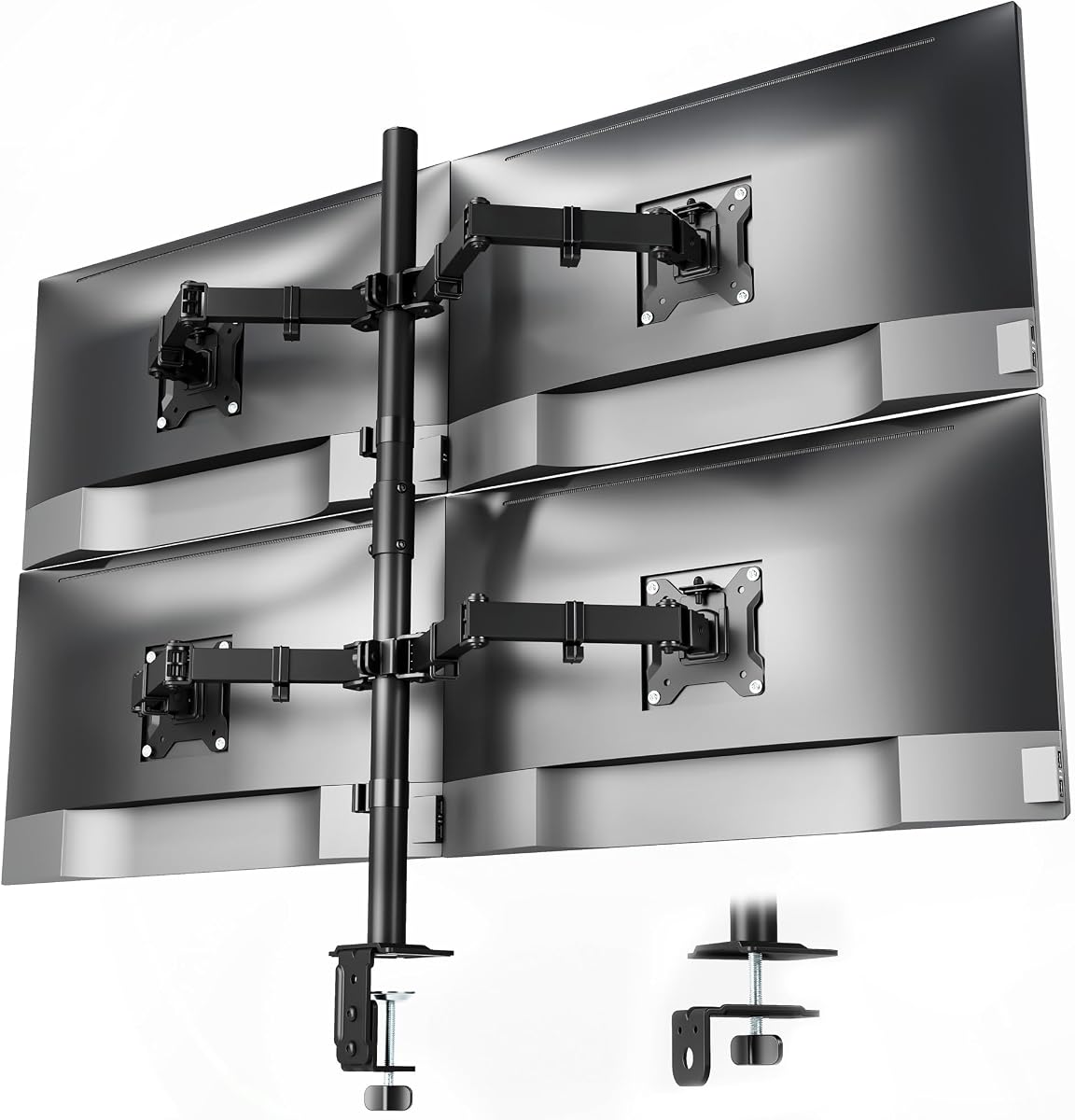
The WALI Quad Monitor Desk Mount delivers a useful combination of capacity, articulation, and installation flexibility. It carries a 4.6 rating, the highest among the products reviewed, and supports four flat-panel monitors from 13 to 32 inches. Each arm handles up to 22 pounds, while detachable plates fit both 75-by-75-millimeter and 100-by-100-millimeter VESA patterns.
We may earn a commission when you buy through this link, at no additional cost to you.
Its movement is broad enough for most four-screen arrangements. The arms extend and retract, tilt 90 degrees in either direction, swivel 90 degrees in either direction, and rotate 360 degrees from landscape to portrait. A height-adjustable 31.5-inch pole gives users room to raise the screens and arrange them at different levels, which can improve viewing comfort and make better use of a broad desk.
A two-stage locking system supports the included C-clamp and grommet base, and the listing refers to compatibility with up to 3.62-inch desk thickness for these components. Users should still check the dimensions of their own installation surface. The detachable mounting plates simplify monitor attachment, while the package includes a mounting hardware kit and user manual.
Integrated cable management guides cords along the arms and keeps them away from the main work area. Combined with lifting four screens off the desktop, this creates space for a keyboard, notebook, docking station, or simply a clearer work surface. The organization is not limited to aesthetics: keeping wiring routed with the structure can reduce loose cable movement around the desk.
This WALI is an excellent budget pick for users who need four conventional monitors and want broad movement without moving into a specialized ultrawide category. It lacks the capacity for very large or exceptionally heavy displays, but it covers a wide range of common sizes and weights. For a first four-screen office, shared workstation, or gaming setup using standard panels, the balance of features is difficult to beat.
A 22-pound rating on every arm and support for screens from 13 to 32 inches cover a wide range of common displays. The design does not need a large ultrawide workstation to be useful.
Built-in cable management routes wiring along the arms, while the elevated layout returns valuable desk area to the user. Both features support a cleaner and more practical multi-screen workspace.
We may earn a commission when you buy through this link, at no additional cost to you.
The VIVO 3 Plus 1 Monitor Mount is built for a four-screen arrangement with one display placed above three others. It has a 4.3 rating and supports screens from 13 to 32 inches, with up to 22 pounds on each arm. Compatibility with 75-by-75-millimeter and 100-by-100-millimeter VESA holes makes it suitable for many standard flat-panel monitors.
We may earn a commission when you buy through this link, at no additional cost to you.
The longer upper bracket is a notable layout feature. It allows the top display to angle downward and align more closely with the lower row, which can create a more unified viewing field. The lower screens can also be rotated into portrait orientation, making the system practical for workflows that mix broad reference windows with narrow documents, messages, or code.
Articulation is more restrained than on several gas-spring or premium mounts. The arms tilt 15 degrees in either direction, swivel 180 degrees, and rotate 360 degrees. Height adjustment is provided along the center pole. While the smaller tilt range means less freedom to angle a screen sharply toward a particular seat, the overall movement is still sufficient for many ergonomic arrangements.
Installation is drill-free through a heavy-duty C-clamp for surfaces up to 3.94 inches thick. An optional grommet mount is also described, and padding is included to help protect the desk surface. All hardware and step-by-step instructions are supplied, while included cable clips help keep the finished setup organized. The mount is recommended for use on a sturdy desk or tabletop.
This VIVO is a practical choice for home offices and professional desks where three primary displays sit below a fourth overview screen. Its 22-pound capacity and broad size compatibility support standard panels, while the 3-plus-1 shape makes it more distinctive than a generic stacked frame. Users who require extreme tilt angles or oversized ultrawide support will find more specialized options better suited to their needs.
The extended upper bracket creates a natural place for an overview monitor above three main screens. This arrangement can reduce unused space between a raised display and the lower row.
Every arm rotates 360 degrees, allowing the lower screens to switch between broad and vertical formats. This is helpful for users whose software workflows benefit from different aspect ratios.
We may earn a commission when you buy through this link, at no additional cost to you.
The right four-monitor mount depends on screen size, weight, VESA layout, desk construction, and the amount of repositioning required. These factors determine whether a standard stacked stand, a gas-spring system, or a heavy-duty ultrawide mount is the most suitable choice.
Begin with the specifications of every display rather than estimating from diagonal size alone. The reviewed mounts range from compact 13-inch compatibility to support for a 49-inch ultrawide, and per-arm limits range from 15.4 pounds to 44 pounds. A mount that accepts a large panel but has a low load rating may still be unsuitable if the display is heavy. Measure the width and depth of the complete display, including any curved screen allowance, then compare those dimensions with the stand's maximum reach and intended layout.
VESA compatibility is the physical connection between a display and its mounting plate. Most models in this guide support both 75-by-75-millimeter and 100-by-100-millimeter patterns, but buyers should remove the monitor and inspect the four mounting holes rather than assuming every display matches. Curved monitors and ultrawide models may have different mounting arrangements, so their specifications should be checked separately. A monitor without compatible rear holes may require a separate adapter, which can affect the final fit and available clearance.
Articulation determines how easily a screen can be moved into a comfortable position. Tilt changes the vertical viewing angle, swivel moves a display from side to side, and rotation allows a monitor to turn between landscape and portrait modes. Gas-spring and pneumatic systems add counterbalanced movement, while basic locking arms may require more effort. Users should consider their seating position, desk depth, and whether the screens will be shared, since different adjustments become more important as a layout changes.
C-clamp installation is convenient because it usually requires no drilling and can be repositioned later. A grommet base passes through an existing or newly cut desk opening and can provide a more integrated appearance. Check maximum desk thickness, underside clearance, edge space, and whether a grommet is already available. The stands in this guide do not all support the same thickness range, and some include only one mounting method, so the base is a meaningful part of the purchase rather than a minor accessory.
Four displays need more space than their individual screen sizes suggest. Users should map the desk width, monitor bezels, arm joints, and desired viewing distance before ordering. Stacked and three-plus-one arrangements can fit narrower desks, but four side-by-side screens may demand a very wide surface. Measure from the desk edge to the wall or obstruction behind it as well, because long arm extension can create cable tension and limit how close the screens can sit to the user.
Fixed or jointed arms generally use friction at the joints to remain in position, while gas-spring and pneumatic arms use a balanced internal mechanism. The latter can feel easier to move and often allow more deliberate height changes, particularly with larger displays. They are especially useful in shared spaces where screens are moved frequently. If a mount will remain in one fixed arrangement, a simpler articulated design may provide ample adjustment without the extra bulk of a counterbalanced system.
The goal of a four-screen mount is not simply to fit every display, but to place them at useful heights and angles. Look for a tall center pole, adequate extension, and enough tilt to orient upper screens toward the user. Mixed-size displays need careful attention because a large top screen can dominate the visual field while smaller panels become difficult to view. Mixed portrait and landscape orientation is another common setup, but it requires arms capable of full rotation and sufficient horizontal room to avoid crowding.
Four monitors usually means several power, video, and network cables. Integrated channels or clips on the arms can keep those lines from crossing the desktop, while a quick-release plate can simplify monitor installation and future changes. Even a mount without elaborate management can work well if its arms provide a route for cables. Users should allow extra length for full arm movement, avoid tight bends, and ensure that a grommet installation does not pinch a cable at the desktop.
Begin by assembling the mount near the intended desk location, but do not attach the monitors until the base and center structure are secure. Confirm that the chosen clamp or grommet fits properly, tighten the hardware evenly, and check the desk is stable enough to support the complete four-screen arrangement. A mounting surface that is too light, damaged, or uneven can undermine an otherwise suitable stand.
Attach each VESA plate to the back of a compatible monitor before lifting it into position. Route power and signal cables along the arms as the displays are installed, leaving enough slack for extension, swivel, tilt, and rotation. After all four screens are connected, set the height and angles while seated in the position where the workstation will normally be used, then tighten the joints and locking mechanisms.
For ongoing care, inspect the clamp, pole, joints, and fasteners periodically for loosening, especially after moving the desk or changing the screen arrangement. Clean the mount with a soft, dry cloth and avoid abrasive materials or excess moisture. Do not exceed the stated per-arm weight limit, and avoid forcing a joint beyond its intended range. If a gas-spring arm begins to sag, check the spring tension and balance before increasing the load or changing positions.
The required width depends on the screens and the desired layout. Four 13-inch monitors may fit on a modest desk, while four 32-inch or ultrawide panels usually need a very wide surface and considerable rear clearance. Buyers should measure the actual monitor bezels, arm joints, and viewing arrangement rather than relying on screen diagonal size alone.
Some models can, but standard stacked mounts are often limited to displays up to 32 inches. The VIVO Pneumatic Arm Quad Ultrawide model supports one display up to 49 inches and two up to 38 inches, while the PUTORSEN design is intended around one 49-inch upper display. Always verify the screen size, weight, and VESA pattern of every monitor.
A friction arm relies on tightened joints to stay in a selected position. A gas-spring or pneumatic arm uses a counterbalancing mechanism that supports the display's weight and makes movement easier. Gas-spring systems are often more convenient for large or frequently repositioned screens, while simpler arms can still work well in fixed arrangements.
No. Most of the reviewed models include both, but the VIVO Quad Pneumatic Monitor Mount specifies a heavy-duty C-clamp, and the premium ultrawide model also uses a clamp base. Check the package contents and desk dimensions before ordering so that the included installation method meets your needs.
Look at the rear of each monitor for four threaded mounting holes arranged in a square. The mounts in this guide generally support 75-by-75-millimeter and 100-by-100-millimeter patterns. A display with only a proprietary connector or a different hole pattern may require an adapter that is not included with the mount.
Most of the reviewed mounts provide 360-degree rotation, allowing compatible displays to be used in either portrait or landscape orientation. Users should confirm that the articulating joints can physically rotate in the intended layout and that the rotated screen will not crowd an adjacent display or interfere with the desk edge.
Clamp safety depends on the construction, surface condition, and the hardware used. Some mounts include padding to reduce the risk of scratching, while others do not. Users should inspect the clamp, ensure it contacts a suitable edge, and avoid tightening it on a surface that is thin, fragile, uneven, or already damaged.
Route power and signal cables along the arms as the monitors are installed, using integrated channels or included clips where available. Leave enough slack for the intended range of motion and keep connectors away from pivoting joints. Before moving the screens fully, check that no cable is stretched, pinched, or caught behind a VESA plate.
The WALI Quad Monitor Desk Mount stands out as the budget leader, combining a 4.6 rating with 22-pound arm capacity, broad adjustment, and two mounting options. The newer WALI Stacked 4 Monitor Mount is the strongest all-around recommendation for standard displays, while the VIVO Pneumatic Quad Ultrawide Mount is the premium choice for very large panels and demanding multi-monitor workstations.
Prioritize VESA compatibility, per-arm weight limits, desk mounting method, and physical layout before considering finer adjustments. A stand with the widest advertised tilt range will not help if it cannot fit the desk, support the monitors, or accommodate the available rear clearance. Gas-spring movement is particularly useful for frequently adjusted or heavy displays, while a standard articulated mount can provide sufficient flexibility for a fixed setup.
Finally, verify the current listing details and compatible hardware before ordering, because supported dimensions, included accessories, and product information can change. Confirm every monitor's size, weight, and mounting pattern, measure the desk, and then choose the model whose capacity and adjustment style best match the intended workstation.