
xTool P3 80W
4.5Editor score
80W cutting power
36 by 18-inch workspace
LiDAR autofocus
AI-powered smart nesting
Class 1 enclosed design
Explore the best CO2 laser cutters for 2026, with expert comparisons of power, work areas, safety, software, cooling, and production features.
CO2 laser cutters combine focused laser power, precise motion controls, and computer-driven cutting paths to turn digital designs into finished parts. The best machines balance cutting strength, work-area flexibility, clean exhaust, reliable safety controls, and software support. Your ideal choice ultimately depends on material thickness, project scale, and how often the machine will be used.
This guide compares ten CO2 laser cutters using the information published for each model, including laser power, maximum material depth, working-area dimensions, operating speeds, autofocus, cooling systems, safety features, and compatible design software. It covers compact desktop machines, larger commercial systems, and automation-focused models without claiming that any product was personally tested.
The recommendations reveal where each machine stands out, from the xTool P3's automated setup and nesting tools to the OMTech K40+'s approachable desktop format. The VEVOR 100W model stands out for its especially large work area, while several OMTech machines target production-scale throughput. Ratings, configurations, availability, and prices can change, so confirm current details before purchasing.
4.5Editor score

4.4Editor score

5.0Editor score
The comparison below organizes the ten featured CO2 laser cutters by their most important published specifications, including power, working area, speed, and workflow features.


The xTool P3 80W is the most automation-focused machine in this guide, combining an 80W CO2 laser with LiDAR autofocus, dual cameras, an adjustable base, and production-oriented nesting tools. It carries a 4.5 rating, and its defining advantage is not simply power but the effort required to prepare, position, and execute each job.
We may earn a commission when you buy through this link, at no additional cost to you.
Its published maximum cutting speed of 1200 mm/s is especially useful for high-volume work, while the ability to cut 20mm wood and 25mm acrylic provides a useful combination of depth and throughput. The 36 by 18-inch workspace accommodates a substantial desktop production area, and the dual-camera system is designed for both a broad preview and close-range alignment. Smart Nesting is advertised at 98.7% material utilization, while batch import can support mass customization.
The trade-off is the scale of the investment and the learning curve associated with a more sophisticated platform. Accessories such as the conveyor feeder, rotary attachment, infrared laser, and air purifier are not automatically included, so the exact bundle should be checked before purchase. The P3's automation does not eliminate the need for safe operating procedures, suitable ventilation, and careful job preparation.
This is the strongest recommendation for a workshop that values repeatable setup, efficient nesting, and a large production surface. It is particularly compelling for makers who expect to run customized batches and want camera-assisted placement rather than relying entirely on manual coordinates. For occasional, smaller projects, a more compact desktop machine may offer a simpler path.
LiDAR ranging, automatic focus, dual cameras, and the height-adjustable AutoLift Base reduce several common sources of setup error. That makes the P3 particularly compelling for repeat jobs where consistent placement matters as much as raw cutting power.
Smart Nesting and spreadsheet-based batch filling are valuable when every sheet matters. The advertised 98.7% utilization figure indicates an emphasis on reducing waste, though actual results depend on the geometry and dimensions of the parts being produced.
We may earn a commission when you buy through this link, at no additional cost to you.
The OMTech K40+ 45W is a compact desktop cutter with a 4.4 rating and a practical balance of power, speed, safety, and software flexibility. It can slice up to 10mm acrylic and 8mm wood according to the published specifications, making it more than a light-duty engraving-only machine.
We may earn a commission when you buy through this link, at no additional cost to you.
Its 45W laser is claimed to improve cutting speed by 1.5 to 2 times and depth by 15 to 20 percent compared with the earlier version. Engraving speeds reach 300 mm/s, while the 12 by 8-inch honeycomb bed provides enough room for common small-batch projects. The angled air assist adjusts airflow to laser power, helping clear debris, protect optics, reduce wood carbonization, and support safer cutting.
Its limitations are mostly dimensional. A 12 by 8-inch area will feel restrictive when signs, panels, or repeated batches need more room, and the desktop format is not intended to receive oversized stock. It is a Class 2 product with published output listed as 0.827 mW, so users should understand the machine's safety category and follow all manufacturer instructions.
The K40+ is a strong pick for beginners, educators, home workshops, and small businesses producing individual components or modest batches. LightBurn and LaserGRBL support, an emergency stop, door and water protection, and an exhaust fan help it serve as an accessible first serious laser cutter without giving up important workflow tools.
The 45-degree air assist adjusts to the laser power, a useful refinement over a fixed setting. By clearing smoke and debris while controlling combustion on wood, it can improve cut consistency and reduce contamination around the lens and mirrors.
Support for both LightBurn and LaserGRBL gives users a choice between popular control environments. The detachable base and optional rotary axis also extend the machine beyond flat, sheet-fed projects when cylindrical or elevated objects need engraving.
We may earn a commission when you buy through this link, at no additional cost to you.
The VEVOR 100W combines a 5.0 rating with a remarkably large 24 by 35-inch working area. That 840-square-inch bed gives it a strong advantage for signs, panels, multiple smaller parts, and layouts that would require repeated repositioning on a desktop machine.
We may earn a commission when you buy through this link, at no additional cost to you.
Its 100W laser can cut materials up to 0.59 inch thick in one pass and engraves at speeds as high as 19.7 inches per second. The product supports wood, acrylic, cardboard, glass, leather, stone, and a broad range of other nonmetallic materials. A honeycomb bed, front and back pass-through doors, linear guide rails, and a red-dot positioning system support a more flexible workflow.
The large enclosure requires adequate floor space, ventilation, and a safe operating area. A 100W laser does not mean every material can be cut at maximum depth in one pass, so material combinations, machine settings, and assist configuration remain important. The product listing identifies the machine as Class 1 and also lists a 2.161 mW output figure, two details worth confirming with the seller because safety-class and output information should always match the exact configuration.
This is our best value-oriented recommendation for buyers who prioritize work area and cutting power over a compact footprint. It is well suited to signage, educational displays, panel work, and small production runs. Users who work primarily with palm-sized pieces may find a smaller machine easier to operate, but this VEVOR offers unusually generous capacity for its category.
The 24 by 35-inch bed and pass-through doors make the machine more practical for large flat stock. That is especially useful when a design must remain in one position or when several components can be nested across the honeycomb surface.
The control panel works with third-party design programs such as LightBurn, CorelDRAW, and AutoCAD. Compatibility with Windows, Linux, and macOS also makes it easier to use existing artwork and workflows across different computers.
We may earn a commission when you buy through this link, at no additional cost to you.
The OMTech Maker 90W is a commercial-style machine that combines 90W output, a 20 by 28-inch bed, four-way pass-through access, and an included water chiller. It does not have a displayed rating in the supplied product information, so its evaluation rests on its published specifications and feature set.
We may earn a commission when you buy through this link, at no additional cost to you.
The laser can engrave as deep as 0.4 inch on nonmetallic materials and operates at up to 23.6 inches per second. Its Yongli H2 tube is rated for up to 8,000 hours, with the manufacturer noting longer service life when lower settings are used consistently. Four-way pass-through doors make it easier to handle longer stock, while the honeycomb and aluminum blade beds offer two workholding options.
The bundled chiller is valuable for extended sessions because it helps control heat buildup, while built-in air assist removes smoke and dust. The cover interlock shuts off the beam when the window is opened, and the viewing panel is described as flame retardant. As with every high-powered CO2 machine, the room also needs appropriate ventilation, fire awareness, and safe material handling.
The Maker 90W is well suited to small businesses that regularly cut wood and acrylic or engrave mixed materials. It offers a more productive balance than a compact desktop unit without moving into the footprint of the largest professional systems. Buyers should confirm the machine's physical dimensions, included accessories, and local service arrangements before finalizing their setup.
Including a water chiller makes the package more complete for sustained work. Temperature control is especially relevant when a production schedule leaves little downtime between cuts and when precise repeatability is important.
Four-way pass-through doors reduce the need to reposition a long board across the bed. Honeycomb and aluminum blade surfaces also let users select a bed configuration suited to either small components or longer pieces.
We may earn a commission when you buy through this link, at no additional cost to you.
The OMTech Maker 60W stands out as a turnkey creative-production package with a 4.7 rating. It includes LightBurn and a water chiller, while its adjustable workbed and preinstalled autofocus simplify one of the most common setup tasks: establishing the correct focal distance.
We may earn a commission when you buy through this link, at no additional cost to you.
The 20 by 28-inch area provides meaningful room for signs, educational aids, decorative panels, and production batches. Four-way pass-through doors support larger or longer materials, while the honeycomb and aluminum blade beds offer useful flexibility. Air assist helps clear smoke and dust around the working area and protects the optical components from contamination.
Compared with a 90W or 130W system, the 60W laser will generally demand more passes or adjusted settings for demanding cuts. The trade-off is a potentially more manageable production machine and a package that already includes key workflow components. Class 2 status, a published output of 0.827 mW, flame-retardant viewing material, and an interlock should be considered alongside the machine's ventilation requirements.
This model is a compelling choice for makers who want a larger workspace, software support, autofocus, and cooling without moving to the most powerful production tier. It suits freelancers, educators, and small studios that need flexibility across a broad mix of wood, acrylic, and other nonmetallic materials.
The motorized workbed and preinstalled autofocus locate the focal plane automatically. This reduces setup time and makes results more repeatable when materials have slightly different thicknesses or when operators change jobs frequently.
LightBurn and the water chiller are included, reducing the need to source essential workflow and cooling components separately. The 20 by 28-inch bed then gives users enough capacity for many projects beyond small desktop tags.
We may earn a commission when you buy through this link, at no additional cost to you.
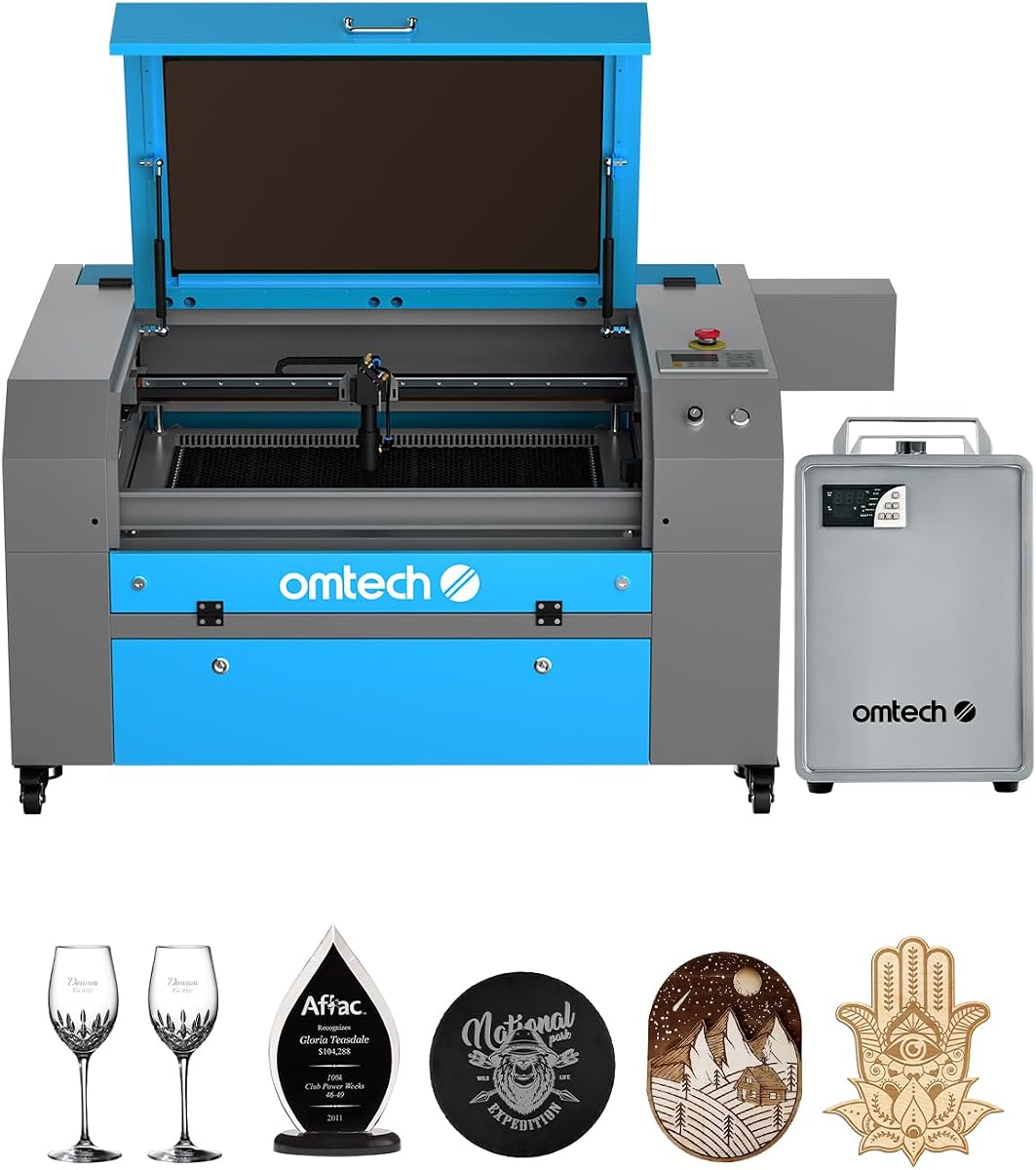
This OMTech K40+ 45W listing carries a 4.5 rating and offers the same compact 45W platform as the second-ranked product. It is a strong value for users who want actual cutting capability in a desktop format rather than settling for a machine intended only to mark surfaces.
We may earn a commission when you buy through this link, at no additional cost to you.
Published specifications include cuts through 10mm acrylic and 8mm wood, engraving speeds up to 300 mm/s, and a 12 by 8-inch honeycomb bed. The 45-degree air assist automatically adjusts airflow to the laser power, helping clear debris, reduce carbonization, and protect the lens. LightBurn and LaserGRBL support provide flexible control, and a detachable base plus optional rotary axis support more varied objects.
Safety provisions include an emergency stop, door and water protection, a flame-retardant acrylic panel, and a high-powered exhaust fan. The compact area remains the main limitation, particularly for signs or multiple full-size parts. Like the other K40+ listings, it is identified as Class 2 with 0.827 mW output and model SH-K40.
Choose this option for a home studio, classroom, craft workshop, or small business that primarily handles smaller wood, acrylic, and leather pieces. It provides an accessible introduction to CO2 cutting with enough speed and safety equipment for regular work, provided the user stays within the limits of the 12 by 8-inch bed.
The 45W tube delivers meaningful cutting depth in a relatively compact machine. It is a sensible option for tags, ornaments, labels, jewelry blanks, and other pieces whose dimensions fit comfortably within the bed.
Automatic air assist works together with the exhaust fan to maintain a cleaner working environment. These systems also help preserve the lens and mirrors from smoke, particles, and wood residue.
We may earn a commission when you buy through this link, at no additional cost to you.
The OMTech Pronto 100W is built for throughput, with published engraving speeds reaching 1000 mm/s and a 40 by 24-inch honeycomb and aluminum blade bed. No rating is displayed in the supplied information, but the specification profile clearly targets users who process more material in less time.
We may earn a commission when you buy through this link, at no additional cost to you.
Automatic autofocus removes much of the guesswork from setup, while the 100W tube is rated for up to 12,000 hours and is described as lasting longer when operated consistently at lower settings. The machine supports wood, acrylic, leather, and other nonmetallic materials, making it adaptable to signs, panels, and repeated production pieces.
Airflow is unusually prominent in the specification. A 4.4 cfm air pump and 318 cfm fan are intended to improve cut cleanliness and reduce material burn. Safety features include water protection, air assist, temperature alarms, cover protection, and an emergency stop. Two-way pass-through doors support longer items, although the machine still requires a large, well-ventilated operating area.
The Pronto 100W is best for growing operations that have outgrown a desktop cutter but do not require the largest possible work area. Its major advantage is speed, making it a strong choice for batch engraving and high-volume cutting where setup time and motion performance materially affect the workday.
A maximum speed of 1000 mm/s can shorten cycle times on suitable designs. Automatic focus helps preserve that advantage by reducing manual adjustments between materials and different thicknesses.
The high-flow air pump and fan combination is intended to clear combustion residue and reduce burning around the cut path. This is particularly useful for production work where repeatability and edge quality matter.
We may earn a commission when you buy through this link, at no additional cost to you.
The OMTech Pronto 130W pairs the highest laser output in this roundup with one of its largest work areas. It has a 5.0 rating, a 51 by 35-inch bed, and speeds up to 1000 mm/s, making it a compelling option for professional sign, panel, and furniture-related production.
We may earn a commission when you buy through this link, at no additional cost to you.
Its 130W tube can engrave as deep as 10mm on nonmetallic materials such as wood, glass, acrylic, and leather. The bed uses honeycomb and aluminum blade surfaces, and two-way pass-through doors support longer stock. A motorized workbed and preinstalled autofocus establish the focal position automatically, reducing setup variation across different jobs.
The tube is rated for up to 12,000 hours, with the manufacturer stating that consistent lower-setting use can extend its life. Water protection, air assist, temperature alarms, cover protection, and an emergency stop create a broad safety layer. However, the listing includes the model number Pronto60 even though the product title identifies a 130W machine, so buyers should verify the exact configuration and model labeling with OMTech.
This Pronto is ideal for a business that regularly handles large sheets and wants substantial cutting power without moving beyond the OMTech platform. The main compromises are its physical footprint, the need for professional workshop infrastructure, and the greater care required around a high-output machine.
A 51 by 35-inch work area can reduce the need to join separate pieces or reposition large panels. It gives sign makers and fabrication teams room to explore broader layouts and more complex component sets.
The 130W tube addresses demanding cutting tasks, while autofocus and automatic bed adjustment simplify repeated setups. Together, these features support a production environment where consistency between runs is as valuable as raw speed.
We may earn a commission when you buy through this link, at no additional cost to you.
This OMTech K40+ 45W listing provides a compact option for shoppers seeking a capable desktop CO2 cutter. It has no displayed rating, and the supplied information is more limited than the other K40+ listings, so the available product details should be confirmed before ordering.
We may earn a commission when you buy through this link, at no additional cost to you.
The machine is identified as a Class 2 laser with a published output of 0.827 mW. Its 45W designation indicates that it belongs to the K40+ platform also listed elsewhere in this guide, a model associated with engraving wood, acrylic, and leather and cutting thicker material than a low-wattage personal engraver.
Because this listing contains fewer specifications, buyers should not assume that every accessory or feature shown in the more detailed K40+ descriptions is necessarily included. The safe approach is to verify the current package contents, control software, bed size, air-assist configuration, exhaust requirements, warranty, and support terms directly from the seller.
It remains a practical option for a smaller workspace where portability and a manageable footprint matter more than a large work area. Its simplicity can be attractive to new users, but purchasing only becomes compelling if the current listing confirms the expected bed, safety features, and software support.
A desktop machine is easier to introduce into a home workshop or classroom than a large production cabinet. It can provide a practical path into illuminated signage, engraving, and light fabrication without occupying a dedicated industrial bay.
Limited listing detail makes current confirmation especially important. Review the package contents and full specifications before purchase to avoid assuming that features from a differently packaged K40+ listing are included.
We may earn a commission when you buy through this link, at no additional cost to you.
The OMTech Pro 130W is the most expansive integrated machine in this guide, combining a 130W laser with a 35 by 55-inch workspace, built-in cooling, and four-way pass-through doors. It has no displayed rating in the supplied information, but its specifications position it for professional and industrial production.
We may earn a commission when you buy through this link, at no additional cost to you.
The built-in CW-5200 chiller is a key differentiator. It is advertised to maintain temperatures within 0.5°F and provides 5,186 BTU per hour of cooling capacity, helping sustain performance during extended work. Servo motors, ball-bearing guide rails, and speeds up to 1,200 mm/s support fast, accurate movement across the unusually long bed.
Operation is handled through a Ruida 6445G touchscreen, and WiFi connectivity adds a more integrated control experience. A widened tempered-glass viewing window, tri-color status lights, and a flame-retardant design improve visibility and safety awareness. Nevertheless, the machine requires considerable floor space, ventilation, electrical planning, and careful fire-prevention practices.
This Pro is a strong recommendation for established operations that routinely process large panels, dimensional components, or high quantities of customized goods. It may be excessive for a new hobbyist, but for a dedicated production business, the integrated chiller, long work area, and rapid motion system can provide meaningful workflow advantages.
The built-in CW-5200 chiller reduces the need for a separate cooling setup and helps maintain stable operating temperatures. Its precision temperature claim makes it especially relevant for continuous production rather than occasional engraving.
A 35 by 55-inch bed, 1,200 mm/s speed, WiFi capability, and a dedicated touchscreen suit a high-volume workshop. The feature set is impressive, but adequate space and professional operating controls are necessary to realize its potential.
We may earn a commission when you buy through this link, at no additional cost to you.
Choosing a CO2 laser cutter means balancing power, bed size, safety, cooling, software, and the materials you actually plan to process. The following factors help prevent an expensive mismatch between the machine and your workflow.
Laser power determines how quickly and deeply a machine can cut common materials such as wood and acrylic. The models here range from 45W to 130W, with published cutting capabilities ranging from approximately 8mm to 10mm wood in some configurations and deeper single-pass claims from higher-output systems. Power is only one part of the result, however: material composition, color, density, focus, assist, and settings also influence performance.
Choose enough power for your thickest planned material without paying for capabilities you will never use. A 45W machine is practical for small parts and moderate stock, while 60W to 100W systems offer greater throughput. A 130W option makes more sense for demanding production and larger workpieces.
The bed must fit the largest material you expect to process, not merely the average project. Published areas range from 12 by 8 inches on the OMTech K40+ to 35 by 55 inches on the OMTech Pro 130W. Larger beds improve flexibility for signs, panels, and batch nesting, but they increase the machine's footprint and may require a dedicated workshop position.
Allow clearance around the enclosure and consider the route by which material enters the machine. Pass-through doors are particularly useful for long stock. Choose a bed that offers room to move without paying for excess capacity that will complicate storage and ventilation.
Speed is most valuable when the machine will run repetitive jobs. The OMTech Pronto 100W and 130W reach 1,000 mm/s, the OMTech Pro 130W reaches 1,200 mm/s, and the xTool P3 has a 1,200 mm/s maximum. Desktop K40+ models list up to 300 mm/s. Actual cycle time also depends on acceleration, travel moves, pierces, focus accuracy, and software optimization.
For high-volume work, consider autofocus, camera positioning, nesting, batch import, and repeatable bed adjustment together with headline speed. A machine that saves setup time can outperform a nominally faster system across an entire order.
Manual focus can waste time and introduce variation, particularly when material thickness changes frequently. Autofocus appears on the xTool P3, OMTech Maker 60W, OMTech Pronto 100W, and OMTech Pronto 130W. The P3 goes further with LiDAR ranging and dual HD cameras for broad previews and detailed alignment.
Automatic positioning is especially helpful for batch work, where many similar pieces must occupy known positions. It is less critical for occasional, manually positioned projects, but it becomes a major productivity feature as job volume rises.
CO2 laser systems generate heat and combustion residue, so cooling and air movement affect both the machine and the work. Water chillers are included with the OMTech Maker 90W and Maker 60W and built into the OMTech Pro 130W. The K40+ uses power-responsive air assist, while the VEVOR and OMTech Pronto systems advertise more substantial airflow arrangements.
Do not treat airflow as a substitute for a properly designed exhaust system. It helps clear debris at the cut and protects optics, but smoke and fumes still need to be evacuated safely from the workspace.
Every CO2 cutter requires ventilation, fire awareness, safe material selection, and close supervision of the operating area. Enclosures, lid or cover interlocks, tinted windows, emergency stops, water protection, temperature alarms, and power cutoff mechanisms add layers of protection. Listed classifications vary across the products, and some supplied specifications contain details that should be verified with the manufacturer for the exact configuration.
Read the manual, understand the meaning of the stated laser class, keep the exhaust unobstructed, and never bypass interlocks. Review local workplace requirements and select only approved, nonhazardous materials for laser processing.
The K40+ supports LightBurn and LaserGRBL, the VEVOR works with programs including LightBurn, CorelDRAW, and AutoCAD, and the OMTech Maker 60W includes LightBurn. File transfer options and operating-system support affect how readily existing artwork can be used. A familiar interface is valuable because small changes to speed, power, passes, and travel can materially affect results.
Choose a system supported by software you already know or are willing to learn. Confirm whether the required application is included, whether hardware control is supported, and whether artwork can be imported without unnecessary format conversion.
Support matters because CO2 cutters combine optics, motion systems, cooling, software, and safety controls. OMTech advertises 24-hour global support and two years of service for its K40+ models, while the xTool P3's feeder, rotary system, infrared laser, and purifier are described as optional accessories. Local demos, replacement-part availability, and warranty terms can be more important than a small feature difference.
Before buying, ask what is physically included, how service is handled in your region, and which consumables or accessories are likely to be needed soon. This prevents unexpected costs after the machine arrives and helps ensure that expanding production will not require changing platforms.
Begin by reading the complete manual, identifying the laser class, checking the machine for transit damage, and verifying that the exhaust system, air assist, water cooling, emergency stop, and enclosure safeguards work correctly. Place the cutter on a stable surface with ventilation, fire resistance, and access to suitable electrical service. Install only approved operating software, import a simple test design, and confirm the focus and travel path before processing real material.
Select the correct material, confirm that it is safe for laser processing, and use the power, speed, passes, and focus settings recommended for the material and thickness. Clean the bed and lens, check that the air assist is directed properly, and use an appropriate exhaust filter. Never leave the machine unattended during operation, and keep the lid or cover closed whenever the system permits it.
For maintenance, follow the maker's cleaning schedule for the lens, mirrors, ventilation paths, filters, and moving components. Monitor the cooling system, remove debris, and address unusual sounds, temperature warnings, or material residue promptly. Keep firmware and control software updated, back up important job files, and use protective transport procedures whenever the machine is moved.
A laser engraver primarily marks or shallowly engraves surfaces, while a laser cutter is designed to pass through sheet material. The distinction is not always absolute because many machines can perform both jobs. The available laser power, bed construction, assist system, and software settings determine how practical deeper cutting will be.
A 45W laser can handle smaller wood and acrylic pieces, including published cuts through 8mm wood and 10mm acrylic for the OMTech K40+. Higher-power 60W to 130W machines are better for thicker material, faster production, and larger work areas. Material color, density, composition, and assist also affect the result, so published thickness limits should be treated as guidance rather than a promise for every sheet.
Common choices include wood, acrylic, leather, cardboard, glass, stone, paper, and various plastics, depending on the machine. The products in this guide are CO2 systems intended primarily for nonmetallic materials. Do not laser-process unknown plastics, PVC, vinyl, painted or coated surfaces, or any material containing hazardous compounds without confirming that it is safe.
No. A larger bed provides more freedom for signs, panels, and batch layouts, but it also requires more space and may be less convenient for small projects. A 12 by 8-inch desktop bed can be ideal for a compact workshop, while a 51 by 35-inch cabinet makes more sense when oversized work is routine. Choose the smallest area that reliably fits your materials.
Yes. A proper exhaust system is essential for removing smoke, dust, and fumes, and many machines include an exhaust fan or air assist. Filtration must be selected for the materials being cut, and the outlet should discharge safely according to the manufacturer and local requirements. Air assist improves the cut area but does not replace room or building exhaust.
Autofocus is not essential for every project, but it improves consistency and saves time when material thickness or job configuration changes. It is especially valuable for batch production and mixed-material workflows. The xTool P3 adds LiDAR and camera positioning, while several OMTech models use autofocus to simplify bed-height and focal-distance setup.
LightBurn is a common choice for advanced layout, nesting, and machine control, while LaserGRBL and the controls associated with major design packages offer other workflows. Compatibility varies by model, so verify the current software requirements before purchasing. The OMTech Maker 60W includes LightBurn, while the K40+ and VEVOR listings explicitly support compatible third-party options.
Cleaning frequency depends on workload and material. A lens that collects smoke, dust, or adhesive residue can reduce power and damage finishes, so it should be inspected frequently and cleaned using the manufacturer's approved method. Also monitor filters, cooling equipment, mirrors, rails, and exhaust components according to the manual, and investigate alarms or unusual performance promptly.
The xTool P3 80W is the leading choice for automated production because LiDAR focusing, dual cameras, smart nesting, and high speed reduce manual work. The OMTech K40+ 45W is our most accessible desktop recommendation, while the VEVOR 100W stands out with a large work area and strong cutting specifications. Each suits a different scale of operation.
Before purchasing, prioritize the material and workpiece size you genuinely need, then balance those requirements against automation, safety, cooling, and software. A compact 45W machine is a sensible first step for smaller parts, while higher-output and larger-bed systems become more valuable as production volume and stock dimensions increase. Plan the workshop ventilation and floor space as part of the machine selection.
Finally, review the current listing, included accessories, warranty, support, and specifications before ordering. Ratings and product configurations can change, and prices fluctuate over time. Checking the seller's latest information helps ensure that the model you choose is the one that actually matches your materials, workflow, and available space.