
Raidmax i802 Vibe Series Bundle
4.0Editor score
700W power supply included
Five preinstalled FRGB fans
Digital CPU temperature display
Tempered glass side panel
Explore the best PC case with PSU combo options, comparing included power supplies, cooling, case sizes, compatibility, and included fans.
A PC case with PSU combo can simplify a new build by pairing a chassis with a power supply, and some bundles add fans or a CPU cooler. The best combination balances fit, airflow, power capacity, connector availability, and the confidence that the included components work well together.
We compared the listed products using their supplied specifications, focusing on whether a PSU is actually included, motherboard support, graphics-card clearance, cooling provisions, fan configuration, front I/O, and room for future expansion. The list includes complete bundles as well as standalone cases for transparent comparison.
Our top selections highlight the most complete combinations for different priorities, including a cooling-focused bundle, a high-output RGB package, and a compact micro-ATX option. Product listings and prices change, so confirm current specifications, component quality, and system compatibility before purchasing.
4.0Editor score

4.7Editor score

3.9Editor score
This side-by-side comparison distinguishes complete case-and-PSU bundles from standalone cases, while also examining chassis size, cooling hardware, motherboard support, expansion room, and visual design.


The Cooler Master HAF 500 Pro Bundle earns the Editor's Choice position because it is the most complete package in the list, combining a high-airflow ATX mid-tower, a 650W 80 Plus Gold power supply, and a Hyper 212 Halo CPU air cooler. Its 4.7 rating reflects a strong balance of cooling, expandability, and installation convenience for builders who would otherwise purchase three major components separately.
We may earn a commission when you buy through this link, at no additional cost to you.
The case is engineered around airflow. Its mesh front panel draws air through two 200mm ARGB fans, while a 120mm ARGB rear fan and rotatable 120mm GPU fan add further circulation. The included Hyper 212 Halo cooler uses a 120mm PWM ARGB fan and supports the listed AM4, AM5, LGA 1700, and LGA 1821 platforms. Together, these parts provide useful cooling without requiring an immediate liquid-cooling purchase.
The bundle also offers room to grow. Graphics cards up to 410mm are supported, E-ATX motherboards are accommodated within the stated dimensions, and the top mounting area accepts radiators from 120mm through 360mm. Front connectivity includes two USB 3.2 Gen 1 ports and one USB 3.2 Gen 2 Type-C port. The primary trade-off is complexity: a full component bundle is less suitable for a small office build, and the case is larger than the most compact alternatives here.
This is the strongest recommendation for a gaming build that wants substantial cooling, a capable power supply, and fewer initial purchases. It is especially appealing for builders using an ATX or E-ATX motherboard who can accommodate a mid-tower footprint. Verify exact CPU-socket and motherboard support against your chosen parts, but as a ready-to-assemble foundation, it offers the most balanced feature set.
The mesh front panel, dual 200mm ARGB intake fans, rear exhaust, rotatable GPU fan, and Hyper 212 Halo create airflow in several directions. That makes the bundle sensible for a gaming system that will run its processor and graphics card under sustained load.
Bundling the chassis, PSU, and CPU cooler reduces the number of major components a new builder must select. It also creates a more coherent package than pairing a case with an unrelated PSU and cooler without checking dimensions or socket support.
We may earn a commission when you buy through this link, at no additional cost to you.
The Raidmax i802 Vibe Series Bundle combines an ATX mid-tower with a 700W 80 Plus power supply, an AM1204 air cooler, and five preinstalled FRGB fans. Its standout attribute is the unusually complete set of core components, while the 700W supply offers more stated capacity than the 650W bundles in this guide. It carries a 4.0 rating, placing it behind the more highly rated HAF 500 Pro Bundle.
We may earn a commission when you buy through this link, at no additional cost to you.
Cooling and appearance are central to the package. The five fixed-RGB fans provide airflow and illumination without requiring additional fan purchases, while the AM1204 cooler's digital display is intended to show CPU temperature in real time. A tool-free tempered glass side panel presents the internal components and lighting as a visual centerpiece, making this bundle appealing to builders who value a coordinated RGB appearance.
The 700W power supply is described as suitable for modern GPUs and CPUs and as providing stable, efficient operation during demanding workloads. Nevertheless, wattage alone does not guarantee compatibility with every high-end graphics card. Builders should check recommended PSU capacity, connector type, transient-load behavior, and the power requirements of their specific CPU and GPU. The fixed lighting also lacks the broader effects commonly associated with addressable RGB systems.
Choose this bundle if you want a ready-made foundation with substantial stated power capacity, multiple preinstalled fans, and a display-equipped CPU cooler. It is less compelling for buyers prioritizing silence, modular cabling, or fully controllable RGB. Checking every included component against the final build remains essential, but the package itself is unusually comprehensive.
The bundled 700W PSU offers more nominal capacity than the 650W alternatives. That can provide useful headroom for power-hungry graphics cards and processors, although the exact components still need to meet the manufacturer's recommendations.
Five fixed-RGB fans and a digital CPU-temperature display make the bundle visually distinctive. They also reduce the need to source basic cooling and monitoring hardware before the first power-on.
We may earn a commission when you buy through this link, at no additional cost to you.
The Micro-ATX Mini-Tower Gaming PC Case is a complete case-and-PSU package built around Micro-ATX and Mini-ITX motherboards. It includes a 650W power supply, eight 120mm ARGB fans, and a 10-port ARGB hub. With a 3.9 rating, it is one of the lower-rated products here, but its extensive accessory list and compact board support make it worth close consideration for appropriately sized builds.
We may earn a commission when you buy through this link, at no additional cost to you.
The case measures 16.54 by 11.22 by 14.17 inches and accommodates graphics cards up to 400mm, CPU air coolers up to 170mm, and power supplies up to 200mm. Four horizontal expansion slots, a vertical GPU position, and top support for 120mm, 240mm, or 360mm radiators give the compact chassis more flexibility than its size might suggest. Full-view dual tempered glass panels emphasize the internal lighting and components.
One important limitation is motherboard compatibility: standard ATX motherboards are not supported. The eight fans operate at a consistent speed of approximately 1200 RPM rather than using variable-speed PWM control, which may produce more consistent airflow but can also limit the ability to tune noise. The top I/O panel includes USB 3.0, two USB 2.0 ports, separate headphone and microphone jacks, plus reset and power buttons.
This package is a practical choice for a compact gaming PC built around a Micro-ATX or Mini-ITX motherboard. It offers a rare combination of 650W output, extensive cooling hardware, and a relatively small footprint. Buyers should not expect full ATX compatibility, and those who prioritize silent idle operation may prefer a case with PWM-controlled fans.
Eight included 120mm ARGB fans and support for a 360mm top radiator make this micro-ATX chassis more ambitious than a typical compact model. Buyers still need to confirm that their CPU cooler, graphics card, and radiator fit within the stated limits.
The accessible top panel provides USB 3.0, two USB 2.0 connections, and separate headset and microphone jacks. That makes attaching common gaming accessories more convenient than routing them to ports at the rear.
We may earn a commission when you buy through this link, at no additional cost to you.
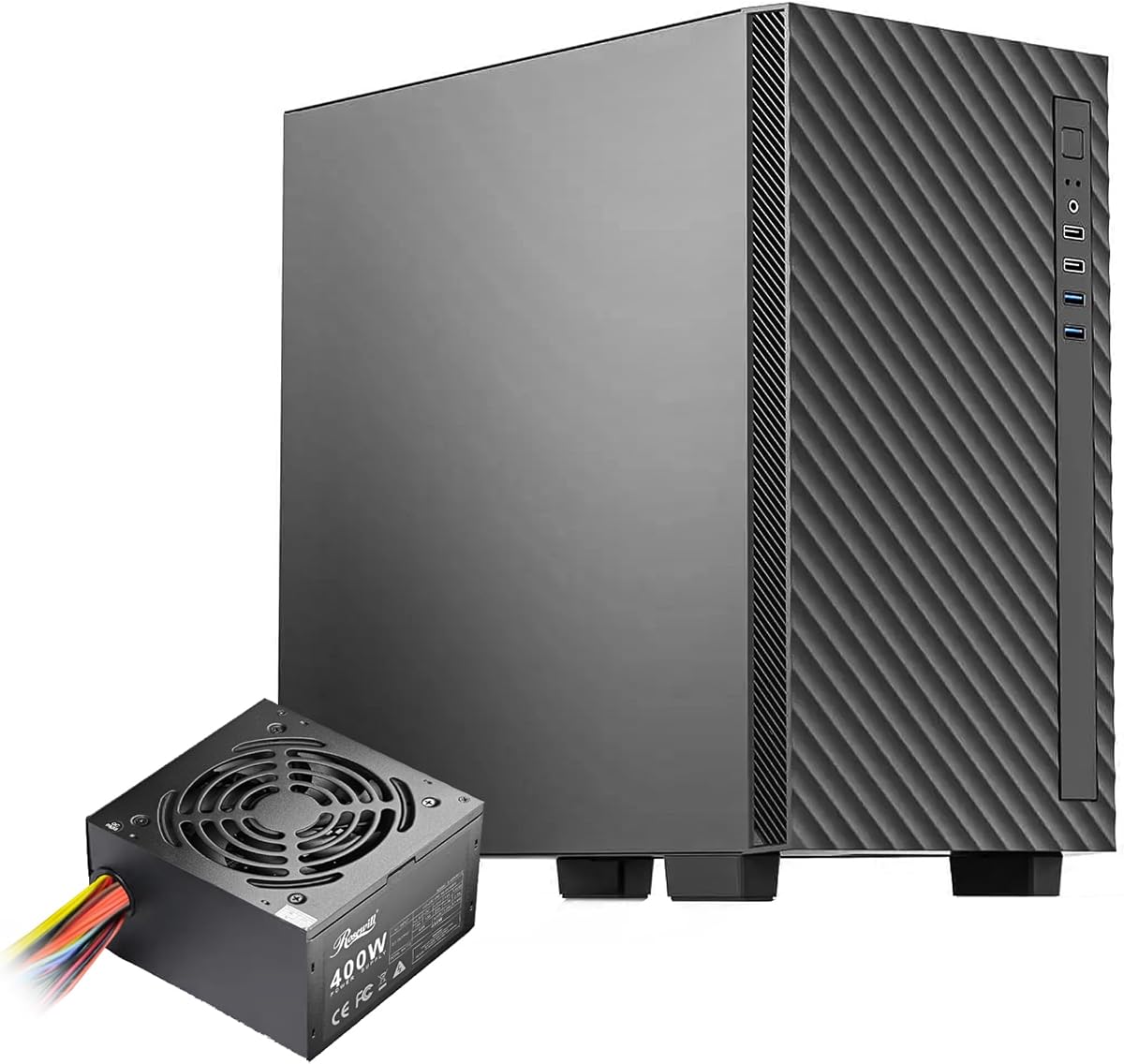
The Rosewill FBM-X5 has a 4.9 rating, the highest among the listed products, and offers one of the most straightforward complete combinations. It pairs a steel-and-plastic microATX mini-tower with a preinstalled 400W non-modular power supply. That configuration is well suited to office systems and restrained gaming builds where a more elaborate high-power package would be unnecessary.
We may earn a commission when you buy through this link, at no additional cost to you.
The chassis supports Micro-ATX and Mini-ITX motherboards, four expansion slots, one 3.5-inch drive bay, and two 2.5-inch drive bays. A rear 120mm PWM fan is included, with space for two additional front 120mm fans, two top 120mm fans, or one 240mm front radiator. The front panel also offers two USB 2.0 and two USB 3.0 ports, covering the connection needs of many everyday systems.
The main limitation is the 400W power supply. That amount can be restrictive with a high-end graphics card or power-hungry processor, particularly when considering the graphics card's vendor-recommended PSU requirements. Its non-modular cabling also means unused power cables remain in the chassis, although the case's dedicated cable-management design is intended to keep routing organized.
The FBM-X5 is most convincing for an office PC, entry-level gaming system, or compact general-purpose build that will not use demanding high-end graphics hardware. Its strong rating, included PSU, flexible cooling layout, and simple front I/O make it a sensible foundational purchase. Upgraders should verify PSU needs and accept that adding a larger power supply may require additional planning.
The included 400W PSU and restrained exterior suit basic workstations and modest gaming configurations. They reduce setup complexity for users who prioritize a straightforward build over elaborate lighting or high-end expansion.
Although only one fan is included, the chassis accepts additional 120mm fans or a 240mm front radiator. Builders can begin economically and add cooling only when their chosen components and workload justify it.
We may earn a commission when you buy through this link, at no additional cost to you.
The H3 HYXN ATX PC Case is not a complete case-and-PSU bundle because no power supply is listed as included. It is still relevant to this comparison as a heavily equipped chassis option, offering six Infinity Mirror PWM ARGB fans, a dual-cavity layout, and broad hardware compatibility. Its 4.2 rating reflects a solid feature set, but buyers must add a PSU separately.
We may earn a commission when you buy through this link, at no additional cost to you.
The dual-chamber design separates the main hardware area from the power supply and drive area. This can assist thermal performance and cable management, while built-in anchor points and the A/B partition arrangement help keep wiring orderly. High-hardness tempered glass provides a broad view of the components, and the A/B partition design allows the motherboard to be mounted from either side according to the builder's preference.
Cooling support is a major strength. The included fan set consists of five 120mm reverse fans and one 120mm forward fan, all using PWM ARGB lighting. The case supports a 360mm radiator in dual-fan configuration and accommodates ATX, Micro-ATX, and Mini-ITX motherboards. Graphics cards up to 400mm and power supplies up to 200mm are also supported, although no PSU is supplied.
This case is best for builders who already have a PSU or specifically want to choose one after checking wattage, efficiency, dimensions, and modularity. The six fans and tempered-glass design suit a colorful gaming build, while the dual cavity helps preserve a clean internal layout. It should not be selected under the mistaken assumption that it includes a power supply.
Separating the PSU and drives from the main chamber can improve airflow and hide wiring. The partition and anchor points give builders a structured path for routing cables in an otherwise visually open chassis.
Six Infinity Mirror PWM ARGB fans form an ambitious default lighting and airflow package. A separate 360mm-capable radiator option gives experienced builders a clear path toward liquid cooling later.
We may earn a commission when you buy through this link, at no additional cost to you.
The Cooler Master Q300L V1 is a standalone Micro-ATX case rather than a true PSU combo, despite its strong 4.5 rating. Its defining characteristics are an open thermal design, an adjustable modular I/O panel, and compatibility with both Micro-ATX and Mini-ITX motherboards. It is included here as an alternative to bundles for builders who prefer to choose their own power supply.
We may earn a commission when you buy through this link, at no additional cost to you.
Perforated panels on all sides encourage airflow and heat dissipation. The transparent side panel presents the internal components, while magnetic dust filters help maintain a clean-looking and functional system. A particularly versatile feature is the modular I/O panel, which can be positioned at the front, top, or bottom on either side of the chassis to suit the user's desk and preferred access pattern.
Component limits deserve careful attention. The case supports CPU coolers up to 159mm, graphics cards up to 360mm, and power supplies up to 160mm in length. It can accommodate a 240mm liquid cooler and up to five fans, but the shorter GPU allowance than many modern mid-towers may rule out the largest graphics cards. Its compact dimensions also require more discipline with cable routing.
The Q300L V1 is a good fit for a smaller gaming or productivity PC where open airflow and a visible side panel matter. Choose it over a bundled option only if you are comfortable sourcing a compatible PSU and verifying every clearance. Its flexibility in I/O placement makes it particularly appealing for compact desks and unusual desk orientations.
Perforated surfaces across the chassis reduce the reliance on a fully sealed outer shell. This approach can be helpful in compact builds, where component spacing leaves less room for complex internal ducting.
Moving the I/O panel to the front, top, or bottom improves access according to the desk setup. That flexibility is more useful than it might initially appear, especially in a compact installation.
We may earn a commission when you buy through this link, at no additional cost to you.
The Thermaltake View 270 Plus WS ARGB is a standalone mid-tower case with a 4.6 rating and a strong emphasis on visual presentation. Its lower chamber is wrapped with four squared wood strips, creating a design detail intended to complement a coordinated desk setup. No power supply is included, despite the product title's inclusion of a 220mm PSU-clearance specification.
We may earn a commission when you buy through this link, at no additional cost to you.
Three 120mm ARGB Lite fans arrive installed, with two mounted for side intake and one at the rear for exhaust. The vented-panel design supports up to nine 120mm fans and radiators as large as 360mm. Additional mounting flexibility, a mesh-and-tempered-glass viewing area, and broad motherboard support make it a capable foundation for a gaming system that may grow over time.
The case supports E-ATX, ATX, Micro-ATX, and Mini-ITX motherboards. Graphics-card clearance reaches 420mm, and the power-supply area accommodates units up to 220mm. Those dimensions are useful for large modern components, although the distinctive exterior means the case may not suit every office or minimalist environment. The included lighting also depends on the system's ARGB control and the supplied fan wiring.
The View 270 Plus WS is most appropriate for a builder who wants a highly visible, customizable-looking system and has no need for a prebundled PSU. It offers strong expansion and cooling potential, so purchasing a suitable power supply separately allows more deliberate selection. Choose it for design and flexibility; choose a true bundle when convenience and immediate completeness are the priority.
Tempered glass, open mesh, ARGB fans, and wood trim give the View 270 Plus WS a more decorative identity than a conventional black enclosure. It works best when the PC is visible and the rest of the setup can complement its materials.
Support for 420mm graphics cards, E-ATX boards, 360mm radiators, and as many as nine 120mm fans leaves considerable headroom. The separate 220mm PSU-clearance figure helps buyers choose a compatible unit before assembly.
We may earn a commission when you buy through this link, at no additional cost to you.
The Antec Flux Pro is a full-tower E-ATX case rather than a PSU combo, but it is the most aggressively equipped standalone chassis in the list. It includes six PWM fans, supports as many as 12 fans in total, and can host a 420mm and 360mm radiator simultaneously. Its 4.7 rating reflects a strong foundation for enthusiasts who prioritize cooling capacity and physical room.
We may earn a commission when you buy through this link, at no additional cost to you.
The default configuration uses three 140mm Tranquil PWM fans at the front, two P12R PWM reverse fans on the power-supply shroud, and one 140mm Tranquil PWM rear fan. A multi-directional vent design supports a wide range of cooling layouts, while removable top, front, and shroud brackets make it easier to configure radiators and fans. The innovative 90-degree power-supply mount and CPU/GPU dual temperature display add functional details.
Materials including metal, glass, and wood give the case a layered appearance, but the full-tower format requires ample desk or floor space. Although the case accommodates E-ATX boards and large cooling hardware, a standalone PSU purchase is required. Its size and cooling focus may be excessive for a small office system, and the abundance of fans creates more opportunities to manage cable routing and acoustic tuning.
Choose the Flux Pro for a high-end or spacious gaming build where airflow, radiator options, and upgrade potential are the main priorities. It is especially relevant to builders willing to source a compatible modular or high-capacity power supply and manage the larger footprint. For a simpler first PC, one of the complete bundles is the more efficient path.
Six included PWM fans create a high starting point for airflow. The option to support up to 12 fans and two large radiators makes the full-tower format especially relevant to enthusiasts planning extensive cooling.
Removable cooling brackets, a 90-degree PSU mount, and support for E-ATX boards provide room for advanced configurations. The full-tower dimensions are the trade-off for that flexibility.
We may earn a commission when you buy through this link, at no additional cost to you.
The CORSAIR 4000D RS ARGB Frame is a customizable standalone mid-tower that combines a strong 4.7 rating with a distinctive modular design system. No PSU is included, so it is not a direct complete bundle, but its removable and adjustable components offer an attractive option for builders who want to shape the chassis around their own hardware.
We may earn a commission when you buy through this link, at no additional cost to you.
The FRAME system enables future changes to areas such as the motherboard tray and front I/O panel. Three CORSAIR RS ARGB PWM fans are preinstalled at the front. Their daisy-chainable four-pin PWM connections simplify wiring, Zero RPM mode supports near-silent operation at low loads, and each fan has eight controllable LEDs connected through the motherboard's 5V ARGB header.
The InfiniRail fan mounting system uses multipoint steel rails to place fans of different sizes in the front and roof. Front positions can accommodate fans up to 200mm, while the roof supports up to 140mm. The internal side panel can remain in place as a cable cover or be removed to mount additional side fans. A perforated steel front panel uses a Y-pattern to reduce airflow restriction.
This case is best for builders who value modularity, tidy cable management, and a high-quality front-fan package more than immediate bundle convenience. It works particularly well for someone who already owns a suitable PSU or wants to choose a unit based on exact efficiency, modularity, and connector requirements. Verify the current front-I/O and accessory configuration with the seller, as this model is designed to change over time.
The FRAME system's replaceable and movable parts make it possible to alter the layout as needs evolve. That is useful for builders who may later change motherboards, front I/O, or fan positioning.
PWM control and Zero RPM mode allow the included fans to remain inactive during suitable low-load conditions. Adjustable InfiniRail mounts add another layer of positioning flexibility for front and roof airflow.
We may earn a commission when you buy through this link, at no additional cost to you.
The NZXT H5 Flow is a compact ATX mid-tower with a 4.7 rating, though it does not include a power supply. Its appeal comes from a restrained footprint, clean styling, effective mesh ventilation, and a focused set of airflow features. It is best viewed as a strong standalone case for builders who already know which PSU they want.
We may earn a commission when you buy through this link, at no additional cost to you.
Two 120mm Quiet Airflow fans are preinstalled, one at the front and one at the rear. Ultra-fine mesh across the top, front, and side panels supports airflow while filtering dust. The case also accepts a 360mm radiator at the front and a 240mm radiator at the top, providing room for a substantial liquid-cooling configuration if the builder's motherboard and CPU allow it.
Cable management is handled through wide channels, hooks, and straps designed to conceal wiring without requiring a full separate panel. The perforated PSU shroud can draw air from two optional 120mm fans on its side and bottom. The central limitation is that only two fans are included, so users wanting a dense lighting or high-airflow arrangement will need to add more hardware.
The H5 Flow suits compact ATX gaming and productivity builds where a smaller mid-tower is preferred but full-size ATX motherboards are still required. It is a sensible option for builders who prioritize a clean interior, quiet defaults, and organized wiring. A compatible PSU must be purchased separately, and any radiator or extra-fan plan should be checked against the case layout.
The H5 Flow accepts ATX motherboards while preserving a more compact mid-tower footprint. This makes it a practical middle ground for builders who want standard board compatibility without moving to a full tower.
Wide cable channels, hooks, and straps make it easier to keep the interior orderly. The result is a polished build with less dependence on later cable-management accessories.
We may earn a commission when you buy through this link, at no additional cost to you.
The most useful bundle is not necessarily the one with the most included hardware. Match motherboard size, component dimensions, power requirements, cooling plans, and connector needs before considering the package's extras.
A case advertised as a combo must explicitly identify a power supply in the package. Some listings in this category are cases alone, while others include a PSU of varying wattage. The Raidmax, Cooler Master HAF 500 Pro, Micro-ATX 650W, and Rosewill FBM-X5 bundles state that a PSU is included; the other six cases do not.
Always check the box contents, because a case's PSU-clearance figure refers to compatible dimensions, not an included unit. Buying a standalone case requires adding a suitable power supply yourself.
Motherboard size determines which cases are physically suitable. The HAF 500 Pro Bundle supports ATX and stated E-ATX configurations, while the Micro-ATX 650W and Rosewill FBM-X5 accept Micro-ATX and Mini-ITX boards. The Micro-ATX bundle explicitly does not support standard ATX motherboards, which is a critical distinction.
Choose a case that supports the board you already own or plan to buy. A smaller board can sometimes fit in a larger case, but a micro-ATX-only case cannot accept a full-size ATX board.
The included capacities range from 400W to 700W, but the correct amount depends on the processor, graphics card, number of drives, and expected power spikes. The 650W and 700W packages provide more stated headroom than the 400W Rosewill combination, while the HAF 500 Pro specifies 80 Plus Gold efficiency.
Follow the graphics-card manufacturer's recommended PSU capacity and connector requirements. Higher wattage is useful, but certification, transient response, connector availability, and overall component quality matter too.
Case size alone does not guarantee that a build will fit. Compare graphics-card length, CPU-cooler height, power-supply length, radiator dimensions, and motherboard clearance with the published specifications. The H3 HYXN supports GPUs up to 400mm and PSUs up to 200mm, while the Thermaltake allows a 420mm GPU and 220mm PSU.
Measure unusual components and include room for cables, fans, reservoirs, and mounting hardware. A specification that appears adequate on paper may still require a little clearance for practical installation.
Included fans can make a bundle more attractive, but quantity does not always equal better cooling. The HAF 500 Pro combines a mesh front with two 200mm ARGB fans, a rear fan, and a rotatable GPU fan. The Micro-ATX bundle includes eight ARGB fans, although they run at a consistent speed rather than variable PWM control.
Consider fan direction, PWM support, noise behavior, radiator compatibility, and CPU-cooler clearance. A bundle with a high-output PSU and a case full of fans still needs a CPU cooler suited to the processor and socket.
A larger case with radiator support and generous expansion slots can age better than a compact model with tight limits. The Antec Flux Pro supports simultaneous 420mm and 360mm radiators, while the Thermaltake View 270 Plus WS supports up to nine 120mm fans and a 360mm radiator. These standalone cases require a separately selected PSU.
Plan for the hardware you may add rather than the hardware you have today. A future graphics-card upgrade, additional storage, or a liquid cooler should not immediately exceed the chassis's clearance or power capacity.
Front connectors influence daily convenience more often than many buyers initially expect. The HAF 500 Pro includes USB 3.2 Gen 2 Type-C, while the H3 HYXN and Rosewill also provide Type-C or multiple USB ports. The NZXT H5 Flow stands apart for a particularly clean exterior and internal cable routing.
Match the panel to your accessories. A Type-C port may be useful with compatible headsets, phones, cameras, or storage devices, but the connector's speed and compatibility should be confirmed before relying on it.
Useful cable-management channels, tool-free panels, magnetic dust filters, and accessible I/O can make a first build less intimidating. The HAF 500 Pro includes a cable-management system, the Raidmax has a tool-free tempered glass panel, and the Q300L V1 allows its I/O panel to be repositioned.
Consider the builder's experience as well as the hardware. A well-organized case does not eliminate the need to follow the included manual, but it can reduce frustration, especially when every loose cable must be hidden.
Before assembly, inventory every included part and compare it with the product listing. Remove the case from its packaging, install the supplied power supply in the intended orientation, and connect the correct front-panel wires to the motherboard headers before adding bulky components. Consult the manuals for both the chassis and any bundled cooler, PSU, or fan hub.
Install the motherboard, processor, memory, storage, and graphics card while leaving enough space to route cables around them. Connect the PSU with the specific power connectors required by the graphics card and CPU, and use the small front-panel connectors for the power switch, reset switch, USB ports, and audio jacks. Never force a connector or assume every similarly shaped plug has the same pin arrangement.
After the first startup, confirm that every fan spins, the CPU temperature display functions when applicable, and the ARGB hub or lighting connects correctly. Arrange cables away from fans, close the panels only after checking airflow, and maintain the dust filters according to the manufacturer's instructions. For long-term care, clean filters regularly, keep dust away from intake and exhaust openings, and avoid restricting the perforated PSU shroud or front ventilation.
A combination can be convenient because it reduces the number of products to compare and may include coordinated fans or a CPU cooler. It can also limit your choice of power supply and case finish, so the bundle is only better when its specifications match your build. Check wattage, efficiency, connectors, dimensions, and warranty details before deciding.
No. The Raidmax, Cooler Master HAF 500 Pro, Micro-ATX 650W, and Rosewill FBM-X5 listings state that a PSU is included. The H3 HYXN, Cooler Master Q300L V1, Thermaltake View 270 Plus WS, Antec Flux Pro, CORSAIR 4000D RS, and NZXT H5 Flow are standalone cases. A stated PSU-clearance specification does not mean a PSU is supplied.
The correct capacity depends on the CPU, graphics card, other components, and the graphics-card manufacturer's guidance. Bundles here range from 400W to 700W, with the 700W Raidmax offering the most stated capacity. Use the component recommendations rather than choosing solely by case size, and verify that the required connectors are present.
No. The supplied specifications explicitly state that standard ATX motherboards are not supported by that micro-ATX case. It accepts Micro-ATX and Mini-ITX motherboards. If you already own an ATX board, choose a chassis whose listed motherboard support includes ATX.
Case fans move air through the chassis, but they do not necessarily cool the processor directly. A CPU cooler is still needed unless your processor includes one. The Raidmax and HAF 500 Pro bundles include a CPU air cooler, while the other complete bundles in this list do not state that a processor cooler is included.
Confirm radiator length, fan thickness, mounting position, and the case's supported configuration. Some chassis reserve particular mounts for radiators, and a radiator plus thick fans may exceed the available clearance. The HAF 500 Pro, H3 HYXN, Thermaltake View 270 Plus WS, Antec Flux Pro, and NZXT H5 Flow list 360mm radiator support in different locations and configurations.
The physical function is similar, but modular PSUs allow unused cables to be removed, while non-modular units have all cables permanently attached. The Rosewill FBM-X5 includes a 400W non-modular supply. If replacing it, compare wattage, connector types, dimensions, efficiency, and the case's PSU-clearance allowance.
Check that the motherboard power switch is connected, the PSU is switched on, and all required CPU and motherboard power cables are seated. Recheck the front-panel wires and RAM seating, and confirm the display is connected to the graphics card when applicable. If the problem persists, isolate the major components and follow the troubleshooting instructions in the manuals.
The Cooler Master HAF 500 Pro Bundle is the strongest all-around choice because it includes a case, 650W Gold PSU, CPU cooler, four ARGB case fans, and broad cooling support. The Raidmax i802 Vibe Bundle stands out for its 700W PSU, five included fans, and temperature-display cooler, while the Micro-ATX 650W Gaming Case provides the most compact complete package with eight fans.
Before choosing, prioritize motherboard format, graphics-card length, CPU-cooler height, radiator position, PSU wattage, and required connectors. The Rosewill FBM-X5 is a practical lower-power option for office and modest gaming systems. The other six cases are excellent standalone alternatives for builders willing to choose a PSU separately, with the NZXT H5 Flow standing out for compact ATX support and the Antec Flux Pro for extensive cooling room.
Finally, verify the current box contents and specifications when ordering, especially for listings that are updated over time. Prices and component availability can change, and manufacturer revisions may alter cables, accessories, or compatibility details. Checking the live listing and warranty terms will help ensure the selected bundle fits the finished system.