
Apple Magic Keyboard
4.5Editor score
Slim cantilever design
Integrated precision trackpad
USB-C charging pass-through
Explore the best iPad Air folio case with keyboard options, comparing trackpads, stands, protection, connectivity, and iPad compatibility.
An iPad Air folio case with keyboard can transform a tablet into a compact productivity setup while adding everyday protection. The best models combine comfortable keys, useful navigation, flexible viewing positions, secure tablet attachment, and enough access to ports and cameras to avoid removing the case constantly.
We compared ten keyboard folio cases for iPad Air models using the supplied feature details, customer ratings, compatibility information, input methods, stands, trackpads, lighting, charging approaches, and protective construction. The guide covers recent 11-inch Air releases as well as 4th- and 5th-generation 10.9-inch models, plus a few alternatives designed for additional Apple tablets.
Each pick highlights a different reason to buy: a polished integrated experience, a premium first-party design, a capable lower-cost alternative, broad compatibility, or specialized features such as a large trackpad and illuminated keys. Product listings and prices change, so verify the exact tablet model and current listing details before purchasing.
4.5Editor score

4.5Editor score

4.4Editor score
The table below compares all ten keyboard folio cases by their most important features, including iPad support, input hardware, stand flexibility, protection, and power or connectivity methods.
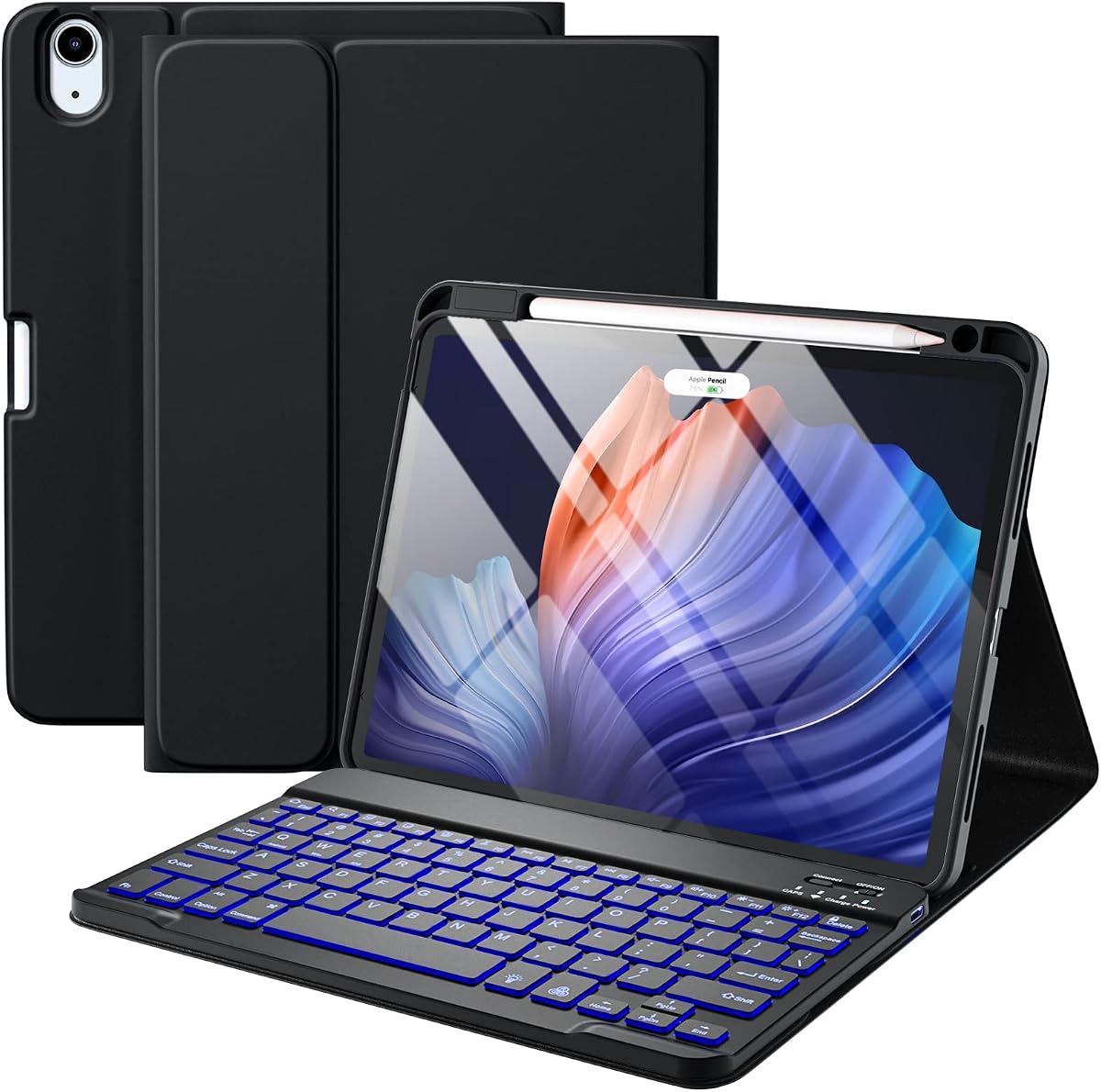



The Logitech Flip Folio Keyboard Case earns a 4.5 rating and stands out as the most balanced productivity folio in this guide. It combines a precise multi-touch trackpad, well-spaced illuminated keys, a row of iPadOS shortcuts, and four working modes in one polished enclosure. Its Smart Connector approach also removes the routine charging and pairing friction found with detachable Bluetooth keyboards.
We may earn a commission when you buy through this link, at no additional cost to you.
The strongest feature is the combination of navigation and typing. Swipe, pinch, and scroll gestures work through the trackpad, while the large, separated keys and dedicated shortcut row support familiar tablet workflows. A magnetic closure protects the screen during travel, and the kickstand offers a 40-degree range that works well for viewing, typing, reading, or sketching. The case also meets the stated MIL-STD-810G protection standard.
There are trade-offs. Its compatibility is narrower than several competing listings because it is specifically offered for the 11-inch iPad Air rather than the wider iPad ecosystem. It also cannot operate independently as a wireless keyboard, since power and connection come directly from the tablet through the Smart Connector. For shoppers who own the correct iPad Air and value a polished, integrated experience, those limitations are reasonable.
This is the recommendation for most people who want a folio that feels like a complete mobile workstation rather than a tablet with a keyboard attached. It is especially compelling for writing, editing, browsing with a cursor, attending classes, or switching between tablet and laptop-style tasks. Confirm your iPad Air size and model before ordering.
A large multi-touch surface makes the Logitech folio useful for tasks that become tiring on a touchscreen. Pinch, swipe, and scroll gestures support navigation, while the shortcut row reduces steps for common iPadOS controls.
The Smart Connector pairs the keyboard with the iPad and draws power directly from the tablet. That integrated arrangement reduces cables and avoids the charging routine required by a standalone Bluetooth keyboard.
We may earn a commission when you buy through this link, at no additional cost to you.
The Harvopu Detachable Keyboard Case carries a 4.3 rating and provides a feature-rich setup for numerous iPad Air generations. Its strongest attraction is value: the case includes a detachable, backlit Bluetooth keyboard, several viewing grooves, and a holder that can charge supported second-generation Apple Pencil or Apple Pencil Pro devices while the tablet remains in its case.
We may earn a commission when you buy through this link, at no additional cost to you.
Compatibility is a major advantage for households with different Apple tablets. The supplied model list covers 11-inch iPad Air M2, M3, and M4 versions, along with 4th- and 5th-generation 10.9-inch Air models. The keyboard attaches magnetically for typing or detaches completely for reading, video, and sketching. Its rechargeable 400mAh battery supports an energy-saving mode, and the Type-C charging port is convenient for modern charging setups.
The case uses a PU leather upper shell, a soft TPU back with an anti-skid finish, and a honeycomb interior intended to assist heat dissipation. Cutouts preserve access to ports, speakers, microphones, cameras, and Touch ID. One limitation is that no trackpad is listed, so users who want cursor-based navigation must touch the screen. The detached keyboard also requires its own power and Bluetooth connection.
Choose this model when broad compatibility, removable-keyboard convenience, colorful lighting, and pencil charging matter more than an integrated trackpad. It is a particularly practical choice for students or travelers who alternate between typing and reading, provided the iPad model number matches the compatibility list.
Strong magnetic attachment makes the keyboard easy to remove when you want a lighter tablet-only setup. That flexibility is valuable for video viewing, reading, and stylus work without changing protective cases.
The built-in holder keeps a compatible stylus accessible and can charge it directly. This reduces the need to remove the folio or handle a separate charging arrangement for the pencil.
We may earn a commission when you buy through this link, at no additional cost to you.
Apple Magic Keyboard holds a 4.5 rating and offers a minimalist first-party alternative to the broader third-party selection. It is built for 11-inch iPad Air M2, M3, and M4 models as well as 4th- and 5th-generation iPad Air devices, giving it strong coverage across several recent Air generations.
We may earn a commission when you buy through this link, at no additional cost to you.
The floating cantilever design places the display above the keyboard in a laptop-like arrangement. A two-hinge structure provides smooth angle adjustment, while physical scissor keys and a 14-key function row support familiar typing behavior. The integrated precision trackpad adds cursor control without requiring a separate pointing device. USB-C pass-through charging allows a cable to reach the tablet while the keyboard remains attached.
The main trade-offs involve lighting and flexibility. Backlit keys are not listed, which matters for frequent low-light typing. The keyboard also appears to remain attached to the folio, so it does not offer the same detached-tablet convenience as the magnetic alternatives in this guide. The cantilever can occupy more space in a bag than a basic folio cover.
Apple Magic Keyboard is the premium pick for buyers who prioritize slim construction, seamless iPad integration, and the familiar cantilever format. It is particularly suitable for travel, note-taking, and conventional document editing. Users who work at night or frequently switch between keyboard and pure tablet modes may prefer a detachable illuminated alternative.
The cantilever hinge raises the display above the keyboard and allows smooth angle changes. This supports a conventional working posture while keeping the overall enclosure relatively thin and portable.
The keyboard draws power from the iPad and needs no separate pairing process. Its USB-C pass-through provides a route for charging the tablet, and the built-in trackpad adds precise cursor navigation.
We may earn a commission when you buy through this link, at no additional cost to you.
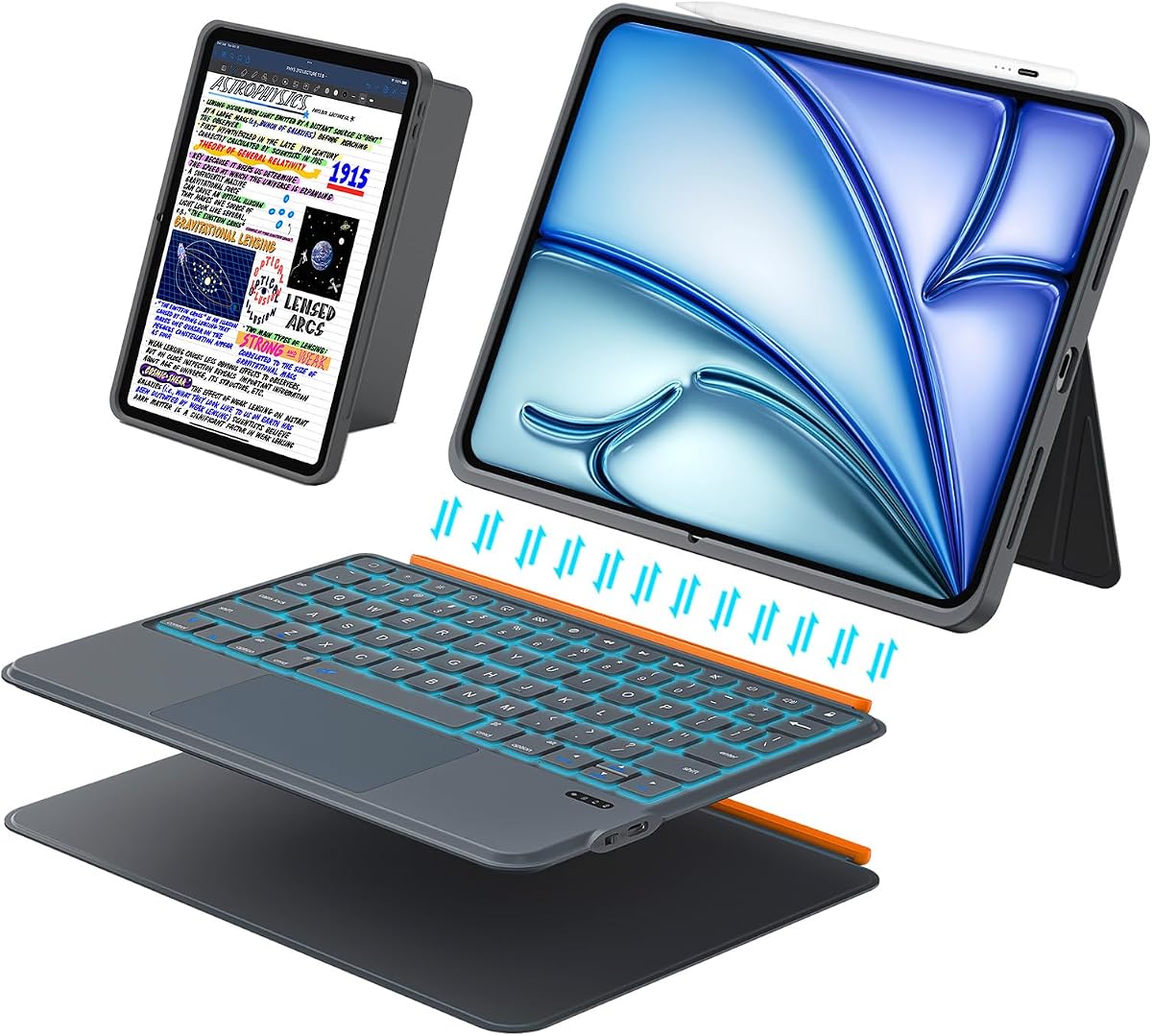
The ESR Magnetic Keyboard Case has a 4.4 rating and prioritizes portability, cursor control, and a detachable design. At a listed thickness of 6.9 millimeters, it is among the thinnest options here. Its extra-large precision trackpad is 65 percent larger than a regular keyboard touchpad and supports one-finger dragging and three-finger scrolling.
We may earn a commission when you buy through this link, at no additional cost to you.
Strong magnets let the keyboard attach or detach quickly. When attached, the triangular support offers a 65-degree position for working, viewing, or reading and a 20-degree position for sketching or writing. The cover adds reinforced Air Guard corners, magnetic strips, and precise cutouts for buttons, ports, and speakers. Compatibility covers current 11-inch Air generations and the 4th- and 5th-generation 10.9-inch models.
This keyboard does not have a backlight, which may limit its appeal for nighttime work. The two listed angles are fewer than several competitors offer, although they cover the most common typing and writing positions. Users should also account for the separate charging needs of a detachable keyboard, although no specific battery or charging system is listed in the supplied information.
This ESR model is a strong pick for mobile workers who want a full-size typing area and oversized trackpad without carrying a bulky folio. The detachable design also works well when reading or sketching. Confirm that your precise Air model appears in the compatibility list before buying.
The oversized touchpad gives gestures and cursor control more room than a compact keyboard deck. That makes document editing, app switching, and browsing more comfortable without requiring a separate mouse.
A 6.9-millimeter profile keeps the folio easy to carry, while reinforced corners and magnetic strips help protect the tablet from scratches, dust, and everyday knocks.
We may earn a commission when you buy through this link, at no additional cost to you.
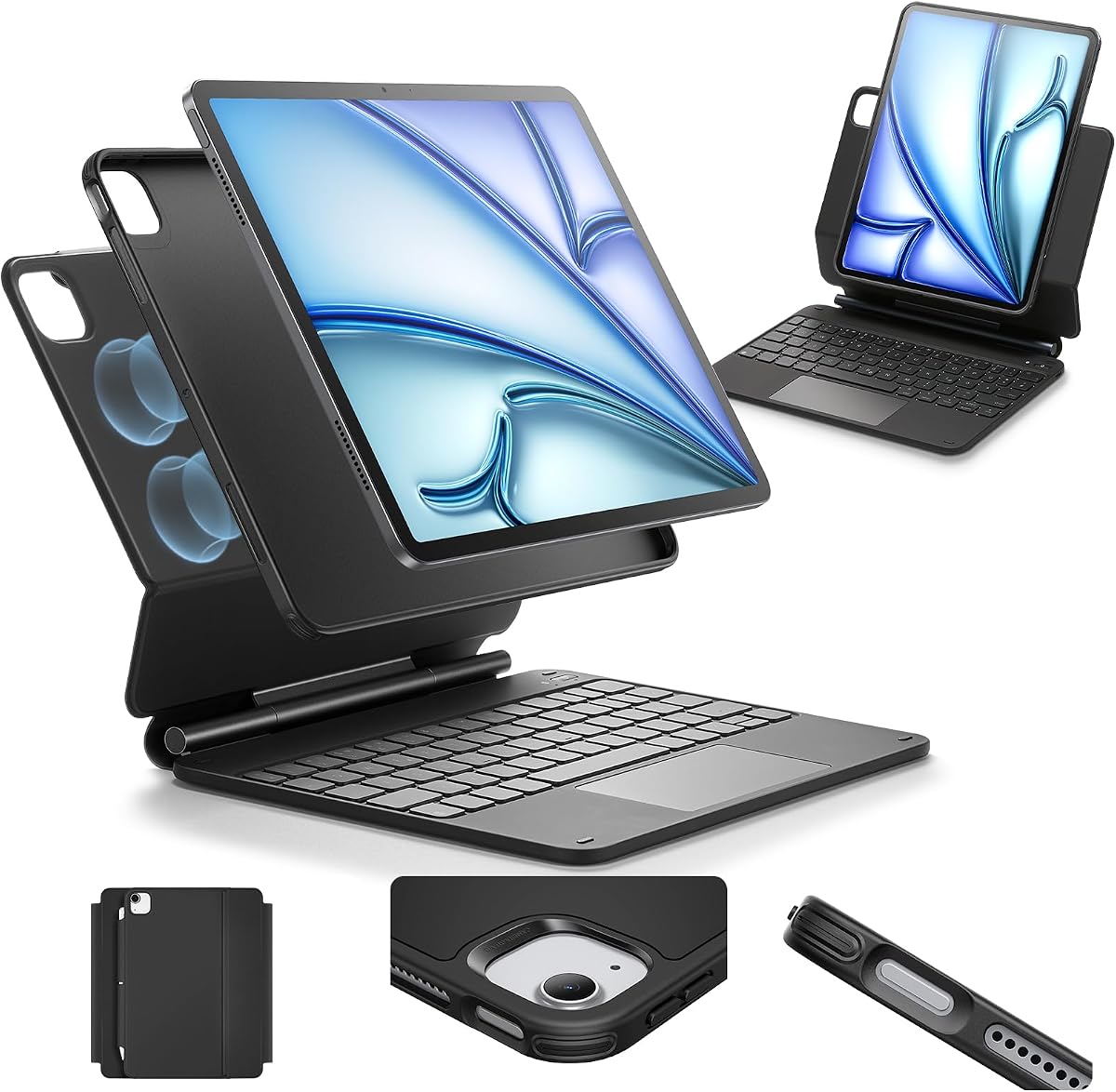
The Magic-Style Multi-Touch Case carries a 4.3 rating and combines a floating magnetic stand, illuminated keyboard, and precision touchpad. Its compatibility list extends beyond the iPad Air to include four generations of 11-inch iPad Pro and multiple 10.9-inch Air releases, making it useful for buyers who rotate between Apple devices.
We may earn a commission when you buy through this link, at no additional cost to you.
The stand attaches magnetically and forms a cantilevered laptop-style arrangement. A multi-touch trackpad supports gesture navigation, while a row of iPadOS shortcuts gives quick access to brightness, volume, and media controls. The keyboard includes a backlight with three brightness levels and a rechargeable 750mAh battery. The stated battery claims include three months of daily use or two weeks of nightly use between charges.
Its broad model support also requires careful checking. Several model identifiers are listed, but small differences among generations and regional variants can affect fit. Because this is a keyboard case with an integrated magnetic arrangement, the keyboard still has its own charging routine rather than drawing power directly from the tablet. The synthetic vegan leather and sturdy keyboard base are designed for portability and protection.
This is a compelling choice for users who want illumination, gestures, and a laptop-style stand without paying for a first-party accessory. It is also attractive to households with both an iPad Air and an 11-inch iPad Pro. Verify the exact A-number model listed on your tablet before ordering.
Three backlight brightness levels help preserve key visibility in dim rooms without requiring a constant maximum setting. The rechargeable battery adds convenience for regular mobile use.
Magnetic attachment creates a raised screen position that resembles a laptop. It provides a natural relationship between display and keyboard for typing while preserving a separate touchpad surface.
We may earn a commission when you buy through this link, at no additional cost to you.
This Gray Magnetic Detachable Keyboard Case earns a 4.5 rating and offers one of the broadest compatibility lists in the guide. It supports 11-inch iPad Air M2, M3, and M4 models, 10th- and 11th-generation iPad, 4th- and 5th-generation Air models, and four generations of 11-inch iPad Pro. That makes it appealing for multi-device households.
We may earn a commission when you buy through this link, at no additional cost to you.
The keyboard uses Bluetooth 5.3 and a 78-key scissor layout with one-millimeter travel. Its multi-touch trackpad includes smart palm rejection, reducing accidental input while typing. The rear stand adjusts through 160 degrees in landscape mode and also supports portrait placement, giving users more freedom than simpler fixed-angle folios. A skin-friendly PU leather exterior provides full-edge coverage against scratches and knocks.
The trade-off is that the detachable keyboard needs separate power and pairing. Buyers must also review the unusually long model list carefully because visually similar tablets can use different identifiers. Although the stand is highly adjustable, the stated adjustment is primarily associated with landscape placement, and the product does not describe an integrated kickstand with a separate high-angle range.
Choose this case when compatibility across several Apple tablets, quiet typing, and flexible display positioning are priorities. It is particularly useful for students or professionals who alternate among writing, viewing, and keyboard-based work. Confirm both the device model and your preferred orientation before purchasing.
The 160-degree rear support and portrait capability accommodate typing, media viewing, and vertical communication. It offers a wider range of positions than many fixed-folio alternatives.
Quiet scissor keys with one-millimeter travel support focused typing, while the multi-touch trackpad includes palm rejection. Together, they provide a more conventional laptop-style working experience.
We may earn a commission when you buy through this link, at no additional cost to you.
The renewed Apple Smart Keyboard Folio has the highest rating in the comparison at 4.6. It is a straightforward accessory for the iPad Air 5th generation and iPad Pro 11-inch 4th generation, combining a full-size keyboard, a folding cover, and a stand without a separate trackpad.
We may earn a commission when you buy through this link, at no additional cost to you.
Its main convenience is the absence of setup. The Smart Keyboard Folio uses the Smart Connector arrangement, so it does not require charging or manual Bluetooth pairing. The cover folds into a stand, allowing the tablet to be raised for typing, while the keyboard remains protected when the folio is closed.
As a renewed listing, condition and warranty details deserve attention. Compatibility is also narrow, and the supplied information contains an inconsistent reference to fitting an iPad Air 3rd generation even though the product title identifies the 5th generation. Buyers should rely on the exact model designation and confirm the fit with the seller. There is also no listed touchpad, so navigation remains touch-based.
This is best suited to an owner of the specifically listed 5th-generation iPad Air who values simplicity and wants a familiar Apple folio design. It is a good fit for basic typing and note-taking without carrying a separate keyboard battery. Confirm the renewed condition and device compatibility before purchase.
The Smart Connector arrangement simplifies setup by connecting the keyboard directly to a compatible iPad. There is no separate keyboard battery to recharge or pairing menu to manage.
The front cover protects the display when closed and folds into a basic stand when open. This dual function keeps the overall accessory relatively straightforward for travel.
We may earn a commission when you buy through this link, at no additional cost to you.
The renewed Logitech Folio Touch receives a 4.1 rating and is designed for the 4th- and 5th-generation iPad Air. It brings Logitech's established folio format to owners of those older models with a precise multi-touch trackpad, illuminated keys, and a complete set of iPadOS shortcuts.
We may earn a commission when you buy through this link, at no additional cost to you.
Users can move among type, sketch, view, and read modes. The kickstand has a 40-degree adjustment range, and the keyboard folds out of the way for sketch and reading positions. Smart Connector technology handles pairing and draws power from the iPad, so there is no separate keyboard charging cycle. The enclosure is stated to exceed MIL-STD-810G and includes a magnetic closure.
The listing is renewed, and its 4.1 rating is the lowest among the products here. It is also limited to model numbers for the 4th- and 5th-generation Air, so it should not be considered for 11-inch Air owners. The protection claim and included pencil-storage details depend on the exact configuration shown in the listing.
This renewed Folio Touch makes the most sense for an older 10.9-inch iPad Air owner who values a strong trackpad and the established Logitech Smart Connector experience. Verify the device model, pencil compatibility, physical condition, and return coverage before ordering.
Typing, sketching, viewing, and reading are supported by a folding keyboard and adjustable kickstand. This flexibility makes the folio useful across different kinds of daily work.
The Smart Connector supplies power and pairing, while the trackpad and illuminated keys enrich the limited keyboard support available on some older iPad models. Check the exact A-number before buying.
We may earn a commission when you buy through this link, at no additional cost to you.
The Harvopu Multi-Touch Keyboard Case has a 4.3 rating and combines a detachable magnetic keyboard with a sensitive multi-touch trackpad. It supports 11-inch iPad Air M2, M3, and M4 models along with the 4th- and 5th-generation 10.9-inch versions, offering broad coverage for current and previous Air owners.
We may earn a commission when you buy through this link, at no additional cost to you.
The keyboard attaches magnetically and uses Bluetooth pairing activated through the listed Fn+C combination. Its backlight offers seven colors and three brightness levels, while the touchpad supports document editing, browsing, and app management without direct screen contact. Multiple viewing positions accommodate typing, watching video, and drawing, and the case has precise cutouts for ports, buttons, and cameras.
As with other detachable designs, the keyboard must be charged independently, and the magnetic attachment may not be as structurally rigid as a fixed or cantilever assembly during vigorous typing. The supplied compatibility information also appears to swap some model-number groupings, so the actual A-number printed on the tablet should determine whether the fit is appropriate.
This Harvopu model is a good match for users who want more visual customization than a standard black keyboard provides. The combination of touchpad, colored backlight, and detachable construction supports both productivity and entertainment. Verify the model number and charging requirements before ordering.
Seven backlight colors and three brightness levels let users adjust the appearance for different settings. The illumination is particularly useful for low-light typing sessions.
The magnetic keyboard can remain attached for productive work or come off for a lighter tablet experience. A dedicated touchpad supports cursor control when the keyboard is in use.
We may earn a commission when you buy through this link, at no additional cost to you.
The ESR Multi-Mode Magnetic Stand receives a 4.2 rating and focuses on flexible display positioning. It supports current 11-inch iPad Air generations, the 4th- and 5th-generation 10.9-inch Air, and all four listed generations of 11-inch iPad Pro, making it a versatile option for several Apple tablet owners.
We may earn a commission when you buy through this link, at no additional cost to you.
Strong magnets attach the tablet to the case and create a floating cantilever for typing or browsing. The back can detach for hands-on use while continuing to provide full-body protection. Raised screen and portrait modes add flexibility, and the extended multi-touch trackpad supports tap, pinch, and swipe gestures for more precise navigation than a traditional keyboard.
No keyboard backlight is specified, which may reduce comfort in dark environments. The product description focuses more heavily on the stand, trackpad, and protective cover than on battery details, so buyers should review the complete listing for charging and connectivity information. It is also important to check whether a keyboard is included with the particular package being purchased.
This ESR case is best for users who spend significant time adjusting between typing, raised viewing, portrait communication, and hands-on tablet work. It is a sensible choice for an iPad Pro owner who wants a flexible mobile workstation. Confirm the package contents and the exact model identifier before ordering.
The raised screen mode places the display higher than a conventional flat folio position. That can reduce the need to hunch over the tablet during extended typing or browsing.
The back cover detaches for stylus use and direct tablet interaction while retaining full-body protection. Magnetic attachment keeps the folio compact when it is not needed separately.
We may earn a commission when you buy through this link, at no additional cost to you.
The best keyboard folio depends on your iPad generation, typing habits, navigation preferences, and need for portability. Use the following factors to narrow the field before comparing models.
iPad Air compatibility is more complicated than matching screen size. The guide covers 11-inch Air M2, M3, and M4 models alongside 4th- and 5th-generation 10.9-inch versions, but fit also depends on the A-number identifier, camera placement, port arrangement, and magnetic attachment geometry. Several listings support additional iPad or iPad Pro generations, while others are restricted to one or two releases.
Check the model number before ordering by opening Settings, selecting General, choosing About, and tapping the Model Part Number line until the A-number appears. Compare that identifier with the manufacturer or seller compatibility list. If a listing groups generations together, look for your exact identifier rather than relying on the generation name alone.
A fixed or connected folio generally feels more cohesive and may provide a steadier typing surface, while a detachable keyboard gives you the option to use the iPad as a bare tablet. Magnetic detachable designs also tend to make it easier to change from typing to reading, drawing, or watching video without carrying a fixed keyboard deck.
Choose a fixed design if you want a laptop-like product that is always ready to type. Choose a detachable design if portability, stylus access, or occasional tablet-only use matters more. Detachable keyboards normally require their own charging and pairing process, so compare that inconvenience against the freedom they provide.
A trackpad changes an iPad from a touch-first device into a more practical cursor-driven tool. Look for multi-touch support rather than a simple tap pad, because swiping, pinching, scrolling, and app switching are important parts of iPadOS navigation. Larger surfaces can reduce accidental touches and make small selections easier.
The standout examples here include Logitech's high-precision trackpad, Apple's integrated touchpad, and ESR's enlarged surface. Consider whether palm rejection is included, especially if you type with your wrists resting near the touchpad. Trackpads are less essential if your workflow is mostly brief text entry, but they become increasingly valuable for editing, spreadsheets, and desktop-style browsing.
Comfortable typing depends on key spacing, travel, feedback, layout, and the size of the keyboard deck. Full-size or near-full-size arrangements are usually better for long writing sessions, while compact layouts preserve portability. Dedicated iPadOS shortcut keys can reduce the number of taps required for brightness, volume, and media controls.
For frequent low-light use, favor an adjustable backlight. The Logitech models offer illumination, while the multi-touch magnetic alternatives provide several brightness levels or multiple colors. Scissor mechanisms and quiet keys can help in shared spaces. If a keyboard lacks a trackpad, ensure you are comfortable with touchscreen navigation before committing.
A keyboard can feel awkward if the screen angle does not match the task. Typing usually benefits from an elevated, laptop-like position; sketching and handwriting often work better at a lower angle; video viewing benefits from a stable upright setup. Some folios use a floating cantilever, while others use grooves, folding panels, or adjustable rear stands.
Check the stated angles rather than assuming every position is possible. The ESR magnetic case offers dedicated high and low angles, the Gray Magnetic case supports a broad 160-degree landscape range, and the Logitech kickstand provides a 40-degree range. Portrait support is useful for FaceTime or reading but is not universal.
A keyboard folio serves as both a productivity accessory and a protective cover. Look for a secure magnetic closure, reinforced corners, a textured back, and coverage around the tablet's edges. A textured or anti-skid surface can improve grip on a desk and reduce the chance of the tablet sliding while you type.
Precise cutouts matter as much as protection. Check access to charging ports, speakers, microphones, cameras, buttons, and Touch ID without taking the case off. Some products also include a magnetic Apple Pencil holder or a charging holder, but compatibility depends on the exact pencil model and whether the feature is present in the package being purchased.
Integrated Smart Connector designs draw keyboard power from the iPad and generally do not require manual Bluetooth pairing or separate charging. Detachable Bluetooth keyboards are more flexible but require charging, pairing, and attention to battery status. Backlit keyboards generally consume more power than non-lit models, making battery life especially relevant for travel.
Compare the practical consequences rather than focusing only on connection speed. If you want the fewest accessories and simplest routine, a Smart Connector model may suit you. If you expect to use the keyboard across several tablets or separate it frequently, Bluetooth independence can be valuable. Check which Bluetooth version is stated and whether the keyboard can reconnect quickly.
The most protective case is not automatically the easiest one to carry. A large folio with a rigid keyboard base can add bulk, while a slim magnetic design may feel lighter in a bag but offer less structural support. Thickness, weight, corner reinforcement, and closure strength should be weighed against your typical travel routine.
For frequent commuting, consider the 6.9-millimeter ESR option or another slim detachable design. For stationary work or device storage, a larger folio with a secure closure may be more reassuring. Also consider whether you will carry a pencil, charger, and external accessories, since those items can influence the overall size of the carrying setup.
Begin by confirming the fit and installing the tablet according to the manufacturer's instructions. For a magnetic case, align the tablet with the connector or magnetic points and lower it into position gently rather than pulling on the keyboard. Fixed Smart Connector cases should be opened fully before attaching the iPad so the connector does not receive unnecessary sideways pressure.
Pair a detachable Bluetooth keyboard by placing it in pairing mode and selecting it from the iPad's Bluetooth menu. Some listings specify an Fn+C shortcut. Allow the keyboard to reconnect before moving it to another location, and remember that a detachable keyboard will need its own charge even when the case itself has no battery. Raise or lower the stand to the angle that suits typing, drawing, reading, or viewing.
To care for the folio, remove the tablet before cleaning the exterior and use a soft, slightly damp cloth for PU leather, synthetic leather, or molded surfaces. Avoid pressing moisture into seams, ports, or the magnetic attachment points. Keep the keyboard free of crumbs and dust, and do not place incompatible liquids or sharp objects against the trackpad. For renewed products, inspect the closure, corners, hinge, keys, and charging connections carefully upon arrival.
Open Settings, select General, choose About, and tap the Model Part Number line to reveal the A-number. Compare that identifier with the case's compatibility list, which may list several model numbers for each generation. Screen size alone is not enough because port locations, dimensions, and attachment points can differ among versions.
It depends on the design. Smart Connector models such as Logitech's Folio Touch and Apple's Smart Keyboard Folio draw power from the compatible iPad and require no separate keyboard charge. Detachable Bluetooth models use their own rechargeable battery and need periodic charging through the charging method specified in the listing.
A trackpad is very useful for document editing, spreadsheets, web browsing, app management, and other cursor-based work. It reduces repeated screen taps and feels more familiar on a laptop-style setup. For occasional messaging or short notes, a keyboard without a trackpad can still be sufficient, but check your usual workflow before choosing.
Yes, and many folios are specifically designed for that mode. Lower viewing angles can provide a more natural writing position, while detaching the keyboard makes the tablet lighter and easier to handle. Verify that the case includes a suitable Apple Pencil or Logitech Crayon holder and confirm whether it supports charging or merely storage.
A cantilever design holds the tablet above the keyboard on a raised hinge, resembling a laptop screen. A folding case uses the keyboard and cover panels as a stand, placing the display at a different height and angle. Cantilevers often feel more laptop-like, while folding designs can be more compact when the keyboard is hidden.
They are designed for repeated magnetic attachment and detachment, but the keyboard should still be handled by its edges. Avoid forcefully pulling the keyboard away, particularly while it is supporting meaningful weight. Keep the attachment surfaces free of grit and metal particles, which can scratch the tablet or reduce magnetic alignment.
A renewed case can be a practical option when the model meets your needs and the listing provides clear condition and return information. Inspect photographs and check for descriptions of scratches, discoloration, hinge wear, key damage, and trackpad function. Confirm that the seller offers appropriate protection for a product with electronics and moving magnetic parts.
Not necessarily, even when the screens have similar dimensions. Some listings in this guide support several 11-inch iPad Pro generations, but the fit depends on the specific model number, dimensions, ports, and attachment geometry. Always verify the exact A-number before choosing a case marketed for both iPad Air and iPad Pro.
The Logitech Flip Folio Keyboard is the strongest all-around recommendation because it integrates a precise trackpad, illuminated keys, flexible viewing modes, Smart Connector power, and substantial protection. Apple's Magic Keyboard is the premium alternative for buyers seeking a particularly slim cantilever design, while the ESR Magnetic Keyboard Case offers a capable lightweight setup with a large trackpad.
Your priority should determine the rest of the shortlist. Choose a detachable model for tablet-only flexibility, a fixed Smart Connector design for minimal charging and pairing, a backlit keyboard for low-light work, or a case with a charging pencil holder for stylus-heavy workflows. Above all, verify the exact iPad Air model number and assess the keyboard, trackpad, and stand as a complete working system rather than focusing on a single feature.
Prices and product listings can change over time, and compatibility details may be updated by manufacturers or sellers. Before making a final purchase, confirm the included components, current condition, return terms, and latest device compatibility on the product page. Those checks help ensure that the chosen folio matches both your iPad and the way you actually work.
