
QNAP Thunderbolt 3 Expansion Card
4.7Editor score
Two Thunderbolt 3 ports
PCIe Gen3 x4 interface
Low-profile bracket included
Our expert Thunderbolt Add in Card for PC guide compares ten expansion cards for bandwidth, ports, display support, charging, compatibility, and ease of setup.
A Thunderbolt add-in card gives a desktop PC access to fast USB-C, high-bandwidth peripherals, and potentially external display connections without relying entirely on a motherboard's built-in ports. The best choice depends on your motherboard, PCIe slot, devices, display needs, and the Thunderbolt generation supported by your equipment.
We compared all ten products by examining their documented ports, PCIe interfaces, bandwidth, charging capabilities, display support, daisy-chain ability, physical design, and intended use. The list includes conventional PCIe Thunderbolt cards, USB4 alternatives, and specialized expansion cards that only suit particular audio, NAS, or compact-computer systems.
Each review explains the strongest feature and the important limitations so you can distinguish a general-purpose upgrade from a device-specific solution. Product ratings and availability can change over time, so verify current specifications, operating-system support, and the compatibility requirements of your PC before buying.
4.7Editor score
3.2Editor score

4.2Editor score
The table below compares the ten cards by their principal connection standard, port count, PCIe interface, and most notable capability. It also highlights that several products are intended for specialized systems rather than ordinary desktop PCs.


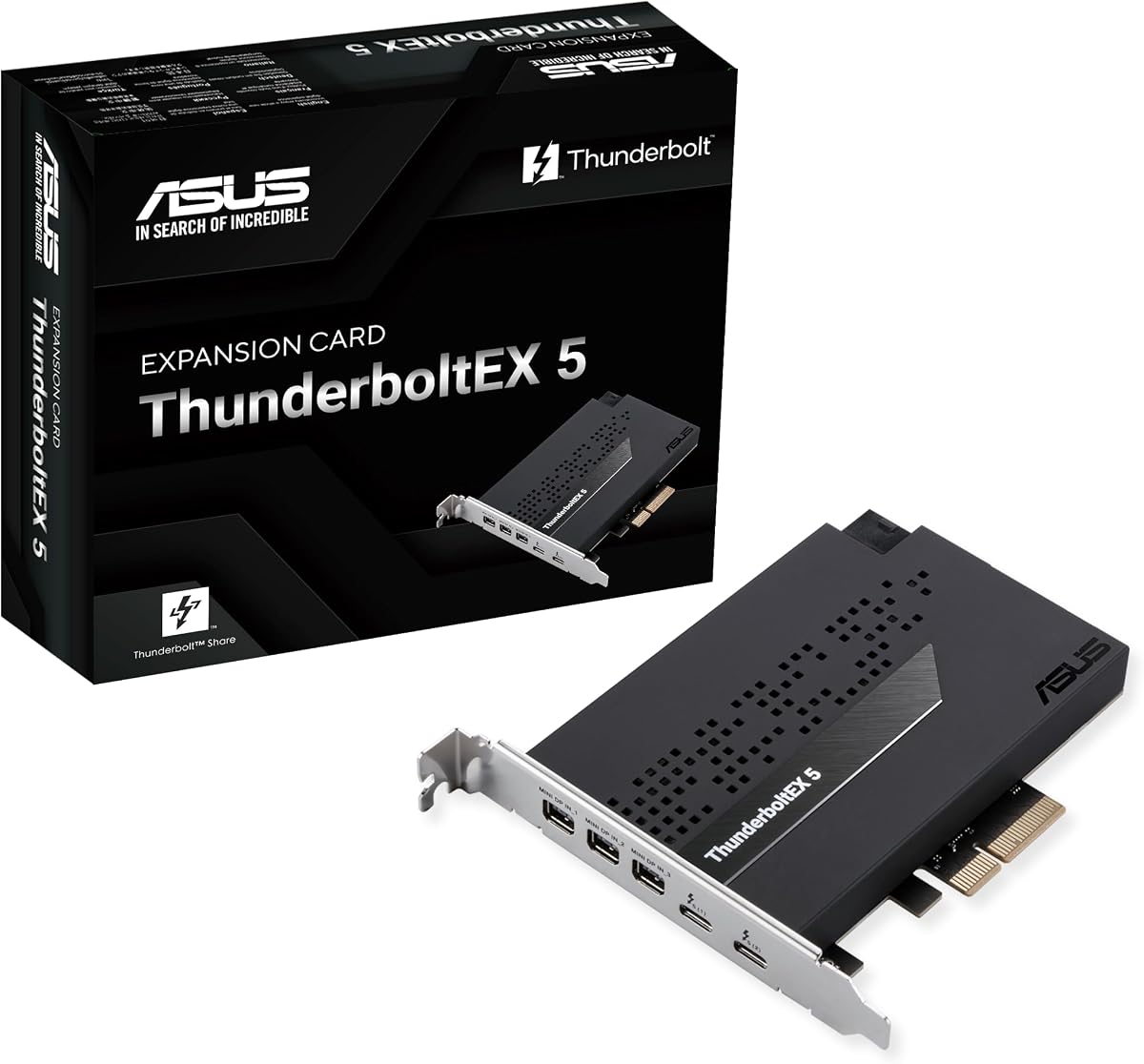
The ASUS ThunderboltEX 5 Expansion Card is the most feature-forward conventional PCIe card in this group. It uses an Intel-certified Thunderbolt 5 controller and provides two USB Type-C ports, a PCIe 4.0 x4 interface, and DisplayPort 2.1 support. Its 3.2 rating is the lowest among the numerically rated products, so prospective buyers should investigate platform compatibility and firmware support before committing.
We may earn a commission when you buy through this link, at no additional cost to you.
Its standout feature is support for up to 120Gbps of bandwidth, which makes it well suited to demanding storage arrays, high-resolution media workflows, and professional displays. The documented display configuration reaches three 8K 60Hz displays with DSC when paired with suitable equipment. Two front USB-C ports also support up to 130W of combined charging and up to 96W for one device.
Five Thunderbolt devices can be connected in a daisy-chain configuration, reducing the need for separate adapters and hubs. That flexibility is useful for creators moving large media libraries, editors working with external storage, and users connecting several high-speed accessories. However, the card is listed as compatible with Intel 800 Series motherboards, which may rule out many systems built around other platforms.
This is the best overall pick for a new, compatible Intel 800 Series desktop that needs both fast peripherals and advanced display support. It is less suitable for an older motherboard, a compact system without an available PCIe slot, or a builder whose primary need is simply additional USB-A connectors. Confirm the motherboard model, slot layout, operating system, and display hardware before purchasing.
Up to 120Gbps of bandwidth gives compatible Thunderbolt 5 equipment more headroom than older 40Gbps interfaces. That capacity is especially relevant to external NVMe storage, media workflows, and multi-device professional setups where a conventional USB hub would be the limiting factor.
DisplayPort 2.1 support and the stated three-display 8K 60Hz capability make this card appealing for advanced workstations. The Type-C ports also provide meaningful charging, although the exact output still depends on the host system, power delivery, and the capabilities of connected devices.
We may earn a commission when you buy through this link, at no additional cost to you.
The ASUS ThunderboltEX 4 brings a current-generation Thunderbolt interface to a desktop through an Intel Thunderbolt 4 JHL 8540 controller. Its 3.9 rating is moderate, but the documented feature set is clear and balanced: two Type-C ports, 40Gbps bidirectional bandwidth, DisplayPort 1.4, and charging up to 100W.
We may earn a commission when you buy through this link, at no additional cost to you.
The 40Gbps link is a meaningful improvement over many USB add-in cards and offers ample headroom for external SSDs, high-resolution displays, and other Thunderbolt-enabled accessories. Either port can participate in a daisy chain, with up to five Thunderbolt-enabled devices connected. DisplayPort 1.4 support extends the card's usefulness for monitor setups, including resolutions up to 8K when the complete system supports it.
The main limitation is generational. Thunderbolt 5 cards can provide substantially more bandwidth and newer display capabilities, so this model makes the most sense when you already own Thunderbolt 4 peripherals or need a well-understood interface rather than the newest standard. Platform support, available power, and the motherboard's own display outputs still matter for a successful installation.
Choose the ThunderboltEX 4 when you want a conventional desktop expansion card with strong charging, fast storage support, and modern display capabilities without moving to the latest generation. It is a sensible middle ground for a compatible PC, particularly one already equipped with Thunderbolt 4 accessories or displays.
A 40Gbps Thunderbolt 4 connection can substantially reduce bottlenecks when working with compatible external NVMe drives and high-bandwidth peripherals. The interface is particularly valuable for users who need more throughput than a basic USB 3.2 expansion card can provide.
Up to 100W quick charge can simplify a desk by allowing compatible USB-C laptops or tablets to recharge through the expansion card. The system must provide adequate power, and the connected device must support the corresponding USB-C charging profile.
We may earn a commission when you buy through this link, at no additional cost to you.
The QNAP Thunderbolt 3 Expansion Card, model QXP-T32P, combines two Thunderbolt 3 USB Type-C ports with a PCIe Gen3 x4 interface. It carries a 4.7 rating, the highest established customer rating in this group, and includes both a low-profile bracket and a full-height bracket for easier fitting in different desktop cases.
We may earn a commission when you buy through this link, at no additional cost to you.
Thunderbolt 3 provides a familiar 40Gbps foundation for external storage, display equipment, and other compatible peripherals. The included bracket options are especially useful for small-form-factor systems, where full-height cards may not fit properly. A low-profile bracket is already preinstalled, reducing the need for additional parts during installation.
The specification list is concise, so buyers should verify the exact host requirements, supported displays, power delivery, and operating-system behavior with QNAP or the seller. It also lacks the newer 80Gbps and 120Gbps capabilities associated with Thunderbolt 5 products. That makes it more appropriate for existing Thunderbolt 3 equipment than for a new high-end workstation seeking the newest standard.
The QXP-T32P is the best budget-oriented Thunderbolt option for users who already need a mature, well-reviewed expansion card and want flexible physical installation. Its dual ports and bracket support give it strong practical value, although it is not the first choice for a brand-new Thunderbolt 5 ecosystem.
The preinstalled low-profile bracket and included full-height bracket allow the card to fit both compact and conventional desktop cases. This flexibility can prevent an otherwise simple upgrade from becoming a case-planning problem.
Thunderbolt 3 remains useful for many external drives, displays, and accessories already in circulation. For users who do not need Thunderbolt 5 bandwidth, this card offers a more established platform with the strongest customer rating among the products listed.
We may earn a commission when you buy through this link, at no additional cost to you.
The OWC Mercury Helios 5S is a premium connectivity enclosure and PCIe expansion solution rather than a simple card that merely adds two USB-C ports. It carries a 4.2 rating and provides three Thunderbolt 5 USB-C ports, each with 80Gbps bandwidth and 15W power delivery.
We may earn a commission when you buy through this link, at no additional cost to you.
Its internal PCIe 4.0 x4 support uses a full-length, x16 mechanical slot and accepts half-length, full-height, single-width, or double-width cards. That makes it useful for video capture, fiber or Ethernet adapters, NVMe RAID, and professional audio I/O. The enclosure can bring these capabilities to space-constrained computers such as MacBook models, Mac Studio, and Mac mini.
The main distinction is that Mercury Helios 5S acts as a bridge between compact computers and PCIe devices rather than simply occupying one PCIe slot inside a standard tower. Over 6000MB/s of available simultaneous read/write bandwidth supports demanding workflows, while the three external ports provide generous connectivity for displays, storage, and accessories.
Choose the Mercury Helios 5S when you own a compatible compact computer and need to add serious PCIe capabilities as well as Thunderbolt 5 ports. It is less sensible for a desktop that already has abundant PCIe expansion and internal connectivity. Verify enclosure dimensions, power delivery, card compatibility, and operating-system support before ordering.
The ability to install half-length, full-height, single-width, or double-width PCIe 4.0 cards transforms what compact computers can do. Video capture, high-speed networking, NVMe RAID, and audio interfaces become more accessible without rebuilding an entire workstation.
Three 80Gbps Thunderbolt 5 ports create a flexible external backbone for storage, displays, and accessories. The 15W per-port power delivery is suitable for many lightweight peripherals, although demanding devices may require separate power.
We may earn a commission when you buy through this link, at no additional cost to you.
The StarTech 5-Port USB 10Gbps PCIe Card is included because it solves a closely related expansion problem, but it is not a Thunderbolt add-in card. It has a 4.4 rating and uses a PCIe x4 connection to add four external USB Type-C ports and one internal USB Type-A port.
We may earn a commission when you buy through this link, at no additional cost to you.
Its ASM3142 controller supports USB 3.2 transfer speeds of up to 10Gbps. That makes the card useful for external storage, high-resolution photo workflows, and video editing where more front-panel or rear-panel USB connections are needed. A single PCIe x4 connection handles all five ports, reducing the need for multiple add-in devices.
The card can accept SATA power when motherboard power is insufficient, providing up to 15W per USB Type-C port and 7.5W on the internal USB-A port. Drivers are stated to auto-install in most current operating systems, including Windows, macOS, and Linux, and the card works with Intel, AMD, and Apple Silicon platforms that provide a suitable PCIe slot.
This is the right choice for a user who needs more USB sockets but does not need Thunderbolt bandwidth, display routing, daisy chaining, or USB Power Delivery. The absence of DisplayPort Alt Mode makes it unsuitable for using those USB-C ports to drive a display, but its value and compatibility make it a strong practical USB expansion option.
Combining four external USB-C connections and one internal USB-A header in a single x4 card is efficient for compact builds. It gives users access to modern peripherals without sacrificing multiple expansion slots to separate adapters.
Although USB-C connectors resemble Thunderbolt ports, this card does not support DisplayPort Alt Mode or USB Power Delivery. It should be chosen for data and peripheral connectivity rather than as a display or laptop-charging solution.
We may earn a commission when you buy through this link, at no additional cost to you.
The ASUS USB4 PCIe Gen4 Card offers a USB4 alternative to Thunderbolt expansion. It has a 3.8 rating, two USB Type-C ports, a PCIe 4.0 x4 interface, and a certified USB4 controller. Its headline capabilities are comparable in several respects to Thunderbolt 4, including 40Gbps bidirectional bandwidth and daisy chaining.
We may earn a commission when you buy through this link, at no additional cost to you.
The two USB-C ports support up to 60W rapid charging and can connect as many as five USB4 devices in a daisy chain. DisplayPort 1.4 support allows the card to serve as part of an advanced monitor arrangement, including 8K Ultra HD output when the host, graphics output path, cables, and displays support it.
The main caveat is that USB4 and Thunderbolt are related but not identical ecosystems. A USB4 card may work well with USB4 hubs, storage, and displays, but Thunderbolt-specific accessories or application requirements should be checked carefully. Users may also need to confirm that the motherboard exposes a suitable PCIe slot and supports the required drivers.
Choose this card when your goal is high-speed USB4 expansion rather than guaranteed Thunderbolt accessory compatibility. It can be an attractive alternative for a compatible desktop, particularly if your peripherals are primarily standards-based USB4 equipment. For a Thunderbolt-specific workflow, a certified Thunderbolt card is the clearer choice.
The 40Gbps link provides ample throughput for compatible USB4 storage and accessories while retaining the familiar USB-C connector. This makes the card useful for users who want a modern all-USB-C desk without committing to a specific Thunderbolt accessory ecosystem.
Sixty-watt charging and DisplayPort 1.4 support add everyday convenience beyond basic data transfer. The available output still depends on the complete system, so verify compatibility with your intended laptop, monitor, resolution, and refresh-rate combination.
We may earn a commission when you buy through this link, at no additional cost to you.
The Universal Audio Thunderbolt 3 Option Card is a specialized upgrade for Apollo rackmount interfaces and carries a perfect 5.0 rating. Rather than installing into a standard desktop PCIe slot, it is a user-installable option card intended to add two Thunderbolt 3 USB-C ports to compatible Apollo equipment.
We may earn a commission when you buy through this link, at no additional cost to you.
The two ports support daisy chaining of Apollo devices and peripherals, while Thunderbolt 3 provides up to 40Gbps for demanding external equipment such as dual 4K displays and hard drives. Fifteen watts of downstream bus power can support compatible peripherals without requiring every attached device to have a separate power connection.
Compatibility is the central consideration. The card requires macOS Sierra or High Sierra or Windows 10 with the Anniversary update in the 64-bit edition, according to its listed requirements. It also requires an Apollo rackmount interface designed to accept the option card. Buying it for an ordinary desktop PC would not make sense.
This option card is the clear choice for music professionals and studio operators who want to modernize a compatible Apollo setup with Thunderbolt 3 connectivity. Its strong customer rating reflects a product that fits a particular role extremely well. Everyone else should look at a standard PCIe Thunderbolt or USB4 card.
The option-card format integrates directly with compatible Apollo rackmount interfaces. That focused design makes installation and operation more predictable for studios already using the Universal Audio platform.
Daisy-chain support allows compatible Apollo units and other peripherals to share a Thunderbolt 3 connection. This can simplify a studio desk while preserving bandwidth for displays, storage, and external audio equipment.
We may earn a commission when you buy through this link, at no additional cost to you.
The QNAP Thunderbolt 5 QXP-T52P provides two Thunderbolt 5 USB Type-C ports through a PCIe Gen4 x4 interface. It has a 1.0 rating, indicating very limited or strongly negative customer feedback, but its listed specifications are attractive for compatible NAS and high-speed storage workflows.
We may earn a commission when you buy through this link, at no additional cost to you.
The card supports up to 40Gbps unidirectional and 80Gbps bidirectional bandwidth. That is intended to accelerate file transfers, 4K editing, and large project backups when the host, storage, cables, and applications all support the full interface. The design is particularly relevant to QNAP-oriented users who want to connect fast external storage to a compatible PCIe platform.
It is also listed as compatible with Thunderbolt 4 and Thunderbolt 3 devices, allowing a gradual transition between generations. That backward compatibility is valuable, but it does not guarantee that every older accessory will deliver its full performance when connected through a newer host card.
The low rating means this model needs especially careful review. Buyers should confirm recent customer feedback, exact operating-system support, firmware requirements, and compatibility with their QNAP or PC platform. It is best considered for a planned NAS expansion where its high bandwidth and backward compatibility justify the additional platform checks.
The stated use cases—file transfers, 4K editing, and large project backups—align with the card's high bandwidth. These workloads benefit when every component in the chain supports the advertised generation, including the PCIe slot, host controller, cable, and storage enclosure.
Compatibility with Thunderbolt 4 and Thunderbolt 3 devices helps protect an existing peripheral investment. Performance will vary by device and connection, so older accessories should not be assumed to gain Thunderbolt 5-level throughput.
We may earn a commission when you buy through this link, at no additional cost to you.
The Dell Thunderbolt 3 PCIe Add-in Card with Dual USB Type-C Ports is listed under part number 0NKT13. It is a Thunderbolt 3 expansion option with two USB Type-C connectors, but the supplied product information contains almost no detailed specifications and no customer rating.
We may earn a commission when you buy through this link, at no additional cost to you.
That limited documentation is an important distinction. Prospective buyers cannot determine the supported PCIe generation, lane width, physical bracket configuration, host requirements, display capabilities, or power delivery from the available data. Those omissions make this card harder to recommend for a general audience than models with clearly documented controller and platform details.
Its strongest potential advantage is fit within a compatible Dell workstation or managed desktop that was designed for this type of option card. The part number may help facilities managers and IT departments identify an exact supported component. It may also serve as a straightforward way to preserve an existing Dell system rather than replacing it.
Choose this card only after verifying the host system manual, supported part numbers, connector layout, and required software. Without that confirmation, the lack of specifications and customer feedback makes it a poor general recommendation. A fully documented ASUS, QNAP, or OWC alternative is safer for an unfamiliar custom build.
Thunderbolt 3 remains a capable interface for compatible legacy workstations. If a Dell system was designed around this option card, retaining the platform may be more practical than replacing the entire computer.
The absence of detailed specifications and customer feedback requires extra care. Confirm the exact system model, part number, bracket, PCIe lane requirements, operating system, and intended peripherals with reliable documentation.
We may earn a commission when you buy through this link, at no additional cost to you.
The Sonnet Thunderbolt 3 Upgrade Card is a dedicated upgrade for the Echo Express SE I expansion system and carries a 5.0 rating. Its purpose is narrow but clear: adding Thunderbolt 3 connectivity to an existing compatible chassis so users can connect high-capacity external drives and access large media libraries more efficiently.
We may earn a commission when you buy through this link, at no additional cost to you.
Thunderbolt 3 provides the bandwidth needed for demanding storage and media workflows, while the card's documentation supports a straightforward setup. The listed compatibility covers a range of Macs and PCs with Thunderbolt 3 and older Thunderbolt versions through an adapter, giving established creative systems more flexibility.
This is not a conventional PCIe add-in card for an ordinary desktop tower. It requires the correct Echo Express SE I platform, and its installation should follow Sonnet's instructions for that system. Trying to use it in a general PC would be a category error even though the underlying interface is Thunderbolt 3.
Choose this card when you already own the named Echo Express SE I and need faster external storage or additional Thunderbolt flexibility. Its strong rating and specialized purpose make it an excellent fit for the right environment, but it offers little value as a generic upgrade for a custom gaming or office PC.
The card lets an Echo Express SE I user connect high-capacity external drives for larger media libraries and project files. This is particularly useful when internal storage is limited and a centralized working directory is needed.
Because the card is designed for a named expansion chassis, its installation and intended role are more predictable than that of a generic PCIe card. The documentation included with the product further supports a straightforward upgrade when the host system matches.
We may earn a commission when you buy through this link, at no additional cost to you.
Choosing the right expansion card starts with identifying your host system and the peripherals you need to connect. Bandwidth, PCIe lane access, physical fit, display routing, charging, operating-system support, and device-specific requirements can each determine whether a card is suitable.
Thunderbolt generations determine the theoretical performance ceiling and the types of accessories likely to work with the card. Thunderbolt 3 and Thunderbolt 4 provide up to 40Gbps bidirectional bandwidth, while Thunderbolt 5 cards in this list advertise 80Gbps per port for OWC or 120Gbps aggregate capability for ASUS. Newer generations can improve large-file transfers, reduce storage bottlenecks, and support more demanding display arrangements. However, the fastest card cannot exceed the capabilities of the connected drives, adapters, displays, cables, host controller, and application software.
In short, choose the generation that matches the equipment you already own and the workload you actually expect.
The PCIe interface determines how the expansion card communicates with the motherboard and which systems can accept it. Products in this guide use PCIe Gen3 x4, PCIe Gen4 x4, or specialized formats. A card may physically fit a larger slot while operating with a limited number of lanes, so both the connector and lane requirement should be checked. Also verify whether the motherboard exposes the required slot when an M.2 or other device is installed.
Match the card's PCIe generation and lane width to a slot the PC actually provides, and confirm that the operating system recognizes the card.
Dual Thunderbolt ports are the most common configuration in this roundup, while the OWC Mercury Helios 5S provides three. More ports can reduce hub clutter and make daisy chaining easier, but the connectors alone do not tell the whole story. Consider whether you need USB-C peripherals only, internal USB-A headers, display outputs, or compatibility with legacy USB devices.
Choose enough ports for the devices you already use and the daisy-chain arrangement you intend to build rather than simply selecting the highest port count.
Display capability depends on the connector path, controller, host graphics output, monitor capabilities, cables, and operating system. The ASUS ThunderboltEX 5 supports DisplayPort 2.1 and is documented for up to three 8K 60Hz displays with DSC. The ThunderboltEX 4 and ASUS USB4 card list DisplayPort 1.4 support. Thunderbolt 3 may drive dual 4K displays in suitable systems. Verify resolution, refresh rate, HDR, color depth, and adapter requirements rather than relying on the generation alone.
For a display upgrade, test the exact monitor-and-computer combination and confirm that the card's supported output mode matches your needs.
Some expansion cards can charge laptops, tablets, and other USB-C devices while acting as data connections. Documented figures include up to 100W on the ASUS ThunderboltEX 4, up to 130W total and up to 96W for one device on the ThunderboltEX 5, 60W on the ASUS USB4 card, and 15W per port on the OWC enclosure. These limits depend on host power, device requirements, and the negotiated charging profile.
Check both the card's maximum output and your device's charging requirements, and ensure the desktop power supply and board can deliver enough current.
Expansion cards vary from standard full-height desktop cards to low-profile models and complete external enclosures. The QNAP QXP-T32P includes both low-profile and full-height brackets, which simplifies installation in different cases. The OWC Mercury Helios 5S is designed to expand compact computers rather than occupy a conventional internal slot. Specialty option cards from Universal Audio, Dell, and Sonnet require named host systems.
Measure the case, inspect the slot position, and confirm the required bracket or host chassis before ordering.
PCIe expansion cards can work differently across Windows, macOS, and Linux, and some manufacturers support only specific chipsets or motherboard families. The ASUS ThunderboltEX 5 is listed for Intel 800 Series motherboards, while the Universal Audio option card lists particular versions of macOS and Windows 10. Other products mention broad operating-system support, but a generic claim does not replace checking the current driver and support documentation.
Use the manufacturer's compatibility list, check the motherboard or NAS model, and read recent customer feedback for installation issues before buying.
Daisy chaining can reduce cable clutter by linking multiple Thunderbolt devices through a single host connection. The ASUS ThunderboltEX 5 and ThunderboltEX 4 support chains of up to five devices, while the ASUS USB4 card supports up to five USB4 devices. Actual chain limits can vary with device power, bandwidth allocation, display traffic, and the specific accessories involved. Verify that each product in the chain is designed for daisy chaining.
Prioritize daisy-chain support when your desk is crowded, but test individual devices if you plan to combine displays, storage, and power-hungry accessories.
Before installation, shut down the PC, disconnect the power cable, and confirm that the selected card fits the available PCIe slot and case geometry. Consult the motherboard manual for slot lane support, the card manual for installation details, and the operating-system documentation for required drivers. For system-specific cards, verify the exact chassis, adapter, or option-card slot before opening the computer.
Install the card with the system powered off, secure the bracket, connect any required SATA power or auxiliary power cable, and tighten the retention hardware. Boot the computer and install the listed drivers and firmware updates. Connect one known-compatible Thunderbolt or USB4 peripheral first, confirm that the system recognizes it, and only then attach additional displays, storage devices, docks, or daisy-chained equipment.
For ongoing care, keep the card seated firmly and avoid repeated unplugging of the expansion-card connector itself. Route heavy Thunderbolt cables away from sharp edges and fans, use supported high-quality cables, and keep ports free of dust. Monitor temperatures during sustained transfers, update host software and drivers, and investigate unexpected disconnects, display changes, or reduced charging performance before assuming the card has failed.
It is a PCIe expansion card that gives a compatible desktop access to Thunderbolt USB-C ports and the devices connected through them. Depending on the model, it can provide fast external storage, display connectivity, device charging, or daisy-chained peripherals. It is most useful in a desktop that lacks suitable built-in Thunderbolt ports but has a compatible free PCIe slot.
No. You need to match the card to the available PCIe slot, motherboard or chipset requirements, physical case clearance, operating system, and intended accessories. Some products in this guide are also restricted to particular QNAP, Dell, Echo Express, or Apollo systems. Checking the manufacturer documentation before purchasing can prevent an expensive compatibility mistake.
It can still be useful because newer Thunderbolt controllers generally support older Thunderbolt devices, but the older accessory will retain its own speed limit. A Thunderbolt 5 card is most compelling when paired with compatible high-speed storage, displays, docks, or other modern equipment. If your existing devices top out at Thunderbolt 3, paying for the newest generation may provide little practical benefit.
No. The card must advertise the required charging output, and the connected device must support a compatible USB-C charging profile. The PC's power supply and motherboard also need to provide enough power. The ASUS ThunderboltEX 4 supports up to 100W, while the ThunderboltEX 5 supports higher combined charging, but actual results depend on the complete system.
Yes, if the controller, host graphics outputs, cable topology, operating system, and monitors support the desired configuration. The ASUS ThunderboltEX 5 lists DisplayPort 2.1 support for up to three 8K 60Hz displays with DSC, while other cards list DisplayPort 1.4 or support for multiple displays through suitable adapters. Verify resolution, refresh rate, color depth, and cable requirements for the exact setup.
Thunderbolt USB-C ports can usually connect compatible USB peripherals, and the USB4 generation is designed around broad USB-C compatibility. A dedicated USB card, such as the StarTech model in this guide, may be a better choice when the requirement is simply more 10Gbps USB sockets. The StarTech card specifically does not support DisplayPort Alt Mode or USB Power Delivery.
Both use USB-C connectors and can provide very high data rates, but they are distinct standards with different certification and compatibility requirements. A Thunderbolt card may be preferable for Thunderbolt-specific peripherals, while a USB4 card can be an excellent match for a standards-focused USB-C setup. Check the exact peripherals and host software rather than assuming every USB-C device behaves identically on both.
Several products in this guide support up to five devices in a chain, including the ASUS ThunderboltEX 5, ThunderboltEX 4, and USB4 cards. Actual results can depend on the connected devices, available bandwidth, power requirements, and whether displays are present. The host card's limit does not remove the need to check each peripheral's own daisy-chain support.
The ASUS ThunderboltEX 5 stands out as the best overall choice for a compatible Intel 800 Series system because it combines two Thunderbolt 5 ports, up to 120Gbps of bandwidth, and DisplayPort 2.1 support. The QNAP Thunderbolt 3 QXP-T32P is the best budget-oriented option, with a strong 4.7 rating, two ports, and both low-profile and full-height brackets. The OWC Mercury Helios 5S is the premium choice for compact computers that need both advanced Thunderbolt connectivity and PCIe expansion.
Prioritize your host platform before any other feature. Confirm the motherboard or NAS model, PCIe lane support, case clearance, operating system, and peripherals before choosing a card. For a standard workstation, prioritize the Thunderbolt generation, display output, charging needs, and daisy-chain support. For a specialized system, choose only the card explicitly designed for that chassis or interface.
Ratings, driver support, and product availability can change, and current prices also fluctuate. Review the latest manufacturer documentation and customer feedback immediately before buying, then compare the final card's capabilities with the exact devices you intend to connect.