
Lian Li V100-ATX Mid-Tower
4.8Editor score
Four ARGB fans included
Supports 420mm graphics cards
Tool-less side panel access
Our Aluminum PC Cases guide compares ten models for airflow, compatibility, build quality, cooling support, and usability to help you choose an enclosure.
Aluminum PC cases combine rigid metal construction, efficient heat dissipation, and a refined appearance that suits everything from compact workstations to expansive enthusiast systems. A good enclosure should do more than protect components: it must manage airflow, accommodate modern hardware, simplify installation, and provide enough room for tidy cable routing.
The ten products in this guide span full towers, mid-towers, compact ATX designs, an open test bench, and a very small Mini-ITX case. We compared the supplied specifications for motherboard support, graphics-card clearance, cooling options, storage capacity, front connectivity, dimensions, construction, and practical builder features.
Each selection illustrates a different approach to aluminum chassis design, from expansive water-cooling support to aggressive airflow or minimal desk footprint. Ratings and specifications reflect the available product information, while current prices and availability can change, so compare the latest listing details before purchasing.
4.8Editor score
4.4Editor score

4.6Editor score
This side-by-side comparison highlights the major differences in case format, motherboard support, cooling capacity, included fans, and hardware clearance, making it easier to identify the enclosure that fits your components and preferred build style.




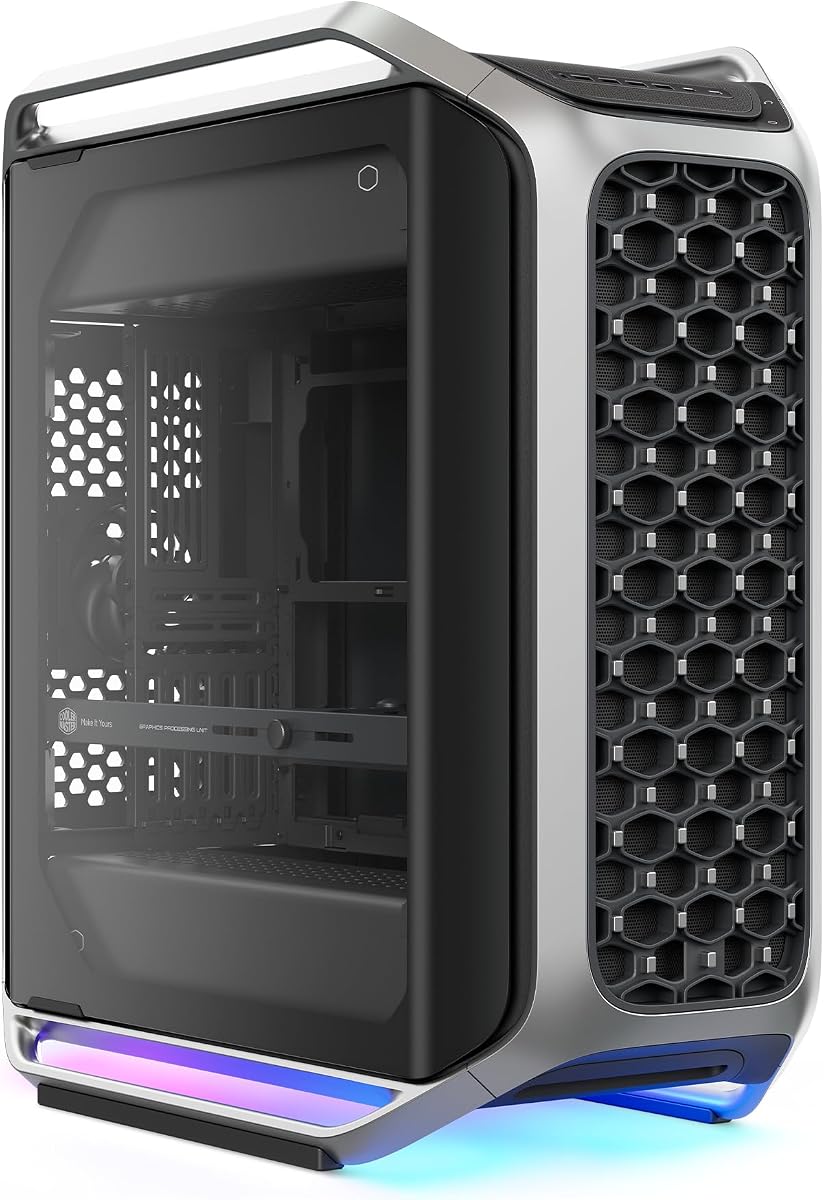
The Cooler Master Cosmos Alpha is a full tower with a curved aluminum frame, full tempered glass panels, integrated ARGB lighting, and a 4.4 customer rating. Its standout feature is the FreeForm 2.0 layout, which allows major internal components to rotate left or right so builders can adapt the chassis to airflow, desk placement, and visual presentation.
We may earn a commission when you buy through this link, at no additional cost to you.
Hardware compatibility is unusually broad for a showcase enclosure. The case supports E-ATX and EEB motherboards, graphics cards up to 400mm, and power supplies up to 240mm with 53mm of rear cable clearance. A sliding modular motherboard tray adds another layer of flexibility by making it easier to switch between air and liquid cooling arrangements or to adjust graphics card position.
The modern front panel deserves particular attention because it includes four USB-A 5Gbps ports and two USB-C 20Gbps ports. That is a generous selection for a desktop system, particularly one intended to serve as a showcase or work station. Removable dust filters add practical maintenance value, although the enclosure's full-tower proportions will require sufficient desk or floor space.
This is an appropriate recommendation for builders who want extensive compatibility, flexible positioning, refined materials, and a high degree of visual presentation. It is less suited to anyone with a very small workspace or a strict preference for a straightforward fixed-layout interior, but for a large custom build, the adaptability gives the Cosmos Alpha a compelling advantage.
The rotatable FreeForm 2.0 design is more than a visual gimmick. It allows the builder to reorient components for better cooling, a more attractive side view, or a layout that works better in a particular workspace.
Four USB-A 5Gbps connections and two USB-C 20Gbps ports make the front panel unusually versatile for a full tower, reducing the need to reach around to rear ports for routine device connections.
We may earn a commission when you buy through this link, at no additional cost to you.
The B2Pro is a compact 17.8-liter aluminum micro-ATX case with a 5.0 customer rating. Its measured dimensions of 14.61 by 6.61 by 11.26 inches make it substantially smaller than a conventional tower, yet the specification list shows useful support for Micro-ATX and Mini-ITX motherboards, multiple power-supply formats, air cooling, and a 240mm integrated liquid cooler.
We may earn a commission when you buy through this link, at no additional cost to you.
The chassis uses a silver anodized finish and comparatively thick aluminum, including a 3.0mm frame, 2.0mm side panels, and 1.5mm components. Mesh side panels encourage heat dissipation, while the foot stand and handle help position and move the system on a desk. The integrated cooler also reduces the need to source a separate CPU cooling solution immediately.
There are limits to the compact format. ATX power supplies must fall within a 140 to 170mm length range, and the maximum graphics card is a three-slot unit measuring 340 by 142 by 78mm, including the rear panel. The CPU cooler allowance reaches 135mm for a high tower, while a pump must remain no taller than 70mm.
The B2Pro is a strong choice for a compact build where full aluminum construction, portability, and broad Mini-ITX-to-MATX flexibility matter more than space for the longest graphics card or power supply. It is especially compelling for a compact gaming or productivity system with carefully selected components.
A 17.8-liter capacity is achieved without using visibly thin metal, as the frame and panels use stated thicknesses of up to 3.0mm and 2.0mm. That combination gives the enclosure a more deliberate feel than a typical ultra-compact plastic or mixed-material case.
Support for an integrated 240mm liquid cooler gives new builders a simpler path to a complete system. Builders still need to confirm CPU socket support and fit before treating it as a universal replacement for every cooler.
We may earn a commission when you buy through this link, at no additional cost to you.
This open-air test bench is built for builders who want unrestricted airflow and complete visibility of the components. The listed material is aerospace magnesium aluminum alloy with an actual thickness of 8mm, and the treated surface is intended to reduce corrosion. Its 11.1 by 11.1 by 5.12-inch format is designed around a standard MATX motherboard.
We may earn a commission when you buy through this link, at no additional cost to you.
The open structure makes installation, inspection, and troubleshooting much easier than in a conventional enclosed chassis. The frame can support four hard drives or solid-state drives, standard ATX power supplies, and integrated water-cooling hardware with 120, 140, 240, 280, or 360mm drainage options. Metal support rods and anti-slip pads help stabilize the arrangement.
One important caveat is that the product ships as a frame rather than a finished, ready-to-install case. The seller must assemble it according to the instructions, and buyers should account for that extra work. The open construction also leaves components more exposed to dust and less protected from accidental contact than they would be behind panels.
The test bench is best suited to experimental builders, developers, modders, and anyone who values visibility and unrestricted cooling over a polished exterior. It can also serve as a temporary platform for a system that will later be moved into a conventional enclosure, provided the power supply and cooling hardware are suitable for open-frame use.
An open frame makes cables, tubing, and component placement easy to inspect. That visibility is particularly useful while planning airflow or when changing a liquid-cooling layout.
The stated 8mm magnesium aluminum alloy construction and corrosion-resistant surface treatment create a rigid platform designed for repeated installation and removal of components.
We may earn a commission when you buy through this link, at no additional cost to you.
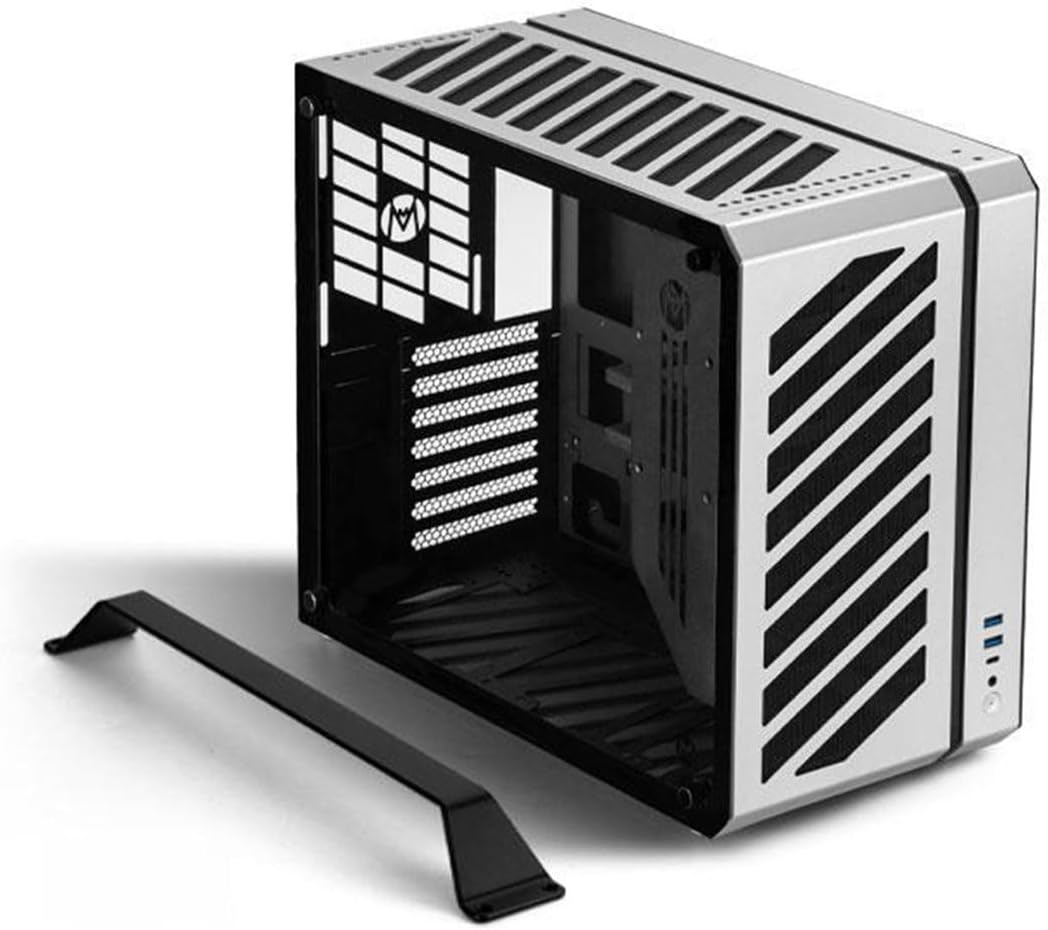
The Mechanic Master C34 is an ultra-compact ATX case with a 4.6 rating and a design centered on portability. It supports standard ATX motherboards, full-size ATX power supplies, and graphics cards up to 335mm, making it unusual among small-form-factor enclosures that often require miniature components.
We may earn a commission when you buy through this link, at no additional cost to you.
A built-in carry handle is a meaningful convenience for a system that may travel to LAN events, move between workstations, or simply need to be rearranged around the desk. Cooling is flexible, with support for a 240mm liquid radiator or an air cooler up to 162mm tall. The interior is also designed to reduce installation difficulty and cable-management complexity.
The recommendation for an SFX or SFX-L power supply is worth emphasizing. Although the case can accept a larger ATX-style unit, the compact layout is easier to manage with a smaller power supply, and the recommendation from the supplied specifications should guide parts selection. Buyers should also verify that their chosen graphics card and cooler fit within the stated dimensions.
The C34 is a good match for someone who wants a genuine ATX build in a relatively small enclosure and values the built-in handle. It is less appropriate for a system requiring extreme internal space or a builder committed to very large power supplies, but it offers a practical balance between component support and portability.
Support for standard ATX motherboards, full-size ATX power supplies, and long graphics cards separates the C34 from cases designed only around Mini-ITX or compact power supplies.
The integrated handle makes the system easier to carry to events or move between work areas. It adds convenience without requiring a separate bag for a basic system transport.
We may earn a commission when you buy through this link, at no additional cost to you.
The MasterFrame 500 Mesh is an open-frame aluminum ATX case built around flexibility and airflow. It receives a 4.2 rating and includes two pre-installed 200mm front intake fans, a useful starting configuration for builders who want substantial moving air without immediately sourcing every fan.
We may earn a commission when you buy through this link, at no additional cost to you.
The FreeForm 2.0 aluminum exo-structure allows flexible installation arrangements, while interchangeable panels offer some control over the final appearance. Motherboard support ranges from Mini-ITX to E-ATX, including boards up to 305 by 330mm, which gives the case broad applicability across compact, standard, and extended ATX systems.
Cooling capacity extends to as many as seven fans and radiators up to 360mm. The tradeoff is that an open frame inherently leaves components more exposed to dust than a fully enclosed case. The large 200mm fans also demand careful clearance planning, particularly when combining them with a long graphics card, a broad CPU cooler, or a front-mounted radiator.
This case is a strong recommendation for a visually open, performance-oriented build where airflow and the ability to see and modify the layout matter. It may be less suitable for a quiet office, a clean-room environment, or a system where the owner prefers all internal components fully enclosed.
Two pre-installed 200mm intake fans can move a large volume of air through the open structure, reducing the number of additional fans required for a basic high-airflow configuration.
Mini-ITX through E-ATX motherboard support makes the MasterFrame 500 adaptable to many generations of components. Its interchangeable panel approach also leaves room for personalizing the final presentation.
We may earn a commission when you buy through this link, at no additional cost to you.
The C34Pro is a compact gaming case designed to accept substantial components inside a 30.6-liter enclosure. Its 3.9 rating is the lowest among the products reviewed, but the specification list is focused on versatility: ATX and E-ATX motherboard support, 420mm graphics cards, 360mm radiators, 165mm tower coolers, and 220mm ATX power supplies.
We may earn a commission when you buy through this link, at no additional cost to you.
Construction combines a 2mm aluminum shell with a 1mm steel frame, while 18mm of cable-management space helps keep wiring behind the motherboard tray. Top, bottom, and front fan-mounting zones support a flexible cooling arrangement, and dust filters help reduce the debris that would otherwise collect in a compact system.
Power supply mounting can be configured at the front, bottom, or side, allowing builders to organize the interior around different component combinations. A magnetic screwdriver kit and the included carry handle are useful additions for repeated installation and transport. These flexible options also introduce more planning than a simple fixed-layout chassis would require.
The C34Pro is most appropriate for a portable gaming build that must accommodate a long graphics card and serious cooling hardware. Buyers should compare its compact dimensions against their desired aesthetic, confirm power-supply fit, and account for the lower customer rating when evaluating the overall value proposition.
The 420mm graphics card allowance makes the C34Pro unusually capable for a compact gaming chassis. It offers room for large modern cards without moving to a full-size tower.
Front, bottom, and side mounting positions let the builder align the power supply with the available space. This is particularly helpful in a dense layout where rigid placement could create unnecessary cable-routing problems.
We may earn a commission when you buy through this link, at no additional cost to you.
The Fractal Design Define 7 XL is a premium full tower that pairs a brushed aluminum exterior with a steel chassis. It carries a 4.6 rating and is built for expansive builds, supporting motherboards up to E-ATX and SSI-EEB, large custom water loops, and storage configurations far beyond what a typical gaming tower needs.
We may earn a commission when you buy through this link, at no additional cost to you.
The default storage layout can hold up to 18 hard drives and five solid-state drives. Converting to the open layout creates additional room for large reservoirs and radiators up to 480mm. Versatile multi-brackets can turn otherwise unused fan positions into hard-drive, SSD, or pump mounts, making it possible to adapt the interior as the build evolves.
Its refined front door uses reversible dual-handed hinges and magnetic latching, combining a clean appearance with convenient access. The trade-off is the size and complexity of a full tower. It can consume substantial desk or floor space, and buyers who need only a single graphics card, a modest cooler, and a couple of drives may gain little from the additional volume.
The Define 7 XL is ideal for serious enthusiasts, workstation builders, creators, and custom-loop owners who want a refined enclosure with exceptional expansion potential. It is a premium recommendation because the combination of storage flexibility, motherboard support, and 480mm cooling capability goes well beyond ordinary mid-tower requirements.
The default configuration supports extensive conventional storage, while the open layout provides additional room for reservoirs and large radiators. That gives builders a practical way to support different project priorities.
Brushed aluminum creates a refined exterior, while the reversible magnetic front door makes routine access easier without requiring a separate handle or tool for every opening.
We may earn a commission when you buy through this link, at no additional cost to you.
The Lian Li V100-ATX is a mid-tower that combines strong hardware compatibility with an unusually complete set of pre-installed lighting features. Its 4.8 customer rating is the highest in this group. Four PWM-controlled 120mm ARGB fans come fitted, and an integrated 26-LED ARGB strip adds another synchronized lighting element.
We may earn a commission when you buy through this link, at no additional cost to you.
The motherboard support covers ATX, Micro-ATX, Mini-ITX, and back-connect ATX or Micro-ATX boards, allowing a cleaner front-side cable appearance with compatible back-connect models. Both side panels use a tool-less mounting mechanism, so routine access does not require removing fasteners. A 26-LED strip can synchronize with motherboard software for coordinated effects.
The enclosure accommodates graphics cards up to 420mm, CPU coolers up to 178mm, and top radiators up to 360mm. Its included fans run up to 1800 RPM and use hydraulic bearings. This makes it a capable general-purpose platform, although the strong emphasis on RGB means it may not fit a strictly minimalist or business-only aesthetic.
For buyers who want a polished mid-tower with cooling and lighting already arranged, the V100-ATX offers an efficient path to a complete-looking build. It is a particularly attractive recommendation for general gaming and productivity systems, provided the visual language of ARGB lighting is welcome.
Four pre-installed PWM-controlled ARGB fans reduce the need to select and install a basic fan set. The integrated LED strip adds a coordinated appearance that can be synchronized through compatible motherboard software.
Support for a 420mm graphics card, a 178mm CPU cooler, and a 360mm top radiator gives the V100-ATX room for a broad range of standard performance components.
We may earn a commission when you buy through this link, at no additional cost to you.
The LIAN LI O11D EVO RGB is a panoramic E-ATX case designed to make the internal hardware the center of attention. Its 4.7 rating reflects the appeal of a near-uninterrupted view created by dual tempered glass panels and the option to remove the front support pillar without compromising the stated structural integrity.
We may earn a commission when you buy through this link, at no additional cost to you.
The expanded main compartment accommodates graphics cards with up to 455.7mm of clearance and provides seven expansion slots. Two 1.5mm L-shaped RGB strips sit at the top and bottom of the glass panels, creating defined lighting accents without requiring lighting strips to be installed separately.
Builders can choose between two motherboard installation heights, which changes the relationship between the graphics card, CPU cooler, and fans. Cable management is supported by Velcro straps and dual-layered clips, while the power supply bracket extends 15mm beyond the chassis to provide extra room for wiring. The wide format does require more desk space, and both glass surfaces will need regular cleaning.
The O11D EVO RGB is a strong recommendation for display-oriented builds where the appearance of the components matters. It is especially suitable for a long graphics card, an elaborate custom loop, or a system intended to be visible through a side panel, while remaining less suitable for users with very limited desk space.
Removing the front support pillar creates a broad, uninterrupted view through the chassis. That makes the case well suited to systems with visually coordinated components and carefully arranged cables.
Two motherboard heights allow the cooling arrangement to change, while Velcro straps, dual-layer clips, and the extended power supply bracket help keep wiring organized.
We may earn a commission when you buy through this link, at no additional cost to you.
The JOYJOM Mini ITX Case is the most compact enclosure in the guide, with a stated capacity of only 4.3 liters. Its aluminum alloy body and included PCIe 3.0 riser make it possible to use a standard Mini-ITX motherboard in a desktop footprint that is dramatically smaller than a conventional tower.
We may earn a commission when you buy through this link, at no additional cost to you.
Compatibility is precise and narrow. The case supports a 17 by 17cm Mini-ITX motherboard, an 18.5cm PCIe 3.0 riser cable, a 15 by 4 by 8cm FLEX-Small 1U power supply, a graphics card up to 17 by 10 by 4cm, up to two 2.5-inch SSDs with a thickness below 9mm, and a CPU cooler under 36mm.
These limitations mean the case is not a general-purpose small form factor option. A standard tower graphics card, conventional power supply, or normal-height air cooler will not fit. The package contains one case, one riser, and some screws, so a complete system still requires compatible components and the appropriate tools.
The JOYJOM case is best for a highly constrained workspace or a portable Mini-ITX system built around a low-profile graphics card and compact power supply. It earns its place as the specialist option in the comparison, but only makes sense when every major component is selected around the enclosure's exact limits.
At 4.3 liters, the case dramatically reduces the volume required for a complete computer. Its dimensions make it suitable for desks where a conventional tower would be impractical.
The included PCIe 3.0 riser allows the graphics card to connect even when its orientation differs from the motherboard layout. Builders still need to verify that their selected card and riser configuration produce the required clearances.
We may earn a commission when you buy through this link, at no additional cost to you.
Choosing an aluminum PC case means balancing chassis size, component limits, cooling strategy, connectivity, and convenience. Start with the hardware you already own or intend to purchase, then choose a layout that supports it without compromising airflow or access.
Motherboard support is the first constraint because it determines the case category and the position of nearly every other component. Full towers such as the Cosmos Alpha and Define 7 XL support E-ATX and even SSI-EEB, while the MasterFrame 500 covers Mini-ITX through E-ATX. The B2Pro focuses on MATX and Mini-ITX, the open-frame model is built around MATX, and the JOYJOM enclosure supports only standard Mini-ITX. The Mechanic Master models offer a compromise by fitting conventional ATX boards inside relatively compact formats. Back-connect motherboard support is especially useful in the Lian Li V100-ATX because it can simplify the visible cable arrangement.
Choose a case that supports your exact board and offers room around it. Do not assume a case labeled ATX will also support every E-ATX board, and verify the stated motherboard dimensions when clearance is not explicitly published.
Long graphics cards can determine whether a case works even when the motherboard fits. The JOYJOM case accepts an exceptionally small card, while the Lian Li models provide 420mm and 455.7mm limits, and the Cosmos Alpha supports up to 400mm. The C34 allows 335mm, the B2Pro lists a 340 by 142 by 78mm maximum, and the open frame provides more exposed positioning options. Clearance also involves power connectors, cable bends, sag support, and adjacent fans or radiators, so a case with only a few millimeters of headroom may prove inconvenient.
Measure the specific graphics card and consider connector and cable clearance rather than relying on the headline length alone. More headroom gives the builder flexibility to change components later.
Aluminum can aid heat transfer, but the enclosure's ventilation still governs how effectively warm air leaves and cool air enters. Open-frame models provide almost unrestricted airflow, while enclosed cases rely on intake and exhaust positions, dust filters, and fan placement. The MasterFrame 500 includes two 200mm intakes, the V100-ATX includes four 120mm ARGB fans, and the B2Pro supports an integrated 240mm liquid cooler. The Cosmos Alpha and C34Pro emphasize configurable layouts and multi-zone mounting, while the Define 7 XL can support a custom loop with radiators up to 480mm.
Match the ventilation design to the cooling hardware and intended workload. More open construction improves airflow but exposes components to dust, whereas a fully enclosed design looks tidier and may better suit a quiet office.
CPU cooling limits are easy to overlook because a motherboard fit does not guarantee that the cooler will clear the side panel, drive cages, or radiator. The B2Pro allows a 135mm high-tower cooler and a 70mm pump, the C34 supports a 162mm air cooler, and the V100-ATX accepts up to 178mm. The C34Pro reaches 165mm, the Define 7 XL accommodates a 360mm radiator in its standard layout and up to 480mm in the open layout, and the MasterFrame 500 supports radiators up to 360mm. At the extreme compact end, the JOYJOM case accepts only a CPU cooler under 36mm.
Check the exact cooler height, radiator length, pump dimensions, and mounting orientation. This prevents the frustrating situation in which every major component is compatible individually but the cooling assembly cannot fit together.
Power supply selection affects both chassis compatibility and cable management. The Cosmos Alpha supports power supplies up to 240mm and provides 53mm of rear cable clearance. The B2Pro accepts ATX units from 140 to 170mm, SFX, and SFX-L, while also recommending an SFX or SFX-L unit for cleaner routing. The C34 supports full-size ATX power supplies, the C34Pro accepts 220mm ATX units and provides several mounting positions, and the JOYJOM case requires a very specific FLEX-Small 1U unit. The Define 7 XL and O11D EVO RGB provide structural space and dedicated cable-management provisions.
Prefer the smaller standard when it meets your power needs, because a compact unit can leave more room for cable bends and drives. For a full tower, prioritize adequate clearance behind the tray and comfortable access to modular connectors.
Case size should be judged by more than the product name. The JOYJOM is a 4.3-liter Mini-ITX solution, the B2Pro has a 17.8-liter capacity, and the C34Pro measures 429 by 205 by 349mm with 30.6 liters of capacity. Mid-towers occupy a familiar middle ground, while the Cosmos Alpha, Define 7 XL, and other full towers require considerably more room. Compact formats may also constrain the builder's working area during installation, especially if the power supply, drive cages, or radiator mounts must be removed.
Measure the available desk, shelf, or floor space before ordering, including room for the handle, front ports, side-panel access, and airflow clearance. A case that fits only in theory may be difficult to use in practice.
Front connections determine how conveniently you attach everyday accessories. The Cosmos Alpha includes four USB-A 5Gbps ports and two USB-C 20Gbps ports, while the Mechanic Master C34 provides a metal front I/O panel with USB 3.0 and USB Type-C. The V100-ATX focuses on tool-less access and lighting rather than a detailed port count. Consider the number and type of devices you connect regularly, and note that port presence does not guarantee support for every display, charging standard, or data feature.
Match the front panel to your daily workflow. A frequent user of external storage, phones, headsets, cameras, or external drives benefits from multiple high-speed USB ports, while the physical placement of those ports matters on a crowded desk.
Metal thickness, panel access, dust filtration, and mounting hardware influence how pleasant the case is to build and maintain. The B2Pro uses a 3.0mm frame with 2.0mm side panels, the open-frame model uses 8mm magnesium aluminum alloy, and the C34Pro combines a 2mm aluminum shell with a 1mm steel frame. The V100-ATX and O11D EVO RGB use tool-less side-panel mechanisms, while several full-tower designs offer removable dust filters. A magnetic screwdriver kit in the C34Pro can also reduce assembly friction. Glass, mesh, and open panels each demand different cleaning routines.
Prioritize repeatable access and removable filters if you expect to upgrade components often. A case that looks attractive but is awkward to open can become frustrating long before its cooling or storage capacity is exhausted.
Before installing components, lay the case on a protected surface, remove the panels, and identify every required mounting point against the motherboard, power supply, drives, fans, and radiator. Install the power supply and storage devices first when the layout requires them, then mount the motherboard, processor cooler, graphics card, and finally the front panel wiring. Follow the case manual and keep screws organized by their original mounting area.
Confirm that every fan spins freely, all cables route through their intended channels, and no component sits against a panel or filter. Connect the front-panel switches and USB headers to the correct motherboard headers, and verify that the motherboard's selected power configuration matches the installed processor and memory. After the first startup, check temperatures and airflow direction, then revisit any loose cables or vibration-prone components.
For routine care, power down and disconnect the system before opening the chassis. Dust removable filters on a schedule based on the environment, clean mesh and fans with controlled airflow, and wipe tempered glass or brushed aluminum with a soft microfiber cloth that will not scratch the finish. Avoid blocking ventilation openings and allow adequate clearance around the case. Before cleaning, consult the manufacturer's guidance for surfaces that should not be treated with liquid cleaners.
Aluminum transfers heat effectively and gives many chassis a refined, rigid appearance, but case material alone does not determine system temperature. Ventilation, fan placement, radiator size, dust filters, component density, and the hardware itself usually have a greater effect. Compare the airflow design and cooling support of each case rather than choosing on material alone.
Mini-ITX offers the smallest footprint, while Micro-ATX provides more expansion at a moderate size. The B2Pro supports MATX and Mini-ITX, while the JOYJOM case is restricted to Mini-ITX with very specific component dimensions. If you need a full-size board, consider the C34 or C34Pro, which accommodate ATX and E-ATX hardware in compact chassis.
No. The MasterFrame 500 includes two 200mm fans, the V100-ATX includes four 120mm ARGB fans, and the B2Pro supports an integrated 240mm liquid cooler. Other cases may provide fan mounts without supplying the fans. Check the included components and cooling specifications before budgeting for additional fans, radiators, or pumps.
The Define 7 XL provides the strongest custom-loop potential because its open layout supports large reservoirs and radiators up to 480mm. The Cosmos Alpha, C34Pro, MasterFrame 500, and O11D EVO RGB also offer strong liquid-cooling flexibility, with radiator support ranging up to 360mm in the supplied specifications. Confirm pump, tubing, and reservoir dimensions before ordering.
They can be, especially when quick access, visual presentation, and unrestricted airflow are priorities. However, open frames collect dust more readily and provide less physical protection than enclosed cases. The Open Air Frame Test Bench is also shipped as a frame that requires assembly, making it more of a specialist platform than a conventional plug-and-play enclosure.
Capacity varies dramatically by design. The Define 7 XL supports up to 18 hard drives and five SSDs in its default layout, the Open Air Frame Test Bench supports four drives, and the JOYJOM case supports two slim 2.5-inch SSDs. Check both the number of mounts and the thickness, connector, and cable requirements of the drives you intend to install.
Tempered glass can often be cleaned with a suitable glass product, but the surrounding materials may not tolerate the same treatment. Brushed aluminum, powder-coated steel, plastic trim, and fabric filters can react differently, so it is safer to use a dry microfiber cloth or follow the manufacturer's cleaning instructions for the complete case.
Check the dimensions of the graphics card, power supply, CPU cooler, motherboard, radiator, drives, and any power cables that must bend. Compact cases can list broad support for a component category while still imposing strict length or height limits. The JOYJOM case is the clearest example, requiring a particular compact power supply, a very small graphics card, and a CPU cooler under 36mm.
The Cooler Master Cosmos Alpha stands out for flexible full-tower construction, rotatable components, excellent motherboard and graphics card support, and modern front connectivity. The Lian Li V100-ATX offers the most rounded general-purpose package with four ARGB fans, generous clearance, and a strong customer rating, while the Fractal Design Define 7 XL is the premium choice for extensive storage and large custom water loops.
For compact systems, the B2Pro balances a small footprint with substantial aluminum and included cooling, whereas the Mechanic Master C34 and C34Pro support full-size ATX hardware in relatively constrained enclosures. The JOYJOM case is the specialist ultra-compact option, and the open-frame products prioritize visibility, serviceability, and unrestricted airflow over enclosure and dust protection.
Before ordering, verify the exact dimensions of every large component, check the current listing details, and compare the case's included fans and cooling hardware. Prices and availability can change, so the final purchase should reflect both your hardware needs and the most current product information.