
UGREEN 40Gbps M.2 NVMe Enclosure
4.3Editor score
Up to 3600 MB/s
USB4 and Thunderbolt support
Fan-free double-sided cooling
Eight-terabyte SSD support
This Thunderbolt 5 SSD Enclosure guide compares speed, cooling, power delivery, capacity support, portability, and host compatibility across ten leading
A Thunderbolt 5 SSD enclosure turns an internal M.2 NVMe drive into a dramatically faster external storage device. The strongest models combine an 80Gbps host interface, PCIe 5.0 support, effective thermal management, broad device compatibility, and a enclosure that remains practical for work, gaming, backups, and media production.
The products in this guide were compared using their stated specifications, ratings, controller platforms, maximum transfer rates, cooling systems, supported SSD formats, host connections, power features, and included accessories. The list covers dedicated 80Gbps enclosures, a USB4 alternative, a dock with built-in storage, and options that prioritize portability or laptop charging.
Each review explains where a particular enclosure stands out and where its requirements may limit certain users. Thunderbolt 5 speed depends on compatible ports and cables, while the installed SSD and host device can reduce observed throughput. Product listings and prices change frequently, so readers should verify current details before purchasing.
4.3Editor score

4.6Editor score

4.0Editor score
The following comparison highlights the stated interface speed, controller generation, cooling approach, and practical considerations of all ten enclosures, from compact dedicated units to a full-featured desktop dock.




The ACASIS 80Gbps M.2 NVMe SSD Enclosure receives a 4.3 rating and combines a current Thunderbolt 5 interface with a practical cooling system. Its JHL9480 controller supports PCIe 5.0 SSDs, while the stated read and write speed reaches 6000 MB/s. The result is a well-rounded enclosure for fast working drives, large project libraries, and high-capacity external storage.
We may earn a commission when you buy through this link, at no additional cost to you.
Its strongest feature is the intelligent fan, which starts automatically at 55°C and stops at 40°C. Users can also press and hold the switch for one second to force the fan on, then turn it off to restore automatic operation. This flexibility is useful when moving multi-gigabyte files or running sustained workloads that produce more heat than a short benchmark.
There are important limits to understand. Full 80Gbps operation requires USB4 V2.0 or a compatible Thunderbolt 5 connection, and the product is not compatible with Thunderbolt 3. ACASIS also recommends avoiding prolonged, continuous transfers of large files and keeping the enclosure ventilated when maximum stability is the priority.
This is an excellent choice for content creators and professionals who want a dedicated Thunderbolt 5 storage device without paying for a full docking station. The included 80Gbps cable, thermal pads, size adapter, silicone stoppers, and manual make the package more complete than many competing enclosures.
Automatic temperature thresholds provide convenient everyday cooling, while manual activation gives users additional control during demanding transfers. The enclosure should still be kept in an open, ventilated position.
The tool-free design removes the need for a screwdriver, and the supplied thermal pads, size adapter, stoppers, and 80Gbps cable cover the essential installation steps.
We may earn a commission when you buy through this link, at no additional cost to you.
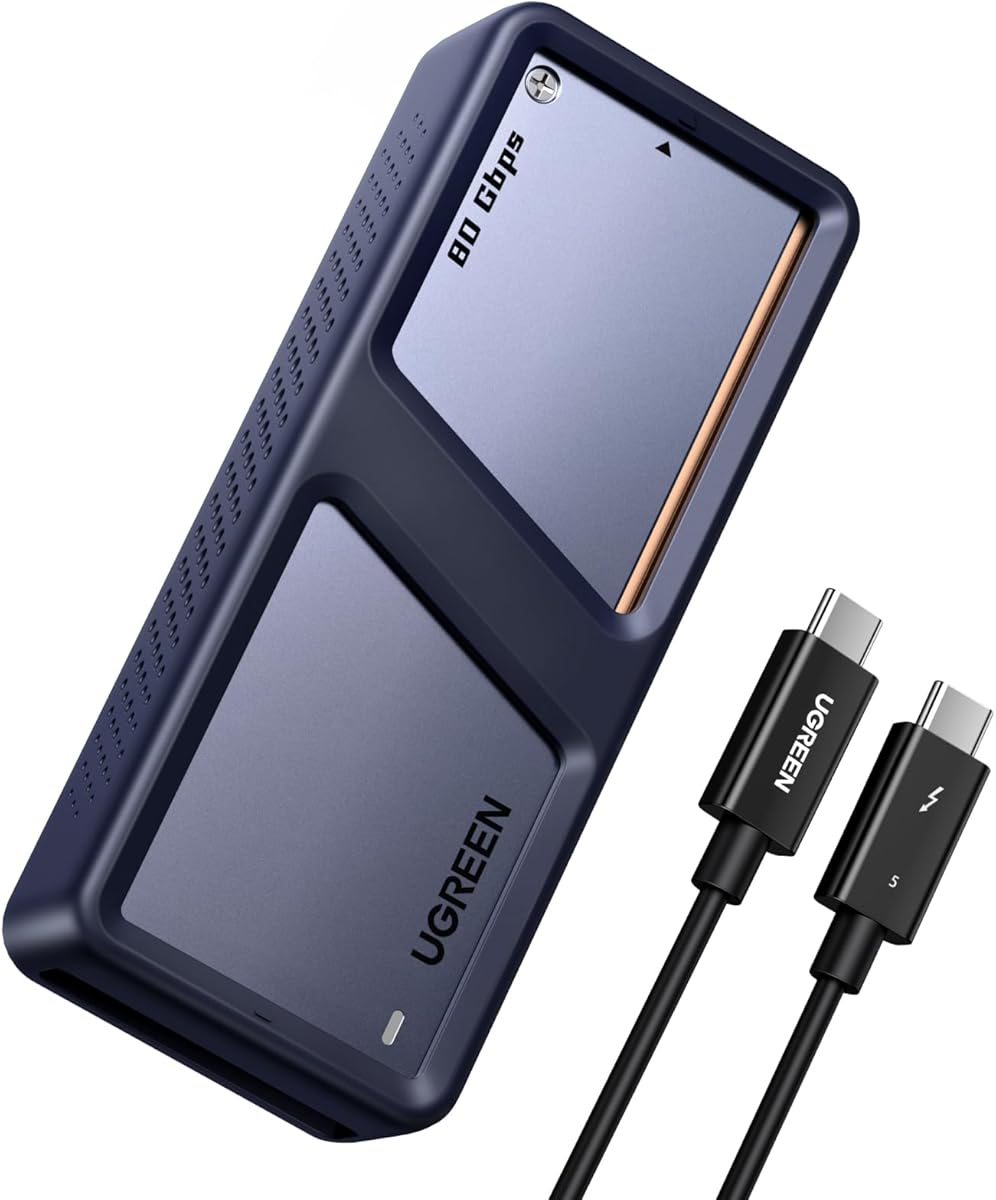
The UGREEN 80Gbps M.2 NVMe SSD Enclosure holds a 4.6 rating and stands out for its dual-chip design. An Intel JHL9480 Thunderbolt controller works alongside a JMicron JMS583 bridge controller, and UGREEN claims transfer speeds of up to 7000 MB/s. It is among the most performance-oriented dedicated enclosures in this guide.
We may earn a commission when you buy through this link, at no additional cost to you.
Cooling receives equal attention. Dual-sided aluminum alloy fins use a biomimetic structure to increase stated heat dissipation by 91%, while the internal spatial design is intended to reduce surface temperatures by 10%. The enclosure accepts 2230, 2242, 2260, and 2280 M.2 NVMe SSDs, giving it flexibility across compact and standard drive formats.
The trade-offs concern compatibility rather than core speed. SATA NGFF and mSATA SSDs are unsupported, and drives with pre-installed heatsinks may not fit. SSDs up to 8TB are supported, but some thicker drives can require a thinner thermal pad. The SSD itself is not included.
Buyers who want the highest stated performance and appreciate a sophisticated cooling structure should give this UGREEN strong consideration. It is particularly attractive for video editors, developers, and power users with a recent Thunderbolt 5 or USB4 V2.0 computer.
Pairing the JHL9480 and JMS583 chips is the defining technical feature. UGREEN positions the architecture as a route to faster, more stable transfers while remaining compact enough for travel.
The fin arrangement and internal airflow design target sustained performance rather than only short bursts. Users should still confirm that their chosen SSD fits without an oversized or pre-installed heatsink.
We may earn a commission when you buy through this link, at no additional cost to you.
The ACASIS TB501 Max is the strongest premium choice for users who want one Thunderbolt 5 connection to handle both storage expansion and laptop charging. It has a 4.7 rating, supports up to 60W power delivery, and reaches stated speeds of 6000 MB/s with a compatible PCIe 5.0 SSD.
We may earn a commission when you buy through this link, at no additional cost to you.
The JHL9480-based enclosure supports PCIe 5.0 drives and current Thunderbolt 5 and USB4 V2.0 devices. It also offers backward compatibility with 40Gbps, USB4 V1.0, and USB 3.2, 3.1, and 3.0 connections, though Thunderbolt 3 remains unsupported. The smart fan adjusts to SSD temperature without requiring manual intervention.
Its premium feature introduces a dependency: the host must support appropriate USB-C Power Delivery for laptop charging. A compatible port alone does not guarantee that the system will negotiate 60W. Sustained workloads can still generate heat, making ventilation and responsible file-transfer practices important.
This enclosure is best for mobile workstations, compact desks, and Thunderbolt 5 laptop users who want to reduce cable clutter. The bundled 80Gbps cable, thermal pads, size adapter, silicone stoppers, and manual make it a polished all-in-one storage solution.
The 60W PD function can power a compatible laptop while external storage remains active. This makes the enclosure especially useful with workstation laptops that rely on a single high-bandwidth port.
The enclosure combines a JHL9480 controller, PCIe 5.0 support, and an intelligent fan. It prioritizes straightforward operation over manual thermal intervention.
We may earn a commission when you buy through this link, at no additional cost to you.
This upgraded ACASIS enclosure shares a strong core specification with the brand's other 80Gbps model: a JHL9480 controller, PCIe 5.0 SSD support, and stated transfer speeds up to 6000 MB/s. Its 4.3 rating reflects a capable package designed for users with recent high-speed computers.
We may earn a commission when you buy through this link, at no additional cost to you.
The smart fan automatically activates at 55°C and stops at 40°C. Manual mode can be engaged by holding the switch for one second, which is helpful during predictable heavy-transfer sessions. The enclosure also includes an 80Gbps cable, two silicone stoppers, a size adapter, thermal pads, and a user manual.
Compared with the TB501 Max, it does not provide 60W laptop charging, so buyers who value a single-cable mobile workstation setup should favor that model. This enclosure also does not work with Thunderbolt 3, and ACASIS advises keeping it ventilated while avoiding extremely long uninterrupted transfers.
It is a sensible choice for creators and gamers who want manual fan control, current-generation interface support, and a generous accessory bundle without needing a full docking station. It is best used with a USB4 V2.0 or Thunderbolt 5 host and a suitably capable SSD.
The automatic cycle handles normal operation, while the one-second switch press gives users a way to keep cooling active during intensive transfers.
Thunderbolt 5 and USB4 V2.0 support unlock the enclosure's intended bandwidth. Older USB connections remain usable, although their lower link speeds will limit performance.
We may earn a commission when you buy through this link, at no additional cost to you.
The UGREEN 80Gbps M.2 NVMe SSD Enclosure with Cooling Fan is built around the JHL9480 controller and a stated theoretical transfer rate of up to 7000 MB/s. Its 4.0 rating makes it a strong option for users who want a portable 80Gbps enclosure with active cooling.
We may earn a commission when you buy through this link, at no additional cost to you.
The aluminum body is intended to move heat away from the drive, while the built-in fan activates when the internal temperature reaches 40°C. That early threshold is notable for sustained workloads, because cooling begins before the enclosure reaches the levels used by some competing models.
Drive support needs careful attention. The listing specifies 2280 PCIe 5.0 M.2 NVMe drives with M-Key or combined M-and-B keying, while SATA NGFF and certain B-key configurations are excluded. Thunderbolt 3 use carries a macOS 15-or-higher condition, and full 80Gbps still requires a Thunderbolt 5 port and cable.
This enclosure suits travelers and performance-minded users who can confirm their SSD's keying and host platform. The included silicone case adds protection, while support for up to 8TB makes it useful for large game libraries, working media, and portable backups.
A fan activation point of 40°C helps keep the enclosure cooler during extended activity. The aluminum shell supplements the fan by providing a second path for heat dissipation.
The listed compatibility emphasizes M-Key and combined M-and-B-key PCIe NVMe drives. Buyers with SATA or unusual B-key-only SSDs should confirm fit and protocol support before purchase.
We may earn a commission when you buy through this link, at no additional cost to you.
The UGREEN 40Gbps M.2 NVMe Enclosure is a value-oriented alternative for users whose computers support USB4 or Thunderbolt 4 rather than Thunderbolt 5. It carries a 4.3 rating and uses the ASM2464PD controller to reach a stated maximum of 3600 MB/s.
We may earn a commission when you buy through this link, at no additional cost to you.
Its thermal approach uses double-sided fins and a three-dimensional cooling system without a fan. That makes it appealing to users who prefer a silent enclosure and do not want fan noise or a moving component. It accepts 2230, 2242, 2260, and 2280 M.2 NVMe drives and supports capacities up to 8TB.
The main limitation is bandwidth. At 40Gbps, it cannot match the transfer ceiling of a full 80Gbps Thunderbolt 5 enclosure, even when both use fast SSDs. Some thicker drives may not fit properly, and UGREEN notes that replacing the thermal pad with a thinner one can resolve fit issues. SATA NGFF and mSATA drives are unsupported.
This is a compelling pick for photographers, editors, and backup users who want fast external storage without requiring the newest host interface. Achieving the stated maximum requires Thunderbolt 4 hardware and cable, while the SSD is sold separately.
The double-sided fin structure removes the need for a fan. This can be preferable in quiet offices and on desks where continuous fan noise would be distracting.
A stated 3600 MB/s ceiling is well suited to large media transfers, project scratch storage, and backups. It remains a 40Gbps device, so Thunderbolt 5 users should consider whether they need the higher link.
We may earn a commission when you buy through this link, at no additional cost to you.
The Satechi Thunderbolt 5 CubeDock is a desktop docking solution with a built-in M.2 NVMe enclosure. Its 4.0 rating reflects a feature set aimed at users who want high-speed storage, charging, displays, networking, and card access in one compact aluminum unit.
We may earn a commission when you buy through this link, at no additional cost to you.
The built-in storage slot accepts a PCIe 4×4 M.2 NVMe SSD up to 8TB and supports speeds up to 6000 MB/s. An adaptive cooling system and vented aluminum design help manage heat, with stated fan noise of 20–40 dB(A) during demanding use. The SSD itself is not included.
Dock connectivity extends well beyond storage. Satechi lists up to 120Gbps aggregate bandwidth, 140W host charging, 30W USB-C Power Delivery, UHS-II SD and microSD readers, USB-C and USB-A ports, and 2.5Gb Ethernet. Display configurations include single 8K at 144Hz, dual 8K at 120Hz, and triple 8K at 60Hz on Windows.
This is the premium option for a Thunderbolt 5 workstation that would otherwise need several separate accessories. It is less appropriate for users seeking only a simple, highly portable enclosure, but it delivers considerable value when displays, charging, and storage are all needed at one desk.
Thunderbolt 5 connectivity ties together storage, displays, charging, network access, and card readers. The included cable and power supply support a clean single-cable workstation arrangement.
The integrated NVMe slot provides up to 6000 MB/s performance and 8TB capacity. Adaptive cooling and a vented shell help maintain stability during renders, backups, and other sustained jobs.
We may earn a commission when you buy through this link, at no additional cost to you.
The SABRENT USB4 NVMe SSD Enclosure offers a balanced combination of portability, active cooling, and tool-free installation. It has a 4.5 rating and reaches a stated 3900 MB/s over USB4, with lower performance of up to 2700 MB/s when connected through Thunderbolt 3 or 4.
We may earn a commission when you buy through this link, at no additional cost to you.
Users can install 2230, 2242, 2260, or 2280 PCIe NVMe SSDs without tools. The enclosure works with Thunderbolt 3, Thunderbolt 4, USB4, and USB-C ports on Windows and macOS, while backward compatibility covers USB-C links rated at 20, 10, and 5Gbps. It draws bus power and does not require external power or additional drivers.
Aluminum and ABS construction gives the enclosure a mixed-material design, and an integrated active fan helps maintain speed during large transfers. The important caveat is that this is a USB4 enclosure rather than a full Thunderbolt 5 product, so an 80Gbps host will not unlock a higher transfer rate. SATA M.2 SSDs are not supported.
This is a strong choice for creators, editors, and mobile professionals who already use USB4 hosts. It is particularly convenient for travel because installation is quick, the unit is compact, and no separate power supply is needed.
The enclosure is designed for fast physical installation and removal of compatible NVMe SSDs. That convenience is useful when moving between a desktop workstation and a mobile setup.
The built-in fan supports stable performance during large transfers. The enclosure still uses USB4 bandwidth, making host interface compatibility the key purchasing consideration.
We may earn a commission when you buy through this link, at no additional cost to you.
The OWC Express 1M2 80G is a portable USB4 enclosure with an 80Gb/s interface and more than 6000 MB/s of stated real-world speed. Its 4.5 rating places it among the strongest options for users who need modern bandwidth without the complexity of a desktop dock.
We may earn a commission when you buy through this link, at no additional cost to you.
OWC emphasizes broad compatibility with Macs, PCs, iPad Pros, Chromebooks, and Surface devices. The enclosure is bus-powered through the included USB4 cable, and its patented heat-dissipating design protects the drive while keeping it cool without advertising an active fan.
The enclosure supports PCIe 3.0, 4.0, and 5.0 M.2 NVMe SSDs in 2242 and 2280 formats. Users can choose a DIY build-your-own approach or a ready-to-run solution, making future upgrades straightforward. OWC recommends a Gen 5 SSD that consumes no more than 11 watts during sustained operations because host, dock, and hub power limits vary.
This model is well suited to mobile creative work, fast scratch storage, and cross-device use. Buyers should pay attention to their host's bus-power capability when selecting a power-hungry Gen 5 drive, but the passive design may be especially attractive in quiet environments.
Bus power and the included USB4 cable simplify mobile deployments. The enclosure can be carried between computers without a separate power brick or adapter.
Not every high-speed Gen 5 SSD operates equally well under bus power. OWC recommends drives that remain at or below 11 watts during sustained reads or writes.
We may earn a commission when you buy through this link, at no additional cost to you.
This 80Gbps M.2 NVMe SSD Enclosure combines an all-metal body, a JHL9480 controller, and a stated theoretical transfer rate of up to 7039 MB/s. Its 3.6 rating is the lowest in the group, but the specification sheet reveals a potentially capable option for buyers who value headline speed and cooling.
We may earn a commission when you buy through this link, at no additional cost to you.
The cooling system combines an aluminum alloy shell, thermal pads, and an automatic fan that activates at 40°C. Installation is tool-free, although the description also mentions securing the SSD with an included screw. It supports 2280 M-Key SSDs up to 8TB and works with Thunderbolt 5, 4, and 3 as well as USB4 devices.
Compatibility is narrower than several rivals. It cannot fall back to USB 3.2, 3.1, or 3.0, and the listing recommends a PCIe 4.0 x4 NVMe 1.4 SSD for speeds above 3000 MB/s. PCIe 5.0 SSDs are not recommended, despite the enclosure's ability to work with them at lower link rates.
This product makes most sense for buyers with a modern Thunderbolt or USB4 host, a 2280 drive, and a willingness to validate less-detailed compatibility information. It is best viewed as a high-specification alternative rather than the most broadly compatible enclosure in the guide.
The metal body and thermal pads provide a strong foundation for heat removal, while the automatic fan activates at 40°C. Ventilation remains important during extended transfers.
This enclosure offers no USB 3.x fallback and supports only 2280 M-Key drives. Compatibility with older or slower host connections is therefore much more limited than the headline 80Gbps suggests.
We may earn a commission when you buy through this link, at no additional cost to you.
The right enclosure depends on more than a headline transfer rate. Host compatibility, SSD support, cooling, power delivery, physical design, and intended workload should all shape the decision.
Thunderbolt 5 and USB4 V2.0 are the principal routes to an 80Gbps connection. The host computer must expose a compatible port, and the cable must also support the required protocol and bandwidth. Even with both in place, the operating system, device, and display configuration can influence available performance.
Choose a compatible 80Gbps port and certified cable before considering a Thunderbolt 5 enclosure. If the computer only offers USB4 or Thunderbolt 4, a 40Gbps model may deliver a more practical experience than paying for unused headline bandwidth.
Enclosures in this guide advertise transfer rates from 3600 MB/s to more than 7000 MB/s, but those figures are maximum or theoretical claims under favorable conditions. The installed SSD's generation, sustained write performance, available host bandwidth, thermal state, and file size all influence the result.
Prioritize stable sustained throughput rather than a single peak number. PCIe 4.0 x4 NVMe 1.4 drives or newer are generally required to exceed 3000 MB/s in the relevant ACASIS models, and a PCIe 5.0 SSD adds further potential.
Most modern enclosures accept M.2 NVMe drives, but they do not all support SATA M.2, mSATA, every keying arrangement, or every physical length. Supported capacities range as high as 8TB in the listed products. Some drives with thick heat spreaders or pre-installed heatsinks may require modification or a thinner thermal pad.
Check the drive protocol, dimensions, keying, capacity, and physical thickness before ordering. The safest choices are standard 2280 PCIe NVMe drives, particularly M-Key models without a bulky factory heatsink.
High-speed NVMe drives generate heat, and a warm enclosure can lose performance or become unreliable. Active fans offer direct cooling, while passive fin systems are quieter and simpler. ACASIS models include automatic thresholds and, in some cases, manual fan control, while OWC relies on a patented passive design.
For sustained transfers, rendering, backups, and gaming-library maintenance, choose active cooling or a proven passive heatsink design. For a quiet desk, a fan-free enclosure may be preferable as long as its thermal structure suits the workload.
A laptop with limited USB-C ports may benefit greatly from an enclosure that can also charge the computer. The ACASIS TB501 Max supports up to 60W PD, while the Satechi CubeDock offers 140W host charging and acts as a full docking station. Compatibility with the host's charging negotiation remains essential.
Choose a charging enclosure only when the computer supports the relevant USB-C PD profile. If the main goal is a lightweight drive adapter, adding charging and docking features may add size, complexity, and cost without improving storage performance.
Compact aluminum enclosures are easy to carry, while a dock is designed to remain on a desk. Dedicated products include thermal pads, cables, stoppers, or adapters, whereas the Satechi model integrates storage with displays, Ethernet, card readers, and charging. Tool-free installation is especially useful for frequent drive changes.
Think about where the device will live. Choose a slim dedicated enclosure for travel and temporary backups, or a multiport dock when a permanent workstation can benefit from broader connectivity.
Active cooling can produce audible noise during heavy transfers, while passive designs remain quiet. Material quality also matters: aluminum shells assist heat transfer, but the internal fins, pads, and fit around the drive determine how effectively that heat leaves the enclosure.
Consider both the noise level and thermal design rather than choosing a fan solely because it is present. A well-ventilated enclosure with a suitable SSD should be operated in an open position, especially during long continuous file transfers.
Most models list support for Windows, macOS, Linux, and Android, but certain host combinations have extra conditions. Thunderbolt 3 performance or compatibility may depend on the macOS version, while iPad, Chromebook, and Surface users should confirm that the specific port supports the intended USB4 or Thunderbolt mode.
Read the full compatibility notes before buying. The presence of a USB-C connector alone does not guarantee USB4 bandwidth, so identify the exact protocol and maximum data rate offered by the intended computer.
Begin by confirming that the enclosure supports the protocol, size, keying, and capacity of your M.2 NVMe SSD. Install the drive according to the enclosure's instructions, apply the supplied thermal pads where directed, secure the cover, and make sure the enclosure is fully closed before connecting it.
For the fastest results, connect the enclosure directly to the computer with a compatible Thunderbolt 5 or USB4 V2.0 port and cable. Avoid hubs, docks, adapters, and extension cables that do not support the same bandwidth. When practical, format the drive for the intended operating system and verify that the enclosure is recognized before transferring critical files.
During long transfers, keep the enclosure uncovered in a ventilated location and use its cooling controls as directed. Active fans should be allowed to spin freely, and thermal pads should not be stacked or compressed incorrectly. Safely eject the drive before disconnecting it, and periodically check for firmware, host, or SSD updates that may improve stability.
No. A compatible host, port, cable, and SSD are all necessary to approach the enclosure's maximum rate. The drive's generation, sustained performance, cooling, file type, and operating system can also affect results. A lower link on the computer will limit the enclosure even if it supports 80Gbps internally.
A USB-C connector may physically fit, but the cable must also support the required protocol and bandwidth. For full 80Gbps operation, use a cable rated for Thunderbolt 5 or USB4 V2.0 as specified by the manufacturer. A basic USB-C charging cable may provide only basic data speeds.
Most of the listed products support M.2 NVMe only, not SATA NGFF or mSATA drives. The SABRENT model also explicitly excludes SATA M.2 SSDs. Confirming the protocol on the drive is essential because the physical M.2 shape alone does not guarantee compatibility.
The host, cable, SSD, and thermal state can all limit throughput. Using an older port, a shared USB-C connection, a slower SSD, fragmented files, or an enclosure that has become hot may reduce results. A PCIe 4.0 x4 NVMe 1.4 or newer drive is generally needed to exceed 3000 MB/s in the relevant enclosures.
Most dedicated enclosures draw bus power from the host, while the Satechi CubeDock includes a power supply for its broader docking and charging functions. The ACASIS TB501 Max provides up to 60W PD to a compatible laptop while also operating as storage. Host power negotiation determines actual charging performance.
Only if the enclosure explicitly lists 2280 compatibility. Several models support 2230, 2242, 2260, and 2280 drives, while the last product in the guide is restricted to 2280 M-Key SSDs. Physical size and protocol support should both be verified before purchase.
It is highly useful during sustained transfers and with high-power PCIe 5.0 drives. Active models explicitly cool the drive, while passive models use their shell, fins, and internal structure to dissipate heat. Either can be appropriate, but long jobs should always be performed with the enclosure in a ventilated location.
Many enclosures include backward compatibility, but the result depends on the specific model. The ACASIS products in this guide exclude Thunderbolt 3, while UGREEN's fan enclosure lists Thunderbolt 3 compatibility with an operating-system condition. Thunderbolt 4 and USB4 hosts may operate at reduced link speeds unless they support 80Gbps.
The UGREEN 80Gbps dual-controller enclosure stands out for the highest stated throughput and advanced cooling, while the ACASIS TB501 Max is the most compelling premium pick for users who also need laptop charging. The UGREEN 40Gbps model offers a more economical path to fast USB4 storage, and the Satechi CubeDock serves buyers who want a complete desktop platform rather than only a drive adapter.
Before choosing, prioritize the connection your computer actually supports, then confirm that the enclosure accepts your SSD's protocol, dimensions, keying, and capacity. Thermal design matters for sustained work, while power delivery and dock features should be selected only when they solve a real portability or desk-connection problem.
Product availability, technical revisions, and prices can change, so check the current listing and compatibility notes before ordering. The most important final step is to match the enclosure, cable, host port, and SSD as a complete high-speed setup rather than evaluating the headline transfer rate in isolation.