
MAYFLASH F700 Elite
4.6Editor score
Eight Sanwa action buttons
Bluetooth and 2.4GHz wireless
Anti-slip full-size mat
Our Arcade Stick for PS5 guide compares ten controllers for fighting games, focusing on compatibility, buttons, connectivity, comfort, and core customization.
An arcade stick for PS5 can transform competitive fighting games by replacing a compact gamepad with full-size buttons, a stable lever, and a more deliberate control layout. The right model should match your preferred input style, supported platforms, setup preferences, and comfort needs while fitting comfortably on your gaming space.
We compared ten options based on the supplied specifications, including PlayStation compatibility, joystick or leverless design, button configuration, connection methods, audio support, customization, and official licensing. The list covers traditional fight sticks, wireless models, licensed tournament designs, and a compact leverless alternative for players who want more keys.
Each review explains the standouts, limitations, and best-fit buyer for every stick. Our top selections highlight a strong all-around licensed model, a versatile wireless option, and a practical PlayStation-focused choice. Product availability and prices can change, so confirm current details before purchasing.
4.6Editor score

4.6Editor score

4.5Editor score
This side-by-side overview compares the ten sticks by control layout, PlayStation support, connection method, customization, and notable features. It is designed to help PS5 fighting-game players identify the most suitable option for their preferred games, setup, and competitive habits.




The HORI PlayStation 5 Fighting Stick Alpha is our strongest overall recommendation for players who want a straightforward, officially licensed PS5 fight stick. It carries a 4.6 product rating, supports PS5, PS4, and PC, and uses HORI's HAYABUSA buttons and joystick. Those qualities make it especially appealing to fighting-game players who value established components, simple setup, and a design made for a living-room or tournament-style setup.
We may earn a commission when you buy through this link, at no additional cost to you.
One of the most useful features is the opening top panel, which allows the player to reach the internal components for customization and maintenance. That matters because fight sticks are frequently modified over time. Players may change buttons, joystick parts, artwork, or other preferences, and a model designed to open makes that process less cumbersome. The replaceable top-panel artwork also gives the Alpha a more personal appearance without requiring users to settle for a completely fixed design.
The trade-off is that this is primarily a wired, traditional joystick design. It therefore suits a fixed gaming station more naturally than a player who wants to move between the couch and a tournament venue or connect without cable management. It also does not offer the Sanwa component package or wireless modes found in the MAYFLASH F700 Elite. For a player choosing a single dependable stick for PS5, however, the combination of licensing, established HORI components, broad platform support, and maintenance-friendly construction outweighs those limitations.
Buy the HORI Fighting Stick Alpha if you primarily play on PS5, prefer a conventional joystick and full-size button layout, and want a Sony-licensed product with a strong 4.6 rating. It is also an excellent choice for players who may switch between PlayStation and PC or intend to customize the controls later. Among the products reviewed, it delivers the most balanced combination of build features, platform support, and recognizable fighting-game hardware.
The opening top panel gives players direct access when they want to modify the control layout or perform maintenance. Combined with replaceable panel artwork, it makes the Alpha easier to personalize over time.
HAYABUSA buttons and joystick components give the stick a recognizable identity for fighting-game users. The design also supports PS4 and PC, making it useful beyond a single console generation.
We may earn a commission when you buy through this link, at no additional cost to you.
The Nacon Daija Arcade Fight Stick is an officially licensed, feature-rich traditional fight stick for PlayStation players. Its 4.2 rating may not lead the list, but the supplied specifications reveal a particularly complete package: SANWA joystick and action-button components, configurable profiles, a lock function, interchangeable joystick heads, customizable front plates, headset connectivity, and included accessories. It is a strong option for competitive players who want control over nearly every part of the setup.
We may earn a commission when you buy through this link, at no additional cost to you.
Full button mapping through the Nacon Daija Arcade Stick software is the standout feature. On PC and Mac, players can create game profiles and adjust the configuration through intuitive software, reducing the need to repeatedly change physical settings. The two included joystick heads let the user choose between different feel and control options, while the textured palm rest is designed to provide steady support during extended sessions. The lock function is also particularly relevant in intense online matches because it can prevent accidental button presses from interrupting a fight.
The Daija is not as universally flexible as the MAYFLASH F700 Elite because it is presented as a wired PlayStation arcade stick rather than a multi-mode wireless controller. Its 4.2 rating is also lower than the 4.6 ratings of our first pick and the F700 Elite. Some users may prefer a model with Sanwa parts but no requirement for PC software mapping. Those considerations narrow its audience, yet the extensive customization and bundled tools make it particularly compelling for users who want to configure the stick precisely for different fighting titles.
Choose the Nacon Daija if software-assisted button mapping, a lock function, interchangeable stick heads, and a supportive palm rest are priorities. It is well suited to PlayStation fighting-game players who want a polished, fully equipped traditional stick and do not require wireless connectivity. For broad setup flexibility, the F700 Elite is easier to recommend; for a premium licensed package with detailed software control, the Daija is the more focused choice.
The included software can create game profiles for title-specific layouts. This is useful for players who regularly switch between games with different control requirements and prefer not to adjust physical controls manually.
A textured palm rest supports steadier hand positioning, while the lock function helps prevent accidental inputs. These details favor players who spend long periods training or competing online.
We may earn a commission when you buy through this link, at no additional cost to you.
The MAYFLASH Arcade Stick F700 is a flexible traditional fight stick for PS5 and an unusually broad range of other systems. Its 4.5 rating reflects a well-regarded product, while Bluetooth, 2.4GHz receiver, and wired USB operation separate it from many permanently cabled designs. It is an attractive option for players who move between a PS5, PC, Switch, or other supported fighting-game platforms.
We may earn a commission when you buy through this link, at no additional cost to you.
The three connection methods provide practical flexibility. The included 2.4GHz receiver has a hidden compartment for storage, reducing the chance of losing the small adapter. Wired headset support can carry background music and chat on PS5, PS4, and PC with XInput, and adjustable turbo functions add another layer of control. The F700 is also compatible with Sanwa Denshi buttons and joysticks, so players can pursue the popular Sanwa customization route without being limited to the installed components.
The important boundary is platform and game support. The specifications state that PS5 use is intended for fighting games such as Street Fighter 6, Tekken 8, and Mortal Kombat 1, while other game genres are not supported. It also does not work with Xbox Series X/S or Xbox One systems; MAYFLASH directs buyers toward the F700X for that need. Buyers who only want a universal controller for a broad library may therefore prefer a different product category.
The F700 is best for a fighting-game enthusiast who values wireless freedom, broad platform support, and the option to customize with Sanwa parts. It is less suitable for general-purpose console gaming or Xbox users. For PS5 specifically, it gives players a capable three-mode connection system without requiring a separate controller to be plugged into the console.
Bluetooth, 2.4GHz, and wired USB modes let the player choose between cable-free freedom and a direct connection. The stored receiver also keeps the setup organized for travel or tournament use.
The F700 supports numerous PC, Apple, Android, Nintendo Switch, and PlayStation environments. Its limitation is deliberate, however, because the product is designed for fighting games rather than general gamepad use.
We may earn a commission when you buy through this link, at no additional cost to you.
The Qanba N3 Drone 2 is a well-rounded, officially licensed wired fight stick for PS5, PS4, and PC. It has a 4.5 rating and focuses on the essentials: a full control panel, a Qanba 30-millimeter B30 lever, an OV7 OMRON-switch joystick, and the expected PlayStation interface features. For buyers who want a conventional PS5 stick without paying for wireless versatility or extensive software mapping, it is a practical selection.
We may earn a commission when you buy through this link, at no additional cost to you.
The supplied control details make the stick appealing to players who understand fighting-game hardware. Authentic Qanba buttons and lever provide a defined starting point, while the full-panel layout offers a familiar arrangement for digital fighting games. It also includes touchpad access and a 3.5-millimeter microphone input with mute-button control, covering common PlayStation communication features without adding unnecessary complexity to the core design.
Its principal limitation is connection flexibility. The N3 Drone 2 is specified as wired, with no Bluetooth or 2.4GHz mode listed. That makes it best suited to a permanent desk or a gaming table where cable management is simple. It also lacks the software-driven profile features highlighted by the Nacon Daija, so changing layouts for different titles may require more manual adjustment. For players who do not need those features, the straightforward design can be a benefit.
Buy the Qanba N3 Drone 2 if you want an officially licensed Sony peripheral with a strong 4.5 rating, authentic Qanba components, and straightforward PS5, PS4, and PC support. It is a particularly sensible choice for a fixed setup and for players who prefer the conventional fight-stick format over a wireless or leverless alternative.
The full control panel gives the stick the familiar structure associated with competitive fighting games. Qanba's 30-millimeter B30 buttons and OV7 OMRON-switch lever form the centerpiece of the control experience.
Touchpad access and a microphone input with mute control address familiar console needs. The wired design keeps the setup direct and avoids unnecessary connection menus.
We may earn a commission when you buy through this link, at no additional cost to you.
The MAYFLASH F700 Elite is our premium wireless recommendation because it combines a 4.6 rating with Sanwa controls, three connection methods, and a broad platform list. It is built for PS5 fighting games, particularly titles such as Street Fighter 6, Tekken 8, and Mortal Kombat 1, while also supporting PS4, PC, Switch, mobile systems, and several compact or retro platforms.
We may earn a commission when you buy through this link, at no additional cost to you.
The hardware specification is the central attraction. Eight responsive Sanwa buttons and a precision four-way joystick give players a premium control foundation, while Bluetooth, 2.4GHz, and wired USB modes allow the stick to adapt to different locations. The full-size anti-slip rubber mat is included, helping the controller remain firmly placed on a desk. Wired headset support for music and chat, adjustable turbo modes, and a hidden storage compartment for the 2.4GHz receiver further improve the complete package.
The Elite retains the F700 family's important boundaries. It is not compatible with Xbox Series X/S or Xbox One systems, and the manufacturer states that it is intended for fighting games rather than other genres. It is also a substantial traditional stick, so players with limited desk area should consider dimensions and setup space. These are meaningful restrictions, but for a PS5 player who values wireless operation, Sanwa components, and an included mat, the feature set justifies its premium position.
Choose the F700 Elite when you want a traditional joystick fight stick with no need to compromise between wireless and wired connections. It is ideal for a player who values the feel of Sanwa parts, regularly travels between fighting-game platforms, and wants a stable mat included with the controller. Among the listed options, it provides one of the most complete PS5-focused packages.
The stick arrives with eight Sanwa action buttons and a four-way joystick. These premium components are a major reason to choose the Elite over a more basic traditional layout.
The included anti-slip mat helps keep the controller stable, and the receiver has a dedicated storage compartment. Those details make the package more convenient for both home and event use.
We may earn a commission when you buy through this link, at no additional cost to you.
The MAYFLASH F500 Arcade FightStick is notable for supporting an extensive collection of console and computer platforms. It is listed for PS5, PS4, PS3, Switch, Switch 2, Xbox Series X/S, Xbox One, Xbox 360, Windows, macOS, Steam Deck, Raspberry Pi, and Android. Its 4.0 rating is the lowest among the ten products, but the platform coverage makes it a distinctive choice for households that use more than one system.
We may earn a commission when you buy through this link, at no additional cost to you.
The included MAGICBOOTS adapter is the key PS5-specific feature. The specifications state that it enables plug-and-play use with PS5 and PS4 without requiring the original console controller to remain plugged in. For older Xbox One and Xbox 360 systems, however, a wired Microsoft controller is required. The F500 also supports XInput and DInput on PC, adjustable turbo functions, and headset audio and chat on PS4 and Xbox One or Xbox One S.
Users seeking the most current component package may favor the F700 Elite, which lists premium Sanwa parts, wireless modes, and an anti-slip mat. The F500's older 4.0 rating may also give cautious buyers pause. On the other hand, the F500's cross-platform reach is broader for several console families, and the MAGICBOOTS approach reduces setup friction for PlayStation users. Its value is therefore strongest for a shared setup where one fight stick serves multiple machines.
Buy the F500 if supporting many older and current consoles matters more than having the newest listed joystick and button package. It is a practical choice for a shared gaming room, a player who regularly moves between PlayStation and PC, or anyone who values the included PS5 adapter. Check the special adapter requirements for older Xbox consoles before finalizing the setup.
The unusually broad compatibility list includes modern PlayStation and Xbox systems, older consoles, PC operating systems, Steam Deck, and Android. This makes the F500 especially useful in a multi-device environment.
MAGICBOOTS allows the fight stick to connect to PS5 or PS4 without keeping a standard controller plugged in. The older Xbox platforms have different requirements, including a wired Microsoft controller.
We may earn a commission when you buy through this link, at no additional cost to you.
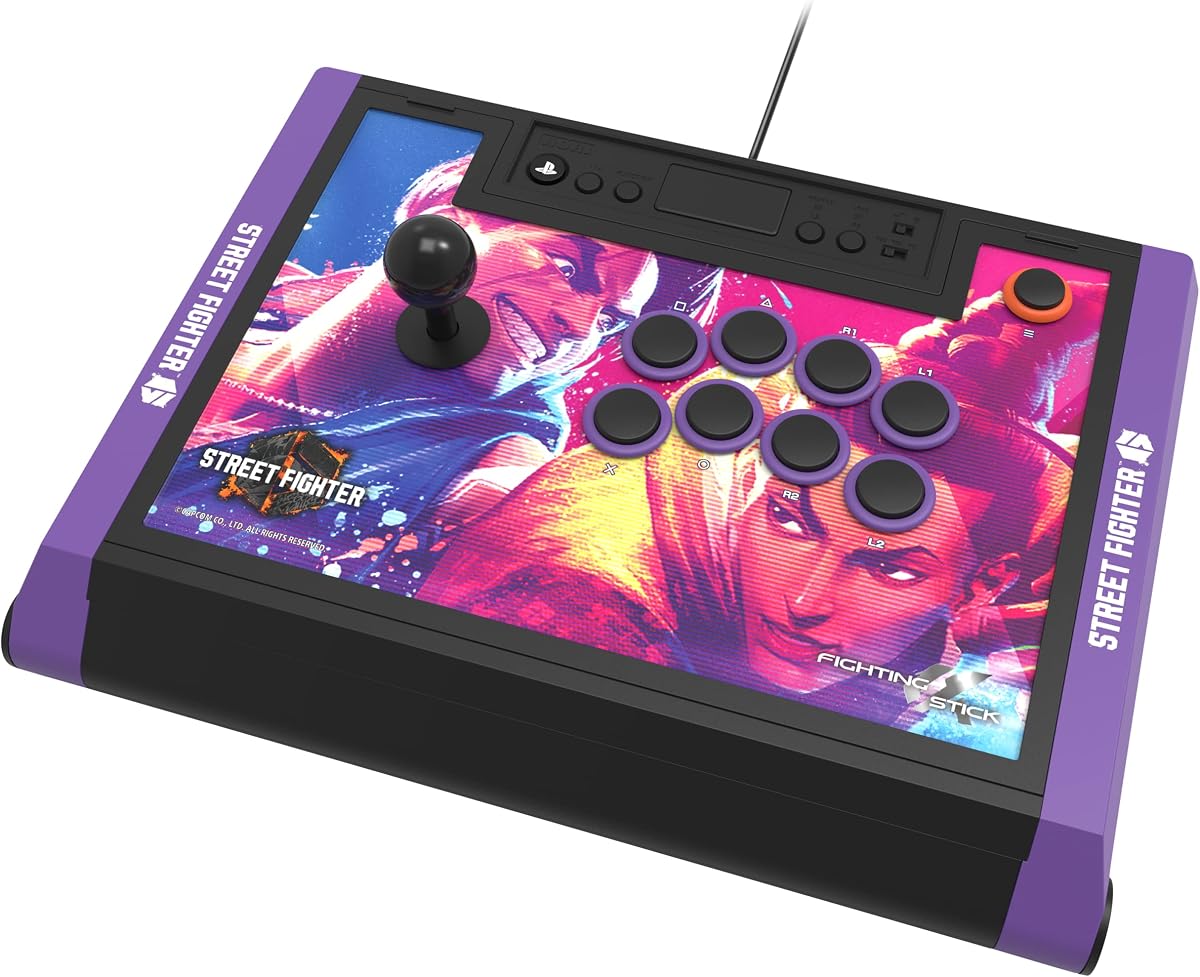
The HORI PlayStation 5 Fighting Stick Alpha Street Fighter 6 Edition is a licensed tournament-grade fight stick that combines a 4.5 rating with official Sony and Capcom approval. It supports PS5, PS4, and PC and uses HORI's HAYABUSA buttons and joystick. The defining feature is its Street Fighter 6 presentation, including a link to 18 downloadable high-resolution character images for the top panel.
We may earn a commission when you buy through this link, at no additional cost to you.
That artwork option is more substantial than a simple fixed theme. Players can select favorite Street Fighter 6 characters and give the stick a personalized appearance. The opening top panel supports customization and maintenance, while the standard HORI control components provide a familiar foundation for fighting-game players. Together, these details make the edition feel purpose-built rather than like a standard stick with a decorative panel attached.
The main compromise is thematic. Buyers who do not care about Street Fighter 6 gain little from the downloadable artwork, and the standard Fighting Stick Alpha is the more general option. The edition remains a wired design with no wireless modes listed, which can be inconvenient for players who regularly travel. The 4.5 rating is also slightly below the 4.6 ratings earned by the standard Alpha and F700 Elite, although the difference alone should not determine the purchase.
Choose this version if you play Street Fighter 6 and want your equipment to reflect that game while retaining tournament-grade construction and official licensing. It is also a fitting choice for a Capcom-focused collection. Players seeking broader theme options and interchangeable components may instead prefer the standard Alpha, while the Street Fighter 6 Edition stands out as the most expressive licensed design in this roundup.
The included link provides 18 downloadable high-resolution Street Fighter 6 images. This gives owners a wider range of visual options than a single permanently printed theme.
Official Sony and Capcom licensing, HAYABUSA controls, and PS5 support establish this as a legitimate themed tournament product rather than merely a decorative variant.
We may earn a commission when you buy through this link, at no additional cost to you.
The Qanba Q7 Obsidian 2 is an officially licensed wired joystick for PS5, PS4, and PC. It carries a 4.3 rating and centers on a full control panel, Qanba 30-millimeter OBSF buttons, and swappable Sanwa JLF joystick tops. It is a confident traditional stick for players who value recognized components and a straightforward physical platform switch over wireless controls.
We may earn a commission when you buy through this link, at no additional cost to you.
The ability to change between PS5, PS4, and PC using a hardware switch is convenient. Rather than navigating an onscreen mode menu, the user can select the desired platform directly. The swappable Sanwa stick tops add another layer of personal control, making it possible to alter the joystick feel without replacing the entire component. A touchpad, 3.5-millimeter microphone input, and microphone mute control cover the major PlayStation interface functions.
Its 4.3 rating places it in the middle of this group, behind the most highly rated models but still showing a favorable response from users. As a wired product, it shares the general limitations of the N3 Drone 2 and the standard HORI Alpha. It also lacks the Mayflash models' wireless modes, software-assisted game profiles, and included anti-slip mat. Those omissions matter most to players who need to move frequently or configure complex layouts for numerous games.
Buy the Q7 Obsidian 2 if you want an officially licensed PS5 stick with a hardware platform switch and customizable Sanwa stick tops. It is a good fit for a fixed multi-platform station, particularly for a player who alternates between PS5, PS4, and PC. The Qanba N3 Drone 2 may be the more value-oriented traditional alternative, but the Q7's swappable tops and explicit platform selector add a different kind of convenience.
A dedicated switch moves the stick among PS5, PS4, and PC. That direct control is useful in a fixed setup where the platform changes regularly.
Swappable JLF joystick tops allow the player to change the top of the lever without replacing the entire joystick. This offers a simple degree of control personalization.
We may earn a commission when you buy through this link, at no additional cost to you.
The HORI PlayStation 5 Fighting Stick Alpha TEKKEN 8 Edition is a highly rated themed fight stick, carrying a 4.6 rating. It is officially licensed by Sony and Bandai Namco Entertainment, supports PS5, PS4, and PC, and uses HORI's HAYABUSA buttons and joystick. It offers the same underlying strengths as the standard Alpha while giving TEKKEN 8 players a more focused visual identity.
We may earn a commission when you buy through this link, at no additional cost to you.
The top panel arrives with TEKKEN 8 artwork and can be replaced with downloadable alternate artwork. The opening construction makes customization and maintenance convenient, allowing the product to evolve beyond its original theme. Because it retains the familiar HAYABUSA components, players who already favor HORI's control feel can choose this edition without moving away from the established Fighting Stick Alpha platform.
As with the Street Fighter 6 Edition, the main limitation is audience. Players who do not care about TEKKEN 8 may see little benefit in the licensed artwork, while the standard Fighting Stick Alpha offers a more neutral design. The product is also wired, with no wireless connection listed, so it is best used on a stable desk. Finally, the supplied information does not describe detailed software mapping comparable to the Nacon Daija, keeping manual configuration as the primary approach.
Choose the TEKKEN 8 Alpha if you want a premium-feeling, officially licensed PS5 stick that reflects the game. It is particularly suitable for TEKKEN 8 players who appreciate HAYABUSA controls and want downloadable top-panel alternatives. If your gaming identity covers several franchises rather than one, the standard HORI Fighting Stick Alpha is the more versatile presentation.
The original top panel features TEKKEN 8 branding, while downloadable artwork provides an immediate way to change the appearance. The replaceable-panel design keeps the choice open after the initial theme is set.
HAYABUSA buttons and joystick provide a consistent center for the themed design. Official Sony and Bandai Namco licensing makes it particularly suitable for dedicated TEKKEN 8 players.
We may earn a commission when you buy through this link, at no additional cost to you.
The GuileKeys GK-18 is the roundup's leverless alternative, offering 18 keys instead of a conventional joystick and action-button layout. It has a 4.3 rating and an unusually rich feature set for the category, including Kailh Choc low-profile switches, an OLED display, RGB lighting, hot-swappable switches and keycaps, adjustable turbo, M1 and M2 macro keys, and tournament lock.
We may earn a commission when you buy through this link, at no additional cost to you.
Its four-direction movement buttons are designed to reduce input errors by replacing physical lever motion with discrete directional keys. The GP2040-CE controller chip and firmware are specified to provide less than one millisecond of input latency in all modes. The OLED screen displays the active input mode and button layout, while dynamic RGB backlighting offers 15 modes and per-key lighting offers 14 colors across five modes. A built-in web configurator adds further layout and lighting control.
PS5 compatibility is the decisive limitation for shoppers focused on this roundup's keyword. The supplied specifications explicitly state that an additional arcade stick converter is required for PS4, PS5, and Xbox compatibility. The listed native platform list includes Windows 10 or later, Steam Deck, PS3, PS4, Switch, and Android, but PS5 is not included without the separate converter. That extra requirement, combined with the learning curve of a leverless layout, makes this less convenient than the ready-made PS5 sticks elsewhere in the list.
Choose the GK-18 if you want a deeply customizable all-button controller, enjoy experimenting with key layouts, and are comfortable adding the required PS5 converter. It is especially compelling for players who value hot-swapping, macro functions, visual personalization, and minimal lever movement. For a straightforward PS5 setup with no additional hardware, the traditional licensed sticks provide a more direct route.
The all-button panel provides substantially more available inputs than a standard eight-button fight stick. That extra room can help players organize complex motions, shortcuts, and title-specific configurations.
Hot-swappable switches and keycaps can be removed and replaced without soldering. The web configurator, OLED display, macros, and lighting controls extend that customization across both software and hardware.
We may earn a commission when you buy through this link, at no additional cost to you.
Choosing an arcade stick for PS5 comes down to platform readiness, control style, component quality, connection method, and the amount of desk space available. These factors determine whether a controller feels like a natural extension of your fighting-game setup or an ongoing source of setup friction.
Start by confirming that the stick connects to PS5 without requiring another controller or a special adapter. The HORI, Qanba, and Nacon models in this guide are identified as PlayStation-compatible or officially licensed products, while the Mayflash F500 uses MAGICBOOTS for its PS5 connection. The GuileKeys GK-18 requires an additional arcade stick converter for PS5, which is an important distinction for anyone seeking a ready-to-use console setup.
A traditional joystick fight stick places directional input on the left and action buttons on the right. It is the format most directly associated with arcades and is the easiest choice for many players moving from a standard controller. A leverless controller replaces the stick with directional buttons, which can reduce physical lever movement and provide more keys, but requires familiarity with a new layout. The GK-18's 18-key panel is designed for players who value dense layouts, macros, and extensive personalization.
The named components on several products provide useful guidance. HORI uses HAYABUSA buttons and joystick, the Nacon Daija uses SANWA components, the F700 Elite includes eight Sanwa action buttons and a precision four-way joystick, and the Qanba sticks use specific Qanba button and lever designs. Component brands can help you understand what is preinstalled, while the F700 and GK-18's customization support indicates room for further modification. Players who plan to alter their controls should confirm compatibility before buying parts.
A wired stick provides a consistent connection and works naturally on a fixed desk. The HORI Alpha, Nacon Daija, Qanba models, and themed HORI editions are presented as wired designs. The Mayflash F700 and F700 Elite offer Bluetooth, 2.4GHz, and wired options, making them better suited to players who move between locations or want to reduce cable management. The F700 Elite also includes a receiver-storage compartment and anti-slip mat, which strengthens its case for portable tournament use.
Multi-platform compatibility can be valuable, but it should be matched to the games you actually play. The Mayflash F700 and F700 Elite support many PC, mobile, Switch, and PlayStation environments, yet they are specifically described as fighting-game devices and do not support Xbox consoles. The F500 spans a wider range of console families but requires a wired Microsoft controller on Xbox One and Xbox 360. Always read the restrictions rather than relying only on a long compatibility list.
A full-size fight stick needs a stable surface and enough room for the top panel, cable, and your hands. The F700 Elite addresses stability with a full-size anti-slip rubber mat, which may be particularly useful on smoother desks. The Nacon Daija adds a textured palm rest for support, while the traditional competing designs rely primarily on the stick itself for positioning. Players with limited space should also consider the physical footprint of a leverless controller with 18 keys.
Customization can range from cosmetic panel changes to software-based button mapping. The HORI Alpha opens for maintenance and accepts replaceable artwork, the themed editions include downloadable designs, and the Nacon Daija supports full button mapping and game profiles. The GK-18 goes further with hot-swappable switches and keycaps, macros, an OLED screen, and RGB controls. More features are not automatically better, so decide whether you need cosmetic changes, functional remapping, or both.
A fight stick should support the way you communicate and listen during online matches. The Nacon Daija includes a 3.5-millimeter jack for a direct headset connection. The F700 and F700 Elite support wired headset output for background music and chat on PS5, PS4, and PC XInput. The Qanba N3 Drone 2 and Q7 Obsidian 2 each provide a 3.5-millimeter microphone input with mute control. These features help determine whether the stick fits your gaming routine.
Begin by placing the stick on a stable, level surface with enough room to operate the joystick and buttons without obstruction. If the model includes a rubber mat, position it beneath the full base. Connect the controller using the specified PS5 method, select the correct platform mode, and allow any required firmware update to finish before launching a fighting game. Confirm that every direction, action button, touchpad function, and headset connection is working.
For the first few matches, use the game's training mode to verify the control layout. Test each direction, assign buttons where needed, and adjust the response of the stick or directional buttons to your established gamepad habits. When using a software-configurable model, create separate profiles for games with different control requirements. Physical platforms can also be changed through a hardware switch on models that provide one, but users should never move the selector while the controller is actively being used.
Keep the fight stick away from spills, excessive dust, and extreme heat, and clean the exterior with a soft, dry cloth. Openable models should be powered down and fully disconnected before the top panel is removed. If components are changed, retain the original screws and confirm that the replacement parts are compatible. Tournament travel also benefits from protective storage, particularly for models with a removable 2.4GHz receiver, optional joystick heads, or replaceable panel artwork.
It depends on the model. The MAYFLASH F500 uses MAGICBOOTS to connect to PS5 and PS4 without keeping the original controller plugged in. Other officially licensed sticks are designed for direct PS5 use, while the GuileKeys GK-18 specifically requires an additional arcade stick converter. Check the product's connection requirements before making a purchase.
That depends on the product. The Mayflash F700 and F700 Elite are specifically described as fighting-game devices and do not support other game types. The F500 has a broader console list, but general compatibility does not necessarily mean every game supports a standard fight-stick layout. The most important issue is whether the game accepts the relevant control method and recognizes the stick as a supported device.
A joystick fight stick uses a physical lever for directional input and a separate cluster of action buttons. A leverless controller replaces the lever with directional buttons and may provide more total keys. The traditional format is familiar to many arcade and fighting-game players, while the leverless approach can reduce lever movement and support dense custom layouts. The GK-18 is the leverless option in this guide.
They are generally designed for straightforward console use, with the relevant buttons and interface functions already integrated. Products identified as officially licensed by Sony, such as the HORI and Qanba models, are built specifically for the PlayStation ecosystem. Always confirm whether a model is licensed and whether it includes the necessary cable, adapter, or platform switch for your intended console.
Wireless is valuable if you want to move the stick between rooms, attend events without managing a long console cable, or prefer a cleaner desk. The Mayflash F700 and F700 Elite offer Bluetooth, 2.4GHz, and wired modes. A wired stick may be simpler and more consistent for a permanent station, so choose based on your setup rather than wireless status alone.
Customization options vary. The HORI Fighting Stick Alpha opens for component access and panel changes, the Nacon Daija provides software-based button mapping and game profiles, and the GK-18 supports hot-swappable switches and keycaps. Some models also encourage Sanwa component customization. Before replacing parts, verify the dimensions, mounting arrangement, and control-board requirements of the exact model.
A mat can help keep the controller stable and reduce unwanted movement during intense matches, particularly on a smooth desk. The MAYFLASH F700 Elite includes a full-size anti-slip rubber mat as part of its package. Other sticks do not list one, so buyers who are concerned about stability may want to confirm whether a suitable mat is included before ordering.
The MAYFLASH F700 Elite is the strongest travel-oriented option in this group because it supports Bluetooth, 2.4GHz, and wired connections, stores the receiver in a hidden compartment, and includes an anti-slip mat. Tournament organizers may impose their own rules, and players should confirm connection requirements for the event. For a fixed home setup, a wired licensed stick may be equally effective and simpler to manage.
The HORI Fighting Stick Alpha stands out as the most balanced overall choice because it combines official Sony licensing, a 4.6 rating, HAYABUSA controls, an opening customizable panel, and PS5, PS4, and PC support. The MAYFLASH F700 Elite is ideal when premium Sanwa components, wireless operation, and a stable included mat matter most, while the Qanba N3 Drone 2 offers a straightforward licensed setup for traditional controls.
Prioritize native PS5 readiness, the control style you already understand, and the connection method that suits your space. Wired licensed sticks are direct and dependable for permanent desks. Wireless Mayflash models provide more freedom across supported platforms, and software mapping can be valuable for players who regularly switch fighting games. The GK-18 offers the deepest leverless customization, but PS5 users should account for its required converter.
Before purchasing, confirm the current platform mode, included cable or adapter, button configuration, desk footprint, and headset support for the exact product listing. Product prices, bundles, firmware, and availability can change over time, so checking the latest listing details will help ensure that the arcade stick you choose is ready for your PS5 setup.