
4K Mirror Dash Cam 10-inch
4.5Editor score
4K front camera
10-inch touch display
Wi-Fi and parking monitor
A rearview mirror backup dash camera combines forward and rearward recording with a large display that can make driving, reversing, and parking feel more informed. The best model balances sharp video, a readable screen, intuitive controls, reliable parking assistance, and enough storage or wireless connectivity to keep important footage accessible.
We compared ten mirror-style dash cameras on front and rear resolution, viewing angles, night visibility, display size, touch controls, Wi-Fi performance, driver-assistance features, loop recording, and parking-monitor support. The list includes models for different priorities, from straightforward dual-camera systems to feature-rich models with ADAS, blind-spot warnings, GPS, voice control, and smartphone connectivity.
Each pick below explains where the camera stands out, what compromises may apply, and who is most likely to appreciate it. We also cover installation, memory-card requirements, hardwiring, and the accessories needed for parking surveillance. Product configurations, ratings, features, and availability can change, so check the current listing before making a final decision.
4.5Editor score

4.3Editor score

4.3Editor score
As an Amazon Associate we earn from qualifying purchases.
The comparison below highlights the major differences among all ten mirror-style dash cameras, including display size, front-camera resolution, rear-camera capability, connectivity, and parking or driver-assistance features. It is designed to make it easier to identify the model that matches your recording, reversing, and installation needs.



The WOLFBOX G840S combines a 12-inch curved streaming-media mirror, 4K UHD front recording, and a 1080p rear camera in one polished package. Its 4.3 rating reflects a well-rounded system for drivers who want a large display, smartphone access, GPS information, and flexible front-and-rear coverage without moving to a conventional compact dash cam.
We may earn a commission when you buy through this link, at no additional cost to you.
The standout feature is the oversized curved display, which provides substantially more viewing area than a standard mirror. A 170-degree front lens and 140-degree rear lens broaden the field of view, while the split-screen function makes it possible to monitor both directions. The low-reflectivity LCD, WDR, HDR, a professional-grade sensor, and a six-glass lens are all intended to improve visibility in direct sunlight, tunnels, and nighttime conditions.
Connectivity is another strength. The included external GPS antenna can display location information, and 5.8GHz Wi-Fi links the camera to the WOLFBOX app for live viewing, playback, downloads, and sharing. Loop recording, a collision-locking G-sensor, and a 24-hour parking monitor add useful protection, although the parking function requires a separate hardwire kit. As with any large mirror-style unit, buyers should also check that its size and weight will work with their vehicle and original mirror.
This is our best overall pick because it balances display size, front-camera detail, rear coverage, smart features, and parking readiness without forcing users to choose between basic recording and connected functionality. It is especially suitable for daily commuters, rideshare drivers, and owners of larger vehicles who want the rear camera readily available while reversing. For buyers seeking the most balanced all-purpose mirror camera, the G840S is the strongest recommendation in this list.
The 12-inch curved screen is more than a stylistic upgrade: it creates a broad live image and makes the front and rear feeds easier to compare. Sliding controls allow quick camera changes and viewing-angle adjustments, while the low-reflectivity panel is designed to limit daytime glare.
The 5.8GHz Wi-Fi system, GPS antenna, and WOLFBOX app make it easier to locate and share recordings without treating the camera as an isolated device. For parked coverage, a compatible hardwire kit enables time-lapse surveillance and reduces the need for manual intervention.
We may earn a commission when you buy through this link, at no additional cost to you.
The WOLFBOX G930 delivers a 4K front camera, 1080p rear camera, 10-inch streaming display, 64GB memory card, and 5.8GHz Wi-Fi. It earns a 4.3 rating and is aimed at drivers who prioritize straightforward dual-camera recording, fast wireless access, and enough included storage to begin recording immediately.
We may earn a commission when you buy through this link, at no additional cost to you.
Its display can slide vertically to change the viewing angle and horizontally to move between split-screen front-and-rear images or the rear view alone. The upgraded 5.8GHz Wi-Fi is designed for smoother connection to the WOLFBOX app, making video downloads and sharing more convenient. GPS information can be displayed on the screen when the receiver is inserted, and the GPS Player provides location data when reviewing saved recordings.
The G930 also includes WDR, a low-reflectivity screen, and a six-glass lens for more balanced exposure and improved low-light imagery. Loop recording overwrites older files in selectable intervals, while the G-sensor locks footage following a collision. Compared with the G840S, however, the G930 does not list a 24-hour parking monitor, so drivers who need continuous parked surveillance should plan around that limitation or choose a model designed for the task.
This camera works well for commuters, families, and rideshare drivers who want a generous screen, strong front-camera resolution, and convenient phone-based file management. It is a particularly compelling option when a large memory card is already included. Those wanting parking surveillance, a more curved display, or additional connectivity features should compare it closely with the G840S before deciding.
The 5.8GHz Wi-Fi connection and dedicated app reduce friction when reviewing or sharing clips. Rather than repeatedly removing and reconnecting a memory card, users can browse and download recordings wirelessly from a compatible phone.
With the GPS receiver installed, the camera can show speed and direction. That data is also available through the GPS Player during playback, adding useful context to road footage without requiring a separate tracking device.
We may earn a commission when you buy through this link, at no additional cost to you.
This 10-inch mirror dash cam is a practical choice for drivers who put reversing assistance ahead of wireless convenience. It records with 1080p front and rear cameras, provides an IPS full-touch display, and has a 4.1 rating. Its rear camera becomes the full-screen parking view when the vehicle is reversed, helping users judge obstacles and lane position more clearly.
We may earn a commission when you buy through this link, at no additional cost to you.
Parking guide lines provide a useful reference, and the viewing range can be adjusted vertically to obtain a more suitable angle. The rear camera uses a six-layer glass lens with upgraded night-exposure processing, while the front and rear cameras use 1080p streaming to capture road details. The touch interface supports camera switching, angle and brightness adjustment, exposure control, playback, and date or time settings.
Loop recording manages storage by overwriting older files, and the G-sensor protects collision-related clips from being replaced. Memory cards up to 128GB are supported, although one is not included. A compatible hardwire kit enables time-lapse and 24-hour parking monitoring. The important installation caveat is size and weight: the mirror weighs 0.72 pounds and has a tapered shape, so buyers should confirm compatibility with their original mirror and mounting point.
The model is best suited to drivers who frequently reverse, park in tight areas, or want adjustable parking lines and a larger rearward image. It may be less attractive for those expecting a conventional reflective mirror when the screen is off, because glare optimization changed the screen's reflectivity. It also lacks the built-in Wi-Fi convenience found on several competing models.
The automatic full-screen rear view is paired with adjustable guide lines, making the display more useful in parking situations than a basic rear camera. Vertical adjustments help account for different vehicle heights, camera positions, and viewing preferences.
Because this unit has a broad lower section and weighs 326 grams, compatibility is not automatic. Measure the original mirror, inspect its attachment, and allow enough clearance for the screen and controls before purchase.
We may earn a commission when you buy through this link, at no additional cost to you.
The 4K 13-inch Wireless CarPlay Mirror is built for drivers who want the dash cam, reversing display, and connected-car functions in one unit. It combines a 4K 160-degree front camera, a waterproof 1080p 140-degree rear camera, a large touch display, and wireless CarPlay or Android Auto compatibility through Bluetooth and Wi-Fi.
We may earn a commission when you buy through this link, at no additional cost to you.
Its headline benefit is the 13-inch screen, which provides ample room for split-screen playback and large touch icons. The display can be used for navigation, music, calls, Siri, and Google Voice Assistants while also providing front and rear road views. That makes it a more ambitious infotainment replacement than a conventional mirror camera, particularly for larger vehicles and owners who value a wide, uncluttered cockpit.
Recording features include loop recording, automatic overwriting of older unprotected clips, and G-sensor locking after an impact. Reverse assist is included, while a 24-hour parking surveillance mode can record unusual events when the vehicle is parked. The necessary parking-monitor cable is sold separately, and no published customer rating accompanies the supplied listing, so buyers should place extra emphasis on compatibility checks and a clear return policy.
This model is most appropriate for drivers who want a single large display for recording, reversing, navigation, and phone integration. Its physical size may dominate a smaller windshield or interfere with controls near the mirror, so measuring the mounting area is important. For people who prioritize one cohesive connected-cabinet experience, it is a compelling option, but it is not the safest choice for buyers unwilling to manage a separate parking cable.
Wireless CarPlay and Android Auto support turn the mirror into a multifunction display for navigation, communication, and music. Voice-control support is intended to reduce the need to touch the screen while the vehicle is moving.
The 13-inch panel offers a generous viewing area for large vehicles, but it also needs more space around the original mirror. Buyers should assess windshield clearance, rearward visibility, and the positioning of overhead controls.
We may earn a commission when you buy through this link, at no additional cost to you.
The AZDOME 12-inch 4K+2.5K model combines higher-resolution rear recording with an unusually broad driver-assistance feature set. Its 4.2 rating reflects a capable system that records the front at 3840 by 2160 and the rear at 2560 by 1440, while adding ADAS, blind-spot detection, lane-change assistance, voice commands, and app-based augmented-reality analysis.
We may earn a commission when you buy through this link, at no additional cost to you.
The ADAS tools are designed to alert drivers to forward collision risk, pedestrians, lane departure, lead-vehicle movement, and following distance. Blind-spot and lane-change warnings can be useful in dense traffic, while the rearward features provide additional awareness during merges. In the AZDOME app, downloaded footage can present recognized license plates, vehicle distance, speed, and lane guidance as augmented-reality overlays, reducing the need to inspect every frame manually.
A 5.8GHz Wi-Fi connection supports live preview, downloads, sharing, settings, and timeline playback. Ten English voice commands allow actions such as taking a picture, locking a clip, switching views, and managing audio or screen functions. The 12-inch touchscreen provides front and rear views, and reverse assist adds parking lines. Time-lapse and collision-detection parking modes are available, but they require a separately purchased three-lead Type-C hardwire kit with a 3A output.
This camera is a strong fit for drivers who want more than basic recording from their mirror unit. It is particularly attractive to people who commute on multi-lane roads, regularly change lanes in busy traffic, or want higher-resolution rear footage for parking and incident review. Driver-assistance systems are aids rather than substitutes for attention, and buyers should understand that alert accuracy depends on road, weather, lighting, and camera conditions.
ADAS, blind-spot detection, and lane-change assistance create a more proactive safety package than a basic mirror camera. These tools are best treated as situational prompts that support, rather than replace, careful observation of surrounding traffic.
The app's augmented-reality overlays can bring license plates, speed, distance, and lane data into the playback interface. This can make important footage easier to interpret, particularly when reviewing a collision or disputed lane-change event.
We may earn a commission when you buy through this link, at no additional cost to you.
The WOLFBOX G850 PRO is a feature-heavy mirror camera focused on recording quality and driver awareness. It holds a 4.3 rating and pairs front 2160p recording with a 1080p rear channel, a full IPS touch screen, ADAS, an enhanced blind-spot algorithm, 5.8GHz Wi-Fi, and 12 voice commands.
We may earn a commission when you buy through this link, at no additional cost to you.
The ADAS package can issue alerts for forward collisions, pedestrian collisions, lane departures, lead vehicles starting to move, and unsafe following distance. Its blind-spot system watches for vehicles beside and behind the car during lane changes and can also provide rear-collision warnings. These functions extend the value of the unit beyond rearward visibility and incident capture, especially for long-distance and multi-lane driving.
Both camera channels use wide-angle lenses along with WDR and HDR, helping balance exposure when moving between shadows and bright sunlight or when driving at night. The 5.8GHz Wi-Fi connection allows use of the WOLFBOX app for video management and sharing. Voice commands cover functions such as activating Wi-Fi, taking a photograph, and locking footage, reducing some touchscreen interaction while driving.
The G850 PRO is a good fit for drivers who want a premium feature set focused on proactive warnings and high-resolution front capture. Its many alerts require a learning period, and no automated system can guarantee that every hazard is detected. Buyers who want a simpler mirror camera may find comparable core recording features elsewhere, but this model offers one of the most extensive safety-tool combinations in the list.
Forward, pedestrian, lane, lead-vehicle, blind-spot, and rear-collision warnings broaden the camera's role beyond evidence capture. The most useful alerts are those checked against actual traffic conditions during a quiet period, before relying on them in demanding road environments.
Twelve available voice commands simplify common actions such as saving a photograph, locking a clip, and changing wireless settings. Learning the supported phrases before driving helps keep operation predictable and focused.
We may earn a commission when you buy through this link, at no additional cost to you.
The Upgraded 10-inch Rear View Mirror Camera is a practical dual-1080p system with a feature that can simplify installation: a 19.6-foot rear camera cable. The extra length offers more routing flexibility in larger vehicles or when the standard cable would need an awkward extension, and the camera has a 4.1 rating.
We may earn a commission when you buy through this link, at no additional cost to you.
The front camera uses a 170-degree wide-angle lens, while the rear camera provides a 140-degree perspective and is rated for outdoor use. Both record at 1080p and use WDR or HDR processing, a Starvis sensor, a six-glass lens, and night-vision features to improve low-light visibility. The full touchscreen makes it possible to change camera views, adjust the viewing angle, and alter brightness with straightforward gestures.
When the vehicle enters reverse, the mirror automatically changes to the rear camera's perspective and displays parking guidelines. Loop recording overwrites the oldest files, the G-sensor locks collision clips, and an optional ACC hardwire kit enables a parking monitor that records short locked clips when an impact is detected. Because the rear camera belongs outside the vehicle, the IP68-rated housing is designed to tolerate weather exposure.
This camera is best for installers who need extra cable length, want a complete front-and-rear setup without wireless file management, and value straightforward touch controls. It may be less appealing to drivers who expect a connected app, GPS, or integrated smartphone casting. The long cable is an installation asset, but it must be routed carefully away from sharp edges, moving parts, and exhaust components.
The 19.6-foot rear lead can travel around trim panels and across larger cabins more easily than a short cable. It provides additional routing options without requiring a separate extension and can be especially helpful in SUVs, trucks, and vans.
The screen automatically switches to the rear feed when reverse is engaged and overlays parking guidelines. This reduces setup steps and places the most relevant camera view where the driver expects it during backing.
We may earn a commission when you buy through this link, at no additional cost to you.
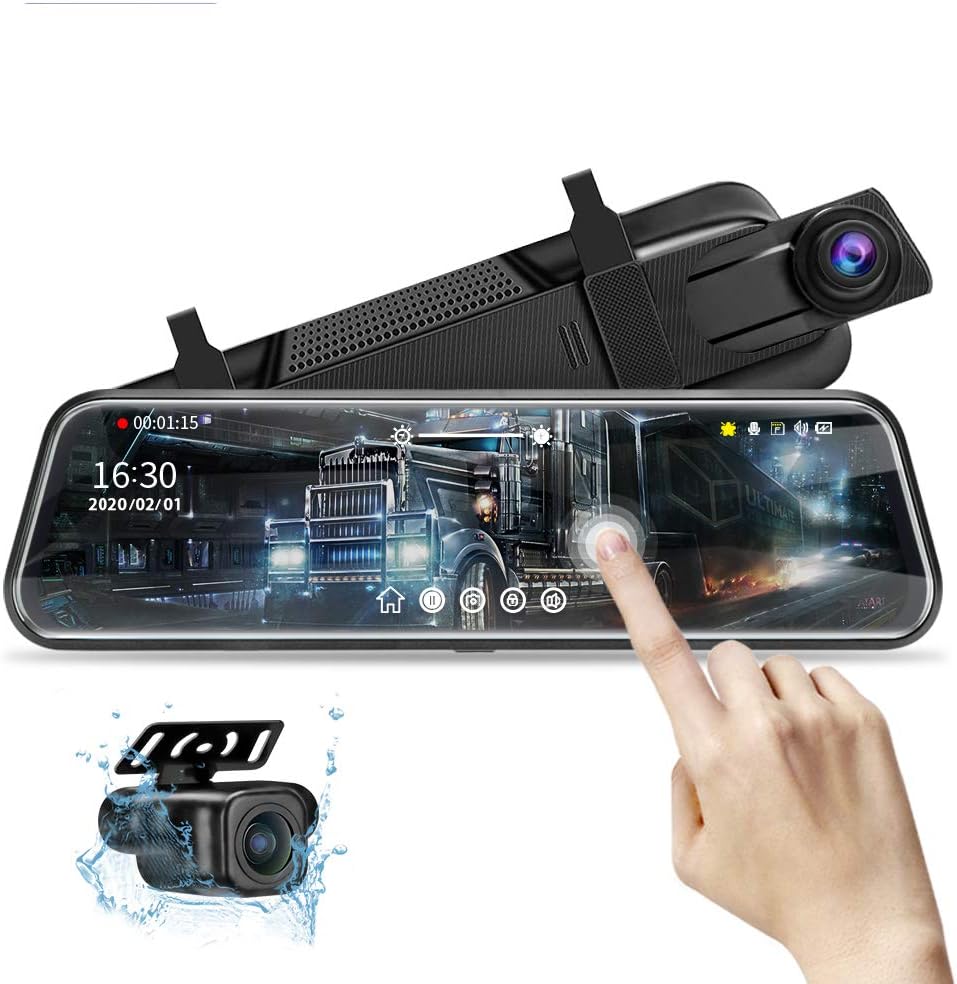
The 4K Mirror Dash Cam 10-inch combines 4K front recording, a 1080p rear camera, a 10-inch HD IPS touch display, Wi-Fi, night vision, and an included 32GB card. Its 4.5 rating is the highest published rating among the supplied products, giving it an appealing combination of capability and value.
We may earn a commission when you buy through this link, at no additional cost to you.
The F1.8 front aperture and night-vision features are intended to preserve detail in difficult lighting, while a 130-degree front lens and 145-degree rear lens create a broad field of view. The IPS display offers a wide live image and responsive touch controls. Users can switch between front and rear recording views and benefit from automatic rear-view activation when the vehicle is placed in reverse.
Wi-Fi connectivity allows the camera to connect to a compatible app for video downloads and sharing. A G-sensor locks the current file following a collision, providing a dedicated record that can be reviewed later. The parking monitor is designed for around-the-clock surveillance through an OBD connection, making it particularly relevant to owners who want a simpler power connection than a full hardwire installation.
This is the strongest budget-oriented pick for drivers who want modern essentials without moving to a premium model. It provides 4K detail, a large touchscreen, a rear camera, phone connectivity, and a usable memory card in one package. Those wanting a higher-resolution rear channel, ADAS warnings, GPS, or an even larger display may prefer a more specialized alternative, but this model covers the essentials with an especially strong published rating.
A 4K front camera, IPS touch display, Wi-Fi, night vision, and a 1080p rear feed cover the features many buyers prioritize. The included card eliminates the need to purchase standard storage before the first recording session.
The companion app supports wireless downloads and sharing, so important clips can be reviewed or transferred without routinely removing the memory card. Keeping the app updated and using a strong local Wi-Fi connection can improve the transfer experience.
We may earn a commission when you buy through this link, at no additional cost to you.
The AUTO-VOX Dual 2K OEM rear-view mirror camera is the premium choice in this roundup because it replaces the original mirror at its factory mounting position rather than hanging over it with straps. It combines a 9.36-inch touchscreen, dual-camera recording, HDR and WDR processing, automatic brightness, and Smart CarPlay support in an integrated-looking installation.
We may earn a commission when you buy through this link, at no additional cost to you.
The product information describes 2K HDR recording for both front and rear views, although another section refers to dual 1080p output. Buyers should verify the final recording specifications in the current listing before purchase. The stated strengths are clear regardless: broad daylight detail, reduced overexposure from headlights, a wide rearward view, and sensors designed to improve visibility in changing light.
The OEM-style approach removes straps, suction cups, and dashboard clutter. Four bracket adapters are included for broad vehicle compatibility, although exact fitment still needs to be confirmed for the intended car. Smart CarPlay enables directions, calls, music, and voice control through a familiar interface. Automatic brightness adjustment dims the screen at night and raises it in daylight, which is particularly useful for a permanently mounted display.
This camera is best for drivers who want the mirror to look and feel like an integrated part of the dashboard, especially when a strap-on unit would appear bulky. It also suits owners who want one screen for forward visibility, reversing, and connected navigation. The premium choice requires the most attention to vehicle compatibility, so check the supported models, mounting dimensions, and installation requirements before ordering.
Mounting at the original mirror position creates a cleaner dashboard and avoids the visual bulk of elastic straps. Multiple bracket adapters support many vehicles, but the owner should verify the exact mounting interface and available clearance.
Automatic brightness adjusts the 9.36-inch screen to surrounding light, reducing the need for repeated manual changes. This is particularly valuable at night, when an overly bright display can create glare for the driver.
We may earn a commission when you buy through this link, at no additional cost to you.
The 4.5-inch Mirror Dash Cam is the most compact option here, designed for drivers who want rear-camera coverage without a large display blocking the windshield. It combines a 4.5-inch IPS touchscreen with 1080p front and rear cameras, a 150-degree interior-facing front lens, and a 120-degree rear camera.
We may earn a commission when you buy through this link, at no additional cost to you.
Despite its small footprint, the unit includes useful protection features. A gravity-shock sensor automatically locks footage after a collision or bump, while loop recording overwrites the oldest unprotected files as storage fills. Night-vision processing is intended to maintain clarity in dim environments, making the camera relevant to ride-share drivers, night-shift workers, and owners concerned about low-light incidents.
The parking monitor offers motion detection and collision-triggered recording to avoid storing unnecessary footage. A separate hardwire kit is required. Installation is designed to be straightforward: the rear camera connects to the front unit without removing the vehicle's reversing light, and the compact housing is intended not to distract the driver or excessively shade the view.
This camera is a practical choice for older vehicles, trucks, and drivers who prioritize a traditional mirror shape and simple installation. It is less suitable for people who want a broad streaming-media display, split-screen road views, or detailed reverse guidelines. Because no published customer rating accompanies the supplied listing, checking the current feedback, warranty terms, and return policy is especially important for this compact model.
The 4.5-inch display preserves more of the driver's forward view than a 10-, 12-, or 13-inch mirror. That makes the system easier to integrate with trucks and vehicles whose mirrors are already close to the windshield or roofline.
Motion and collision detection can begin recording when relevant activity occurs, helping the camera monitor a parked vehicle without filling storage with uneventful clips. A compatible hardwire kit is still necessary to supply continuous parking power.
We may earn a commission when you buy through this link, at no additional cost to you.
Choosing a mirror-style dash camera means balancing image quality, screen size, parking usefulness, connectivity, and installation requirements. The most important steps are to assess your vehicle, identify the features you will actually use, and confirm which accessories or accessories are required before installation.
Resolution determines how much detail a camera can preserve, but it is only one part of overall image quality. A 4K front camera can capture fine road texture, signs, and distant vehicles more clearly than a 1080p unit, while the rear camera should provide enough detail to identify vehicles, pavement markings, and obstacles during reversing. The products in this guide range from dual-1080p arrangements to 4K front and 2.5K rear systems, and some use 2K across both channels.
Choose the front resolution according to your recording priorities, but do not assume a higher number automatically produces a better image. Sensor quality, lens construction, WDR, HDR, exposure control, and nighttime processing all influence the result. Review sample footage from similar lighting conditions whenever possible, particularly if you regularly drive at night or through tunnels.
Mirror cameras range from a compact 4.5-inch screen to expansive 12-inch and 13-inch displays. A larger panel can show a broader image, make touch icons easier to select, and provide useful split-screen layouts, but it may obscure more of the windshield, sit awkwardly near overhead controls, or conflict with the original mirror's shape and mounting point. The listed dimensions and weight should be checked before purchase.
For a vehicle with a narrow windshield area or a mirror mounted high on the glass, a compact screen may be more comfortable. Larger displays are often preferable in roomy cabins and larger vehicles. Confirm that the replacement can be secured safely and that it does not interfere with sensors, airbags, sight lines, or regulatory visibility requirements.
A backup camera is most useful when the rear view appears automatically in reverse and the image is easy to interpret. Parking guide lines provide a visual reference, while vertically adjustable viewing ranges can help account for different camera heights and vehicle geometries. Reverse assist appears across many of the listed products, but guide-line quality and adjustment options vary.
Look for a rear camera that is weather resistant if it will be mounted externally, and consider how the cable must be routed from the trunk or hatch to the mirror. If you park on busy streets or in dim areas, night exposure and low-light clarity deserve particular attention. Test the reverse trigger and guide lines after installation in several lighting conditions.
Wi-Fi makes it easier to preview recordings, download important clips, and share footage from a phone. Models with 5.8GHz Wi-Fi are designed for faster local transfers than basic wireless connections, although actual performance depends on the phone, signal conditions, and file size. App-based timeline playback and in-app support can also make stored footage easier to navigate.
A GPS receiver adds route, speed, and direction information to recordings, which can provide useful context. Wireless CarPlay or Android Auto support may be valuable if you want navigation, calls, and music on the mirror display. Before buying, confirm that the feature is compatible with your phone, vehicle, and preferred app ecosystem, and check whether the advertised connection is genuinely wireless.
Advanced Driver Assistance Systems can provide warnings for forward collisions, pedestrians, lane departures, lead vehicles, blind spots, and unsafe following distance. These features are useful for increasing awareness, particularly on highways and during lane changes, but they are not guarantees. Detection performance can be affected by weather, lighting, road markings, traffic density, and sensor limitations.
Consider ADAS when it supports a real driving need, such as frequent highway commuting or substantial time in heavy traffic. Read the alert behavior and limitations before relying on it. Voice control can make frequent actions less distracting, but command recognition may vary. A vehicle with good conventional visibility and reliable cameras may still be the more important foundation for safe operation.
Continuous or event-triggered parking surveillance requires a stable power source after the vehicle is shut down. Some models support a hardwire kit, some use an OBD connection, and others require a specific parking-monitor cable. These accessories are not always included, and their exact compatibility should be confirmed with the seller or manufacturer before purchase.
A hardwired installation is generally integrated and can support uninterrupted monitoring, but it involves routing and connecting wiring safely. OBD-based power can be simpler, though its behavior varies with the vehicle. Before choosing, consider battery drain, parking mode, time-lapse or event-trigger behavior, and whether the system can record after ignition shutdown without interfering with normal vehicle operation.
Mirror cameras commonly use microSD cards, and supported capacity differs by model. Several products include a card, while others require separate storage. Loop recording overwrites older unprotected clips to keep recording continuous, and a G-sensor locks footage associated with sudden impacts so it is less likely to be replaced.
Match the card to the camera's stated maximum capacity and use a card with appropriate speed and reliability for continuous recording. Format the card in the dash cam when the instructions recommend it, and periodically check that important locked files have been exported. If the vehicle spends long periods parked, time-lapse or motion-triggered recording can conserve storage compared with uninterrupted capture.
Rear-camera cable length, mounting method, and the physical dimensions of the mirror can determine whether installation is straightforward. Strap-on systems are often adaptable to more vehicles, while OEM-style replacements can look cleaner but require precise compatibility. The rear camera must be securely mounted, the lens kept clean, and cables routed away from sharp or moving components.
Plan how you will use the display before installation. Rear view, front view, split screen, and full touch controls should be reachable without obstructing safe driving. Use voice commands or physical buttons where available, adjust brightness for day and night, and verify that reversing activates the correct feed. A clean lens and regularly checked connections are simple maintenance steps that preserve recording quality.
Begin by mounting the mirror unit securely over or within the original rear-view mirror position, following the supplied instructions. Route the rear-camera cable along interior trim without crossing areas that could interfere with pedals, the steering column, sharp metal edges, or moving seats. Mount the rear camera where it has a clear view, protects the lens from dirt and direct glare, and remains within the vehicle's legal visibility expectations. Connect power and insert a compatible memory card before attempting a full setup.
Once the system powers on, set the date, time, recording mode, exposure, screen brightness, and Wi-Fi or GPS options. Connect the camera to its app, confirm that live preview appears, and test downloading a short recording. Park safely and engage reverse to verify the rear camera activates and that guide lines match the vehicle's position. Adjust the viewing angle at both normal ride height and, where appropriate, with the vehicle loaded. If parking monitoring is required, install the specified power cable or hardwire kit and test each recording mode before relying on it.
During normal use, keep the front and rear lenses clean with a soft microfiber cloth, and check that the mirror is stable after bumps or temperature changes. Review locked footage promptly after an incident, export anything important, and avoid relying only on the memory card as a permanent archive. Format the card as directed, check available capacity regularly, and update the app or camera firmware when instructed. For long-term parked surveillance, confirm that power remains stable and that the selected parking mode records as expected.
A streaming-media mirror camera can replace the reflective function while powered on, but it may not work as a normal mirror when switched off. Some models use a low-reflectivity display specifically to reduce glare from headlights behind you. Check the product description, confirm local visibility rules, and retain a legal backup if the screen cannot show a reflective image.
Most mirror-style dash cameras record video to a microSD card, and compatibility and maximum capacity vary by model. Some options in this guide include a card, while others do not. Use a card that meets the camera's stated capacity and recording requirements, format it as directed, and export important locked files before loop recording overwrites them.
Only if the model supports a parking-monitor mode and the required power connection is installed. Depending on the system, recording may be continuous, time-lapse, motion-triggered, or collision-triggered. A hardwire kit, OBD connection, or proprietary parking cable may be required, and that accessory may need to be purchased separately.
A 4K front camera can preserve more detail than 1080p, which is useful for distant signs, vehicles, and incident review. However, image quality also depends on the sensor, lens, exposure processing, and lighting. If your priority is a large display, simple reversing, and lower-cost operation, a dual-1080p system may still provide adequate coverage.
Models with Wi-Fi and a compatible app generally allow wireless preview, download, and sharing of recordings. The 5.8GHz models listed here are intended to provide a faster local connection than lower-frequency systems. Connection quality can still vary with the phone, nearby wireless congestion, and file size, so maintain a stable local network when transferring large clips.
No. Mirror cameras differ in width, height, weight, mounting method, and attachment style. Compact units are easier to fit in trucks and vehicles with high mirror mounts, while a 13-inch model may require considerable clearance. OEM-style replacements can also require vehicle-specific brackets, so check fitment and measure the original mirror before ordering.
No. ADAS, lane-departure alerts, blind-spot detection, and forward-collision warnings are supplementary aids whose performance varies with weather, lighting, road markings, and traffic. They can improve awareness and provide useful prompts, but the driver remains responsible for observing the road, judging surrounding vehicles, and controlling the vehicle safely.
Use a soft, clean microfiber cloth and avoid abrasive or chemical cleaners that could damage the lens or display. Dust, rain residue, fingerprints, and interior haze can reduce image clarity, especially at night. Check both lenses regularly, inspect the mount for looseness, and confirm that cables remain securely routed after temperature changes or interior work.
The WOLFBOX G840S is the most balanced overall recommendation, combining a large curved display, 4K front recording, GPS, 5.8GHz Wi-Fi, and parking-monitor potential. The 4K Mirror Dash Cam 10-inch is a compelling value option with a 4.5 rating, 4K front camera, touchscreen, Wi-Fi, and an included card, while the AUTO-VOX Dual 2K OEM stands out as the premium factory-style installation with integrated CarPlay functionality.
Prioritize the features that match your normal driving rather than choosing solely by screen size or the longest feature list. Frequent reversers should examine guide lines and adjustable rear views, smartphone users should verify app and Wi-Fi support, and owners needing parked coverage should confirm the power accessory first. Night driving, storage needs, vehicle fit, and whether you value a strap-on or OEM-style design are equally important.
Before purchasing, check the current listing for the exact camera specifications, included accessories, memory-card requirements, compatibility information, ratings, warranty, and return terms. Product configurations and prices can change, so the final purchase should reflect your vehicle, installation preferences, and recording priorities at the time of ordering.