
Ethernet Adapter for Fire TV Stick, Firestick Micro USB to RJ45 Ethernet
4.7Editor score
Driver-free plug-and-play setup
Aluminum alloy housing
LED connection indicator
Discover the best Ethernet Adapter for Fire TV Devices, with ten options compared for connector fit, wired speed, power design, compatibility, and setup.
An Ethernet adapter can give a Fire TV device a steadier connection than crowded or distant Wi-Fi, reducing the likelihood of buffering and interruptions. The right model must also match the connector on your specific Fire TV Stick, Fire TV Cube, or third-generation Fire TV, making compatibility the most important place to begin.
This guide compares ten Ethernet adapters using the information listed for each product, focusing on connector type, supported Fire TV models, advertised Ethernet speed, power requirements, installation method, and physical design. It includes micro-USB and USB-C options, as well as one USB-A adapter intended for devices with a suitable USB port.
Each review explains the strongest feature, practical limitations, and the type of user most likely to benefit. The top selections represent the best budget, overall, and premium choices, while the complete list helps readers find an option that matches their hardware. Product listings and prices can change, so verify the current details before buying.
4.7Editor score

4.5Editor score

4.1Editor score
The table below compares all ten adapters by connector, stated Ethernet speed, power approach, and Fire TV compatibility, making it easier to identify the option that fits your device and connection needs.


The Micro-USB Ethernet Adapter for Amazon Fire TV Devices is an overall choice for users who want a straightforward way to connect a compatible Fire TV device to a wired network. Its 4.5 rating reflects a generally positive customer reception, while its strongest qualification is the unusually broad list of supported Fire TV hardware, including Lite, second-generation Stick, HD, 4K variants, Cube, and third-generation Fire TV models.
We may earn a commission when you buy through this link, at no additional cost to you.
The adapter uses 10/100 Ethernet and connects to a router with a standard Ethernet cable. Setup is uncomplicated: the micro-USB end goes into the Fire TV's USB port, and the Ethernet cable runs to the router. The Fire TV's existing power adapter can also power the Ethernet adapter, reducing the number of separate leads around the television. This arrangement is particularly attractive for people who want a wired connection without reorganizing their entire entertainment area.
The principal limitation is connector compatibility. This version does not work with the Fire TV Stick HD second generation because that model uses USB-C. Its 10/100 Ethernet specification also places it below adapters advertising 300 Mbps, 480 Mbps, or 1000 Mbps. Those faster figures do not guarantee faster streaming if the home connection or Fire TV is the bottleneck, but they do make this option less future-oriented for high-bandwidth networks.
It is best suited to owners of a micro-USB Fire TV Stick who value compatibility, simplicity, and a clean setup. Buy this model if its listed Fire TV models include the device you own and your priority is a dependable wired connection without additional power hardware.
The long supported-device list is the defining advantage of this adapter. It covers numerous Fire TV Stick generations, the Fire TV Cube, and third-generation pendant Fire TV hardware, making it a practical choice for households with more than one compatible streaming device.
Reusing the Fire TV power adapter avoids a separate power lead, and the direct router connection provides a straightforward alternative to changing Wi-Fi settings. The result is a setup that can be completed in minutes.
We may earn a commission when you buy through this link, at no additional cost to you.
The Right Angle USB-C Ethernet Adapter is a focused solution for owners of the Fire TV Stick HD second generation with USB-C. Its 4.3 rating indicates solid but not exceptional customer feedback, and the defining feature is connector accuracy: it directly addresses a common compatibility mistake made when buyers assume every Fire TV Stick uses micro-USB.
We may earn a commission when you buy through this link, at no additional cost to you.
The right-angle form can also sit more neatly beside a television, reducing the amount of space required by the connector. The product supports up to 480 Mbps when used with the second-generation Fire TV Stick HD, a higher stated rate than the common 10/100 Mbps category and sufficient to remove the adapter as an obvious constraint on many home broadband connections.
Its compatibility is intentionally narrow. It is incompatible with the first-generation Fire TV Stick HD, which uses micro-USB. The supplied information focuses on one current device model rather than presenting a broad list of supported Fire TV products, so buyers should not infer universal compatibility from the general adapter category.
Choose this adapter if you have confirmed that your Fire TV Stick HD has a USB-C port. It is a sensible targeted solution for newer hardware, especially when a right-angle profile fits the television setup better than a straight connector.
The right-angle connector is designed to reduce the visual and physical bulk around the television. That makes the adapter useful when the Fire TV is mounted close to a wall or positioned in a narrow entertainment cabinet.
This adapter avoids trying to serve every Fire TV model. That focused approach can be an advantage because it gives owners of the second-generation Fire TV Stick HD an option specifically designed around the device's USB-C connection.
We may earn a commission when you buy through this link, at no additional cost to you.
The ELECTOP 1000 Mbps Ethernet Adapter is the premium speed option in this roundup, advertising up to 1000 Mbps over Ethernet through a micro-USB-to-RJ45 connection. Its 4.1 rating is the lowest among the listed products, but the specification set is unusually rich for a Fire TV accessory, including an LED indicator, aluminum housing, and several electrical protections.
We may earn a commission when you buy through this link, at no additional cost to you.
The adapter is designed for micro-USB streaming hardware and is listed as compatible with Fire TV Stick 4K, Chromecast models, Google Home Mini, and Raspberry Pi Zero. It supports driver-free installation, so the basic process is to connect it to the device, attach an Ethernet cable, and add the suggested external power connection if needed. Adhesive pads are included to help position the adapter and reduce strain on the connection.
Several compatibility caveats require attention. It does not fit first-generation Fire TV Stick, Fire HD 10 tablets, Roku devices, or phones. The product information also excludes Fire Stick 4K Max from 2021 onward, Chromecast with Google TV, and USB-C Chromecast models. Its 1000 Mbps rating describes the adapter's Ethernet capability, not a guarantee that every device or internet plan will achieve that throughput.
This is the best choice for a compatible micro-USB device on a high-capacity network where maximum advertised Ethernet speed and physical protections are priorities. Confirm the port and exact model before purchasing, and expect to use the suggested additional power lead for stable operation.
A stated 1000 Mbps Ethernet capability makes this adapter the most speed-oriented choice in the list. It can remove the adapter from the equation on appropriately fast networks, although overall streaming performance still depends on the Fire TV, router, internet service, and content source.
The aluminum alloy housing is intended to dissipate heat during extended use. Over-voltage, over-current, over-power, and short-circuit protections add practical safeguards for a device that remains connected to power and the network.
We may earn a commission when you buy through this link, at no additional cost to you.
The Firestick Ethernet Adapter, Micro USB to RJ45 for Fire TV Stick 4K is a practical option for users who want a wired connection and a more secure physical placement. It carries a 4.2 rating and provides a 100 Mbps wired link, with an included power cable recommended for optimal performance.
We may earn a commission when you buy through this link, at no additional cost to you.
Its most useful physical feature is the pair of self-adhesive pads. These can hold the adapter in a suitable position and help prevent the connector or Ethernet cable from hanging freely. The aluminum alloy body is also designed to dissipate heat during long streaming sessions, while a plug-and-play process removes the need to install drivers or navigate complicated network settings.
Compatibility is centered on micro-USB streaming sticks. The listing includes Fire TV Stick 2, 3, 4K, and 4K Max along with several other micro-USB devices, but it specifically excludes first-generation Fire TV Stick, Fire HD 10 tablets, Roku devices, phones, and USB-C hardware. That distinction is particularly important for later Fire TV Stick 4K Max versions, which may use USB-C.
The adapter is a good fit for owners of an eligible micro-USB device who want stable 100 Mbps networking and tidy installation. It may not be the right option for a USB-C Fire TV Stick HD or someone prioritizing a higher advertised Ethernet rate.
The included adhesive pads allow the adapter to sit against or near the television instead of pulling downward on the Fire TV's port. That can reduce accidental movement and help maintain a consistent physical connection.
Once the Ethernet cable and recommended power lead are connected, the adapter operates without driver installation. This keeps the process approachable for users who want a wired connection without complex configuration.
We may earn a commission when you buy through this link, at no additional cost to you.
The ZEXMTE Ethernet Adapter for Fire TV Stick combines a well-regarded 4.5 rating with a straightforward micro-USB design. It supports Fire TV Stick Lite, second- and third-generation Fire TV Sticks, Fire TV Stick 4K, and Fire TV Stick 4K Max, giving it broad relevance among micro-USB Fire TV owners.
We may earn a commission when you buy through this link, at no additional cost to you.
Its 10/100 Mbps Ethernet specification is common for this type of compact streaming accessory. The product emphasizes a stable wired connection, smooth streaming, and reduced dependence on Wi-Fi, but users should not mistake the low advertised rate for a lack of practical usefulness. Actual performance is limited by the device and internet connection, and many streaming services do not require the full capacity of a gigabit network.
The setup process is a direct connection between the adapter, Fire TV, and router. An aluminum casing helps with heat dissipation, and status lights provide quick visual confirmation that the connection is active. The product information does not highlight a separate power cable, so buyers should carefully consider whether their setup can accommodate the adapter's connection and cable arrangement.
This adapter is best for users who want a compact, uncomplicated micro-USB solution across common Fire TV Stick generations. Its 4.5 rating and restrained feature set make it a balanced alternative to faster models that carry more design complexity.
A direct Ethernet connection can deliver a steadier stream than an unstable Wi-Fi signal. The adapter is intended to reduce the disruption associated with dropouts, while its modest Ethernet rate remains appropriate for many standard streaming scenarios.
Built-in status lights give immediate visual feedback that the wired link is active. This is useful when troubleshooting a setup and helps users distinguish a physical connection problem from an issue within the Fire TV interface.
We may earn a commission when you buy through this link, at no additional cost to you.
The Ethernet Adapter for Fire TV Stick, Firestick Micro USB to RJ45 Ethernet stands out with a 4.7 rating, the highest among the ten listed products. It combines a familiar micro-USB connection, driver-free setup, a 10/100 Mbps link, and an aluminum housing in a compact package that should appeal to value-conscious Fire TV owners.
We may earn a commission when you buy through this link, at no additional cost to you.
Installation requires connecting the adapter to a micro-USB TV stick, running an Ethernet cable to the router, and then checking the connection. The built-in LED provides an immediate operating indicator, while two self-adhesive tapes can secure the unit and reduce movement caused by the weight or bend of the Ethernet cable.
The product supports Fire TV Stick 4K and other micro-USB streaming hardware, including Google Home Mini, Chromecast Ultra Audio, and Raspberry Pi Zero. It does not support USB-C devices, and the product information specifically warns against using it with Chromecast with Google TV. Its stated 10/100 Mbps Ethernet rate and Micro USB 2.0 link place it below higher-speed models, but the adapter is designed primarily to provide a reliable wired path rather than benchmark-level throughput.
This is the best budget selection for someone with a compatible micro-USB streaming device who wants an easy setup and strong customer feedback. It is less suitable for a Fire TV Stick HD second generation or any other device that requires USB-C.
The 4.7 rating indicates strong customer satisfaction, and the core feature set covers the essentials: Ethernet connectivity, an operating light, and mounting support. Buyers do not need to manage drivers or navigate a complicated configuration process.
The included adhesive tapes help keep the adapter from dangling beneath the television. Better positioning protects the connection and can make the overall installation look and feel more deliberate.
We may earn a commission when you buy through this link, at no additional cost to you.
The UGREEN Ethernet Adapter for Fire TV Stick is a 4.4-rated option distinguished by its three-foot power cable and ability to power both the network adapter and the Fire TV Stick. That arrangement is helpful when the television's power outlet or wall charger is difficult to reach.
We may earn a commission when you buy through this link, at no additional cost to you.
The listed compatibility includes Fire TV Stick Basic, second-generation, 4K, and Lite models, along with several Chromecast generations, Google Home Mini, and Fire TV third-generation devices. The adapter uses 10/100 Mbps Ethernet and installs without drivers. Its USB-A power cable must be connected to a USB wall charger rated above 5 watts, rather than a television USB port.
Important exclusions include all Roku devices, first-generation Fire TV Stick, and Fire TV Stick 4K Max. The maximum speed is 100 Mbps, and the micro-USB connector makes the unit unsuitable for USB-C hardware. These limits make careful model verification essential before ordering.
UGREEN's adapter is best for owners of a listed micro-USB Fire TV device who need more reach between the television and power source. It is especially practical when power management is the main installation challenge, rather than maximizing Ethernet speed.
The 3.3-foot Micro USB and USB power cable provides more placement flexibility than a short fixed lead. It can reach a nearby wall charger when the television is mounted or positioned away from the outlet.
The USB-A power cord can supply both the Fire TV Stick and the Ethernet adapter. That reduces cable complexity, although buyers must have a suitable wall charger above the stated power threshold.
We may earn a commission when you buy through this link, at no additional cost to you.
The Cable Matters Micro USB to Ethernet Adapter combines a 4.4 rating with a stated Ethernet speed of more than 300 Mbps. It supports streaming devices such as the Fire TV Stick, Fire TV Cube, Chromecast, and Chromecast Ultra, along with Google Home Mini, making it useful for a broader collection of home entertainment hardware.
We may earn a commission when you buy through this link, at no additional cost to you.
The adapter includes a three-foot USB power cable for connection to a wall charger. Installation is driver-free: connect the appropriate cable to the streaming device, attach the Ethernet lead to the adapter, and link the adapter to the router. A wired connection can reduce buffering associated with weak or inconsistent Wi-Fi signals, although it cannot resolve every source of playback delay.
Compatibility still depends on the physical connector. The product is centered on micro-USB devices, so owners of newer USB-C Fire TV hardware should not assume it will fit. The stated speed is also an adapter-level capability rather than guaranteed application throughput, and the supplied information does not explicitly identify every supported Fire TV generation.
This is a good selection for someone who wants a faster-than-100-Mbps micro-USB option and may also use the adapter with compatible Chromecast or smart-speaker hardware. Confirm that your streaming device has the required port before purchase.
The advertised 300+ Mbps capability is noticeably above the common 10/100 Mbps specification found on many compact Fire TV adapters. That headroom can be useful on faster local networks, even if streaming services rarely require the full rate.
Support for Fire TV, Chromecast, and Google Home Mini products increases the adapter's usefulness across a household. It can serve as a shared wired accessory for compatible micro-USB devices rather than being limited to a single streaming box.
We may earn a commission when you buy through this link, at no additional cost to you.
The Ethernet Adapter for FIRE Stick is a 4.4-rated, budget-conscious option for second-generation, third-generation, and 4K Fire TV versions that use the Type-B micro-USB connection. It advertises speeds up to 100 Mbps and includes power support, focusing on the basic benefit of replacing a problematic Wi-Fi connection with a steady wired link.
We may earn a commission when you buy through this link, at no additional cost to you.
The adapter is driver-free and works by connecting it to the device and router. Its product information also explains how a wired connection can help in homes with congested Wi-Fi, weak signals, or an older router that supports limited wireless standards. The approach removes wireless interference and channel variation from the connection path, although other factors can still produce buffering.
The most important limitation is physical. It will not fit the newer oval-shaped Type-C power connections, so owners of USB-C Fire TV models need a different adapter. The 100 Mbps maximum is modest but suitable for many standard streaming use cases when the internet service and local network offer similar performance.
It is best for owners of a compatible older or midrange Fire TV Stick who want an uncomplicated way to improve connection consistency. The no-driver design makes it approachable, while the clear connector warning helps prevent an incompatible purchase.
A wired link removes the Fire TV from the wireless network's competing traffic. That can be valuable in busy homes where multiple devices share bandwidth or where the television is far from the router's strongest signal area.
The adapter operates without driver installation or complicated configuration. Users connect the hardware, allow the Fire TV to recognize the network, and can then manage the connection through the normal television interface.
We may earn a commission when you buy through this link, at no additional cost to you.
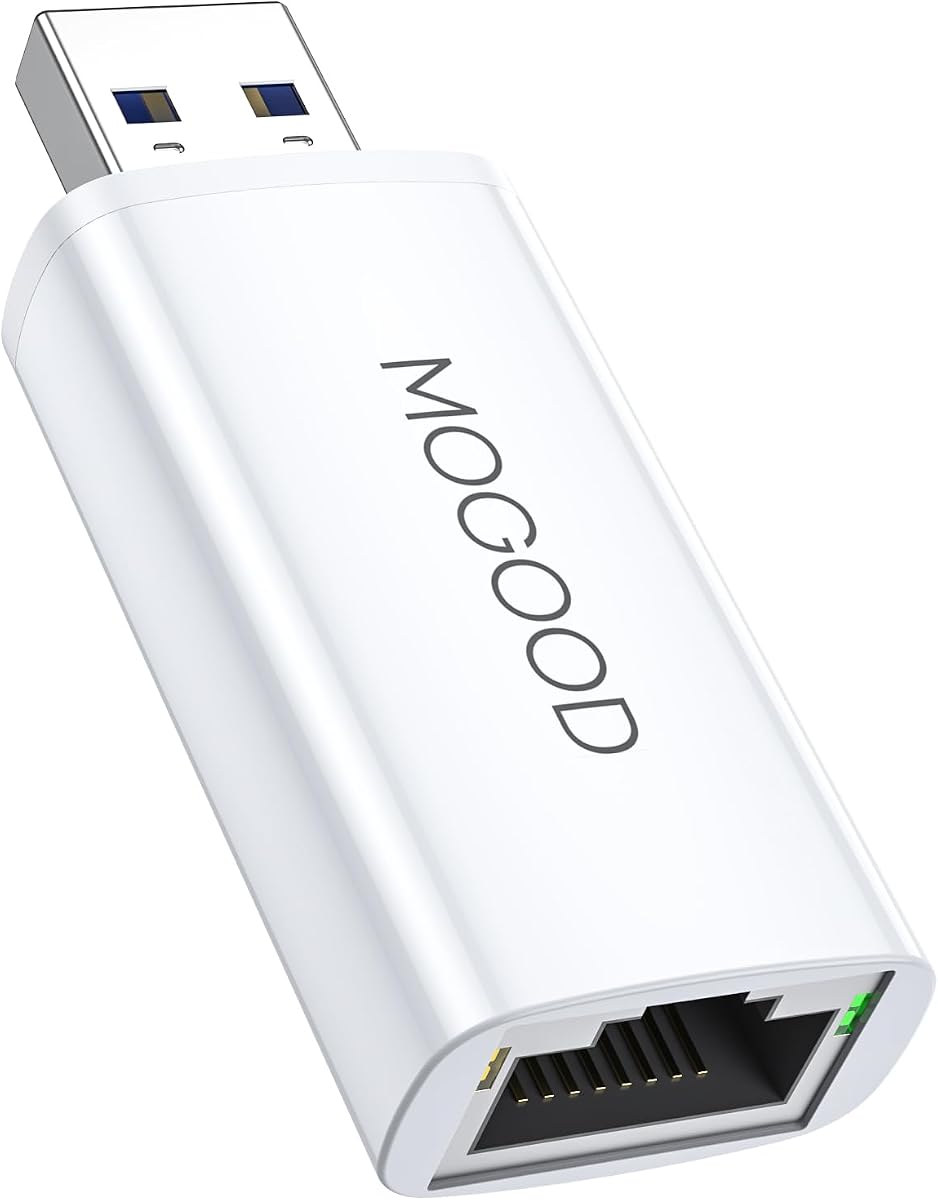
The MOGOOD USB 3.0 to Gigabit Ethernet Adapter is the most relevant option for a Fire TV Cube in this roundup. It uses a USB-A device connector rather than the micro-USB plug found on many Fire TV Stick adapters, while also supporting laptops, Chromebooks, Macs, Surface Pro devices, and the Nintendo Switch for wired connectivity.
We may earn a commission when you buy through this link, at no additional cost to you.
The adapter advertises up to 1000 Mbps Ethernet and uses a USB 3.0 interface that is backward compatible with USB 2.0. Installation is plug-and-play on most supported systems without a driver. This makes it a flexible wired networking accessory for a home setup that includes several types of devices.
It should not be treated as a universal Fire TV Stick solution. Fire TV Sticks typically connect through their dedicated micro-USB or USB-C ports rather than a standard USB-A host connection. The product information specifically names Fire TV Cube compatibility, making it important to distinguish the Cube from the Stick family. The listed operating environments include Windows, Mac, and Chrome OS.
This adapter is best for a Fire TV Cube owner seeking gigabit Ethernet, or for a household that wants one adapter for several USB-capable devices. It is not the appropriate selection for a Fire TV Stick with a micro-USB connector.
Unlike the compact Stick adapters, this unit uses a standard USB 3.0 connection. That opens the possibility of using it with the Fire TV Cube and other USB-capable computers rather than restricting it to a dedicated streaming-stick connector.
The broad compatibility list makes the adapter useful beyond the television. A single wired networking solution can support a Fire TV Cube, laptop, Chromebook, Mac, Surface Pro, or Switch, depending on the device's available port and system support.
We may earn a commission when you buy through this link, at no additional cost to you.
The right Ethernet adapter depends first on your Fire TV hardware, then on the network, power arrangement, and installation space. These factors prevent a costly mismatch and help you select a model that works reliably without unnecessary complexity.
Fire TV hardware does not use a single universal connector. Most Fire TV Stick adapters in this guide use micro-USB, while the Fire TV Stick HD second generation requires USB-C. The MOGOOD option uses USB-A and is specifically listed for Fire TV Cube use. Inspect the port on the device you own and compare it with the product listing before ordering. A connector that looks broadly similar may still have a different shape or fit.
In short, verify the exact port and Fire TV generation first. Connector compatibility is the one factor that can make an otherwise capable adapter completely unusable.
A product name may mention one popular model while the compatibility notes contain essential exclusions. Some adapters exclude first-generation Fire TV Stick, later USB-C Fire TV Stick 4K Max models, Fire HD 10 tablets, Roku devices, and phones. Others support Chromecast or Google Home Mini hardware in addition to Fire TV products. Read the complete list rather than relying on the headline title, and compare every model number you own.
In short, the fine-print compatibility list is more useful than a broad product description. Make sure your exact streaming device appears without being contradicted by an exclusion.
Options in this guide range from 10/100 Mbps to 1000 Mbps, with one USB-C model supporting up to 480 Mbps and one USB-A product claiming gigabit Ethernet. Higher adapter speed can offer more headroom on a fast local network, but it does not guarantee faster streaming. The Fire TV, router, internet plan, server, and application all influence the final result. Most standard streaming use does not require the full 1000 Mbps figure.
In short, prioritize a stable connection first and treat speed as a secondary factor. Do not pay for extra capacity unless your network and devices can realistically benefit from it.
Some adapters draw power from the Fire TV connection, while others include or recommend a separate USB power lead. The UGREEN model includes a 3.3-foot USB-A power cord and requires a suitable wall charger above 5 watts. Other products specifically recommend an additional power cable for stable performance. Consider where the television's power outlet is, whether a nearby charger is available, and how many cables you are willing to manage behind the screen.
In short, choose a power method that suits your room. A direct adapter is tidier, while a separate powered connection may be more reliable or offer better placement flexibility.
The Ethernet lead must reach from the television to the router or a nearby network switch, while the power connection must also be usable. Short or rigid arrangements can pull the Fire TV's connector downward, especially with heavier Ethernet cables. Adhesive mounting pads included with some adapters can keep the unit in position. Longer power cables, such as the UGREEN model's 3.3-foot lead, may provide more freedom when the outlet is poorly positioned.
In short, measure the available space before ordering. A secure, unrestrained installation is more reliable than one where the adapter and cables are left hanging.
An LED indicator can show whether the adapter is receiving power or maintaining an active link. This information is valuable during setup because it helps distinguish a physical connection issue from a software or Wi-Fi configuration problem. Adapters with status lights are particularly helpful if the television is difficult to reach or the router is in another room. The feature does not replace network troubleshooting, but it makes the first diagnostic step faster.
In short, a visible status light is a useful, low-effort troubleshooting feature. It is especially valuable for installations where accessing the Fire TV settings is inconvenient.
Streaming devices can operate for long periods, making heat management relevant to sustained reliability. Several adapters in this guide use aluminum alloy housings intended to dissipate heat. Cable routing, adhesive mounting, and a stable position also affect how the connector handles strain. A compact adapter may be attractive, but a larger housing with room for heat dissipation can be beneficial if the device runs near a warm television cabinet.
In short, favor a design that dissipates heat and keeps the connector stable. Long-term reliability depends on both electronics and physical installation.
Every option described in this guide emphasizes a plug-and-play approach without requiring software drivers. This is a major convenience for Fire TV users because navigating a desktop-style driver installation on a television can be difficult. The usual process is to connect the adapter and Ethernet cable, allow the device to detect the wired network, and complete any sign-in steps that appear on screen. Simplicity does not guarantee that every connection problem is solved, but it reduces setup variables.
In short, a driver-free adapter is strongly preferable for a television. Confirm that the Fire TV recognizes Ethernet, then select the wired connection through the normal network settings.
Begin by identifying the connector on your Fire TV device and comparing it with the adapter. For a micro-USB model, confirm that the shape and width match and that the Fire TV model is not excluded by the listing. For the Fire TV Stick HD second generation, use a USB-C Ethernet adapter. A Fire TV Cube owner with a suitable USB port should verify the MOGOOD USB 3.0 option and confirm operating-system support.
Connect the adapter to the Fire TV, then run a standard Ethernet cable from the adapter's RJ45 port to the router or network switch. If the product includes or recommends a power cable, connect it to the specified wall charger or other approved power source. Do not substitute a television USB port for a power connection when the instructions call for a wall charger above 5 watts. Once connected, open the Fire TV network settings, select the wired Ethernet option, and complete any router authentication if prompted.
Position the adapter so it does not pull against the Fire TV's port. Use the included adhesive pads where available, route the Ethernet cable without sharp bends, and leave enough space for air circulation around the housing. Periodically check the connector, status light, and cable for movement or heat-related wear. If the network is not detected, reseat both ends, confirm the cable is working, and verify that the Fire TV has selected Ethernet before changing other settings.
Most Fire TV Stick models in this guide use a micro-USB Ethernet adapter, but the Fire TV Stick HD second generation uses USB-C. Check the port on the streaming stick and the complete compatibility list before buying. Do not assume that a micro-USB adapter will fit the newer oval-shaped USB-C connector.
An Ethernet adapter can eliminate buffering caused by weak, congested, or unstable Wi-Fi because the connection is direct and consistent. It cannot prevent delays caused by slow internet service, limited streaming servers, device performance, or other factors outside the network path. A wired connection removes a common source of interruptions but does not guarantee flawless playback in every situation.
It depends on the model. Some products can use the Fire TV's power adapter, while others include a USB power lead or recommend additional power for stable performance. The UGREEN adapter specifically requires a USB wall charger above 5 watts rather than a television USB port. Follow the instructions for the exact adapter you select.
A 1000 Mbps adapter provides more theoretical headroom, but it will not automatically make every stream faster. Streaming quality usually depends on the internet plan, router, Fire TV model, and content server. A stable 100 Mbps wired connection can still be suitable for many standard streaming uses, so connector fit and reliable installation often matter more than the headline speed.
Several micro-USB adapters in this guide also list compatible Chromecast generations or Google Home Mini devices. However, compatibility varies because newer Chromecast products may use USB-C. Check the specific model and port, especially when a product explicitly excludes Chromecast with Google TV or other USB-C hardware.
The adapters reviewed here are described as driver-free and plug-and-play. After connecting the hardware and Ethernet cable, the Fire TV should recognize the wired connection through its normal network menu. You may still need to sign in, enter network credentials, or confirm the Ethernet setting on the television.
Start by checking that the connector fits and that the exact device model is supported. Reseat the adapter, verify that the Ethernet cable reaches an active router port, and confirm the recommended power arrangement is in place. If it still does not appear, restart the Fire TV and review the network settings for an Ethernet option. Longer or newer USB-C models may require a different adapter.
The hardware may physically support reconnection, but each Fire TV device generally needs to be connected and configured at the same time to use Ethernet. The adapter's connector type must also match every device you intend to use. With a single adapter, swapping between products means unplugging and reconnecting the Fire TV and completing network selection on the new device.
The Micro-USB Ethernet Adapter for Amazon Fire TV Devices is the strongest overall choice for broad Fire TV compatibility and a simple powered setup. The Micro USB RJ45 Adapter earns best budget status with its 4.7 rating, driver-free operation, aluminum housing, and mounting support. For a compatible micro-USB device on a fast network, the ELECTOP 1000 Mbps model offers the most premium speed specification and physical protections.
Before choosing, verify the connector and exact model more carefully than any other feature. USB-C Fire TV Stick HD owners should focus on the dedicated right-angle USB-C option, while Fire TV Cube owners with a suitable USB-A port can consider the MOGOOD gigabit adapter. For everyone else, select the micro-USB model that offers the preferred speed, power method, mounting solution, and device list.
Product availability, specifications, and prices can change over time, and household network conditions vary. Review the current listing and compatibility notes before purchasing, then check the Fire TV's network menu after installation. A properly matched and securely positioned adapter can provide a more consistent home for streaming, downloads, and other connected Fire TV activity.