
PG-275XL CL-276XL 3-Pack
4.9Editor score
Two black and one color
Up to 1,300 pages
Broad PIXMA compatibility
Discover the best Canon PG-275 and CL-276 printer ink options, comparing genuine cartridges, compatible multipacks, yields, compatibility, and value.
Canon PG-275 and CL-276 ink cartridges support several PIXMA inkjet printers, but the best choice depends on whether you prioritize genuine Canon components, higher page yield, cartridge quantity, or lower ongoing printing costs. The PG-275 supplies black ink, while the CL-276 supplies tri-color ink for documents, graphics, schoolwork, and color photographs.
This guide compares ten genuine and compatible PG-275 and CL-276 options, including standard and XL cartridges, two-packs, three-packs, and larger multipacks. We considered printer compatibility, stated page yields, black-to-color cartridge ratios, product construction, manufacturer status, and the practical needs of households, students, and home offices.
Each review explains the cartridge configuration, compatibility, yield claims, and most meaningful trade-offs so you can match the product to your printer and printing habits. Ratings and availability can change, and current prices vary by seller, promotion, and quantity, so compare the latest listing details before purchasing.
4.9Editor score
4.7Editor score

5.0Editor score
This side-by-side comparison covers genuine Canon cartridges, standard and XL yields, individual colors, and multipack configurations. The table highlights the practical differences that matter most: printer support, cartridge balance, estimated output, and whether the package is designed for light or heavy printing.




This two-cartridge pack combines a genuine Canon PG-275 black cartridge with a genuine Canon CL-276 color cartridge. Its 4.6 rating reflects a dependable option for owners of several supported PIXMA models who prioritize manufacturer authenticity and straightforward use over a large amount of ink on hand.
We may earn a commission when you buy through this link, at no additional cost to you.
The most appealing feature is the complete starter configuration. One black and one color cartridge cover ordinary documents, forms, worksheets, web pages, and color photographs without requiring separate shopping trips. Canon states that the PG-275 black ink produces crisp, sharp text, while the CL-276 color ink is designed for accurate color photos. Both cartridges yield up to 100 pages under the listed conditions.
Compatibility is a notable strength. The package supports the TS3520, TS3522, TR4720, TR4722, TS3720, and TS3722. Canon's FINE technology uses 6,000 or more nozzles within the print head to support efficiency, precision, and dependable results. Because these are genuine cartridges, the product is intended specifically for the printers with which Canon designed the ink.
The main drawback is capacity. A 100-page yield per cartridge may be restrictive for students, busy home offices, or anyone printing photographs in volume. Still, this pack is a sensible choice when printer reliability, recognizable Canon packaging, and simple one-black-one-color coverage matter more than minimizing replacement frequency. It is especially attractive as a first replenishment for a compatible standard-yield printer.
For users who want a complete, balanced genuine ink set, this is among the most straightforward picks in the guide. Confirm your exact printer model, keep the sealed cartridges in suitable storage conditions, and compare current pricing against the XL options if your page volume is high.
Using genuine Canon ink gives owners access to cartridges engineered for the supported PIXMA models. The package covers six named models across the TS3520, TS3720, and TR4720 families, reducing the chance of choosing a cartridge that the printer does not recognize.
The pack includes both the PG-275 black cartridge and CL-276 color cartridge. That makes it convenient for mixed printing, although users with high page demands may prefer the higher-yield XL configurations.
We may earn a commission when you buy through this link, at no additional cost to you.
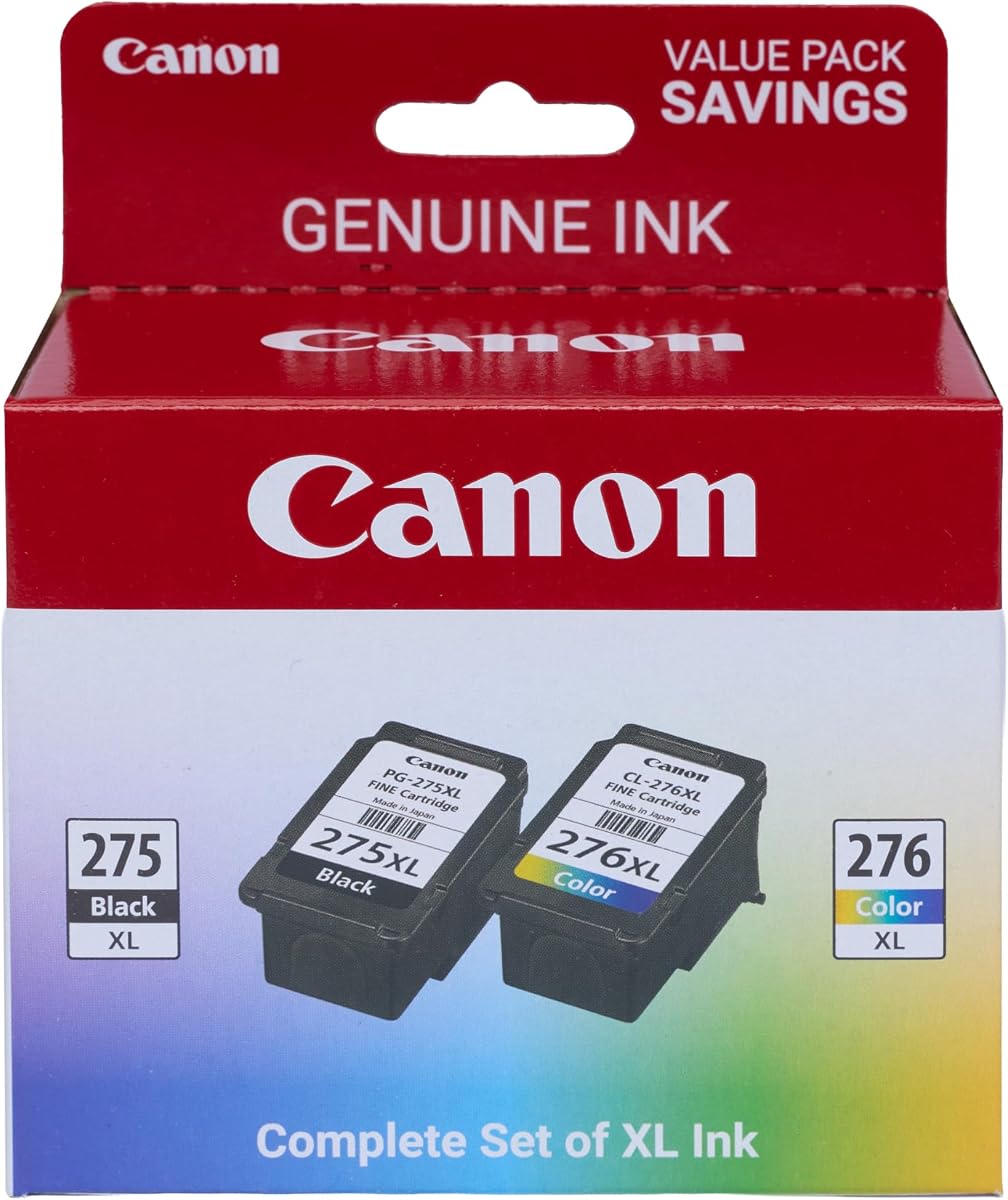
This genuine Canon XL value pack pairs the PG-275XL black cartridge with the CL-276XL color cartridge. It carries a 4.7 rating and stands out for combining manufacturer-verified cartridges with a listed yield of up to 300 pages per cartridge, making it a strong choice for regular home and office printing.
We may earn a commission when you buy through this link, at no additional cost to you.
The XL format is the defining benefit. Compared with the standard cartridges' listed yield of up to 100 pages, these cartridges can produce up to 300 pages each. That larger capacity means fewer replacements during term papers, recipes, invoices, worksheets, reports, and family photo projects. It also allows users to keep more ink reserved for a busy period.
Canon continues to emphasize the quality of genuine ink, including sharp black text and accurate color photographs. Its FINE nozzle technology is designed to improve efficiency, precision, and reliability. The same six-model compatibility list appears here as on the standard-value product, giving buyers a clear upgrade path without changing cartridge families.
The trade-off is the greater initial cost of the XL pair. A light printer that produces only occasional school notes or a few photographs may not use the added capacity quickly enough to justify it. There is also a risk of leaving ink unused if the printer sits idle for long periods or the owner changes printers.
Overall, this is the most balanced high-yield genuine package for a supported PIXMA printer. It is especially compelling for households that print several times a week, students completing assignments, and small offices producing recurring color and black documents. For infrequent use, the standard genuine pack may be more economical.
Each XL cartridge is listed at up to 300 pages, offering three times the stated yield of the standard PG-275 and CL-276. This helps reduce interruptions and provides a larger on-hand reserve for documents that contain substantial text or images.
Because the cartridges are genuine Canon products, they are designed around Canon's ink and printer systems. That can appeal to buyers who prioritize consistent recognition, sharp text, and color output over the lower upfront cost of a compatible alternative.
We may earn a commission when you buy through this link, at no additional cost to you.
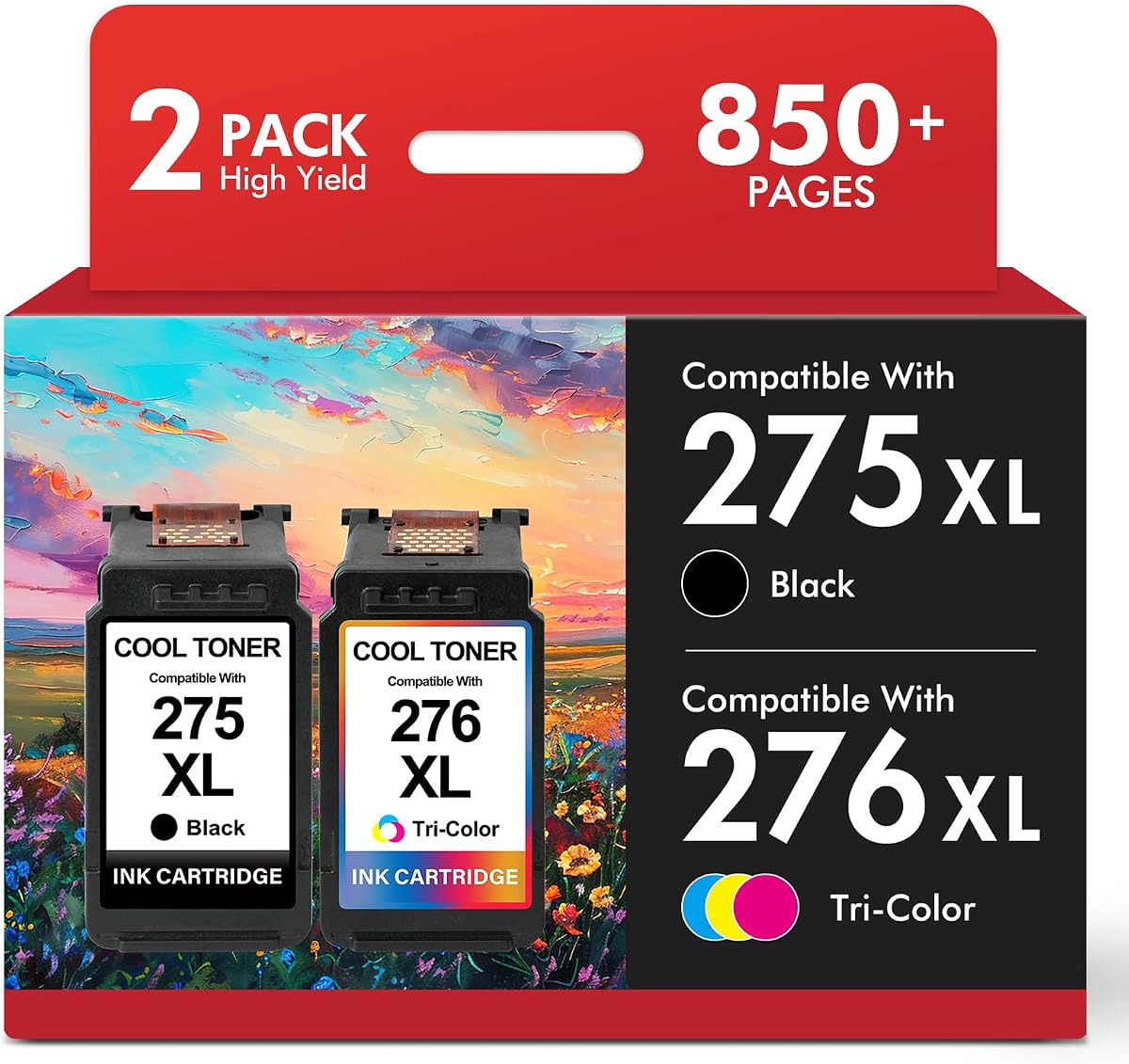
This compatible two-cartridge set supplies one PG-275XL black cartridge and one CL-276XL color cartridge for a broad range of PIXMA models. Its 4.4 rating makes it a practical alternative for cost-conscious buyers, especially those who print many black-and-white pages but need occasional color output.
We may earn a commission when you buy through this link, at no additional cost to you.
The cartridge configuration is sensible. The black cartridge is stated to yield up to 450 pages at 5% coverage, while the color cartridge is listed at up to 400 pages. A smart chip is included in each cartridge and is designed to help the printer recognize the product and display ink levels. That feature is particularly useful for avoiding uncertainty around cartridge status.
The stated compatibility list includes the TS3520, TS3500, TS3522, TR4720, TR4700, TR4722, TR4723, TR4725, TS3720, and TS3722. This broad range gives the package an advantage over listings that support only one model or a single printer series. The manufacturer also advises checking the exact printer model before ordering.
The principal trade-off is that this is a compatible product rather than a genuine Canon cartridge. Print results, yield, and color consistency can differ from genuine ink, and buyers should interpret advertised page counts as estimates based on stated coverage. The different black and color yields may also leave the color cartridge underused in a text-heavy environment.
This pair is a compelling choice for a compatible printer when keeping the initial outlay manageable matters. It is best for users who can accept a non-genuine product in exchange for a smart chip, broad model support, and substantial stated capacity. Check the printer model carefully and compare the latest cost per printed page before finalizing.
Each cartridge includes a smart chip intended to support printer recognition and accurate ink-level displays. The chip can make cartridge management more convenient, although users should still install the products according to the printer and cartridge instructions.
The listed 450-page black yield is particularly useful for essays, invoices, and school assignments. Color output remains available for graphs, family photographs, and projects, making the pair practical for a mixed but predominantly text-focused workload.
We may earn a commission when you buy through this link, at no additional cost to you.
This three-cartridge compatible package contains two PG-275XL black cartridges and one CL-276XL color cartridge. The 4.6 rating reflects a well-received configuration for compatible PIXMA users who print many black-and-white documents and want more black ink in reserve.
We may earn a commission when you buy through this link, at no additional cost to you.
The two-black, one-color arrangement is the feature most likely to influence a purchase. Black is the working color for essays, reports, forms, invoices, and web pages, so a larger black allocation can be more useful than a balanced color count. The listing states up to 400 pages per black cartridge at 5% coverage on A4 paper.
Upgraded chips are designed to promote efficient compatibility, fast printer identification, and stable operation. The package supports the PIXMA TS3522, TS3520, and TR4720. Because the listing includes specific model references, buyers should confirm their exact printer rather than relying only on a broad family name.
The limitation is the single color cartridge in a three-pack. Users who regularly produce photographs or graphics may exhaust color sooner than black and need another replacement. It is also explicitly not an OEM product, so buyers seeking original Canon components should choose a genuine listing instead.
This combo is a sound choice for document-heavy households, students, and offices that print consistently in black and color only occasionally. Its two black cartridges reduce the frequency of color-focused restocking and keep spare black ink available. For balanced or color-heavy use, a two-color multipack may be more convenient.
Including two black cartridges directly addresses the cartridge that is usually consumed fastest in text-heavy environments. It also gives the user a ready spare when a large assignment, report, or batch of household forms is due.
The upgraded chips are designed to help the printer identify the cartridges and maintain steady operation. Actual recognition and ink-level behavior can depend on the specific printer, firmware, and installation, so users should follow the device prompts.
We may earn a commission when you buy through this link, at no additional cost to you.
The Canon Genuine PG-275 is a single black ink cartridge intended for the TS3520, TS3522, TR4720, TR4722, TS3720, and TS3722. Its 4.6 rating makes it a straightforward replenishment option for users who already own a compatible CL-276 and only need more black ink.
We may earn a commission when you buy through this link, at no additional cost to you.
Buying a single color-specific cartridge avoids unnecessary duplication. If your printer still has a functioning CL-276, the PG-275 is the only replacement needed for a black-ink refill. Canon describes the output as crisp and sharp black text for documents, while FINE nozzle technology supports efficiency, precision, and reliability.
The listed yield is up to 100 pages. That makes the cartridge appropriate for occasional printing, but heavy document users may find themselves replacing it more often than they would an XL cartridge. Its straightforward one-cartridge format is nevertheless convenient for extending ink without buying a paired package.
A buyer should not treat this as a complete ink set because no CL-276 color cartridge is included. It also requires a compatible printer, and the 100-page figure should be treated as an estimate rather than a promise. Genuine Canon packaging and construction distinguish it from compatible alternatives.
Choose the PG-275 when your color cartridge remains usable and your printing is mainly black text, forms, or drafts. It is a particularly convenient option for occasional users, while high-volume owners will find the XL or multipack configurations more efficient over the long term.
A single black cartridge lets you replenish only the ink you need. If the color cartridge remains usable, this avoids paying for a duplicate tri-color unit and keeps restocking simple.
Canon positions the PG-275 for crisp, sharp black text in documents. That focus makes it especially suitable for homework, forms, reports, invoices, and everyday office printing.
We may earn a commission when you buy through this link, at no additional cost to you.
This compatible three-pack includes two PG-275XL black cartridges and one CL-276XL color cartridge. With a 4.9 rating, it is the strongest-rated product in this guide and an attractive bulk option for supported PIXMA printers that see regular use.
We may earn a commission when you buy through this link, at no additional cost to you.
The package is unusual but useful: two black cartridges and one color cartridge, rather than an equal split. The listing states up to 450 pages for each black cartridge and up to 400 pages for the color cartridge, producing a total claimed yield of 1,300 pages. The configuration strongly favors black output, which is beneficial for schools and offices.
Compatibility spans numerous TS3500, TS3700, TR4700, and related models, including the TS3520, TS3522, TS3720, TR4720, TR4722, and TR4723. The product is presented as a high-yield replacement designed for smooth installation, sharp results, and reduced replacement frequency.
The trade-off is that this is a compatible cartridge rather than genuine Canon ink. Some users may prefer the tighter manufacturing relationship and expected output consistency associated with an original cartridge. Its color allocation is also uneven, so a color-heavy user could run out of tri-color ink while black remains available.
For a text-heavy user seeking one bulk purchase, this is a particularly compelling configuration. It combines a high rating, generous stated yield, and a practical black-heavy ratio. Confirm that your printer is included, compare current cost with genuine multipacks, and consider whether your printing mix justifies storing an extra black cartridge.
Buying three cartridges in one package can reduce the frequency of individual reorders. The two black units provide a useful reserve for assignments and office documents, while the color cartridge covers graphics and photographs.
The model list covers several members of the TS3500, TS3700, and TR4700 families. Buyers should still verify the exact model on the printer because listings can combine multiple compatible series in a single title.
We may earn a commission when you buy through this link, at no additional cost to you.
This compatible two-pack includes one PG-275XL black cartridge, one CL-276XL color cartridge, and a user guide. Its 4.6 rating makes it a balanced, high-yield option for owners of the many PIXMA models named in the listing.
We may earn a commission when you buy through this link, at no additional cost to you.
The package provides a useful one-black, one-color configuration. The black cartridge is stated to yield up to 450 pages, and the color cartridge up to 400 pages at 5% coverage on A4 or letter paper. Those figures make it suitable for users who want fewer replacements without buying three or four cartridges.
Compatibility includes the TS3520, TS3522, TS3700, TS3720, TS4700, TR4720, TR4722, and TR4723, giving the product broad reach. The included guide may help first-time compatible-cartridge users with setup, although the printer's own manual remains the primary installation reference.
This is explicitly a non-OEM product, and the listing does not claim the upgraded or smart-chip features found in some competing compatible packs. Print characteristics and real-world yield may vary from genuine Canon cartridges, so buyers seeking maximum certainty about recognition and ink-level reporting should account for that difference.
The two-pack is a practical selection for mixed-color users who need substantial capacity from a smaller bundle. It works well for a compatible printer used for homework, household projects, reports, and occasional photographs. Verify the model, install the cartridges carefully, and compare the latest price with the genuine two-cartridge option.
One black and one color cartridge create a straightforward replacement set. Users do not need to calculate which color they need or manage an uneven multipack when the printer is already low on both types of ink.
The listed yields of up to 450 black pages and 400 color pages are useful for reducing replacement frequency. As with all page-yield claims, actual output varies with coverage, images, settings, and the documents being printed.
We may earn a commission when you buy through this link, at no additional cost to you.
This retail-packaged pair combines the Canon PG-275XL black cartridge, model 4981C001, with the CL-276XL color cartridge, model 4987C001. Its 4.7 rating makes it a strong choice for buyers who want genuine high-capacity Canon ink, particularly those who print and keep photographs.
We may earn a commission when you buy through this link, at no additional cost to you.
The standout feature is the ChromaLife100 system. The listing states that, when paired with the CL-276XL, the system helps protect photos from fading for up to 100 years in an album or 30 years behind glass. These are system-level longevity claims, and actual durability still depends on the image, paper, light exposure, humidity, and storage conditions.
The product is sold as two items in retail packaging, which can be appealing to buyers who prefer individually identifiable Canon components. The PG-275XL provides sharp black text, while the CL-276XL supplies the color ink used for photographs and graphics. This combination covers both major printing needs in one purchase.
The primary limitation is that high-capacity cartridges can be unnecessary for occasional users. If the printer is used lightly, the ink may remain in storage for a long time. Another consideration is that photo longevity is not guaranteed merely by owning the cartridges; quality paper, appropriate printer settings, and careful storage also influence the result.
Choose this pair for genuine Canon components, high-capacity printing, and photo projects where preserving color matters. It is particularly appropriate for family archives, scrapbooks, framed prints, and albums. Check your exact printer model and view the latest seller and price information before ordering.
The ChromaLife100 system is the central benefit for photo-focused users. Its listed fading-resistance goals make the color cartridge appealing for keepsake prints, provided photographs are stored away from direct light and in suitable conditions.
Separate model numbers and retail packaging help distinguish the black and color cartridges. This is useful for buyers who want confidence that they are receiving the intended Canon products rather than a mixed or unbranded multipack.
We may earn a commission when you buy through this link, at no additional cost to you.
This four-cartridge set includes two PG-275XL high-yield black cartridges and two CL-276XL high-yield color cartridges. Its 5.0 rating makes it the highest-rated option in the collection, while the balanced two-black, two-color configuration is designed for sustained home or small-office printing.
We may earn a commission when you buy through this link, at no additional cost to you.
The broad reserve is the defining benefit. Four cartridges reduce the need for frequent reorders and allow users to maintain a backup of both black and tri-color ink. Stated yields reach approximately 400 pages for each black cartridge and 300 pages for each color cartridge at 5% coverage, offering a substantial total on-hand supply.
The listing describes pigment-based black ink for sharp, smudge-free text and dye-based color ink for vibrant photos, graphics, and creative work. That chemical distinction aligns well with the likely use of the set: dense text and office documents on the black side, while color projects benefit from the tri-color cartridges.
This is a compatible alternative rather than an original Canon product, and it represents the largest upfront commitment among the ten options. Buyers should not choose it merely for its large quantity if their printing is light or if they place a high priority on original manufacturer components. Storing several cartridges for a long period can also reduce the value of the bundle.
For a compatible printer used consistently, the balanced reserve makes this a strong premium pick. It suits households that print recipes, school projects, work documents, and color photographs without wanting to reorder each type soon. Verify compatibility, compare the current bundle cost, and store unused cartridges properly.
Two black and two color cartridges provide a strong inventory without overloading one ink type. The result is convenient for mixed workloads that include formal documents, household projects, graphics, and photographs.
The set pairs pigment-based black ink with dye-based color ink. That combination reflects the product's stated emphasis on sharp, smudge-free text alongside vibrant color, although actual appearance depends on the document, paper, and print settings.
The packaging is described as recyclable, adding a practical consideration beyond cartridge capacity. Once opened, cartridges should be stored in a cool, dry location and used within a reasonable period to preserve print quality.
We may earn a commission when you buy through this link, at no additional cost to you.
The Canon Genuine CL-276 is a single tri-color cartridge for the TS3520, TS3522, TR4720, TR4722, TS3720, and TS3722. Its 4.7 rating makes it an attractive targeted refill for users who still have working black ink but need more color capacity.
We may earn a commission when you buy through this link, at no additional cost to you.
Buying only the color cartridge is the most efficient choice when the PG-275 remains usable. It avoids the cost and storage space associated with an unnecessary black refill, while restoring the ink needed for family photographs, school projects, charts, and everyday color documents. Canon describes the CL-276 as producing accurate, impressive color photographs.
The standard cartridge yields up to 100 pages. This gives it a more limited output than the XL version, but it remains a practical option for occasional color printing. Canon's FINE technology, which uses 6,000 or more nozzles within the print head, is designed to support precision, efficiency, and reliable results.
This is a color-only product, so users without black ink will need a separate PG-275 or PG-275XL. Actual yield depends on how much of the page is covered, and photos generally consume more ink than plain text. A printer warning should always be followed with the appropriate cartridge rather than an assumed model number.
The CL-276 is best for owners of a supported printer who mainly need color replenishment and prefer genuine Canon ink. It is simple, targeted, and avoids unnecessary duplication. For frequent photo or project printing, an XL color cartridge may provide fewer replacements, but this genuine standard cartridge remains a sensible choice for lighter color use.
The single CL-276 cartridge is convenient when the black cartridge is still usable. It restores color output for photographs, graphs, recipes, and assignments without adding an unnecessary black refill.
As a genuine Canon cartridge, the CL-276 is designed for supported Canon printers and positioned around accurate color photographs. Paper choice, print settings, and image quality still influence the final appearance.
We may earn a commission when you buy through this link, at no additional cost to you.
The right ink depends first on exact printer compatibility, then on whether you value genuine Canon components, cartridge yield, color usage, or the convenience of a multipack. Use the model number, expected print volume, and type of documents to narrow the options before comparing current seller listings.
PG-275 and CL-276 cartridges are used with specific PIXMA models rather than every Canon printer. The listings in this guide repeatedly name the TS3520, TS3522, TS3720, TR4720, and TR4722, while some compatible products add models such as the TS3500, TS3700, TR4700, TR4722, TR4723, and TR4725. Locate the model number on the printer, compare it with the product's supported list, and avoid assuming that a similar Canon ink model will work. A mismatch can prevent installation, produce an ink warning, or lead to poor cartridge recognition.
Genuine Canon cartridges are made by the printer manufacturer and are specifically positioned for compatible Canon systems. Compatible cartridges are produced by other brands and may offer a lower upfront cost, larger multipacks, or a different balance between black and color ink. The deciding factors include your budget, confidence in exact output, need for original packaging, and willingness to troubleshoot cartridge recognition. Genuine products are often preferable when reliability and manufacturer-designed performance are priorities, while compatible products can be sensible for cost-conscious buyers with compatible printers.
The standard PG-275 and CL-276 cartridges are listed at up to 100 pages each, while the genuine XL value pack is listed at up to 300 pages per cartridge. Compatible XL products state different estimates, including 400 or 450 pages for black and 400 pages for color in certain configurations. These figures are based on stated coverage and do not guarantee identical real-world output. Page yield matters most when you print regularly; for occasional use, a smaller cartridge may be more practical, especially if you want to avoid ink aging in storage.
A one-black, one-color pack is the simplest balanced choice, while a two-black, one-color set is optimized for text-heavy work. Four-cartridge sets provide the largest reserve and balance both ink types equally. Consider the ratio of black pages to color pages you actually produce. School assignments, invoices, and reports place heavier demand on black ink, while family photographs and creative projects can consume color more quickly. Choosing the wrong mix may leave unused cartridges on hand even when another color needs replacement.
The most useful comparison is not simply the cost of a package but the estimated cost of the pages you need. Divide the current package cost by the combined listed yield, then consider that image-heavy documents use more ink than text pages. A multipack may offer better value for heavy users, while a single cartridge can be more economical if it prevents unused ink from sitting for months. Compatible cartridges often have attractive bulk yields, but genuine cartridges may provide more predictable recognition and user confidence. Compare current prices, package sizes, and yields together.
Some compatible cartridges advertise upgraded or smart chips designed to help the printer identify the cartridge and display ink levels. This can be a meaningful convenience, but it does not guarantee identical performance to genuine Canon ink. Look for clear installation instructions, warnings against improper chip contact, and printer-model guidance. If your priority is the least uncertainty around recognition and status reporting, a genuine product is generally the simpler choice. If you select a compatible option with a smart chip, install it exactly as directed and allow the printer to complete its setup sequence.
Black ink is central to sharp, dense text, while the CL-276 tri-color cartridge is needed for photographs, graphics, and colorful documents. The Canon retail pair highlights the ChromaLife100 system and its listed photo-fading resistance, making it relevant to users who preserve prints in albums or behind glass. Other compatible options emphasize sharp text, vibrant color, and high yields. No cartridge can guarantee a particular photographic result by itself; paper, settings, image source, storage, and exposure all contribute. Choose based on the output you create most often rather than on a single maximum page figure.
Buying the largest multipack is not always the best choice for a rarely used printer. Sealed cartridges should be kept in their original packaging and stored in a cool, dry environment away from direct sunlight and temperature extremes. Once installed, cartridge life depends on how frequently the printer is used and how often the print head is cleaned. Plan replacements around actual warning messages and routine use, and avoid keeping a large reserve indefinitely. A balanced two-pack may offer the best compromise between convenient restocking and limited long-term storage.
Before installation, confirm the cartridge model and exact printer model, then read the printer's current ink warning and setup instructions. Open the package carefully without touching the copper contacts, chips, nozzles, or electrical contacts. Do not shake or alter the cartridge unless the manufacturer specifically instructs you to do so, and avoid touching the bottom surface where the print head is located. Prepare both the printer and cartridge as directed before beginning installation.
Install the black or color cartridge into the correct slot and ensure it clicks securely into place. A compatible cartridge may include a smart or upgraded chip, so do not press on or damage that component while closing the cover. Turn on the printer and allow it to recognize and configure the ink. If a message appears, follow the on-screen prompts rather than repeatedly removing and reinstalling the cartridge. Run the printer's alignment or cleaning process only when prompted, since unnecessary cleaning consumes ink.
Use compatible print settings for the paper and document type, and store opened cartridges according to the packaging instructions. Keep the printer on a stable, level surface, avoid extended periods of unused ink in extreme conditions, and use the printer regularly if it is prone to clogging. When replacing an ink, change only the color that the printer reports as low. For a long-term backup, retain sealed cartridges in their original packaging in a cool, dry place and check the manufacturer guidance for storage temperature and duration.
No. The PG-275 contains black ink, while the CL-276 contains tri-color ink for photos and color documents. Most printers that use these cartridges need both installed, although you can buy either one separately when only that color is running low. The XL versions are PG-275XL and CL-276XL.
The products in this guide repeatedly identify the PIXMA TS3520, TS3522, TR4720, TR4722, TS3720, and TS3722 as compatible models. Some compatible listings also include models from the TS3500, TS3700, and TR4700 families. Check the exact model number printed on your printer because compatibility can differ within a series.
Genuine Canon cartridges are designed and marketed by the printer manufacturer, which can provide greater confidence in recognition, output consistency, and photo performance. Compatible cartridges may be less expensive, offer larger multipacks, and provide attractive stated yields. The better choice depends on your printer, budget, printing volume, and tolerance for troubleshooting.
The genuine standard cartridges are listed at up to 100 pages, while the genuine XL value pack is listed at up to 300 pages per cartridge. Compatible products state various estimates, including up to 400 or 450 black pages and 400 color pages for some XL configurations. Real output varies with coverage, images, settings, and the documents being printed.
The PG-275XL and CL-276XL cartridges are intended for the same broad families of supported PIXMA models, but you should still verify the exact printer model before buying. Compatibility also depends on the cartridge itself, so confirm that the listing clearly identifies both the printer model and the XL cartridge numbers.
A two-pack is a good choice for moderate use because it includes both ink types without creating a large storage commitment. A three-pack with two black cartridges suits text-heavy printing, while a four-cartridge set offers the greatest reserve for frequent users. If you print only occasionally, a single black or color cartridge may prevent unused ink from aging.
First, confirm that the cartridge model and printer model appear on the product listing. Installation problems can also result from damaged contacts, an improperly seated cartridge, a cover that was closed before setup finished, or a printer that needs a reset. Follow the on-screen cartridge error instructions, clean the relevant contact area according to the manual, and reinstall only as directed.
Keep sealed cartridges in their original packaging and store them in a cool, dry place away from direct sunlight, moisture, and extreme temperatures. Once opened or installed, consult the cartridge and printer instructions for storage guidance. Avoid buying a large multipack for a printer that will remain unused for months, since ink condition can change with time and environmental exposure.
The best overall balance of genuine construction, compatibility, and convenience is the Canon PG-275 / CL-276 Value Pack for light-to-moderate printing. For users who want genuine ink and fewer replacements, the Canon XL Value Pack is the stronger choice. The compatible three-pack stands out for bulk value, while the four-cartridge set serves high-volume users who want a balanced reserve of both colors.
Prioritize exact printer compatibility before anything else, then choose between genuine and compatible ink based on your budget and confidence requirements. Consider the cartridge mix, especially whether you use more black pages than color pages, and compare realistic page output rather than relying on maximum estimates alone. For occasional printing, a smaller purchase may be more sensible; for frequent document or photo output, XL cartridges or multipacks reduce restocking interruptions.
Finally, check the current listing, seller, package configuration, and price before purchasing because availability and prices can change. The products in this guide cover single cartridges, balanced pairs, black-heavy multipacks, and a larger four-unit reserve, giving you practical options for nearly any compatible PIXMA printing routine.