
Kensington Combination Nano Lock
4.3Editor score
Slim head for nano slots
Four-digit resettable combination
Five-foot carbon steel cable
Discover the best laptop lock cables for 2026, comparing compatibility, lock type, cable length, anchoring options, portability, and security for desks and
Laptop lock cables help protect computers, tablets, and other portable electronics from opportunistic theft in offices, schools, cafes, hotels, and shared workspaces. A useful cable must match the device's security slot, connect securely to a fixed anchor, and provide enough cable length to work without restricting access to essential ports.
We compared the ten products in this guide by examining supported devices, standard, nano, wedge, and alternative attachment methods, keyed or combination mechanisms, cable construction, cable length, portability, and the degree of hardware security each model offers. The list includes established Kensington systems, universal adapters, and adhesive-anchor solutions for devices without a native security slot.
Each review explains the strongest use case, important compatibility limitations, and practical trade-offs so you can choose by device type rather than by appearance alone. Ratings reflect the supplied customer feedback, while product listings and market conditions can change, making it sensible to verify current specifications, availability, and cost before buying.
4.3Editor score

4.9Editor score
4.5Editor score
The side-by-side comparison highlights each cable's attachment method, locking mechanism, reach, and best-fit devices, making it easier to identify a model that matches your equipment and intended workspace.


The Kensington Combination Cable T-Bar Standard Lock, model K64673AM, is a well-rounded cable lock for laptops and other electronics using a standard Kensington security slot. Its supplied rating is 4.4 out of 5, reflecting generally favorable customer feedback. The combination mechanism removes the need to carry a key, while the six-foot carbon steel cable offers useful reach for anchoring to a desk, table, or another fixed structure.
We may earn a commission when you buy through this link, at no additional cost to you.
The lock head is designed for the familiar standard Kensington slot found across many HP, Lenovo, Acer, and Asus devices, as well as compatible desktops, monitors, docking stations, projectors, and hard drives. A push-button design supports one-handed engagement, and the resettable four-digit code provides 10,000 possible combinations. The rotating connection and cut-resistant cable make it practical for everyday shared workspaces where convenience matters as much as basic theft deterrence.
Compatibility is the central limitation. This model does not fit Dell or Alienware wedge-style slots, and certain 2016 and newer Dell laptops and tablets with Noble slots are also incompatible. Kensington identifies K68008WW and K64440WW as alternatives for those systems. It is therefore important to check the exact slot in your device rather than assuming every laptop accepts the standard T-bar configuration.
This is a strong choice for a conventional office laptop that has a full-size Kensington slot and for users who prefer a resettable combination over a keyed lock. It is less suitable if your equipment uses a nano, mini, or wedge slot, or if it lacks a native security opening altogether. For the right device, it offers a balanced combination of straightforward operation, portable size, and dependable physical deterrence.
The four-wheel resettable code can be set to a value you remember without carrying a key in a bag or pocket. This makes the lock especially convenient for daily commutes, shared offices, and locations where keys are easily misplaced.
Its strongest advantage is compatibility with the widely used standard Kensington slot. Check the device specifications for a Kensington security slot, and also confirm that no Dell-specific wedge or Noble-style opening is involved.
We may earn a commission when you buy through this link, at no additional cost to you.
The Kensington N17 Dell Laptop Computer Lock, model K68008WW, is a purpose-built answer for Dell and Alienware laptops with a wedge-type security slot. It carries a supplied rating of 4.3 out of 5. Rather than trying to accommodate every connector design, it focuses on a specific slot style and gives compatible Dell users a secure, familiar way to tether a computer.
We may earn a commission when you buy through this link, at no additional cost to you.
Its resettable four-digit combination offers 10,000 possible combinations, eliminating the inconvenience and loss risk associated with a physical key. The push-button design allows one-handed engagement, while the unique lock engagement creates a firm connection between the lock head and compatible slot. A six-foot carbon steel cable resists cutting attempts and can run around a desk, table, or other fixed point.
The trade-off is specialization. This cable is intended for Dell and Alienware systems using wedge-style openings and may not suit standard Kensington, nano, mini, or Noble slots. Users with several devices across different brands may need to identify each connector before purchasing or consider a more universal model such as the Sendt lock listed later in this guide.
Choose the N17 when your primary device is a compatible Dell or Alienware laptop with the wedge slot. It offers a more tailored fit than a generic universal cable and avoids adhesive mounting on the device. For business fleets, it is also straightforward to standardize on this model after confirming the security slot used across the managed devices.
The N17 addresses a common source of buyer frustration: cables that fit most laptops but leave Dell wedge-style systems unusable. Confirming the exact slot before buying avoids the need for an additional adapter or alternative lock.
The resettable code provides quick daily access and 10,000 possible combinations. Users should select a code they can remember and record it securely, especially if it will be used away from a home or office.
We may earn a commission when you buy through this link, at no additional cost to you.
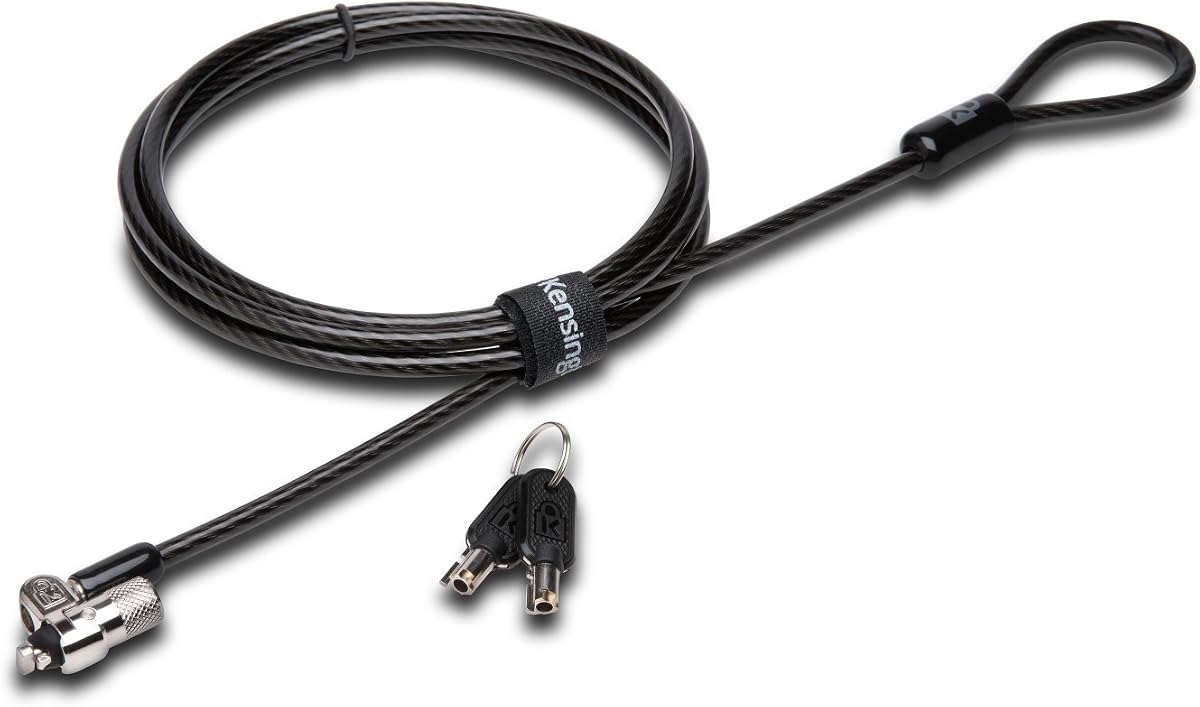
The Kensington T-Bar Standard Keyed Lock, model K65035AM, combines a traditional keyed mechanism with modern anti-pick engineering and a compact pivoting head. Its supplied rating is 4.5 out of 5, the highest rating among the established Kensington selections in this comparison. It is positioned for standard Kensington-equipped laptops and other compatible electronics used in fixed workspaces.
We may earn a commission when you buy through this link, at no additional cost to you.
The hidden pin tubular lock uses patented anti-pick technology, while the smaller, stronger 10 mm pivoting lock head is designed to fit thin devices without compromising accessibility. A six-foot carbon steel cable is covered by a plastic sheath to resist cutting attempts. A specialized hinge helps the cable avoid awkward angles, improving the experience of locking, unlocking, and repositioning the computer.
The main drawback is that the keyed design requires you to manage a physical key. That is a minor inconvenience for a permanent workstation but may be less attractive for frequent travel. Compatibility exclusions also matter: the cable does not work with newer Dell wedge slots, some HP EliteBook X2 tablets and Chromebooks require the NanoSaver system, and other compact devices may use a different standard.
This lock is a strong premium-style choice for a business desk where the computer stays tethered and key control is important. It suits users who value anti-pick construction, a refined lock head, and broad standard-slot support. Review the device specifications and Kensington lock selector before purchase, particularly for newer Dell, HP, or unusually slim models.
Patented hidden pin technology strengthens the keyed mechanism against common picking techniques. It is a meaningful advantage for a permanent workstation where the lock remains connected to valuable equipment.
The compact pivoting head is intended to preserve access on thin laptops. Its hinge and rotating geometry also reduce awkward cable angles, making the cable easier to route behind a display or desk.
We may earn a commission when you buy through this link, at no additional cost to you.
The Kensington Desktop & Peripherals Locking Kit 2.0 is designed for a broader workstation environment rather than a single portable computer. It has a supplied rating of 4.3 out of 5. The kit can secure a desktop computer and compatible peripherals, while its anchor plate adds a way to protect equipment that does not have a native Kensington security slot.
We may earn a commission when you buy through this link, at no additional cost to you.
A strong lock head is paired with a 5 mm keying system using patented anti-pick hidden pin technology. The included adapters and cable trap help secure peripheral accessories, and the eight-foot carbon steel cable provides generous reach around desks, tables, and fixed structures. This makes the kit more useful for a permanent office, classroom, studio, or shared work area.
Its scope is also its main limitation. A desktop and peripheral kit may be excessive for someone who only wants to protect a notebook for a few hours in a café. The keyed mechanism requires key storage and coordination, and the anchor plate approach should be evaluated carefully for any equipment that might be moved or frequently repositioned.
The kit is most appropriate when a desk contains multiple valuable components, such as a desktop, external drive, docking equipment, or peripherals. It is particularly helpful where one equipment inventory includes devices with and without security slots. For a mobile laptop user traveling between locations, a compact combination lock may be simpler and easier to carry.
The adapters, cable trap, and anchor plate expand the kit beyond a basic laptop cable. That makes it useful for securing several stationary components that might otherwise be disconnected and carried away individually.
At eight feet, the cable offers more routing flexibility than most laptop-focused models. It can pass behind larger desks or connect equipment positioned farther from a central anchor point.
We may earn a commission when you buy through this link, at no additional cost to you.
The Hardware Security Cable Lock offers two ways to protect electronics: a conventional lock head for devices with a standard slot and an adhesive anchor plate for devices without one. It has a supplied rating of 4.3 out of 5. This broad approach makes it relevant to laptops, tablets, smartphones, monitors, projectors, and other electronics used in both mobile and semi-permanent setups.
We may earn a commission when you buy through this link, at no additional cost to you.
For devices with a standard security slot, the lock head inserts directly and the six-and-a-half-foot twisted steel cable loops around a fixed object. For devices without a suitable slot, the included adhesive plate can be bonded to a hard surface before the lock engages it. The stainless steel head rotates 360 degrees, helping accommodate different cable directions without forcing the device into an awkward orientation.
The adhesive method is the principal trade-off. Its effectiveness depends on the surface, the cleanliness of the bond area, and whether the device is subject to movement, heat, moisture, or frequent handling. The product information also notes that certain models may require the I3C adhesive security plate, so buyers should identify the attachment method their device needs before ordering.
This lock is most useful for a mixed collection of devices, particularly when some have standard slots and others need a plate. It offers a practical way to tether a tablet or phone in a public place, but permanent installations deserve careful surface preparation. Users wanting a more secure native-slot connection should favor a lock explicitly engineered for that exact slot.
The ability to use either a standard slot or an adhesive plate is the key advantage. It broadens the range of devices that can be secured, although native-slot attachment generally provides a more integrated result.
The 360-degree head helps the cable approach from different directions. This can reduce strain around the connection point and make it easier to position a device while it remains tethered.
We may earn a commission when you buy through this link, at no additional cost to you.
The Universal Laptop Security Lock is designed for laptops that lack a dedicated Kensington-style security slot. It uses an anchor adapter fitted into a 3.5 mm headphone or auxiliary port. The supplied rating is 4.1 out of 5, and the product offers an alternative approach to adhesive plates by creating a mechanical connection through a common port.
We may earn a commission when you buy through this link, at no additional cost to you.
Its resettable four-digit combination has 10,000 possible combinations and uses a flick-switch mechanism for fast setup. Installation involves plugging the adapter into the audio port, tightening its screw, and attaching the combination lock. The 1.7-meter cut-resistant steel cable provides ample reach and flexibility for tethering to a desk, table, or other fixed structure.
The significant limitation is obvious: the audio port becomes occupied while the lock is attached. Some newer or thinner devices do not include a 3.5 mm port, while others use a differently sized or multifunction connector. Because the adapter engages the jack rather than a purpose-built security slot, users should assess how the device rests while secured and whether the connector is likely to wear from repeated use.
This is a practical option for a compatible laptop without a native security slot, especially when adhesive mounting is undesirable. It works across major brands such as MacBook, Surface, Dell, and Lenovo models that include the required port. Check the device for a 3.5 mm opening before buying, and avoid using the adapter if the audio connection must remain accessible while the device is tethered.
The audio-port approach serves devices that cannot accept a Kensington-style connector. It avoids attaching an adhesive plate to the device, although it does occupy the headphone connection.
A 1.7-meter cable is longer than many portable laptop locks in this guide. That extra reach makes it easier to loop around a fixed structure while maintaining a sensible device position.
We may earn a commission when you buy through this link, at no additional cost to you.
The Kensington Combination Laptop Lock for Nano Size Security Slot, model K60214WW, is built for thin laptops that use a nano-sized connector. Its supplied rating is 4.3 out of 5. Compared with a full-size T-bar lock, the slim head is designed to let the computer lie flat and stable after connection.
We may earn a commission when you buy through this link, at no additional cost to you.
The five-foot, or 1.5-meter, carbon steel cable resists cutting attempts and includes an anti-shearing plastic sleeve to protect surfaces. A four-wheel resettable code provides 10,000 possible combinations, while the lock tip rotates 360 degrees and the cable pivots up to 90 degrees. Together, these movements help keep nearby ports accessible and make the device easier to connect.
The main constraint is slot specificity. A nano lock will not serve a laptop with a standard Kensington, wedge, mini, or other connector. Its five-foot cable is also shorter than several alternatives, so users need to identify a secure fixed object that is reasonably close to the computer. Checking the dimensions of the slot before purchase is essential.
This is an economical and straightforward choice for a compatible ultra-thin laptop used for short-term work away from home. It is especially appealing to people who do not want to carry a key. The rotating construction, low-profile head, and protective cable sleeve make it a comfortable choice for café tables, library desks, and shared workspaces.
The slim head is purpose-built for the tiny security slots found on many thin and compact laptops. It supports a stable setup without the bulk associated with a standard T-bar lock.
A 360-degree lock tip and 90-degree cable pivot allow the connection to approach the device from more than one direction. This is useful when an adjacent port or the laptop's resting position would otherwise be obstructed.
We may earn a commission when you buy through this link, at no additional cost to you.
The AboveTEK Laptop Lock is a mobile-device security kit centered on adhesive anchor plates and a keyed steel cable. It has a supplied rating of 4.4 out of 5. Two sets of adhesive stickers and anchor plates allow the system to secure more than one device, making it a practical choice for shared inventories of tablets, phones, notebooks, and other electronics.
We may earn a commission when you buy through this link, at no additional cost to you.
The anchor plates use industrial-grade 3M adhesive intended to bond to most flat surfaces. The six-foot galvanized steel cable is cut-resistant, while the high-quality stainless steel lock resists damage and supports smooth operation. Two keys are included, and the minimalist design is intended to permit quick installation in public libraries, cafes, restaurants, retail stores, and showrooms.
As with any adhesive security system, the result depends on surface preparation and environmental conditions. Dust, oils, moisture, heat, texture, and repeated movement can affect the bond. The anchor plate also adds a layer between the device and cable, and the lock mechanism protrudes where the device sits unless it is placed in a suitable stand. Users should test the surface and verify that the plate does not interfere with buttons, ports, or ventilation.
Choose this kit when devices need to be secured without a native lock slot and multiple items need coverage. It is less suitable for high-value equipment that requires a deeply integrated locking solution or for surfaces that cannot accept adhesive. Confirm the bond on a discreet test area, allow proper curing time, and keep the included keys in a controlled location.
The adhesive plates allow phones and tablets to be tethered without cutting a security opening or using an occupied port. They are particularly useful for temporary public demonstrations and shared-device programs.
Two anchor sets and two keys provide a broader deployment than a single-device adhesive lock. This is helpful in cafés, classrooms, libraries, and retail environments where several devices may need protection.
We may earn a commission when you buy through this link, at no additional cost to you.
The Kensington NanoSaver Combination Laptop Lock, model K60603WW, is a refined security option for selected ultra-thin HP, Lenovo, and Asus laptops with nano-sized slots. It has a supplied rating of 4.4 out of 5. The defining feature is a slim lock head that lets the device lie flat without blocking valuable ports or disrupting the user's workspace.
We may earn a commission when you buy through this link, at no additional cost to you.
The resettable four-wheel code offers 10,000 possible combinations. A pivoting, rotating cable head enables one-handed connection and flexible movement, while the six-foot carbon steel cable with a plastic sheath resists tampering and cutting. The product information also mentions a free online registration and retrieval program for recovering a forgotten combination, along with a two-year warranty and lifetime technical support.
Compatibility is narrower than the wording of many universal locks may suggest. The lock supports select HP, Lenovo, and Asus laptops and select Kensington docking stations, not every device branded with those names. Buyers should check the computer specifications to confirm that it has a nano-sized security slot. A visually similar opening may not have the correct dimensions or internal geometry.
This is a strong choice for a compatible ultra-thin business laptop that users carry between offices or travel locations. It balances a discreet profile, convenient combination access, and established hardware features. The registration program adds useful peace of mind because a forgotten code does not automatically mean the lock must be discarded.
The slim head is designed for compact security slots and allows the laptop to remain stable on a desk. It is a better fit for ultra-thin machines than a bulky standard T-bar lock.
The free registration program lets owners store their combination online for later retrieval. It is a useful safeguard for people who use a combination across multiple offices or travel frequently.
We may earn a commission when you buy through this link, at no additional cost to you.
The Sendt Black Universal Notebook Laptop Combination Lock is the broadest compatibility choice in this guide. It has the highest supplied rating at 4.9 out of 5 and is designed to work with common Kensington, wedge, nano, mini-saver, Noble wedge, and Samsung security slots. That makes it particularly useful for users who switch between laptops with different connector styles.
We may earn a commission when you buy through this link, at no additional cost to you.
The six-foot black cable is described as cut resistant, and the combination lock removes the need to carry a key. Installation is presented as straightforward, with no separate adapter specified for the listed slot formats. The broad design makes the cable easier to standardize across a mixed personal or business device collection without maintaining a separate lock for every computer.
Universal does not mean literally compatible with every possible connector. The product specification uses qualified language, including “most other” security slots, and unusual custom openings may still be unsuitable. Buyers should compare the actual opening on the device with the included connector or measure it before purchasing. A lock that enters the slot but feels loose would provide weaker security than a model designed precisely for that format.
This is our editor's choice for buyers seeking the most flexible approach across several device brands and slot formats. It combines a strong customer rating, a resettable combination, a practical cable length, and simple setup. For a mixed fleet or a user unsure which slot type a newly purchased laptop uses, it offers the most adaptable choice in the comparison.
Support for several popular connector styles reduces the need to identify and carry multiple locks. This is especially valuable for consultants, students, IT administrators, and households with a varied device collection.
The combination mechanism supports quick daily unlocking without a key. Its black finish and six-foot cable also suit buyers who want one cable to blend into a shared workspace setup.
We may earn a commission when you buy through this link, at no additional cost to you.
Choosing the right laptop lock cable starts with the device connector and ends with the way you will anchor it. Slot compatibility, lock type, cable construction, reach, portability, and the work environment all affect whether a cable is genuinely useful.
The most important step is identifying the exact opening in your device. Standard Kensington slots are relatively large, nano slots are much smaller, and Dell wedge or Noble slots have different internal geometry. A cable that appears to enter the opening may still fit poorly, so check the device specifications, support documentation, or manufacturer guide for the required connector type. Some adapters can cover several formats, but broad compatibility does not eliminate the need for verification.
Keyed locks provide a traditional mechanical barrier and can be useful when key issuance is controlled. Combination locks are more convenient for portable equipment because the owner does not need to carry a key. Resettable codes are especially helpful for people who use the same lock in several locations. The security of either approach still depends on the strength of the lock body, cable, attachment point, and the value and portability of the equipment being protected.
Cable length determines how easily you can loop around a fixed structure without leaving excessive slack. Five- and six-foot cables suit nearby desk legs, table frames, and compact work areas, while an eight-foot cable offers more routing flexibility for larger desks. A very long cable can be inconvenient to carry, and a short one may not reach a secure point without forcing the device into an awkward position.
A cut-resistant steel cable is a common feature among the stronger options listed here, while some also add a plastic sheath to reduce abrasion and protect nearby surfaces. Look for details such as carbon steel, galvanized steel, twisted steel, and a protective sleeve. Cable resistance should not be confused with complete theft immunity: a determined attacker may target the lock head, the device enclosure, the adhesive anchor, or the fixed structure instead of cutting the cable.
A cable is only as secure as its fixed endpoint. Some products loop around a desk or table, others include an anchor plate, and some use an adapter fitted to an audio port or an adhesive plate attached to a device. Desk anchoring generally avoids modifying the computer, while adhesive solutions broaden compatibility but depend on surface preparation and environmental conditions. Audio-port adapters occupy a functional connection and may not suit every device.
A secure lock can still be frustrating if it prevents you from using a port, prevents the laptop from lying flat, or forces the device into an unstable position. Pivoting lock heads, rotating cable tips, and slim profiles can improve access. Pay attention to where the security slot sits and which adjacent connectors are likely to be used. Thin laptops often need a nano or mini-style head, while universal connectors may require more clearance.
A permanent office lock can prioritize robust cable construction and controlled key access. A travel lock should be compact, easy to carry, and quick to unlock. Public retail, classroom, or café setups may benefit from multiple anchor plates or a long cable. High-security environments may require professional risk assessment and stronger anchoring hardware rather than relying on a consumer cable alone.
Combination locks should be paired with a secure record of the code, and keyed locks require a plan for spare keys. Some manufacturer programs allow users to register a combination for later retrieval, while others leave that responsibility entirely with the owner. Before deploying locks across an organization, decide how codes and keys will be issued, replaced, and revoked. This is particularly important when equipment changes hands frequently.
Begin by identifying the correct connector and testing it on the device before placing the computer in a public area. Connect the lock fully, confirm that it sits firmly in the security slot or adapter, and verify that it does not block frequently used ports. For adhesive plates, clean the selected flat surface, allow the adhesive to bond as directed, and position the device so the plate and lock do not interfere with buttons, speakers, ventilation, or display stability.
Secure the other end of the cable around a fixed structure that cannot be moved or removed easily. Route the cable to remove slack without creating sharp bends, and avoid allowing it to become a trip hazard or a point where someone can pull the device off the desk. After locking, open the device and test the ports and viewing angle. For combination locks, record the code in a protected location; for keyed models, keep the key accessible to authorized users but difficult to associate with the equipment.
Inspect the cable, connector, lock body, anchor plate, and fixed point periodically. Look for fraying, kinks, corrosion, loose screws, damaged adhesive, or a connector that no longer seats securely. Wipe the lock with a soft, dry cloth, keep moisture and debris away from the mechanism, and avoid pulling the device by the cable. Replace an adhesive plate if the bond weakens, and retire a cable if the sheath, steel core, or lock head shows visible damage.
Check the laptop specifications or manufacturer support guide for the security slot used on that exact model. Standard Kensington, nano, mini, wedge, and Noble openings differ in size and internal shape. If the documentation is unclear, compare the opening with the lock head dimensions or contact the device maker. Never force a connector into a slot, because a poor fit can damage the laptop or provide unreliable security.
A combination cable can be an effective theft deterrent when it has a solid lock head, steel cable, and secure anchor. It is especially useful for portable equipment because no key must be carried. No portable cable makes a device impossible to steal, however, so high-value equipment may require an internal lock, managed asset protection, or a fixed installation with a stronger anchor point.
It depends on the slot in the Dell device. Some Dell laptops use wedge-style or Noble-style openings that do not accept a standard Kensington T-bar connector. The Kensington N17 Dell lock is designed for compatible Dell and Alienware wedge slots, while the standard T-bar options require a standard Kensington opening. Always verify the exact model and slot before ordering.
Common alternatives include an anchor plate attached with industrial-grade adhesive or an adapter inserted into a 3.5 mm audio port. Audio-port adapters avoid adhesive placement but occupy the headphone connection and only work with devices that have the required port. For high-value equipment, a device-specific security solution or professional installation is generally more appropriate than relying on an adhesive attachment.
The ideal length is just enough to loop securely around a fixed object while leaving the laptop in a natural working position. Most portable models use five or six feet, which works well around standard desk legs and tables. An eight-foot cable offers more routing flexibility for large workstations but is bulkier to transport. Measure the intended route before choosing.
A conventional security cable will not normally connect through a USB-C port because USB-C is an electrical interface rather than a mechanical security slot. The universal options in this guide use other approaches, such as an audio-port adapter or adhesive anchor plate. If your device lacks both a supported security slot and a compatible audio port, look for a purpose-designed universal locking adapter or another form of asset protection.
Keep combination codes and spare keys in a secure location that authorized people can access without exposing them unnecessarily. For a business, maintain a controlled register and promptly revoke codes or keys when equipment or personnel changes. For personal use, avoid labeling a key with the device or storing it in the same bag as the computer, since that would defeat much of the lock's purpose.
No. A cut-resistant cable makes cable cutting more difficult, but an attacker may try to remove the lock head, defeat the anchor, pull a device through a port, or remove the entire fixed structure. Strong cable construction is most effective when combined with a secure desk anchor, an intact lock body, sensible equipment placement, and broader organizational theft-prevention practices.
The Sendt Universal Notebook Combination Lock stands out for broad compatibility across standard, nano, wedge, mini-saver, Noble, and Samsung-style slots, making it the most flexible choice for mixed devices. The Kensington Combination Nano Lock offers a compact, key-free option for compatible ultra-thin laptops, while the Kensington T-Bar Keyed Lock delivers refined anti-pick construction and a discreet head for standard Kensington workspaces.
Prioritize the connector before every other feature, because a lock that does not fit securely is ineffective regardless of its cable or mechanism. Then match the lock to the environment: use a standard or nano combination cable for portable work, a tailored Dell lock for compatible wedge systems, a keyed lock for controlled permanent installations, and an anchor plate or audio-port adapter only when no native slot is available.
Before purchasing, verify the device model, exact slot dimensions, cable route, anchor surface, and recovery plan for the code or key. Current prices, product listings, included accessories, and compatibility details can change, so check the latest listing and manufacturer information before making a final decision.