
Razer Ornata V3
4.5Editor score
Slim low-profile keycaps
Responsive mecha-membrane switches
Magnetic cushioned wrist rest
Discover the best Razer gaming keyboard options by comparing switches, layouts, lighting, connectivity, responsiveness, comfort, and build quality.
A great Razer gaming keyboard should react quickly, feel comfortable during long sessions, and suit the way you play. Important considerations include switch type, polling rate, key layout, lighting, connectivity, programmability, and build quality, whether you need a full-size board or prefer a compact one.
This guide compares ten current Razer gaming keyboards across mechanical, mecha-membrane, optical, and Hall Effect magnetic designs. It covers standard, tenkeyless, 65%, and 60% layouts while examining actuation, Rapid Trigger, wireless support, keycaps, wrist rests, and other features that affect everyday use.
Each review identifies the strongest reason to consider a model and the compromises worth considering. The recommendations range from a feature-focused full-size keyboard to portable and tournament-oriented options, with the understanding that prices, ratings, and availability can change over time.
4.5Editor score

4.6Editor score
4.3Editor score
The table below compares all ten keyboards by switch technology, layout, connectivity, and standout gaming features, making it easier to identify the model that matches your preferred feel and competitive priorities.





The Razer BlackWidow V4 X combines fast mechanical response, a complete full-size layout, and a balanced set of gaming features. Its Yellow switches actuate at 1.2 millimeters and require 45 grams of force, giving the keyboard a light, quick feel suited to rapid inputs, sustained gaming, and regular typing.
We may earn a commission when you buy through this link, at no additional cost to you.
Six dedicated macro keys make it easy to place essential commands under dedicated fingers rather than relying entirely on layers. A multifunction roller, secondary media keys, and per-key Chroma RGB add practical control and visual customization. Doubleshot ABS keycaps resist worn legends, while under-board foam and lubricated stabilizers help create a more controlled acoustic profile.
The main limitation is the board's physical footprint. A full-size design occupies more desk space than the TKL, 65%, and 60% alternatives in this guide, and its wired connection is less flexible than a wireless option. Some players may also prefer the stronger bump of a tactile switch or the added flexibility of magnetic and analog controls.
Those compromises are reasonable for a general-purpose gaming keyboard that feels equally at home in competitive games, work, and everyday communication. Choose the BlackWidow V4 X when you want a responsive switch, convenient macro controls, polished lighting, and a full complement of keys without moving into the specialized magnetic-switch category.
The Yellow switches provide a short 1.2-millimeter actuation point and a relatively light 45-gram force requirement. This configuration favors quick, repeated presses while retaining the familiar mechanical feedback that many gamers and typists prefer.
Six programmable macro keys, a multifunction roller, and secondary media controls reduce dependence on software shortcuts. These dedicated inputs are particularly useful for complex bindings, volume control, and common media commands.
We may earn a commission when you buy through this link, at no additional cost to you.
The Razer Ornata V3 stands out as a streamlined full-size keyboard designed to reduce the visual and physical bulk associated with taller gaming boards. Its low-profile keys encourage more natural hand positioning, making the model appealing for players who want a shorter travel distance and a clean desk appearance.
We may earn a commission when you buy through this link, at no additional cost to you.
Razer combines clicky feedback with the familiar operation of a conventional membrane keyboard through its mecha-membrane switches. UV-coated keycaps improve resistance to fading and wear, while dedicated backlit media keys provide quick access to playback and volume functions. The magnetic wrist rest adds soft support without requiring a separate purchase.
Its limitations center on flexibility. There are no dedicated macro keys, and the switch system does not offer the customization potential of a hot-swappable mechanical board. Players who depend on analog actuation, Rapid Trigger, or adjustable reset points will need to consider one of the more specialized Huntsman models.
The Ornata V3 is a compelling general-purpose choice for users who value a low profile, straightforward controls, and comfortable support more than deep mechanical customization. It also offers enough functionality for gaming, media use, and daily productivity in a familiar full-size format.
Slimmer keycaps and shorter switches reduce visual height and support a more neutral hand position. The design is particularly useful on desks where a tall keyboard would compete for space with a monitor, accessories, or a large mouse pad.
The UV-coated keycaps are designed to better withstand routine legend wear, and the magnetic wrist rest provides stable, soft support. Together, they make the keyboard practical for work, communication, and long gaming sessions.
We may earn a commission when you buy through this link, at no additional cost to you.
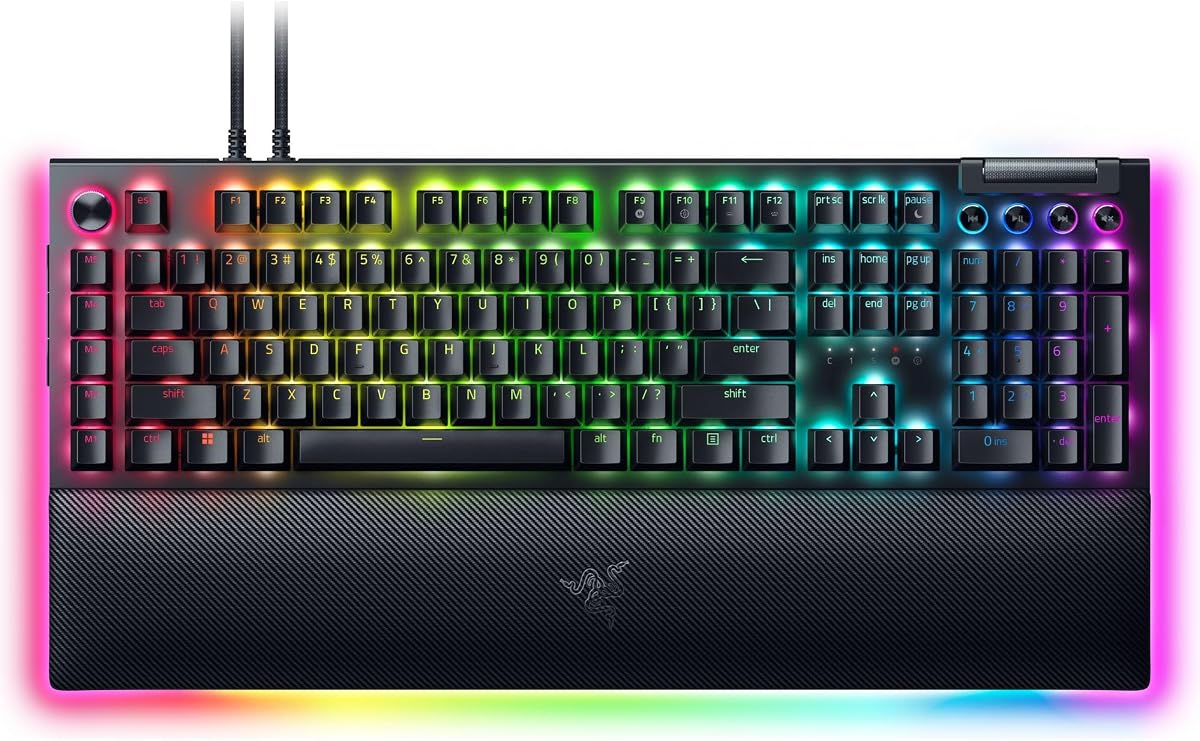
The BlackWidow V4 Pro is a feature-rich full-size option for players who want tactile mechanical feedback and extensive controls. Its Green switches provide noticeable tactile sensation without relying on a loud click, offering a middle ground for gaming, typing, and extended creative work.
We may earn a commission when you buy through this link, at no additional cost to you.
A programmable command dial, eight dedicated macro keys, per-key illumination, and three-sided underglow provide several ways to streamline a setup. The magnetic plush leatherette wrist rest includes Chroma RGB lighting, adding comfort and visual continuity while the doubleshot ABS keycaps are built to resist faded labeling and withstand repeated use.
As a premium desktop keyboard, it remains tied to a wired connection and consumes more space than a compact model. It also does not offer adjustable analog actuation, Rapid Trigger, or magnetic switch behavior. Those omissions keep it from being the obvious choice for players whose main objective is maximizing competitive input control.
The V4 Pro is best for someone who values a rich control surface, strong build characteristics, and a premium full-size experience. It is particularly attractive to users who want a tactile mechanical feel but do not need the specialized electronics found in Razer’s analog or Hall Effect tournament keyboards.
Green mechanical switches give each press a distinct tactile bump, helping users register input without the sharper acoustic character of a clicky switch. The command dial and eight macro keys create additional ways to manage commands without occupying primary gaming keys.
Per-key lighting and a three-side underglow produce a more dimensional effect than a single lighting plane. The matching illuminated wrist rest extends the appearance across the desk while also providing a secure, cushioned landing area for the wrists.
We may earn a commission when you buy through this link, at no additional cost to you.
The Razer Huntsman V3 Pro 8KHz represents Razer’s most aggressively performance-oriented full-size option in this group. Its headline advantage is a true 8000Hz polling rate, accompanied by second-generation analog optical switches, Rapid Trigger, and an adjustable 0.1-to-4.0-millimeter actuation range for fine control over movement inputs.
We may earn a commission when you buy through this link, at no additional cost to you.
The visual onboard LED array makes it possible to inspect and save actuation and Rapid Trigger settings without opening software. A multifunction digital dial handles volume and analog-switch functions, while three control buttons cover media and custom macros. Lubricated switches, dense switch foam, and textured doubleshot PBT keycaps support both feel and longevity.
This feature depth can feel excessive outside competitive gaming, and the analog controls require deliberate configuration. The board is also wired and full-size, so it is not ideal for users prioritizing portability or a smaller desk footprint. None of those issues diminishes its relevance to fast FPS play and precision-focused input.
Choose this model when your priority is maximum input speed and direct control over actuation behavior. It is best suited to competitive players willing to learn and tune its settings, while the standard Huntsman V3 Pro offers the same core analog capabilities at a more conventional polling rate.
The onboard LED array provides a visual reference for actuation height and Rapid Trigger sensitivity. Players can make and save adjustments on the keyboard itself, which is useful during practice or when software access is inconvenient.
A 100-million-keystroke lifespan, individually lubricated switches, and double-layer switch seating are aimed at heavy use. Textured PBT keycaps also resist the shine and legend wear that commonly appear on boards used in high-intensity sessions.
We may earn a commission when you buy through this link, at no additional cost to you.
The Reclusa X Mini delivers a rare combination of compact proportions, hot-swappable construction, and advanced gaming functions. Its 65% layout removes the separate function row and numeric keypad while preserving essential everyday keys, making it a practical choice for smaller desks and setups where mouse movement matters.
We may earn a commission when you buy through this link, at no additional cost to you.
The socketed PCB accepts both three-pin and five-pin mechanical switches, allowing users to change the supplied Orange Tactile Gen-3 switches without soldering. A PPS plate, custom stabilizers, and dual-layer silicone dampening improve the acoustic and tactile result, while doubleshot ABS keycaps use a distinctive three-tone colorway.
Razer Snap Tap, Snap Flex, and Dual-Keypress Priority add competitive functionality that is not always found on compact mechanical boards. South-facing LEDs improve aftermarket keycap compatibility, while detachable USB-C connectivity simplifies portability. The 1000Hz polling rate and N-key rollover support responsive everyday operation, though it does not match the extreme polling of the 8KHz models.
This keyboard is ideal for a player who wants a small board without giving up switch customization or advanced input features. The absence of a function row and wrist rest may frustrate some users, but those omissions are common trade-offs in the 65% category and can be addressed with a separate accessory if desired.
Both three-pin and five-pin mechanical switches fit the socketed PCB, reducing the need to match a narrow compatibility standard. Users can experiment with different switch families and replace a worn switch without a soldering iron.
Snap Tap, Snap Flex, and Dual-Keypress Priority bring competitive input tools to a compact board. Its 65% arrangement creates meaningful mouse space while retaining a functional selection of navigation and editing keys.
We may earn a commission when you buy through this link, at no additional cost to you.
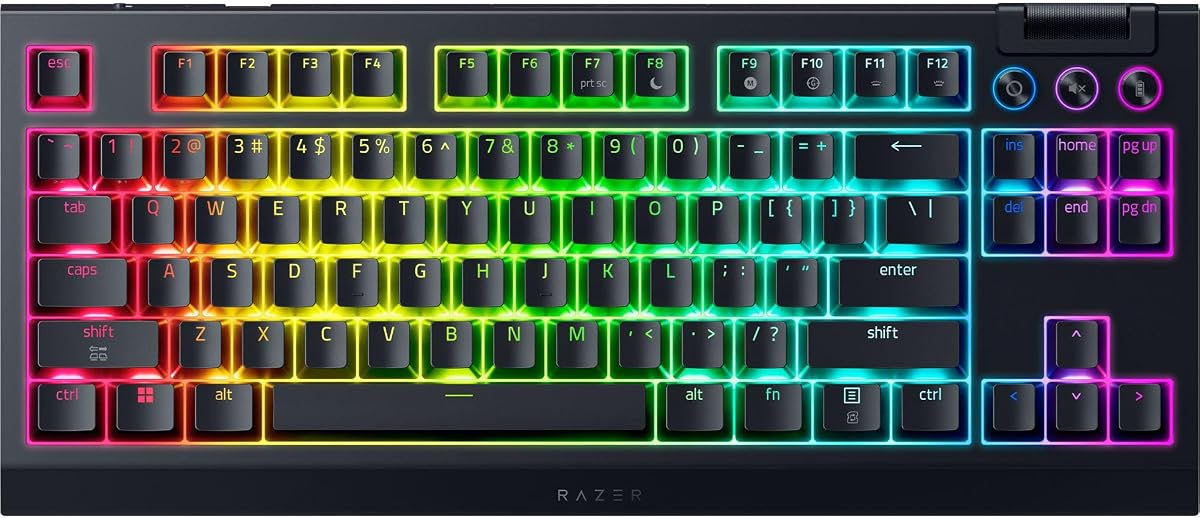
The BlackWidow V4 TKL Wireless balances a familiar tenkeyless layout with flexible connectivity. It supports 2.4GHz HyperSpeed Wireless, a multi-device connection capable of pairing a compatible Razer mouse to the same dongle, and Bluetooth pairing across three devices, allowing the keyboard to shift easily between gaming and other tasks.
We may earn a commission when you buy through this link, at no additional cost to you.
The socketed PCB accepts three- or five-pin switches, so the supplied Orange tactile switches can be replaced with alternatives. A top-mounted stainless-steel plate, tape-enhanced PCB, lubricated stabilizers, and two layers of foam are intended to refine the typing experience. A multifunction roller and three dedicated buttons handle audio, media, and battery functions.
Its stated battery life of up to 980 hours is a major advantage, though actual results depend on connection mode, lighting, and usage. The TKL format still takes meaningful desk space, and the absence of a numeric keypad may inconvenience users who perform extensive data entry. It also lacks the adjustable actuation features of the analog and magnetic models.
Choose the V4 TKL Wireless when a clean gaming setup, mouse freedom, and cross-device convenience are priorities. It is especially useful for users who want a substantial keyboard with a tenkeyless footprint but do not need the specialized input electronics of a tournament model.
HyperSpeed Wireless supports a low-latency gaming connection, while Bluetooth can pair with three devices. This makes the board useful for switching among a gaming PC, laptop, and another computer without replacing the entire desk setup.
Hot-swappable sockets allow the Orange tactile switches to be changed for another preferred mechanical switch. Plate construction, stabilizer lubrication, and internal foam are also designed to improve the board's overall sound and consistency.
We may earn a commission when you buy through this link, at no additional cost to you.
The Huntsman Mini 60% is built for players who want their keyboard to recede visually and physically from the main gaming action. Its compact layout preserves the essential alphanumeric area while removing the function row, navigation cluster, and number pad to create substantial mouse space.
We may earn a commission when you buy through this link, at no additional cost to you.
Razer Linear Optical switches provide a 1.0-millimeter actuation point, which the manufacturer describes as 15 to 30 percent shorter than comparable linear switches. The aluminum top frame adds structural rigidity, and oil-resistant doubleshot PBT keycaps retain a more consistent texture over time. Full macro programmability and Razer Hypershift expand the function of the limited layout.
The board's 60% design creates its biggest practical drawback. Arrow keys, function shortcuts, and dedicated navigation controls are not physically present, so some users will need shortcuts or an additional keypad. There is also no attached wrist rest, and the linear optical feel may not satisfy someone who wants a pronounced tactile bump.
Choose the Mini 60% for minimalist setups, rapid mouse movement, and players comfortable navigating without dedicated function keys. It offers a polished aluminum construction, fast optical action, and strong lighting integration without the desk commitment of a full-size gaming keyboard.
By removing every key outside the primary typing area, the 60% layout leaves more surface available for aiming. The result is visually cleaner and especially useful for games where precise camera movement benefits from unrestricted space.
The 1.0-millimeter actuation point supports quick input, while the linear switch profile offers a smooth path to activation. Optical sensing removes the need for conventional metal contact while preserving a familiar gaming-keyboard feel.
We may earn a commission when you buy through this link, at no additional cost to you.
The Huntsman V3 Pro focuses on competitive movement with Gen-2 analog optical switches, adjustable actuation, Rapid Trigger, and Razer Snap Tap. The actuation range spans 0.1 to 4.0 millimeters, letting players decide how much finger movement is required before a key registers, while Rapid Trigger resets a key as soon as it is lifted.
We may earn a commission when you buy through this link, at no additional cost to you.
An onboard LED array shows the current actuation and Rapid Trigger settings and allows them to be saved without software. A digital dial adjusts volume and analog-switch parameters, while three nearby buttons handle media and custom macros. The included magnetic firm leatherette wrist rest supports the keyboard's tournament-oriented design.
Compared with the Huntsman V3 Pro 8KHz, this model uses a conventional polling rate, making it less focused on maximizing input reports. It is also full-size and wired. Players who are new to analog keyboards may need to adjust actuation carefully, while those who prioritize maximum polling should look to the 8KHz edition.
The Huntsman V3 Pro is a strong all-around competitive keyboard for players who want precise, adjustable inputs and a full collection of conventional keys. It works especially well for FPS movement, repeatable keybind adjustments, and users who prefer tuning physical controls over relying entirely on software.
Rapid Trigger allows a key to reset at the slightest lift rather than waiting for a standard reset point. This behavior can make quick directional corrections feel more immediate when paired with a carefully chosen actuation setting.
The onboard display provides immediate feedback while settings are changed. Saving configurations directly to the keyboard is useful for practice sessions, tournaments, and users who want less dependence on Razer Synapse.
We may earn a commission when you buy through this link, at no additional cost to you.
The BlackWidow V4 is a straightforward full-size mechanical keyboard for players who prefer pronounced clicky feedback. Its Green switches actuate at 1.9 millimeters and require 50 grams of force, delivering a clear tactile event and audible click that makes each registered press easy to perceive.
We may earn a commission when you buy through this link, at no additional cost to you.
Six dedicated macro keys offer room for essential commands, and Chroma RGB per-key lighting combines with two-sided underglow to illuminate the board from multiple angles. The magnetic plush leatherette wrist rest provides stable cushioning, while doubleshot ABS keycaps are designed to preserve their labels under repeated use.
The most important tradeoff is acoustic. Clicky switches are intentionally louder than linear, tactile, or membrane-based alternatives, and they may be less suitable for shared rooms, offices, or late-night use. The keyboard also uses a conventional mechanical design without Rapid Trigger, adjustable analog actuation, or a hot-swappable socketed board.
Choose the V4 if the satisfying click of a mechanical switch is central to your ideal keyboard feel. For competitive players who need millisecond-level input control, one of the Huntsman analog or Hall Effect models will offer more specialized capabilities, but the V4 remains a capable choice for general gaming and everyday productivity.
The Green switches provide a distinct click and tactile bump at a moderate 50-gram force. This gives the keyboard a traditional mechanical character that some users find more satisfying than smoother linear or membrane alternatives.
Six programmable macro keys make frequently used actions easier to access. Two-sided underglow and per-key Chroma lighting add desk-wide visual effects without taking control away from the main keycaps.
We may earn a commission when you buy through this link, at no additional cost to you.
The Huntsman V3 HE TKL 8KHz combines Hall Effect magnetic switches with true 8000Hz polling in a tournament-ready tenkeyless layout. Magnetic switches allow an adjustable 0.1-to-4.0-millimeter actuation point, Rapid Trigger, and Snap Tap, giving competitive FPS players more control over movement than a conventional keyboard.
We may earn a commission when you buy through this link, at no additional cost to you.
Dynamic Keystroke can assign multiple actions to one physical key, while Snap Flex adds release-based activation for advanced binds. The 5052 aluminum alloy top case, detachable USB-C cable, and onboard storage for up to six profiles suit a fixed gaming station. Textured doubleshot PBT keycaps resist shine and fading through intensive use.
This is a specialized instrument rather than a simple general-purpose board. Users may need time to understand magnetic actuation, release behavior, and multi-action key assignments. It is also wired, and its TKL format still occupies more space than a 60% or 65% keyboard. The lower aggregate customer feedback also warrants checking recent owner comments before buying.
Choose this model for competitive shooters and tournament practice where the user values maximum polling and granular input control. Synapse Web adds convenient browser-based adjustment, while onboard profiles make saved configurations accessible without entering a full software workflow between matches.
Hall Effect sensing enables a wide actuation range, Rapid Trigger, Snap Tap, and release-based Snap Flex behavior. Dynamic Keystroke extends the concept further by allowing a single key to trigger several actions under different conditions.
The TKL design preserves dedicated keys while freeing desk space from the number pad. An aluminum alloy case, detachable cable, anti-ghosting, and six onboard profiles support stable use in competitive environments.
We may earn a commission when you buy through this link, at no additional cost to you.
Choosing a Razer gaming keyboard means balancing input technology, layout, connectivity, controls, and comfort against the way you play. The most feature-rich model is not automatically the right choice; a simpler board may suit casual gaming better, while competitive players may prioritize adjustable activation and polling above everything else.
Mechanical switches offer familiar tactile, linear, or clicky responses and are a versatile choice for mixed gaming and productivity use. The BlackWidow V4 X uses light linear Yellow switches, the BlackWidow V4 Pro and standard V4 use tactile or clicky Green switches, and the BlackWidow V4 TKL Wireless uses Orange tactile switches. Analog optical and Hall Effect magnetic switches go further by detecting how far a key travels, allowing adjustable actuation and Rapid Trigger. The Ornata V3 instead uses low-profile mecha-membrane switches for a slimmer, softer general-purpose design.
A full-size board includes the main typing area, function row, navigation cluster, and number pad. It is ideal when you use a number pad or want every conventional key, but it requires the most space. A tenkeyless layout removes the number pad and creates more room for mouse movement, making it popular in competitive and productivity setups. The Reclusa X Mini uses a 65% format, while the Huntsman Mini 60% strips the board down further. Smaller layouts save space but place more importance on shortcuts, remapping, and familiarity with compact keyboards.
Polling describes how often the keyboard reports input to the computer, while actuation determines how far a key must travel before it registers. The Huntsman V3 Pro 8KHz and Huntsman V3 HE TKL 8KHz use true 8000Hz polling, and the standard Huntsman V3 Pro uses analog optical controls at a more conventional rate. Rapid Trigger and adjustable activation can make short directional movements more consistent, particularly in FPS games. These features are valuable to competitive players but may not produce an equally noticeable benefit in slower games or everyday office tasks.
Wired keyboards offer a simple, consistently connected setup and are common in fixed tournament stations. The BlackWidow V4 TKL Wireless supports 2.4GHz HyperSpeed Wireless, multi-device pairing, and Bluetooth connections to three devices, making it easier to move between a gaming PC and other systems. Its long stated battery life reduces charging concerns, although actual endurance varies with lighting and connection mode. Wireless flexibility can also introduce practical considerations involving dongles, power management, and interference in crowded environments.
Razer software and features such as Hypershift, macro keys, and programmable dials can simplify complicated commands. The BlackWidow V4 X and BlackWidow V4 provide six dedicated macro keys, while the V4 Pro adds eight macro keys and a command dial. The Huntsman Mini 60% can remap keys and combinations despite having fewer physical keys. The Reclusa X Mini supports hot-swappable three- and five-pin switches, giving it deeper hardware customization than a fixed-switch board. More programmability is useful for complex games, but it can also create a steeper learning curve.
Razer uses both doubleshot ABS and doubleshot PBT keycaps across the featured models. ABS options such as those on the BlackWidow V4 family use thicker walls and molded legends intended to resist wear. PBT caps on the Huntsman models and Reclusa X Mini offer a textured finish that is less prone to developing shine and grime over time. Low-profile UV-coated caps on the Ornata V3 focus on reducing visual height and protecting legends from fading. Keycap material matters most if the board will be used heavily and you care about texture, appearance, and long-term cleanliness.
The overall typing experience depends on plate construction, stabilizers, dampening, keycap height, and wrist support. The BlackWidow V4 X uses under-board foam and lubricated stabilizers, the BlackWidow V4 TKL Wireless adds a stainless-steel plate and two foam layers, and the Reclusa X Mini uses a PPS plate with dual-layer silicone dampening. The Ornata V3, BlackWidow V4 Pro, and Huntsman V3 Pro include magnetic wrist rests, while other compact options may require a separate rest. Consider desk space, posture, and the types of keys you use most instead of treating specifications as the only deciding factor.
Razer Chroma RGB is a major attraction for many users, supporting per-key lighting, multiple effects, and synchronization with compatible games and other hardware. Most models in this guide offer extensive lighting, although the exact features vary. The BlackWidow V4 Pro and standard V4 add underglow, while the BlackWidow V4 Pro's wrist rest also carries lighting. The Huntsman Mini 60% emphasizes synchronization with popular games, Philips Hue, and Razer-compatible equipment. Lighting should complement your setup, but it is usually better treated as a finishing feature rather than the primary reason to select a keyboard.
Begin by installing the keyboard according to the included connection instructions and update its compatible Razer software before changing switches, lighting, macros, or actuation settings. Assign one profile to a game or application, and give frequently used commands intuitive positions. If the keyboard has an onboard display or storage, save important configurations after adjustment so they remain available when the computer or software is unavailable.
For analog optical and Hall Effect models, begin with conservative actuation settings and a moderate key-travel range. Test the same movement pattern used in your game, particularly short strafes and quick direction changes. Adjust one parameter at a time, save each configuration, and avoid setting activation points so aggressively that accidental presses become common. Familiarize yourself with Snap Tap, Rapid Trigger, or Dynamic Keystroke before entering a competitive match.
Keep the keyboard free of dust, crumbs, and liquid. Disconnect it before cleaning, use a soft microfiber cloth, and gently remove debris between keys with compressed air or a soft brush. Avoid spraying cleaner directly onto the switches. If you use a hot-swappable model, power the keyboard down before changing switches, confirm that the replacement is a compatible three- or five-pin type where required, and ensure that the switch is seated evenly. A detachable USB-C cable and an appropriate wrist position can also help maintain a comfortable, organized setup.
Yes. Razer mechanical keyboards can work well for office communication, writing, and general productivity as well as gaming. The BlackWidow V4 X and standard BlackWidow V4 are particularly versatile because they include a full-size layout, while the Ornata V3 offers a lower-profile alternative. Switch noise, wrist comfort, and whether you prefer a numeric keypad can determine which model feels best for long typing sessions.
Both switch technologies can measure key travel and support adjustable actuation, but they detect movement in different ways. The Huntsman V3 Pro models use analog optical sensing, while the Huntsman V3 HE TKL 8KHz uses Hall Effect magnetic switches. Both can offer Rapid Trigger and customized activation points, giving competitive players more control over how quickly movement inputs register.
An 8000Hz polling rate can benefit competitive FPS games where small changes in directional input matter. It reports the keyboard's status more frequently than conventional polling rates, helping reduce the interval between movement and computer response. The practical advantage varies by game, system, monitor, and player, so it is not the only factor that determines overall performance.
Choose 60% or 65% for the smallest desk footprint and maximum mouse space, accepting the need to adapt to fewer dedicated keys. TKL preserves the function row and navigation keys while removing the number pad, making it a balanced competitive layout. Full size is best when you use a number pad regularly or want every conventional key without relying on alternate shortcuts.
A hot-swappable keyboard uses sockets that allow compatible mechanical switches to be removed and replaced without soldering. The Reclusa X Mini accepts both three-pin and five-pin switches, while the BlackWidow V4 TKL Wireless is also compatible with three- or five-pin options. The process makes it easier to customize feel, sound, and switch color over time.
Yes. Chroma RGB supports per-key colors, lighting effects, and synchronization with compatible games and other Razer ecosystem hardware. Exact options can depend on the model and current software support. The lighting is customizable on every featured keyboard, although models with underglow or an illuminated wrist rest create a broader visual effect than standard per-key illumination.
They generally function as standard USB keyboards while gaming, so they can be used for browsing, documents, communication, and creative work. Models with macro keys, media controls, wrist rests, and comfortable low-profile or tactile switches may be especially pleasant for daily use. Check the layout carefully if your work requires a number pad, dedicated function keys, or particular navigation controls.
Basic typing and gaming functions work without full customization, but software is generally needed to configure advanced lighting, macros, remapping, and analog settings. The Huntsman V3 Pro family also provides onboard controls and storage for some settings, while the magnetic TKL model supports Synapse Web through a compatible browser. The precise software requirements can vary by model and configuration.
The Razer BlackWidow V4 X is the strongest all-around recommendation because it combines quick linear mechanical switches, six macro keys, useful roller and media controls, per-key lighting, and acoustic tuning in a complete package. The Ornata V3 is a more streamlined low-profile choice, while the BlackWidow V4 Pro is ideal for buyers who want tactile feedback, extensive physical controls, and a premium illuminated wrist rest.
For competitive shooters, the right model depends on the level of control you need. The Reclusa X Mini offers a compact and customizable route into advanced gaming features. The Huntsman V3 Pro family adds analog actuation and Rapid Trigger, the 8KHz versions emphasize maximum polling, and the magnetic TKL model supports release-based functions and web-based configuration. Choose the features that match your games rather than assuming the most advanced board is automatically the most enjoyable.
Finally, check current prices, availability, warranty information, and recent customer feedback before ordering. Keyboard technology evolves quickly, and prices and ratings change over time. Confirm that the layout, connection method, switch behavior, and customization options align with your desk and play style, and use the product links in this guide to review the latest listing details.