
SunFounder AI Fusion Lab Kit
4.6Editor score
Multi-LLM learning platform
Vision and voice projects
Pan-tilt camera included
Our AI Raspberry Pi Kits guide compares ten educational, robotics, starter, and accelerator kits for vision, voice, LLMs, sensors, and AI projects.
AI Raspberry Pi kits combine a compact single-board computer with cameras, sensors, microphones, speakers, accelerators, or robotic mechanisms. A worthwhile kit should make machine learning, computer vision, voice interaction, and language models approachable while remaining flexible enough for original projects. The best choices depend on experience, goals, and whether the Raspberry Pi is included.
We compared all ten products by examining their supplied components, AI capabilities, compatibility, learning resources, expansion options, and practical limitations. The list covers complete Raspberry Pi 5 systems, dedicated accelerator packages, sensor-rich learning stations, multimodal labs, and a programmable AI robot. Some kits require a Raspberry Pi, while others bundle one with the computer and accessories.
Each review identifies who the product suits, what makes it useful, and where it falls short. Ratings reflect the information provided for each listing and may change over time. Product configurations and availability also vary, and prices change frequently, so readers should verify the current listing before ordering or comparing final configurations.
4.6Editor score
4.3Editor score

5.0Editor score
The table below compares the ten kits by computer inclusion, primary AI focus, essential hardware, and learning support. These distinctions make it easier to choose between a complete system, an add-on accelerator, a sensor lab, and a robotics platform.
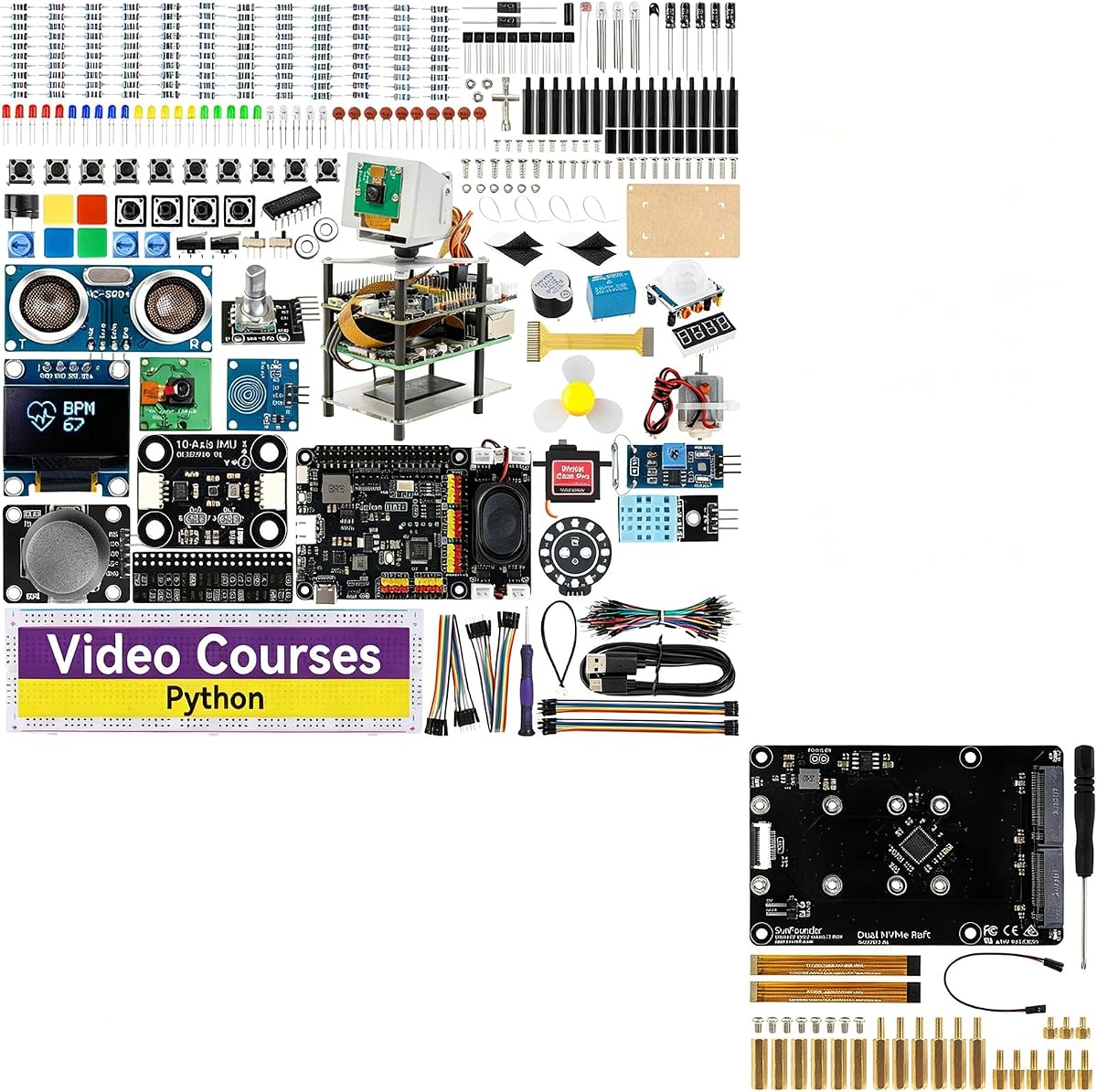


The SunFounder AI Fusion Lab Kit is an all-in-one learning platform for Raspberry Pi users interested in large language models, computer vision, voice interaction, and sensor-driven AI. Its 4.6 rating reflects a strong balance of hardware, documentation, and project variety. The kit supports Raspberry Pi 5, 4B, 3B+, 3B, and Zero 2 W, giving learners flexibility if they already own a compatible board.
We may earn a commission when you buy through this link, at no additional cost to you.
Its defining feature is the breadth of the included system. A Pan-Tilt HAT, camera, 10-axis module, speaker and microphone-equipped Fusion HAT+, breadboard components, and other parts support projects spanning YOLO, OpenCV, MediaPipe, speech-to-text, text-to-speech, and multi-LLM interaction. Rather than teaching only isolated Python commands, the package is structured around combining input, inference, and physical responses in ways that resemble real AI systems.
The main trade-off is that the Raspberry Pi is not included. Buyers without a compatible board must add one, and the kit is not a plug-and-play appliance: assembly, wiring, Python, and careful camera or motor configuration are part of the learning process. A continuous power supply may also be advisable for longer sessions involving the Pan-Tilt HAT, although the supplied documentation should be consulted for its exact power guidance.
Despite those considerations, this is the strongest general-purpose choice in the roundup for beginners who want structured lessons and broad experimentation. It particularly suits students, engineers, and educators seeking vision, voice, sensors, and language models in one Raspberry Pi project kit without paying for several separate systems.
The camera, microphone, speaker, motion module, and Pan-Tilt HAT let learners connect visual recognition with spoken responses and physical movement. That combination makes the kit more engaging than a conventional sensor bundle and demonstrates how separate AI inputs can work together.
Structured video lessons, sample code, and technical support make the package manageable for newcomers. The progression from Python fundamentals to interactive AI systems also gives experienced makers a ready-made foundation for experimentation.
We may earn a commission when you buy through this link, at no additional cost to you.
The Vilros Raspberry Pi 5 AI Kit is a comprehensive hardware bundle for developers who want a Raspberry Pi 5 and a dedicated Hailo accelerator without sourcing each major component separately. Its 5.0 rating makes it one of the strongest options for local AI acceleration. Depending on the selected configuration, the package supports either 26 TOPS or 13 TOPS accelerator variants.
We may earn a commission when you buy through this link, at no additional cost to you.
The bundle includes the Raspberry Pi 5, Raspberry Pi AI HAT+, active cooler, compatible case, 128GB microSD card preloaded with 64-bit Raspberry Pi OS, a USB-C power supply, a micro-HDMI-to-HDMI cable, a neoprene storage case, and a microSD-to-USB adapter. This is a particularly complete package: storage, cooling, power, display connectivity, and the accelerator are all represented.
Its limitation is that it prioritizes AI inference infrastructure rather than a large collection of sensors, cameras, or lesson-based experiments. Buyers who want to build a voice assistant or vision station immediately may still need to add input hardware. They should also confirm the Raspberry Pi memory and Hailo TOPS variants displayed in the current listing because the product title and supplied details indicate configurable options.
For users who already know they want a dedicated edge-AI accelerator and a complete Raspberry Pi 5 workstation, this kit offers an efficient route into local inference. It is particularly appropriate for developers prototyping optimized computer-vision pipelines, educators building a serious workstation, or makers who want cooling and storage included from the beginning.
The Hailo accelerator offloads compatible neural-network workloads from the main processor and integrates with the Raspberry Pi camera software. This makes the package well suited to efficient local computer-vision and embedded inference work.
A preloaded microSD card, appropriate power supply, active cooling, case, and display cable reduce the number of separate purchases required. The included adapter also simplifies moving the operating-system card between a conventional computer and the Raspberry Pi.
We may earn a commission when you buy through this link, at no additional cost to you.
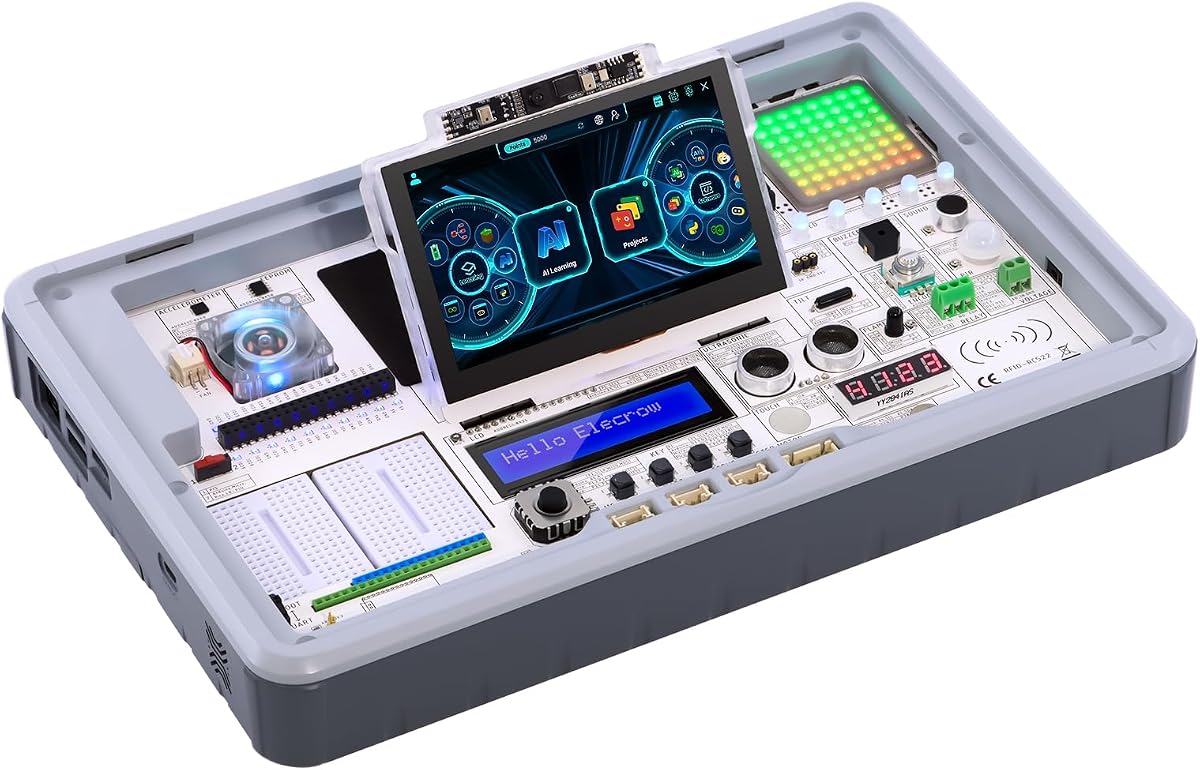
The ELECROW CrowPi3 Basic Kit is a sensor-rich education platform designed for Raspberry Pi 5 and other popular development boards. Its 4.3 rating reflects the appeal of an organized, all-in-one learning station. Rather than requiring users to connect every sensor to loose jumper wires, CrowPi3 integrates the modules into a clearly arranged development platform.
We may earn a commission when you buy through this link, at no additional cost to you.
The hardware includes a 4.3-inch capacitive touchscreen, a two-megapixel camera, and 41 different sensors and modules. It supports OpenCV, facial recognition, and large language model projects, while compatibility with Raspberry Pi 5, Arduino Nano, micro:bit, and Pico lets users compare platforms. The supplied 200 lessons cover component identification, code reading, terminal commands, programming, and practical projects.
The chief drawback is that the Raspberry Pi 5 is not included. Some buyers may also find a station containing dozens of modules less convenient than a small, focused project kit, particularly if they only want to experiment with one sensor or one AI application. The size and breadth of the system can make initial setup feel substantial, even though the organized layout reduces wiring work.
For classrooms, families, and self-directed learners, however, the breadth is a major advantage. It removes much of the friction associated with buying and connecting separate components, while the lessons provide a clear route from identification and basic code to functional AI projects. It is our editor's choice for educational value.
The labeled sensor layout and 200 lessons create a structured path for students and newcomers. Learners can move from recognizing components to reading and running code before tackling larger computer-vision or language-model experiments.
Integrating 41 modules into the station saves time and makes troubleshooting more approachable. That convenience is especially valuable for educators who need students to focus on code and behavior rather than repeated wiring.
We may earn a commission when you buy through this link, at no additional cost to you.
The SunFounder AI Fusion Lab Kit with Dual NVMe Raft combines a broad multimodal AI learning package with high-speed storage expansion for Raspberry Pi 5. It is a distinctive option for users who want to experiment with language models, computer vision, and voice systems while also building storage-intensive projects such as a small network-attached server.
We may earn a commission when you buy through this link, at no additional cost to you.
The Dual NVMe Raft adds two M.2 M-Key slots compatible with 2230-to-2280 drives and supports PCIe Gen 2.0 transfers up to 500MB/s with up to 3A of power per slot. It can be configured for RAID 0 or RAID 1, or one storage slot can be paired with a Hailo-8L accelerator. The supplied information also highlights compatibility with OpenMediaVault, making the package relevant to NAS, media, and Home Assistant experiments.
This is not simply a storage accessory added to a standard kit; it is aimed at makers who want a more capable Raspberry Pi 5 platform. Storage drives are not stated as included, so buyers will need compatible NVMe SSDs if they want to use the new slots. The Raspberry Pi itself is also excluded, and the absence of a listed rating makes direct user-feedback comparison more difficult.
Choose this kit when storage speed, RAID, and server potential matter alongside AI learning. It is less suitable for someone who only wants a simple camera or voice project and has no need for high-speed expansion. For the specified maker workflow, though, it combines AI instruction and infrastructure in an unusually flexible package.
Large models, media, datasets, and project files can benefit from NVMe storage, while RAID options provide choices between speed and redundancy. The two-slot layout also makes it possible to separate workloads or combine storage with acceleration.
The AI curriculum retains the Pan-Tilt HAT, camera, rechargeable power pack, 10-axis module, and multi-LLM support, while the raft targets NAS and Home Assistant use. That crossover suits users who want both education and a durable personal computing project.
We may earn a commission when you buy through this link, at no additional cost to you.
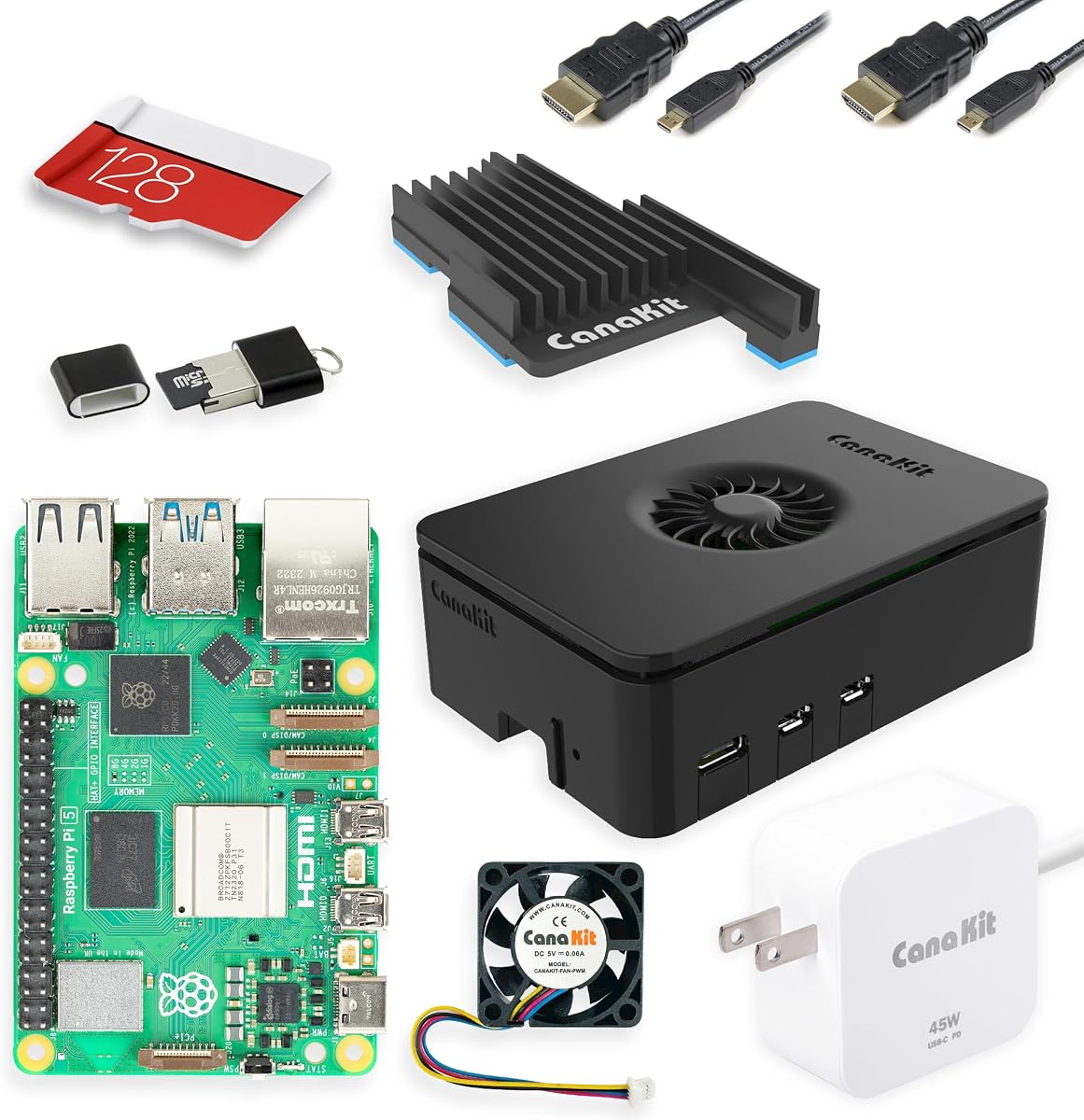
The CanaKit Raspberry Pi 5 Starter Kit PRO is a capable general-purpose Raspberry Pi 5 bundle that can serve as the foundation for many AI projects. Its 4.7 rating reflects a solid overall package, and the eight-gigabyte memory configuration gives builders more headroom for memory-intensive Linux tasks, containers, development environments, and local software than the smaller standard starter bundles.
We may earn a commission when you buy through this link, at no additional cost to you.
The kit includes the Raspberry Pi 5, a 128GB microSD card preloaded with 64-bit Raspberry Pi OS, a USB card reader, CanaKit Turbine Black case, low-noise bearing fan, black anodized mega heat sink, 45W PD power supply, and two six-foot display cables that support up to 4K at 60p. These components create a comfortable starting point for general Raspberry Pi work before AI-specific hardware is added.
It is important not to mistake this for a dedicated AI teaching kit. It does not include a Hailo accelerator, camera, microphone, speaker, or sensor collection. Users planning object detection, voice assistants, robotics, or embodied AI must budget for those additions and learn the required software separately.
That flexibility is also the main advantage. Unlike a tightly packaged AI lab, the CanaKit PRO can become the compute hub for almost any project. It is a strong choice for builders who already understand the desired AI application and want capable, well-cooled hardware in one conventional starter kit rather than a prescribed curriculum.
Eight gigabytes of memory gives developers room to run development tools, containers, and more demanding desktop or server tasks. It also creates a better foundation for local model experiments than many entry-level Raspberry Pi configurations.
The active fan and large anodized heat sink support sustained workloads, while the 45W PD supply is suitable for demanding expansions. Together they form a more practical foundation than an uncased board with a minimal supply.
We may earn a commission when you buy through this link, at no additional cost to you.
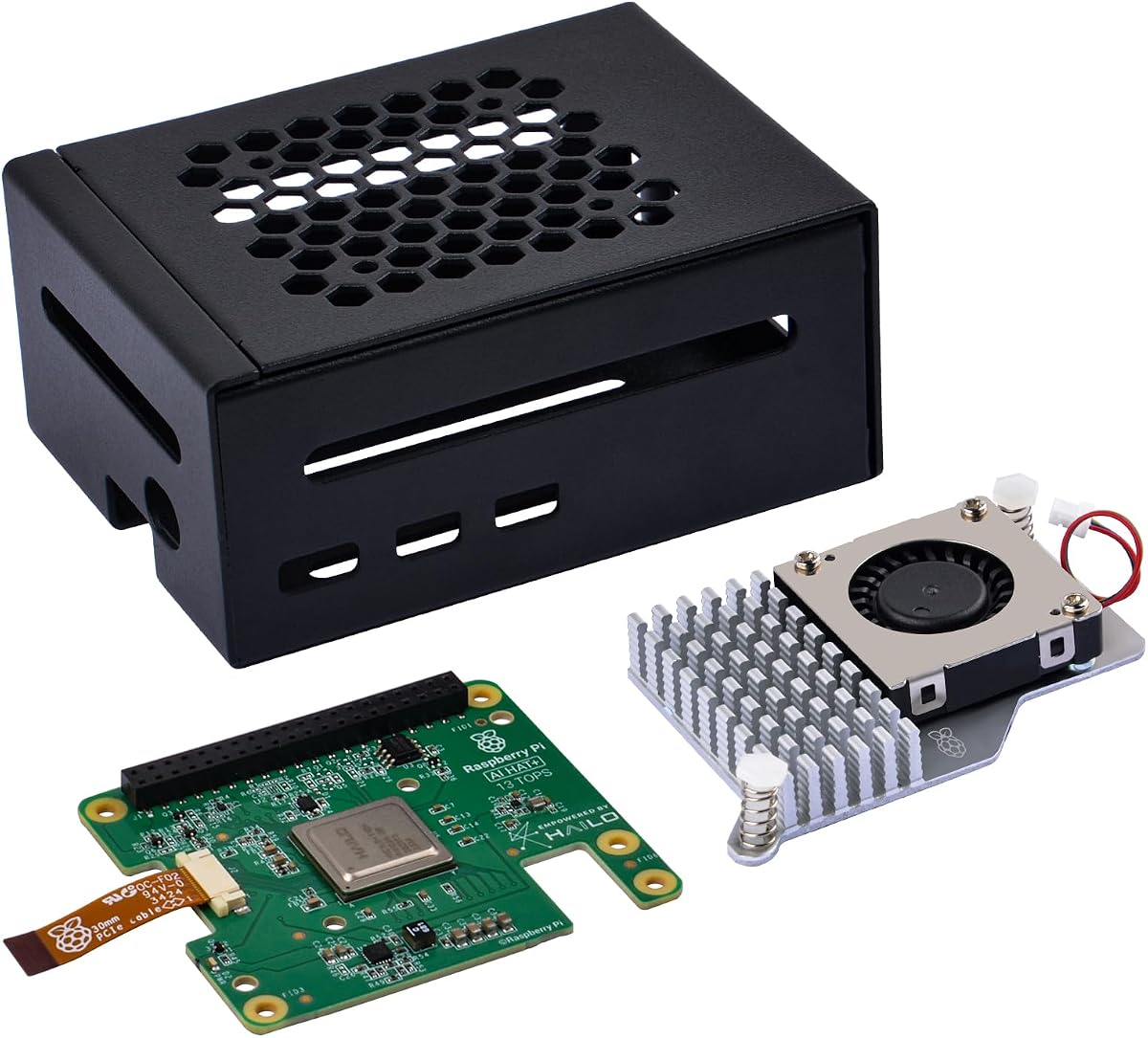
The GeeekPi AI HAT+ Kit is a focused acceleration package for Raspberry Pi 5 owners who want efficient local neural-network inference. Its 4.5 rating reflects a well-targeted combination of Hailo hardware, protection, and cooling. The included 13 TOPS accelerator supports object detection, semantic and instance segmentation, pose estimation, and other accelerated vision tasks.
We may earn a commission when you buy through this link, at no additional cost to you.
The accelerator communicates through the Raspberry Pi 5's PCIe Gen 3 interface. On an up-to-date Raspberry Pi OS image, the system can detect the Hailo accelerator automatically and expose its NPU for supported AI workloads. Raspberry Pi's built-in rpicam-apps can also use the NPU for compatible camera post-processing, making integration more direct than a purely external accelerator arrangement.
The metal case is designed to protect the Raspberry Pi 5 from damage, dust, and scratches while leaving access to most ports, including USB-C power, micro-HDMI, USB, Ethernet, the SD card slot, power button, and GPIO. The active cooler combines an aluminum heat sink with a PWM fan. Stacking spacers, screws, and a 16mm header are included for installation with the cooler in place.
This kit is ideal for a maker who already owns a Raspberry Pi 5 and camera but wants a faster, more efficient inference system. It does not include the board or camera, and its learning value comes more from hands-on deployment than from a structured course. Even so, it is a compact and technically capable way to add serious local AI acceleration.
The Hailo accelerator handles compatible neural-network tasks efficiently, including detection and segmentation. Native camera-application support reduces integration friction for Raspberry Pi vision projects.
The enclosure provides physical protection and port access, while the PWM cooling system helps control heat. The included stacking hardware is designed to make assembly straightforward.
We may earn a commission when you buy through this link, at no additional cost to you.
The Raspberry Pi 5 Essentials Starter Kit PRO is a straightforward, official-component foundation for edge AI, Docker, Home Assistant, robotics, and general development. Its 4.6 rating reflects a dependable setup with the core hardware and software essentials already grouped together. The bundle uses the official case with active cooling, official 27W USB-C supply, and a 128GB microSD card preloaded with Raspberry Pi OS.
We may earn a commission when you buy through this link, at no additional cost to you.
The emphasis on official parts is useful for buyers who value compatibility and straightforward setup. A pre-installed card removes the need to create and flash an operating-system image before the first startup, while the active case maintains more consistent temperatures during processor-intensive workloads. The included power supply is designed for the Raspberry Pi 5 and for stable operation with SSDs, AI accelerators, cameras, and USB peripherals.
This is not a complete AI kit in the instructional sense. It provides no accelerator, camera, sensor bundle, microphone, or robot hardware, and there are no stated step-by-step AI lessons. Those omissions make it a clean and adaptable computer platform rather than a guided laboratory.
For developers who want to choose their own AI peripherals, the Essentials PRO offers a trustworthy base with fewer compatibility guesses than a mixed collection of accessories. It is particularly appropriate for users setting up a workstation, container host, media server, or automation system that may later gain AI hardware.
Official cooling, power, and enclosure components are designed around the Raspberry Pi 5 platform. That coherence is valuable when adding storage or acceleration hardware later.
The preloaded 128GB card and included power supply shorten the path from delivery to first boot. Beginners can begin with Raspberry Pi OS while more advanced users can configure Docker, servers, or edge-AI software.
We may earn a commission when you buy through this link, at no additional cost to you.
The SunFounder AI Robot Kit is the roundup's most specialized option for physical AI, combining a Raspberry Pi-based robot with ChatGPT-4o interaction, camera vision, app control, and 12 servos. Its 4.3 rating reflects a creative package for builders who want machine learning embodied in a moving, responsive machine rather than confined to a desktop project.
We may earn a commission when you buy through this link, at no additional cost to you.
The robot can perform 32 actions, including walking, sitting, standing, shaking its head, wagging its tail, and performing tricks. Its sensor suite includes ultrasonic, touch, gyroscope, sound, camera, speaker, and microphone components. That combination supports obstacle detection, touch reactions, sound recognition, conversational exchanges, math problems interpreted through the camera, and gesture recognition.
A first-person-view camera and application control add another layer, letting users observe the robot's perspective and manage it remotely. Python support makes the platform useful for learners who want to modify behaviors instead of merely operating a finished toy. Online documentation, video tutorials, technical support, and an active forum community provide assistance beyond the initial assembly.
The primary drawback is complexity. Twelve servos and a multi-sensor robot require careful assembly, programming, and adequate power management. The title indicates a Raspberry Pi Zero 2 W and 32GB TF card configuration, although the broader description also lists supported Raspberry Pi models, so buyers should confirm the exact shipped board and accessories. Nevertheless, no other kit here offers this level of embodied movement and interaction.
Servo-controlled actions give learners immediate physical feedback from their code. Walking, sitting, tail movements, and tricks create a memorable way to explore programming, control systems, and sensor fusion.
The camera, microphone, speaker, application controls, and first-person view support several interaction styles. This makes the robot suitable for demonstrations as well as structured AI and Python exercises.
We may earn a commission when you buy through this link, at no additional cost to you.
The ELECROW CrowPi 3 AI Learning and Development Station is a comprehensive Raspberry Pi 5 platform for interactive AI, Python, and IoT experimentation. Its 4.1 rating reflects a versatile educational system with a broad hardware inventory and substantial course support. The Raspberry Pi 5 is not included, allowing compatible users to bring their own preferred board configuration.
We may earn a commission when you buy through this link, at no additional cost to you.
A 4.3-inch capacitive touchscreen, two-megapixel camera, and high-sensitivity microphone support visual recognition, voice recognition, and conversational interfaces. The station's 41 built-in sensors and modules are clearly arranged to simplify access, and its compatibility with Raspberry Pi 5, Arduino Nano, micro:bit, and Pico broadens its use for microcontroller and embedded-development lessons.
The supplied resources extend beyond 200 courses and include AI interaction, Python programming, and Node-RED IoT projects, with material ranging from beginner to more advanced activities. The tradeoff is the physical scale of the platform: users seeking only one small sensor or a minimal camera experiment may find the station more elaborate than necessary. Its breadth is best appreciated by learners working through a curriculum or making varied prototypes.
This CrowPi 3 version is a strong fit for educators, makers, and developers who value organized hardware and self-directed learning. Compared with the Basic Kit option, it is positioned as the more expansive development-station offering, but the core emphasis remains the same: connect ideas to real inputs, outputs, and sensors with minimal wiring.
The touchscreen, camera, and microphone create a complete interface for projects involving recognition and interaction. They also make classroom demonstrations more visually engaging than headless sensor projects.
Support for four development boards lets learners compare Raspberry Pi with Arduino Nano, micro:bit, and Pico. The 200-plus resources then provide structured exercises in Python, AI, Node-RED, and hardware control.
We may earn a commission when you buy through this link, at no additional cost to you.
The CrowPi 3 AI Learning and Development Station with Raspberry Pi 5 16GB Board is the most complete education-oriented configuration in this roundup. It combines the board with a 4.3-inch capacitive touchscreen, a two-megapixel camera, a high-sensitivity microphone, and 41 onboard sensors and modules. Its 4.5 rating reflects a capable package for education, prototyping, and hands-on technical study.
We may earn a commission when you buy through this link, at no additional cost to you.
The 16GB Raspberry Pi 5 provides generous memory for programming, containers, AI experiments, and more demanding development tasks. CrowPi 3 supports OpenCV, facial recognition, object detection, and large language model projects. More than 200 structured lessons cover AI interaction, Python, Node-RED IoT work, microcontroller development, and hardware control, creating a clear progression from component fundamentals to complete applications.
This configuration removes the need to source a separate Raspberry Pi 5, which is its main advantage over the board-optional CrowPi listings. It is still not a dedicated inference accelerator system, so users seeking maximum neural-network throughput may need to add Hailo hardware. The large collection of onboard hardware also occupies more space than a conventional starter kit.
For a classroom, makerspace, or ambitious home learning lab, this is a ready-to-use platform with very little procurement. It suits users who want sensors, interaction hardware, substantial memory, and guided material in a single package. Buyers focused narrowly on robotics, NVMe storage, or high-speed local inference should choose a more specialized kit instead.
Combining the Raspberry Pi 5 with the station and more than 200 lessons lowers setup friction. Teachers and learners can move directly into programming, AI, and IoT exercises instead of assembling a full parts inventory.
Sixteen gigabytes of memory supports heavier development workloads, while the display, camera, microphone, and sensor collection provide varied inputs. The result is a flexible platform for both guided coursework and independent prototyping.
We may earn a commission when you buy through this link, at no additional cost to you.
The right AI Raspberry Pi kit depends on the projects you want to build, your experience with Python and electronics, and whether you need the Raspberry Pi, camera, sensors, accelerator, or robot included. Reviewing these factors before ordering prevents an expensive mismatch.
Start with the kind of result you want to produce. Sensor-rich CrowPi systems suit electronics education and interactive prototypes; SunFounder's Fusion Lab emphasizes language models, vision, voice, and pan-tilt tracking; the robot kit focuses on movement and embodied AI; Hailo-based packages prioritize local inference; and conventional Raspberry Pi 5 bundles provide a flexible workstation. Some products overlap these categories, but the primary emphasis should guide the first shortlist.
Select a kit that matches a project you genuinely want to attempt. A broad catalog is more useful when your goal is general learning, while a focused kit is easier to master when you already know you need acceleration, robotics, or extensive sensor access.
The products in this guide divide into board-optional packages and complete systems. Vilros, CanaKit, the Raspberry Pi Essentials PRO, and the CrowPi3 16GB configuration include a Raspberry Pi. Several SunFounder and CrowPi options do not, so they require you to add a compatible Raspberry Pi or use the board you already own. This distinction affects both convenience and the final components included.
Before buying, verify the exact board in the package. Pay attention to memory capacity, Raspberry Pi generation, and whether a Zero 2 W is included rather than assuming every bundle contains the same hardware.
The Raspberry Pi processor can run many AI examples, but a Hailo accelerator changes the performance available for supported neural-network workloads. The Vilros bundle includes a selectable 26 TOPS or 13 TOPS accelerator configuration, while the GeeekPi package focuses on the 13 TOPS variant. The SunFounder NVMe raft can also accommodate a Hailo-8L alongside an SSD. Dedicated acceleration is most relevant for local vision inference and responsive deployments.
Do not equate TOPS with every possible application. Software support, model compatibility, camera integration, memory, and thermal design all affect real performance. Choose acceleration when the software path is clear and the workload is supported.
Computer-vision projects need a camera, suitable lighting, a stable mount, and enough processing power. Voice projects also require a microphone and speaker or separate audio output. The Fusion Lab and robot kit include components aimed at multimodal interaction, while CrowPi 3 provides a touchscreen, camera, and microphone. Accelerator packages often omit these input devices because they focus on inference hardware.
List the sensors and interfaces your intended project needs. A kit that excels at LLM chat but lacks a microphone or speaker may be less convenient than a balanced station for voice assistants.
A strong curriculum can shorten the path from assembly to useful projects. SunFounder provides structured video lessons and technical support, while CrowPi 3 includes hundreds of lessons covering programming, AI, and IoT. Other bundles provide documentation and sample code without promising the same guided course volume. Resource quality matters most to beginners and educators, whereas experienced developers may value flexible hardware more.
Read the lesson structure, sample-code access, and support terms before purchasing. A large number of lessons matters only if they form a usable progression and align with the hardware supplied.
AI accelerators, active coolers, multiple cameras, servos, and NVMe drives can draw meaningful power and produce heat. Official or quality Raspberry Pi 5 power supplies, active cooling, and adequate case clearance help maintain stability. The Vilros and GeeekPi bundles include cooling; the CanaKit and Essentials PRO packages include active cooling; and the robot kit requires careful attention to servo power demands.
Check connector availability, cable routing, and expansion headers. Also ensure that any external SSDs, cameras, or HAT accessories fit physically and are supported by the chosen power supply.
A station with dozens of integrated modules minimizes wiring but can feel oversized. A compact accelerator kit offers a narrower and potentially cleaner project path. Robotics kits add mechanical complexity, while conventional Raspberry Pi starter bundles leave every expansion choice to the user. The best kit is not necessarily the one with the most components; it is the one whose complexity supports your goals.
For beginners, an integrated station with clear lessons may be easier than assembling a custom system. For experienced builders, fewer components and standard interfaces may provide more freedom and less unnecessary bulk.
Check whether the Raspberry Pi OS image supports the included accelerator, whether the camera applications recognize it, and which AI frameworks the lessons use. Hailo hardware can be detected automatically on an up-to-date Raspberry Pi OS image, while LLM-based kits depend on the selected service and Ollama support. Software compatibility should be checked before committing to a particular project.
Prefer kits with current documentation, sample code, and a responsive support community. That is especially important when combining language models, speech, cameras, sensors, and mechanical components in one project.
Begin by inventorying the included components and reading the quick-start documentation before assembly. Confirm that the Raspberry Pi model is compatible, connect only the specified power supply, and install the operating-system card or flash the provided image as directed. For kits with many sensors, attach only the modules needed for the first lesson so that faults can be isolated easily.
Work through the tutorials in their intended order and confirm basic functions before moving to AI models. Test the camera, microphone, speaker, sensors, display, motors, and network connection individually, then combine them in a small program. For language-model features, use the documented model or service, protect account credentials, and keep local inference tasks within the memory capability of the selected board.
Power the system down cleanly before changing wiring, and keep liquid, dust, and conductive objects away from the board. Use active cooling during sustained accelerator or processor workloads, monitor temperatures, and give servo-driven robots an appropriate power arrangement. Store removable storage safely, back up important files, and revisit the current documentation when operating-system or framework updates change setup steps.
No. The Vilros, CanaKit, Raspberry Pi Essentials PRO, and CrowPi3 16GB options include a Raspberry Pi 5. Several SunFounder and CrowPi products are sold as add-on or board-optional kits, so a compatible Raspberry Pi must be supplied separately. Always verify the configuration in the current listing because bundle contents can vary.
The SunFounder AI Fusion Lab Kit offers guided video lessons, a camera, Pan-Tilt HAT, and examples involving YOLO, OpenCV, and MediaPipe. The CrowPi3 systems are also beginner-friendly, with many sensors and structured lessons. Fusion is more focused on AI projects, while CrowPi3 provides a wider general-purpose electronics environment.
No, but it can substantially improve supported local inference workloads. The Raspberry Pi 5 can run many AI examples on its processor, while Hailo hardware accelerates compatible neural networks and camera post-processing. Choose an accelerator when your planned model and software have a clear Hailo-supported path and responsive local performance is important.
Both are based on the CrowPi 3 platform and support multiple development boards, integrated sensors, a display, and a camera. The supplied listings differ in positioning and bundle configuration, including whether a Raspberry Pi is included and how the learning resources are described. Check the exact item contents before choosing between them.
SunFounder's Fusion Lab listings specifically support multiple language-model services, including ChatGPT, Gemini, Grok, DeepSeek, Qwen, Doubao, and Ollama. Practical behavior depends on network access, service availability, model size, available memory, and the particular board used. Local models are generally better suited to Raspberry Pi configurations with more memory.
No. A touchscreen is useful for visual interfaces, demonstrations, and sensor stations, but many AI projects can operate through a browser, terminal, camera output, or remote control. Kits without a display may be smaller and more flexible for headless servers, robotics, or camera-based inference.
Use the supply supplied with the kit or a manufacturer-approved equivalent appropriate for the Raspberry Pi 5 and attached expansions. Servos, NVMe drives, cameras, accelerators, and other peripherals can increase demand. Underpowering may cause instability, so avoid assuming that a basic phone charger is suitable for every configuration.
The SunFounder AI Robot Kit is purpose-built for movement, with 12 servos, environmental sensors, camera vision, voice interaction, app control, and a first-person view. The SunFounder Fusion Lab is more flexible for creative motion and tracking projects, while the CrowPi3 is better suited to stationary sensor and interaction experiments.
The SunFounder AI Fusion Lab Kit is the best general option because it combines multimodal hardware, multiple language models, camera tracking, voice features, and guided lessons. The ELECROW CrowPi3 Basic Kit stands out for structured education and 41 integrated modules, while the Vilros Raspberry Pi 5 AI Kit is the premium choice for users who want a complete computer with dedicated Hailo acceleration.
Prioritize the project you want to complete rather than the sheer number of included parts. Vision builders should examine camera and accelerator support, education buyers should assess curriculum quality, and robotics enthusiasts should consider servos, power, and mechanical complexity. Verify board inclusion, exact memory configuration, and software requirements before placing an order.
Ratings, bundle configurations, and prices can change, and availability may also vary. Check the current product listing for the latest hardware, accessories, supported software, and final configuration. Doing so helps ensure that the selected AI Raspberry Pi kit matches your project, experience level, and long-term development goals.