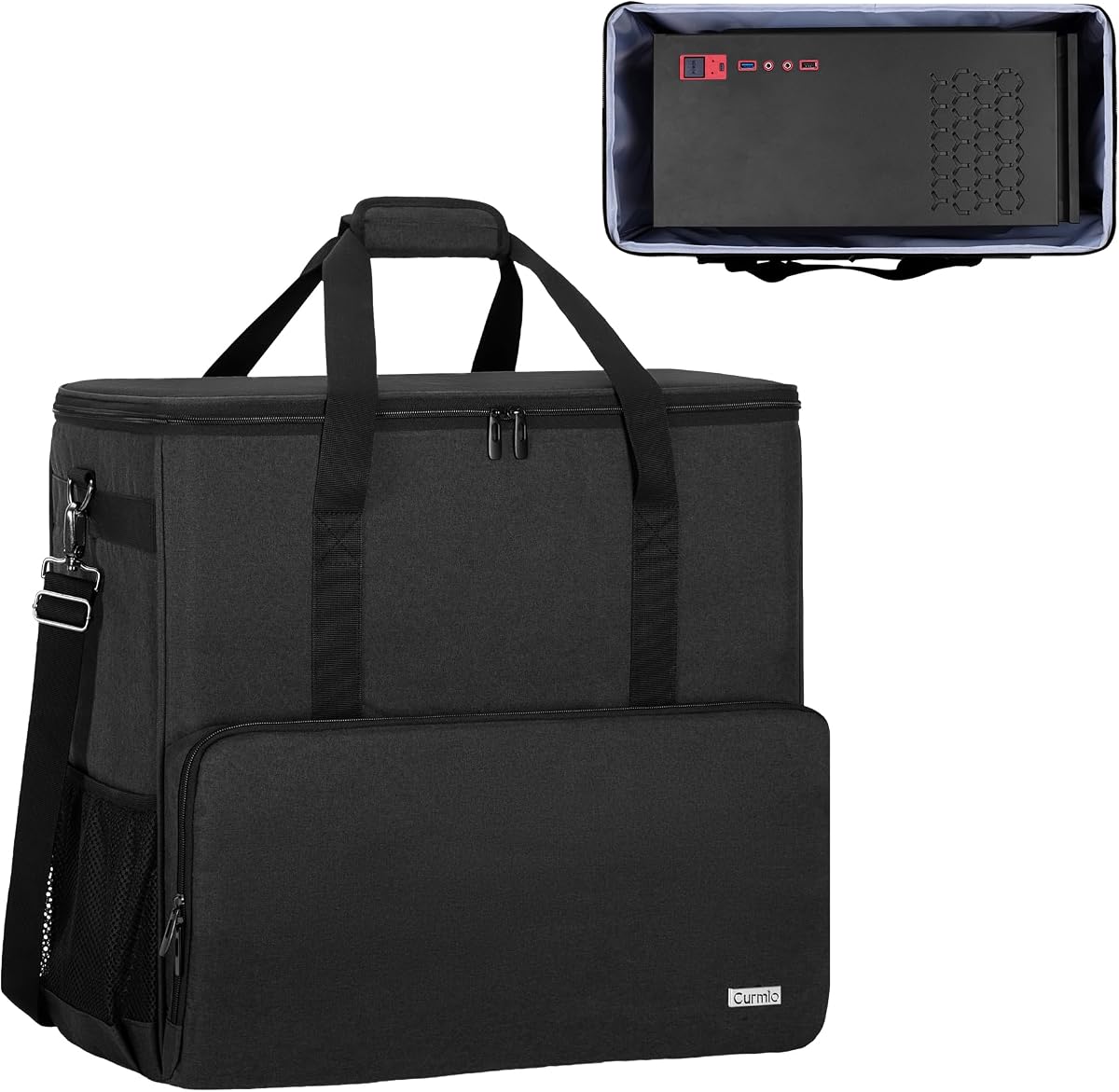
CURMIO PC Carrying Case
4.7Editor score
Tower-focused interior dimensions
Removable foam insert
Multiple peripheral pockets
Water-resistant nylon shell
Compare the best Desktop PC Tower Travel Carrying Case options for fit, protection, organization, portability, and easier moves or travel today.
A desktop PC tower travel carrying case should do more than keep a computer inside an ordinary bag. It needs to control movement, cushion vulnerable components, organize peripherals, and remain manageable over stairs, airport terminals, and long moves. The right model can turn a bulky desktop into a more organized, secure travel load.
The products in this guide were compared using their supplied specifications, including internal and external dimensions, chassis compatibility, padding, fabric, pocket layouts, carrying options, and protective closures. The list covers standard ATX and Micro-ATX bags, extra-large models, wheeled options, and designs that can carry a substantial collection of gaming accessories.
Each review explains the strongest reason to consider that case, along with its limitations and ideal owner. Rankings reflect the balance of fit, protection, organization, and portability rather than price alone. Product availability, configurations, customer ratings, and prices can change, so confirm the current listing and dimensions before purchasing.
4.7Editor score

4.9Editor score

4.3Editor score
The comparison highlights the differences that matter most when transporting a desktop: maximum tower capacity, cushioning, accessory organization, and carrying method. All ten products are designed for large computer equipment, but only those whose stated dimensions closely match your tower should be considered a confirmed fit.


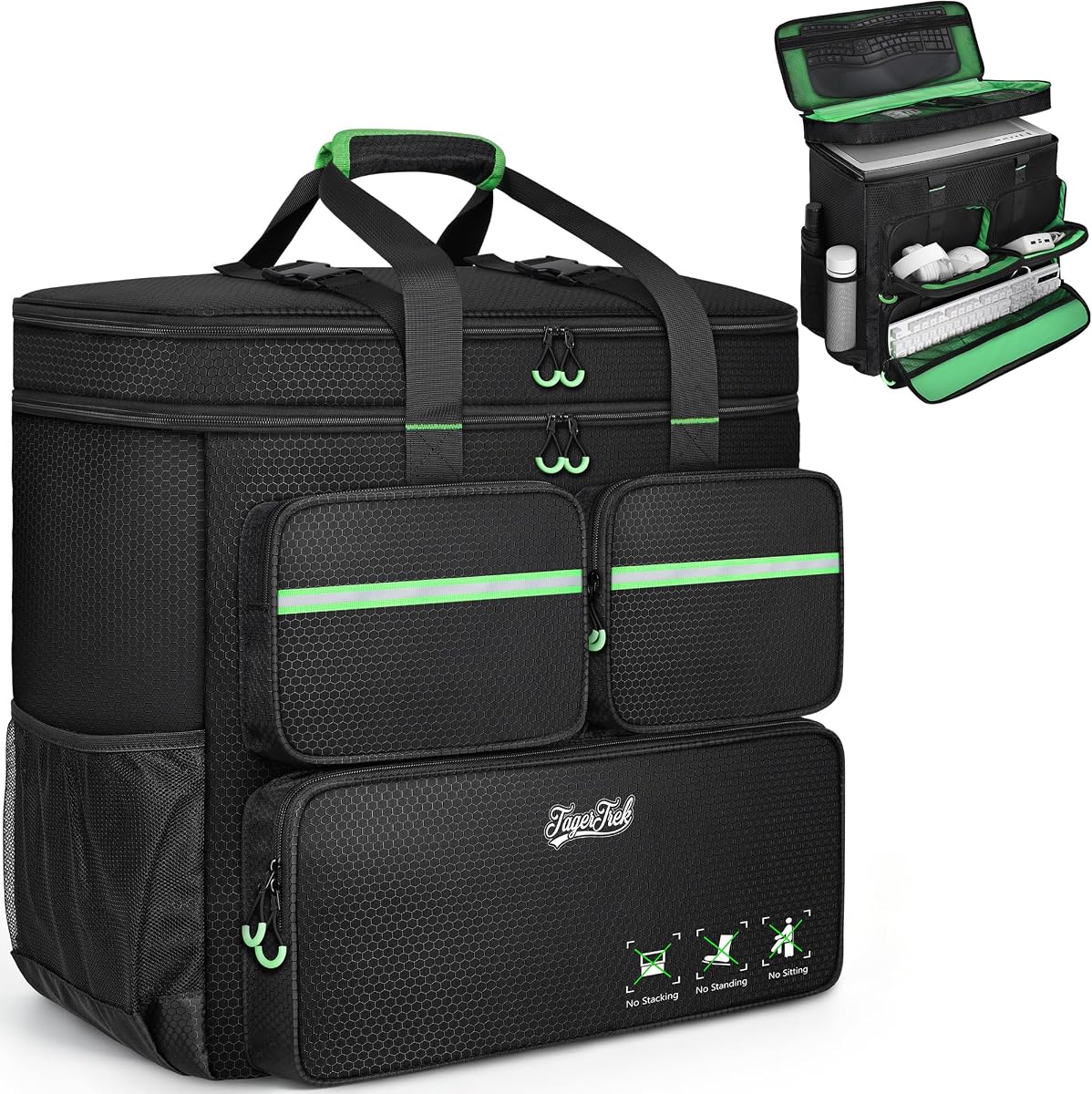


This ATX mid-tower carrying case combines a tall, tower-oriented main compartment with dedicated storage for the accessories that usually get lost during a move. Its 4.3 rating reflects a practical design with strong protection, a weather-resistant Oxford exterior, and several ways to carry the load. The supplied dimensions indicate that it is best suited to standard and mid-tower desktops rather than oversized full towers.
We may earn a commission when you buy through this link, at no additional cost to you.
The internal maximum of 19.88 by 8.86 by 19.69 inches gives owners more height than many narrower bags while keeping the width manageable for traditional ATX and Micro-ATX layouts. Thickened padding, a reinforced base, anti-slip feet, and a rear buckle help prevent the computer from shifting or tipping. A full-height mesh panel keeps cables, tools, and smaller accessories visible and separated from the main chassis.
The principal limitation is its relatively narrow internal width of 8.86 inches. A tower with protruding ports, unusual side panels, or a broader footprint may not fit even if its marketed form factor is ATX. It also does not provide the wheeled convenience of the rolling model later in the guide. Those constraints are understandable for a case that remains more compact and easier to carry on stairs.
This is a strong recommendation for a student, gamer, or office worker moving a conventional mid-tower between locations. Measure the widest point of the case, including ports and feet, and compare it with the internal dimensions before ordering. If it fits, the combination of padding, accessory organization, and backpack-style handling makes it a versatile everyday transport solution.
Thickened cushioning, a reinforced base, and anti-slip feet work together to limit impact and ground friction. The rear buckle also helps stop the tower from leaning while the bag is being carried.
Dedicated areas for the keyboard, mouse, headset, and cables reduce clutter, while the expandable side pockets and mesh organizer provide additional places for small equipment.
We may earn a commission when you buy through this link, at no additional cost to you.
The Extra Large Tower Case is designed for owners who want more clearance than a conventional mid-tower bag provides. Its 4.6 rating accompanies a 20 by 10 by 20-inch internal cavity, plus space for a graphics card, radiator, and other accessories. It is particularly relevant to builders whose tower has a broad chassis, extra cooling hardware, or protruding accessories.
We may earn a commission when you buy through this link, at no additional cost to you.
Protection comes from a high-density 5mm EPE lining under a wear-resistant 600D Oxford shell. That combination is intended to absorb impact and vibration from bumps, squeezes, and drops. The upper lid includes a zippered mesh pocket for a keyboard and mouse, while three front pockets separate the keyboard, cables, and a mouse or power bank. Two side mesh pockets add room for water bottles or similarly shaped items.
Its trade-off is bulk. A 21 by 10.2 by 20.5-inch exterior can be difficult to maneuver through tight doors or into narrow transport seating, even before the owner adds loose accessories. Although the Oxford material is wear-resistant, it should not be treated as fully waterproof, and exposed mesh pockets are not sealed protection for electronics during heavy rain.
Choose this case when your desktop is near the upper limit of standard ATX dimensions or when you want to transport additional components alongside the tower. Verify the internal width against the actual chassis rather than relying only on the ATX label. For users who can accept the larger size, it provides an effective mix of cushioning, room, and accessory organization.
The broad internal dimensions create useful clearance for cases that approach the limits of conventional ATX sizing. That makes the bag more practical for substantial builds than a narrow, universal sleeve.
A 5mm EPE lining adds meaningful separation between the tower and the outer shell. Combined with the Oxford fabric, it is better suited to repeated moving and travel than a basic unpadded bag.
We may earn a commission when you buy through this link, at no additional cost to you.
The Rolling PC Carrying Case adds a detachable cart to the familiar idea of a padded desktop backpack. Its 4.3 rating reflects a versatile design aimed at long-distance moves, business trips, LAN events, and other journeys where a wheeled load can reduce strain. The case itself is 21 by 21 by 11 inches and can accommodate a tower up to 21 by 18.5 by 11 inches.
We may earn a commission when you buy through this link, at no additional cost to you.
The included cart folds flat, uses smooth swivel casters, and offers an aluminum pull handle with three height adjustments. A cushioned top handle remains available for stairs and short carries. Storage is comprehensive: front pockets hold a keyboard, cables, and a mouse or charger; top zippered and mesh compartments support an ergonomic keyboard and mouse; and side mesh pockets can hold water bottles.
The 600D polyester exterior is described as water-resistant and wear-resistant, while solid stitching is intended to withstand heavy loads. Thick internal padding absorbs shock and vibration. The trade-off is complexity and volume: the cart must be attached for rolling, and the overall setup takes more space than a conventional backpack. Wheels are also less useful on stairs or rough surfaces.
This is the most distinctive option for a traveler who expects a long airport transfer, hotel route, or long-distance move. It suits an ATX or Micro-ATX tower within the stated maximum and offers a clear advantage over shoulder-only transport. Buyers who mostly navigate stairs may prefer a simpler handle-and-strap design, but this model gives long walks a more comfortable option.
The rolling cart transfers the load from shoulders to a pull handle, which can be easier during long routes across airports, convention halls, or large buildings. Its folding design keeps the cart ready when needed without making it the sole carrying method.
Separate front, top, interior, and side compartments keep the keyboard, mouse, cables, charger, and personal items organized. The keyboard storage accommodates models with a length below 19.7 inches.
We may earn a commission when you buy through this link, at no additional cost to you.
The CURMIO Full Tower Case delivers a focused combination of tower protection, accessible organization, and conventional backpack handling. Its 4.7 rating is among the strongest in the group, while the listed interior dimensions make the expected fit relatively easy to understand. It is designed around a 19.7 by 9.3 by 18.5-inch computer compartment.
We may earn a commission when you buy through this link, at no additional cost to you.
An interior foam padded insert cushions the desktop, while a removable foldaway cushioned pad adds another layer of support. Four bottom feet help reduce friction when the bag is set down, and the large opening simplifies loading and unloading. Multiple pockets organize a keyboard, mouse, wires, hard drive, headphones, and radiator, allowing the desktop system to travel as a more coherent kit.
The thick nylon exterior is described as water-resistant, scratch-resistant, and wear-resistant. That makes it suitable for ordinary travel and moving conditions, although it should not be left exposed in severe weather. Compared with the extra-large bags in this guide, its main limitation is capacity: users with wider towers or more cooling hardware may need to choose a larger model.
This case is a strong pick for someone seeking a proven, uncomplicated carrying solution without the complexity of a detachable wheel cart. The adjustable removable shoulder strap and reinforced padded handle provide two practical carrying methods. Check the tower dimensions first, remove unnecessary components if needed, and use the padded insert to keep the main chassis separated from accessory storage.
The foldaway pad lets the owner adjust the internal arrangement or create space for another accessory. It also provides a removable barrier between the computer and other stored items.
A reinforced padded handle supports hand carrying, while the adjustable removable shoulder strap offers a more distributed option. The large opening reduces the need to force the tower through a narrow zipper.
We may earn a commission when you buy through this link, at no additional cost to you.
The Large Multi-Pocket PC Case combines a tower-sized main section with one of the more ambitious accessory layouts in the guide. Its 4.7 rating reflects a balanced approach to protection, storage, and backpack handling. The stated exterior size is 21 by 21 by 11 inches, and the tower compartment can hold a chassis up to 21 by 18.5 by 11 inches.
We may earn a commission when you buy through this link, at no additional cost to you.
Front storage includes a bottom keyboard pocket, a cable area with elastic retention, and a right-side pocket for a mouse or charger. Top zippered and mesh sections also support an ergonomic keyboard and mouse, while side mesh pockets expand the available storage. Thick internal padding is intended to absorb shock and vibration, and the water-resistant polyester shell handles ordinary wear.
A top buckle keeps stored items from shifting, and the integrated chest strap helps distribute weight and prevents the shoulder straps from sliding. This makes the case more stable than a simple two-strap tote. The trade-offs are the bag's overall bulk and the stated keyboard pocket limit of less than 19.7 inches in length, which excludes some large keyboards.
This is a sensible choice for a gamer or remote worker who wants the tower, keyboard, mouse, and cables in one organized package. It is especially suitable for ATX and Micro-ATX systems, including the cited LIAN LI and MONTECH models. Confirm the tower's broadest dimension and your keyboard length before ordering, and use the chest buckle during longer carries.
The chest strap helps keep both shoulder straps in position and spreads the load across the upper body. Combined with the top buckle, it gives the bag a more secure feel than an unstructured tote.
Multiple front, top, and side compartments allow a full desktop kit to be sorted by function. Elastic retention keeps cables and smaller accessories from shifting through the busiest pockets.
We may earn a commission when you buy through this link, at no additional cost to you.
This gaming computer backpack emphasizes cushioning and a relatively broad tower cavity. Its 4.6 rating accompanies an 8mm EPE foam interior and rugged 600D Oxford exterior, materials selected to protect a desktop or server from impacts, vibration, and daily wear. The internal dimensions are 19.7 by 10.6 by 18.5 inches.
We may earn a commission when you buy through this link, at no additional cost to you.
The main compartment can hold an ATX or Micro-ATX chassis, with the extra width creating more clearance than several narrower models. Dedicated storage includes a front keyboard sleeve, lined compartments for a mouse and cables, side mesh bottle pockets, and internal mesh storage. Adjustable padded shoulder straps and a stabilizing chest strap are designed to make the assembled load more comfortable.
The 8mm padding is the defining feature, but it does not compensate for incorrect dimensions. A tower taller than 18.5 inches or with a bulky power supply that extends beyond the normal case boundary may not fit. The Oxford exterior is rugged and tear-resistant, yet it should be protected from prolonged rain rather than treated as a sealed waterproof container.
This backpack works well for users carrying a conventional desktop between a home and office, attending a gaming event, or relocating locally. Its wide interior is useful for towers with side-mounted cable space or a slightly irregular footprint. Measure the actual chassis rather than only the motherboard standard, and keep fragile accessories in the lined or internal mesh compartments.
The 8mm EPE foam layer is deeper than the basic pad-and-lining approach used by some simpler cases. It is intended to absorb both sharp bumps and lower-energy vibration during a move.
A front keyboard sleeve, lined mouse and cable areas, and internal mesh storage keep peripherals separated from the tower. This reduces movement inside the main compartment and makes items easier to locate.
We may earn a commission when you buy through this link, at no additional cost to you.
The Trunab Tower Travel Backpack is a compact, tower-focused option for ATX and Micro-ATX systems. Its 4.6 rating is supported by a 20.1 by 8.66 by 18.5-inch main compartment, foam and pearl-cotton cushioning, and multiple accessory areas. The design is aimed at owners who want a conventional travel backpack rather than a wheeled system.
We may earn a commission when you buy through this link, at no additional cost to you.
The internal padding surrounds the computer mainframe, while four no-slip feet pads reduce friction when the case is placed on the floor. Side pockets with buckles help keep personal belongings from being lost. Additional internal pockets can store a keyboard, earphones, radiators, and hard drives, creating a more consolidated transport arrangement.
An adjustable ergonomic padded shoulder strap and padded top handle provide two carrying choices. A buckle chest strap helps prevent the shoulder straps from sliding off during transit. The outer material is tear-resistant and water-resistant, while the padded lining helps limit exposure to dust, scratches, and moisture. Its 8.66-inch internal width is the main constraint for unusual or broad cases.
This backpack is a good fit for students, remote workers, and LAN attendees moving a standard desktop a moderate distance. It avoids the bulk of a wheeled cart and remains straightforward to store. If your tower's maximum width exceeds the listed interior measurement, choose a wider model rather than compressing it into the bag.
Internal foam and thickened pearl-cotton cushions provide support around the mainframe. The four feet pads add a lower level of protection when the loaded bag rests on a hard floor.
Multiple internal pockets separate common accessories, while buckled side pockets help contain smaller belongings. This makes it easier to retrieve a mouse, cable, or drive without unpacking the tower.
We may earn a commission when you buy through this link, at no additional cost to you.
The Mid-Tower Travel Case is one of the broadest designs in the comparison, with an exterior measuring 21.26 by 12.6 by 18.89 inches. Its 4.3 rating reflects a roomy, protection-focused approach suited to standard tower cases and additional components. The product information identifies ATX and M-ATX compatibility and highlights the ability to carry items such as graphics cards and radiators.
We may earn a commission when you buy through this link, at no additional cost to you.
A high-density 5mm EPE lining is paired with a thickened, wear-resistant 600D Oxford exterior. These layers are intended to absorb impact and vibration from bumps, squeezes, and drops. Storage includes three front zippered pockets, a lower keyboard area, an elastic cable section, a fleece-lined mouse or power-bank pocket, side mesh bottle pockets, and a zippered mesh pocket beneath the top cover.
The main drawback is bulk. At 12.6 inches wide, the bag may be difficult to fit through narrow passages, transport doorways, or standard luggage spaces. Only the external dimensions are given in the supplied data, so a prospective buyer should request or verify the internal width before relying on a fit. Water resistance should also be understood as protection from ordinary dampness, not immersion.
Choose this model if you expect to carry loose components or if your desktop includes a radiator and other equipment that would otherwise need a second bag. It is also useful for buyers who want extra room around the tower. Anyone with a compact standard chassis should weigh that space against the difficulty of carrying a broad, fully packed case.
The roomy main section can accommodate a tower and items such as a graphics card or radiator. This is particularly helpful when the owner wants to keep a complete do-it-yourself build together.
The 5mm EPE lining absorbs impact and vibration, while the outer Oxford layer resists everyday wear. A soft padded carry area also improves comfort when the loaded case is handled by hand.
We may earn a commission when you buy through this link, at no additional cost to you.
The CURMIO Double-Layer Case expands on the familiar tower-bag format with a second layer of accessory organization. Its 4.7 rating makes it one of the most highly rated products here, while the 19.7 by 9.3 by 18.5-inch interior provides a clearly defined home for a standard desktop tower. The exterior is taller at 20.5 inches, reflecting the extra storage layer.
We may earn a commission when you buy through this link, at no additional cost to you.
The double-layer layout provides separate areas for a keyboard, mouse, wires, hard drive, radiator, and headphones. An interior foam padded insert and removable foldaway cushioned pad add flexibility around the main computer, while four bottom feet pads reduce friction with the ground. The large opening makes loading the tower and accessories less awkward than a narrow top-entry design.
This case shares the same tower-cavity measurements as the standard CURMIO model, so buyers should not assume the double layer makes every chassis fit. The 9.3-inch internal width can be restrictive for broad or irregular designs. It also lacks a detachable trolley, so very long walking routes may place more strain on the user than the rolling option provides.
The Double-Layer Case is a strong choice for owners who want more accessory storage without moving to an extra-wide bag. Its adjustable removable shoulder strap and reinforced padded handle give flexible transport options. For a standard ATX or Micro-ATX tower, it combines useful organization with a protective insert and a well-established rating.
The taller double-layer design creates additional organization without widening the main computer cavity. That separation is helpful for storing flat accessories above the tower.
The removable foldaway pad can be moved to suit the contents and provides an extra layer between the desktop and stored equipment. Four feet pads protect the case when it is set down.
We may earn a commission when you buy through this link, at no additional cost to you.
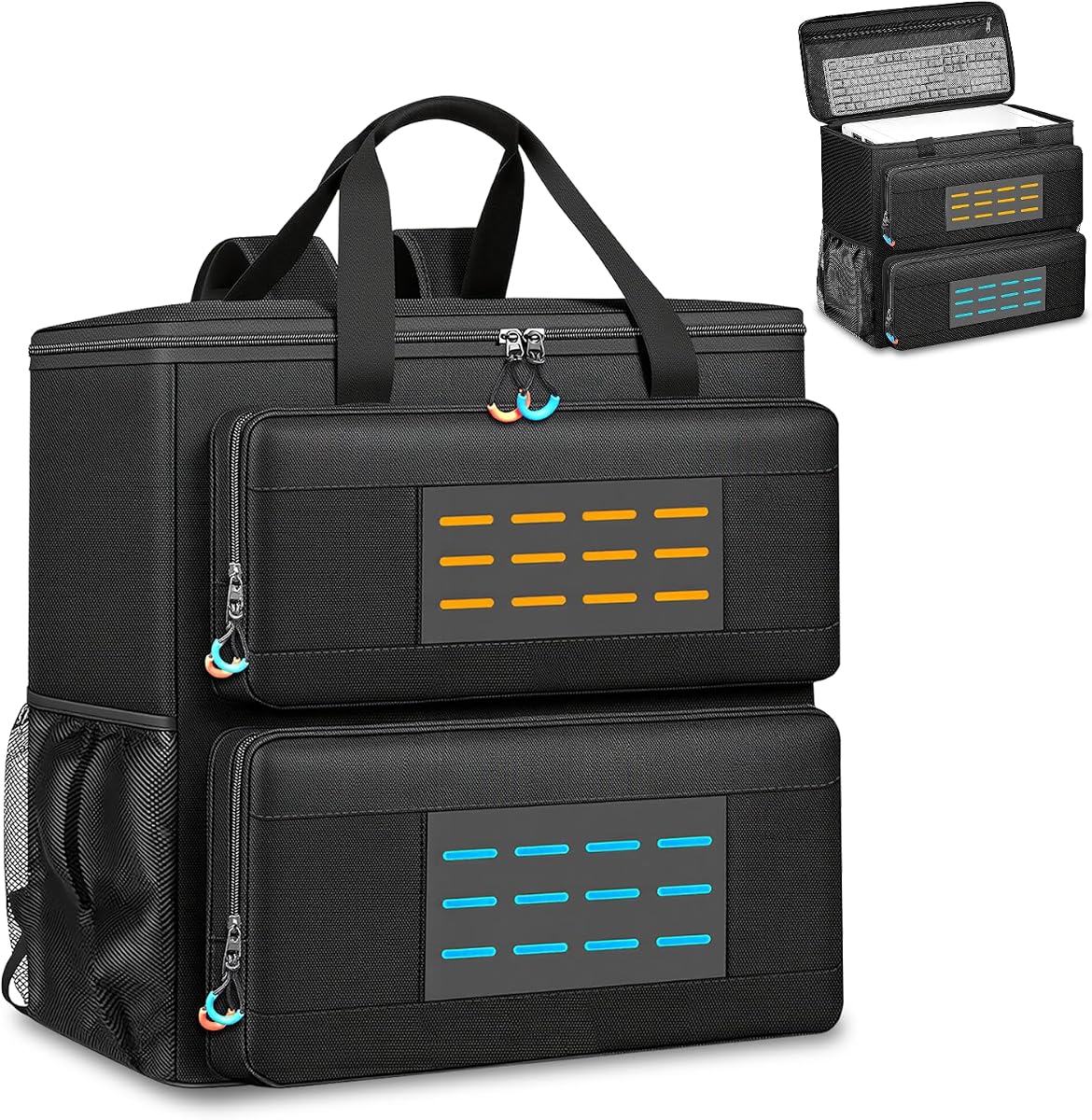
The ATX Tower Carrying Case stands out with a 4.9 rating, a versatile interior, and more ways to integrate with other travel gear than most competing bags. Its approximately 20.4 by 19 by 18.5-inch main compartment is described as accommodating most standard ATX and mid-tower cases, with support for both ATX and Micro-ATX systems.
We may earn a commission when you buy through this link, at no additional cost to you.
The large internal space makes it practical for desktop owners who want room around the chassis, while high-density foam and thickened cushioning help absorb impacts and vibration. Storage includes a zippered mesh lid pocket for a keyboard and a front compartment for a mouse, cables, hard drives, coolers, and headphones. Two stud-secured side pockets add space, and external MOLLE webbing accepts additional equipment.
Carrying versatility is a major advantage. Padded adjustable shoulder straps create a balanced rucksack, a padded top handle supports quick lifting, and the rear luggage strap can secure the bag to a wheeled suitcase. A buckled chest strap improves stability and distributes weight. The trade-off is that the broad interior makes the bag less compact, and the MOLLE system is most useful when the owner has compatible attachments.
This is the strongest all-around recommendation for a standard ATX desktop because it combines a high rating with broad fit, substantial protection, organized storage, and multiple carrying options. It is particularly well suited to travelers combining a PC trip with other luggage. Measure your tower carefully, pack dense accessories separately, and use the rear sleeve when traveling with a rolling suitcase.
The bag works as a balanced rucksack, a hand-carried case, and an attachment for rolling luggage. This flexibility is useful for everything from stairs and local moves to airport travel with multiple bags.
High-density foam and thick cushions help protect the chassis, while the broad 20.4 by 19 by 18.5-inch cavity provides more dimensional freedom than many narrow tower sleeves.
MOLLE webbing adds attachment points for compatible extra equipment. A keyboard pocket, front gear compartment, and stud-secured side pockets cover the core desktop accessories.
We may earn a commission when you buy through this link, at no additional cost to you.
The right carrying case depends on the exact dimensions of your tower, the distance it must travel, and the amount of gear you want to bring. Compare internal measurements first, then evaluate cushioning, closures, pockets, and carrying methods before making a decision.
Start with the external dimensions of your desktop case rather than its advertised motherboard form factor. ATX, Micro-ATX, Mini-ITX, and full-tower labels do not guarantee identical physical footprints. Include the widest point of the chassis, the height of any top-mounted component, protruding rear connectors, and the depth of the power supply or cable management area. Compare those measurements with the case's stated internal maximums, not merely its exterior dimensions, and leave a small amount of clearance where possible.
Measure the tower and choose a model whose internal cavity exceeds those dimensions.
A desktop tower contains rigid parts that can transfer shock directly to the computer's internal hardware. High-density foam, EPE lining, pearl-cotton cushions, and removable inserts provide different degrees of separation and flexibility. The outer material should also resist abrasion and incidental moisture, particularly if the bag will be moved between vehicles, loading areas, and event venues. Water-resistant fabric is useful, but it is not the same as a sealed waterproof enclosure.
Prioritize dense internal cushioning and a durable, water-resistant outer shell.
A good travel case should keep the keyboard, mouse, headset, power cables, and small drives separate from the main tower compartment. Look for dedicated keyboard sleeves, elastic cable loops, lined mouse pockets, internal mesh zones, and external attachment points. Side mesh pockets are useful for water bottles but should not be relied on to protect electronics in wet conditions. Also check whether a keyboard pocket can accept the length of the keyboard you own.
Choose pockets that match your peripherals and confirm keyboard clearance.
A backpack distributes weight across both shoulders and works well for stairs and crowded transit areas. A top handle is convenient for short distances and lifting into vehicles. A detachable rolling cart reduces strain during long walks but adds bulk and is less useful on stairs. A rear luggage sleeve can make the bag compatible with a rolling suitcase. The best option depends on the route, not simply on the number of features.
Match handles, straps, chest buckle, and wheels to your usual route.
A tower that shifts inside the bag can receive damaging impacts even when the outer padding is substantial. Look for a top buckle, internal strap, secure zipper path, structured base, and non-slip feet. A chest buckle helps keep shoulder straps from sliding, while a rear anti-tip fastener can help prevent a tall tower from leaning when the bag is set down. The closure should also be easy to operate without forcing the packed zipper.
Use buckles, retention, and foot pads to limit shifting.
A larger case may accommodate more equipment but can be difficult to maneuver through doors, stairwells, elevators, and transport aisles. For air travel, confirm the carrier's baggage limits and the dimensions of any connecting carrier. For a road move, total capacity and wheel convenience may matter more than compactness. For LAN parties, ensure the case can hold the monitor-related accessories you plan to bring, but remember that some displays require separate protective cases.
Check doors, baggage rules, and route conditions before choosing size.
A large opening makes it easier to place the tower in the correct orientation and retrieve it without disturbing stored accessories. Removable pads and foldaway cushions can be rearranged when a graphics card, radiator, or other component needs a separate position. Owners should also consider whether the computer must be moved through narrow spaces while still connected to the bag. A structured case that opens widely and retains its shape is often easier to use than a soft, unstructured tote.
Prefer wide openings and adjustable internal padding.
Before packing, shut down the computer fully, disconnect every cable, and let the system cool. Remove the graphics card or other large upgrade only if the manufacturer recommends it or if it could move freely inside the chassis. Secure loose internal parts, cover sharp or protruding connectors, and take photographs of the cable arrangement. Measure the tower once more against the case's internal dimensions, especially if the computer was recently rebuilt.
Place the tower in the main compartment and position the removable pad or internal cushion so it fills empty space without pressing unevenly against panels or feet. Store the keyboard, mouse, cables, drives, and cooler in their designated pockets rather than loose above the tower. Use elastic loops for small accessories, close zippered mesh areas, and make sure the tower cannot shift when the bag is lifted. Secure the top buckle and chest strap before moving the load.
Carry the case using the method best suited to the route, and never pull it by a loose accessory strap. When using the rolling cart, engage the height adjustment and keep the load balanced. Store the case in a dry location with the tower removed if possible, allow damp equipment to dry before zipping it shut, and periodically inspect seams, zippers, buckles, padding, and feet for wear. Clean the exterior according to the material guidance supplied with the case.
No. ATX describes a motherboard and case format, but physical tower dimensions can still vary substantially. Compare the case's internal maximum length, width, and height with the broadest and tallest points of your actual chassis, including feet, ports, power supplies, and external cables. A case marketed for ATX is only a confirmed fit if the supplied measurements cover the computer with some clearance.
Water-resistant fabric is intended to resist ordinary dampness and brief exposure, not prolonged rain or submersion. Seams, zippers, mesh pockets, and open areas can allow water to enter. During wet travel, keep the case under a rain cover, avoid dragging it through puddles, and stop if the exterior becomes saturated. Dry the bag and its contents thoroughly before closing it for storage.
It depends on the build and the level of protection around the card. A securely mounted card with sufficient clearance may travel inside the case, but expensive or loosely supported components can be damaged by movement. Follow the computer or graphics card manufacturer's guidance, use a fitted anti-static cover where appropriate, and pad around heavy or protruding parts. For long moves, removing the card and placing it in a separate padded container may offer more protection.
The main compartment is designed for the tower, while many models include separate storage for a keyboard, mouse, headset, cables, and drives. A monitor is usually too large and vulnerable for those pockets, so it needs a separate monitor case. Only place a display in the tower bag if the manufacturer explicitly confirms the dimensions and protection are suitable.
A rolling case is usually more comfortable across long, smooth routes such as large airports or convention centers. A backpack is often simpler, stores more compactly, and provides better control on stairs. The rolling model in this guide includes a detachable folding cart, so owners can choose the relevant method for each trip. Consider how much walking, stair climbing, and baggage handling the route involves.
Use a bag with a rigid or reinforced base, dense internal padding, and secure retention for the tower. Pack the keyboard, mouse, and cables separately so they cannot press against the chassis, and close all exterior pockets before lifting. Keep the case upright when possible, avoid placing heavy items on top, and use a wheeled cart for longer building or airport routes.
Do not force it into the bag or leave the closure strained. A slight difference in a single dimension may sometimes be manageable, but pressure on the zipper can damage the case and inadequate clearance can damage the tower. Check whether a removable top panel, side panel, or peripheral can be detached safely, or choose a larger case. If the manufacturer does not confirm the fit, regard the model as unsuitable.
Use the dedicated cable pockets and elastic retaining loops, then coil longer leads loosely rather than creating tight bends. Keep power and data cables separated where practical, label similar cables, and place small connectors in a separate zippered compartment. Avoid allowing loose cable bundles to move into the tower cavity, where they can press against a panel or interfere with the internal pad.
The ATX Tower Carrying Case is the most versatile overall option, combining a 4.9 rating, broad tower capacity, dense padding, organized storage, MOLLE webbing, and several carrying methods. The CURMIO PC Carrying Case offers the most straightforward value-focused design for a standard tower, while the Rolling PC Carrying Case is the premium choice for travelers who want a folding cart and adjustable pull handle.
Prioritize the internal dimensions above every other feature. A beautifully padded bag is not useful if the tower does not fit, and a large pocket system adds little value if the keyboard is too long or the tower shifts inside the main compartment. After confirming fit, choose based on the route: shoulder straps and a chest buckle for stairs, a rolling cart for long walks, and a luggage sleeve for travel with other bags.
Finally, review the current listing, customer feedback, included accessories, and product dimensions before purchasing. Ratings and configurations can change, and the available options in this category are closely differentiated by small fit and carrying details. Check the tower with a tape measure, plan which peripherals will travel with it, and keep the computer and accessories properly separated for the safest journey.