
Canon MegaTank G3270
4.1Editor score
Wireless print, copy, and scan
Up to two years included ink
Compact 1.35-inch LCD
Ink tank printers combine refillable, high-capacity reservoirs with the familiar convenience of an all-in-one printer. They are especially appealing to households and home offices that print regularly, because they reduce cartridge replacements and can offer generous ink supplies. The right model should balance output quality, wireless controls, scanning, speed, and maintenance needs.
This guide compares ten refillable ink tank options from Canon, Epson, and HP, along with one compatible ink bottle set. We evaluated the supplied specifications and feature details, focusing on included page yields, cartridge-free design, refill systems, wireless connectivity, scanning, copying, displays, and automatic duplex printing. The list covers models suited to different document, photo, and home-office priorities.
Each numbered review explains what a printer emphasizes and where its specification set may suit—or limit—a particular buyer. Our three highlighted picks highlight the strongest combinations of value, feature balance, and premium convenience. Product details and configurations can change over time, so verify the current listing, warranty terms, bundled ink estimates, and system requirements before purchasing.
4.1Editor score

4.2Editor score

4.2Editor score
As an Amazon Associate we earn from qualifying purchases.
This side-by-side comparison highlights refill architecture, included ink, printing functions, connectivity, display features, and workflow conveniences. It includes nine printers and one compatible ink refill set so readers can compare both complete systems and ongoing ink options.





The Canon MegaTank G3270 is an affordable entry point into refillable ink tank printing, combining wireless color output with copying and scanning in one compact unit. Its 4.1 rating reflects a generally practical feature set, and the standout attraction is the bundled ink estimate: up to 6,000 black-and-white pages or 7,700 color pages using one set of inks.
We may earn a commission when you buy through this link, at no additional cost to you.
Its main strengths are convenience and coverage. The printer supports wireless printing, copying, and scanning, while the 1.35-inch square LCD provides a basic on-device interface. Canon describes the included supply as enough for up to two years, making this model especially interesting for users who want to minimize early cartridge or bottle purchases. It is a straightforward choice for schoolwork, household documents, recipes, and occasional color projects.
The clear trade-off is that this model lists single-sided printing rather than automatic two-sided printing. That limitation makes it less attractive for users who routinely produce lengthy reports, double-sided worksheets, or business documents where one-sided output would waste paper. There is also no indication of a full touchscreen interface, so buyers seeking richer direct controls should consider a more advanced model.
Overall, the G3270 is a sensible budget recommendation for a first ink tank printer. Its wireless all-in-one functions and high initial page estimates solve the most common concerns: recurring ink interruptions and complicated connectivity. Choose it when simplicity, refillable ink, and core document functions matter more than duplex printing or premium controls.
The stated yields of 6,000 black-and-white or 7,700 color pages provide a substantial starting point. Buyers can plan around the included ink rather than immediately establishing a replacement schedule.
Wireless printing, copying, and scanning make the G3270 useful beyond a single computer desk. The square LCD adds basic physical controls without requiring a larger touchscreen-style interface.
We may earn a commission when you buy through this link, at no additional cost to you.
The Epson EcoTank ET-2803 is a well-rounded wireless all-in-one for users who want easy refilling, capable scanning, and strong connectivity. Its 4.2 rating is among the highest in this guide, while its estimated yields of up to 4,500 black pages or 7,500 color pages make the bundled ink particularly useful for frequent print routines.
We may earn a commission when you buy through this link, at no additional cost to you.
Epson's cartridge-free system is the defining benefit. The supplied information states that an ink bottle set is equivalent to about 80 individual cartridges and that replacement bottles can produce up to 4,500 black or 7,500 color pages. The high-capacity tanks, keyed EcoFit bottles, wireless connection, built-in scanner, and color display collectively create a convenient home-office package rather than a print-only device.
The primary caution concerns ink compatibility and warranty protection. Epson recommends genuine ink for optimal quality and performance and warns that non-genuine ink could cause damage not covered by the limited warranty. That makes it important to compare the long-term cost of official supplies with any alternative ink you may have been considering. The supplied specifications also do not highlight automatic duplex printing, so buyers needing that feature should verify the listing before buying.
The ET-2803 is our Editor's Choice because it balances core printing, scanning, copying, wireless operation, and refill convenience without an overtly complicated design. It is a strong recommendation for students, families, and home offices that value Epson's bottle-based workflow and want a broad set of day-to-day functions.
EcoFit bottles and high-capacity tanks are intended to make replenishment simpler than handling small cartridges. The claimed cartridge equivalence also suggests fewer replacement interruptions for regular users.
The printer supports wireless operation, voice-activated printing, AirPrint, and the Epson Smart Panel app. A high-resolution flatbed scanner and color display expand its usefulness beyond printing.
We may earn a commission when you buy through this link, at no additional cost to you.
The HP Smart Tank 5003 offering identified as 9B2D3A combines refillable ink with the convenience of a home all-in-one. It carries a 4.1 rating and supports printing, copying, scanning, borderless prints, and mobile or wireless printing. The stated inclusion of up to three years of ink and up to 6,000 color or black pages is its biggest headline feature.
We may earn a commission when you buy through this link, at no additional cost to you.
HP's mess-free refill approach is especially appealing for buyers who want to avoid squeezing cartridges or dealing with complicated installation. The bottles plug into the cartridge-free tanks and drain into them, while the printer's core functions cover most household and home-office workflows. Its borderless printing support also gives it more flexibility for photos and graphics than a basic document-only printer.
There are two qualifications to keep in mind. Automatic duplex printing is not stated in the supplied specifications, so two-sided output should be confirmed directly with the seller. The listing also calls the model AI-capable, but the provided details do not explain that feature; it should not be treated as a meaningful advantage without further information about its actual function.
This HP Smart Tank variant earns the Best Premium designation because it combines an ambitious ink allowance, refill convenience, and everyday copying and scanning in one home-focused package. It is well suited to families that print color materials and want a simple bottle-filling system, provided duplex printing is not a must-have requirement.
Up to three years of included ink and an estimated 6,000 pages can reduce the urgency of an immediate refill. Actual duration varies with use and the color mix selected.
The refill system requires plugging bottles into the ink tanks and allowing them to drain. This approach is designed to minimize squeezing and spilling.
We may earn a commission when you buy through this link, at no additional cost to you.
The Epson EcoTank ET-2903 is one of the most specification-rich models in this guide. Its 4.2 rating, 11 black and 6 color ISO pages per minute, 100-sheet paper tray, and high 5760 by 1440 dpi resolution position it as a capable home and home-office printer with room for photos as well as everyday documents.
We may earn a commission when you buy through this link, at no additional cost to you.
The refill system is designed for low-friction maintenance. Supersized tanks and uniquely keyed EcoFit bottles help prevent mix-ups, while the supplied listing claims up to three years of ink and estimated yields of 3,600 black or 6,500 color pages. A high-resolution flatbed scanner, 1.44-inch color display, wireless printing, and support for Epson Smart Panel, AirPrint, Mopria Print Service, and Mopria Scan make it versatile across devices.
Epson's Heat-Free technology uses a permanent printhead designed to last for the life of the printer, which is one of the model's more compelling durability details. Automatic duplex printing is not listed, however, so it may be less suitable for paperwork-heavy users who regularly need two-sided pages. As with other EcoTank models, Epson recommends genuine ink to maintain quality and warranty protection.
The ET-2903 is a strong all-around recommendation when you want more disclosed speed, resolution, and productivity information than the entry-level models provide. It is especially appealing for users who alternate between text-heavy work, school projects, and color photography while valuing a clean refill experience.
The listed 11 ppm black and 6 ppm color ISO speeds are useful indicators for routine home-office output. Its stated resolution supports detailed text and photographic results across a range of media.
The permanent printhead is intended to last through the printer's life. Keyed refill bottles and an up-to-three-year ink allowance support a lower-maintenance ownership experience.
We may earn a commission when you buy through this link, at no additional cost to you.
The Canon Megatank G3290 adds an important upgrade over simpler home printers: a 2.7-inch color touchscreen. Its 4.2 rating and combination of wireless printing, copying, scanning, and automatic two-sided printing make it a particularly complete option for users who want convenient controls as well as refillable ink.
We may earn a commission when you buy through this link, at no additional cost to you.
Its supplied ink estimates are substantial, reaching up to 6,000 black-and-white or 7,700 color pages from one set of inks. Canon also states that up to two years of ink are included. Automatic duplex printing is the standout practical feature, reducing paper consumption and saving time on reports, school assignments, and multi-page office documents.
The larger touchscreen gives users direct access to printer settings and can make previewing or navigating scans more convenient than a small character display. The trade-off is that the listing supplies fewer productivity details than the Epson ET-2903; no page-speed or paper-tray figure appears in the provided information. Buyers should also account for the cost of replacement Canon ink when evaluating ongoing ownership.
This is a strong recommendation for anyone who considers the touchscreen and automatic duplex printing essential. It is more versatile than the G3270 and particularly well suited to homes, students, and small offices that produce frequent multipage documents alongside color projects.
The 2.7-inch color touchscreen provides a more graphical control experience than a minimal LCD. It is a useful upgrade for scanning, copying, and changing settings directly at the machine.
Automatic two-sided printing improves efficiency for long documents. It also reduces the need to manually rearrange multipage files before printing.
We may earn a commission when you buy through this link, at no additional cost to you.
The Epson EcoTank ET-4800 is a wireless color all-in-one built around high-capacity tanks and bottle-based refilling. Its 3.8 rating is lower than those of the leading choices in this guide, but the core refill design remains attractive for buyers who prioritize ink capacity over modern control features or a fully detailed productivity specification.
We may earn a commission when you buy through this link, at no additional cost to you.
Epson's EcoFit bottles are designed to make filling the high-capacity reservoirs easier than handling conventional cartridges. Heat-Free Micro Piezo technology is described as producing sharp text plus capable color photos and graphics on virtually any paper type. The integrated high-resolution flatbed scanner and color display make the unit suitable for copying and document workflows as well as printing.
Compared with newer EcoTank listings, the available information does not provide the same level of detail about included page yields, print speed, tray capacity, mobile-app support, or duplex functionality. Its 3.8 rating should therefore be considered alongside the possibility that the listing may be older or less thoroughly documented. Verify all current specifications before making a final comparison.
The ET-4800 remains a reasonable recommendation for a household that values Epson's established refill system, high-capacity tanks, and integrated scanner. It is most compelling when your main priorities are simple ink management, dependable all-in-one functions, and quality output rather than a large touchscreen or automatic duplex printing.
The refill reservoirs reduce reliance on small replaceable cartridges. EcoFit bottles are intended to make the replenishment process straightforward and worry-free.
The high-resolution flatbed scanner and copier expand the device's usefulness for school and office paperwork. A color display assists with navigation and copying controls.
We may earn a commission when you buy through this link, at no additional cost to you.
The Epson EcoTank ET-2980 is a home-focused all-in-one whose strongest attraction is a substantial initial ink supply. Its 4.0 rating is supported by claimed yields of up to 6,600 black pages or 5,500 color pages, with enough ink stated to last up to three years. That makes it appealing for households that print frequently and want to defer refill purchases.
We may earn a commission when you buy through this link, at no additional cost to you.
The refill process uses supersized tanks and uniquely keyed EcoFit bottles, which helps keep refilling straightforward. Epson states that one replacement bottle set is equivalent to about 90 individual cartridges. Wireless printing and scanning from a phone or other smart device add convenience, while the all-in-one format keeps the product relevant beyond basic output.
Automatic duplex printing is not mentioned in the supplied details, so users who routinely print two-sided documents should verify whether it is available. Epson also strongly recommends genuine ink for quality, performance, and warranty coverage. That recommendation is relevant because the convenience of a refill system is less useful if incompatible ink causes problems or affects results.
The ET-2980 is a strong fit for printing-heavy households that value a large black-page allowance, generous color capacity, and simple bottle refills. It is less compelling for users whose priority is automatic duplex printing or a larger on-device display, but for straightforward wireless documents, schoolwork, and photos, its ink economics are compelling.
Up to 6,600 black and 5,500 color pages can provide meaningful savings during the first ownership period. These are supplied estimates, so real coverage will vary with document content and printing habits.
The stated three-year ink availability is useful for households that do not want to monitor cartridges closely. Keyed bottles also help reduce the risk of placing the wrong refill in a tank.
We may earn a commission when you buy through this link, at no additional cost to you.
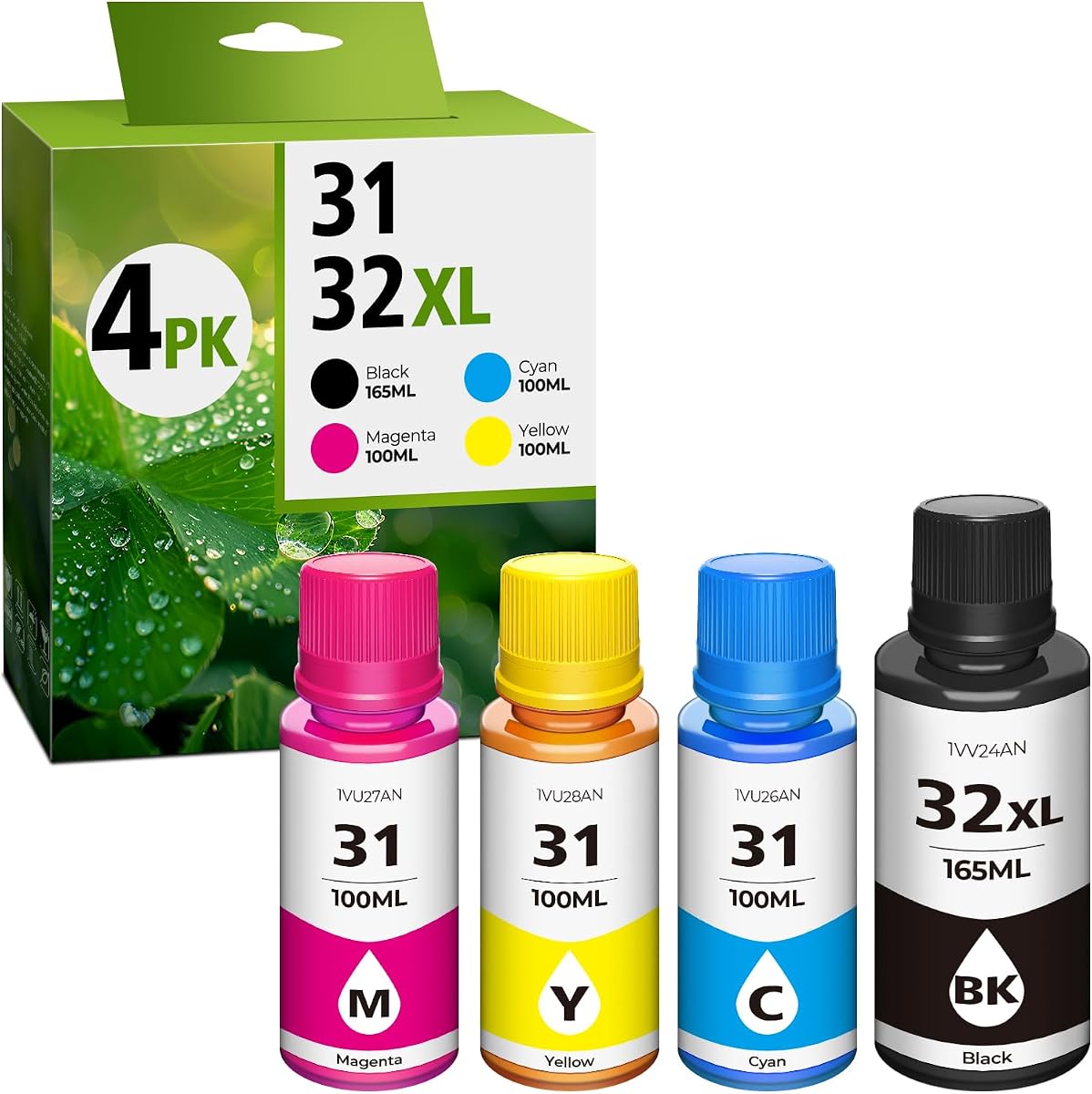
The 31 Ink 32XL set is not a printer, but it is a relevant ink tank accessory for owners of compatible HP Smart Tank, Smart Tank Plus, older Smart Tank, and Ink Tank models. With a 4.4 rating—the highest among the products listed—it offers a four-bottle package containing black, cyan, yellow, and magenta dye inks.
We may earn a commission when you buy through this link, at no additional cost to you.
The black bottle contains 165ml, while each color bottle contains 100ml. The listing states yields of up to 9,500 pages for 32XL black and 9,000 pages for each 31 color bottle at 5% coverage on A4 paper. Compatibility information covers a wide collection of models, including HP Smart Tank 5101, 7602, 6001, 5000, 5003, 5100, 6003, 7603, and numerous other listed printers.
The most important caveat comes directly from the supplied information: these are dye inks and differ from OEM black pigment ink. The manufacturer recommends cleaning the printer heads before refilling and warns against mixing this black ink with OEM black pigment ink because doing so could affect print quality and performance. Buyers should also confirm their exact model is covered rather than relying on a similar model name.
This refill set is best recommended for compatible printer owners who specifically accept third-party dye ink and follow the preparation guidance. It is not a complete printer alternative, but its high rating, large bottle sizes, and extensive stated compatibility make it a noteworthy option for maintaining an existing refillable system.
The set includes one 165ml black bottle and three 100ml color bottles. Its larger containers are intended to reduce how often compatible printers need replenishment.
The listing names many supported HP models, but users should verify the exact printer number. It also specifically warns against mixing this dye black ink with OEM pigment black.
We may earn a commission when you buy through this link, at no additional cost to you.
The HP Smart Tank 5003 variant identified as D06BKA offers the same core refill concept as the other HP listing in this guide, but its 3.8 rating is lower. It remains a practical home printer with wireless printing, scanning, copying, borderless output, and an estimated 6,000 pages of included black or color ink.
We may earn a commission when you buy through this link, at no additional cost to you.
Its refill method is deliberately simple: bottles plug into the cartridge-free tanks and drain, avoiding the need to squeeze ink containers. The claimed up-to-three-year ink availability gives owners a substantial initial buffer. Wireless and mobile printing further improve everyday flexibility, allowing users to send jobs from compatible phones or other devices rather than remaining near a connected computer.
The rating suggests that some buyers may have encountered shortcomings or simply rated the product more conservatively than buyers of the leading models. The provided information also omits automatic duplex printing, paper-tray capacity, and detailed speed figures. Since another Smart Tank 5003 listing appears in the guide, buyers should compare the exact model identifier and current seller information carefully.
The D06BKA is a reasonable value-oriented choice when wireless all-in-one functions and a low-friction refill system are the priorities. It may suit a home that values color and scanning without needing advanced productivity specifications, but buyers should verify duplex capability, connectivity details, and the precise bundle contents before ordering.
The tank design is intended to make replenishment less messy than cartridge replacement. Users plug compatible bottles into the appropriate reservoirs and allow the ink to drain.
Wireless mobile printing and borderless output add flexibility for everyday documents and color images. Copying and scanning make the unit suitable for common home-office tasks.
We may earn a commission when you buy through this link, at no additional cost to you.
The renewed Epson EcoTank ET-2988 combines high stated print speed with automatic duplex printing, making it an intriguing option for users who need efficient multipage documents. Its 3.9 rating reflects a generally capable feature set, including up to 6,600 black or 5,500 color pages from the included ink and a stated three-year supply.
We may earn a commission when you buy through this link, at no additional cost to you.
The productivity figures are notable: 15 black and 8 color ISO pages per minute, no warmup time, a 100-sheet tray, and automatic two-sided printing. A high-resolution flatbed scanner, 1.44-inch color display, wireless mobile printing, Epson Smart Panel support, AirPrint, Mopria Print Service, and Mopria Scan make this a complete home-office package.
As a renewed product, its condition and warranty terms deserve careful review. The supplied listing also gives a maximum resolution of 4800 by 1200 dpi, lower than the 5760 by 1440 dpi listed for the ET-2903, though actual results depend on many factors. The image and text quality claims are still strong, but buyers should inspect the renewed designation and return coverage before deciding.
This model is best for a value-conscious buyer who prioritizes duplex printing and speed over buying a new unit. It suits students, families, and home offices that produce frequent reports or worksheets and want the long-term convenience of EcoTank refilling with wireless scanning and printing.
The stated 15 ppm black and 8 ppm color speeds are the highest speed figures provided in this guide. Zero warmup time can also improve convenience during short printing sessions.
A renewed printer may provide useful savings, but buyers should review cosmetic condition, included accessories, ink levels, warranty coverage, and return terms. Verify the current listing before purchase.
We may earn a commission when you buy through this link, at no additional cost to you.
Choosing an ink tank printer requires balancing initial ink coverage, long-term refill convenience, core functions, connectivity, output quality, and physical workflow. The right choice depends on how often you print, what you print, and how much space you have available.
The amount of ink supplied with a printer can determine how long you can print before the first refill. Canon models list up to 6,000 black-and-white or 7,700 color pages from one set, while the Epson ET-2980 lists up to 6,600 black or 5,500 color pages. HP Smart Tank models advertise up to three years of ink and an initial 6,000-page estimate. These figures are useful comparisons, but they are based on particular testing conditions and will vary with document coverage, photo printing, and color use.
Compare black and color yields separately because most printing needs are mixed. Heavy color users may reach the color limit first, while students and offices printing mostly text will get more value from the black allowance.
Look for a refill design that you understand and will actually use. Epson's keyed EcoFit bottles are designed to simplify filling and reduce mix-ups. HP emphasizes a mess-free process in which bottles plug into the tanks and drain. Canon MegaTank models also use refillable tanks and highlight long bundled yields. For any system, confirm the required ink type, bottle format, regional availability, and warranty implications before settling on a model.
Also distinguish first-party ink from third-party options. The 31 Ink 32XL set in this guide uses dye inks that differ from OEM black pigment ink and should not be mixed with that ink.
An all-in-one printer is more versatile when it includes a flatbed scanner and copier. Every Epson EcoTank model featured here has scanning support, while Canon and HP all-in-one models also combine printing, copying, and scanning. This is particularly valuable for homework, receipts, identity documents, and office paperwork. Choose a multifunction model if you want one device to handle several jobs, or prioritize output only if you already own a separate scanner.
Make sure the scanner's resolution and the copier's controls meet your needs. Epson models include a color display for navigation, while Canon G3290 offers the largest touchscreen among the Canon options.
Wireless printing is standard across the featured printer lineup, but supported methods still matter. Epson models emphasize the Epson Smart Panel app, Apple AirPrint, Mopria Print Service, and Mopria Scan, with some listings also noting voice-activated printing. HP supports mobile and wireless printing, while Canon provides wireless print, copy, and scan functions. Confirm that the app and mobile services are available for your phone or computer platform before purchasing.
Wireless access is especially valuable in shared homes and home offices. It allows every device on the network to use the printer without a direct connection to one computer.
Automatic two-sided printing is one of the most consequential workflow features in this category. Canon G3290, Epson ET-2988 Renewed, and several other modern models include auto duplex, while the Canon G3270 explicitly lists single-sided printing. Automatic duplex saves paper and reduces the manual effort involved in multipage reports, but it is not included in every model featured here.
Also consider the paper tray. The Epson ET-2903 and ET-2988 Renewed list a 100-sheet tray, while equivalent tray information is not supplied for every alternative. Frequent high-volume users should check capacity and replacement paper support.
Print speed matters when jobs are lengthy or time-sensitive. The Epson ET-2903 lists 11 black and 6 color ISO ppm, while the ET-2988 Renewed lists 15 black and 8 color ppm with zero warmup time. For photos, the ET-2903's listed 5760 by 1440 dpi resolution is a notable specification, while the renewed ET-2988 lists 4800 by 1200 dpi. Other models do not provide equivalent speed or resolution figures in the supplied data.
Do not rely on resolution alone to predict photo quality. Paper type, ink behavior, color settings, and the particular printing mode all influence final results.
A printer's interface affects how easily you can change settings, scan documents, and handle copies. The Canon G3270 uses a compact 1.35-inch square LCD, the Epson ET-2903 and ET-2988 use a 1.44-inch color display, and the Canon G3290 uses a 2.7-inch color touchscreen. These differences matter most for users who regularly work directly at the machine rather than primarily from a computer.
Consider physical footprint and desk space alongside controls. A larger screen may be convenient, but it does not indicate greater paper capacity or faster output. Choose based on the workflow you will actually use.
Refillable printers still require responsible operation and compatible supplies. Epson specifically advises using genuine ink to preserve optimal quality and performance and notes that non-genuine ink could cause damage not covered by its limited warranty. Third-party refill sets may reduce ink expense but can introduce compatibility, printhead-cleaning, and warranty considerations. Check the manufacturer's guidance before using alternative ink.
A renewed printer can be attractive when the listing provides meaningful savings and clear protection. Compare the warranty, return window, accessory inclusion, and expected physical condition with a new model before choosing.
Begin by unboxing the printer, removing packing material, and placing it on a level surface with enough room for the paper tray and output. Install the supplied ink bottles according to the manufacturer's setup guide, confirm that each tank is seated correctly, and perform the initial printer-head cleaning if instructed. Fill the paper tray with compatible media and adjust the guides before loading sheets. Connect the printer to the wireless network and install the manufacturer's app on the devices you plan to use.
For normal printing, select the correct paper type in the printer or application settings rather than relying on automatic detection for every job. Use draft or standard modes for routine documents and higher-quality settings for photographs. Keep the nozzles active by printing regularly, and place the printer away from direct sunlight, dust, moisture, and abrupt temperature changes. Clean the exterior with a soft, dry cloth, and follow the manual's instructions for cleaning the scanner glass, internal rollers, and print area.
When ink levels become low, use the compatible refill process specified for your model. Epson's keyed EcoFit bottles are designed to make tank placement straightforward, while HP bottles are inserted and allowed to drain. Do not mix ink formulations, especially pigment and dye black, and avoid leaving partially used bottles open. If print quality declines, run the manufacturer's cleaning cycle and check the nozzles before refilling. For persistent problems, consult the support materials rather than repeatedly flushing the printhead.
Ink tank printers use refillable reservoirs and bottled ink, which can reduce cartridge replacement frequency and help control long-term ink costs. Many models also include substantial page estimates in the box. The exact savings and coverage vary by model, ink type, print volume, and the prices of replacement supplies.
Yes, especially when you print reports, invoices, school assignments, or color documents regularly. Wireless connectivity, scanning, copying, and automatic duplex printing make models such as the Canon G3290 and Epson ET-2988 Renewed especially practical. For very heavy business volumes, also review the manufacturer's duty-cycle and speed information.
Yes. The Epson ET-2903 lists resolution up to 5760 by 1440 dpi and describes its output as suitable for photographic images, while the ET-2988 Renewed lists up to 4800 by 1200 dpi. Image quality also depends on compatible paper, ink, color settings, and whether borderless printing is used.
It depends on page volume and color use. Included estimates range from several thousand pages to more than 6,000 pages under the manufacturers' stated conditions, while some products advertise up to two or three years of ink. High-volume color printing consumes ink faster than ordinary black-and-white documents.
Compatibility depends on the exact printer and ink. Epson recommends genuine ink and warns that non-genuine ink could cause damage not covered by its limited warranty. The 31 Ink 32XL set in this guide is dye ink, differs from OEM black pigment ink, and should not be mixed with OEM black pigment ink.
Automatic duplex printing flips two-sided pages without manual intervention, while manual duplex requires the user to reload or rearrange paper. For long reports, the Canon G3290 and Epson ET-2988 Renewed provide automatic two-sided printing, which can save time and reduce paper waste.
The all-in-one models featured in this guide combine printing with scanning and copying. The Canon G3270, both HP Smart Tank 5003 listings, and all Epson EcoTank printer entries include scanning functions. The separate 31 Ink 32XL product is an ink refill set and does not provide scanning or copying.
A renewed model can be worthwhile when it offers meaningful savings and includes clear return and warranty protection. The Epson ET-2988 Renewed provides strong productivity features, including duplex printing and high stated speeds, but buyers should review its condition, ink level, accessories, and coverage before purchasing.
The Canon MegaTank G3270 stands out as the budget-focused choice, offering wireless all-in-one functions and high initial page estimates. The Epson EcoTank ET-2803 is the Editor's Choice for its balanced cartridge-free design, scanning capability, strong connectivity, and reputable 4.2 rating. For buyers wanting more premium workflow features, the Canon Megatank G3290 adds a large color touchscreen and automatic duplex printing.
Prioritize the features your documents will actually demand. Heavy color users should compare color page yields, while paper-conscious offices should look for automatic duplex printing. Wireless mobile access, a scanner, and a comfortable display can improve daily convenience, but they do not replace adequate ink capacity or a refill system you find easy to use.
Before ordering, confirm the current listing and exact model number because configurations and seller details can change. Review the included page estimates, ink requirements, warranty coverage, printer dimensions, connectivity, and return terms. As with any refillable printer, the long-term cost of approved replacement ink is an important part of the ownership decision.