
WALI Adjustable Single Monitor Arm
4.3Editor score
Supports screens up to 34 inches
Extensive viewing-angle adjustment
C-clamp or grommet installation
A monitor holder can transform a crowded desktop into a more organized, comfortable, and adaptable workspace. The right mount raises the display, recovers usable surface area, and makes it easier to change between focused work, gaming, presentations, and video calls. Installation method, VESA compatibility, weight capacity, and articulation all influence which model fits your setup best.
The products in this guide span single-monitor arms, dual-screen mounts, laptop and tablet holders, and a riser with storage. We compared their stated screen-size limits, supported weights, mounting systems, adjustment ranges, cable-management features, and intended uses. The list also separates conventional monitor mounts from solutions designed for portable screens, notebooks, and tablets.
Each review identifies the product most suitable for a particular type of workspace while acknowledging practical limitations. Featured benefits include broad articulation, drill-free installation, compact storage, support for two displays, and mechanisms that make everyday screen changes easier. Product availability, ratings, and prices can change, so verify current specifications and pricing before purchasing.
4.3Editor score

4.5Editor score
4.5Editor score
As an Amazon Associate we earn from qualifying purchases.
The following comparison covers conventional monitor arms, dual-screen mounts, portable-display solutions, and an elevated desk riser. Screen compatibility, load limits, articulation, and installation method are the most important distinctions to examine before choosing a model.


The WALI Adjustable Single Monitor Arm combines a broad compatibility envelope with unusually extensive movement, making it a strong choice for users who continually reposition a display. It carries a 4.3 rating and supports flat or curved LCD and LED screens, including regular displays up to 32 inches and larger flat screens up to 34 inches. The most substantial stated capacity is 26.4 pounds for flat screens.
We may earn a commission when you buy through this link, at no additional cost to you.
Its articulation is the model's defining advantage. The arm can extend 19.3 inches, rise as much as 17.3 inches above the desktop, swivel through 180 degrees in either direction, tilt from 70 degrees up to 45 degrees down, and rotate a full 360 degrees. This makes the mount useful for moving a monitor directly in front of a seated user, sliding it aside for shared desk space, or changing the screen between portrait and landscape orientations. A wider VESA head and tighter-fitting panel are designed to improve stability.
The trade-offs are its lower curved-screen capacity of 19.8 pounds and the more involved hardware involved compared with a basic riser. WALI recommends a wooden desk and notes that an underside crossbeam can interfere with either mounting method. Buyers should also confirm that their display has 75-by-75-millimeter or 100-by-100-millimeter VESA holes and falls within the relevant size and weight limit. Despite these conditions, the motion range and stated cycle testing set it apart from more limited mounts.
This is the premium option for a serious home office, creative workstation, or gaming setup where a single large display needs to be moved frequently. It is especially attractive when recovering desk space matters and the user wants a genuinely flexible monitor position. Those who only need to raise a modest display by a fixed amount may find a simpler arm or riser more practical.
Lifting the display reclaims the area beneath it for a keyboard, notebook, docking station, or other everyday equipment. The long extension and broad swivel range also let users pull the screen closer when focused and push it away when the desk needs to function as a shared writing surface.
The included C-clamp and grommet base accommodate wooden desks from 0.39 to 2.76 inches thick. Integrated cable guides along the arms provide a practical route for power and display cables, reducing loose wiring around the elevated screen.
We may earn a commission when you buy through this link, at no additional cost to you.
The HUANUO Adjustable Monitor Arm with Laptop Tray is a versatile two-in-one solution for hybrid workers who regularly alternate between a dedicated monitor and a notebook. Its 4.5 rating reflects a broadly capable design, and the product supports 13- to 32-inch VESA monitors weighing as much as 22 pounds. A ventilated 14-by-12-inch tray provides a raised platform for a laptop, with a protruding lower lip to help keep the device in place.
We may earn a commission when you buy through this link, at no additional cost to you.
The main arm offers plus-or-minus 45-degree tilt, plus-or-minus 90-degree swivel, and 360-degree rotation, along with height adjustment up to 17 inches. The separate laptop arm can extend up to 16 inches. This combination allows the monitor to remain the primary display while the notebook occupies a lower secondary position, creating a compact workstation without requiring two separate mounts or a large external display stand.
Users must account for the model's installation limitations. The C-clamp supports wooden desks from 0.39 to 3.07 inches thick, while the grommet base is listed for desks from 0.39 to 2.36 inches thick. The manufacturer specifically recommends wooden material for both methods. The arm also requires the user to tighten screws when changing angles, and the shared structure may not suit people who need each screen to move completely independently.
This mount is an excellent recommendation for people who want one accessory to handle both a monitor and a notebook, particularly hybrid employees, students, and travelers using a compact workspace. Choose it when its fixed tray size and combined movement are convenient. If the laptop and monitor must sit at unrelated heights or move in entirely different directions, two independent arms would offer greater flexibility.
Mounting a notebook below a larger display keeps both visible while preserving a relatively clear working area. It can also replace the separate laptop riser many users place beside a monitor, consolidating the setup around one clamp or grommet-mounted structure.
Ventilation openings in the tray help admit cooling air near the notebook's fan, while the raised position can support a more natural viewing angle. The lip offers a physical barrier against the laptop sliding forward during use.
We may earn a commission when you buy through this link, at no additional cost to you.
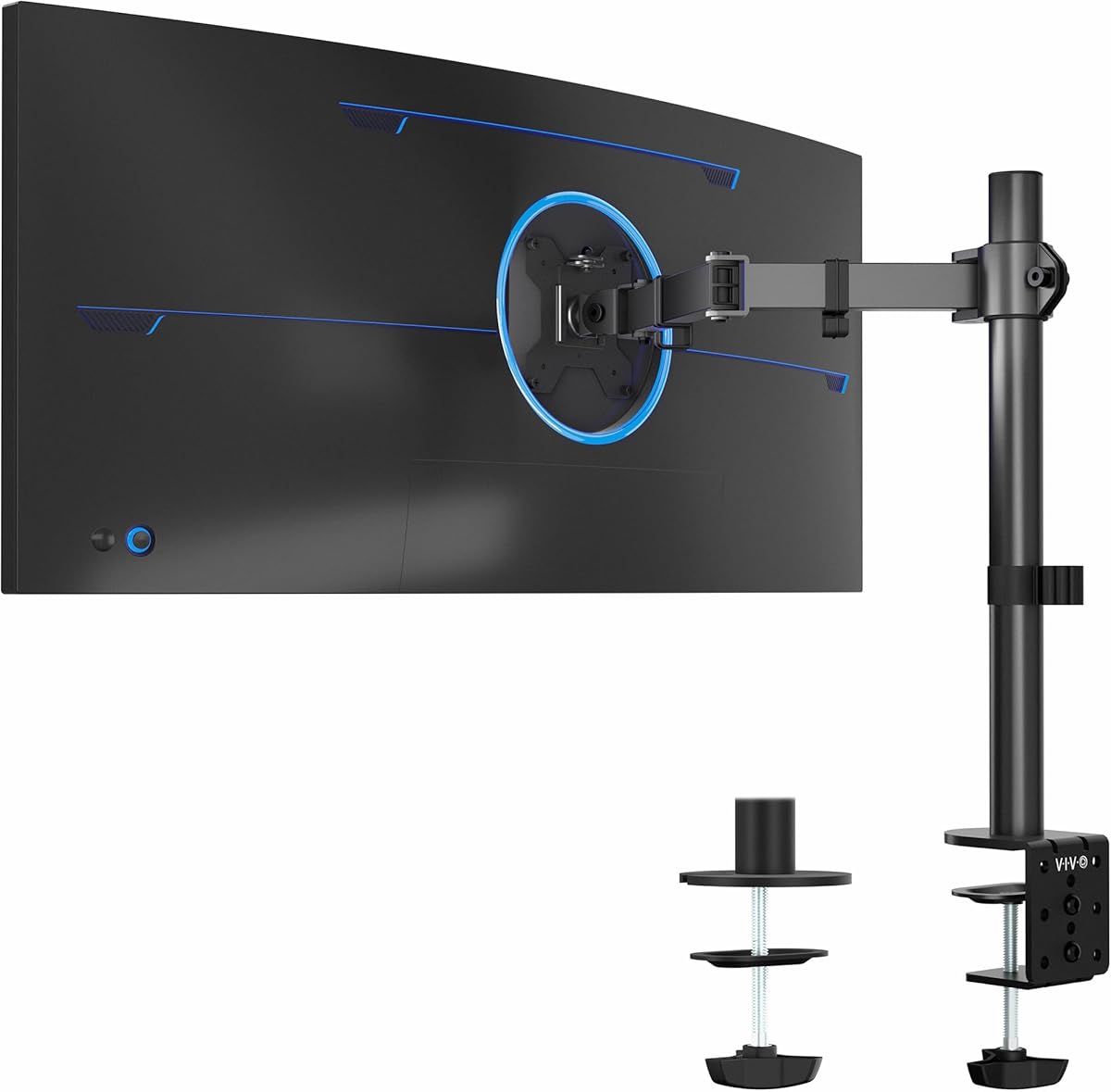
The VIVO Single Ultrawide Monitor Arm provides a generous feature set for a straightforward single-screen setup. It has a 4.5 rating and supports standard 13- to 32-inch monitors as well as ultrawide models up to 38 inches. Its 22-pound capacity covers many mainstream flat and curved displays, provided they use 75-by-75-millimeter or 100-by-100-millimeter VESA mounting holes.
We may earn a commission when you buy through this link, at no additional cost to you.
Adjustment includes plus-or-minus 90-degree tilt, 360-degree swivel, 360-degree rotation, and height adjustment of up to 16 inches along the center pole. The display can therefore be used in portrait or landscape orientation, moved toward the user for close work, or turned out of the way when additional desk space is required. A detachable VESA plate and supplied hardware make the screen attachment comparatively straightforward.
The heavy-duty C-clamp attaches to desks up to 3.25 inches thick using hand-tightening hardware, while an optional grommet base provides an alternative installation. Detachable cable clips along the arm and pole keep power and audiovisual wiring organized. The main limitation is that this remains a single-monitor mount, so users running a complete two-screen workstation need a different design. The stated weight limit is also lower than the WALI model's capacity for large flat screens.
This is a compelling pick for an ultrawide-display owner who wants a practical adjustable arm without moving into a dual-monitor system. It also works well for ordinary gaming, office, and creative displays. The included clamp and grommet options provide flexibility, while the large adjustment range helps users optimize screen position. Buyers should still verify their monitor's VESA pattern and the available clearance beneath the desk.
The ability to accommodate an ultrawide screen up to 38 inches is unusual among single-arm mounts in this guide. That range makes the product particularly relevant to immersive gaming setups and large productivity displays that require more horizontal space.
Moving the display onto an elevated arm creates usable storage space underneath the panel. Cable clips along the structure reduce visible wire clutter, while the removable VESA plate simplifies future monitor changes.
We may earn a commission when you buy through this link, at no additional cost to you.
The HUANUO FlowLift Pro differentiates itself with a MechaSpring arm, a visible tension indicator, and a tool-free VESA plate. It carries a 4.5 rating and is intended for 13- to 32-inch monitors weighing between 4.4 and 15.4 pounds. Compatibility requires either 75-by-75-millimeter or 100-by-100-millimeter VESA mounting holes.
We may earn a commission when you buy through this link, at no additional cost to you.
Its LockSteady system is designed to resist droop and allow smooth movement with one finger. The PrecisionView window shows the movement of a yellow indicator as spring tension is calibrated, reducing the trial-and-error associated with mounts adjusted entirely by feel. The tool-free InstaMount plate lets the display snap into place after the standard arm and base are assembled, making screen attachment less cumbersome.
The manufacturer states that the arm is built with 90 percent professional-grade metal and is TÜV Rheinland certified and tested at three times its load. It is also endorsed by the American Chiropractic Association in relation to ergonomic positioning. These claims position the FlowLift Pro as a stability-focused option, but its stated 15.4-pound ceiling is lower than several competing arms. Installation is also limited to recommended wooden desks between 0.59 and 3.54 inches thick, and irregular edges deserve particular caution.
This is a good match for users who frequently adjust one display and want the arm to remain at a chosen height without constant correction. The visual tension system is especially useful for people who do not want to rely entirely on tactile feedback. For heavier screens, ultrawides, or multi-monitor configurations, a model with a higher load rating and independent arms will be a safer fit.
Most spring arms require users to add or remove tension through trial and adjustment. The PrecisionView window gives immediate visual feedback, helping match the arm's resistance to the monitor's weight and reducing the chance of over-tightening.
The quick-release VESA plate means users do not need to align and tighten individual screws while holding the display. This is particularly useful when the screen needs to be moved regularly or swapped with another compatible model.
We may earn a commission when you buy through this link, at no additional cost to you.
The COOPER FlexArm Tablet Holder is designed for portable displays rather than conventional desktop monitors. It has a 4.4 rating and supports devices from 4.7 to 10 inches wide, including an iPad Pro 13 with a case when measured within the stated grip range. Its load capacity is 3.3 pounds, making it suitable for tablets, many portable monitors, and other lightweight screens.
We may earn a commission when you buy through this link, at no additional cost to you.
The mount uses two 11.8-inch aluminum-alloy segments, creating a total reach of approximately 24 inches. Three re-tightenable tension joints let users reposition the device, while a 360-degree swivel base allows rotation between portrait and landscape. Silicone-padded jaws help grip the device without scratching it, and a built-in cable holder clips keep a connected cable more orderly.
Unlike a VESA monitor arm, this product does not attach to a display's rear mounting pattern. The full-metal U-clamp grips desks up to 3.5 inches thick, but it is not intended for bed frames or round posts. Its lower weight capacity also makes it unsuitable for large desktop panels. As a result, the product's main limitation is specialization, but within portable devices it provides more reach and positioning control than a simple riser.
This holder is an excellent solution for hybrid workers who use a tablet or portable monitor as a secondary display, creators who want an eye-level camera or reference screen, and readers who want hands-free access to content. It can also function as a bedside tablet holder, though the clamp itself is intended for a desk rather than a bed frame. Confirm the device width and weight before installation.
A tablet or lightweight portable monitor can provide a dedicated calendar, chat, reference, or presentation display without occupying a permanent monitor-arm slot. The articulated reach makes it possible to bring the device forward for interaction and move it away when it is not needed.
Silicone-lined jaws provide a softer contact surface than bare metal and help prevent scratches. Re-tightenable joints allow the user to establish firm tension at each section, while the cable clip keeps a connected lead close to the arm.
We may earn a commission when you buy through this link, at no additional cost to you.
The MOUNTUP Dual Monitor Stand is a feature-rich option for productive two-screen workspaces. It has a 4.4 rating and fits flat or curved displays from 17 to 32 inches, with each arm supporting between 4.4 and 17.6 pounds. Both 75-by-75-millimeter and 100-by-100-millimeter VESA patterns are supported, making the stand broadly compatible with common desktop and curved monitors.
We may earn a commission when you buy through this link, at no additional cost to you.
Each display connection is independently adjustable. The arms offer 135-degree tilt, 180-degree swivel, and 360-degree rotation from portrait to landscape. The pneumatic system provides smooth movement with 17.3 inches of extension and 9.4 inches of height adjustment. This level of articulation is useful for arranging one screen in portrait for reference material and another in landscape for a primary application, as well as for collaboration with a nearby person.
Users need to tune the pneumatic tension correctly for the weight of each monitor. The C-clamp is listed for desktops from 0.39 to 2.76 inches thick, and a grommet base is included as an alternative. The dual-arm arrangement also requires sufficient rear clearance and appropriate desk structure. A display in the 17.6-pound range is within the stated range, but heavier or very large professional monitors would require a higher-capacity system.
This stand is best for users who have settled on a two-monitor productivity arrangement and want each panel to move independently. It offers a polished combination of reach, rotation, and integrated cable concealment. For a single ultrawide screen, however, the VIVO arm provides a simpler and more specialized solution. For heavier panels, buyers should prioritize a mount with a higher stated capacity.
Independent arms make it easier to angle one display toward a seated user and the other toward a colleague, or to dedicate separate screens to different tasks. Portrait rotation is particularly useful for long documents, code, messaging windows, and reference material.
The pneumatic construction is designed to move smoothly and remain stable after tension is correctly set. Its substantial extension gives each display a useful range of positions, helping users bring screens closer for detailed work or move them aside for desk access.
We may earn a commission when you buy through this link, at no additional cost to you.
The WALI Adjustable Laptop Desk Mount is a flexible solution for raising a notebook or a single monitor away from the desktop. It carries a 4.5 rating and supports one laptop up to 17 inches or one monitor with 75-by-75-millimeter or 100-by-100-millimeter mounting holes. Its stated load capacity is 22 pounds, comfortably covering many mainstream notebooks and displays.
We may earn a commission when you buy through this link, at no additional cost to you.
The arm extends, retracts, and offers 16 inches of height adjustment, plus-or-minus 15 degrees of tilt, plus-or-minus 90 degrees of swivel, and 360-degree rotation. The included 14-by-11-inch tray includes ventilation holes and a 0.6-inch lower lip. This configuration makes it easy to move a notebook into a better line of sight while using an external keyboard and mouse.
Installation options are generous. The C-clamp fits desks from 0.4 to 4 inches thick, while the grommet mount handles desks from 0.4 to 2.2 inches thick. The broad clamp range is useful with thicker wooden surfaces, although users should still verify that nothing beneath the desk blocks the hardware. Because this is a single platform, it cannot support a laptop and separate monitor at the same time.
This mount is a strong recommendation for laptop-focused students, travelers, and remote workers who already use a full-size keyboard and mouse. It is also a viable display arm when the detachable mounting plate is configured for a VESA screen. Those needing two active displays should choose a dual-arm product, and anyone wanting a smaller footprint may prefer a compact riser without a full articulated arm.
Raising the laptop screen can create a more comfortable viewing position when an external keyboard is used. The ventilated tray supports airflow, and the lip helps prevent the notebook from sliding when the platform is adjusted.
The detachable mounting plates let the same arm carry either a notebook on the tray or a VESA-compatible display. This adaptability gives the product a longer useful life as a user's equipment and workflow change.
We may earn a commission when you buy through this link, at no additional cost to you.
The gianotter Dual Monitor Stand Riser offers a simpler alternative to articulated monitor arms. It has a 4.5 rating and is designed to elevate two displays while adding storage to the desktop. Unlike a clamp-mounted arm, the riser is simply placed on the work surface, allowing the user to change the monitor arrangement without tools or permanent desk modification.
We may earn a commission when you buy through this link, at no additional cost to you.
Its standout feature is the storage below the elevated platform. A drawer holds office supplies and accessories, while two magnetic pen holders keep frequently used writing tools close at hand. Raising the displays can also create room for a keyboard, mouse, or other equipment beneath the shelf, helping a small desk serve more than one purpose without requiring a complex mounting system.
The primary limitation is flexibility. Both monitors rise and move with the platform rather than receiving independent tilt, swivel, and rotation adjustments. This makes the product less suitable for users who need to reposition a screen frequently, angle one panel toward a colleague, or alternate frequently between portrait and landscape. It is also a desktop riser rather than a mount that elevates a screen above a separate monitor arm, so desk depth and the weight of two displays should be considered.
This riser is best for users who want a tidier dual-monitor setup and prioritize storage over dynamic movement. It is particularly useful in compact offices where a drawer, pen holders, and a raised platform make every piece of desk space work harder. For frequent screen adjustment, choose an articulated dual-monitor arm; for simple elevation and organization, this design is direct and effective.
The raised platform creates a useful cavity where a keyboard, mouse, or small accessories can remain accessible. The integrated drawer turns otherwise unused vertical space into organized storage for stationery and small office essentials.
Because the riser does not require a C-clamp or grommet installation, it can move with the rest of the desktop setup. That makes it convenient for changing between seated and standing work or for relocating the complete workstation.
We may earn a commission when you buy through this link, at no additional cost to you.
The Ergear Single Monitor Mount is a practical option for users who want one conventional display elevated and adjusted without the complexity of a dual-screen system. It has a 4.5 rating and supports 13- to 32-inch monitors weighing up to 17.6 pounds. Screens must have VESA holes spaced 75-by-75 millimeters or 100-by-100 millimeters apart.
We may earn a commission when you buy through this link, at no additional cost to you.
Adjustment includes 360-degree rotation, plus-or-minus 45-degree tilt, and plus-or-minus 90-degree swivel. A 15.75-inch steel support pole provides multiple height positions, allowing the monitor to be aligned more closely with the user's eye level. This can reduce the need to bend toward a screen placed low on the desktop, while also clearing space for a keyboard, notebook, or other equipment beneath the display.
The C-clamp provides a drill-free installation for wooden tables between 0.39 and 3.54 inches thick, while a grommet option is also offered. The manufacturer recommends checking that the underside is clear of beams or panels. Detachable cable clips along the center pole help keep power and AV cables out of the way. Compared with specialized ultrawide arms, its size range is conventional and it does not extend into larger curved-display capacities.
This mount is a strong all-rounder for office, study, and general creative setups using one mainstream monitor. It balances useful movement, a straightforward installation process, and cable organization without claiming ultrawide specialization. Users should confirm all three compatibility requirements—screen size, weight, and VESA pattern—and ensure the desk is suitable for the chosen mounting method.
The 15.75-inch pole gives users multiple opportunities to place the display at a comfortable height. Raising the screen can also push notebooks and other materials farther back, leaving the main work surface less crowded.
Detachable clips mounted along the pole keep cables associated with the arm rather than allowing them to fall onto the desktop. Their removable design also makes routing or replacing display cables more convenient.
We may earn a commission when you buy through this link, at no additional cost to you.
The MOUNTUP Dual Monitor Desk Mount provides a compact two-screen solution centered on a single base. It has a 4.4 rating and supports flat or curved LCD and LED displays up to 32 inches, with each arm rated for up to 17.6 pounds. Compatibility extends to both 75-by-75-millimeter and 100-by-100-millimeter VESA patterns.
We may earn a commission when you buy through this link, at no additional cost to you.
Each arm can be adjusted independently, including 360-degree rotation between portrait and landscape, plus-or-minus 90-degree tilt, and 180-degree swivel. Height can be moved along the center pole. Detachable VESA plates simplify attaching and removing the screens, while cable clips help organize and protect the wiring. Using one central base rather than two separate clamps can also conserve valuable desktop edge space.
The C-clamp and grommet bases are interchangeable, but the stated fit for the grommet option describes both desk thickness and hole diameter as being between 0.39 and 2.36 inches. The clamp fits desks from 0.39 to 1.97 inches thick, which is narrower than the allowance offered by some other dual-screen products. Consequently, buyers with a particularly thick desk should check dimensions carefully before ordering.
This mount is appropriate for users who want two adjustable monitors without occupying two separate attachment points. It suits productivity, trading, programming, editing, and general multitasking setups where each screen can be positioned independently. The 17.6-pound limit rules out some heavier professional displays, so heavier models require a more robust system. A detailed compatibility check is especially important before installation.
The shared base reduces the number of attachments required at the rear of the desk. Independent arm movement still allows each display to be angled, raised, and rotated according to the user's preferred arrangement.
Full rotation allows one display to remain landscape while the other moves into portrait. This mixed orientation can support wide applications beside a narrow list, document, timeline, or code view.
We may earn a commission when you buy through this link, at no additional cost to you.
The most suitable monitor holder depends on the display being supported, the available desk space, and how often the screen needs to move. Compatibility should be confirmed before considering articulation, storage, or aesthetic preferences.
Choose a capacity with comfortable margin rather than matching the stated maximum exactly. Check the display weight after any stand or protective case is attached, and account for curved versus flat-screen differences where the manufacturer provides separate limits.
Measure or confirm the hole spacing before ordering. If the display has no VESA interface, look for a grip-based holder or a compatible adapter, and ensure the adapter does not exceed the mount's stated load limit.
Measure the desktop thickness, inspect the underside, and confirm the required edge or grommet clearance before buying. A freestanding riser is the easiest option when drilling is undesirable and frequent screen movement is not required.
Prioritize the movements you will actually use. A fixed-height riser can be sufficient for a static workstation, while a full-motion arm is better for shared desks, frequent focus changes, gaming, and portrait use.
Match the holder to the actual screen arrangement rather than the number of devices you might eventually use. Two separate arms can provide more positioning freedom than a shared riser, while a portable-device grip is not a substitute for a VESA monitor mount.
Prioritize solutions that route the cables you actually own. A holder with a modest adjustment range but integrated guides may produce a tidier result than a highly movable arm that leaves unsecured wires behind.
Set tension while the display is in its intended position and check for drift after every major adjustment. Do not force a movement range that the manufacturer has not rated for the installed screen.
Choose added storage only if it solves a recurring organizational problem. Otherwise, the uncluttered design of a standard arm may produce a more versatile and visually balanced workstation.
Before installation, confirm the monitor's size, weight, and VESA pattern, then inspect the desk edge and underside. A wooden surface without a blocking crossbeam is generally the safest choice. Measure the desktop thickness before choosing the C-clamp or grommet route, and make sure the display is powered off and disconnected while mounting hardware is attached. Position the arm and loose cables before tightening the clamp so the final arrangement does not pull against connectors.
After installing the arm, attach the display to the VESA plate and set the spring or pneumatic tension for the monitor's weight. Adjust the height, swivel, tilt, and rotation gradually while watching how the screen behaves. If the monitor drifts, tighten the appropriate tension mechanism rather than forcing a joint. Route power and video cables through the supplied clips or guides, leaving enough slack at the monitor and desk connection for movement.
For a laptop or tablet holder, use the supplied lip and gripping surface to center the device, then tighten the joints only enough to hold it securely. Clean the padded jaws and tray periodically so dust does not collect around ventilation openings. Inspect clamps, screws, and cable clips every few months, particularly after moving the desk or changing between seated and standing positions. Never exceed the stated load capacity or use a holder on a surface the manufacturer has not recommended.
No, not every monitor is compatible with every desk mount. Conventional arms require compatible VESA holes, usually spaced 75-by-75 millimeters or 100-by-100 millimeters, and the display must remain within the mount's size and weight limits. Tablet and portable-monitor holders use a different gripping system, so check the device's width, thickness, and weight against the holder's specifications.
A C-clamp is usually easier to install and does not require drilling, making it convenient for renters and movable desks. A grommet base may look cleaner and can sit neatly where the arm meets the desktop, but it normally requires a suitable hole. The correct choice also depends on desktop thickness, edge clearance, and whether the underside contains beams or panels that obstruct the mount.
They can, because the display no longer needs to sit directly on a broad base. The area beneath the elevated screen can hold a keyboard, notebook, docking station, or other equipment. Actual usable space depends on the arm's footprint, cable routing, monitor position, and whether the setup also includes a laptop tray, storage shelf, or other attached accessories.
The arm should support the display's actual weight with some margin, and the manufacturer also specifies a maximum capacity. A panel that falls under the weight limit may still be unsuitable if it is too large, lacks the required VESA pattern, or creates excessive leverage when extended. Check both the display's weight and its diagonal size before ordering.
Only if the arm explicitly supports the screen's dimensions and weight. Most of the conventional mounts in this guide are rated for standard 13- to 32-inch screens, while the VIVO model supports ultrawides up to 38 inches. Curved displays may also have a lower weight limit than flat screens, so buyers should read the separate compatibility notes rather than relying on diagonal size alone.
A suitable arm can be used on a standing desk, but the mounting method and desk structure matter. Heavy clamps may not be appropriate for every height-adjustable frame, and grommet installations need a properly sized opening. Users should follow the desk manufacturer's guidance and ensure the arm's load does not exceed any stated workstation limit.
A monitor arm holds a VESA-compatible display on an articulated structure, providing height, tilt, swivel, extension, and rotation. A riser is a freestanding platform that elevates one or more screens as a fixed unit. Arms are generally better for frequent positioning, while risers are simpler, portable, and often useful when storage beneath the screens is the main goal.
Set the arm's tension or spring mechanism according to the manufacturer's instructions and the attached monitor's weight. Allow the display to settle at the intended height, then tighten or loosen the tension control until it remains in position. A monitor that cannot be balanced within the mechanism's adjustment range may exceed the mount's supported specifications.
The WALI Adjustable Single Monitor Arm stands out for premium range, extensive articulation, and support for larger flat displays. The HUANUO Monitor and Laptop Arm offers the most versatile two-in-one arrangement for hybrid work, while the VIVO Single Ultrawide Monitor Arm combines a 4.5 rating with a useful upper size limit of 38 inches and a relatively broad feature set. Each serves a distinct but compelling type of desk setup.
Before buying, prioritize correct fit over adjustment extras. Confirm the screen dimensions, weight, VESA pattern, desktop thickness, and underside clearance. Then choose the mounting style and articulation that match how the display is actually used: a laptop tray for notebook-based workflows, a grip arm for portable screens, a riser for simple elevation and storage, or a dual mount for two independently positioned displays.
Ratings, product availability, and prices can change over time, so confirm current listings and specifications before making a final decision. Review the manufacturer's installation instructions, desk requirements, and load rating for the exact model, and use the included hardware according to those directions.