
Dynatron A43
3.2Editor score
Passive 2U server design
AMD AM4 and AM5 support
Up to 120 watts dissipation
This Passive CPU Cooler guide compares ten coolers for silence, socket support, thermal capacity, clearance, and fit, helping you choose with confidence.
A passive CPU cooler transfers heat from the processor through a metal heatsink without relying on a powered fan, making it especially attractive for silent workstations, compact servers, home-theater systems, and other specialized builds. The right model depends on processor socket, chassis clearance, heat output, and whether natural convection alone is sufficient.
This guide examines all ten supplied products for cooling architecture, socket support, dimensions, acoustic characteristics, mounting requirements, and intended use. Only some are genuinely fanless: several entries are conventional air coolers included for practical comparison because their dimensions and mounting systems help illustrate the trade-offs involved.
The top selections represent the strongest fanless options for different situations, including a premium desktop heatsink, a compact server-oriented cooler, and a dedicated AMD server solution. Each review explains who benefits from that design, while prices and availability can change, so readers should verify current listings before purchasing.
3.2Editor score

4.6Editor score

The comparison below covers three genuinely fanless heatsinks and seven conventional air coolers. It makes the differences in socket support, cooling capacity, size, and intended computing environment clear before the detailed reviews begin.




The Noctua NH-P1 is the most complete passive CPU cooler in this group, earning a 4.6 rating for its fanless construction, broad platform support, and unusually careful motherboard fit. It cools through natural convection, allowing a computer to operate without the continuous airflow noise generated by a conventional CPU fan. An optional NF-A12x25 LS-PWM fan can also be used for a semi-passive configuration when additional cooling is wanted.
We may earn a commission when you buy through this link, at no additional cost to you.
Its SecuFirm2 mounting system supports Intel LGA1851, LGA1700, LGA1200, and LGA115x as well as AMD AM5 and AM4. The design is advertised as fully compatible with system memory on those platforms and clears the top PCIe slot on most ATX and microATX motherboards. That combination of socket coverage and low-profile clearance makes it especially useful in compact builds where a tower cooler would obstruct expansion slots or tall memory modules.
The important limitation is thermal capacity. Noctua recommends the NH-P1 for processors with low to moderate heat dissipation, including examples such as Intel 285K, 265K, and 245K processors or AMD Ryzen 7900, 7700, and 7600 models. A fanless heatsink has no mechanical mechanism to force air across its fins, so processor selection, case airflow, ambient temperature, and the physical position of the heatsink all influence the result. Buying it for an unrestricted high-power CPU would be unwise.
This is the recommendation for a builder who wants a polished, dependable desktop fanless cooler and has a compatible processor. It combines silent operation with a more versatile mounting system than the server-oriented alternatives. Builders should still consult the current CPU compatibility list, confirm case clearance, and understand that “passive” describes the cooler rather than guaranteeing low temperatures under every possible workload.
In its primary configuration, the NH-P1 relies on rising warm air and the surrounding chassis airflow to remove heat from its fins. For processors near the upper end of its recommended range, adding Noctua’s optional 120mm low-speed PWM fan can create a semi-passive setup that remains much quieter than a standard dual-fan tower.
The low-profile construction avoids the overhang commonly associated with tower heatsinks. Noctua states that the cooler provides full RAM compatibility on the listed platforms and clears the top PCIe slot on most ATX and microATX motherboards, making it valuable where expansion-card access matters.
We may earn a commission when you buy through this link, at no additional cost to you.
The Thermalright Peerless Assassin 120 SE is not passive despite appearing in this comparison, and that distinction matters. It combines two 120mm PWM fans with a dual-tower heatsink, six 6mm copper heat pipes, an AGHP-treated heatpipe layout, and a pure copper base. Its 4.7 rating reflects a well-regarded air-cooling package for mainstream and enthusiast systems.
We may earn a commission when you buy through this link, at no additional cost to you.
Each TL-C12C fan operates at 1550 RPM plus or minus 10 percent, provides a listed maximum airflow of 66.17 CFM, and is rated at no more than 25.6 dB(A). Those figures show why the cooler is more appropriate for sustained processor loads than a fanless alternative. The dual-fan arrangement can move air through both sides of the heatsink, while the slim tower structure is intended to preserve usable memory space.
Compatibility includes Intel LGA115X, LGA1200, LGA1700, and LGA1851, along with AMD AM4 and AM5. The mounting hardware supports the listed platforms, but the product information contains an important note: AMD installations require the original motherboard backplate, which is not included. Its dimensions are 125 by 135 by 155 millimeters, so buyers should check both chassis height and any nearby case structure rather than assuming every ATX case will accept it.
The Peerless Assassin 120 SE is a strong alternative for users who want robust cooling and a quieter profile than many large dual-tower designs. It is also a useful performance reference when comparing a true passive cooler’s limited heat capacity. Those prioritizing total silence should choose the NH-P1 or another fanless model instead, while this cooler suits a builder who accepts controlled fan noise in exchange for greater thermal headroom.
The Peerless Assassin 120 SE belongs in the guide because its compact dual-tower design demonstrates the capability available when fans are permitted. Six heat pipes and two 120mm PWM fans offer considerably more active airflow than natural convection, making it a practical option for processors beyond the limits of typical fanless desktop heatsinks.
The cooler supports AM4 and AM5, but the product information states that the motherboard’s original backplate is required and is not included. Builders should confirm that their board has the appropriate backplate before ordering, especially when replacing a cooler in an existing system.
We may earn a commission when you buy through this link, at no additional cost to you.
The 1U Passive CPU Heat Sink is purpose-built for LGA2011 systems and operates without a powered fan. Unlike a miniature desktop tower, its physical form and orientation are optimized for compact server use. The supplied information describes effective heat dissipation, good thermal conductivity, and a passive design that transfers processor heat into the surrounding structure without continuous fan noise.
We may earn a commission when you buy through this link, at no additional cost to you.
The primary appeal is its 1U orientation. Rack servers often rely on carefully directed chassis airflow, and a low-profile heatsink that does not need its own fan can simplify a quiet or acoustically sensitive installation. The cooler is designed specifically for LGA2011, however, so it is not a general-purpose solution for modern desktop platforms or newer server sockets.
The product data does not provide a numerical customer rating, a detailed fin count, a stated thermal rating, or mounting dimensions. Those omissions make direct performance comparison difficult. Buyers should request precise dimensions and processor compatibility information before installation, particularly when mounting in a nonstandard server chassis or using a processor outside the original platform generation.
This cooler is best for a builder restoring or assembling a compatible LGA2011 1U system who needs fanless operation and straightforward heat conduction. It is less suitable for a modern gaming PC or a new workstation with a current processor socket. The lack of published rating and detailed specifications also means that case airflow and processor thermal output should be validated before the purchase.
The 1U format prioritizes low height and compact integration over the taller fin stack used by conventional desktop air coolers. It is best suited to a chassis designed to move air across rack-mounted components, where its low-profile body can sit close to the processor and surrounding server structure.
LGA2011 is the decisive specification. This is not an interchangeable cooler for AM5, LGA1700, or LGA1851 systems, and the lack of broader platform information makes careful case and CPU verification essential before installation.
We may earn a commission when you buy through this link, at no additional cost to you.
The Thermalright Assassin X120 Refined SE is a conventional single-tower air cooler with a 4.7 rating. It uses four 6mm copper heat pipes, an aluminum heatsink, AGHP heatpipe treatment, and one TL-C12C 120mm PWM fan. It is not passive, but its 148mm height and relatively restrained structure make it a useful option for smaller systems where a dual-tower cooler would be excessive.
We may earn a commission when you buy through this link, at no additional cost to you.
The included fan reaches 1550 RPM plus or minus 10 percent, delivers up to 66.17 CFM, and is specified at no more than 25.6 dB(A). Four heat pipes and a compact tower give it meaningful active cooling capability, while the 125 by 71 by 148 millimeter dimensions should be easier to accommodate than a 155mm dual-tower design. It is intended for medium-sized cases according to the product information.
Socket support is extensive, covering Intel LGA1150, LGA1151, LGA1155, LGA1156, LGA1200, LGA1700, LGA1700-series platforms, and LGA1851, plus AMD AM4 and AM5. Mounting parts are provided for the supported platforms. As with any air cooler, the case’s maximum CPU cooler height and the clearance around memory and the rear panel should be checked before purchase.
This is a strong option for a builder seeking efficient cooling in a relatively short tower. It is not a substitute for a true fanless cooler when acoustic silence is the priority. Among active alternatives here, its lower height makes it particularly suitable for compact ATX and similar cases where the Peerless Assassin 120 SE may be too tall.
At 148 millimeters tall, the AX120 R SE sits between a standard low-profile cooler and a large dual-tower design. That middle ground can be particularly useful in smaller cases that still provide a conventional CPU cooler mounting area and adequate airflow.
The supported Intel and AMD socket list gives the cooler broad appeal for both new and older systems. Users should still verify the exact socket and mounting hardware listed in the package, particularly when installing into a used motherboard with nonstandard mounting parts.
We may earn a commission when you buy through this link, at no additional cost to you.
The Dynatron A43 is a dedicated passive 2U heatsink for AMD AM4 and AM5 systems, with a stated heat dissipation capability of up to 120 watts. Its 3.2 rating is lower than those of the other rated products in the guide, but the score does not change the fact that it is one of the few entries built specifically for fanless server-class operation.
We may earn a commission when you buy through this link, at no additional cost to you.
The cooler uses aluminum stacked fins with heatpipes and comes with Shin-Etsu 7762 thermal compound already applied. That pre-applied compound simplifies installation and reduces the chance of applying too much or too little paste. Its listed dimensions are 4.13 by 2.91 by 2.48 inches, and the passive 2U format is designed to work with a server chassis that provides the necessary surrounding airflow.
The main caveat is that the 120-watt figure is a maximum, not a guarantee of stable operating temperatures. Thermal results depend on processor power limits, workload, ambient temperature, orientation, and the airflow architecture of the 2U enclosure. The product also does not support Intel sockets, and its lower customer rating gives prospective buyers less historical feedback than the established fanless desktop choice.
The A43 is the premium passive recommendation for an AMD-based 2U server, workstation, or carefully planned compact system with suitable case airflow. It offers a far more explicit thermal rating than the other fanless server entries. Buyers should confirm socket support, chassis clearance, and airflow requirements before choosing it.
The stated capacity of up to 120 watts gives buyers a concrete figure to compare with processor heat output. That is particularly helpful for fanless server planning because passive performance cannot be evaluated properly without understanding the intended processor workload and chassis airflow.
The pre-applied Shin-Etsu 7762 paste removes one common installation variable. It also means the heatsink should be protected from contamination and positioned carefully during handling, since the compound layer cannot be redistributed after contact.
We may earn a commission when you buy through this link, at no additional cost to you.
The Noctua NH-L12S is a low-profile CPU cooler rather than a passive model, but it is one of the strongest choices for compact, quiet builds. Its 70mm total height suits small-form-factor and home-theater computers, and the 4.7 rating reflects strong satisfaction with its combination of size, acoustics, and installation convenience.
We may earn a commission when you buy through this link, at no additional cost to you.
The cooler uses an optimized NF-A12x15 120mm fan with PWM support and an included Low-Noise Adaptor for automatic speed control. NT-H1 thermal compound and the SecuFirm2 mounting system are included. Compatibility extends to Intel LGA1851, LGA1700, LGA1200, and LGA115x, as well as AMD AM5 and AM4, with an offset mounting option available for improved efficiency on supported AMD platforms.
Its principal limitation is the unavoidable presence of a powered fan. That means the NH-L12S does not satisfy a strict requirement for a completely fanless system, even if its noise level is low. It also offers less thermal headroom than a full-size dual-tower cooler. The product information nevertheless lists it as suitable for high-end Intel Core Ultra and AMD Ryzen processors, indicating a broad practical range when paired with appropriate power settings.
Choose the NH-L12S when chassis height is the defining constraint and low noise matters more than absolute silence. It is ideal for many small-form-factor and media-center systems, particularly where a conventional tower will not fit. For a build in which every moving part should be removed from the processor cooling path, the Noctua NH-P1 is the more appropriate recommendation.
The 70mm total height is the NH-L12S’s defining advantage. It gives builders a substantial amount of extra space compared with a standard tower, helping with compact cases and tightly arranged components without requiring a notebook-style cooler with weaker performance.
PWM support and the included Low-Noise Adaptor give users control over fan speed. The adapter is useful for a near-idle acoustic target, while PWM control allows the fan to respond intelligently as processor demand changes.
We may earn a commission when you buy through this link, at no additional cost to you.
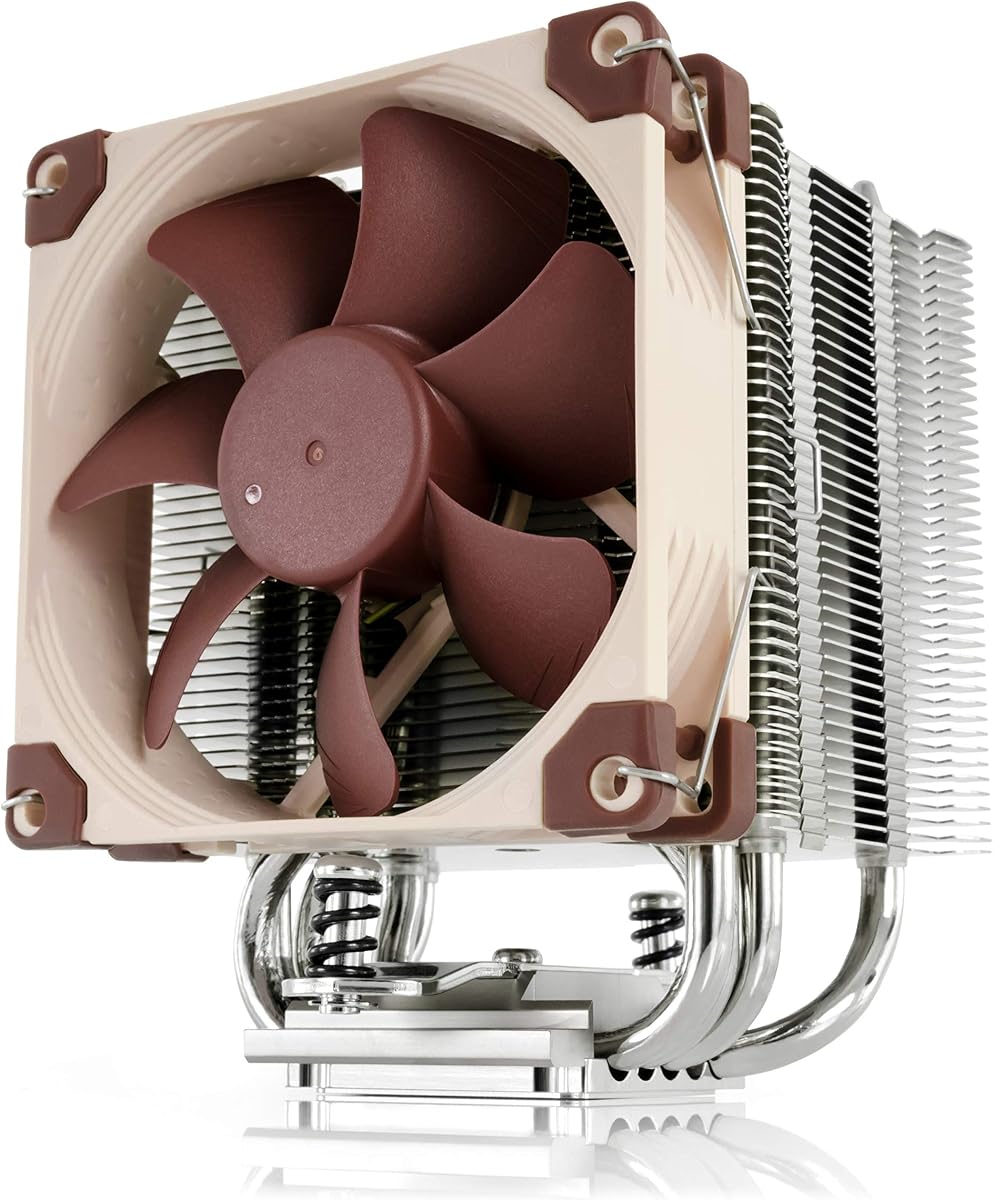
The Noctua NH-U9S carries the highest listed rating in this comparison at 4.8. It is a compact single-tower cooler with a 125mm height, designed to deliver meaningful air cooling while avoiding the overhang and obstruction associated with larger heatsinks. That balance makes it particularly attractive for HTPC, ITX, and other small-form-factor systems.
We may earn a commission when you buy through this link, at no additional cost to you.
The optimized NF-A9 92mm fan supports PWM and includes a Low-Noise Adaptor for automatic speed control. Noctua states that the design does not overhang RAM or PCIe slots on most current motherboards, which helps preserve upgrade access. NT-H1 thermal compound and the SecuFirm2 mounting system are included, with broad support for Intel LGA1851, LGA1700, LGA1200, and LGA115x plus AMD AM5 and AM4.
This is still an active cooler. A buyer whose definition of passive requires no powered fan should not treat the quiet NF-A9 as equivalent to a fanless heatsink. Its smaller fan and shorter tower also mean it will not match a large dual-tower model under demanding loads, although the product information positions it as suitable for current Intel Core, Core Ultra, and AMD Ryzen processors.
The NH-U9S is the recommendation for builders seeking a strong balance of thermal performance, low noise, and compact dimensions. Its 4.8 rating, mature mounting system, and low profile make it especially appealing for a small workstation where a tower cooler needs to fit without interfering with memory or expansion slots. It is the leading active compact option here, while the NH-P1 remains the true passive desktop alternative.
At 125 millimeters tall, the NH-U9S offers a recognizable heatsink-and-fan structure while remaining much smaller than a conventional tower. Noctua specifically notes that it does not overhang RAM or PCIe slots on most current motherboards, preserving practical usability.
The 92mm NF-A9 fan uses PWM control and can be paired with the included Low-Noise Adaptor. This lets builders balance thermal response and acoustics instead of relying on a fixed-speed fan profile.
We may earn a commission when you buy through this link, at no additional cost to you.
The Cooler Master Hyper 212 Black is a widely recognizable single-tower air cooler with a 4.7 rating. Its four heat pipes and copper base are intended for processors such as AMD Ryzen 7 and Intel Core i7 models, giving it more cooling capability than a compact low-profile design while remaining simpler than a dual-tower cooler.
We may earn a commission when you buy through this link, at no additional cost to you.
The SickleFlow 120 Edge fan supports dynamic PWM control from 690 to 2500 RPM. That broad range allows the cooler to remain quiet at light loads and increase airflow when processor demand rises. Installation is supported on AM5 and Intel LGA1851 and LGA1700 platforms through redesigned brackets, and the package includes thermal paste for straightforward setup.
Its 152mm height is typical of mainstream tower coolers and narrower than many large dual-tower models, but it is taller than the NH-U9S and NH-L12S. A prospective buyer should compare the case’s documented CPU cooler limit with the exact installed height, including any board components that may reduce practical clearance. The Hyper 212 Black is an active model, so it does not meet a true zero-fan cooling requirement.
The Hyper 212 Black is a straightforward option for a mainstream desktop that prioritizes recognizable cooling architecture, flexible fan control, and broad modern platform support. It is not the best choice for a silent workstation where a fanless heatsink is mandatory, nor for a very small chassis that demands the lowest possible profile. Its balanced design and included mounting accessories make it a dependable conventional alternative.
The 690–2500 RPM range provides more control than a simple fixed-speed fan. Users can create a quiet idle profile through PWM control while retaining higher speeds for sustained processor workloads.
Redesigned brackets simplify setup around AM5 and LGA1851 and LGA1700 platforms. The included thermal paste reduces the number of extra items required for a clean installation.
We may earn a commission when you buy through this link, at no additional cost to you.
The Supermicro SNK-P0048PS is a passive 2U-and-up server heatsink for LGA2011 systems using Intel Xeon E5-2600 and E5-4600 series processors. Its 4.0 rating reflects a specialized product designed around a clearly defined server platform rather than a broad range of consumer applications.
We may earn a commission when you buy through this link, at no additional cost to you.
The construction combines a copper-and-aluminum base, aluminum fins, and heatpipes. Mounting uses screws and springs, a common approach in rack servers where secure, repeatable contact and serviceability matter. The passive design removes fan noise from the cooler itself, but it depends on the server chassis to provide the airflow needed to carry heat away from the fin stack.
Compatibility is the central limitation. The product information refers to X9 UP, DP, and MP server applications, LGA2011 socket type, and specific Xeon E5 families. It should not be treated as a general LGA2011 desktop cooler or assumed to work with every server board, because backplate layout, processor model, chassis orientation, and airflow routing all influence compatibility.
The SNK-P0048PS is a practical choice for maintaining or repairing a compatible Supermicro server where a passive replacement is required. Its 2U format and specified Xeon support make it more specialized than the Dynatron A43, which targets AMD platforms. Buyers should confirm the exact system model and processor generation before ordering, and should also verify the physical mounting pattern and expected server airflow.
A passive rack heatsink relies on the server’s front-to-rear airflow path to remove heat. The chassis design, fan wall, baffles, and processor position therefore matter as much as the heatsink itself, making passive cooling a system-level decision.
Support is specifically described for LGA2011 and Xeon E5-2600 or E5-4600 series processors in X9 UP, DP, or MP applications. This focused specification is useful for server maintenance, provided the buyer verifies the complete system model.
We may earn a commission when you buy through this link, at no additional cost to you.
The Thermaltake UX150 ARGB is a low-profile active cooler aimed at small-form-factor and full-size systems that want both a short cooler height and integrated lighting. Its 4.2 rating comes with a 72mm height, a copper base, aluminum fins, and a 130mm PWM fan that operates from 500 to 2400 RPM.
We may earn a commission when you buy through this link, at no additional cost to you.
The 130mm fan includes an infinity-mirror effect in its center hub, allowing the ARGB lighting to add visual depth to a build. Its 130-watt TDP figure gives shoppers a stated thermal target, though actual results depend on the processor, power settings, case airflow, and application. The hydraulic bearing is intended to support reliable operation with lower noise and improved thermal efficiency.
Compatibility is limited to the listed Intel platforms: LGA1851, LGA1700, LGA1200, LGA1156, LGA1155, LGA1151, and LGA1150. AMD sockets are not listed. The non-interference design avoids overlap with memory, helping the cooler fit around tall modules. At 72 millimeters tall, it is among the shortest conventional coolers here, though it is still taller than some purpose-built notebook replacements.
The UX150 ARGB is best for an Intel compact build in which low profile, lighting, and a 130mm fan matter more than passive operation. It also offers a wider fan and faster maximum speed than the Noctua low-profile alternative in this group. It is not suitable for an AMD system based on the supplied information, and it should not be considered for a build that requires complete elimination of cooling fans.
The 72mm height gives the UX150 ARGB a useful position between a basic low-profile cooler and a full tower. It offers a large 130mm fan without the vertical demands of a conventional 120mm tower assembly.
The infinity-mirror hub provides a decorative focal point, while the non-interference layout keeps the cooler from overlapping memory. The result is aimed at compact builds that want visual customization without sacrificing RAM clearance.
We may earn a commission when you buy through this link, at no additional cost to you.
Choosing a passive CPU cooler requires matching heat-transfer capacity to the processor, confirming physical and electrical compatibility, and accounting for the airflow supplied by the rest of the system. The most important distinction is whether genuine fanless operation is mandatory or whether a quiet active cooler is acceptable.
A true passive CPU cooler has no powered fan attached to the processor heatsink. It moves heat exclusively through conduction into the metal structure and then through natural convection. Some products can operate fanlessly under light loads and activate a fan when temperatures rise, while others in this list are conventional air coolers from the start. Buyers who require silence at all times should distinguish fanless, semi-passive, and merely quiet designs before buying.
Socket support is the first mechanical filter. The fanless products in this guide support different combinations of LGA2011, AM4, and AM5, while several active coolers cover a much wider range of desktop sockets. Check the exact processor socket, motherboard layout, and any required backplate. Platform compatibility should also include BIOS behavior, power limits, and whether the cooler is intended for a workstation, consumer desktop, or server.
Passive cooling capacity is limited by surface area, heatpipe design, fin orientation, and the air movement available around the heatsink. The Dynatron A43 provides an explicit figure of up to 120 watts, while the Noctua NH-P1 is recommended for low-to-moderate dissipation processors. Compare the processor’s sustained power use and workload with the cooler’s documented limits, and leave thermal margin rather than treating a maximum rating as a constant operating capability.
Natural convection still needs a path for warm air to leave. Small-form-factor cases may have restricted openings, while rack servers often use a carefully arranged fan wall and baffles to direct air across passive heatsinks. The ideal position is where rising air can escape without being trapped beneath a side panel, immediately beside another heat source, or behind a restrictive filter. A server cooler should never be treated as a generic desktop model merely because both attach to a processor.
Passive desktop models such as the NH-P1 prioritize a low profile, while passive server products are shaped around 1U or 2U rack dimensions. Measure available space rather than comparing only the stated cooler height. Consider memory modules, the rear I/O area, the mainboard VRM, the graphics card, and the side panel. For compact systems, the difference between 70, 72, 125, 148, and 155 millimeters can decide whether the cooler fits at all.
Low-profile coolers are often selected to preserve access to memory and PCIe slots. The NH-P1 is specifically noted to clear the top PCIe slot on most ATX and microATX boards and to provide full RAM compatibility on listed platforms. The NH-U9S and UX150 ARGB also emphasize minimal overhang or non-interference. Verify the actual motherboard layout because tall heat spreaders, raised components, and large graphics cards can change the available space.
The mounting system affects both convenience and long-term reliability. Noctua’s SecuFirm2 system includes support for numerous Intel and AMD sockets and is designed for straightforward installation. The 1U LGA2011 model, Dynatron A43, and Supermicro server heatsink are intended for more specialized environments and may require familiarity with server retention hardware. The Thermalright Peerless Assassin 120 SE also has an AMD backplate requirement that should be resolved before installation.
Thermal compound forms the critical link between the processor integrated heat spreader and the cooler base. The Dynatron A43 arrives with Shin-Etsu 7762 already applied, while the Noctua models include NT-H1 or improved NT-H2 compound. Proper application, even mounting pressure, and a clean contact surface are essential. Do not assume a pre-applied layer can be moved or corrected after touching the processor.
Begin with a powered-off system and compare the cooler’s mounting holes with the socket pattern. Install the required backplate or retention hardware first, apply or preserve the specified thermal compound, and tighten fasteners gradually in a cross pattern. Secure any fan or cable only after the heatsink is firmly attached, and keep fingers, tools, and loose screws away from exposed heatsink fins.
For a fanless desktop cooler, install it in a case with unobstructed ventilation and avoid blocking the nearest exhaust openings with a drive cage or cable bundle. In a server, follow the chassis manufacturer’s airflow and baffle arrangement. After startup, monitor processor temperatures under a realistic workload and verify that no unexpected thermal throttling occurs. If temperatures are high, check case airflow, cooler seating, and processor power settings before removing the cooler.
Maintenance is mostly limited to inspection. Keep dust away from the fins, avoid compressed air that could bend delicate fins, and do not disassemble a heatsink unless its manufacturer’s instructions permit it. For models with fans, clean the blades gently and preserve PWM control. If thermal compound must be removed, use suitable cleaning materials and apply a fresh, even layer rather than reusing a disturbed or contaminated interface.
No. The Noctua NH-P1, 1U Passive CPU Heat Sink, Dynatron A43, and Supermicro SNK-P0048PS are genuine fanless designs. The remaining products use powered fans and are included as practical alternatives or references for users who can accept controlled fan noise. A semi-passive configuration, such as the NH-P1 with an optional fan, is also distinct from a completely fanless installation.
They eliminate the CPU fan’s direct noise, but the rest of the computer still contains fans, and a fanless heatsink can run hotter and cause case fans to work harder. In a well-ventilated quiet build, the difference can be substantial. In a compact server with loud chassis fans, removing the processor fan may not transform the overall acoustic character.
Only if its documented thermal capacity matches the processor’s sustained heat output. The NH-P1 is intended for low-to-moderate heat dissipation processors, while the Dynatron A43 claims support for up to 120 watts. High-end processors can exceed passive limits, especially under sustained all-core workloads, so check the current compatibility guidance and consider power limits or an active alternative.
A passive heatsink transfers heat into its fins but cannot move air by itself. Server chassis are engineered with fans, baffles, and openings that create a controlled front-to-reach airflow path across processor heatsinks. If the cooler is installed outside that path, its rated performance may not be achieved. The chassis design and processor position are therefore integral to passive server cooling.
Low profile describes physical height, while passive describes the absence of a powered cooling fan. The Thermaltake UX150 ARGB and Noctua NH-L12S are low-profile active coolers, and the Noctua NH-U9S is a compact active tower. The NH-P1 and the three server-oriented models in the guide are the true fanless options.
Only if the processor socket, mounting pattern, physical dimensions, thermal requirements, and thermal interface are compatible. Server heatsinks may also depend on specific retention hardware and chassis airflow. Reusing a Noctua cooler is generally straightforward when the listed socket support applies, whereas a specialized LGA2011 server model requires more careful system-level verification.
Yes. Every processor cooler needs an effective thermal interface between the processor’s integrated heat spreader and the cooler base. The Dynatron A43 includes pre-applied Shin-Etsu 7762 compound, while the Noctua models include their specified paste. The layer should be even, clean, and undisturbed when the cooler is seated.
The result depends on processor power, heatsink capacity, case airflow, and room temperature, so no single temperature figure applies to every system. A well-suited passive cooler can maintain acceptable temperatures under normal and sustained loads, but an undersized passive model will run warmer and may cause thermal throttling. Monitor the actual processor behavior in the intended chassis rather than relying on a generic expectation.
The Noctua NH-P1 is the strongest overall passive choice for a compatible desktop processor, combining a genuinely fanless design, broad socket support, and excellent motherboard clearance. The Dynatron A43 stands out for AMD-based 2U systems because it supplies a stated 120-watt capacity, while the 1U Passive CPU Heat Sink offers a more specialized and economical option for compatible LGA2011 installations.
Prioritize socket compatibility, processor heat output, and chassis airflow before any other feature. A passive cooler cannot compensate for an undersized fin stack, poor placement, or a blocked exhaust path. If a true fanless design does not fit the processor or server environment, the compact active options in this guide provide more thermal headroom, with the NH-U9S, NH-L12S, Thermalright Assassin X120 Refined SE, and Peerless Assassin 120 SE covering different height and cooling compromises.
Finally, verify the current product listing, compatibility list, dimensions, included mounting parts, and price before ordering. Product specifications and retailer offerings can change, and the cost of the cooler is only one part of the decision. The right passive CPU cooler is the one that fits mechanically, suits the processor’s sustained thermal load, and works with the airflow the computer can provide.
