
NZXT H5 Flow
4.6Editor score
Two 120mm fans included
360mm front radiator support
Fine mesh airflow panels
Our Hybrid Airflow PC Case guide compares 10 high-airflow enclosures for cooling, radiator support, cable management, component clearance, and build quality.
A hybrid airflow PC case blends a conventional rectangular chassis with dedicated venting, mesh panels, angled fans, and segmented internal layouts to move air more deliberately than a basic tower. The best examples balance cooling capacity with cable management, component clearance, tidy installation, and a layout that suits the hardware inside rather than relying on fan quantity alone.
This guide compares ten airflow-focused cases using the specifications and feature details supplied for each model. We look closely at fan and radiator support, front-to-rear cooling paths, chamber separation, motherboard and graphics-card clearance, cable routing, included fans, and the compromises that may affect a particular build.
The list shows why the CORSAIR 4000D RS ARGB and NZXT H6 Flow stand out for accessible, flexible configurations, why the HAVN HS 420 targets enthusiasts, and how larger or simpler designs serve different needs. Product ratings and availability can change, and current prices should always be checked before purchasing.
4.6Editor score

4.8Editor score

4.6Editor score
The comparison below highlights the defining traits of each enclosure, including its airflow architecture, bundled cooling hardware, radiator flexibility, and chamber layout.




The CORSAIR 4000D RS ARGB combines a conventional mid-tower footprint with a more adaptable airflow layout than a basic vented case. Its supplied rating is 4.7, and the defining feature is the FRAME modular system, which lets builders alter the motherboard tray, front I/O, and other structural elements as a configuration evolves.
We may earn a commission when you buy through this link, at no additional cost to you.
Three pre-installed CORSAIR RS ARGB PWM fans provide an immediate front-to-rear cooling path. The InfiniRail system allows front fans up to 200mm and roof fans up to 140mm, making it possible to position larger intake fans where they are most useful. The perforated steel front panel uses a three-dimensional Y-pattern to reduce obstruction while admitting air.
The removable internal side panel serves two purposes: it can conceal cables for a cleaner appearance or be detached so additional side-mounted fans can contribute to cooling. That versatility is valuable, although buyers should account for the effect of the case's visual simplicity and the added complexity introduced by a configurable frame system.
This is a strong all-around recommendation for builders who want high airflow, good cable management, and the ability to reposition fans without moving to a radically different chassis. It is especially suitable for ATX systems that may transition between air cooling and liquid cooling, provided the builder understands the different front and roof fan-size limits.
Rather than fixing fans at a small number of holes, InfiniRail uses sliding steel mounting points. That lets a builder align 140mm or larger front fans with intake areas and use the roof more deliberately, improving control over the path from cool-air intake to hot-air exhaust.
The modular FRAME approach makes the chassis adaptable as component, connector, and cable-management needs change. It is particularly useful for builders who want a tidy presentation but may later add higher-port-count front I/O or a different motherboard-tray treatment.
We may earn a commission when you buy through this link, at no additional cost to you.
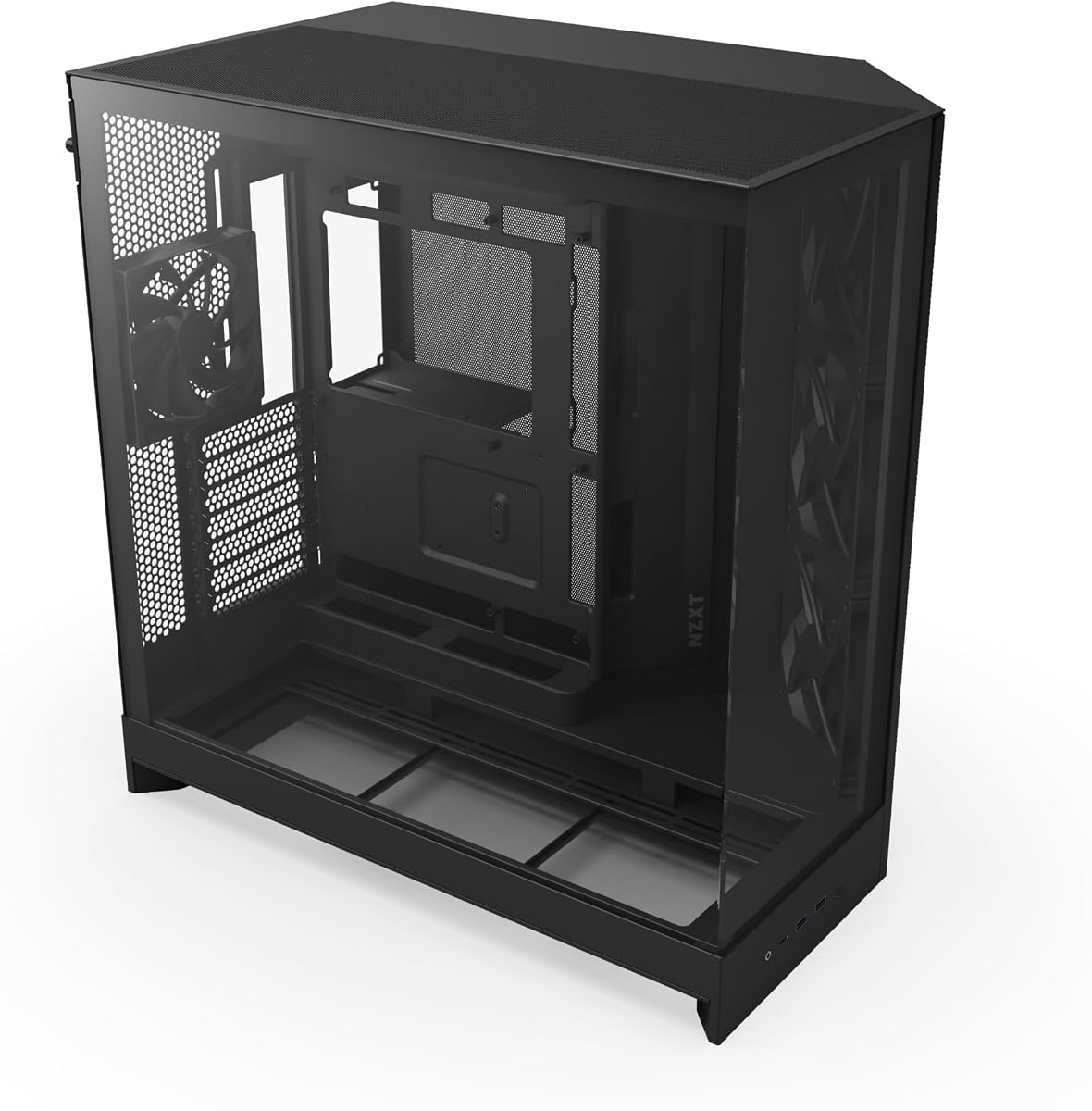
The NZXT H5 Flow is a compact ATX mid-tower aimed at users who want better ventilation and cleaner organization without moving to a large full tower. It carries a 4.6 rating and includes two 120mm Quiet Airflow fans, one at the front and another at the rear, giving the build a basic intake-and-exhaust arrangement from the start.
We may earn a commission when you buy through this link, at no additional cost to you.
Ultra-fine mesh covers the top, front, and side panels to promote airflow while filtering dust. The perforated PSU shroud adds another intake route, and the case supports a 360mm front radiator or a 240mm top radiator for builders who outgrow air-only cooling.
Its main limitation is that the supplied cooling package is modest compared with several larger cases in this list. The two included fans are practical rather than extravagant, and the case does not emphasize accommodations for multiple graphics cards. Nevertheless, its core strengths remain well balanced for ordinary gaming and productivity systems.
Choose the H5 Flow when a smaller footprint, straightforward installation, and a clean appearance matter more than maximum fan capacity. It is a sensible starting point for an ATX build that may receive a liquid cooler later, and its cable channels, hooks, and straps make the initial setup less cumbersome.
Front and rear 120mm fans establish a clear path through the chassis, while the ventilated PSU shroud introduces an additional intake. The result is a useful baseline for systems that do not begin with a large liquid-cooling assembly.
The case can accept a 360mm front radiator or a 240mm radiator in the roof. That flexibility makes it viable for compact builds that still want room for a substantial cooling upgrade later.
We may earn a commission when you buy through this link, at no additional cost to you.
The NZXT H6 Flow RGB combines a dual-chamber design with panoramic glass, three pre-installed 120mm RGB fans, and an airflow-optimized panel layout. Its 4.8 rating makes it one of the strongest overall fits for buyers who want a polished, thermally organized mid-tower without moving into the largest premium enclosures.
We may earn a commission when you buy through this link, at no additional cost to you.
Separating the power supply and drives from the main component chamber helps keep those heat sources away from the CPU and graphics card. The included fans are positioned to support the case's intended airflow, while the perforated top and side panels increase ventilation and dust filtering around the visible interior.
The visual design is a major part of the appeal, but it is supported by practical features. Wide cable channels and straps simplify routing, and the wraparound glass provides a broad view of the components. The trade-off is that the glass and white finish place greater emphasis on appearance, and the RGB fans are not necessary for the case's airflow architecture.
This case is recommended for builders who want a balanced mix of clean presentation, effective component separation, and a ready-to-run fan package. It works particularly well for color-coordinated gaming systems, although buyers who need the highest possible radiator density or a large number of 140mm fans should consider more specialized designs.
The compact dual-chamber structure separates the power supply and storage from the central hardware area. This helps the case maintain a clean interior while reducing the way peripheral heat and cable clutter interact with the CPU and graphics card.
Wraparound glass gives the build a broad viewing area, but the top and side panels also use optimized perforations. The case is therefore designed to look open without relying on a completely unrestricted panel that would offer no dust filtering.
We may earn a commission when you buy through this link, at no additional cost to you.
The HAVN HS 420 is a premium mid-tower explicitly designed around a hybrid cooling structure. Its 4.6 rating reflects a case that emphasizes capacity and organized airflow: eleven 140mm fan positions, support for 420mm radiators at the top, right, and bottom, and a dual-chamber layout that directs intake air toward a centrally positioned graphics card.
We may earn a commission when you buy through this link, at no additional cost to you.
The case's custom panel ventilation, SimpliCable routing system, and integrated PWM fan hub distinguish it from simpler mesh towers. Its curved, heat-formed uni-sheet glass offers a panoramic view, and a three-way adjustable GPU bracket supports cards of varying shapes and sizes while keeping the internal layout neat.
The trade-off is physical scale and complexity. A chassis designed to accommodate three large radiators and a high density of 140mm fans is not aimed at the smallest possible installation, and the white finish requires more care around fingerprints and visible marks. The extensive feature set also makes it more elaborate than a straightforward mid-tower.
This is the right recommendation for an enthusiast who plans a powerful graphics card, substantial air or liquid cooling, and careful cable management. It is especially compelling when cooling is the priority and the builder intends to use several large fans or reserve multiple radiator mounting positions for future expansion.
Eleven 140mm fan slots and three possible 420mm radiator locations give the HS 420 exceptional planning flexibility. This is useful for builders who want to begin with extensive air cooling or reserve one large radiator position for a later liquid-cooling upgrade.
Top-to-bottom grooved guides and the SimpliCable system help maintain a tidy interior even when a complex system requires many leads. Rubber-isolated fan brackets also help reduce resonance transmission through the chassis.
We may earn a commission when you buy through this link, at no additional cost to you.
The Antec Flux Pro is a full-tower E-ATX case for builders who prioritize expansion space and a large collection of pre-installed fans. It has a supplied rating of 4.7 and arrives with six PWM fans: three Tranquil 140mm fans at the front, two P12R PWM reverse fans on the power-supply shroud, and one Tranquil 140mm rear fan.
We may earn a commission when you buy through this link, at no additional cost to you.
Its multi-directional vent design supports up to 12 fans in total. Removable cooling brackets at the top, front, and power-supply shroud give the airflow layout flexibility, while the case can hold a 420mm radiator and a 360mm radiator simultaneously.
This substantial hardware comes with obvious trade-offs. A full-tower needs more desk space, and the combination of metal, glass, and wood produces a more distinctive appearance than a uniformly industrial or minimalist chassis. The innovative 90-degree power-supply mount and CPU/GPU temperature display add function but also contribute to the case's elaborate design language.
Choose the Flux Pro for high-end E-ATX builds that need room for powerful components, extensive cooling, and plenty of fan positions. It is a better fit for a spacious workstation or showcase gaming system than for users seeking a compact, minimalist enclosure.
Six included fans place cooling in the front, rear, and power-supply shroud from the start. Reverse shroud fans can also help direct air toward the graphics card, making the initial arrangement more useful than three front fans and one rear fan.
Support for up to 12 fans and simultaneous 420mm and 360mm radiators makes the case suitable for systems expected to grow. The removable top, front, and shroud brackets let users reorganize the cooling path as hardware changes.
We may earn a commission when you buy through this link, at no additional cost to you.
The Cooler Master HAF II 500 takes a distinctive approach by using very large cooling hardware. It comes with two 220 by 40mm front intake fans and a 180 by 40mm rear exhaust fan, creating high airflow through large front and rear ventilation openings. Its supplied rating is 4.8.
We may earn a commission when you buy through this link, at no additional cost to you.
The Mighty40 cooling system is built around the idea that large, slow-moving fans can move substantial air while producing less noise than several small high-speed alternatives. The MasterRail system supports multiple fan and radiator sizes at the top and front, while split-level cable management creates routing space around the oversized rear cooling hardware.
These are notable strengths for a performance build, but they are not universally ideal. Buyers must source compatible large fans, and the chassis is less forgiving than a standard mid-tower when desk space is limited. The dual-mode GPU holder supports either one stabilized card or two cards up to 3.6 slots thick each, but that is a specialized configuration rather than the central strength of the airflow design.
This case is recommended for builders committed to a large-fan cooling strategy and willing to plan radiator and fan dimensions carefully. It offers a compelling balance of airflow capacity and acoustic intent, while the adjustable storage cage adds flexibility for different drive layouts.
The 220mm front and 180mm rear fans are designed to move more air across fewer, larger openings. The Mighty40 layout and split-level cable arrangement are built to preserve cooling space despite the substantial fan dimensions.
Top and front mounting points can accept multiple fan and radiator sizes, allowing the chassis to accommodate different cooling hardware. Builders should still verify the precise dimensions of every fan, bracket, and radiator before ordering components.
We may earn a commission when you buy through this link, at no additional cost to you.
The CORSAIR AIR 5400 RS ARGB is built around a three-chamber architecture that separates the CPU cooling area, the graphics card and motherboard chamber, and the power supply and storage area. Its supplied rating is 4.6, and the central idea is to prevent heat from one chamber from unnecessarily affecting another.
We may earn a commission when you buy through this link, at no additional cost to you.
The front CPU chamber can hold a 360mm radiator, while the main chamber receives vertical airflow for the motherboard and graphics card. A dedicated lower chamber houses the power supply, storage, and cables, with its own intake and exhaust openings. Bottom airflow ducts accelerate air into a narrow path, increasing velocity without requiring the fans to run faster.
The trade-off is that the enclosure is more architecturally complex than a standard open mid-tower. A builder who wants a simple three-fan arrangement may find the separate chambers unnecessary, while liquid-cooling users need to plan the CPU radiator around the front chamber. The panoramic presentation and extensive separation do provide a strong basis for a clean, organized build.
This is a good recommendation for users with a powerful CPU and graphics card who want a case designed to control the movement of heat. It works especially well for showcase systems where a tidy internal layout and clear thermal zoning are priorities, though it may be more elaborate than necessary for a modest office system.
The isolated CPU section keeps radiator heat away from the main chamber, while the power supply and storage receive their own ventilation. This separation can make a complex high-performance system feel more organized and reduce interference between hot and cool zones.
The bottom duct directs intake through a narrowed channel before it reaches the central chamber. The design seeks stronger cooling through focused airflow rather than simply adding more fan speed and noise.
We may earn a commission when you buy through this link, at no additional cost to you.
The NZXT H9 Flow is a spacious dual-chamber ATX case with an emphasis on fan capacity. It has a 4.7 rating and includes three F140Q case fans in the angled front-right section plus one F120Q case fan at the rear. These case versions use 3-pin DC connections rather than the more common four-pin PWM specification.
We may earn a commission when you buy through this link, at no additional cost to you.
The perforated steel panels and angled fans establish a dedicated path through the right side of the chassis. The case supports nine 140mm fans across the top, front-right, and bottom, as well as one 120mm rear fan. It also accepts 420mm radiators at the top and front-right and provides clearance for high-end graphics cards.
The dual-chamber layout separates the power supply and drives from the main components, improving both thermal organization and cable management. Wide channels, built-in Velcro straps, and tie-down points simplify routing, while compatibility with rear-connecting motherboards can produce an especially clean appearance. The main caveat is that the included fans are 3-pin DC models, and a large graphics card requires careful clearance planning.
Choose the H9 Flow for a spacious, fan-heavy build that will benefit from many 140mm options and large radiators. It is a practical choice for enthusiasts who value a clear cable layout and future cooling flexibility over the more compact proportions of a standard mid-tower.
The front-right fans pull air through the side intake and direct it through the main chamber. Their angled placement is central to the case's airflow design and helps distinguish it from a conventional front-to-rear tower arrangement.
Support for nine 140mm fans and 420mm radiators creates considerable cooling flexibility. Builders should confirm whether their desired controller and fan connection types fit the supplied 3-pin case fans and the rest of the chassis.
We may earn a commission when you buy through this link, at no additional cost to you.
The CORSAIR AIR 5400 LX RGB shares the sophisticated three-chamber concept of the AIR 5400 family while adding a panoramic RGB presentation. Its supplied rating is 4.7, and the defining cooling feature is an isolated front section capable of holding a 360mm radiator for the CPU.
We may earn a commission when you buy through this link, at no additional cost to you.
The middle chamber provides vertical airflow for the graphics card and motherboard, while the lower PSU and storage section has dedicated openings. Airflow ducts in the bottom array accelerate air into a focused channel, improving cooling without requiring greater fan speed. The RGB model is intended for builders who want the internal organization to remain visible.
This complexity and presentation carry a trade-off. The enclosure is more elaborate and premium-oriented than a basic high-airflow tower, and some buyers may prefer a subtler appearance without extensive lighting. Buyers also need to plan the front radiator and component arrangement around the chamber boundaries.
This is a strong recommendation for a polished, high-performance showcase build that needs both visual presence and organized thermal zones. It suits users willing to plan the cooling path carefully and value the separation of CPU, graphics card, motherboard, power supply, and storage areas.
A dedicated front CPU chamber, a vertical central chamber, and an isolated lower section give each major hardware group a more deliberate environment. That organization can make a powerful system look cleaner while keeping heat sources from sharing the same unrestricted volume.
The wraparound viewing area highlights components and RGB lighting, while the lower duct concentrates airflow through the main chamber. It is a presentation-focused design that still places cooling performance and component separation at its center.
We may earn a commission when you buy through this link, at no additional cost to you.
The MONTECH AIR 903 MAX is a high-airflow E-ATX mid-tower that focuses on straightforward cooling and generous compatibility. It has a supplied rating of 4.8 and includes four 140mm fans: three HP140 ARGB PWM intake fans at the front and one 140mm PWM exhaust fan at the rear.
We may earn a commission when you buy through this link, at no additional cost to you.
A ventilated mesh front panel supports unrestricted intake, and radiators up to 360mm can be installed at the front or top. The 478 by 230 by 493mm chassis accommodates demanding components, including graphics cards up to 400mm, and supports E-ATX, ATX, Micro-ATX, and Mini-ITX motherboards.
The trade-off is that it does not isolate heat into separate chambers like the more specialized dual- and triple-chamber designs. It also lacks some of the elaborate GPU-support and specialized routing features found in premium cases. In exchange, it offers a more familiar mid-tower layout with four fans already fitted and a clear upgrade path.
This case is recommended for builders who want substantial airflow and component clearance without paying for a highly segmented enclosure. It is a good fit for a powerful gaming or workstation system using standard ATX-family motherboards, particularly when a large graphics card and future liquid-cooling upgrade are expected.
Three front intakes and a rear exhaust form a conventional, understandable cooling arrangement. The ARGB-equipped front fans add visual interest while the PWM controls allow the system to be tuned for either quieter or more aggressive operation.
Support for E-ATX motherboards and graphics cards up to 400mm provides room for substantial components. Front and top positions for 360mm radiators also keep liquid-cooling options open as the system evolves.
We may earn a commission when you buy through this link, at no additional cost to you.
A hybrid airflow case works best when its vent pattern, chamber arrangement, and included cooling hardware match the components in the planned system. The following factors are more useful than fan count alone when comparing a conventional mesh tower with a segmented or dual-chamber design.
Start by understanding how air enters, crosses the components, and exits the chassis. Perforated or fine-mesh panels reduce restriction, while angled fans can direct intake toward the graphics card and vertically through the motherboard area. Dual- and triple-chamber cases separate heat sources so the CPU radiator, GPU, motherboard, PSU, and storage do not all share one open volume. A case may contain many fans, but it performs best only when each position serves a clear intake, exhaust, or pressure-balancing role.
Check the dimensions and connection type of every included fan. Standard 120mm and 140mm fans are easy to replace, while specialized 180mm and 220mm designs may limit future options. PWM control offers finer speed management than basic fixed-speed or three-pin DC operation, while ARGB lighting adds aesthetics at the cost of another cable and synchronization requirement. Buyers should compare the installed fans with the additional positions the case supports.
Radiator support determines how easily the case can move from air cooling to liquid cooling. Front and top positions are the most common, while the HAVN HS 420 adds a third 420mm position and the Antec Flux Pro supports simultaneous 420mm and 360mm installations. Measure the combined thickness of the radiator, fans, tubing, and mounting hardware rather than relying only on the stated radiator size.
A dual-chamber design can isolate a power supply and drives from the CPU and GPU, improving the organization of both cooling and cables. Triple-chamber models go further by giving the CPU a dedicated radiator section and creating a separate PSU and storage area. These structures are useful in high-performance systems, but they also require more careful planning than a conventional open chassis.
Case labels such as ATX, Micro-ATX, and E-ATX indicate motherboard compatibility, but graphics-card length and thickness are equally important. The MONTECH AIR 903 MAX supports cards up to 400mm, while the HAF II 500 offers a holder for two cards up to 3.6 slots thick each. Buyers should also account for power connectors, cooler height, and the space needed to route tubing.
Good cable management improves both appearance and airflow. Look for wide routing channels, tie-down points, hooks, straps, and space behind the motherboard tray. The NZXT H6 Flow and H9 Flow use dedicated channels and straps, while the HAVN HS 420 adds grooved SimpliCable guides. Also consider whether the power supply mounts directly to the bottom, the side, or behind a shroud, since each arrangement affects installation order and visible cable runs.
More airflow is not automatically quieter. Small fans may need to spin faster to move the same volume of air, while large fans can create a lower-pitched flow with less perceived noise. The HAF II 500 centers its design on 220mm front and 180mm rear fans, whereas the NZXT H5 Flow uses two restrained 120mm units. Builders should decide whether acoustic comfort, a specific fan ecosystem, or a particular lighting style matters more than maximum mounting flexibility.
Full towers and heavily segmented mid-towers can exceed the available desk or floor space, while compact cases may restrict large coolers and radiators. Glass panels improve visibility but require more care than opaque panels, and white finishes can show fingerprints. Consider front I/O, removable dust filters, drive placement, and how easily the side panel or fan trays can be removed for routine maintenance.
Begin by assembling the case outside the system or with the motherboard installed as late as possible in the process. Fit the power supply, storage, rear I/O shield, and standoffs first, then connect the motherboard and front-panel wiring before adding graphics cards or bulky coolers. This order provides better access to tight spaces, especially in cases with separated chambers or removable cooling brackets.
Balance the cooling configuration by treating front and side positions as intake, the rear as exhaust, and the top according to the case's intended path. Fan-control software or a hardware controller can create ramps that keep the system quiet during light work and increase airflow under sustained CPU or GPU load. After tuning, compare temperatures and noise while watching for unusually high fan speed, uneven intake, or airflow fighting between adjacent fans.
Dust control is particularly important for densely perforated and mesh-front cases. Clean removable filters regularly, inspect intake areas for accumulated debris, and use compressed air in short bursts while holding fan blades so they do not spin. When cleaning glass or coated panels, use a soft microfiber cloth and avoid aggressive chemical cleaners that could damage the finish.
A hybrid airflow PC case combines conventional ATX-style component layout with targeted vents, mesh panels, angled fans, or separated chambers. These features work together to establish a deliberate cooling path while preserving access to standard motherboard, graphics card, power supply, and storage positions. The exact implementation differs among the cases in this guide, ranging from a straightforward ventilated mid-tower to a three-zone premium design.
A dual-chamber design can improve cooling by separating the power supply and storage from the CPU and graphics-card area. It also tends to make cable routing cleaner because more cables can remain in the lower section. Results still depend on fan direction, radiator placement, component density, and whether the case's openings align with the intended intake and exhaust paths.
Several models already include a useful fan package. The NZXT H5 Flow includes two 120mm fans, the H6 Flow RGB includes three 120mm RGB fans, the H9 Flow includes four case fans, and the Antec Flux Pro and Cooler Master HAF II 500 arrive with six each. Additional fans may still be useful for filling empty mounts, creating balanced pressure, or upgrading to a different size or control method.
A mid-tower is often sufficient when it supports the graphics-card length, CPU-cooler height, radiator thickness, and motherboard format required by the build. The HAVN HS 420, CORSAIR AIR 5400 models, and MONTECH AIR 903 MAX offer substantial room in mid-tower formats, while the Antec Flux Pro is a larger full tower for particularly expansive systems.
No. The number and size of possible fans are only useful when the case has a coherent intake and exhaust plan. Fans should push air through the intended path rather than fight one another, and radiator thickness, tubing space, cables, and component clearance all affect the final result.
Most models support common radiator sizes, but the available mounting positions differ. The NZXT H5 Flow supports a 360mm front or 240mm top radiator, the H6 Flow and H9 Flow support larger configurations, and the HAVN HS 420 offers three 420mm positions. Always check CPU-socket compatibility, radiator thickness with fans attached, tubing clearance, and whether a separate chamber changes the available mounting area.
Yes. PWM fans can be adjusted more precisely by compatible controllers and firmware, while three-pin DC case fans commonly operate at a fixed speed or offer fewer control options. The NZXT H9 Flow specifically includes F140Q and F120Q case versions using 3-pin DC connections, so buyers should account for that when planning fan control.
Inspection frequency depends on the environment, dust level, and how often the system operates. Users should check visible mesh filters and fan areas every few months and clean them more frequently in dusty rooms or during periods of heavy use. Cleaning filters and preventing buildup around intake fans helps preserve the airflow path the case was designed to create.
The NZXT H6 Flow RGB stands out as the most balanced overall option, combining a dual-chamber layout, three RGB fans, panoramic glass, and organized cable routing. The NZXT H5 Flow is a more compact and budget-conscious starting point, while the HAVN HS 420 takes the premium route with eleven 140mm fan positions, three 420mm radiator locations, and extensive organization features.
Other builds may align more closely with different priorities. The CORSAIR 4000D RS ARGB offers modularity and flexible fan positioning, the MONTECH AIR 903 MAX delivers a practical high-airflow foundation, and the Antec Flux Pro and Cooler Master HAF II 500 suit builders willing to use a large footprint for extensive cooling. Choose the airflow architecture and component fit before considering fan quantity or lighting.
Ratings, configurations, and current prices can change over time, so verify the latest listing and compatibility information before ordering. Measure the main components, check radiator and fan dimensions, and confirm that the case's included cooling and front I/O suit the finished system.