
VEVOR 3D Printer Enclosure
4.6Editor score
Integrated ventilation system
Flame-retardant tent construction
Large transparent viewing window
Explore the best enclosure with ventilation for resin printing, comparing airflow, odor control, dimensions, lighting, filtration, and printer compatibility.
Resin printers can produce fumes, odors, dust, and ultraviolet exposure that make a dedicated enclosure valuable. The right unit combines controlled ventilation with activated-carbon filtration, stable construction, useful visibility, and enough room for your printer, wash station, and curing equipment. Together, these features help create a cleaner and more controlled printing environment.
This guide compares ten resin-printer enclosures using the specifications and product information supplied for each model. We examine ventilation design, interior dimensions, filtration, temperature control, noise reduction, viewing access, lighting, materials, and compatibility. The list includes compact, large, dual-space, and sensor-equipped options, but every choice is evaluated on the same practical buying criteria.
Each pick highlights the features that make its enclosure most useful for a particular workflow, from a lower-cost tent to a large setup with real-time air monitoring. Ratings and product details reflect the supplied listings, while availability and pricing can change at any time. Always verify dimensions, ventilation requirements, and current details before ordering.
4.6Editor score

4.8Editor score

4.2Editor score
The comparison below highlights the main differences in airflow, filtration, usable space, environmental monitoring, and convenience features across all ten enclosures.




The YOOPAI Pro Resin Enclosure combines a 12V variable-speed fan, an enlarged carbon filter, and a flexible exhaust duct to create a more deliberate approach to resin-print ventilation. Its 4.8 rating is the highest in this comparison. The enclosure also provides a transparent amber-tinted window, a front monitor for temperature and humidity, and a spacious 18.9 by 18.9 by 28.3-inch interior.
We may earn a commission when you buy through this link, at no additional cost to you.
One of its strongest features is the attention to airflow management. The fan can be adjusted rather than operated at a single fixed setting, while a hook-and-loop flap on the unused port allows makeup air to enter. That distinction can help maintain smoother circulation and limit excessive negative pressure. The enlarged carbon filter is intended to adsorb noticeable resin odors before air is directed toward a suitable ventilation outlet.
The tent also supports a stable printing environment. Internal insulation is designed to limit temperature changes, while the large window lets operators observe progress without opening the cover. Compatibility is listed for popular models including the Saturn 4 Ultra, Mars 5 Ultra, Photon Mono 4, and HALOT X1, although lid clearance should always be confirmed. A zippered front door, exterior tool pocket, LED, and included support for assembly or replacement parts add convenience.
This is the strongest all-around choice for someone who wants more control than a basic tent provides. It is particularly attractive for workshops, studios, and garages where odor control, visibility, and environmental awareness all matter. The square 18.9-inch width and depth may be less accommodating than a rectangular dual-space model, and the exhaust should lead toward an appropriate outlet rather than simply recirculating fumes into the room.
Adjustable fan speed, an enlarged carbon filter, and a flexible duct give this enclosure a more configurable ventilation arrangement. The make-up-air flap is especially useful for balancing airflow when the unused port is closed.
The amber-tinted window reduces ambient ultraviolet exposure while preserving visibility. A front temperature and humidity display also makes it easier to check the enclosure environment without interrupting the print.
We may earn a commission when you buy through this link, at no additional cost to you.
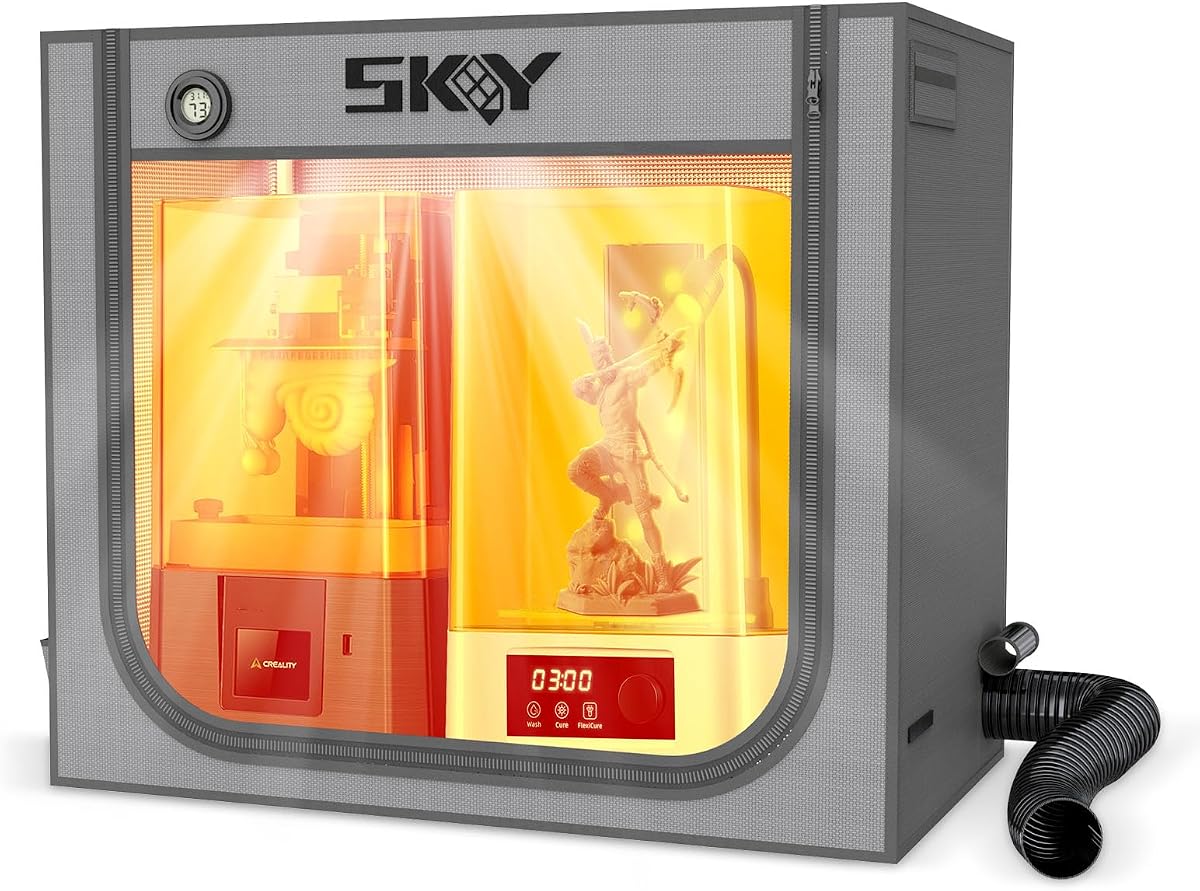
The VEVOR 3D Printer Enclosure offers a practical way to contain resin printing without adding a large collection of digital controls. It has a 4.6 rating and a 21.65 by 25.59 by 29.53-inch enclosure designed for small printers and many LCD resin models, including the Photon Mono and Mars 3. Its integrated ventilation system, transparent window, and LED make it a straightforward choice.
We may earn a commission when you buy through this link, at no additional cost to you.
The ventilation system is described as quickly expelling smoke and dust after printing while limiting the release of harmful gases and particles into the room. Unlike several filtered enclosures in this list, the supplied product information does not identify a carbon filter, so buyers who require activated-carbon odor control should confirm what is included before purchase. The basic goal is still useful: controlled exhaust and faster post-print cooling without leaving the front panel open.
Environmental benefits come from the tent's closed structure. It helps keep dust out, reduces accidental contact with moving print components, and uses flame-retardant materials for added safety. The description also emphasizes a stable structure and a warmer internal environment that may support material adhesion and help reduce warping, cracking, clogging, or jamming. A large window and internal LED make monitoring easier in a dim workshop.
This is the best budget-oriented option for a maker with a small printer who wants ventilation, lighting, and containment in one affordable-style package. Measure the printer and any accessories before ordering, since the stated dimensions are more compact than the dual-space tents. It is also best understood as a simpler protection setup rather than a fully monitored air-quality station.
The integrated system provides a practical way to move printing smoke, fumes, and dust away from the immediate workspace. Its uncomplicated design suits makers who want essential ventilation without managing several separate controls.
A large transparent window provides a broad view of the printing process. The integrated LED adds illumination so operators can check layers and spot developing issues without opening the enclosure.
We may earn a commission when you buy through this link, at no additional cost to you.
The Creality Official Resin 3D Printer Enclosure is built around a generous 1000 by 500 by 1000mm interior. That vertical space is the key attraction, allowing room for a resin printer and a UV curing machine while potentially accommodating a wash station. Its 4.2 rating remains competitive, particularly for buyers who value workspace capacity and a robust metal frame over digital environmental monitoring.
We may earn a commission when you buy through this link, at no additional cost to you.
Construction is a major strength. The enclosure uses flame-retardant aluminum foil cloth, described as fire-resistant and heat resistant, supported by a robust metal frame. This gives it a more substantial appearance than a lightweight fabric tent. The fully enclosed design also blocks noise and odors to a degree, shields equipment from dust, and creates a more stable environment for resin curing, which the product information associates with fewer print defects.
Observation is handled through a large transparent viewing window, allowing print progress to be checked without opening the cover and releasing odors. Compatibility is broad, with the listing naming the Creality HALOT series, ANYCUBIC Photon Mono series, ELEGOO Saturn and Mars series, and other UV printers. The main caveat is that the enclosure provides a fan interface rather than a stated included fan, so ventilation equipment must be planned separately.
This premium enclosure is best for serious hobbyists, studios, or educational spaces that need a tall, durable, large workstation. Its footprint and height are meaningful advantages when a curing or cleaning station must share the enclosure, but they also require adequate room. Buyers should secure a suitable exhaust fan and verify all machine dimensions before ordering.
The 1000mm interior height creates room for taller accessories and a curing machine. It can also accommodate a cleaning machine, provided the dimensions of each unit are checked in advance.
A robust metal frame supports flame-retardant aluminum foil cloth that is described as heat resistant. The result is a stable structure designed for repeated workshop use.
We may earn a commission when you buy through this link, at no additional cost to you.
The SKOUPHY Double Space Resin Enclosure is designed around a 31.5 by 18.1 by 28.3-inch interior, equivalent to 800 by 460 by 720mm. That layout provides room for a resin printer and a curing box while encouraging a more organized workbench. Its 4.5 rating reflects a balanced set of features that includes ventilation, activated carbon, lighting, environmental monitoring, and a protective outer cover.
We may earn a commission when you buy through this link, at no additional cost to you.
At the center of the ventilation kit is a fan described as reaching 4500 RPM. The system is intended to absorb and promptly remove chemical odors released during printing, while an activated-carbon box on the exhaust pipe adsorbs additional odor factors. Together, these features make the enclosure a strong candidate for users who consider odor control more important than maximum compactness.
A diffused LED light improves visibility, and an upgraded thermo-hygrometer can switch between Fahrenheit and Celsius. Tracking temperature inside the enclosure may help users understand whether resin flow and print consistency are being affected by changing conditions. The outer cover uses a double-layer aluminum-mold Oxford-cloth bonding process that is described as waterproof, dustproof, and noise reducing, with fire prevention also listed as a design goal.
This enclosure is best for makers who run a printer and curing box together and want better environmental visibility. Its measured dimensions allow meaningful equipment space, although buyers should still compare the footprint of the printer, curing unit, and vent connections. It is a particularly practical choice for dedicated resin work areas where odor capture and a tidy bench matter.
A fan rated at up to 4500 RPM is paired with an activated-carbon box on the exhaust pipe. This combination targets resin odors before they accumulate around the workbench.
The thermo-hygrometer provides a quick reading of temperature and humidity and can switch units. That visibility helps makers monitor enclosure conditions without opening the cover.
We may earn a commission when you buy through this link, at no additional cost to you.
The YOOPAI Large Resin 3D Printer Enclosure is built to accommodate two resin printers, or a printer and curing machine, within a 30 by 19.7 by 28.3-inch interior. Its 4.4 rating makes it a strong contender for creators who have outgrown a single-printer tent. The wide dual-space layout helps separate equipment while keeping fumes, dust, and resin splashes inside a controlled area.
We may earn a commission when you buy through this link, at no additional cost to you.
Ventilation relies on a built-in carbon filter sheet, exhaust fans, and expandable pipes. The filter is intended to adsorb resin odors and emissions, while the pipes direct treated air out of the enclosure. The product guidance notes that activated carbon can slow airflow and suggests waiting for air to discharge before opening the hood. Installing exhaust pipes on both sides is presented as another way to increase airflow.
Visibility comes from a large, high-transparency PVC window that is described as lightweight, tough, and resistant to wrinkles. It allows users to observe printing dynamics without opening the cover. The six-sided structure also helps block dust and resin splashes, while internal insulation is designed to support more consistent temperature and stable resin flow. These features are useful in a garage or studio where temperature changes are common.
This model is best for advanced hobbyists running multiple resin devices or a larger curing workflow. The dimensions should be compared with every machine and accessory that will be placed inside, including the required clearance around the door and duct ports. It is a capable large enclosure, but those needing the highest flow rate should follow the stated waiting guidance and consider additional pipe routing.
The unusually wide interior can hold two resin printers or a printer and curing machine. That capacity makes it easier to create a complete, enclosed resin-production station.
A broad, transparent PVC panel gives operators a clear view of print progress. Keeping the cover closed during inspection helps limit the spread of polluted air into the room.
We may earn a commission when you buy through this link, at no additional cost to you.
The Large Vented Resin Enclosure provides one of the widest interiors in this guide, measuring 33 by 18.9 by 28.7 inches. That width allows it to accommodate two resin printers or a printer and curing machine. With a 4.4 rating, it is especially relevant to users who want a broad workstation and odor isolation without moving to the much taller Creality model.
We may earn a commission when you buy through this link, at no additional cost to you.
Its ventilation system combines a built-in carbon filter sheet, exhaust fans, and expandable pipes. The goal is to adsorb resin odors and emissions while discharging air toward a suitable outlet. As with other carbon-filtered tents, the supplied guidance says that airflow can slow as air passes through the activated material. Waiting for the enclosure to clear before opening, or adding exhaust pipes on both sides, can improve circulation.
The front PVC viewing window is described as high transparency, tough, and resistant to wrinkles. It allows users to watch print dynamics without opening the protective cover, helping limit odor spread. A six-sided enclosed design protects against dust, resin splashes, and outside interference, while the insulated construction is intended to maintain a relatively stable internal temperature for smoother resin flow.
This enclosure is a good fit for a dedicated resin area that handles a printer and a curing system, especially when width matters more than the compact footprint of a smaller tent. It does not list a digital temperature or humidity display, so environmental readings must come from another source. The main setup consideration is ensuring that both devices fit while leaving the expandable exhaust ports unobstructed.
The 33-inch interior width provides flexibility for two printers or a printer and curing machine. It is a practical choice for users who have already outgrown a narrow single-device enclosure.
Fans, a carbon filter sheet, and expandable pipes form a ventilation package designed to capture odors and direct emissions away from the immediate room. The enclosure remains fully enclosed during monitoring.
We may earn a commission when you buy through this link, at no additional cost to you.
The 5-in-1 Detector-Adjustable Fan Enclosure stands apart through its environmental monitoring. Its 3.0 rating is the lowest in this list, but it offers a 31.5 by 21.7-inch dual-space interior and a real-time monitor for carbon dioxide, formaldehyde, total volatile organic compounds, temperature, and humidity. It is the most technically oriented option here for users who want data about the enclosure environment.
We may earn a commission when you buy through this link, at no additional cost to you.
A speed-regulating active fan controls internal airflow, while a retractable 6.5-foot, two-meter duct is intended to carry fumes outdoors. The listing states that the fan runs at 40dB. Reinforced plastic brackets support the duct and are intended to limit leakage and deformation. The large interior can hold two desktop resin printers in a staggered arrangement, or one printer and a UV curing machine, with additional room for tools and filament.
Compatibility information is extensive, covering resin models from Anycubic, Elegoo, Phrozen, Creality, Flashforge, and Formlabs. It also addresses several FDM configurations, although all Bambu Lab A1 Combo models are excluded. Buyers should note the supplied warnings: the printed manual may contain confusing instructions, the official listing assembly video should be followed, and batteries for the separate temperature-humidity gauge are not included.
Despite its lower rating, this is a compelling specialty choice for classrooms, hobbyists, and technical makers who value air readings. The monitor provides visibility that simple tents cannot, while the adjustable fan and long duct support active exhaust. The tradeoff is greater setup complexity and the need to follow the current video guidance rather than relying solely on the paper manual.
The built-in monitor tracks carbon dioxide, formaldehyde, total volatile organic compounds, temperature, and humidity. This makes it useful for checking conditions rather than relying only on odor perception.
The 80 by 55 by 73cm interior supports two staggered resin printers or one printer paired with a curing machine. It also accommodates a wide selection of listed FDM and resin hardware.
We may earn a commission when you buy through this link, at no additional cost to you.
The Large Carbon Filter Enclosure is a 4.6-rated option centered on a complete resin workflow. Its expanded interior is designed to hold a printer and curing machine together, creating an enclosed area for curing, washing, and printing. The product information does not provide exact dimensions, so the manufacturer listing should be checked carefully before purchase, especially when a curing unit sits close to the tent walls.
We may earn a commission when you buy through this link, at no additional cost to you.
Ventilation is handled by a carbon filter sheet, an exhaust fan, and a vent hose. Together, they are intended to capture resin odors and remove harmful emissions before they spread through a home, garage, or indoor workspace. This makes the enclosure appealing to makers who want a single station for both equipment and containment rather than separate solutions for each machine.
A six-sided sealed design shields the workspace from dust, resin splashes, and external interference. The high-clarity PVC front window allows users to monitor progress without opening the enclosure, which helps preserve the stable internal environment. Insulation is also intended to maintain a consistent temperature for smoother resin flow, while the enclosed structure reduces printer noise and creates a tidier, more comfortable area.
This is a strong choice for creators who want both a dual-device layout and straightforward carbon-filtered ventilation. It combines several benefits without the complexity of the sensor-equipped model. The lack of stated measurements and digital monitoring means the buying decision depends more heavily on fit, ventilation routing, and a clear view of the included components before ordering.
The expanded interior is designed to accommodate both a resin printer and a curing machine. Keeping the workflow together can improve organization and reduce open handling of fumes.
A high-clarity PVC panel supports monitoring without opening the cover. The fully enclosed construction also helps reduce the spread of dust, splashes, and printer noise.
We may earn a commission when you buy through this link, at no additional cost to you.
The Makacces Resin 3D Printer Enclosure combines a fire-resistant fabric body, adjustable 12V ventilation, and a brown UV-shielding window in a 25 by 21 by 29.5-inch package. Its 4.5 rating reflects a useful set of features for both LCD resin and FDM printers. The enclosure is particularly relevant to users who want to limit ambient ultraviolet exposure while maintaining visibility.
We may earn a commission when you buy through this link, at no additional cost to you.
The pre-installed fan and ventilation pipe simplify the initial setup, and a speed controller lets the user adjust airflow according to the print and room. Smoke and odor extraction is designed to keep fumes from accumulating and to improve the surrounding workspace. Unlike many competitors, however, the supplied information does not explicitly list activated carbon, so buyers seeking dedicated chemical odor adsorption should confirm the included filter configuration.
The brown window is intended to block most ultraviolet rays and help prevent premature curing of resin materials. It also allows the printer to be monitored without opening the tent. A sturdy stainless steel frame provides a stable structure while remaining lightweight, and the closed design supports dustproofing, noise isolation, and a more consistent internal temperature. The kit also includes a high-quality zipper, a tool bag, and a storage bag.
This enclosure is best for a single-printer workspace where UV control, simple assembly, and adjustable airflow are priorities. It fits within the dimensions of many LCD and FDM printers, including models from Elegoo, Anycubic, and Creality series, but every machine should be measured first. It is less suitable than the dual-space models for housing multiple large devices at once.
The brown window is designed to block most UV rays while keeping the print area visible. This helps protect uncured resin from unwanted ambient exposure during a job.
A pre-installed 12V fan, speed controller, and ventilation pipe make airflow adjustment straightforward. Users can change the rate without installing a separate fan assembly.
We may earn a commission when you buy through this link, at no additional cost to you.
The Multifunctional 3D Printer Enclosure is distinguished by a three-layer filter attached to its cooling fan and a speed-controllable 12V ventilation system. It holds a 4.5 rating and combines odor control, UV protection, and a stainless steel frame in a tent-style design. The three layers are intended to absorb large dust particles and harmful gases before treated air leaves the enclosure.
We may earn a commission when you buy through this link, at no additional cost to you.
Its power adapter accepts AC input from 100 to 240V at 50 or 60Hz and supplies a 3 to 12V, 2A output. Users can adjust the fan speed according to the printing situation. A UV-blocking window allows progress monitoring while protecting the resin print from harmful ambient ultraviolet rays. The enclosure also uses fire-resistant fabric for added protection during operation.
The frame has been updated with lightweight stainless steel pipes instead of iron, supporting a longer service life while retaining a stable structure. Compatibility is intended for some small printers and most common LCD resin devices, including examples such as the Photon Mono and Mars 3, as well as compatible wash machines. Users of other printers must measure the full setup to ensure adequate clearance.
This is a good option for a small resin workstation where layered particle and gas filtration are priorities. One notable setup detail is that the plastic adapter replacing the steel fan bracket must be 3D printed, with the file downloaded from the designated Thingiverse listing. Buyers without access to a printer may prefer another model, while experienced makers may appreciate the customization.
The multi-layer filter is designed to capture large dust particles and adsorb harmful gases. It offers a more structured filtration path than a basic exhaust-only tent.
A UV-blocking window allows inspection while limiting ambient UV exposure. Lightweight stainless steel support pipes create a stable frame designed for a longer service life.
We may earn a commission when you buy through this link, at no additional cost to you.
Choose an enclosure by balancing printer fit, ventilation effectiveness, filtration, interior space, visibility, and safety. The most useful setup is one that contains fumes without restricting airflow and remains manageable within your available workspace.
Start with the dimensions of the printer, curing machine, wash station, power connections, and any resin containers that will sit inside. Some enclosures are sized for one compact printer, while others are wide enough for two devices or a complete curing station. Measure the usable interior rather than relying on exterior dimensions, and leave room to open the door, access controls, and route ventilation pipes without crushing or bending them.
Measure the full footprint, including side-mounted accessories and top lids. The Creality enclosure offers a notably tall interior, while the wide YOOPAI models prioritize width. In short, match every device and clearance requirement before choosing.
A useful enclosure should pull resin fumes toward a filter or exhaust outlet instead of merely trapping them. Look for an adjustable fan, a dedicated exhaust connection, and a way for replacement air to enter. Some designs include a hook-and-loop flap for make-up air, while others may need an additional port opened to maintain circulation. Very strong extraction without adequate inlet air can reduce flow or create excessive negative pressure inside the tent.
Prefer clear airflow paths with controllable fan speed and a practical outlet connection. In short, ventilation should move air deliberately while preserving a balanced enclosure environment.
Activated carbon is the primary feature to inspect when odor control is a major concern. Carbon adsorbs many odor-bearing compounds, while additional filter layers may capture larger particles. A fan alone can move fumes, but it does not necessarily remove their odor before discharge. The SKOUPHY model includes an activated-carbon box, the YOOPAI options use carbon filter sheets, and the multifunctional model uses a three-layer filter attached to the fan.
Check whether activated carbon is included and whether it is replaceable. Also note that carbon can slow airflow, so some manufacturers recommend allowing time for the enclosure to clear before opening. In short, select the level of filtration that matches your resin workflow and room sensitivity.
Ventilation equipment should discharge toward a suitable outdoor outlet or another safe location rather than directly into a frequently occupied part of the home. Long ducting can create resistance, and the enclosure may need to be positioned near a window, wall penetration, or other appropriate exhaust point. Review the duct length, included support pieces, and number of ports before arranging furniture. The sensor-equipped model includes a retractable two-meter duct, while several dual-space tents use expandable pipes.
Plan the route before assembly and avoid kinks. In short, a safe outlet is more important than simply having a fan attached to the tent.
Resin can be sensitive to ambient ultraviolet light, so a tinted or UV-blocking window adds useful protection. Amber and brown panels can reduce exposure while preserving a view of the print. Transparent PVC is also available on several models, allowing users to observe progress without opening the cover and releasing odors. A wide window is helpful for checking the build plate and catching layer or placement issues early, while an LED can make monitoring easier in a dim garage or workshop.
Look for a window that balances visibility with light protection. In short, monitor prints without repeatedly opening the enclosure and exposing resin to unwanted UV.
Resin behavior can be affected by temperature, and a fully enclosed tent may become warmer than the surrounding room. Insulation is intended to limit rapid temperature changes, while a stable frame helps the structure remain upright. Consider the enclosure material, supported or unsupported construction, and whether the supplied information identifies heat-resistant or flame-retardant components. These characteristics matter in a home studio, classroom, garage, or other shared workspace.
Prioritize a rigid frame and insulated walls for consistent operation. In short, environmental stability is a practical feature, not merely a comfort improvement.
Basic enclosures focus on containment and extraction, while more advanced models add temperature, humidity, carbon dioxide, formaldehyde, or total volatile organic compound readings. The 5-in-1 monitor is the most comprehensive option in this guide, while the SKOUPHY and YOOPAI Pro models provide thermo-hygrometer information. A display is useful for learning how your setup responds to a long print, but it should complement rather than replace a sound ventilation design.
Choose monitoring based on your technical interest and budget priorities. In short, readings can reveal enclosure conditions, but the underlying airflow and filter arrangement still determine odor performance.
Some tents arrive with a pre-installed fan, while others require separate exhaust equipment, adapters, or additional support rods. One product explicitly recommends following an official assembly video because its printed manual may be confusing, and another requires users to print a plastic adapter before replacing the steel fan bracket. Consider whether you already own a 3D printer, whether you can print replacement parts, and how often the carbon filter and other consumables will need changing.
Choose a model you can realistically assemble and maintain. In short, straightforward setup and replaceable parts can be more valuable than an extra feature that is difficult to use.
Assemble the frame in the intended location before bringing in the printer, curing unit, or wash station. Leave clearance around the door, filter, fan, and exhaust connection, and route the duct before starting the equipment. If the manufacturer provides an assembly video, follow it alongside the written instructions. For models that require a custom adapter, print the specified file and confirm that the fan bracket is supported correctly before applying force.
Place resin containers and sensitive materials away from the fan intake, keep the ventilation path unobstructed, and connect the exhaust to a suitable outlet. Use the lowest fan setting that reliably controls odor during a normal print, then adjust it when resin type, room conditions, or print stage changes. Some carbon-filtered enclosures need time to discharge remaining fumes before the cover is opened, so follow the product-specific guidance and avoid entering the space unnecessarily.
Wipe resin splashes from the interior, clean the fan and filter on a schedule appropriate to the resin and printing frequency, and allow the enclosure to cool before extensive cleaning. Replace or refresh activated-carbon media when odor control declines, and inspect the duct for dust, compression, or moisture. Keep the frame dry, remove any residue that could weaken fabric or zippers, and periodically check the window, zipper, straps, joints, and support rods for wear.
No. An enclosure can contain fumes and direct them through filtration or exhaust, but it cannot guarantee perfect removal of every airborne compound. A carbon filter can adsorb many odor-bearing substances, while a fan moves air through the system. The quality of the result also depends on resin, airflow, filter condition, duct routing, and where the exhaust is discharged.
In most cases, yes, the exhaust should lead toward a suitable outdoor outlet or another approved ventilation location. Discharging filtered resin fumes into a bedroom, office, or frequently occupied room can undermine the purpose of the enclosure. Check local requirements and the manufacturer's instructions, and never route hot exhaust or position the duct where it creates a fire or condensation hazard.
Choose one that fits the printer with room for the curing machine, wash station, tools, and airflow connections if you plan to use them together. Measure each device and compare it with the stated interior dimensions, including space needed to open lids and reach controls. Wide dual-space models suit two devices, while tall or extra-large models offer more vertical and total working room.
No. A UV-shielding window is designed to block most ambient UV and reduce premature curing, but the enclosure does not replace a properly controlled curing system. Exposure can still occur when the cover is open, through less-shielded areas, or from light sources inside the tent. Follow the resin manufacturer's curing instructions and use the window as one part of a controlled process.
Replacement frequency depends on resin type, print volume, room ventilation, fan settings, and how quickly odors return. A practical approach is to monitor whether odor control weakens and inspect the filter for dust or saturation. Follow the manufacturer's replacement guidance, keep spare media available, and avoid stretching or damaging the filter when fitting it to the fan.
Yes, several products in this guide are compatible with both resin and FDM equipment. The important factors are the device dimensions, required clearance, heat characteristics, and ventilation behavior of the specific printer. A resin setup may benefit more from odor filtration and UV shielding, while FDM users may prioritize filament storage, stable temperature, and space for multi-spool systems.
An odor can remain because the filter is old or saturated, the fan is operating too slowly, the duct is restricted, or make-up air is inadequate. Activated carbon can also slow airflow, and the enclosure may need additional exhaust ports or time to discharge before opening. Check the filter, fan speed, duct route, and inlet configuration before assuming the enclosure has failed.
They can help contain dust, splashes, noise, odors, and some ultraviolet exposure, but they do not replace appropriate ventilation or safe material handling. Follow resin supplier instructions, wear suitable personal protective equipment, store waste resin correctly, and keep the enclosure away from heat and ignition sources. Any fire-resistant material designation should be treated as an added feature rather than a guarantee of zero risk.
The three leading choices serve different priorities. The YOOPAI Pro Resin Enclosure is the strongest balanced option because it combines an adjustable 12V fan, enlarged carbon filter, flexible duct, UV-reducing window, and temperature-humidity display. The VEVOR enclosure stands out as the best budget-oriented choice for straightforward ventilation, lighting, and compact containment, while the Creality Official enclosure is the premium option for buyers who prioritize a large, tall, metal-framed workstation.
Before choosing, prioritize the way you actually print. Measure your devices, decide whether one printer or a complete curing workflow must fit, and select a ventilation system that moves air toward a safe outlet. Carbon filtration, active airflow, UV protection, monitoring, and temperature control should be evaluated together rather than treating any single feature as a substitute for proper setup and safe resin handling.
Finally, check the current product listing, included accessories, dimensions, compatibility notes, and ventilation instructions before ordering. Availability and pricing change, and manufacturer updates may alter the included fan, filter, duct, or monitoring equipment. The best enclosure is the one that fits your equipment, suits your space, and provides a practical and correctly routed ventilation solution.