
WALI Monitor Riser
4.7Editor score
Raises devices three heights
Supports up to 44 pounds
Adds ventilated storage
A laptop rack can transform a crowded workstation by raising your screen, storing closed notebooks vertically, or creating a dedicated place for devices and accessories. The right model depends on whether your priority is ergonomic positioning, compact storage, multiple-device organization, simple installation, or a combination of these benefits.
We compared ten stands across capacity, adjustability, supported sizes, materials, stability, ventilation, mounting method, and useful secondary features. The list includes vertical organizers, adjustable risers, rotating stands, under-desk shelves, and a monitor-style platform, with options for single users, shared offices, and multi-device setups.
Each review explains where that particular rack stands out and where its design may be less suitable. Ratings and specifications reflect the supplied product information, while current availability, configuration details, and prices can change, so readers should confirm those details before purchasing.
4.7Editor score

4.8Editor score

4.6Editor score
As an Amazon Associate we earn from qualifying purchases.
The table below compares all ten racks by design, device capacity, adjustability, materials, and practical features, making it easier to identify the right format for your desk setup.




The OMOTON Dual Vertical Desk Laptop Stand is our strongest all-around choice for organizing multiple notebooks without taking over the work surface. Its 4.8 rating reflects a well-executed vertical design, and its defining feature is the ability to support two laptops at the same time rather than forcing a user to choose between compactness and capacity.
We may earn a commission when you buy through this link, at no additional cost to you.
Both storage areas use adjustable widths to accommodate devices with thicknesses ranging from 0.55 to 1.65 inches. That range covers many common notebooks, including MacBook, Samsung, and Microsoft Surface models, while silicone mats in the slots help protect the devices from scratches. A broad base with additional nonslip pads improves stability and reduces the chance of the rack or laptops shifting during use.
The aluminum alloy construction also gives the stand a more refined appearance and durable feel than a basic plastic organizer. Its sandblasted, brushed, and CNC-machined finish is designed to visually complement Apple hardware. The tradeoff is that this is primarily a vertical storage solution: it does not raise an active laptop to a more ergonomic viewing height, and its two-device capacity may be more than a single-user workstation needs.
Choose the OMOTON when you regularly switch between two laptops, want closed notebooks standing within easy reach, or want a compact alternative to leaving a large device flat on your desk. For one active computer and a conventional monitor, a separate riser may be more useful. For shared desks and tightly packed charging stations, however, this dual vertical format offers the strongest balance of capacity, adjustability, and footprint.
The two-slot format is particularly useful for people who alternate between a work notebook and a personal or travel device. Storing both vertically keeps the screens protected and leaves more open desk area for a keyboard, mouse, notebook, or writing materials.
Adjustable slot widths let each compartment accommodate a different device thickness, while silicone contact points help prevent scratches and slipping. These details make the stand more adaptable than a fixed-width organizer.
We may earn a commission when you buy through this link, at no additional cost to you.
The NODOCA 2-Slot Laptop Storage is a practical vertical organizer for users who want their laptops close at hand without covering the main work area. It receives a 4.6 rating and stands apart through a high-strength carbon steel frame, adjustable laptop spaces, and a lower hook that can hold headphones, a controller, a hat, or a handbag.
We may earn a commission when you buy through this link, at no additional cost to you.
Its adjustable storage system is compatible with a wide range of notebooks, including MacBook Air, MacBook Pro, Lenovo ThinkPad, Dell, HP, ASUS, and Chromebook models. A silicone protective pad at the bottom helps keep the laptop from scratching against the support surface. The steel construction supplies the rigidity needed for a vertical dock, while the hook expands its usefulness beyond device storage.
Unlike stands placed directly on top of the desk, the NODOCA mounts to the side, potentially keeping the main work surface clearer. That design also comes with installation constraints: the effective desk depth must be greater than 5 centimeters, or 2 inches, and the desk thickness must be less than 6 centimeters, or 2.3 inches. It therefore is not a universal side-mount solution and should not be confused with the no-drill under-desk shelf in this list.
This organizer is well suited to a home office, shared workstation, or gaming setup where a controller or headset also needs a home. It may be less appropriate for desks with thick panels, limited overhang, or a frame that prevents a firm side attachment. Check those dimensions carefully before buying, and favor it when side-mounted vertical storage is more important than active-screen elevation.
The lower hook turns a basic laptop dock into a broader accessory organizer. Headphones and game controllers can hang below the laptops, making better use of the vertical space without adding another separate hook to the desk.
Mounting at the side of a compatible desk keeps notebooks accessible while preserving the central work area. It is a particularly good arrangement for users who regularly connect and disconnect portable computers.
We may earn a commission when you buy through this link, at no additional cost to you.
The BYMECOST No Drill Under Desk Laptop Mount takes a different approach to laptop organization by placing the storage tray beneath the desktop. Its 4.5 rating reflects a highly practical shelf for power adapters, mini computers, hubs, cables, controllers, and other equipment that would otherwise compete for desk space.
We may earn a commission when you buy through this link, at no additional cost to you.
The metal tray measures 16.7 by 10.1 inches and can support up to 44 pounds. Installation is designed to be tool-free: the shelf clips to the desktop frame, and anti-scratch pads help protect the installation area. Its hollow structure supports airflow and reduces dust accumulation, while three openings provide routes for charging and other cables.
The major limitation involves desk compatibility. The product is not suitable for tables with crossbars, and the installation area must be at least 20 inches wide even though the internal tray is narrower. A laptop and its connector also need to fit within the stated 16.7-inch width when stored together. These constraints make careful measurement more important than for a simple desktop stand.
Buy the BYMECOST if you have a compatible frame desk, standing desk, lift table, or gaming table and want a dedicated hidden shelf for accessories. It is less suitable for desks with crossbars, drawers that interfere with the mounting area, or a need to keep the active laptop visibly on the desktop. For those situations, an adjustable riser or vertical organizer will be easier to integrate.
A shelf can hold bulky items that would otherwise occupy valuable surface space. It is especially useful for mini computers, surge protectors, hubs, power cords, and other accessories used around a primary workstation.
The no-drill approach reduces installation work and avoids permanent modifications to the desk. Anti-scratch pads add another practical layer by helping protect the contact area around the frame.
We may earn a commission when you buy through this link, at no additional cost to you.
The Adjustable Laptop Stand for Desk is a versatile riser for users who want to change screen height and angle throughout the day. Its 4.6 rating reflects a combination of ergonomic adjustability, ventilation, sturdy metal construction, and a folding design that makes it suitable for commuting or shared workspaces.
We may earn a commission when you buy through this link, at no additional cost to you.
The height and angle can be set according to the user's preferred posture, helping position the display closer to eye level during extended sessions. Multiple holes in the upper platform encourage airflow around the laptop, while rubber mats on the hooks, silicone pads on the upper and lower surfaces, and smooth edges help protect both the device and the user's hands. The stated load capacity is up to 17.6 pounds, or 8 kilograms.
Compatibility spans laptops from 10 to 15.6 inches, including MacBook Air and Pro, Google Pixelbook, Dell XPS, HP, ASUS, Lenovo ThinkPad, Acer, Chromebook, and Microsoft Surface models. The folding construction is a meaningful advantage for people who work in different locations, although it is only a single-device stand and does not provide a place to store a second notebook or accessories.
This is a good choice for a user who alternates between sitting and standing, works in a home or office, and needs to carry a riser between locations. Choose it for active-screen elevation and cooling rather than closed-laptop organization. If your priority is storing several devices upright, a multi-slot vertical stand will offer a better solution.
Repeatedly adjusting the display can help users find a more comfortable viewing position as their posture changes. The stand is especially useful for pairing with an external keyboard and mouse when a higher laptop position is preferred.
The folding structure reduces the space required for transport and storage. It makes the riser more convenient for hybrid workers who use the same setup in an office, home, and temporary workspace.
We may earn a commission when you buy through this link, at no additional cost to you.
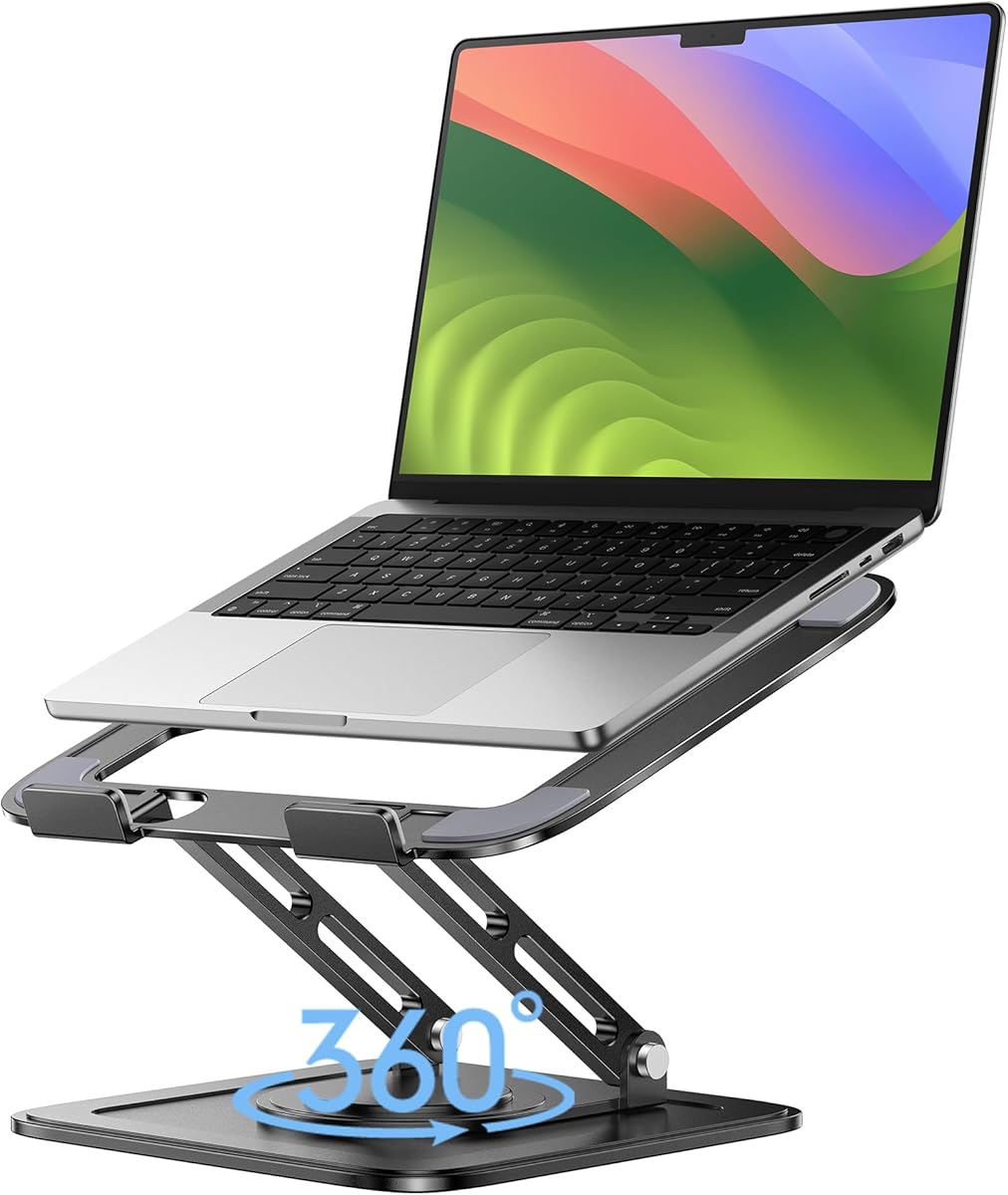
The LOXP Adjustable Laptop Stand is built for users who want more freedom in repositioning an active computer. Its 4.6 rating reflects a 360-degree rotating base, adjustable height and angle, a stable construction, and compatibility with laptops from 10 to 16 inches.
We may earn a commission when you buy through this link, at no additional cost to you.
Rotation makes it easier to share a screen, adjust the computer toward another seated person, or change the device's orientation without moving the entire stand. The height and angle can also be adjusted to maintain a comfortable viewing position whether the user is sitting or standing. A one-piece fiber-metal construction supports stability, while silicone surfaces help keep the laptop from sliding.
The stand folds for travel and can be used at home, in the office, or outdoors. It accommodates well-known laptop families from brands such as Apple, Google, Dell, HP, ASUS, Lenovo, Acer, and Microsoft. Its upper size limit of 16 inches means it is not intended for every 17-inch or 17.3-inch system, and it provides no built-in storage for a second device.
The LOXP is most compelling for collaborative work, presentations, or a single-device setup that is constantly repositioned. If you do not need rotation, a fixed riser may be simpler and more compact. If your priority is organizing several computers, choose a vertical multi-slot organizer rather than this adjustable active-screen platform.
A rotating base lets the display move toward a collaborator without requiring the laptop to be picked up and placed elsewhere. That convenience can make the stand useful in shared offices and meeting areas.
Independent height and angle adjustments make it easier to accommodate both seated and standing work. The rotating movement adds a second layer of positioning control for frequently shared screens.
We may earn a commission when you buy through this link, at no additional cost to you.
The BESIGN LS03 Aluminum Laptop Stand is a refined riser for users who want a laptop elevated without taking up much room. Its 4.8 rating ties for the highest customer score in the group, while the detachable aluminum construction gives the stand a clean, permanent-looking appearance without requiring a complicated frame.
We may earn a commission when you buy through this link, at no additional cost to you.
The LS03 can elevate a laptop by up to 14.5 centimeters, or 5.7 inches, helping bring the display closer to a comfortable viewing level. It fits laptops from 10 to 15.6 inches, including MacBook Air, MacBook Pro, Lenovo ThinkPad, Dell, HP, ASUS, and Chromebook models. The open aluminum structure promotes airflow around the computer, reducing the likelihood of heat buildup compared with a fully enclosed platform.
Its stated load capacity is 4 kilograms, or 8.8 pounds, and the rubber on the holder hands helps keep the laptop stable while protecting it from scratches. Assembly takes three steps, and the stand folds flat for storage. The main tradeoff is that the elevation is fixed rather than continuously adjustable, so users seeking multiple height settings may prefer another model.
Choose the BESIGN when appearance, a compact footprint, and a predictable elevated position matter most. It is especially effective for users who work at a consistent desk and connect an external keyboard and mouse. It also suits those who want a laptop riser that can be removed easily but stored without remaining permanently beneath the computer.
The aluminum construction and folding shape coordinate well with a modern workstation. Once raised, the platform occupies a relatively small visual footprint and keeps the laptop away from the desk surface.
The absence of a solid enclosed deck allows air to circulate around the underside of the laptop. That open design supports cooling while the computer remains in its normal operating position.
We may earn a commission when you buy through this link, at no additional cost to you.
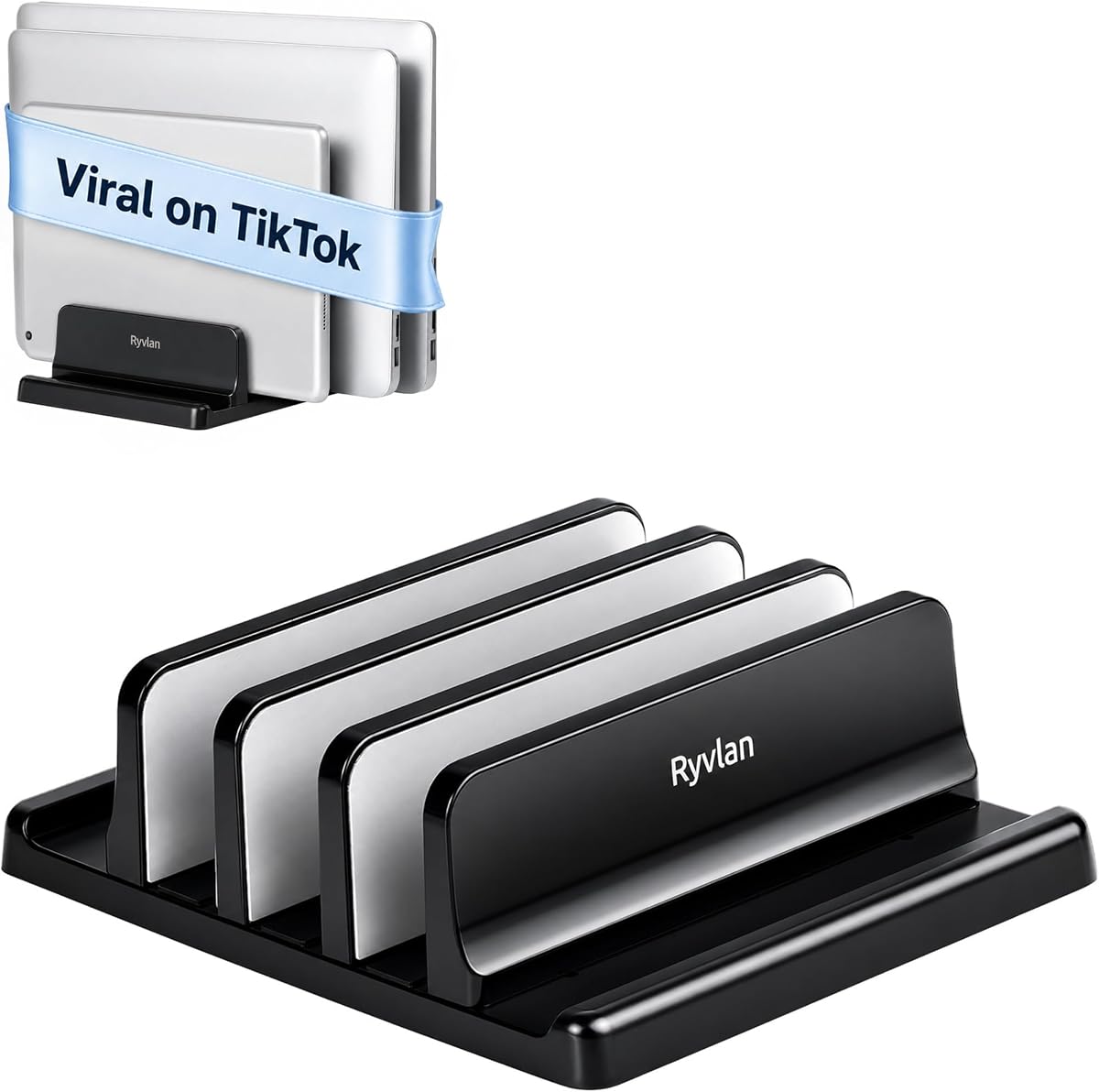
The Ryvlan Vertical Laptop Stand is a high-capacity desktop organizer that combines three laptop slots with two front compartments for smaller devices. Its 4.6 rating reflects a flexible layout capable of holding multiple notebooks as well as an iPad, tablet, e-reader, or phone.
We may earn a commission when you buy through this link, at no additional cost to you.
Each laptop slot adjusts from 0.47 to 1.2 inches, allowing the organizer to accommodate both thin ultraportables and thicker systems. The listed compatibility extends from 11-inch ultraportables to 17-inch gaming laptops, including MacBook, Microsoft Surface, Dell, HP, Lenovo, Samsung, Acer, XPS, and Chromebook models. A supplied wrench allows users to make adjustments in about a minute.
The body uses impact-resistant ABS with silicone padding across six walls and three bases. Those contact surfaces are intended to reduce scratches, improve grip, and keep the organizer from shifting on an uncovered desk. The footprint is approximately 7.3 by 5.9 inches, making the design relatively compact despite its unusually high device capacity.
The Ryvlan is an excellent choice for IT departments, classroom instructors, creative teams, and home offices that routinely handle several laptops. Its main drawback is that the slots are vertical, so it does not provide an ergonomic viewing angle for the active computer. It also requires a tool for width changes, making repeated reconfigurations less convenient than tool-free models.
Three rear laptop bays and two front accessory positions allow the stand to consolidate an entire temporary workstation. This is more versatile than a simple two-device dock and useful when devices must be connected and disconnected throughout the day.
Silicone padding covers the walls and bases where devices make contact. The grip helps protect against scratches while also reducing movement as different notebook thicknesses are supported.
We may earn a commission when you buy through this link, at no additional cost to you.
The Vaydeer Vertical Laptop Stand is a straightforward organizer for users who want one laptop and a smaller device stored upright in a compact footprint. Its 4.6 rating reflects a 3-in-1 design, adjustable width, broad compatibility, and a lighter ABS construction.
We may earn a commission when you buy through this link, at no additional cost to you.
The laptop compartment accommodates thicknesses from 0.55 to 1.69 inches, while the design supports computers up to 17.3 inches. MacBook Pro and Air, Microsoft Surface, Dell, Samsung, Lenovo, Acer, Sony, ASUS, XPS, and HP ENVY models are among the listed compatible devices. A separate area can hold a phone, iPad, or other small device vertically, allowing accessories to share the same footprint.
Soft silicone mats around the groove help prevent scratches, and the repeatedly polished surface is intended to feel smooth. An Allen wrench is included so the width can be adjusted to match the stored notebook. The trade-off is that the stand does not provide the larger multi-laptop capacity of the Ryvlan or Elestoria models, and the included tool makes repeated changes slightly less convenient.
The Vaydeer is well suited to home offices, dorm rooms, and personal setups where one portable computer is stored alongside a phone or tablet. It can also hold books and other narrow items according to the product information. Choose a higher-capacity organizer if you regularly store several notebooks simultaneously rather than a single computer and one accessory.
Storing a closed notebook upright leaves more usable surface area than laying it flat. The compact structure is especially useful on smaller desks where every square inch of work area matters.
Beyond laptops, the integrated storage can accommodate a phone, iPad, or other slim objects. That flexibility makes the organizer useful as a general charging and docking location rather than a one-purpose laptop shelf.
We may earn a commission when you buy through this link, at no additional cost to you.
The Elestoria 5-Slot Vertical Laptop Stand is the most capable organizer in this guide, designed to dock as many as four laptops and one tablet or mobile device. Its 4.6 rating reflects a premium aluminum construction, wide size compatibility, independent slot adjustment, and a stable base for a substantial collection of electronics.
We may earn a commission when you buy through this link, at no additional cost to you.
Three sliding brackets create four laptop positions, while a separate section accommodates a tablet or mobile device. Individual laptop slots adjust from 12 to 38 millimeters, or 0.5 to 1.5 inches, and support systems up to 17.3 inches, including gaming laptops. Adjustment is performed through screws on the bottom, allowing the user to fit different thicknesses without a separate accessory.
The stand is made from aluminum alloy with polished edges and soft silicone padding. A heavy base helps prevent tipping, and the vertical arrangement encourages airflow around the stored devices. The manufacturer also describes the design as suitable for clamshell workstations in which a laptop connects to an external monitor, keyboard, and mouse.
Choose the Elestoria for a tech-heavy office, shared development environment, classroom, or charging station that regularly handles multiple computers. Its premium materials and capacity justify the emphasis on organized, permanent equipment storage. It is less appropriate for a minimalist single-device setup because the multi-slot body occupies more space than a simple riser or two-device stand.
Four independent laptop positions and a fifth area for a smaller device consolidate substantial electronics into one base. This makes the stand useful for offices that support several portable workers or students.
Each of the four laptop brackets can be adjusted separately, allowing thin notebooks and thicker gaming systems to share one organizer. The tool-free screw mechanism also simplifies setup and reconfiguration.
We may earn a commission when you buy through this link, at no additional cost to you.
The WALI Computer Monitor Stand doubles as a practical laptop riser and provides a strong balance of storage, elevation, and utility. Its 4.7 rating makes it the top-scoring option in the guide, while its ability to support displays, laptops, and printers gives it broader uses than a dedicated notebook dock.
We may earn a commission when you buy through this link, at no additional cost to you.
The metal shelf measures 14.6 by 9.3 inches and can raise a supported device by 3.9, 4.7, or 5.5 inches. Those three positions make it easy to select a viewing height for a monitor or notebook, while the 44-pound maximum load capacity is the highest stated capacity in this roundup. Rubber pads help prevent slipping and protect the desk surface.
Vented holes support airflow, and the open area beneath the shelf can hold a keyboard, notebooks, papers, and other accessories. That under-stand storage is a meaningful advantage over simple laptop risers because it converts unused vertical space into a compact organizational area. The larger shelf footprint, however, may feel more substantial than necessary for a small notebook-only setup.
The WALI is a strong budget choice for creating a dual-monitor station, raising a laptop, or organizing a workstation with accessories. It works particularly well for users who want one platform to handle several equipment types. Those who need a narrow, portable riser for travel may prefer a folding model, while vertical-storage users should look for a dedicated multi-device organizer.
Preset heights make it simple to switch among several viewing positions without continuously adjusting a mechanism. The options can accommodate different users, monitor combinations, and preferred desk arrangements.
The open space under the raised shelf can hold items that would otherwise create desktop clutter. It is especially useful for a keyboard, papers, and accessories used with a raised display.
We may earn a commission when you buy through this link, at no additional cost to you.
The right laptop rack depends on how you work, how many devices you use, and whether your priority is screen position, vertical storage, hidden accessory storage, or portable adjustability. Consider the following factors before making a selection.
Vertical organizers keep closed laptops upright and recover desk space, while risers support an active screen at a more comfortable height. Under-desk shelves focus on accessories such as hubs, mini computers, power cords, and controllers, and monitor-style platforms can handle both laptops and external displays. Begin by identifying whether your main problem is too many devices, an uncomfortable screen position, or a lack of usable surface area.
Compatibility involves more than the diagonal screen size. Check the listed laptop dimensions, supported thickness range, and any specific size limits. Several stands accommodate models from 10 to 15.6 inches, while others extend to 16 or 17.3 inches. Adjustable slots are valuable when the collection includes both slim ultraportables and thick gaming systems, but the adjustment range must still cover every device you plan to store.
A single-device riser is sufficient for one active computer, but a multi-slot dock makes more sense for a shared office, classroom, or charging area. Available capacities range from one active laptop to four stored laptops plus a smaller device. Consider how often devices are used simultaneously, whether they need to remain connected to power, and whether a simple visual organizer is enough or whether dedicated accessory capacity is also needed.
Adjustable height and angle are most important for a laptop that is actively viewed. Fixed elevations work well when one person uses the same desk every day, while rotating bases help with screen sharing or frequent repositioning. Vertical organizers generally do not offer active-screen ergonomics, so they are better for storing closed devices than for improving neck and shoulder positioning during long sessions.
A stable rack should resist sliding and keep devices from tipping, particularly when a laptop has a thick chassis or is stored vertically. Look for a wide base, non-slip feet, rigid materials, and protective contact pads. Aluminum and steel offer a substantial feel and good structural support, while ABS can provide adequate strength in a lighter, more compact design. Stated load ratings are useful, but the base geometry and device fit are equally important.
Heat management matters when a laptop remains active on a riser. Open frames and perforated surfaces encourage airflow and keep the device from sitting directly against a solid platform. If the rack sits near charging cables, look for openings or hooks that can guide cords out of the way. Under-desk shelves are particularly useful when the goal is to keep chargers, hubs, and power adapters organized without crossing the work surface.
Desktop stands generally require only placement and, in some cases, width adjustment. Side-mounted organizers need adequate desk depth and a panel thinner than the stated limit. Under-desk shelves may be incompatible with crossbars and often require a minimum installation width. No-drill designs are convenient and avoid permanent modifications, but every user should measure the frame, surface, and surrounding drawers before selecting a mounting style.
A large multi-device organizer can organize more equipment but occupies more desk area, while a folding riser travels easily but serves one active laptop. Compact vertical stands are useful where desk space is tight, whereas monitor-style shelves provide valuable storage below the platform. Compare the product dimensions with your available work area and consider whether you will move the setup frequently.
Before use, confirm that the rack is stable and that every device fits without forcing the supports. For an adjustable model, loosen the relevant screw or knob, position the device within the stated thickness range, and tighten it gradually. Do not place a device between supports that do not make contact, since a loose fit can lead to tipping, unstable charging connections, or damage to the contact surfaces.
For an active riser, place the laptop on a clean, level surface and adjust the height and angle to suit the user and the current seating or standing position. If the laptop is used with an external keyboard and mouse, allow enough clearance for the hands and pointing device. For vertical storage, connect cables before sliding the computer into the slot and route them through any available openings or hooks.
Clean the rack with a soft, dry or slightly damp cloth, depending on the material, and avoid abrasive cleaners or excessive moisture. Do not use strong chemicals on silicone pads, polished surfaces, or protective coatings. Keep the base free of dust, inspect attached devices regularly, and tighten adjustable hardware if it begins to loosen. For mounted products, periodically check clips, screws, and scratch-protection pads.
A laptop riser supports an open, active computer at a higher position and is mainly used to improve screen placement and airflow. A vertical laptop rack stores closed notebooks upright to conserve desk space, with adjustable slots supporting devices of different thicknesses. Some users keep both an active riser and a separate storage rack.
Check both the maximum screen size and the supported device-thickness range. A stand can accept a laptop by diagonal measurement but still fail to hold it securely if the chassis is too thick. Also confirm that the base is stable, the surface has enough room, and any mounting method is compatible with your desk.
Vertical storage can promote airflow around a closed laptop because its surfaces are not pressed against a solid shelf. Cooling performance also depends on the laptop's own vents and whether the device is active or powered down. For active use, an open or ventilated riser is generally the more relevant choice.
Some under-desk shelves use a clip-on installation that requires no permanent drilling, but compatibility still depends on the frame design. Tables with crossbars may prevent proper installation, and the surrounding area must be wide enough for the bracket and tray. Measure the desktop frame before purchasing any mounted rack.
Using an external keyboard and mouse is recommended when the laptop is raised considerably because it separates the screen from the input devices. This can create a more comfortable viewing position and reduce the need to reach over the keyboard. The stand should also leave enough room for the mouse and the user's wrists.
A multi-slot vertical organizer is usually most practical for a shared desk because it can hold several notebooks in one footprint. Adjustable widths are important when users bring devices of different thicknesses, while a headphone hook or separate accessory positions can further consolidate the area. A rotating active stand may be preferable when sharing one live screen.
Use a soft cloth and remove the device before cleaning. A dry cloth is suitable for routine dust removal, while a slightly damp cloth may be used on the base if the material permits it. Avoid abrasive pads, strong chemicals, and flooding the rack, especially around screws, silicone pads, and protective coatings.
They can, particularly when a closed laptop is stored vertically or accessories are moved to an under-desk shelf. A riser may raise the laptop but still occupy much of the same footprint, so it solves ergonomic positioning more than surface congestion. The greatest space savings come from compacting several devices into a single organized area.
The OMOTON Dual Vertical Stand is the most balanced overall pick because it stores two adjustable laptops in a stable, compact aluminum design. The WALI Monitor Riser is the budget-friendly choice for users who want three height settings, a strong load capacity, and extra storage, while the Elestoria Five-Slot Stand is the premium option for organizing several laptops and a smaller device in one place.
Prioritize the rack format that solves your actual desk problem: choose a vertical organizer for closed devices, an adjustable riser for active-screen comfort, or an under-desk shelf for chargers and accessories. Measure your desk and laptop, verify the supported thickness and screen size, and consider ventilation, stability, and how often devices will be moved.
Ratings, configurations, availability, and prices can change, so check the current product listing and all dimensions before ordering. Reviewing the stated capacity, installation requirements, and included features against your daily workflow will help ensure that the chosen rack remains useful rather than becoming another piece of desk clutter.