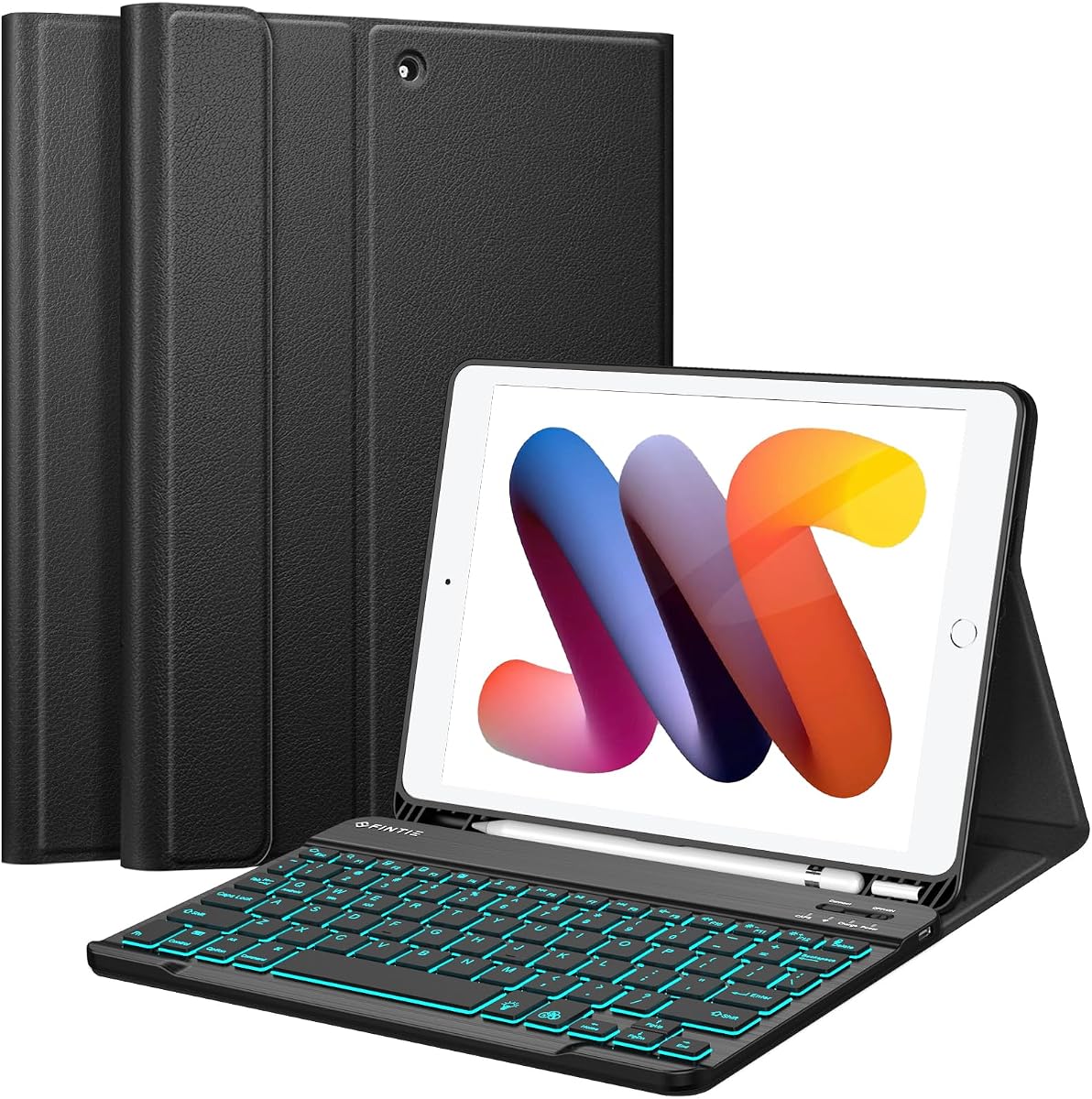
FINTIE Backlit Keyboard Case
4.5Editor score
Seven-color backlit keys
Detachable 7mm keyboard
Three viewing grooves
A keyboard case can transform an 8th Generation iPad into a practical typing and editing setup, but the best choice depends heavily on fit, keyboard quality, viewing positions, and protection. A case that feels convenient with one tablet may leave awkward gaps or unstable angles with another, making model verification essential before buying.
We compared ten keyboard cases using the specifications provided for each product, focusing on iPad 8th Generation compatibility, key layout, backlighting, pointing options, stand flexibility, charging method, stylus storage, shell protection, and expected battery life. The list covers detachable magnetic keyboards, rotating folios, trackpad models, and conventional slim designs.
Each review explains the strongest features, practical trade-offs, and likely users for all ten options. The top picks highlight a budget-focused model, an all-around editor's choice, and a premium floating design. Product listings and prices can change, so confirm the current model number, accessories, and seller information before purchasing.
4.5Editor score

4.4Editor score

4.3Editor score
As an Amazon Associate we earn from qualifying purchases.
The comparison highlights the major differences among all ten models, including supported tablets, pointing devices, lighting, stand behavior, battery charging, and stylus storage. Exact iPad 8th Generation model numbers should always be checked before ordering.


TUNKARMOR's case combines a protective tablet shell, detachable Bluetooth keyboard, and rechargeable mouse in one coordinated setup. Its 4.4 rating reflects a broadly capable package, while the included pointing device distinguishes it from many competing cases that require a separate mouse. It supports the iPad 8th Generation models A2270, A2428, A2429, and A2430, along with several other compatible tablets.
We may earn a commission when you buy through this link, at no additional cost to you.
The seven-color backlight makes the keyboard easier to use in low-light environments, and the magnetic keyboard attaches firmly enough to hold the tablet upright while allowing the tablet position to be adjusted. Three viewing angles support typing, media viewing, reading, writing, and drawing. The integrated pencil holder is useful for owners of a compatible stylus, although the stylus itself is not supplied.
Protection is provided by full edge coverage, cushioning, and a honeycomb inner pattern intended to assist heat dissipation. The case offers automatic sleep and wake when the cover is opened or closed, helping conserve power during periods of inactivity. The main compromise is that the complete accessory set may create more bulk than a simple folio, and the mouse and keyboard need to be charged or paired independently according to the included instructions.
This is a strong choice for buyers who want a complete mobile workstation rather than only a keyboard shell. Students, commuters, and office users who prefer a mouse will appreciate having the essential pointing and typing accessories included. Verify the model number printed on the back of the iPad before ordering, and expect the most balanced overall package in this group.
The included rechargeable Bluetooth mouse removes the need to buy a separate pointing device. Combined with the backlit keyboard and adjustable stand, it creates a more familiar computer setup for spreadsheets, documents, and web research.
Full edge coverage and a cushioning layer are useful for daily transport, while the detachable keyboard lets owners remove excess weight when the iPad is being used primarily as a tablet.
We may earn a commission when you buy through this link, at no additional cost to you.
FINTIE provides one of the strongest budget-oriented combinations of typing convenience and battery endurance. The case holds a 4.5 rating and supports iPad 8th Generation model numbers A2270, A2428, A2429, and A2430. Its built-in 420mAh battery is stated to deliver as much as 230 hours of continuous use, with a full Type-C charge taking approximately two to three hours.
We may earn a commission when you buy through this link, at no additional cost to you.
The magnetic keyboard detaches at a thickness of 7mm, making it easier to carry than a permanently attached panel. Its scissor keys have a rebound design intended to reduce noise, while seven backlight colors help preserve key visibility in dim rooms. A stated 10-meter wireless range offers useful freedom when the iPad is propped on a stand and the keyboard is moved closer for comfortable typing.
There is no trackpad, so users who want cursor control must add a separate mouse or rely on touch navigation. The stated auto sleep and wake function operates in case-only mode, an important distinction for owners who plan to detach the keyboard regularly. Otherwise, the combination of a slim profile, sturdy viewing grooves, and a 7mm keyboard is notably practical.
This case is best for students and everyday users who want an inexpensive, portable typing accessory with long battery life and illumination. It is less suitable for people who need a trackpad as a central part of their workflow. It remains a compelling budget option because it provides backlighting, a detachable keyboard, and solid viewing support without a trackpad.
The detachable 7mm design and stated 230-hour battery life make this a practical travel companion. Its automatic energy-saving mode after ten minutes of inactivity further supports unattended use.
Laser-style illuminated keys can be selected in seven colors, while the rebound scissor mechanism is designed to keep typing quieter and more comfortable during extended sessions.
We may earn a commission when you buy through this link, at no additional cost to you.
typecase stands out by combining a trackpad, illuminated keyboard, and highly flexible rotating hinge. Its 4.4 rating reflects a feature-rich design, and the precision trackpad supports multi-finger gestures for editing, browsing, and presentation work. It is compatible with the iPad 8th Generation models A2270, A2428, A2429, and A2430.
We may earn a commission when you buy through this link, at no additional cost to you.
The keyboard includes a full row of iPadOS shortcut keys and laser-etched characters that remain visible under an adjustable 10-color RGB backlight. The patented 360-degree hinge is stated to have undergone 20,000 stress-test cycles and creates seven usage modes, ranging from laptop-style typing to viewing video or returning the iPad to a native tablet configuration.
A hard-shell design surrounds the tablet, and opening or closing the case initiates auto sleep and wake to conserve power. A holder keeps an Apple Pencil accessible without allowing it to obstruct typing. The tradeoff is bulk: the rotating structure and keyboard assembly make this case heavier and more elaborate than a straight magnetic folio.
This is the most adaptable option for people who alternate among typing, reading, drawing, and media viewing. It is particularly attractive to professionals and students who value a trackpad and strong keyboard shortcut access. Those who prioritize minimal weight over hinge flexibility may prefer a slimmer detachable design, but this model offers one of the most complete mobile computing experiences.
Multi-finger gestures provide a more efficient way to navigate iPadOS, particularly when moving between documents, web pages, and presentation interfaces. It reduces the need for a separate mouse.
The rotating hinge allows a meaningful change in viewing geometry without removing the entire keyboard assembly. That makes the case suitable for typing, sketching, watching, and ordinary tablet use.
We may earn a commission when you buy through this link, at no additional cost to you.
Hamile delivers a 4.5-rated, conventional folio design that focuses on backlighting, battery life, and straightforward device support. It fits iPad 8th Generation models A2270, A2428, A2429, and A2430. The magnetic Bluetooth keyboard can be repositioned or removed, while three grooves keep the tablet stable at different viewing angles.
We may earn a commission when you buy through this link, at no additional cost to you.
Its 400mAh battery is stated to provide at least 180 hours of use and reaches a full charge in approximately two hours with the included Type-C cable. Seven illuminated keyboard colors improve visibility, and the mechanical scissor keys are designed for quick rebound and reduced noise. Shortcut keys and operating-system switching for iOS, Windows, and Android add further flexibility.
The case uses a soft PU exterior and flexible TPU interior with a honeycomb heat-dissipation pattern. Cutouts preserve access to ports, sensors, speakers, microphones, and cameras, while a pencil holder and separate pen slot improve stylus organization. As with many similarly equipped cases, there is no trackpad, and the provided backlight information does not mention multiple brightness levels.
Hamile is a good fit for owners who want a flexible, detachable keyboard without a trackpad. It should appeal to students, note-takers, and travelers who value long operating time and broad system support. Confirm the exact iPad model and charging requirements before purchase, especially if your workflow depends on a physical mouse.
A stated operating time of at least 180 hours reduces the likelihood of frequent charging. The included Type-C cable and roughly two-hour recharge time make the keyboard easy to prepare between outings.
Magnets allow the keyboard to be moved closer or removed entirely. Support for iOS, Windows, and Android makes the case useful when the iPad is used alongside different systems.
We may earn a commission when you buy through this link, at no additional cost to you.
Divufus offers a straightforward detachable keyboard case with a 4.4 rating and broad operating-system support. It is compatible with iPad 8th Generation models A2270, A2428, A2429, and A2430. The magnetic keyboard can be removed freely, allowing users to switch quickly between a mini-laptop arrangement and a lighter tablet-only configuration.
We may earn a commission when you buy through this link, at no additional cost to you.
The keyboard uses mechanical scissor keys intended to rebound quickly and feel smooth during typing. A dedicated Fn combination changes the operating system, and a full set of shortcut keys is provided for iPad-oriented tasks. The stated battery life is more than 80 hours, with up to 130 days of standby and automatic sleep after 15 minutes of inactivity. Pressing any key wakes it.
This model does not offer backlit keys, a trackpad, or an included mouse. Its protective PU exterior uses a magnetic buckle, while the interior incorporates a honeycomb grid for heat dissipation and a non-slip rubber lining. The package includes the case, keyboard, Type-C charging cable, and manual, but neither the iPad nor a stylus is included.
Divufus is most suitable for buyers who prefer a simple, illuminated-free keyboard and frequently switch between iPad and other operating systems. It is a useful option for bright rooms, shared study spaces, or users who want a detachable keyboard without paying for extra pointing features. The absence of backlighting is the main limitation for nighttime work.
Removing the keyboard makes the iPad noticeably easier to hold for reading, drawing, or media consumption. The magnetic arrangement also allows the keyboard to be positioned where it feels most comfortable.
Switching among iOS, Android, and Windows through the Fn controls broadens the case's appeal. Dedicated shortcut keys can reduce the number of taps needed for common tablet actions.
We may earn a commission when you buy through this link, at no additional cost to you.
Logitech's Slim Folio offers a refined alternative to rotating and magnetic designs, with a 4.4 rating and emphasis on comfortable typing. Its large, well-spaced keys stretch across the available width, while a full row of iOS shortcuts provides direct access to media, volume, and other common controls.
We may earn a commission when you buy through this link, at no additional cost to you.
The folio provides three modes: Type, Sketch, and Read. The stated typing angle is 58 degrees, and the viewing angle is 10 degrees. Two replaceable coin-cell batteries power the keyboard, and smart power management is stated to support up to four years of use based on two hours of daily typing. Connectivity uses energy-efficient Bluetooth Low Energy.
The surrounding cover protects the iPad against bumps, scratches, and spills, while an internal lightweight frame adds structural support. A dedicated holder stores either a Logitech Crayon or a first-generation Apple Pencil, although neither is included. The keyboard is fixed rather than detachable, and the supplied specifications do not mention key illumination.
This case is a strong choice for buyers who value Logitech's established keyboard layout, long battery replacement interval, and simple three-mode design. It may appeal to writers and professionals who prefer a stable laptop-style angle over a floating or rotating hinge. Those wanting illuminated keys or a removable keyboard will need to look elsewhere.
The Type, Sketch, and Read configurations cover the most common activities without a complex hinge. Each mode provides a defined position intended to reduce guesswork.
Large, edge-to-edge keys and a full iOS shortcut row support a laptop-like rhythm. The 58-degree type position places the screen and keyboard in a familiar working arrangement.
We may earn a commission when you buy through this link, at no additional cost to you.
KBCASE's light blue case has a 4.5 rating and emphasizes portability, straightforward support, and a detachable keyboard. It fits the iPad 8th Generation models A2270, A2428, A2429, and A2430. The slim Bluetooth keyboard is designed to fit easily into a briefcase, handbag, or backpack while providing more spacious scissor-style keys.
We may earn a commission when you buy through this link, at no additional cost to you.
Slot-based viewing adjustment lets the user choose different angles for writing, editing, reading, and video. A built-in pencil holder includes an access hole that makes the stylus easier to remove. The case also supports several other compatible iPad models, but buyers should still verify the A-prefixed model number printed on their device.
Protection comes from a solid case structure, wave shock absorption, and a honeycomb pattern intended to assist heat release. The anti-slip design helps keep the tablet stable. The supplied information does not mention key backlighting, a trackpad, or an included mouse, which means this is a more basic productivity accessory than several higher-ranked alternatives.
This case is a good fit for people who want a colorful, lightweight keyboard cover for occasional typing and travel. Its detachable construction is especially useful when the iPad is used for reading or drawing without a keyboard. A separate mouse or trackpad is necessary for extensive cursor-based work, and illumination should not be expected from the published specifications.
The thin detachable keyboard reduces the amount of hardware that must travel with the iPad. Users can carry the tablet and add the keyboard only when a typing session requires it.
A dedicated holder keeps a compatible stylus accessible, while the honeycomb interior pattern is intended to aid heat release during sustained use.
We may earn a commission when you buy through this link, at no additional cost to you.
Dexnor creates the most premium-looking iPad 8th Generation option in the group, with a 4.3 rating, floating cantilever stand, aluminum alloy hinge, and integrated touchpad. It supports the iPad 8th Generation models A2270, A2428, A2429, and A2430. The magnetic stand holds the tablet above the keyboard and allows customizable angles for typing, reading, and viewing.
We may earn a commission when you buy through this link, at no additional cost to you.
The detachable back case includes a pencil holder for secure storage and quick access, and it can be used in portrait mode for vertical viewing. The touchpad supports multi-finger actions such as tapping, pinching, scrolling, and swiping, giving users a more computer-like way to navigate documents, web pages, and presentations.
Seven solid backlight colors are supplemented by three brightness levels. The 650mAh battery is stated to provide as much as 200 hours of working time and 1,200 hours of standby, with a recharge time of roughly 3.5 hours using the included USB-C cable. Auto wake and sleep are included, as is a full row of shortcut keys and a quiet scissor-switch keyboard.
This is the best option for buyers willing to accept greater complexity in exchange for refined materials and a floating presentation. The aluminum hinge and suspended tablet create an attractive workstation, while the touchpad broadens navigation options. It is less attractive for buyers wanting the smallest or simplest case, but it offers the strongest premium feature combination.
The cantilevered tablet position and aluminum hinge create a polished desktop look. Customizable angles help keep the display visible while the keyboard remains in a natural typing position.
Multi-finger navigation reduces dependence on screen taps, while seven colors and three brightness levels adapt the keyboard to different ambient lighting conditions.
We may earn a commission when you buy through this link, at no additional cost to you.
INFILAND pairs a 4.5 rating with a useful combination of a trackpad, backlit keyboard, and detachable magnetic design. It supports iPad 8th Generation models A2270, A2428, A2429, and A2430. The keyboard is advertised as delivering immediate key response, stable feedback, and firm magnetic attachment for storage and use.
We may earn a commission when you buy through this link, at no additional cost to you.
Seven backlight colors and three brightness levels offer more lighting control than designs with one fixed setting. The precision trackpad handles navigation, scrolling, and selection, providing cursor control without the need for a separate mouse. Pairing instructions and shortcut keys are printed on the back of the keyboard, which helps with initial setup.
The case folds into a stand for video viewing, can have its keyboard detached for reading or drawing, and can lie flat for normal tablet use. A built-in pencil holder keeps a stylus secure, and precise cutouts maintain access to ports, buttons, and cameras. The shell protects against scratches, scuffs, and minor bumps, although the supplied information does not specify the keyboard's charging connector or battery endurance.
INFILAND is a strong recommendation for buyers who want a trackpad and adjustable illumination without moving to the most complex rotating or floating designs. It suits students, professionals, and casual creators who need flexible working modes. Verify charging requirements and the iPad model before purchase, and note that the Apple Pencil is not included.
The integrated trackpad supports more natural cursor movement than touch-only navigation. It is particularly useful for document editing, file management, and general browsing.
Seven color options and three brightness levels make the keyboard easier to tailor to dim classrooms, nighttime use, or brighter workspaces.
We may earn a commission when you buy through this link, at no additional cost to you.
KBCASE's light purple model provides a rotating case and built-in touchpad at a more basic feature level than some premium rivals. It holds a 4.4 rating and supports the iPad 8th Generation models A2270, A2428, A2429, and A2430. The construction allows a 360-degree swivel and a 180-degree keyboard flip.
We may earn a commission when you buy through this link, at no additional cost to you.
The touchpad lets users tap, scroll, and swipe without touching the display, and a documented Fn plus A shortcut switches the touchpad function. This pointer is useful for editing, browsing, and managing content. A pencil holder keeps a compatible stylus available and reduces the chance of leaving it behind, though the stylus is not included.
The hard-shell design surrounds the iPad and is intended to protect against scratches, dust, wear, and ordinary impacts. Precise cutouts preserve access to ports and device features. No information is supplied regarding keyboard illumination, battery capacity, charging method, or operating time, so buyers should inspect the current listing for those details.
This case is best for users who want more positioning freedom than a standard folio but do not need a trackpad with advanced gesture support. Its rotating structure is useful for typing, reading, and viewing. For people who require a trackpad, adjustable backlighting, long battery life, and a refined floating hinge, one of the higher-ranked premium models may be more suitable.
The swivel and flip movements allow the iPad to move between landscape typing, portrait viewing, and other supported orientations without detaching the keyboard.
A hard exterior and fitted cutouts provide a practical layer against scratches and wear. The structure also keeps the touchpad and keyboard together as one portable accessory.
We may earn a commission when you buy through this link, at no additional cost to you.
The best keyboard case balances an exact fit, comfortable keys, useful viewing angles, adequate protection, and features that suit the intended workload. Model verification should come before every other consideration because similarly sized iPads can have different case openings and connector locations.
An 8th Generation iPad is commonly identified by model numbers A2270, A2428, A2429, or A2430, but compatibility should be verified directly on the device. The model number begins with A and can normally be found on the back of the tablet or in the device information screen. Some cases also support iPad 7th and 9th Generation models, while others are restricted to only those three generations.
Check every number in the seller's compatibility statement rather than relying on the display size alone. The 8th, 7th, and 9th Generation iPads use 10.2-inch screens, yet their dimensions and openings remain similar enough to cause confusion.
A keyboard alone improves text entry, but a trackpad or mouse makes document editing, browsing, and file management more efficient. The typecase, Dexnor, INFILAND, and KBCASE purple models include trackpads, while the TUNKARMOR set includes a separate Bluetooth mouse. The remaining products are better suited to buyers who already own a mouse or prefer touch navigation.
Decide based on workflow rather than feature count. Trackpads suit compact mobile setups, while a separate mouse can be more familiar for precise cursor work. Touch-only operation remains sufficient for reading, streaming, and note-taking.
Look for well-spaced keys, visible labels, scissor-style travel, and a dedicated row of iPadOS shortcuts. FINTIE and Logitech emphasize larger key spacing, while typecase provides a full shortcut row. Hamile, Divufus, INFILAND, and Dexnor also mention shortcut access, making them more useful for frequent iPad navigation.
A familiar layout matters more than novelty. If possible, check key size and spacing in product photographs, and favor a design that offers quick rebound and comfortable travel for extended typing.
Backlit keys are valuable in dim lecture halls, evening travel, and low-light work areas. Most illuminated models offer seven colors, while typecase offers ten RGB colors and INFILAND and Dexnor add three brightness levels. FINTIE states up to 230 hours of use, Hamile at least 180 hours, and Dexnor as much as 200 hours, though actual results depend on use and settings.
Compare charging methods as well as endurance. Type-C rechargeable models are convenient for users who already carry the same cable, whereas the Logitech Slim Folio uses replaceable coin-cell batteries. Verify current battery and charging details for products whose specifications are incomplete.
Fixed grooves provide stable, limited positions and are ideal for work, reading, and video. Rotating hinges offer greater orientation changes, while floating stands place the iPad above the keyboard for a desktop-like arrangement. The typecase offers seven modes, the Dexnor uses a floating cantilever, and the KBCASE purple model supports swivel and flip movements.
Think about the desk and chair you actually use. A stable, moderately inclined typing position is usually more valuable than numerous positions if you type for long periods or use the iPad in a fixed workspace.
A keyboard case should surround vulnerable edges and resist scratches, bumps, and routine handling impacts. Flexible TPU interiors and hard shells can improve grip and impact resistance, but port openings must remain accessible. Several products also mention honeycomb grids intended to assist heat dissipation during extended use.
Protection matters most for owners who regularly travel with the iPad. Check that the case does not block cameras, speakers, microphones, buttons, or charging ports, and avoid using any case as a substitute for a purpose-built protective sleeve during rough travel.
A magnetic detachable keyboard allows the iPad to be used at full tablet weight when typing is unnecessary. This is especially useful for reading, drawing, and media consumption, where an attached keyboard adds bulk. Folios with rotating or floating hinges tend to remain together but offer more viewing configurations.
Compare the complete footprint rather than the keyboard alone. The TUNKARMOR bundle includes a mouse and therefore adds more accessories, while the 7mm FINTIE keyboard is specifically designed for easy transport. Consider bag size and how often the case will be carried.
A built-in pencil holder is useful for owners of a compatible Apple Pencil, though the products in this list do not include a stylus. FINTIE specifically describes storage for the first-generation Apple Pencil, while several other cases provide generic holders. TUNKARMOR includes a Type-C cable, mouse, keyboard, and manual for a more complete package.
Confirm the stylus generation and holder opening before buying. Accessories that are not included must be purchased separately, and incompatible styluses may sit too loosely or fail to reach the intended charging contact.
Begin by fully charging the keyboard and completing the Bluetooth pairing described in the included manual or printed instructions. For detachable models, attach the keyboard magnetically after pairing and select the correct operating system if the case supports iOS, Windows, or Android. Place the iPad in the supported orientation, then use the viewing grooves, rotating hinge, or floating hinge to obtain a stable working position.
Open and close the case as intended. Products with auto sleep and wake will normally wake the iPad when the cover opens and sleep it when the cover closes, although some specify that this behavior requires case-only mode. Use the provided function-key shortcut to change touchpad behavior when applicable, and avoid placing heavy objects on the keyboard or against an attached stylus.
Remove the keyboard before cleaning the tablet screen, and use a soft lint-free cloth for the case surface. Keep charging ports free of dust, avoid exposing the case to prolonged moisture, and inspect magnetic attachments, hinge movement, and viewing slots occasionally. Recharge the keyboard between major trips, and do not attempt to open or repair the internal battery assembly.
The iPad 8th Generation is commonly listed under A2270, A2428, A2429, and A2430. Find the model number on the back of the tablet or in the iPad's device information screen. Match it against the seller's compatibility list before ordering, especially when a case also claims support for the 7th or 9th Generation.
No. Screen size alone is not enough to establish compatibility because opening sizes, camera placements, buttons, and internal dimensions can differ between generations. A case may physically resemble one intended for the 7th, 8th, or 9th Generation without providing a proper fit. Always compare the exact A-prefixed model numbers.
A detachable keyboard is usually better for portability because the iPad can be carried without the keyboard when it is not needed. A fixed folio provides a more unified structure and may be easier to position in laptop mode. The best choice depends on how often you type versus read, draw, or watch video.
It depends on your tasks. Typing notes and short messages works well without either device, while extensive document editing, spreadsheet work, and web browsing are easier with a trackpad or mouse. Cases with trackpads save space, whereas separate mice may offer more familiar and precise cursor control.
Several cases include a holder designed to keep a compatible stylus available, but no Apple Pencil is included with the listed products. Check the holder dimensions and the compatible Apple Pencil generation. Some cases specifically mention first-generation Apple Pencil support, while other holders simply provide general storage.
The stated figures vary considerably. FINTIE lists up to 230 hours of continuous use, Hamile lists at least 180 hours, and Dexnor lists up to 200 hours. Other products provide incomplete or different battery information, including replaceable batteries in the Logitech Slim Folio. Actual runtime varies with backlight use, inactivity settings, and typing intensity.
They can be, especially when brightness is adjustable. Most of the illuminated options offer several colors, and INFILAND and Dexnor also list three brightness levels. Avoid setting the brightest mode for every environment, use a suitable color, and periodically check the battery because illumination can affect overall runtime.
Charge the keyboard first, then open the iPad's Bluetooth settings and select the model name shown in the pairing instructions. If it does not appear, turn Bluetooth off and on again, charge the keyboard, and attempt the process in a location with fewer nearby wireless devices. Printed pairing guidance on the back of the keyboard can make identification easier.
FINTIE is the strongest budget-focused choice because it combines a long stated battery life, seven-color illumination, a thin detachable keyboard, and stable viewing grooves. typecase is the most versatile editor's choice, adding a multi-gesture trackpad, ten-color RGB lighting, and seven rotating modes. Dexnor is the premium selection, with an aluminum floating hinge, sophisticated touchpad, and extensive lighting and battery features.
Prioritize exact model compatibility first, then choose according to the way you work. Basic typing needs may be met by a slim magnetic design, while touchpad or mouse support becomes increasingly important for document-heavy tasks. Viewing flexibility, detachable construction, stylus storage, and protection should be weighed against portability and your preferred keyboard layout.
Before making a final purchase, compare the current listing, included accessories, charging method, and customer-service information. Product designs and seller details can change over time, and prices also vary. Checking the iPad's model number and the latest specifications will help ensure that the selected case delivers the intended fit and workflow.