CENMATE Hybrid JBOD Enclosure
4.6Editor score
Hybrid SATA and NVMe bays
Four RAID operating modes
Tool-free drive installation
USB 3.2 Gen 2 connectivity
A JBOD enclosure combines multiple disk drives into one accessible storage volume while allowing each drive to remain individually identifiable. The right enclosure can simplify backups, media storage, archive management, and expansion of an existing NAS, but important differences in RAID support, interface speed, cooling, and drive capacity can affect how well it meets your needs.
The products in this guide were compared using their published specifications and listed customer ratings. We examine bay count, supported drive types, storage capacity, USB or NAS connectivity, RAID and JBOD options, hot-swapping, power delivery, cooling design, operating-system compatibility, and practical features such as tool-free trays and individual drive controls.
Each review highlights a particular use for the enclosure, from compact hybrid storage and quiet four-bay models to high-capacity professional arrays. Ratings and specifications can change as manufacturers update products, and current prices, bundle contents, and retailer offers may vary, so readers should verify the latest listing before purchasing.
4.6Editor score

4.2Editor score
4.7Editor score
As an Amazon Associate we earn from qualifying purchases.
The table below compares all ten enclosures by drive capacity, RAID flexibility, maximum interface speed, cooling approach, and the environments they are designed to support.




The TERRAMASTER D4-320 is a four-bay direct-attached storage enclosure rated 4.2 stars by customers. It distinguishes itself through a 10Gbps USB 3.2 Gen 2 interface, support for as much as 120TB when four compatible 30TB drives are installed, and a design that treats each disk as an individually accessible volume rather than combining it into a hardware RAID array.
We may earn a commission when you buy through this link, at no additional cost to you.
Its strongest qualities are the combination of a fast interface, tool-free drive trays, and hot-swapping. The published specifications state that a single SATA III 1TB SSD can read at up to 510MB/s, while a fully populated enclosure using four 8TB SATA III hard drives can reach up to 1,016MB/s in combined read and write activity. Those figures depend on the host connection, drives, workload, and file configuration, so they should be treated as maximum scenarios rather than guaranteed everyday results.
Cooling is handled by an intelligent temperature-controlled fan, sound-absorbing panels, and vibration-damping measures. Standby noise is listed below 21 dB(A), making the enclosure appealing for desktop workspaces where continuous fan noise would be distracting. The trade-off is that it does not provide RAID. Users who want performance and convenient drive management without a NAS can access each disk separately, while those expecting redundancy need a different solution.
This is a strong recommendation for photographers, video editors, developers, and backup users who want a flexible external four-bay system around a modern computer. It works with Windows, macOS, and Linux, supports USB Type-C connections, and can connect through compatible Thunderbolt 3 or Thunderbolt 4 interfaces. Choose it for speed, convenient swapping, and broad drive compatibility rather than for built-in redundancy or network sharing.
The 10Gbps USB 3.2 Gen 2 connection gives the D4-320 ample host bandwidth for large media libraries and backup sets. Actual storage performance still depends on the installed drives, but the interface itself is designed to avoid becoming the immediate bottleneck for modern SATA SSDs.
Tool-free trays and hot-swapping make it convenient to add, replace, or isolate drives without shutting down the enclosure. A push-lock tray design helps keep installed disks secure while still allowing fast physical maintenance.
We may earn a commission when you buy through this link, at no additional cost to you.
The CENMATE four-bay aluminum enclosure carries a 4.3-star customer rating and targets users who need an uncomplicated way to connect several SATA drives to a computer. It supports both 2.5- and 3.5-inch HDDs and SSDs, allows up to 20TB per drive, and provides a stated total capacity of 80TB when all four bays are populated.
We may earn a commission when you buy through this link, at no additional cost to you.
Its 5Gbps USB 3.0 connection is less advanced than the 10Gbps interfaces offered by several competitors, but it remains appropriate for backups, archives, and media collections where sustained maximum throughput is not essential. The enclosure includes USB-A and USB-C cables, works with Windows, macOS, and Linux, and is described as plug-and-play without additional driver installation.
The aluminum housing and built-in fan are intended to address the heat generated by multiple spinning disks. Unlike some products that emphasize near-silent operation, CENMATE states that fan noise is around 40 to 50 decibels and specifically cautions against the enclosure for people who are highly sensitive to sound. There is also no RAID or NAS functionality, so every disk must be managed through the connected computer.
This is a sensible choice for a user who wants broad drive compatibility and tool-free hot-swapping in a durable four-bay shell. It suits personal archives, small-business backups, and media-library projects where a separate disk-management strategy is acceptable. Buyers seeking a silent enclosure, high-speed 10Gbps connection, or built-in array protection should consider other models in this guide.
The ability to use 2.5-inch and 3.5-inch SATA hard drives or SSDs makes this enclosure useful for combining existing disks of different sizes. Each bay can hold up to 20TB according to the supplied specifications.
Tool-free installation, hot-swapping, and the included USB-A and USB-C connections simplify setup. Since the enclosure is a DAS without RAID, administrators should plan how each disk will be mounted and backed up.
We may earn a commission when you buy through this link, at no additional cost to you.
The IO CREST eight-bay enclosure is designed around capacity and operational control. Its customer rating is 4.0 stars, while the published specifications show support for 2.5- and 3.5-inch SATA drives from different manufacturers, with up to 24TB accepted per disk.
We may earn a commission when you buy through this link, at no additional cost to you.
A major advantage is the presence of an independent power switch for every drive. Users can turn off disks that are not currently required, reducing unnecessary activity and making it easier to control which volumes are available to the host. A smart fan with a built-in thermal sensor can operate automatically or manually at three speed levels, giving administrators a choice between cooling and noise management.
The USB 3.0 interface supports up to 5Gbps, SATA I, SATA II, SATA III, and UASP. That makes it suitable for large-file storage and external backups, though it will not take advantage of newer 10Gbps host connections. The enclosure is strictly a direct-attached product and does not provide RAID or NAS functions, which means the connected computer controls the individual disks.
IO CREST is a good fit for users accumulating large archives, maintaining multiple backup sets, or wanting the ability to power individual drives down. It is particularly relevant when a four-bay enclosure feels too restrictive but a ten-bay professional dock is unnecessary. Buyers who require redundancy should look toward a hardware-RAID model, and those prioritizing high-speed transfers should verify whether 5Gbps meets their workflow.
Eight drive positions provide more room than conventional four-bay desktop units. With support for drives from multiple manufacturers and 2.5- or 3.5-inch form factors, the enclosure can consolidate an existing collection of SATA disks.
Individual power switches make it possible to deactivate unused drives one at a time. The three-level fan control and automatic thermal mode add another layer of control for long-running storage workloads.
We may earn a commission when you buy through this link, at no additional cost to you.
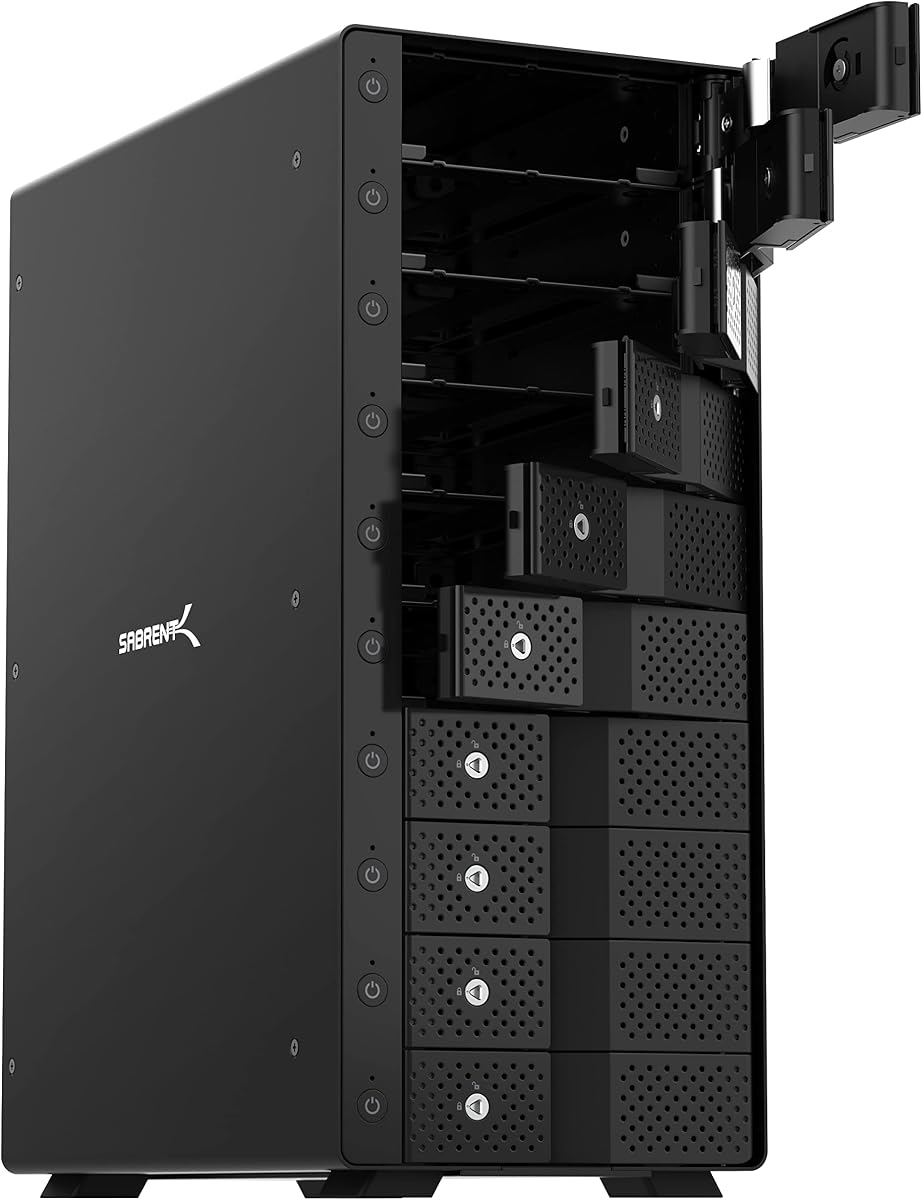
The SABRENT DS-UCTB is a substantial ten-bay direct-attached storage dock with a 4.1-star customer rating. It can hold ten 3.5-inch SATA hard drives, each up to 20TB according to its listed specifications, creating a maximum stated aggregate capacity of 200TB.
We may earn a commission when you buy through this link, at no additional cost to you.
Every drive mounts independently, and each bay has an individual on/off switch and status indicator. A master control is also included, while the tray-less hot-swap design allows disks to slide in and out without tools. Security-oriented users can benefit from the locking key and Kensington slot, both of which help reduce the risk of unauthorized physical access.
The USB 3.2 Gen 2 Type-C interface offers 10Gbps bandwidth and is backward compatible with USB 3.0 and 2.0. To achieve the full stated interface rate, the host computer must provide a USB 3.2 Gen 2 port. SABRENT includes both USB-C-to-C and USB-C-to-A cables, adding flexibility when the computer has only a Type-A port.
Cooling is handled by a rigid aluminum chassis and two 120mm fans designed to move air across all ten drives during sustained loading. The product is a good recommendation for IT workflows, large backups, and media servers that need substantial capacity with independent disk access. It is less suitable for compact desks, and 2.5-inch SSD or HDD use requires the separately sold SABRENT BK-PCBS adapter.
Ten separately controlled bays let a user distribute backups, projects, or media collections across individual drives. The dedicated ASMedia controller is specified to provide stable independent access to each mounted disk.
An aluminum body and dual 120mm fans help dissipate heat across the full set of drives. The enclosure is physically large, but that footprint supports its high bay count and professional storage role.
We may earn a commission when you buy through this link, at no additional cost to you.
The QNAP TR-004 is a four-bay USB Type-C DAS with a 4.2-star customer rating. Its defining advantage is hardware RAID support for RAID 0, RAID 1, RAID 5, JBOD, and individual disks, giving it considerably more array flexibility than most direct-attached enclosures in this guide.
We may earn a commission when you buy through this link, at no additional cost to you.
It can be used as external storage for Windows, macOS, and Linux systems, serve as a NAS backup target, or expand the capacity of a compatible QNAP NAS. Four lockable 3.5-inch SATA bays accept 3Gb/s drives, and a USB Type-C-to-Type-A cable is included. The enclosure is diskless, so the buyer must provide suitable hard drives.
There are important limitations when using the TR-004 with a NAS. It can appear as an individual storage pool or volume, but that pool cannot be merged with the connected NAS. QNAP applications cannot be installed on the enclosure, and data moved to or from a NAS or another device will not be recognized. Drives can be migrated only between compatible TR-004 units, making QNAP ownership and a carefully planned data-management process relevant.
This enclosure is a strong choice for a QNAP user who wants a compact desktop extension with selectable RAID modes. It is also viable for a Windows, macOS, or Linux user who needs RAID 1 or RAID 5 without purchasing a full network-attached system. It is less suitable for people expecting the TR-004 to act as a general-purpose NAS or to combine its storage with an existing NAS volume.
RAID 0 prioritizes performance, RAID 1 supports mirrored redundancy, and RAID 5 balances usable capacity with protection against a single-drive failure. JBOD and independent-disk modes are also available for workflows that do not require a conventional RAID array.
The TR-004 integrates naturally with compatible QNAP environments, but its restrictions are important. It operates as a separate pool or volume and cannot run NAS applications or merge storage with the attached NAS.
We may earn a commission when you buy through this link, at no additional cost to you.
The QNAP TL-R1200C-RP is a rackmount JBOD enclosure intended for high-capacity QNAP expansion and professional storage environments. It has a 4.1-star customer rating and provides twelve bays for 3.5-inch SATA 6Gb/s drives in a rack-oriented enclosure.
We may earn a commission when you buy through this link, at no additional cost to you.
Its defining feature is a redundant 250W power supply unit, which is more appropriate for an always-on installation than a small desktop adapter. A single USB 3.2 Gen 2 Type-C connection provides 10Gbps bandwidth and allows the enclosure to expand a QNAP NAS, connect to a Windows computer, or integrate into a supported server environment.
The physical form factor is not a casual desktop accessory. It is intended for users who already have a compatible rack, power infrastructure, and storage workflow. The twelve-bay layout makes it suitable for large archives, consolidated business storage, and expanding compatible NAS systems, but those users should confirm model and software compatibility before integrating it into a production array.
The TL-R1200C-RP is best recommended for administrators who prioritize bay count, rack integration, and redundant power. It is far beyond the needs of a typical laptop user and more specialized than the direct-attached models in this roundup. Its strengths become most relevant when storage must remain available as part of a structured QNAP or server installation.
Twelve 3.5-inch drive bays allow an organization to consolidate substantial storage into one expansion enclosure. The rackmount format is particularly useful in equipment cabinets where desktop enclosures would be awkward or fragile.
A redundant 250W PSU is a notable difference from the external adapters used by many desktop models. It is better suited to extended operation, although the enclosure still requires compatible QNAP hardware, software, and cabling.
We may earn a commission when you buy through this link, at no additional cost to you.
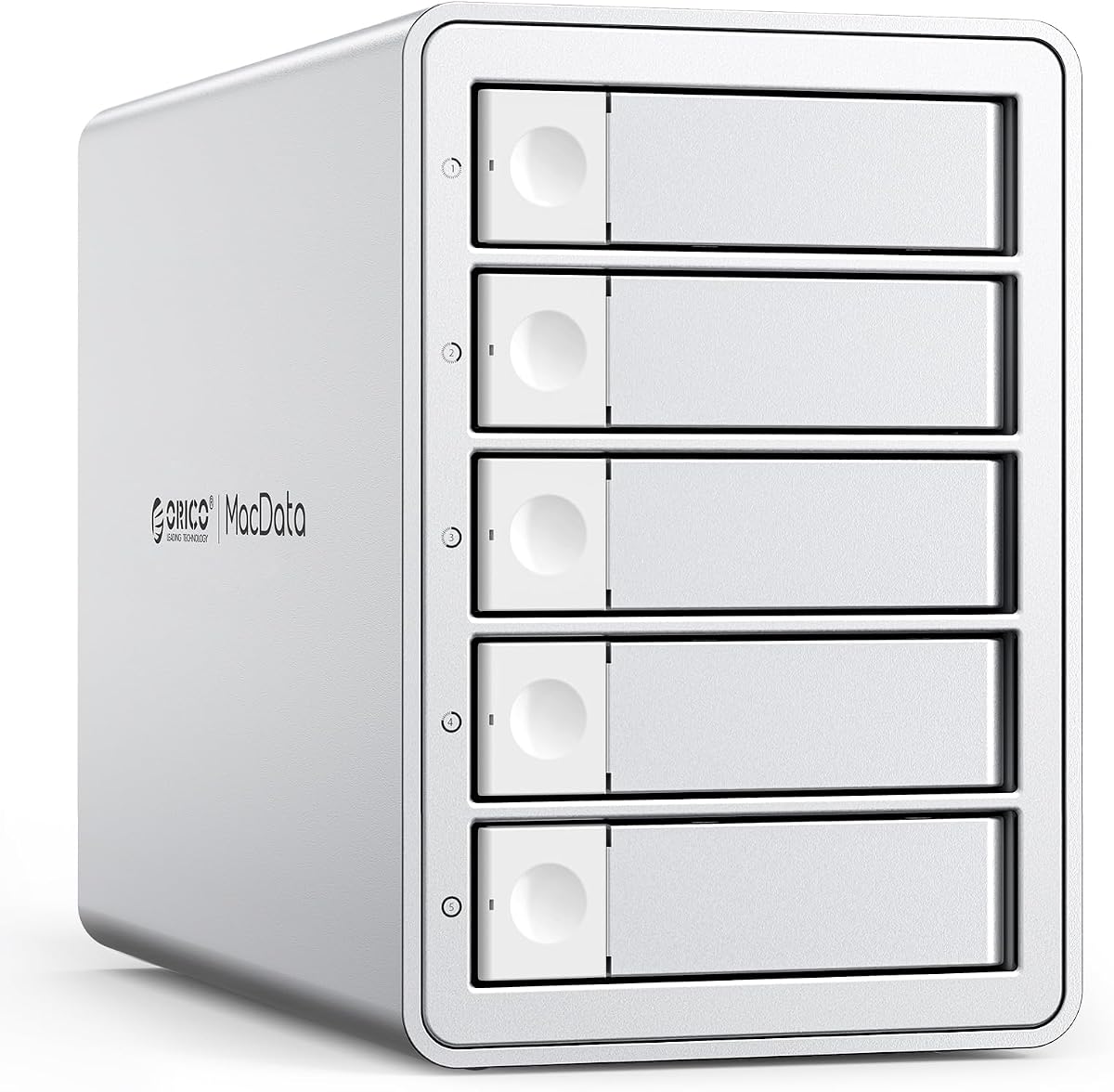
The ORICO five-bay RAID enclosure has the highest customer rating in this roundup at 4.7 stars. It combines five mixed-form-factor SATA bays, a hardware RAID controller, eight configuration modes, and a built-in 150W power supply, making it a versatile centerpiece for demanding desktop storage workflows.
We may earn a commission when you buy through this link, at no additional cost to you.
Its controller supports RAID 0, RAID 1, RAID 3, RAID 5, RAID 10, JBOD, Clone, and Clear modes. Those choices cover performance, redundancy, independent disk access, and cloning workflows. The enclosure accepts both 2.5- and 3.5-inch SATA HDDs and SSDs, supports drives up to 22TB each, and has a listed maximum aggregate capacity of 110TB.
Power delivery is integrated into the chassis, avoiding a large external adapter. An aluminum alloy shell, 80mm fan, and front and rear honeycomb vents support cooling during extended use. The USB 3.0 Type-A interface is rated for up to 230MB/s, so it is capable but not as future-facing as a 10Gbps enclosure. Plug-and-play operation is listed for Windows, Mac, and Linux without additional drivers.
This is our premium recommendation for users who want many array choices, robust desktop power, and a generous capacity ceiling in one enclosure. It suits creative studios, IT professionals, and advanced backup users, but new operators should read the RAID documentation carefully. The model also requires enough desk space for a five-bay chassis and should not be selected solely for its headline capacity without confirming the required RAID mode.
Eight hardware-controlled modes let the enclosure adapt to different storage goals without turning the device into a network server. RAID 0 and RAID 10 favor performance, while RAID 1, RAID 3, and RAID 5 add redundancy in different ways.
The internal 150W power supply is designed to maintain stable voltage with several high-consumption mechanical disks running at once. A rugged aluminum shell, fan, and honeycomb vents help carry heat away from the drives during sustained workloads.
We may earn a commission when you buy through this link, at no additional cost to you.
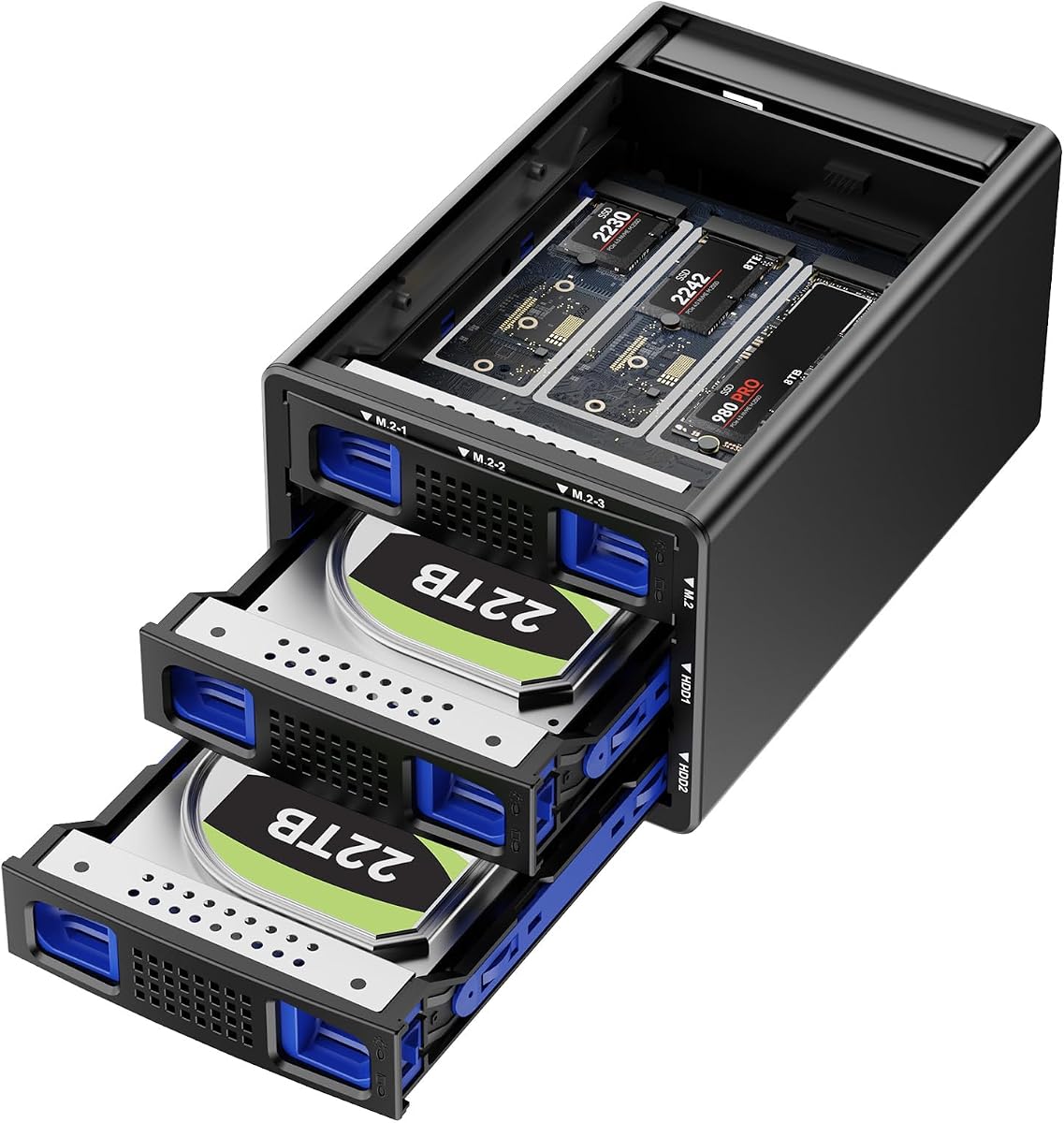
The CENMATE Hybrid enclosure is a distinctive two-SATA, three-NVMe storage product with a 4.6-star customer rating. Rather than filling every bay with the same drive type, it lets a user combine two 2.5- or 3.5-inch SATA HDDs or SSDs with up to three M.2 NVMe SSDs in supported 2230, 42, 60, 80, or 110 sizes.
We may earn a commission when you buy through this link, at no additional cost to you.
Its listed capacity reaches 68TB when two 22TB SATA drives and three 8TB M.2 SSDs are installed. The enclosure supports RAID 0, RAID 1, Normal, and JBOD modes. RAID configuration includes an important procedural warning: after resetting an array, the reset button must be held for five seconds, and the product documentation notes that arranging RAID can result in data loss.
The USB 3.2 Gen 2 interface has a stated 10Gbps bandwidth, with full-load read rates of 200 to 300MB/s outside RAID modes. USB-A and USB-C cables are included, and compatibility extends across USB 3.0, 3.1, 3.2, Thunderbolt 3, and Thunderbolt 4. A 2.7-inch fan runs continuously for cooling, making noise a consideration for sound-sensitive workspaces.
This is the budget recommendation for a user who wants high-speed NVMe scratch space and large SATA archives in one compact enclosure. It is especially useful for editing projects that benefit from separating hot working files from capacity storage. Mac users should note that RAID software is unavailable, so Normal or JBOD operation is the more appropriate starting point for them.
The hybrid layout supports SATA disks for capacity and NVMe modules for speed in the same chassis. It is a useful model for creators who want fast working volumes without relying entirely on network-attached storage.
Four modes cover striped performance, mirrored protection, independent disks, and JBOD behavior. The enclosure supports USB-C and USB-A connections, but Mac users should avoid assuming that the RAID options behave the same way as on Windows or Linux.
We may earn a commission when you buy through this link, at no additional cost to you.
The ORICO 9848RU3 is a four-bay desktop RAID enclosure with a 4.3-star rating. It supports 3.5-inch SATA disks up to 22TB per drive, yielding a listed maximum capacity of 88TB, and provides eight configuration choices: RAID 0, 1, 3, 5, 10, JBOD, Clone, and Clear.
We may earn a commission when you buy through this link, at no additional cost to you.
The USB 3.0 interface is paired with SATA 6Gb/s support, and the stated transfer rate reaches up to 235MB/s. That makes it suitable for backups, video transfers, and centralized desktop file management, although a 10Gbps enclosure would offer more headroom for demanding workloads. The operating system options include Windows, macOS, and Linux.
Its 150W built-in power supply avoids the need for a bulky external adapter, while the aluminum enclosure, 80mm fan, and front and rear vents promote stable operation. The tray-less design makes the drive bays easier to access, and an independent safety lock helps prevent accidental ejection or removal of a disk.
The ORICO is a good option for a four-bay desktop that needs more array flexibility than a plain DAS can offer. It is particularly relevant for users creating mirrored, cloned, or expanded logical volumes. The main limitations are its focus on 3.5-inch SATA drives and the absence of a stated M.2 NVMe option, so buyers wanting a mixed-media design should examine the CENMATE hybrid model instead.
The hardware-controlled array menu gives users options for performance, redundancy, independent access, and cloning. As with any RAID enclosure, mode changes should be planned around backups and data-retention requirements.
A built-in 150W power supply supports stable operation with multiple mechanical drives and removes the visual clutter of a large adapter. Thermal management is supported by an 80mm fan and vents at both ends of the aluminum chassis.
We may earn a commission when you buy through this link, at no additional cost to you.
The OWC Mercury Elite Pro Quad is a four-bay USB-C storage enclosure with a 3.7-star customer rating, the lowest rating among the products listed. It nevertheless targets performance-focused users with a USB 3.2 interface offering 10Gb/s bandwidth and a stated maximum throughput of 947MB/s.
We may earn a commission when you buy through this link, at no additional cost to you.
Four universal drive bays accept both 2.5- and 3.5-inch drives, making the enclosure flexible for a mixture of desktop hard drives and portable SSDs. It connects to USB-C or Thunderbolt 3-equipped Mac and Windows computers through the included USB-C cable. The product also includes a one-year OWC limited warranty.
RAID management requires separate consideration because SoftRAID is not included. Buyers who need a fully configured array should obtain the appropriate management software independently and confirm that it supports the desired operating system and enclosure configuration. The supplied information does not describe specific RAID levels, so the exact array behavior should be verified from OWC's current documentation.
This enclosure is best suited to a creative professional who prioritizes interface speed and broad physical drive compatibility in a compact four-bay design. Its potential drawbacks are the comparatively low customer rating, the lack of bundled RAID software, and the absence of published details about supported RAID structures. It is less attractive to buyers who want a complete turnkey RAID package or extensive hot-swap and cooling features.
The 10Gb/s USB-C interface is suitable for modern Macs and Windows systems, including Thunderbolt 3-equipped computers. Its stated speed of up to 947MB/s provides ample headroom for SATA SSDs and can be valuable in media-oriented workflows.
Universal 2.5- and 3.5-inch drive support simplifies mixed-media deployments. Because SoftRAID is not included, users should treat the required management software as an additional part of the setup rather than assuming a complete RAID package.
We may earn a commission when you buy through this link, at no additional cost to you.
Choosing a JBOD enclosure involves balancing the number of drives, usable capacity, array behavior, interface speed, power requirements, and physical environment. The following factors help narrow the field before considering individual models.
JBOD combines disks into one large logical volume while preserving the ability to identify individual drives, whereas RAID configures data according to a redundancy or performance scheme. Some enclosures offer only JBOD or independent disks, while others include RAID 0, 1, 5, 10, Clone, and other modes. RAID 0 can improve performance but provides no redundancy, and RAID 1 or RAID 5 can protect against certain drive failures while requiring additional capacity. The CENMATE Hybrid and both ORICO models provide several modes, whereas the TERRAMASTER D4-320, CENMATE aluminum unit, IO CREST enclosure, and SABRENT dock are explicitly direct-attached products without RAID.
Bay count determines how much storage can be installed and how many individual volumes the enclosure can expose. Four-bay models are common for desktops, while the IO CREST offers eight bays, SABRENT offers ten, and the QNAP TL-R1200C-RP provides twelve rackmount positions. More bays increase flexibility but require a larger chassis, more heat management, and enough power for every installed disk. It is also important to distinguish the number of physical slots from the aggregate capacity, because supported capacity per drive may vary.
The host interface can determine how quickly a computer can work with the installed storage. USB 3.0 provides up to 5Gbps and is suitable for many backup and archive tasks, while USB 3.2 Gen 2 provides up to 10Gbps and offers more headroom for SSDs, video editing, and large collections. Thunderbolt 3 and Thunderbolt 4 compatibility on several newer models can also provide a useful performance path. A fast interface cannot make a mechanical hard disk faster than its own mechanical limits, but it helps when multiple SATA SSDs are installed.
Most multi-bay enclosures focus on 3.5-inch SATA hard drives, while smaller desktop units may also accept 2.5-inch SATA HDDs and SSDs. The CENMATE Hybrid goes further by adding three M.2 NVMe positions, allowing fast solid-state working space to coexist with larger SATA disks. The OWC enclosure also supports both 2.5- and 3.5-inch drives, while the SABRENT ten-bay model requires an adapter for 2.5-inch devices. Confirm SATA versus NVMe support, physical dimensions, and any required adapter before ordering.
Multiple hard drives generate heat, particularly during sustained transfers, so enclosure cooling deserves careful attention. Active fans, temperature sensors, aluminum cases, and front-to-back vents can help prevent thermal throttling and disk degradation. Noise is another consideration: the TERRAMASTER emphasizes a quiet temperature-controlled fan, while the CENMATE models specify continuous cooling and warn that noise-sensitive users may prefer another option. The best choice depends on whether the enclosure lives in an office, editing suite, server room, or near a recording setup.
A multi-disk enclosure must deliver stable power across several startup loads, especially when multiple mechanical drives spin up together. The ORICO models use integrated 150W power supplies, the rackmount QNAP includes a redundant 250W supply, and smaller desktop units generally use external adapters. Integrated power can reduce cable clutter, while redundant or higher-capacity supplies may better suit continuous operation. The correct power arrangement should match the number of drives, their spin-up demand, and the length of the intended operating cycle.
Hot-swapping allows a drive to be replaced without shutting down the entire enclosure, which is valuable for backup systems and high-availability workflows. Tool-free trays and tray-less bays make installation easier, while locks can prevent accidental removal. Individual power switches and status LEDs also help administrators identify and manage active drives. Tool-free access is particularly useful in the TERRAMASTER and CENMATE products, while the SABRENT includes per-bay controls, a master switch, and a locking key. A fixed NAS or RAID migration workflow may benefit from lockable bays instead.
Desktop enclosures commonly support Windows, macOS, and Linux over USB, but a NAS-oriented model may have tighter ecosystem requirements. The QNAP TR-004 can extend a compatible QNAP NAS and provides hardware RAID, yet it cannot run QNAP applications or merge its pool with the connected NAS. The rackmount TL-R1200C-RP similarly targets QNAP expansion and compatible server deployments. For broad cross-platform use, verify operating-system support, interface type, filesystem behavior, and whether the enclosure is intended to be a computer-attached device or a managed NAS component.
Before installing drives, verify that each disk matches the enclosure's supported interface, form factor, and capacity. Read the manual, identify the operating-mode controls, and make sure the enclosure has adequate desk or rack space. Connect the appropriate power and data cables, install the drives with the supplied trays or tool-free mechanisms, and confirm that each bay is securely seated before adding files.
Create a backup of any important data before changing a JBOD or RAID configuration. Arrays can require specific reset procedures, and selecting a different mode may erase or reorganize the existing volume. Use the manufacturer's software or operating-system disk manager to format the enclosure, assign a recognizable name, and verify that the expected total capacity appears. For a NAS enclosure, complete the manufacturer's compatibility and initialization workflow before moving existing data.
Allow space around the vents and keep the enclosure away from enclosed cabinets, direct heat, liquids, and unstable surfaces. Monitor temperature and drive health during long transfers, avoid abrupt power removal, and power down cleanly before changing a hot-swappable disk when the procedure calls for it. Periodically review SMART information, refresh backups, and confirm that the computer or NAS can still access every intended volume.
A JBOD enclosure presents multiple disks as one combined volume while allowing the operating system to identify the individual physical drives. A RAID enclosure uses a controller to distribute or duplicate data according to a selected mode such as RAID 0, RAID 1, or RAID 5. JBOD is generally simple and flexible, while RAID can provide performance or redundancy depending on the chosen configuration.
Usually, a basic JBOD volume does not provide drive-failure redundancy. If one disk fails, the combined volume may become inaccessible, although the remaining physical drives and their contents may still be recoverable. Users requiring continued availability or automatic rebuild behavior should choose an enclosure with a supported redundant RAID mode and maintain an independent backup.
It depends on the model. Most conventional SATA enclosures accept 3.5-inch HDDs and 2.5-inch SATA HDDs or SSDs in the same bay, but they do not accept M.2 NVMe modules. The CENMATE Hybrid enclosure is specifically designed to combine two SATA positions with three M.2 NVMe positions, while the SABRENT ten-bay model requires an adapter for smaller 2.5-inch drives.
A 10Gbps interface can remove host-interface bottlenecks, especially when several SATA SSDs are used or many small files are transferred. It cannot make a single mechanical hard drive exceed its inherent sequential or random performance. The faster interface is most beneficial for SSD arrays, media workflows, and transfers that saturate the capabilities of individual disks.
Only if the enclosure is specifically designed and supported for that NAS model. The QNAP TR-004 can act as external storage or expand capacity on a compatible QNAP NAS, but it remains a separate pool or volume and cannot run NAS applications. The TL-R1200C-RP is a rackmount expansion enclosure intended for compatible QNAP systems, so administrators should check the current compatibility list before installation.
Yes, even a correctly configured RAID array is not a substitute for a separate backup. RAID can reduce downtime or protect against a limited drive failure, but it cannot protect against accidental deletion, ransomware, controller failures, enclosure damage, fire, or theft. Important data should be copied to another system or storage medium using a tested versioned backup strategy.
A desktop enclosure is easier to place near a workstation and generally suits home offices, studios, and small businesses. A rackmount unit is better for equipment cabinets, server rooms, and continuous QNAP expansion, and may provide more substantial power delivery. The best choice is determined less by raw bay count than by the available physical space, cooling environment, and network-storage integration.
Many controllers allow mode changes, but doing so can erase the existing array or require a specific reset procedure. The CENMATE Hybrid, for example, requires holding its reset button for five seconds after resetting an array. Always read the current manual, back up the data, and confirm the controller's supported mode-switching procedure before making changes.
The TERRAMASTER D4-320 stands out as the most balanced overall choice for buyers who want four accessible SATA bays, a 10Gbps interface, tool-free hot-swapping, and quiet temperature-controlled cooling. The CENMATE Hybrid is the budget pick for users who want the unusual combination of two SATA and three NVMe positions, while the ORICO five-bay RAID model is the premium selection for extensive array modes, integrated power, and high capacity in a five-bay desktop.
Prioritize the features your workflow actually requires. Choose plain JBOD or individual disk access for simple pooled storage, hardware RAID when redundancy or performance modes matter, 10Gbps for SSD-heavy work, and enough bays for realistic expansion. Cooling, noise, physical space, and operating-system or NAS compatibility can be just as important as headline capacity.
Finally, check the current retailer listing, drive compatibility notes, included accessories, and warranty terms before ordering. Ratings, product configurations, software behavior, and retailer offers can change, and the information in this guide is intended to support comparison rather than replace the manufacturer's latest documentation.