
ELUTENG Dual Cooling Fan
4.4Editor score
Dual 80mm USB fans
Three adjustable speeds
25.6–32.5dB operation
Our Quiet GPU Cooling Solution guide compares ten USB, CPU, AIO, replacement, and custom-loop options for quieter performance, easier setup, and better cooling.
A quiet GPU cooling solution should lower temperatures without turning a workstation, gaming room, or home office into a noisy environment. The right choice depends on whether you need external airflow, dedicated graphics-card replacement, a quiet CPU heatsink, or a full liquid-cooling system.
We compared the included products by examining their cooling architecture, stated noise levels, airflow, dimensions, power requirements, installation demands, and device compatibility. The list covers USB-powered accessories, CPU air and liquid coolers, a replacement GPU fan, and a custom-loop water block.
Each numbered review shows where the product fits best, along with its limitations and ideal buyer. Ratings reflect the supplied customer feedback, while specifications and features are drawn from the available product information. Prices and availability can change.
4.4Editor score

4.8Editor score

3.5Editor score
This side-by-side comparison covers external USB fans, CPU air and liquid coolers, a graphics-card replacement fan, and a custom-loop GPU water block, with special attention to noise, compatibility, setup, and cooling capacity.


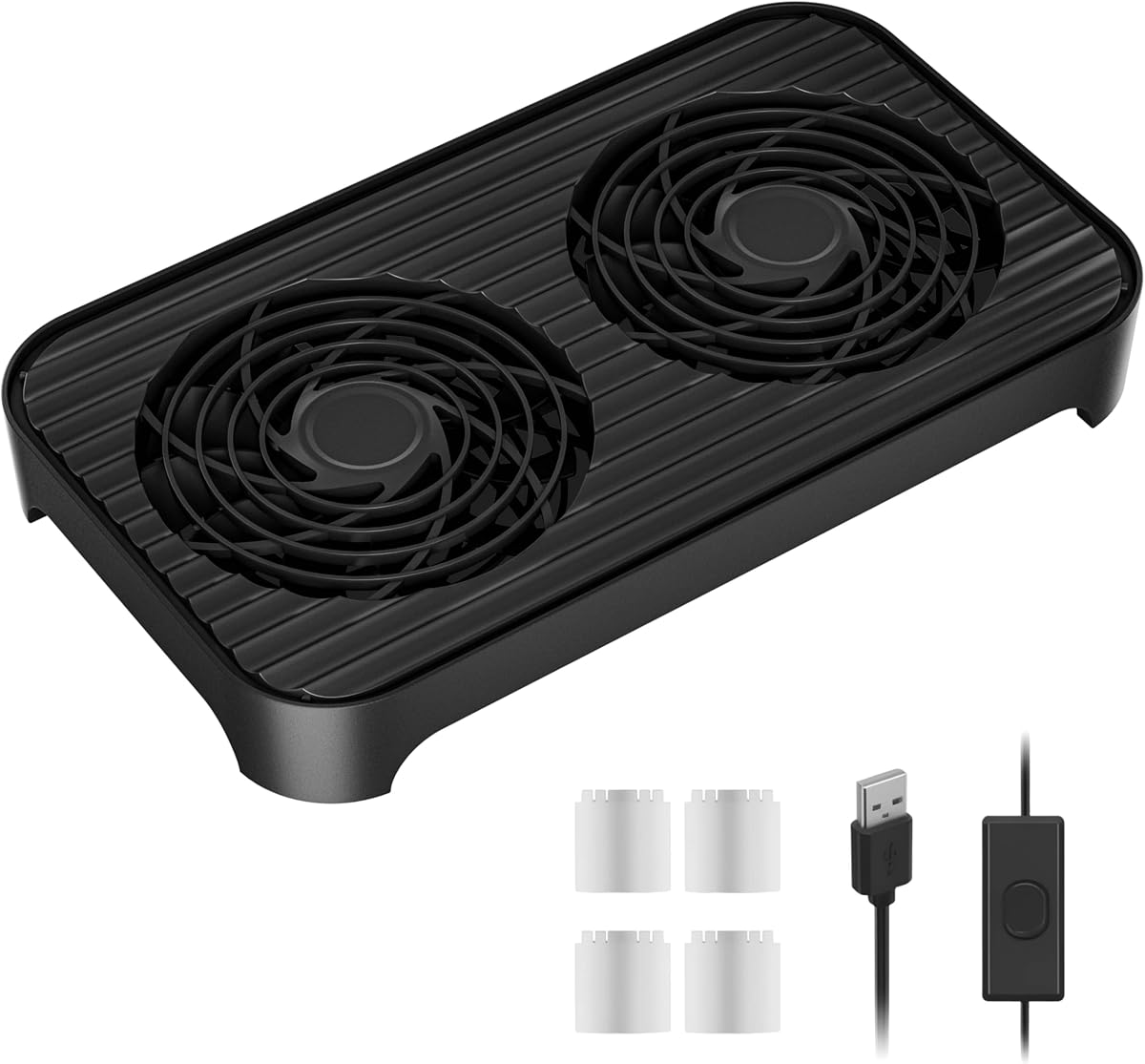


The ELUTENG Dual Cooling Fan is a straightforward external cooling accessory rated 4.4 out of 5 by customers. It uses two connected 80mm fans to move air around a router, console, receiver, laptop, projector, hard-drive enclosure, or other heat-producing device. Its strongest appeal is accessibility: it needs USB power and can be placed horizontally or vertically.
We may earn a commission when you buy through this link, at no additional cost to you.
Three speed settings allow the owner to balance airflow against the stated 25.6dB minimum and 32.5dB maximum operating noise. At the lower setting, it is better suited to offices, libraries, bedrooms, and study spaces. The hydraulic bearings support smooth operation, while four removable rubber feet help limit vibration and keep the fan stable on a surface.
The main limitation is scope. This is an external circulation fan rather than a graphics-card cooler, so it cannot directly cool a GPU mounted inside a desktop case. It also has a manual controller rather than automatic temperature sensing. Those compromises are reasonable when the goal is inexpensive, flexible cooling for a console, router, media device, or other external component.
Choose this fan for simple cooling on a desk, shelf, or entertainment center without adding another internal case fan. It is a particularly useful budget option for PS4, PS5, TV box, receiver, router, and similar devices listed in its compatibility information. For cooling a GPU inside a chassis, consider one of the dedicated replacement, AIO, or custom-loop options later in the guide.
The low, medium, and high controller settings let users reduce sound when the equipment does not need maximum airflow. This makes the dual-fan design useful around offices and study areas where constant full-speed operation would be distracting.
USB plug-and-play power makes setup much less involved than installing internal hardware. Protective side grids, reinforced cable joints, and vibration-absorbing feet also make the fan more practical for long-running external setups.
We may earn a commission when you buy through this link, at no additional cost to you.
The Thermalright Assassin X120 Refined SE is a compact single-tower CPU air cooler with a 4.7 customer rating. Its four 6mm heat pipes, aluminum heatsink, and 120mm PWM fan provide a conventional air-cooling option for users who want moderate physical size and controlled acoustic output without maintaining a liquid-cooling system.
We may earn a commission when you buy through this link, at no additional cost to you.
The included TL-C12C fan spins at 1550RPM with a maximum airflow of 66.17 CFM and a stated maximum noise level of 25.6dB(A). PWM control allows compatible motherboards to adjust the speed, and the metal fan fasteners and supplied platform-specific hardware support installation across a wide range of Intel and AMD sockets.
The trade-off is that this product cools a CPU rather than a graphics card. It can help a quieter overall system by reducing the need for loud case fans, but it cannot directly remove heat from a GPU. Buyers must also confirm that their case has at least the stated 148mm cooler height and enough clearance for the fan and motherboard components.
This cooler makes sense for compact gaming or productivity builds on supported platforms, especially when users value a straightforward air cooler and low reported noise. It is a sensible companion piece for a quiet PC strategy, but it should not be purchased under the mistaken belief that it is a dedicated GPU cooling solution.
A four-pin PWM connection lets the motherboard vary fan speed according to its configured curve. This can reduce unnecessary noise during light workloads while retaining the stated 1550RPM maximum when greater cooling is requested.
The 148mm tower is described as suitable for medium-sized cases. Buyers should still verify cooler clearance, including the 125mm length and 71mm width, before ordering for a compact enclosure.
We may earn a commission when you buy through this link, at no additional cost to you.
The be quiet! Pure Loop 3 360mm is a high-capacity all-in-one liquid CPU cooler rated 4.4 out of 5. It is designed for demanding applications and slightly overclocked processors, using a 360mm radiator and three Pure Wings 3 120mm PWM high-speed fans to move air through the radiator.
We may earn a commission when you buy through this link, at no additional cost to you.
Its pump uses a six-pole, three-phase motor intended to run smoothly and quietly at both low and high RPM. The fans use a closed-loop motor function to maintain steady speed despite resistance, which is particularly useful in a radiator position. Even at maximum speed, the listed noise figure is 30.9dB(A), which supports a quiet-system objective.
A practical advantage is the daisy-chain function. It allows the three included fans to connect in series, reducing cable clutter and helping the system avoid exhausting motherboard fan headers. Installation remains more involved than a simple USB fan, however, and the 360mm radiator demands a suitably large case with the necessary mounting support.
Choose the Pure Loop 3 360mm when CPU thermal headroom, smooth pump operation, and a refined acoustic profile matter more than a simple installation. It is excellent for high-performance quiet workstations and gaming systems, but it is a CPU cooler rather than a dedicated graphics-card water block.
The closed-loop motor function helps each radiator fan maintain a consistent speed as resistance changes. That behavior supports predictable cooling and can make acoustic tuning more straightforward.
Daisy-chain support lets the three fans be connected in series. The result is fewer separate fan connections and a less cluttered interior than three individually cabled fans.
We may earn a commission when you buy through this link, at no additional cost to you.
The Cooler Master 240 Core II is a 240mm AIO liquid CPU cooler with a 4.6 customer rating. Its dual-chamber pump design is presented as improving water flow toward the CPU hotspot, making it relevant for Ryzen 7 and Intel Ultra 7-class systems where improved CPU cooling can support a quieter overall build.
We may earn a commission when you buy through this link, at no additional cost to you.
The included fan operates through dynamic PWM control from 650 to 1,750 RPM, giving the system room to balance cooling and noise. A mirror-style ARGB design adds a visual centerpiece, while the installation brackets support AM5 and AM4 as well as LGA 1851 and LGA 1700 platforms.
The CryoFuze thermal paste is included and has a stated stable operating range of -50°C to 250°C. That reduces one additional purchase during assembly. As with any AIO, however, the 240mm radiator must fit the chosen case, and the product does not directly cool a discrete GPU.
This cooler is a good match for builders who want liquid cooling, adjustable fan behavior, and coordinated lighting without moving to a larger premium system. It is best recommended for compatible modern CPUs, with case clearance and radiator mounting checked before installation.
The broad 650 to 1,750 RPM range allows compatible systems to reduce fan activity during lighter workloads. That makes the cooler suitable for users who want quieter operation without giving up higher-speed cooling under load.
The infinity-mirror appearance is customizable through motherboard lighting control. It brings visual appeal to a build while the dual-chamber pump and 240mm radiator address the more important goal of CPU thermal performance.
We may earn a commission when you buy through this link, at no additional cost to you.
The 87MM PLD09220S12H is a dedicated replacement cooling fan for several EVGA GeForce RTX 3070, RTX 3080, RTX 3080 Ti, RTX 3090, and RTX 3090 Ti FTW3 Ultra Gaming models. It has a 4.4 customer rating and directly addresses the need to replace a worn or noisy graphics-card fan.
We may earn a commission when you buy through this link, at no additional cost to you.
The fan measures approximately 87 by 87 by 22mm, runs on DC 12V, draws 0.55A, and uses a four-pin header. Its black three-fan appearance is designed to blend with a compatible EVGA card while restoring airflow directly through the graphics-card shroud.
Compatibility is the central issue. The listing identifies specific FTW3 Ultra Gaming models, and it should not be assumed to fit every RTX 3070 or RTX 3090 board. There is also no stated acoustic rating, so buyers seeking a guaranteed decibel reduction should confirm the original card fan and cooling requirements before purchasing.
This replacement is best for a compatible EVGA user whose original GPU fan has become noisy or unreliable. It offers a targeted repair path, but it is less flexible than universal external fans and requires careful part-number matching before installation.
Unlike a desk fan, this component is designed to move air through the graphics-card cooling assembly. That direct relationship can make it more relevant to a noisy or failed GPU fan than a general-purpose USB accessory.
The supported list is limited to named EVGA FTW3 Ultra Gaming models. Checking the physical label and part number is essential because similarly named RTX cards can use different fan assemblies and mounting layouts.
We may earn a commission when you buy through this link, at no additional cost to you.
The X4 Quiet USB Cooling Fan is an external cooling pad designed for routers, laptops, receivers, amplifiers, DVRs, game consoles, and computer cabinets. It carries a 4.1 customer rating and uses two 140mm, eleven-blade high-pressure fans to move a stated 65.8 CFM of air.
We may earn a commission when you buy through this link, at no additional cost to you.
Its standout feature is the claimed 18dB operating level, which positions it as a very quiet external option. The one-touch switch provides basic control, while raised 15mm feet create a storage layer for phones, power banks, or modems. Four transparent feet also permit the unit to be stacked with another compatible unit.
Two USB interfaces allow the fan to be powered while another port remains available for charging, and the 31.5-inch cable supports more flexible placement. The listing also states support for up to 20kg and a service life above 40,000 hours, though actual durability will depend on the operating environment.
Choose the X4 when a broad, shallow airflow platform and very low stated noise are priorities. It is more specialized than the smaller ELUTENG dual fan, but it remains an external accessory rather than a direct internal GPU cooler. Reviewing owner feedback is advisable because it has the lowest rating among the listed products.
The stated 18dB operation makes the X4 appealing in offices, bedrooms, and quiet entertainment areas. Its large 140mm fan format is intended to provide useful airflow without requiring an internal mounting position.
Raised feet create room for a phone, power bank, or modem beneath the fan. The dual USB interface also helps maintain device charging while the cooling platform is operating.
We may earn a commission when you buy through this link, at no additional cost to you.
The Thermalright TL-C12C X3 is a three-pack of 120mm PWM case fans rated 4.6 out of 5. Each fan reaches up to 1,550 RPM, produces a stated 66.17 CFM of airflow, and has a maximum noise level of 25.6dBA, making the set appropriate for improving case airflow in a quieter system.
We may earn a commission when you buy through this link, at no additional cost to you.
Four-pin PWM control allows the motherboard to adjust speed based on temperature, rather than requiring the fans to run continuously at maximum output. S-FDB bearings are designed to reduce blade vibration, while soft silicone corner pads help limit vibration transferred to the case. Up to 55cm of cable per fan is supplied for routing.
This set does not directly replace a graphics-card fan. It can contribute to a quieter GPU environment indirectly by improving overall case circulation and removing hot air generated by the CPU and other components. A board with limited fan headers may require a splitter or powered hub, and each fan also needs an unobstructed mounting position.
Choose the TL-C12C X3 when you want matched case airflow with automatic control. It is a strong supporting upgrade for a quiet workstation or gaming PC, particularly if you need several intake or exhaust fans and already have a compatible CPU cooler.
PWM operation allows motherboard software to vary speed with system temperature. Quiet users can use a gentle curve during everyday tasks and increase airflow only when the hardware needs it.
Three identical fans simplify matching intake and exhaust positions. Their stated 66.17 CFM airflow can improve case circulation when installed with a deliberate front-to-back or bottom-to-top airflow plan.
We may earn a commission when you buy through this link, at no additional cost to you.
The Thermalright Peerless Assassin 120 Vision MAX is a feature-rich dual-tower CPU air cooler with a 4.8 customer rating. It combines a high-capacity heatsink, dual 120mm PWM fans, ARGB lighting, and a magnetic 5-inch IPS display that can show live system information and custom content through TRCC software.
We may earn a commission when you buy through this link, at no additional cost to you.
Six 6mm copper heat pipes use AGHP Gen 5.0 technology to reduce the adverse effects of gravity in vertical and horizontal orientations. The dual-tower layout is designed to accommodate tall RAM heat spreaders and provide GPU clearance through an offset arrangement, while the display and fans are placed to avoid an overly obstructed build.
Its 164mm height is the main practical limitation. Although described as compatible with mainstream ATX cases, users should check the exact case model, side-panel clearance, and nearby components. The display also requires power and data through the motherboard's 9-pin USB connection, and TRCC must be installed for customization and monitoring features.
This cooler is an excellent choice for a quiet build that emphasizes both cooling and presentation. It receives the Editor's Choice distinction because it combines the highest customer rating in the list with a distinctive display, flexible ARGB control, and a strong dual-tower air-cooling platform. It is a CPU cooler, so its relationship to GPU quietness is indirect rather than direct.
The magnetic 5-inch IPS panel displays system parameters and supports custom backgrounds and video playback through TRCC. It turns otherwise unused space above the heatsink into a functional monitoring and personalization area.
The dual-tower and dual-fan arrangement supports high airflow, while the offset layout is intended to preserve room for RAM and GPU hardware. The 164mm height still makes accurate case-clearance checks essential.
We may earn a commission when you buy through this link, at no additional cost to you.
The Noctua NL-LC1-36 is a high-performance 360mm AIO CPU cooler with a 4.8 customer rating. It combines an Asetek Emma V2 closed-loop platform with a 360mm radiator and three NF-A12x25 G2 PWM 120mm fans, giving it a strong foundation for near-silent gaming PCs and workstations.
We may earn a commission when you buy through this link, at no additional cost to you.
Acoustic design is central to the product. The pump incorporates a three-layer soundproofing structure and a tuned-mass damper effect intended to reduce operating noise and vibration. The fans support speed-offset operation for acoustic optimization, while the closed-loop motor on Pure Loop-style radiator systems is a separate characteristic rather than part of this Noctua listing.
The SecuFirm2 mounting system provides multiple socket options, including offset choices intended to assist hotspot positioning on AMD AM5 and Intel LGA1851. High-end NT-H2 thermal paste and an AM5 paste guard are included. A 360mm radiator also demands a case with sufficient mounting space and clearance around the CPU socket.
Choose this cooler for a high-end quiet system where acoustic refinement and flexible installation are priorities. It does not cool a discrete GPU directly, but a quieter CPU cooler can reduce the need for aggressive case-fan speeds. The optional NL-ACF1 auxiliary fan is available separately for additional airflow over VRMs, M.2 storage, or memory.
The layered acoustic structure and tuned-mass damper approach target the sound and vibration normally associated with a liquid-cooling pump. These details make the cooler suitable for systems where background noise matters.
SecuFirm2 provides offset options for AM5 and LGA1851 installations. Correct placement can assist with hotspot positioning while retaining the larger 360mm radiator's cooling capacity.
We may earn a commission when you buy through this link, at no additional cost to you.
The CORSAIR XG3 RGB Hybrid GPU Water Block is the only dedicated custom-loop GPU cooling product in the list. It has a 3.5 customer rating and is compatible with specified GeForce RTX 5080, RTX 5070 Ti, and RTX 5070 models. The block brings direct graphics-card and VRAM cooling into a broader custom cooling loop.
We may earn a commission when you buy through this link, at no additional cost to you.
Its hybrid design combines the custom loop with a dedicated fan that cools the circuit board and VRM area. The integrated temperature sensor and iCUE control allow users to manage cooling and performance through CORSAIR software. Eighteen individually addressable RGB LEDs provide a synchronized lighting effect, while iCUE LINK offers a cleaner connection approach when compatible components are chained.
This is not a plug-and-play cooler. It requires a suitable custom liquid-cooling loop, pump, reservoir arrangement, compatible fittings, and careful installation. The product listing also notes that iCUE LINK components require a separately sold System Hub. Its 3.5 rating is the lowest here, so prospective buyers should examine current customer feedback carefully.
Choose the XG3 for an enthusiast custom-loop build with a compatible GPU and the skills to maintain the loop. It is the most directly relevant option for quieting and cooling a dedicated graphics card, and its hybrid design may be especially attractive when a full liquid loop already exists.
The water block directly cools the graphics processor and VRAM through the custom loop. Its dedicated fan supplements the loop by moving air across the circuit board and VRM region.
The temperature sensor and iCUE integration provide software-level management, while eighteen addressable LEDs add coordinated lighting. An iCUE LINK System Hub is required for the described universal connection setup and is sold separately.
We may earn a commission when you buy through this link, at no additional cost to you.
The right quiet cooling option depends on the hardware you need to cool, the space available, and your tolerance for installation work. Sound output, airflow, compatibility, and control features should be evaluated together rather than by size alone.
Choose a solution that matches the component requiring the most attention.
Compare the exact model, connector, socket, dimensions, and mounting points before purchase.
Prioritize adjustable or PWM-controlled fans that can run gently when full cooling is unnecessary.
Balance airflow, radiator size, and component workload rather than choosing solely on noise.
Measure the chassis, side panel, socket area, and intended placement before ordering.
Choose a complexity level that matches your experience and willingness to maintain the system.
Favor temperature-responsive PWM control when a consistently quiet system is the priority.
Choose visual features after confirming that the cooling hardware fits and addresses the actual thermal need.
Begin with a safe shutdown and by checking every compatibility detail. For an external USB fan, clear the area around the intake and outlet, place the unit on a stable surface, and connect it to a suitable USB power source. For an internal component, follow the manufacturer's instructions, confirm case clearance, and avoid routing cables where they can interfere with fans.
Establish a sensible operating strategy. Use low or medium external-fan settings when the cooled device is not under heavy load, and use motherboard PWM curves for internal case fans and CPU coolers. For liquid systems, inspect tubing routes, radiator fit, connector seating, and pump orientation according to the included guidance before closing the case.
Keep the cooling path clean and monitor behavior over time. Remove dust from external fan blades and accessible grilles, keep radiator and case vents unobstructed, and periodically check for unusual vibration, intermittent operation, or rising temperatures. Custom loops should be inspected for leaks and proper connections, while replacement GPU fans require compatible screws, headers, and physical alignment.
The X4 Quiet USB Cooling Fan has the lowest stated operating noise at 18dB, although that figure describes the external fan and does not guarantee the total noise of the cooled device. The Thermalright products list maximum levels of 25.6dBA, while the ELUTENG offers a selectable range from 25.6 to 32.5dB. Actual sound depends on speed, mounting, airflow resistance, and the hardware being cooled.
Not directly. A USB fan can improve airflow around the case or move cooler air toward an intake, but it cannot clamp onto a GPU or cool its processor and memory in the way a dedicated replacement fan or water block can. For internal graphics cards, verify model-specific parts and use a suitable internal cooling solution.
No. Quiet operation depends on case design, fan quality, fan curves, CPU and GPU temperatures, and system workload. A well-sited air cooler with PWM-controlled case fans can be effective, while a 240mm or 360mm AIO may add thermal headroom in demanding systems. The most appropriate choice depends on the case and components.
Match the card's complete model name, part number, dimensions, connector, and screw pattern against the replacement listing. Similar product families can use different fan assemblies, so a broad chipset name is not enough. The 87MM PLD09220S12H option specifically lists several EVGA FTW3 Ultra Gaming models, and buyers should not assume compatibility with other brands or variants.
PWM control is useful because it lets the motherboard increase speed only as needed. During lighter tasks, the fan can remain at a lower RPM, reducing sound while retaining the option for stronger cooling under load. Manual controllers offer simpler operation, but they require the user to select an appropriate setting.
Check the maximum CPU-cooler height listed by the case manufacturer and compare it with the product dimensions. The Thermalright Assassin X120 Refined SE is 148mm tall, while the Peerless Assassin 120 Vision MAX is 164mm. Also inspect the motherboard socket area, tall memory modules, side panel, and graphics-card position, because nominal case height does not reveal every possible obstruction.
They require more planning and experience than a USB or case fan. The installer must prepare compatible fittings, pump and reservoir components, tubing, and a correctly sized radiator, then fill and leak-test the loop. The CORSAIR XG3 also requires a separately sold iCUE LINK System Hub for the described universal connectivity setup.
It can indirectly. A cooler that keeps the CPU at lower temperatures may allow case fans to run more slowly because less total system heat needs to be removed. It does not replace a GPU cooler, however, and a hot graphics card can still demand substantial fan speed regardless of the CPU cooling hardware.
The ELUTENG Dual Cooling Fan stands out as the best budget external option, offering three speeds, flexible placement, and simple USB power. The Thermalright Peerless Assassin 120 Vision MAX earns the Editor's Choice distinction for its high customer rating, dual-tower design, ARGB lighting, and integrated magnetic display, while the CORSAIR XG3 is the premium choice for builders seeking direct GPU and VRAM cooling in a custom loop.
Prioritize the component you actually need to cool, then verify exact model compatibility and physical clearance. External fans are easiest to deploy, internal PWM fans help with overall case circulation, CPU coolers can lower system-wide thermal demands, and dedicated GPU hardware requires particularly careful part-number matching. Noise figures should be considered alongside airflow and control because the quietest mode is only useful if it still handles the workload.
Finally, check current prices, availability, case specifications, and the latest customer feedback before ordering. Product costs and stock levels can change, and installation requirements may vary with the exact motherboard, chassis, graphics card, and socket revision. Taking those details seriously will lead to a more reliable quiet cooling setup.