
MAIWO Dual Bay SATA Docking Station
4.5Editor score
48TB combined capacity
Offline clone progress LEDs
Three USB-A hub ports
A hard drive duplicator cloner docking station combines two essential jobs in one device: making bare SATA drives accessible through a computer and copying one drive to another without relying on complicated cloning software. The best models support convenient tool-free loading, clear progress indicators, broad operating-system compatibility, and enough power for demanding backup tasks.
This guide compares ten dual-, triple-, four-, and five-bay models based on their stated drive compatibility, offline cloning capabilities, connection standards, capacity support, included accessories, and practical features. The list covers simple SATA-only docks as well as more advanced systems that add M.2 NVMe support, multi-drive duplication, or secure erasing capabilities.
Each pick demonstrates a different balance of features and intended use, from a straightforward desktop copier to a professional four-bay duplicator and eraser. Ratings reflect the supplied customer feedback, while feature details come from the manufacturer information. Product prices and availability can change, so check the current listing before purchasing.
4.5Editor score

4.5Editor score

4.5Editor score
As an Amazon Associate we earn from qualifying purchases.
The comparison highlights each dock's bay count, supported storage formats, standalone copying capability, host connection, and maximum stated capacity, helping readers identify the right balance of simplicity, flexibility, or professional functionality.





The SABRENT USB 3.0 Dual Bay Hard Drive Docking Station & Cloner is a straightforward choice for users who want one device to handle both drive access and standalone duplication. It has a 4.5 rating and supports standard 2.5-inch and 3.5-inch SATA hard drives and SATA SSDs, making it suitable for a broad mix of older and newer storage media.
We may earn a commission when you buy through this link, at no additional cost to you.
Its main advantage is the straightforward combination of two bays, plug-and-play operation, and offline cloning without a computer. The stated cloning rate reaches 60Mbps, while the USB 3.0 host interface is listed at up to 5Gbps. Backward compatibility with USB 2.0 and USB 1.1 adds flexibility when connecting to older systems, although the installed drive will ultimately limit achievable transfer speed.
The dock supports drives up to 10TB, which remains useful for many file archives and backups. Its cloning performance is modest compared with the faster professional models in this guide, and users should not interpret the 5Gbps host specification as a guaranteed real-world file-transfer rate from a mechanical hard drive. Even so, the product focuses on a clear purpose and avoids unnecessary complexity.
This is a strong recommendation for home users, computer technicians, and small offices that regularly move data between bare SATA drives. It works particularly well for straightforward drive-to-drive duplication, quick file access, and system migration projects where simplicity matters more than maximum throughput or support for modern NVMe media.
The source drive can be copied to the target without a connected computer, making the dock useful for migrations, drive refurbishment, and routine backup preparation. The target must be the same size as the source or larger.
Both bays make it convenient to compare files, move information, or work from two drives at once. A single USB 3.0 connection provides the stated transfer path for supported SATA media.
We may earn a commission when you buy through this link, at no additional cost to you.
The SABRENT Dual-Bay USB-C Hard Drive Docking Station & Cloner provides a modern take on the conventional two-bay SATA dock. Its 4.4 rating reflects broad appeal, while USB-C connectivity and tool-free, hot-swappable bays make it a natural fit for newer laptops and compact workstations.
We may earn a commission when you buy through this link, at no additional cost to you.
The dock can mount both drives separately when connected to a computer, allowing users to move files or access both volumes at the same time. It also provides a one-button offline cloning function with speeds stated at up to 60MBps. Per-bay access LEDs make it easier to identify drive activity, which is especially helpful during multi-step data-transfer workflows.
Compatibility is limited to bare 2.5-inch and 3.5-inch SATA hard drives and SATA SSDs. The product does not support IDE or PATA media, drives using a 4-pin Molex power connector, or M.2 and NVMe drives. The included cable is USB-C at the dock end, so a computer with only USB-A may require an additional compatible cable.
Buyers should choose this model when a recent USB-C computer is their primary system and their storage needs are limited to SATA. It handles everyday docking and duplication tasks cleanly, though the three-bay models offer more flexibility and the StarTech dual-bay option provides substantially higher stated cloning performance.
The USB-C dock-end connection reduces cable clutter on compatible modern computers. Plug-and-play operation on Windows and Mac avoids a separate driver installation step.
Both bays mount as separate volumes, which is useful for moving data between drives, checking backups, or keeping one drive connected while another is serviced.
We may earn a commission when you buy through this link, at no additional cost to you.
The ICY BOX Triple Bay stands out for combining two SATA bays with an M.2 PCIe NVMe slot. It carries a 4.5 rating and gives users a more flexible storage platform than SATA-only docks, especially for PC builders, technicians, and anyone transitioning between NVMe and SATA storage.
We may earn a commission when you buy through this link, at no additional cost to you.
One-touch offline cloning can copy between NVMe and SATA devices, including NVMe-to-NVMe or SATA-to-NVMe workflows. The three independent slots allow multiple drives to be connected simultaneously, and tool-free loading helps reduce preparation time. A USB 3.2 Gen 2 interface is listed at up to 10Gbps, and the included USB-C-to-USB-C and USB-C-to-USB-A cable broadens host compatibility.
Its flexibility does not remove the need for careful drive selection. Users must match the physical format and interface of each device to the correct slot, and the target needs sufficient capacity. The three-bay design also takes up more space than a compact dual-bay model, while the mixed-format feature set is unnecessary for those who only use 2.5-inch or 3.5-inch SATA media.
This dock is an excellent match for mixed-drive workshops and recent desktop upgrades. It earns consideration for readers who want NVMe cloning in the same device as conventional HDD and SSD docking, offering one of the strongest combinations of versatility and compactness in the guide.
The dedicated NVMe capability allows fast internal SSDs to participate in the same offline cloning workflow as SATA drives. This reduces the need to move SSDs between multiple adapters and docks.
Three independently accessible slots are useful for transferring files, checking multiple backups, or preparing a replacement system. The stated 10Gbps host interface is designed for modern high-speed storage workflows.
We may earn a commission when you buy through this link, at no additional cost to you.
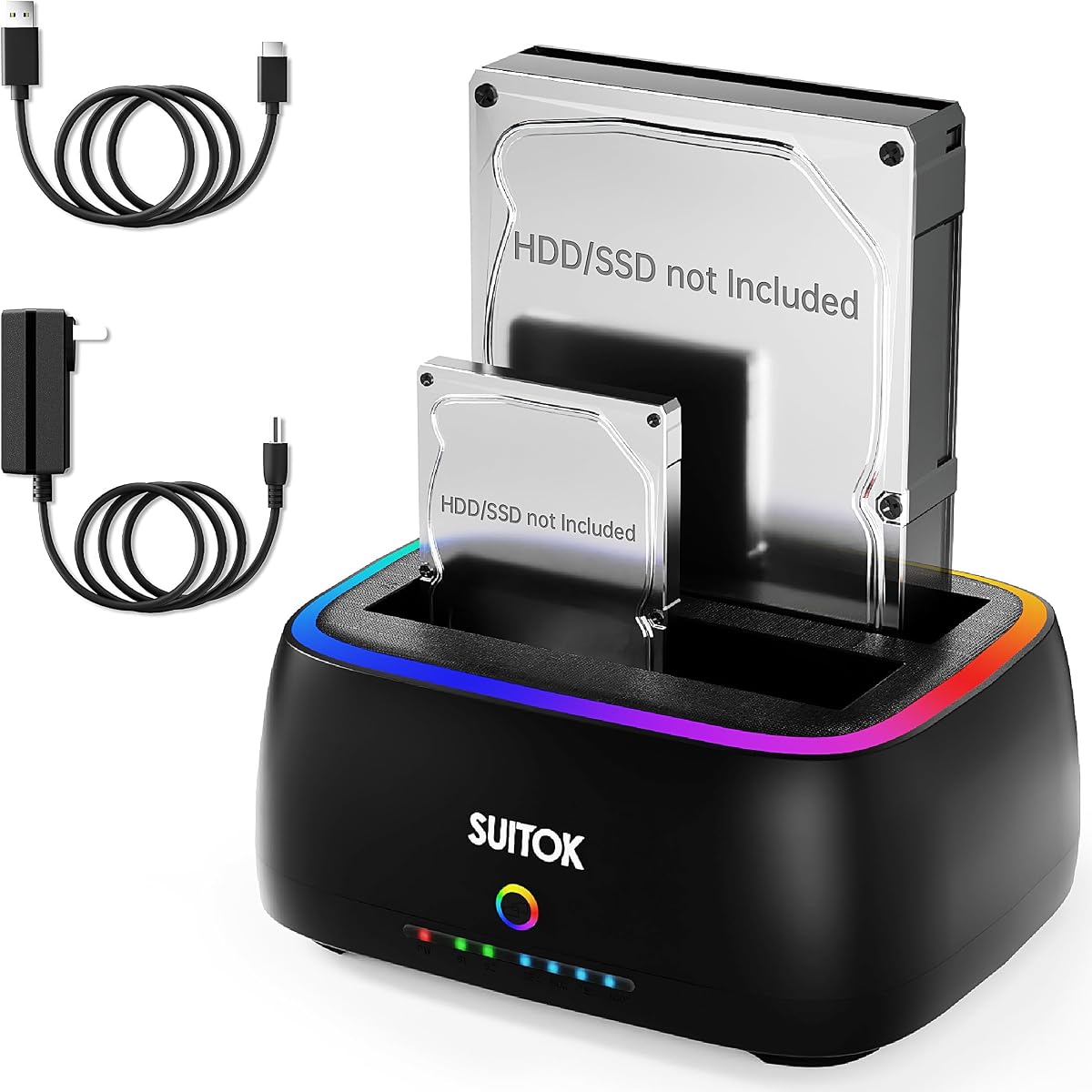
The MAIWO Hard Drive Docking Station Cloner combines a dual-bay SATA dock, standalone duplication, and a three-port USB 3.0 hub. Its 4.5 rating and generous stated capacity make it compelling for users who want a single desktop accessory for storage access, backup preparation, and peripheral connectivity.
We may earn a commission when you buy through this link, at no additional cost to you.
The two bays accept 2.5-inch and 3.5-inch SATA hard drives and SSDs. Each port is stated to support drives up to 24TB, for a combined capacity of 48TB. Offline cloning works without a computer or drivers, while four LED stages indicate progress at 25%, 50%, 75%, and 100%. A dedicated 12V, 3A power supply supports stable operation.
The three USB-A hub ports add practical value because they can accommodate flash drives and other peripherals; one port also supports 2.4A mobile charging. The tradeoff is that the hub makes the device less minimalist, and this model does not handle M.2 NVMe media. Its 5Gbps interface is also shared within the dock's overall connectivity design rather than guaranteed for every attached peripheral.
This dock is a good recommendation for budget-conscious home and office users who want capacity, offline duplication, and a USB hub together. It is especially useful when a computer has limited USB-A ports or when a desk needs a central point for connecting backup drives and everyday removable storage.
The stated 48TB combined capacity is among the highest in this guide and makes the dock suitable for expansive archives. Actual usability still depends on the capacities, interfaces, and availability of the drives being installed.
Three USB-A ports turn the dock into a small workstation hub. This can reduce desk clutter when flash drives, a card reader, or a charging handset are regularly connected.
We may earn a commission when you buy through this link, at no additional cost to you.
The Dual Bay SATA Hard Drive Cloner Dock combines a vertical, open-air drive layout with offline duplication and extensive connection support. Its 4.3 rating is still solid, and the combination of UASP, TRIM, S.M.A.R.T., and broad operating-system compatibility gives it a feature set that extends beyond basic file transfer.
We may earn a commission when you buy through this link, at no additional cost to you.
A one-key offline clone function duplicates a source drive to a target without a connected PC. The integrated progress bar reports 25%, 50%, 75%, and 100% stages. The RTL9201DP bridge is listed with SATA III 5Gbps transfer rates, and each bay supports up to 20TB, producing a stated combined maximum of 40TB.
The vertical tool-free design promotes airflow and makes drive swapping straightforward. Cooling vents and anti-slip silicone pads are intended to reduce vibration, while support for UASP, TRIM, and S.M.A.R.T. adds useful protocol-level functionality. The product also lists Windows, macOS, Linux, Chrome OS, and Android with OTG compatibility, making it unusually broad for a cloning dock.
The dock is well suited to users who want flexible host compatibility and useful drive-health features in a two-bay enclosure. Its custom RGB lighting may appeal to some desktop setups, but it does not improve cloning performance. Buyers should still verify that their chosen computer, cable, and target drive are compatible before beginning a copy.
The open vertical arrangement is designed to improve heat dissipation around 2.5-inch and 3.5-inch drives. Tool-free insertion also makes it convenient to rotate between backup and archive media.
UASP can improve command efficiency where the host and drive support it, while TRIM is relevant for SSDs and S.M.A.R.T. can expose drive-health information. These features are most useful in managed IT workflows.
We may earn a commission when you buy through this link, at no additional cost to you.
The StarTech SDOCK2U313R is built for users who need more than a general-purpose hard drive dock. Its 4.4 rating, 28GB-per-minute stated copy rate, and sector-by-sector duplication make it a strong option for rapid drive preparation, deployment, and professional data-handling workflows.
We may earn a commission when you buy through this link, at no additional cost to you.
The standalone copier reproduces the entire source disk, including empty sectors and any file format, rather than copying only recognized files. It works with 2.5-inch and 3.5-inch SATA hard drives and SSDs, is OS independent, and is listed as 4Kn compatible. The target must be equal to or larger than the source, an important requirement when planning migrations.
For computer access, the dock supports a 10Gbps USB 3.2 Gen 2 host connection as an optional configuration, while its internal SATA interface operates at 6Gbps. Tool-less, top-loading drive doors and eject buttons suit repeat use, and multi-function LEDs show power and status. Legacy IDE support requires a separately sold adapter.
This model is a compelling recommendation for IT departments, repair shops, and installers who routinely create matching drive images. Its specialized speed and sector-level copying make it less necessary for casual users, but for high-volume preparation it offers capabilities that ordinary file-transfer docks cannot match.
A sector-by-sector copy includes empty space and does not depend on the source's file system. That makes the result more appropriate for deployment, forensic workflows, and making a full working replacement.
Top-loading doors, eject controls, status LEDs, and an OS-independent design support efficient workflows. The stated two-year coverage and 24/5 multilingual technical assistance reinforce its professional positioning.
We may earn a commission when you buy through this link, at no additional cost to you.
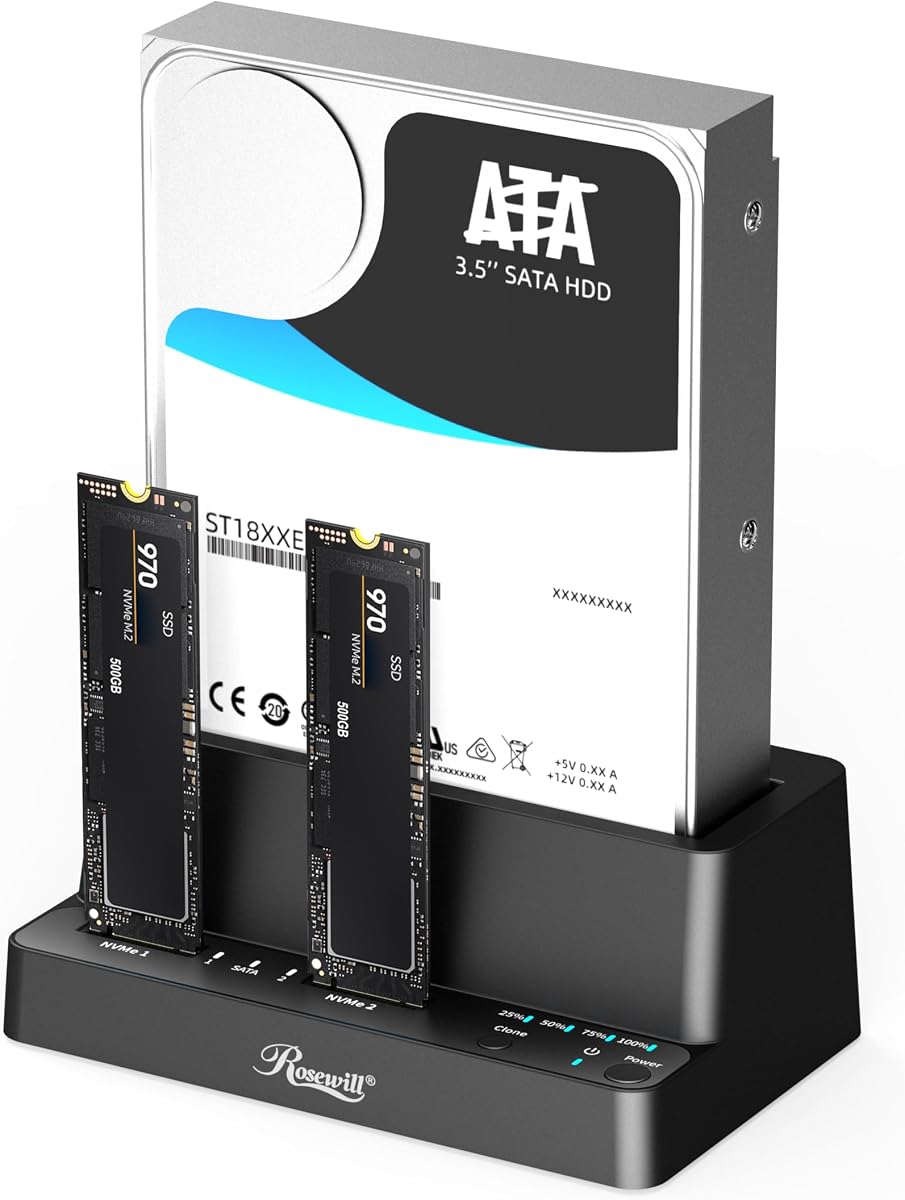
The Rosewill RS-N2S-CL is a compact three-bay option that supports M.2 NVMe media alongside 2.5-inch and 3.5-inch SATA hard drives and SSDs. Its 4.5 rating suggests strong user satisfaction, while tool-free operation and a 10Gbps connection make it appealing for technicians who need flexible drive access.
We may earn a commission when you buy through this link, at no additional cost to you.
Offline cloning can be performed for HDD and SSD storage without a host computer, and the same unit functions as both a reader and duplicator. Three drive positions allow users to connect multiple devices simultaneously, reducing the need to swap media during backups, transfers, or migrations. The USB 3.2 Gen 2×1 interface is specified at up to 10Gbps.
Compared with the more fully described ICY BOX triple-bay model, the supplied information for Rosewill gives less detail about cloning speed and maximum drive capacity. Buyers should therefore verify those details for their intended workflow. The compact and portable construction is nevertheless a clear advantage for mobile technicians and users with limited desk space.
This dock is a good fit for mixed-format workspaces, system builders, and repair professionals who want NVMe and SATA support in a relatively portable unit. It is especially useful when the requirement is flexibility and quick drive swapping rather than a precisely stated sector-copy rate.
M.2 NVMe, SATA SSDs, and conventional hard drives can share one compact device. This is convenient when a technician regularly handles both laptop and desktop storage.
The stated lightweight, compact design makes the unit easier to transport than a large multi-bay workstation. Three positions support simultaneous connection while still keeping the footprint relatively restrained.
We may earn a commission when you buy through this link, at no additional cost to you.
The ORICO USB C 5 bay Hard Drive Docking Station is built for bulk drive preparation. It accepts up to five 2.5-inch or 3.5-inch SATA drives and can produce four simultaneous copies with one-button offline duplication. Its 3.9 rating is the lowest among the listed products, but its unusual one-to-four function gives it a distinct role.
We may earn a commission when you buy through this link, at no additional cost to you.
The stated maximum capacity is 100TB across five 20TB drives, making this an appealing option for photographers, media archives, and offices producing multiple identical backups. A vertical aluminum-alloy enclosure is designed to improve heat dissipation, while anti-vibration pads help stabilize the installed drives. LED indicators communicate operating status.
The trade-offs are physical size and the more specialized operating procedure required for multi-target copying. The target drives will be overwritten, so users should back up any important content before starting. The supplied information also does not state a standalone clone rate, which is important when comparing this model with faster duplicators.
Buyers should consider this dock when they regularly create several copies from one master image. It is less compelling for occasional two-drive backups, but for high-volume media distribution and archive preparation, the one-button four-copy mode can substantially streamline the workflow.
The one-to-four duplication mode separates this dock from ordinary two-bay products. It is intended to reduce repeated manual copying when several identical drive sets are needed.
The vertical aluminum-alloy body and anti-vibration pads address two common concerns with five-drive setups: heat management and physical stability. Adequate airflow around the enclosure remains important during extended operations.
We may earn a commission when you buy through this link, at no additional cost to you.
The WAVLINK USB 3.0 and USB C to SATA Dual-Bay External Hard Drive Docking Station is an accessible two-bay option for routine drive access and offline duplication. It has a 4.4 rating and supports 2.5-inch and 3.5-inch SATA hard drives and SSDs across SATA I, SATA II, and SATA III generations.
We may earn a commission when you buy through this link, at no additional cost to you.
Its UASP protocol is listed at up to 6Gbps, with standard USB 3.0, USB 2.0, and USB 1.1 rates also identified. Offline cloning runs at up to 60Mbps without requiring drivers, and the target must be equal to or larger than the source. Hot-swapping, a built-in power switch, and automatic sleep after 30 minutes make daily use more convenient.
The product's operating-system support is broad, including listed versions of Windows, Linux, Unix, and Mac OS X, but the supplied information specifically states that it is not compatible with M1- and M2-based Macs. Its cloning rate is modest, so buyers focused on rapid full-drive deployment should consider the StarTech professional duplicators instead.
This dock suits users who need a simple way to access two SATA drives, transfer files, and prepare occasional offline copies. It is also useful for older or mixed computer systems, although checking computer architecture and connector type before purchase is essential.
UASP can reduce protocol overhead where both the computer and installed drive support it. The listed speed is a theoretical interface figure, so real performance depends on the drive, file sizes, and host system.
Automatic sleep after 30 minutes of inactivity is useful for a dock that remains connected throughout the day. The physical power control also provides a clear way to disconnect the enclosure when it is not needed.
We may earn a commission when you buy through this link, at no additional cost to you.
The StarTech SATDOCK4U3RE is the most functionally complete model in the guide because it combines standalone duplication, drive erasing, and computer docking in a four-bay enclosure. Its 4.5 rating and support for one-to-three copies make it a strong choice for IT departments, data-handling teams, and service professionals.
We may earn a commission when you buy through this link, at no additional cost to you.
Standalone sector-by-sector copying can create up to three matching target drives, with the target required to be equal to or larger than the source. It also offers Quick Erase and Secure Erase modes, including an NIST SP 800-88 Rev. 1 Purge implementation. These functions make the device useful when drives must be prepared for redeployment, not merely copied.
For ordinary file access, the dock supports USB 3.2 Gen 1 at 5Gbps or eSATA at 3Gbps, with USB and eSATA cables included. An LCD display and push-button navigation provide clearer control than simple LED-only models. The unit works with 2.5-inch and 3.5-inch SATA drives, while included adapters add support for 40-pin and 44-pin IDE media.
The device is overkill for a user who only needs to connect one or two drives occasionally. Its value becomes clear in managed environments where repeatable duplication, verified erasure, multi-copy production, and professional support are more important than a compact footprint or decorative styling.
Quick Erase and NIST-aligned Secure Erase modes help prepare drives for reuse or disposal. The appropriate erasure method should still be selected according to the organization's data-handling and compliance requirements.
One source can be copied to as many as three targets in a standalone workflow. The LCD interface and multi-function LEDs make operation and status checking more accessible in technical environments.
We may earn a commission when you buy through this link, at no additional cost to you.
The right choice depends on the formats you use, the volume of drives involved, the required duplication method, and whether the device must also function as an everyday computer dock.
Most hard drive duplicator cloner docking stations are designed around bare 2.5-inch and 3.5-inch SATA hard drives and SATA SSDs. Some advanced models add an M.2 slot for PCIe NVMe drives, allowing modern SSDs and conventional hard disks to be handled in one unit. Legacy IDE or PATA support usually requires an optional or included adapter, and the small four-pin Molex power connector used by some older drives may not be supported at all.
Two bays are sufficient for the most common source-and-target copying task. Three bays are useful when comparing several drives or handling different formats, while four- and five-bay devices support large backup batches and multi-target duplication. More bays increase desk footprint, power requirements, heat generation, and the number of drives that must be managed. Consider whether the extra positions will be used regularly enough to justify those trade-offs.
Offline cloning allows a source drive to be copied without a computer, which is convenient during migrations and repeated image preparation. Sector-by-sector duplication copies empty space and every recorded sector, making it appropriate for full-disk deployment. Some docks also support simultaneous one-to-three or one-to-four copying, while others provide only source-to-target operation. The target generally must be at least as large as the source.
Do not confuse host-interface speed with offline clone speed. USB 3.0 interfaces are commonly listed at 5Gbps, while newer 10Gbps connections can improve throughput with compatible drives. Standalone cloning rates may be much lower, and a mechanical hard drive cannot approach the full interface bandwidth. The StarTech dual-bay model stands out with a stated sector-copy rate of 28GB per minute, while many consumer docks list offline cloning up to roughly 60MBps.
USB-A remains common, while USB-C offers a neater setup for modern laptops. Some docks include a USB-C-to-USB-A cable, and others use a detachable host cable with USB-C on the dock end. Check the connector on your computer, operating-system support, and whether the included cable carries data as well as power. Models advertised for USB 3.0 are backward compatible with older USB generations, though performance will also be reduced.
Stated capacity differs considerably across the guide, from 10TB support in the first SABRENT model to 100TB across five 20TB drives in the ORICO dock. More capacity does not automatically make a device faster or more reliable. It does, however, help avoid replacing the dock when larger hard drives become available. Consider current storage needs, realistic expansion plans, and whether the device will be used for archival media, server data, or system images.
Professional workflows may need more than copying. S.M.A.R.T. support can expose drive-health information, TRIM is relevant to SSD maintenance, and UASP can improve command efficiency on compatible systems. Dedicated erasure functions are valuable for preparing drives for redeployment or disposal. The StarTech four-bay model adds Quick Erase and NIST SP 800-88 Rev. 1 Purge, while recovery and disk-mount utilities support broader servicing tasks.
A dedicated power adapter is important when a dock supports multiple 3.5-inch hard drives, particularly during long duplication jobs. Look for stable power delivery, ventilation, and vibration control. Vertical aluminum designs can improve heat dissipation, while tool-free doors and bay indicators speed up daily work. A physically attractive design is secondary to reliable power, adequate airflow, and an enclosure that can remain stable during sustained operation.
Begin by consulting the dock's manual and confirming that every drive uses a supported interface, connector, and physical format. Place the unit on a stable, ventilated surface, connect its power adapter, and attach the appropriate data cable to the computer. Insert the source into one bay and the target into the other, then confirm that the target is equal to or larger than the source before initiating any copy.
For standalone duplication, make sure the computer connection is not required by the selected process, place the source and target in their specified bays, and use the clone button or menu. Keep the power connected and avoid touching the drives during copying. Watch the progress LEDs or display, and do not disconnect either device until the unit clearly indicates that the operation is complete.
When using the docking function, insert the drive, wait for the operating system to mount it, and avoid pulling it out while files are being read or written. Use the supplied shutdown or eject process when available. Keep the vents unobstructed, handle the enclosure by its housing rather than its drive doors, and periodically verify important files on both the source and cloned target.
No. The main advantage of a standalone duplicator is that the source drive can be copied to a target without a computer or complicated cloning software. The target drive must generally be the same capacity as the source or larger. You still need the dock's power supply, and you should follow its specific button sequence and LED instructions.
Only models with a dedicated M.2 NVMe slot can clone that format. The ICY BOX and Rosewill triple-bay products support M.2 PCIe NVMe alongside SATA drives, while the remaining models are limited to 2.5-inch and 3.5-inch SATA storage. Confirm that the NVMe protocol is supported rather than assuming every M.2 drive will fit or operate.
No. Interface bandwidth describes the maximum connection rate, not the actual speed of every transfer or offline copy. Drive type, file size, host system, and the dock's cloning controller all influence results. Mechanical hard drives generally cannot sustain modern interface maximums, while the StarTech SDOCK2U313R lists a distinct sector-copy rate of up to 28GB per minute.
The target must normally be equal to or larger than the source drive. Using a larger target can leave additional unallocated space, but the copied content will still be a complete representation of the source. Always confirm the model's instructions because the operating limits of the target and source should be respected.
Most models in the guide fit both 2.5-inch and 3.5-inch SATA drives, but the larger drives require adequate power. Use the supplied power adapter and the correct bay opening, and do not attempt to connect a drive while the dock is powered. Older IDE drives and certain four-pin Molex-equipped drives may need an adapter or may not be supported.
Offline duplication can create a full-drive copy, including empty sectors, without depending on the operating system's file-transfer process. That makes it useful for migrations and system deployment. It does not replace verification: check the target's contents, bootability if applicable, and important file hashes or recovery status before relying on the copied drive.
The listed products generally use standard USB mass storage and are described as plug-and-play on supported Windows, macOS, Linux, and other systems. The exact compatibility can vary, especially for newer Mac architectures on certain older models. The included documentation and current manufacturer support information should be consulted before use.
Do not rely on deleting files if the drive previously held sensitive information. A duplicator with a dedicated secure erase function can prepare the drive according to a defined sanitization process, and the StarTech four-bay model offers Quick Erase and NIST SP 800-88 Rev. 1 Purge modes. For regulated environments, follow internal policy and verify that the chosen method meets the applicable standard.
The SABRENT USB 3.0 Dual Bay is the most straightforward all-around choice, combining tool-free SATA docking with standalone cloning and broad drive compatibility. The MAIWO model stands out for high stated capacity and an integrated USB hub, while the StarTech four-bay unit is the most comprehensive option for professional duplication and secure erasing.
Prioritize the features your workflow actually needs. A two-bay SATA dock is enough for common backups, a mixed-format triple bay is valuable for NVMe and SATA work, and a professional multi-bay duplicator becomes worthwhile when preparing repeated copies or sanitizing drives for reuse. Also verify cable type, operating-system support, target size, and whether sector-level copying is required.
Before making a final purchase, check the current listing for availability, included accessories, and any updated compatibility information. Product prices and seller conditions can change, and the most capable unit is only worthwhile if it matches the formats, volume, and speed demands of your particular drive-management process.