
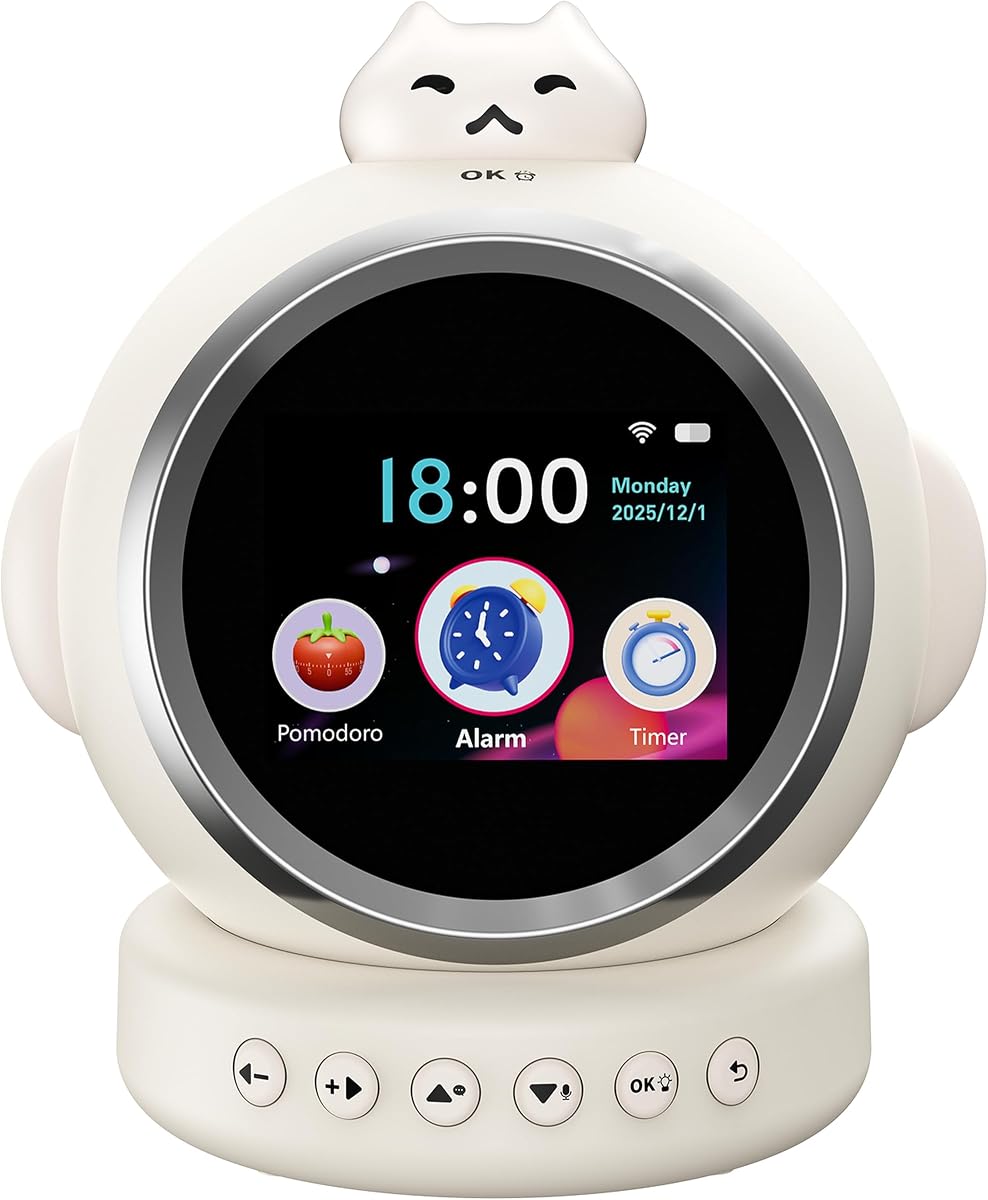
Kinglucky Smart Alarm Clock for Kids
4.4Editor score
Eight integrated daily functions
Over 800 bedtime stories
Twelve natural sleep sounds
Dual timing and multi-alarm controls
AI Kids Alarm Clock guide comparing 10 models for voice control, sleep training, stories, focus tools, multilingual support, ease of use, and family routines.
An AI kids alarm clock is more than a timepiece with a gentle wake-up function. These devices combine alarms, sleep sounds, stories, voice assistance, focus timers, reminders, and child-friendly controls in one bedside unit. The best model should make mornings calmer, bedtime more consistent, and independent routines easier without overwhelming a young child with complicated settings.
This guide compares ten current options according to their supported AI features, voice-control experience, sleep-training tools, story and music libraries, timer functions, display and lighting design, connectivity, battery details, multilingual support, and parent-facing controls. It covers products intended for toddlers, school-age children, and older children who need help building homework and daily routine habits.
The selections also reveal an important distinction: some clocks are true sleep-training companions, while others place greater emphasis on education, focus training, or conversational entertainment. Each review highlights the most useful features, along with setup requirements and trade-offs. Product specifications and availability can change, so readers should verify current details and prices before purchasing.
4.4Editor score

4.6Editor score

4.0Editor score
The table below compares the ten shortlisted clocks by their primary strengths, sleep features, content, focus tools, and practical hardware details. Ratings are included only where a numeric customer rating was supplied in the source information, and several newer products do not yet have an available rating.




The VoxNimbus AI Kids Alarm Clock is designed to be a conversational partner rather than a conventional alarm clock with a few bonus features. Its source information lists a 3.5 rating, but its more distinguishing feature is an adaptive AI system that adjusts to a child's vocabulary and interests. It can hold two-way conversations, provide stories, and answer the kinds of “why” questions that encourage independent curiosity.
We may earn a commission when you buy through this link, at no additional cost to you.
The clock also includes a study interval timer, translation support for ten languages, an ok-to-wake format, and an alarm and sound-machine function. Its 1200mAh rechargeable battery, Type-C charging, included AAA backup battery, and TF card slot make it more flexible than a simple plug-in bedside unit. The lack of a camera and the stated parental controls are especially relevant in a child's bedroom.
The main trade-off is that its AI functions require a 2.4GHz Wi-Fi connection, making initial setup and ongoing operation less flexible than a fully offline clock. The supplied 3.5 rating suggests that some buyers may have encountered mixed experiences, although the product description is unusually strong in its coverage of educational, privacy, and sleep-related functions. Families should also confirm the latest 12-hour or 24-hour display setting after completing the stated system update.
This is a worthwhile choice for parents who want their child to have a more interactive educational companion and do not mind handling network setup. It may be less suitable for households that require 5GHz-only connectivity or want a larger battery. Overall, it stands out for adaptive conversation, multilingual reach, and a broad combination of entertainment, focus, and sleep functions.
The personalized two-way dialogue is the centerpiece of this model. Rather than simply reading a fixed story, the AI can adjust its vocabulary and subjects to the child's questions, making it useful for both learning and emotional companionship.
The stated no-camera design and encrypted processing provide reassuring privacy controls. Families should still review permissions, connected services, and parental settings during setup, and they must use a 2.4GHz Wi-Fi network for AI features.
We may earn a commission when you buy through this link, at no additional cost to you.
The ChatGPT Kids Alarm Clock targets families seeking a straightforward combination of toddler sleep training and conversational entertainment. It uses ChatGPT technology to answer questions, tell stories, and provide educational content through voice control. That combination could make the clock more useful than a basic night-light alarm, particularly as a child becomes comfortable initiating requests independently.
We may earn a commission when you buy through this link, at no additional cost to you.
Sleep routines are supported by an ok-to-wake light system, gentle alarms, customizable nap timers, and a night light that gradually dims. The entertainment hub adds a music player, lullabies, white noise, time-teaching games, more than ten sounds, and seven night-light color choices. Parent-oriented controls include volume adjustment and timeout settings, while soft edges and child-friendly materials suit bedroom or classroom placement.
No numeric customer rating was supplied for this listing, so its performance cannot be compared using a numerical score. The description is detailed, but it does not provide battery capacity, dimensions, supported languages, Wi-Fi requirements, or specific information about how the timeout function interacts with the assistant. Those omissions make it particularly important for buyers to check the current listing and confirm that the connected experience is appropriate for their child.
The product is best suited to families seeking an easy-to-use assistant that combines sleep training, stories, and early time-learning activities. It may appeal more to toddlers and younger children than to teenagers. With gradual lighting, voice operation, and parental controls already included, it is a credible all-in-one choice for establishing a predictable bedtime and morning routine.
The ok-to-wake display and gradual dimming night light provide visual and environmental cues throughout the bedtime sequence. Customizable nap timers can also help families maintain a consistent daytime schedule for younger children.
Children can operate core functions by voice, which reduces reliance on small touch controls. Adults should still configure volume, content access, and timeouts together so the device remains age-appropriate over time.
We may earn a commission when you buy through this link, at no additional cost to you.
The Kinglucky Smart Alarm Clock for Kids offers the broadest stated feature set in this guide and carries a 4.4 rating. Its eight-in-one design combines an ok-to-wake clock, Pomodoro timer, countdown timer, MP3 player, weather forecast, AI voice assistant, an 800-plus story library, and a white-noise sleep machine. Few competitors cover morning, school, focus, play, and bedtime tasks in one enclosure.
We may earn a commission when you buy through this link, at no additional cost to you.
The Timi assistant responds to the wake word “Hello Timi,” allowing children to request stories, hear the daily weather, set school alarms, and ask questions without touching the screen. Its dual timing system supports both structured focus cycles and ordinary countdowns. For nighttime use, the clock provides 12 natural sounds, a soft night light, programmable automatic shutoff, and a gradual dimming effect. A blue-light-blocked touchscreen, large icons, and shortcut buttons support independent operation.
The number of features also creates a learning curve. Adults may need to set permissions, alarms, and timer defaults before handing the device over. The 540-day warranty and stated 24/7 support add reassurance, but the supplied information does not list battery capacity, supported languages, dimensions, or exact Wi-Fi requirements. Those details should be verified, particularly if the clock will travel or serve multilingual households.
This model is the strongest premium option for a child who wants one device rather than a separate alarm, sound machine, story player, and focus timer. It is particularly useful for school-age children who can benefit from Pomodoro sessions, weather checks, and voice-controlled alarms. The extensive library and broad routine coverage justify the premium designation for families willing to invest some setup time.
The eight functions are complementary rather than isolated extras. A parent can use the same device for waking, story time, focus blocks, countdowns, music, weather, and sleep sounds, reducing the number of separate devices on a child's desk or bedside table.
With more than 800 stated stories, 12 nature sounds, gradual lighting, and automatic shutoff, the clock offers more variation than a conventional sound machine. A programmable night routine can become predictable without feeling repetitive.
We may earn a commission when you buy through this link, at no additional cost to you.
The Bewinner AI Alarm Clock combines a touchscreen routine device with voice-activated storytelling and gamified focus training. Its primary appeal is the way it makes Pomodoro sessions more motivating: completed cycles produce interactive sound effects and reward feedback, turning homework or reading time into a challenge that can feel more approachable for children.
We may earn a commission when you buy through this link, at no additional cost to you.
The clock does more than manage study periods. It includes standard alarm functions, memo reminders, schedule management, white noise, soothing music, a night light, and story narration designed to help children relax at bedtime. Its multilingual assistant supports English, French, Spanish, Portuguese, German, Russian, Chinese, Vietnamese, and Indonesian, making it useful for multilingual families.
A 1500mAh rechargeable battery and Type-C charging provide practical portability, although the supplied listing does not state runtime. The 2.4GHz Wi-Fi requirement also matters because a compatible network is needed for the described connected functions. No numeric rating is available in the source information, so families should look for current customer feedback and confirm the setup process before buying.
The Bewinner is a strong choice for a child who is motivated by stories, feedback, and gamified routines. It is less compelling for a family seeking extensive information about battery life, supported content languages, dimensions, or detailed parental controls. Nevertheless, its combination of bedtime narration, focus rewards, multilingual assistance, and standard planning tools makes it a versatile middle-school and elementary-school companion.
The Pomodoro timer adds sound effects, interactive reminders, and rewards to each completed cycle. This is especially useful for children who struggle with homework initiation and respond better to immediate encouragement than to a conventional countdown.
Nine supported languages broaden the practical appeal of the assistant and content system. Families should confirm whether each interface, voice, and content category is translated consistently before relying on it for daily multilingual use.
We may earn a commission when you buy through this link, at no additional cost to you.
The Kids Alarm Clock with Nursery Stories is the strongest all-around selection in this guide, combining a 4.6 rating with a notably broad feature set. Despite the name, it is not limited to nursery use: the stated age range spans three to 15 years, making it appropriate for toddlers, elementary students, and older children establishing study or daily planning routines.
We may earn a commission when you buy through this link, at no additional cost to you.
Voice nursery stories offer hands-free access to calming content, while a multilingual encyclopedia adds general information and learning support. The Pomodoro timer uses interactive reminders, sound effects, and rewards to motivate focus sessions. At bedtime, white noise, wave sounds, lullabies, and a night light establish a calmer environment. Its 1500mAh battery and Type-C port are convenient for regular use, although actual runtime is not stated.
The key technical restriction is that the clock requires a 2.4GHz Wi-Fi network and does not support 5GHz. Some modern routers combine both bands, so buyers should confirm compatibility before setup. The source information also does not provide a specific AI model, voice wake phrase, screen size, dimensions, or detailed content controls. Those are important details to check for anyone who needs more than the core story, alarm, and timer functions.
This is the editor's choice because it balances sleep, education, focus, and routine features without centering the experience on one activity. It should appeal to families looking for a device that can grow with a child. The combination of a strong available rating, a broad age range, voice stories, and rewarding timers gives it wider everyday utility than a dedicated baby sound machine or a basic learning clock.
Nursery stories and soothing sounds serve younger children, while the encyclopedia, rewards, and Pomodoro sessions become more useful as school demands increase. The stated three-to-15-year range makes it easier to justify as a long-term bedside and desk companion.
Interactive sounds and positive feedback after each completed Pomodoro cycle provide immediate reinforcement. Adults can still supervise task selection, but the child receives a more engaging reason to finish a reading or study interval.
We may earn a commission when you buy through this link, at no additional cost to you.
The ChatGPT Smart Voice Control Clock emphasizes simple operation for children who are not yet comfortable with complex menus. Voice control allows a child to ask questions, request bedtime stories, and obtain educational content, while the clock's physical controls remain available for adults and older children who prefer direct interaction.
We may earn a commission when you buy through this link, at no additional cost to you.
Its sleep-training system includes an ok-to-wake light, gentle wake alarms, customizable nap timers, and gradual night-light dimming. A music player, lullabies, white noise, and time-teaching games make it more useful across the day. Seven night-light colors and parent-controlled volume, timeout, and general settings create a flexible environment for bedrooms, playrooms, and classrooms.
The description identifies the product as suitable for ages three to 12 in its title while also describing a three-to-eight-year use case, so parents should interpret the age range broadly. No numeric customer rating, battery specification, Wi-Fi requirement, multilingual list, or dimensions are included in the supplied data. Those omissions make hands-on setup verification important before committing to the device.
This option is best for a family that prioritizes voice-first interaction and a gentle transition between entertainment, learning, and sleep. It offers a useful mix of content and controls but does not provide the same level of detail about battery, story quantity, or focus statistics as the Kinglucky. Its main appeal is accessibility: a child can direct many functions with simple spoken requests.
The assistant can handle questions, stories, and educational requests without requiring a child to navigate small icons. This is valuable for younger users and reduces frustration when they are still developing reading fluency.
Customizable nap timers, gradual dimming, and seven light colors support different stages of a child's day. As a child gets older, the same physical device can shift from bedtime assistance toward independent morning routines and time learning.
We may earn a commission when you buy through this link, at no additional cost to you.
The AI Voice Time Management Clock offers one of the strongest combinations of timer flexibility, sleep audio, and portable entertainment. Its assistant uses a large language model similar to ChatGPT and activates with the wake word “Helo Timi.” Children can set alarms, check the weather, ask questions, and request stories, making the alarm and time-management functions accessible by voice.
We may earn a commission when you buy through this link, at no additional cost to you.
Three timing modes—Pomodoro, countdown, and count-up—cover study, reading, chores, naps, and general activities. Alarm customization includes multiple alarms, three themed soothing sounds, ten volume levels, and separate system and alarm volume settings. For sleep, the top knob accesses 12 white-noise or calming-music categories, while a long press on the AI button starts a timer lasting 15, 30, 45, 60, 90, or 120 minutes.
The 3.6 rating indicates mixed customer feedback, and the product requires 2.4GHz Wi-Fi for AI voice functions and automatic time and date updates. It supports eight system languages and Fahrenheit or Celsius, which adds flexibility for international households. The TF card slot can also turn it into a portable music player for children's songs, story audio, or study material, although supported file formats and card capacity are not specified.
This is a compelling option for a child who needs both structured time management and flexible entertainment. It offers more timer choices than many competing models and a generous sleep-timer range. Families should test the wake-word sensitivity, review network setup instructions, and consider the available feedback before choosing it for a child who relies heavily on it.
Pomodoro, countdown, and count-up modes accommodate both planned and spontaneous activities. A child can use a focus cycle for reading, a countdown for a bedtime task, or count-up mode to see how long a practice or game session lasts.
Multiple alarms, three themed sounds, ten volume levels, and independent system and alarm volume controls allow the wake-up experience to be tuned more precisely. The child can select a preferred ringtone without changing the overall interface volume.
We may earn a commission when you buy through this link, at no additional cost to you.
The ChatGPT Ok-to-Wake Clock shares a broad toddler-focused design with the other ChatGPT-labeled models in this guide, but its identity centers on a simple sleep-training proposition. A child can interact with the assistant for questions, stories, and educational content, while the ok-to-wake light system establishes a clear visual boundary between sleeping and getting ready.
We may earn a commission when you buy through this link, at no additional cost to you.
Gentle wake-up alarms, customizable nap timers, and gradual night-light dimming help families build a repeatable schedule. The entertainment features include a music player, lullabies, white noise, time-teaching games, more than ten soothing sounds, and seven color choices. Volume controls and parental timeout settings let adults decide how long conversational access remains available.
No numeric rating is available for the supplied listing, and the information does not state battery capacity, dimensions, supported languages, or Wi-Fi compatibility. Because several listings use very similar descriptions and imagery, shoppers should carefully check the ASIN and current listing details to ensure they are evaluating the intended model. The convenience of a connected assistant should be weighed against the need for clear parental oversight.
This product suits families seeking a straightforward toddler clock that brings together a morning light, calming night routine, and interactive content. It may be less suitable for a child primarily seeking advanced productivity tools, since its stated focus is entertainment, time learning, and sleep training. It remains a capable option when those routines are the priority.
An ok-to-wake light gives a child an immediate visual cue when it is time to leave bed. Combined with gentle alarms and adjustable settings, it offers a less abrupt alternative to waking with a sudden loud sound.
Parental timeout settings provide a useful boundary around the assistant's availability. They can help families keep story time and question periods within a bedtime window rather than allowing the device to become an open-ended screen.
We may earn a commission when you buy through this link, at no additional cost to you.
The PRUNUS AI Companion Alarm Clock is the strongest value-oriented selection because it combines a conversational assistant with practical routine tools across a stated age range of three to 18. Its 4.0 rating gives it a positive available score, while the unusually broad age range makes it relevant to toddlers through teens and older students.
We may earn a commission when you buy through this link, at no additional cost to you.
Its AI can tell stories, answer questions, set reminders, and manage schedules through hands-free voice commands. The visual Pomodoro timer uses the 25/5 method, with progress bars and rewards intended to reduce procrastination during homework. Interactive daily and weekly weather forecasts add planning value, and a TF card slot supports MP3 music playback for songs, lessons, or other audio.
Unlike several sleep-focused selections, the description does not emphasize an ok-to-wake light, white-noise library, lullabies, gradual dimming, or other dedicated sleep-training features. Battery details, supported languages, dimensions, network compatibility, and sleep-timer options are also not provided. As a result, it is a better fit for a family seeking a general routine and homework companion than for one whose priority is a complete nursery sleep system.
Despite those limitations, the combination of AI conversation, visual focus cycles, reminders, weather, and music is highly useful for a wide age range. It is a particularly strong choice for a teen, a student working independently at a desk, or a family seeking a multifunction gift. Users should verify current connectivity requirements and available controls before setting up the device for regular use.
The 25/5 visual timer turns a familiar productivity method into an interactive task for children. Progress bars and rewards provide immediate feedback, while voice reminders help the user organize sessions without repeatedly checking a phone.
Stories, answers, reminders, and schedule management are integrated into one hands-free device. That makes it useful for children who need company during homework but still need a structured approach to completing tasks.
We may earn a commission when you buy through this link, at no additional cost to you.
The Jiawu AI Alarm Clock is built around a practical combination of interactive storytelling, planning, focus training, and sleep ambience. Voice-activated bedtime stories are the main attraction, offering children narrated content that can help create a calmer transition toward sleep while satisfying curiosity and encouraging imagination.
We may earn a commission when you buy through this link, at no additional cost to you.
The device also includes memo reminders, schedule management, white noise, gentle music, and a soft night light. Its Pomodoro system uses interactive sound effects and rewards to make study sessions feel like challenges. The 1500mAh rechargeable battery and Type-C charging add convenient everyday use, while stated 2.4GHz Wi-Fi support is required for a stable connected experience.
No numeric rating is available, and the supplied information gives only a broad indication of multilingual support, mentioning English, French, Spanish, and more without listing the complete set. Screen size, dimensions, content library size, parent-control options, and exact wake phrase are also unspecified. The shared image and similar feature descriptions across some listings make direct comparison difficult, so buyers should check the ASIN and current product documentation.
The Jiawu is best for a family that wants bedtime stories to lead naturally into a broader routine system. It is less obviously focused on dedicated sleep training than the Kinglucky or the Kids Alarm Clock with Nursery Stories, but it offers a balanced package for children who need both wind-down entertainment and daytime organization. It is a worthwhile option after confirming language, connectivity, and content details.
Voice narration can make a familiar bedtime routine more engaging while allowing the child to choose when a story begins. The soft night light and built-in sounds help maintain a consistent atmosphere from story time through sleep.
Memo reminders, schedule management, and gamified focus sessions make the clock useful during the school day. The same routine structure can help a child organize tasks while providing a more child-friendly method than adult reminders alone.
We may earn a commission when you buy through this link, at no additional cost to you.
The most useful AI kids alarm clock is not necessarily the one with the longest feature list. The right choice depends on a child's age, bedtime habits, attention needs, home network, and the amount of supervision parents want to provide.
Start with the manufacturer's stated age range, but also consider what the child can realistically manage. Toddlers benefit most from simple voice requests, large controls, a reassuring light, and short routines. Elementary-aged children can use time-learning games, Pomodoro sessions, weather checks, and stories with increasing independence. Teens usually value less childish design, useful reminders, study timers, and hands-free assistance more than nursery content. A broad age range is useful only if the interface remains clear as the child grows.
In short, match complexity to maturity. A device with advanced AI can still be a poor choice if its menus, voice responses, or content are difficult for the intended user to navigate.
Check whether the clock uses a wake word, conversational requests, or both. A clear activation phrase and understandable responses are important in a noisy bedroom. Some models support alarms, stories, weather, questions, and reminders by voice, while others emphasize one or two of those functions. The presence of a large language model or ChatGPT branding does not by itself describe the full user experience, so review setup instructions and available parental controls.
Voice features are convenient, but children should know what kinds of questions to ask and when the assistant is available. Timeouts, quiet hours, and content boundaries can make the experience feel more predictable and reduce the chance of late-night conversations.
An effective sleep-training clock should communicate the correct time clearly without waking the entire household. Look for an ok-to-wake light, a gentle night light, adjustable alarm volume, dimming behavior, white noise, lullabies, and a programmable sleep timer. The best design establishes a sequence: soothing sound, gradual light, quiet darkening, and then a clear morning cue. Exact sleep duration is not promised by the clock, but a consistent environment can make routines easier to follow.
For very young children, check that the light is not excessively bright and that controls are simple enough to use at bedtime. For older children, look for independent alarm selection and multiple schedules that can distinguish school days, weekends, naps, and activities.
Stories and music can make a clock more useful than a conventional alarm. Consider both quantity and usability: a large library matters only if children can find stories through an interface they understand. Options such as voice-activated narration, repeatable sleep sounds, TF card playback, and lullabies are useful in different situations. The Kinglucky stands out with a stated library of more than 800 stories, while several other models emphasize voice storytelling without publishing a comparable count.
Parents should also consider whether they want children to play their own TF card audio, use only supplied content, or rely on connected services. A broad content library is valuable, but easy parental controls and understandable navigation are just as important.
Pomodoro timers can help children divide homework, reading, chores, and practice into manageable intervals. Look for clear cycle lengths, visual progress, audible reminders, and positive feedback. Some clocks also offer count-up and countdown modes, which support tasks with a fixed deadline and activities where the child needs to know elapsed time. Voice-set reminders may make it easier to build a morning or after-school sequence.
A timer should support independence without encouraging endless screen use. A clear start, visible progress, and satisfying completion signal are more useful than a long list of unconnected productivity modes.
Most true AI functions require a Wi-Fi connection. Several products in this guide specifically require 2.4GHz Wi-Fi, and at least one explicitly does not support 5GHz networks. Check whether the router uses a combined band, whether separate network credentials are required, and whether a mobile application is needed for account setup. Automatic time and date updates may also depend on connectivity, so the clock should still have a usable manual setup path.
Network restrictions are a meaningful buying consideration, not a minor technical detail. A parent who relies on a 5GHz-only network should avoid products limited to 2.4GHz or confirm that the router supports a compatible network. Households should also review the connected services, permissions, and privacy policy before enabling conversational access.
Battery capacity and charging method affect how freely the clock can move between a bedroom, playroom, and study desk. Rechargeable models with Type-C charging are convenient, while included backup batteries can add resilience during a power interruption. A stated 1500mAh capacity may be preferable when a child uses stories or music throughout the day, but capacity alone does not reveal runtime because screen brightness, sound output, and network activity all affect consumption.
Consider size, weight, and charging location as well. A bulky clock may work well on a desk but be less suitable for travel. Always verify the actual dimensions, included cables, adapter requirements, and battery replacement information before ordering.
Look for adjustable volume, time limits, quiet hours, and controls over conversational access. The ideal device lets a child use the assistant independently without allowing unlimited use late at night. Privacy features such as a camera-free design, encrypted processing, or clear data policies deserve close attention, although marketing claims should still be compared with the manufacturer's documentation and applicable privacy terms.
The best arrangement is a shared setup. Let the child explore approved voice commands while parents establish alarms, volume, timeouts, and appropriate content. Revisit those controls as the child gets older and begins requesting more independent access.
Begin by charging the clock and reading the included setup instructions before allowing a child to use it. Connect it to the required 2.4GHz Wi-Fi network, create or sign into the necessary account, select the correct time format, and set automatic date and time updates. Test the volume, display brightness, night light, alarms, voice activation, and sleep timer while an adult is present. Some models require a first-time activation sequence, such as pressing and holding a knob or following on-screen prompts.
Create a simple routine with the child. Set separate alarms for waking and naps, choose one or two familiar sounds, and decide when stories or voice conversation will be available. A parent can demonstrate how to request the time, hear a story, or begin a Pomodoro session. For young children, keep the wake word and voice commands short, use the same phrasing consistently, and avoid placing the unit where background noise makes activation difficult.
For care, keep the device on a stable surface away from moisture and direct heat, and clean it with a lightly dampened soft cloth rather than pouring liquid over it. Check the TF card slot, charging port, and speaker for dust or debris. Review parental settings periodically, rotate passwords where applicable, and adjust language, content, volume, and timeouts as the child ages. If the device is used for travel, confirm that the destination network supports its connection requirements.
Most models require Wi-Fi for AI conversations, automatic time updates, streaming content, and connected account features. Basic physical alarms and some locally stored audio may still work without a network, but functionality can vary. Several products specifically require 2.4GHz Wi-Fi, and some do not support 5GHz networks, so checking the router is an essential first step.
Many models include toddler-oriented features such as ok-to-wake lighting, gradual dimming, lullabies, voice stories, and simple controls. The most appropriate choice should also offer parental timeouts, adjustable volume, and an easy way to limit conversation. Because even three-year-olds may be unable to read menus reliably, voice operation and adult configuration are especially useful for this age group.
Yes, several models include time-teaching games or voice functions that state the current time. These features work best when connected to a real routine: ask the child to find a particular hour, compare the display with a familiar activity, or use the clock during a short time-learning game. The clock can reinforce concepts, but it should complement rather than replace other learning.
An ok-to-wake clock uses a gradual or color-coded light to show when a child may safely get out of bed. A regular alarm relies mainly on sound. Combining light with adjustable audio, a night light, and sleep sounds can make transitions gentler and help a child understand the difference between quiet time and morning time.
That depends on the model's controls and the child's age. Voice-activated storytelling can be engaging, but parents should first review available content, configure appropriate time limits, and establish when the assistant may be used. Younger children benefit from adult-guided use, while older children may be able to navigate approved content independently.
Check the product requirements before setting up the clock. Many options in this category specify 2.4GHz Wi-Fi, and one explicitly excludes 5GHz. Routers that broadcast both bands can usually support a 2.4GHz connection, but the network may need to be selected separately. Confirm compatibility before ordering to avoid delays during initial setup.
Choose a sleep-focused model if bedtime stories, white noise, night lighting, and an ok-to-wake signal are the main requirements. Choose a study-focused model if Pomodoro sessions, count-up timing, reminders, progress feedback, and homework organization matter more. The Kinglucky and PRUNUS emphasize broader routine or productivity coverage, while several other selections concentrate more heavily on sleep and narration.
Most are designed for flexible use with a rechargeable battery and Type-C charging, although actual runtime varies by sound volume, screen use, and connected activity. Some models include a backup battery option. Always confirm the battery specification, charging time, and included accessories in the current listing before relying on the clock during travel or overnight use.
The Kids Alarm Clock with Nursery Stories is the best overall choice because it balances stories, sleep sounds, a gamified focus timer, multilingual support, and a broad age range. The Kinglucky Smart Alarm Clock for Kids earns the premium position with its eight-function design, extensive story library, dual timer system, and broad daily coverage. For shoppers seeking strong value and a study-oriented companion, the PRUNUS AI Companion Alarm Clock provides voice assistance, weather, reminders, and a visual 25/5 timer.
Prioritize the routines your child actually needs. A toddler may benefit most from a gentle light, simple voice commands, and a bedtime story function, while an older child may need Pomodoro sessions, count-up timing, weather forecasts, and reminder tools. Before purchasing, confirm Wi-Fi compatibility, battery details, language support, parental controls, and whether the stated content and stories match the intended user's age and interests.
Specifications, software behavior, connected services, customer ratings, and prices can change over time. Review the current product listing and recent customer feedback before making a final decision, and use the included Amazon links to check the latest available configuration and cost.