
BOYI GMK67 Barebones Keyboard Kit
4.5Editor score
65% tri-mode wireless layout
VIA customization and hot swap
Gasket-mounted RGB construction
Our Barebones Keyboards guide compares 10 DIY kits for switch compatibility, connectivity, mounting, programmability, displays, build quality, and overall
Barebones keyboards give enthusiasts the freedom to build a mechanical keyboard around their preferred switches, keycaps, layout, and sound profile. Unlike a complete keyboard, a barebones kit generally provides the case, PCB, plate, stabilizers, and supporting hardware, allowing the user to make the most important personalization decisions.
We compared these kits by examining layout size, mounting system, hot-swap support, wired and wireless connectivity, programmability, lighting, displays, included foam, plate material, and intended build complexity. The list covers compact 65% models, TKL-style layouts, full-size boards, and premium aluminum enthusiast frames for different needs.
Each review explains how a kit could fit a particular build, from a portable wireless daily driver to a full-size office setup or a highly customizable performance board. Ratings reflect the supplied customer feedback, while product availability and prices can change, so check the current listing before purchasing.
4.5Editor score

4.6Editor score

4.4Editor score
The comparison below highlights layout, connectivity, mounting, and customization options across all ten kits, making it easier to identify the right foundation for your next mechanical keyboard build.


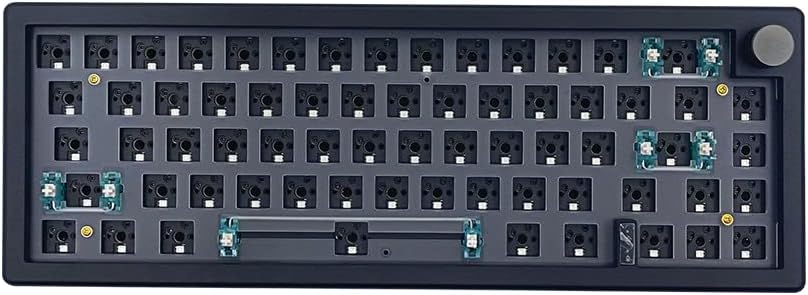


The BOYI GMK67 is a compact barebones kit that combines a 65% layout, tri-mode connectivity, hot-swap sockets, and extensive customization in one approachable package. Its supplied rating is 4.5, placing it among the strongest reviewed options. The most immediately attractive feature is how much functionality is included before the user installs switches, keycaps, and stabilizers.
We may earn a commission when you buy through this link, at no additional cost to you.
Its three connection modes include Bluetooth 5.0, 2.4GHz wireless, and wired USB Type-C, making the board useful across desktop, laptop, and mobile setups. VIA support allows key mapping, macros, and lighting changes, while the 4000mAh battery separates it from many basic DIY kits. The gasket-mounted construction, included foam, and user-installable polycarbonate plate also give buyers meaningful control over sound and feel.
There are important limitations. It accepts conventional three-pin and five-pin mechanical switches but is not listed as compatible with optical or magnetic switches. Building a wireless board also takes more care than assembling a simple wired kit, and the included knob occupies space that some compact-layout users might prefer to use for another key. The white finish may also show grime more readily than a darker build.
Despite those considerations, the GMK67 is a strong recommendation for a first customizable keyboard or for anyone who wants 65% ergonomics without giving up wireless connectivity, RGB, a knob, or software-level programmability. It offers an unusually balanced feature set for the money and leaves meaningful switch and keycap choices in the hands of the builder.
Bluetooth 5.0, 2.4GHz, and wired Type-C operation let the same completed keyboard move between a gaming setup, a laptop, and a mobile device. The 4000mAh battery also makes it more practical as a daily wireless board.
VIA remapping, programmable keys, RGB controls, a multifunction knob, and a user-installable plate make this kit more than a simple blank. The included foam reduces the need for additional internal tuning.
We may earn a commission when you buy through this link, at no additional cost to you.
The GMK104 Black is one of the most complete kits in this guide, combining a traditional full-size layout with a smart display, metal knob, RGB lighting, and tri-mode connectivity. Its supplied rating is 4.6, making it an Editor's Choice for buyers who want extensive functionality without assembling every component from separate vendors.
We may earn a commission when you buy through this link, at no additional cost to you.
The 104-key arrangement includes the function row, navigation keys, arrows, and a numpad, eliminating the compromises associated with smaller layouts. QMK and VIA support enable detailed remapping, macros, and lighting effects. Bluetooth 5.0, 2.4GHz, and USB Type-C operation provide flexible device switching, while the 4000mAh battery supports extended wireless use.
A gasket-mounted, hot-swappable PCB accepts three-pin and five-pin mechanical switches without soldering. South-facing RGB improves the appearance of many keycap configurations, and the board is listed as compatible with both Windows and macOS. The display can present updated images and information, and the knob provides precise volume control.
The tradeoff is footprint and complexity. A full-size keyboard takes materially more room than a 65% or 75% model, and the display, knob, wireless electronics, and 104-key PCB introduce more opportunities for setup issues. Nevertheless, it is particularly well suited to office-focused builders, spreadsheet users, and enthusiasts who value a numpad and dedicated function keys.
Unlike compact kits, the GMK104 preserves a numpad, arrow cluster, and function row. It is better suited to productivity workflows and multi-device users who prefer familiar desktop proportions.
The real-time display, metal knob, and south-facing RGB lighting make the finished board visually distinctive. Users can also create macros and remap keys through the supported programming platforms.
We may earn a commission when you buy through this link, at no additional cost to you.
The M87 Black offers a relatively straightforward route into a custom 75% mechanical keyboard. It is a wired, TKL-style kit with a hot-swappable PCB, south-facing RGB, and a layout that balances function keys with a more compact footprint. Its supplied rating is 4.2 reflects a positive but less emphatic customer response than several wireless alternatives.
We may earn a commission when you buy through this link, at no additional cost to you.
The central appeal is its support for three-pin and five-pin switches, including common Cherry, Otemu, Gateron, Kailh, and compatible MX-style options. Builders can install switches without soldering, making later tuning much easier. NKRO support, full-key anti-ghosting, and compatibility with both Windows and macOS also make it appropriate for gaming and everyday productivity.
Its sound-focused design includes sound-absorption foam and a silicon bottom pad intended to reduce case resonance. The detachable USB-C cable supports easier transport than a permanently attached lead. Software-based customization provides lighting effects, music-rhythm modes, macros, and per-key illumination options, although the kit is more basic than boards with QMK, displays, or wireless controls.
This is a good choice for buyers who want a traditional wired mechanical keyboard and a 75% footprint without paying for wireless features. It may disappoint those seeking a knob, screen, Bluetooth, or highly modular aluminum construction, but its straightforward hot-swap foundation and damping materials suit first-time customizers well.
Hot-swap sockets let builders try different mechanical switches without a soldering iron. The broad MX-style compatibility makes it easier to change between linear, tactile, and clicky switch families.
Sound-absorption foam and the bottom pad are intended to reduce unwanted internal noise. Switch choice will still have the greatest influence on the final sound and typing character.
We may earn a commission when you buy through this link, at no additional cost to you.
The GMK104 White shares the extensive feature set of the black model but stands out with the highest supplied rating in the group, at 4.8. It is a 104-key barebones kit with a smart display, metal knob, gasket-mounted hot-swap PCB, RGB backlighting, and tri-mode wireless connectivity.
We may earn a commission when you buy through this link, at no additional cost to you.
Windows and macOS compatibility makes it relevant to a broad range of users, while Bluetooth 5.0, 2.4GHz, and wired Type-C allow convenient switching among devices. QMK and VIA programmability support remapping, complex macros, and lighting effects. The display can be updated in real time with images, and the two multimedia buttons and knob add practical controls beyond the standard key arrangement.
The board includes a numpad, arrow keys, and function row, so it does not ask users to adapt to a tenkeyless arrangement. Hot-swap sockets accept three-pin and five-pin switches, and the gasket structure is intended to provide a cushioned feel while reducing vibration. The white exterior is especially attractive for coordinated desk setups, although it may show dirt and discoloration over time.
Its main disadvantage is the amount of desk space required. Buyers should also expect a more involved assembly than a basic wired DIY kit. Even so, the combination of display, knob, wireless modes, full-size layout, programmability, and strong customer feedback makes this one of the most well-rounded choices in the guide.
The full-size layout retains dedicated numeric and navigation keys, while the display and knob add modern controls. This makes the kit suitable for users who want both office practicality and enthusiast customization.
Bluetooth 5.0, 2.4GHz, and wired Type-C modes provide convenient ways to move between systems. FN+Q/W/E shortcuts are listed for device switching, and the 4000mAh battery supports mobile use.
We may earn a commission when you buy through this link, at no additional cost to you.
The M87 White is a light-colored, wired 75% barebones kit aimed at builders who want a compact mechanical keyboard with hot-swap convenience. It provides a gasket-style construction, south-facing RGB, a detachable USB-C cable, and software support for macros and lighting. Its supplied rating is 3.5, the second-lowest result in this selection.
We may earn a commission when you buy through this link, at no additional cost to you.
The kit accepts common three-pin and five-pin MX-style mechanical switches, so the builder can choose a wide range of switch options and replace them later without soldering. Its software offers factory lighting patterns, music-rhythm modes, per-key effects, and macro creation. Full-key anti-ghosting and NKRO support are useful for gaming, while Windows and macOS compatibility broadens its appeal.
Sound-absorption foam and a silicon bottom pad are included to temper case noise. The detachable cable improves portability and makes cable replacement easier. The 75% format preserves dedicated function keys but removes the separate navigation and number clusters, providing a middle ground between a full-size board and a very compact keyboard.
The white finish may not complement every setup and will need more regular cleaning than a black board. More importantly, the lower rating suggests some variability in customer satisfaction, although the supplied specifications remain attractive. The kit is best for a wired, function-row build where simplicity and a clean white appearance matter more than wireless convenience or a display.
The format maintains a dedicated function row while eliminating the numpad and separated arrow cluster. It is a practical size for gaming, writing, and everyday navigation on a moderately sized desk.
The detachable USB-C design keeps the connection simple and avoids wireless setup or battery management. That makes this an accessible option for a first mechanical keyboard build.
We may earn a commission when you buy through this link, at no additional cost to you.
The black BOYI GMK67 offers the same well-rounded 65% foundation as the white version, but with a darker finish and a supplied rating of 4.3. It is particularly appealing to users who want a wireless mechanical keyboard without giving up RGB lighting, programmability, a rotary knob, or a straightforward hot-swap build.
We may earn a commission when you buy through this link, at no additional cost to you.
Bluetooth 5.0, 2.4GHz, and wired Type-C modes make it adaptable to different computers and mobile devices. The 4000mAh battery supports extended wireless sessions, while VIA software provides key remapping, macros, and lighting customization. Its gasket-mounted PCB, installed foam, and included polycarbonate plate give the builder several levers for influencing the final feel and sound.
The 65% layout removes the function row and navigation cluster to save desk space. That is excellent for a minimal workstation, but users who rely heavily on F-keys, dedicated arrow keys, or a numpad may need to adjust their workflow. The knob is programmable, although it takes room that a conventional 65% board normally reserves for additional keys.
The kit supports only conventional three-pin and five-pin mechanical switches, excluding optical and magnetic switch types. It also requires more assembly and configuration than a ready-made wireless keyboard. Within the barebones category, however, the combination of tri-mode connectivity, gasket construction, hot swap, and software control makes this a compelling compact choice.
The 65% format creates useful desk space while retaining alphanumeric, modifier, and arrow-key functionality. It is well suited to a laptop-centric setup where a full-size board would be intrusive.
Installed foam and a user-installable polycarbonate plate allow the builder to begin tuning the board. These internal choices complement the gasket structure and help reduce excessive case resonance.
We may earn a commission when you buy through this link, at no additional cost to you.
The GMK87 distinguishes itself with an 80% compact layout, a customizable TFT screen, and a metal knob. Its supplied rating is 3.9 places it in the middle of the group, but the feature set is aimed at users who prioritize visible information and modern controls as much as traditional key combinations.
We may earn a commission when you buy through this link, at no additional cost to you.
The display can show customizable images, dates, times, and other information in real time, while the knob handles volume. Bluetooth 5.0, 2.4GHz, and wired Type-C modes allow use with PCs, laptops, tablets, and phones. A 3000mAh battery provides the power source for wireless operation, and VIA software supports macros, key remapping, and RGB customization.
Its 87-key hot-swappable PCB accepts three-pin and five-pin mechanical switches without soldering. Gasket mounting, south-facing RGB, a dual-stage foldable kickstand, and a built-in USB storage compartment are useful design details. The compact layout provides more keys than a 65% model while remaining smaller than a full-size board.
The 3000mAh battery is smaller than the 4000mAh batteries offered by several competing kits, so heavy wireless users should account for charging frequency. The display and wireless electronics also make assembly and configuration more involved. Even so, the GMK87 is a distinctive option for a desk centerpiece, media-control setup, or portable custom build.
The TFT interface can display updated images, dates, and times rather than serving only as a status indicator. That makes it a useful focal point for a custom desk setup.
The 87-key layout balances function-key access and space efficiency, while three connection modes extend the board to computers, tablets, and mobile devices. The foldable kickstand adds adjustable viewing height.
We may earn a commission when you buy through this link, at no additional cost to you.
The GLORIOUS GMMK PRO is a premium 75% barebones frame designed for enthusiasts who value material quality, modularity, and extensive customization. Its supplied rating is 4.4, and the 3.3-pound CNC-machined aluminum body gives it a substantially more substantial feel than typical plastic DIY kits.
We may earn a commission when you buy through this link, at no additional cost to you.
The anodized aluminum construction offers scratch resistance and a satin-like surface. A preinstalled aluminum plate provides a firm, consistent typing foundation, while five-pin hot-swap sockets accept a broad range of three-pin and five-pin MX mechanical switches. The included switch and keycap pullers simplify installation and later changes.
A major strength is the replaceable ecosystem. The top frame, rotary knob, and cable can be exchanged for compatible alternatives, and the aluminum plate can be swapped for a brass or polycarbonate version to alter stiffness, sound, and feel. Internal foam can also be added or removed to tune the acoustic profile. This is meaningful customization rather than a single fixed configuration.
The frame is wired and does not provide the tri-mode wireless functionality offered by several other picks. It also demands additional purchases for switches, keycaps, stabilizers, and possibly alternative plates. For a buyer committed to a premium wired build, however, the solid construction and extensive modularity make the GMMK PRO one of the most compelling options in the guide.
The CNC-machined aluminum body provides weight, rigidity, and a refined finish. These qualities give the frame a premium feel even before the user adds switches, keycaps, and internal tuning materials.
Replaceable top frames, knobs, cables, and switch plates allow the board to evolve over time. Brass and polycarbonate plate options are specifically mentioned as ways to change the typing feel and sound profile.
We may earn a commission when you buy through this link, at no additional cost to you.
The GMK108 is a 108-key full-size barebones kit focused on wireless flexibility, programmability, and a conventional desktop layout. Its supplied rating is 4.1 indicates generally positive feedback, though it does not lead the guide. The main attraction is the combination of 104-key functionality and several additional full-size keys.
We may earn a commission when you buy through this link, at no additional cost to you.
It supports Bluetooth 5.0, 2.4GHz, and wired Type-C, with FN+Q/W/E listed as device-switching combinations. The 4000mAh battery offers a useful capacity for wireless work, while VIA software enables key remapping, macros, and lighting effects. Gasket mounting, hot-swappable three-pin and five-pin sockets, and south-facing RGB support the customizable foundation.
Compared with the GMK104, this model omits the smart display and metal knob. That means it may produce a cleaner, more traditional visual result, but it lacks two of the most noticeable modern extras. The 108-key arrangement also occupies more desk space than either a 75% or 65% kit and may be unnecessary for users who never use a numpad.
The GMK108 is a solid choice for a productivity-oriented wireless build with a full-size footprint. It is especially suitable for users who prioritize battery capacity, familiar navigation, and programmability over a screen or rotary control. Its main trade-off is practical desk space rather than build capability.
The 108-key layout includes a numpad, arrows, and function controls, while tri-mode connectivity allows use across multiple systems. This makes the board suitable for spreadsheets, administration, and general office work.
VIA support handles remapping, macros, and lighting, even though the board has no screen or knob. Users who prefer a visually traditional full-size board can still create a personalized layout.
We may earn a commission when you buy through this link, at no additional cost to you.
The GLORIOUS GMMK 3 is a premium 75% barebones keyboard built around a modular gasket system, programmable knob, and extensive internal customization. Its supplied rating of 3.2 is the lowest among these ten kits, so buyers should investigate current customer feedback carefully. Even with that reservation, its underlying design is highly appealing to experienced enthusiasts.
We may earn a commission when you buy through this link, at no additional cost to you.
The keyboard's modular construction uses nine points of modularity and a building-block-inspired gasket system. Users can alter internal gaskets for a firmer or more flexible typing feel. An aluminum switch plate provides a firm foundation, while two layers of dense foam absorb unwanted case resonance and help produce a cleaner sound profile.
Five-pin MX hot-swap support lets users install and replace compatible switches without soldering. The rotary knob can control volume, play or pause media, mute the device, or trigger a custom action through Glorious CORE software. Those controls make the board useful as a daily driver as well as a customizable project.
Its complexity and premium positioning are the main considerations. First-time builders may find the modular system more involved than a straightforward hot-swap kit, and the full accessory cost will exceed that of basic DIY options. The lower rating also makes the GMMK 3 a more cautious recommendation than its competitors. For an enthusiast who wants extensive control over feel and acoustics, however, it remains a technically distinctive platform.
The modular gasket arrangement can be configured toward firmer or more flexible behavior. That internal control gives experienced builders a way to change the board's feel without replacing the entire enclosure.
Two layers of dense foam are designed to absorb unwanted resonance around the plate and case. Combined with switch and plate choices, this creates several paths to a more controlled acoustic profile.
We may earn a commission when you buy through this link, at no additional cost to you.
The right barebones keyboard depends on layout, connection method, sound goals, and willingness to customize. Consider the entire finished build rather than focusing only on the case, because switches, keycaps, stabilizers, plates, and firmware can influence the final experience as much as the kit itself.
Layout is often the first decision because it determines which functions remain physically available. A 65% board saves the most space and usually includes arrow keys but omits a dedicated function row and separated navigation cluster. A 75% or TKL-style kit adds a function row without restoring the numpad. Full-size 104- and 108-key boards retain a number pad, arrows, and function keys, making them more practical for spreadsheets and office work but substantially wider.
A barebones package may include the case, PCB, plate, stabilizers, foam, cable, and small installation tools, but switches and keycaps are usually purchased separately. Some descriptions refer to an included plate, while others describe the plate as user-installable. Read the package contents carefully, especially when comparing foam, knob, cable, puller, and plate availability. You will also need compatible stabilizers if the kit does not include them for every stabilizer position.
Most kits accept conventional three-pin or five-pin MX-style mechanical switches, but the distinction matters. Five-pin switches have additional stabilizing legs and require compatible sockets, while three-pin switches can sometimes be installed in a five-pin socket if their legs are carefully aligned. The BOYI GMK67 specifically excludes optical and magnetic switches, so do not assume every hot-swap board supports every modern switch technology. Stabilizer sizes and plate cutouts also need to match.
Wired kits are simpler, often lighter, and avoid battery charging, but they remain tied to a cable. Tri-mode kits support Bluetooth, 2.4GHz wireless, and wired USB Type-C, giving them more flexibility across desktop, laptop, tablet, and phone setups. Wireless builds require careful battery management and may take longer to assemble. They are especially compelling for 65% and 80% boards used across multiple devices.
Gasket mounting can provide a softer, more flexible feel by cushioning the PCB and plate assembly. Plate material also shapes the experience: aluminum generally feels firmer and produces a brighter sound, while polycarbonate tends to feel softer and deeper. Preinstalled foam and bottom pads can reduce case resonance, though switch choice remains a major influence. Premium modular boards may allow gaskets, plates, and foam to be changed independently.
VIA support is valuable because it makes key remapping, layers, and macros accessible through a graphical interface. QMK support can appeal to users who want deeper firmware control. Displays, RGB lighting, media buttons, and rotary knobs are useful but add programming choices and more components to configure. A keyboard with dedicated controls may be better for a shared desk, while a blank layout may suit a simpler workflow.
CNC-machined aluminum cases offer weight, rigidity, and a refined finish, while plastic kits are usually lighter and easier to modify casually. Modular top frames, replaceable knobs, interchangeable plates, and adjustable gaskets can extend the life of a build. Premium construction is most attractive when it contributes to a meaningful preference rather than simply adding weight. Beginners may benefit more from an approachable kit with included foam and a straightforward plate.
The kit is only one part of the finished keyboard. Compatible switches, keycaps, stabilizers, and any missing plate or mounting hardware can add substantially to the total expense. Users should also account for assembly time, switch-pulling tools, and possible lubrication. A hot-swap PCB lowers the barrier to future switch experiments, while a soldered design can support more unusual switch arrangements but requires additional equipment and skill.
Begin by inventorying the kit and every component you plan to use. Confirm that the PCB, plate, stabilizers, and case fit together, and identify which switches and keycap sizes your layout requires. Install stabilizers in the correct positions before inserting the PCB, then check that the sockets align properly with the plate. Keep screws and small parts in an organized container during the build.
When installing switches, align the pins carefully with the hot-swap sockets and press gently until each switch seats. Add keycaps only after confirming that every switch registers. If a key does not work, remove its switch and inspect the legs for bent pins rather than forcing the keycap. For wireless boards, pair each device through the listed FN shortcuts, install the supporting software, and test the connection before making extensive macro changes.
For ongoing care, disconnect the cable before opening the case or changing components. Dust the case and keycaps with a soft brush or microfiber cloth, and avoid pouring liquid into the switches. Clean lightly stained keycaps according to their material, and never pull a keycap straight upward without releasing its switch if the fit is tight. Charge wireless models periodically, update the associated software, and test alternate switches or plates only when the board is powered off.
A barebones kit usually includes the case, PCB, plate, stabilizers, and basic accessories such as a cable or pullers. It normally does not include mechanical switches or keycaps. Some kits also provide foam, a knob, or a screen, so buyers should review the package contents and add compatible components separately.
Barebones keyboards are better for buyers who want direct control over switches, keycaps, layout, plate material, lighting, and firmware. Complete keyboards are more convenient because they arrive ready to use and often provide a more immediately consistent experience. The right choice depends on whether customization is a priority or convenience is the priority.
Not with a compatible hot-swap PCB. Most kits in this guide accept three-pin and five-pin mechanical switches without soldering, allowing switches to be inserted, removed, and replaced directly. Some premium boards also use hot-swap sockets. Always confirm the kit's supported switch types, since some models do not accept optical or magnetic switches.
Yes. A 65% kit is most compact and usually omits the function row and separated navigation keys. A 75% kit adds a function row but usually has no numpad. Full-size 104- or 108-key kits include a numpad, arrow keys, and function row, making them wider but more practical for many office tasks.
Yes. Aluminum plates generally create a firmer feel and brighter sound, while polycarbonate plates usually feel softer and produce a deeper sound. Gasket mounting, foam, stabilizers, keycaps, and switches also influence the result. Reviewing all of these variables gives a more accurate expectation than focusing on the case alone.
Many can, but not every kit. The GMK67, GMK104, GMK87, and GMK108 provide tri-mode connectivity using Bluetooth, 2.4GHz, and wired Type-C. The M87 and GLORIOUS options are presented as wired designs. Check the current listing because connectivity configurations can change between model versions.
The required software depends on the PCB. VIA is the most common option and supports graphical remapping, macros, and lighting changes. QMK may be mentioned for more advanced firmware workflows, while the GLORIOUS GMMK 3 uses Glorious CORE for its programmable knob. Some M87 functions are also available through dedicated customization software.
You will normally need compatible mechanical switches, a matching keycap set, and any stabilizers not supplied with the kit. Depending on the design, you may also need a plate, foam, tools, or a USB-C cable. Check the included components and switch format before buying parts, especially for five-pin boards or layouts with large stabilizers.
The BOYI GMK67 stands out as the best budget starting point because it combines a compact 65% layout, tri-mode wireless connectivity, hot-swap sockets, gasket mounting, RGB, and a programmable knob. The GMK104 is the stronger all-around recommendation for a full-size build, particularly in the white version, where the display, knob, and supplied 4.8 rating add further appeal.
For a premium wired experience, the GLORIOUS GMMK PRO offers a refined aluminum frame and broad modular ecosystem, while the GMMK 3 pushes internal customization further through its modular gasket system and dual-layer foam. Before buying, prioritize layout, switch compatibility, connection method, and plate construction. Treat the display, knob, RGB, and wireless features as secondary if your budget is limited.
Finally, remember that a barebones keyboard is only the beginning of the build. Switches, keycaps, stabilizers, and possible hardware upgrades can materially affect the final cost. Check current prices, package contents, software compatibility, and product listings before ordering, since prices and configurations can change over time.