
NGTeco Fingerprint/PIN App Control Time Clock
4.7Editor score
0.5-second fingerprint recognition
Mobile attendance editing
Payroll-cycle timesheet exports
Our biometric fingerprint scanner time clock guide compares 10 models for accuracy, connectivity, payroll features, ease of use, security, and small-business
A biometric fingerprint scanner time clock gives small businesses a faster, more accountable way to record employee attendance. The right model should balance reliable recognition, practical payroll tools, secure data handling, and setup that does not require extensive technical expertise.
We compared ten time clocks based on their authentication options, offline or cloud operation, scheduling capabilities, reporting tools, storage capacity, device backup, supported languages, warranty coverage, and suitability for workplaces of different sizes. The list includes standalone and connected systems.
Each review explains the most important benefits, limitations, and ideal operating environment. Ratings and availability can change over time, and product prices fluctuate, so readers should confirm current specifications, compatibility, and terms before making a purchase.
4.7Editor score

4.1Editor score
3.7Editor score
The comparison highlights fingerprint, face, palm, RFID, and PIN support alongside connectivity, reporting, capacity, and workforce-management features, helping buyers identify the most appropriate time clock for their workplace.


The Biometric Time Clock + Online Reports is a feature-rich attendance system for organizations that want more than a basic fingerprint reader. It combines face recognition, palm scanning, fingerprint authentication, RFID badge access, and PIN entry in one device. Its 4.1 rating reflects a broad set of capabilities, but the most persuasive feature is the range of ways employees can clock in, giving administrators flexibility when different jobs, users, or working conditions require different methods.
We may earn a commission when you buy through this link, at no additional cost to you.
The clock connects through WiFi or LAN and sends punches to a cloud service without requiring local software installation. A mobile application, real-time online reporting, CSV exports, job tracking, early and late alerts, and approaching-overtime notifications make it useful for a manager who needs visibility across multiple shifts. The additional selfie option, geofencing, GPS coordinates, job transfers, and employee kiosk features extend the system beyond basic attendance into workforce oversight.
The main trade-off is the service model. The product information describes a free trial followed by a subscription plan, so the long-term cost structure is not identical to a one-time standalone purchase. Network dependence may also be less attractive for temporary sites, warehouses with limited wireless coverage, or businesses specifically seeking to keep every record on a local device. Buyers should also evaluate whether all the advanced features are genuinely necessary for their workforce.
This is a strong recommendation for growing businesses that want a versatile clock and remote reporting without tying attendance to a single authentication method. It is less suitable for buyers whose priorities are a simple offline system, no recurring service, or minimal administration. For a company seeking one centralized platform with several biometric options and substantial cloud-based management, however, the feature set is unusually broad.
Face, palm, fingerprint, badge, and PIN options allow the same device to serve different employee preferences and job environments. Administrators can encourage a higher-assurance scan without excluding users who are more comfortable with another method.
Real-time punch access, online reports, job tracking, and overtime alerts are valuable when supervisors cannot remain beside the clock. Mobile access also makes it easier to investigate attendance issues before payroll processing.
We may earn a commission when you buy through this link, at no additional cost to you.
The NGTeco Standalone Time Clock offers a direct, uncomplicated approach to employee attendance. Rated 4.3, it is designed for organizations that want a biometric punch machine without a network, cloud account, or complicated software installation. It supports up to 500 user profiles and 50,000 punch records, making its capacity suitable for many small and midsized teams, while USB-based transfer keeps the administrative workflow familiar.
We may earn a commission when you buy through this link, at no additional cost to you.
Included Excel reports are a particularly practical detail for managers responsible for payroll preparation. Rather than requiring everyone to understand an elaborate online platform, administrators can export attendance data and move it into an existing spreadsheet process. The internal backup system is designed to preserve punches during unexpected power loss, reducing the risk that a sudden outage will erase attendance records.
Its limitations are inherent to the standalone design. There is no described web dashboard for checking punches while away from the workplace, and the product information does not mention mobile editing of missed punches. Businesses with multiple locations or managers who need immediate remote oversight may find a cloud-connected model more convenient. The USB workflow also means someone must remember to transfer and reconcile the data regularly.
The NGTeco Standalone Time Clock is well suited to small businesses, warehouses, retail counters, offices, schools, and healthcare facilities that value independence, familiar report formats, and minimal setup. It is especially appropriate where internet access is inconsistent or a local-only attendance workflow is preferred. Buyers should confirm that the stated user capacity and export format align with their workforce and payroll process.
The included USB drive and ready-to-use Excel reports create a simple path from punch capture to payroll preparation. This makes the device approachable for administrators who do not want a separate attendance platform.
Keeping attendance data on the device may appeal to privacy-conscious administrators. The internal backup system adds resilience by preserving records when an unexpected power loss interrupts normal operation.
We may earn a commission when you buy through this link, at no additional cost to you.
The uAttend JR2000 is a cloud-based attendance system that combines fingerprint, RFID, and PIN authentication with access to time and attendance information from different devices. Its 3.7 rating places it below several higher-rated alternatives, but its focus on payroll workflows and cloud reporting makes it relevant to businesses that want attendance administration connected to a broader service.
We may earn a commission when you buy through this link, at no additional cost to you.
The uAttend service can automate payroll with time and attendance data, handle tax filings, and make transitions between attendance and payroll systems easier. Managers can view and manage records in real time from any device, while the reporting tools provide insight into attendance trends, productivity, and labor costs. Automatic cloud backups keep attendance information available without relying exclusively on the physical device.
The central trade-off is the distinction between the included hardware and the premium service. The product details specifically describe a low-cost subscription for features such as robust reporting, real-time access, remote management, and automatic backups. A business that only wants to capture a fingerprint and export hours locally might find that broader service unnecessary. The relatively modest rating also suggests buyers should examine the latest customer feedback for potential implementation concerns.
The JR2000 is a sensible candidate for a small business already using or considering uAttend payroll services. It suits administrators who value real-time cloud records, reporting, and a straightforward connection between attendance and compensation processing. It is less compelling for a company committed to a completely offline device, and buyers should confirm the current subscription terms before assuming the full feature set is included.
The ability to send time and attendance data into payroll workflows can reduce duplicate data entry. This is especially useful for managers who want one operational record from clock-in through compensation processing.
Reports on attendance trends, productivity, and labor costs can help managers identify patterns beyond simple hours worked. These insights are most valuable when they are reviewed regularly rather than generated only at payroll time.
We may earn a commission when you buy through this link, at no additional cost to you.
The NGTeco Fingerprint/PIN App Control Time Clock stands out with a 4.7 rating, the highest in this comparison. Its core proposition is direct: fast fingerprint authentication, automatic time tracking, and app-based management for a small business. The sensor is described as recognizing wet or dry fingerprints in 0.5 seconds, which is particularly useful at shift changes when many employees need to clock in within a short period.
We may earn a commission when you buy through this link, at no additional cost to you.
Scheduling support includes overnight shifts and automatically calculated work hours, while real-time punch detection supports accurate attendance records. Managers can edit punches through the mobile application and synchronize changes across the system when connected to the same local network. Timesheets can be exported by email or USB and organized around monthly, biweekly, or weekly payroll cycles, making the device adaptable to different payroll schedules.
The product is not as authentication-flexible as the first model in the list, since the supplied information specifically highlights fingerprint and PIN methods rather than face or palm recognition. Mobile editing also depends on local network access, which could be a drawback in a large or poorly segmented facility. Nevertheless, its stated backup protection, US-based support, one-year warranty, and fast recognition create a balanced package for organizations focused on fingerprint efficiency.
This is our recommendation for a business that wants fast clock-ins, mobile correction of attendance records, and straightforward payroll exports. It is particularly suitable for offices, shops, and facilities where fingerprint scanning is the preferred method and employees work on recurring or overnight schedules. Buyers should ensure their phone and clock share a compatible local network before relying on remote editing.
A stated recognition time of 0.5 seconds helps reduce queues when a full team arrives or leaves together. Wet and dry fingerprint support also improves practical usability in workplaces where conditions vary.
Mobile editing allows authorized managers to correct a missed or mistaken punch in seconds. Payroll-cycle exports then help administrators fit the corrected records into the schedule their business already uses.
We may earn a commission when you buy through this link, at no additional cost to you.
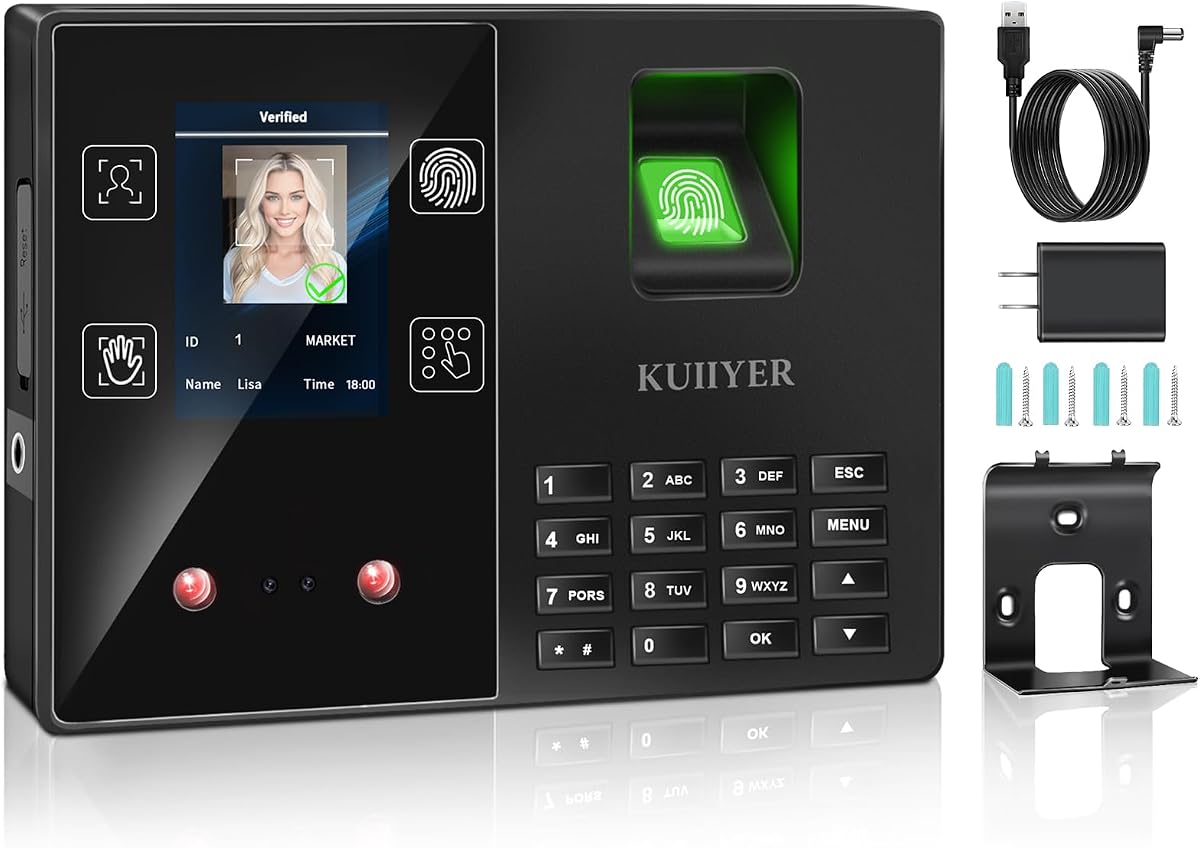
The KUIIYER 4-in-1 Employees Time Clock combines face, palm, fingerprint, and PIN authentication in a standalone device. Its 3.7 rating is shared with another product in the lineup, but the range of recognition methods and generous storage make this a capable option for offices, restaurants, hotels, schools, hospitals, factories, and retail environments that want a broad range of clock-in options.
We may earn a commission when you buy through this link, at no additional cost to you.
The product advertises 1,000 users, 160,000 attendance records, 16 departments, 24 shifts, and bells. A 2.8-inch color TFT display presents identity, department, name, and time, while voice announcements confirm the user after verification. Twelve languages, infrared-assisted recognition, and claimed recognition times of 0.5 to 0.6 seconds support quick operation in different environments. Managers can transfer data and shift information through a FAT32-formatted USB drive.
There are important practical caveats. The USB drive is not included, and the device is focused on offline administration rather than remote monitoring, mobile editing, or live cloud reports. Fingerprint, face, and palm capacities differ from the total user capacity, so buyers with large workforces should confirm which method each employee will use. The 3.7 rating should also prompt a careful reading of current customer feedback.
Despite those limitations, this is a strong budget-oriented choice for a business seeking several biometric methods without a monthly fee or network configuration. It is best for administrators who are comfortable using USB exports and can manage the device locally. Those who need continuous remote oversight, advanced payroll configuration, or live workplace status should choose a cloud-focused alternative.
Face, palm, fingerprint, and PIN authentication let administrators match clock-in methods to employee needs. This can reduce enrollment friction while giving users several familiar ways to record attendance.
Support for 1,000 users, 160,000 records, multiple departments, and numerous shifts makes the device suitable for many small and midsized workplaces. Offline operation avoids the infrastructure requirements of a cloud service.
We may earn a commission when you buy through this link, at no additional cost to you.
The Fingerprint Time Clock Biometric Fingerprint Scanner USB Device is a compact biometric reader rather than a fully featured attendance terminal. It connects to a computer through USB and is intended to capture fingerprints for use with compatible attendance or access-control software. The lack of a published rating means there is no numerical customer feedback to assess, so buyers must judge it primarily by the limited feature description and their software requirements.
We may earn a commission when you buy through this link, at no additional cost to you.
Its advantages center on simplicity. A plug-in USB connection avoids complex network configuration, and the compact, lightweight enclosure makes the device suitable for an office desktop or portable access-control setup. It supports multiple user enrollments and uses an advanced biometric algorithm, while compatibility with common attendance and access-control software gives organizations some flexibility in how they deploy it.
The central limitation is that this is a reader, not a complete clock with a built-in display, employee scheduling, automatic hours calculation, and integrated reporting. Buyers must already have compatible software or be prepared to add it. This makes the product less convenient than an all-in-one time clock and unsuitable for someone expecting a simple, self-contained attendance system out of the box.
It is best for a business that already operates attendance or access-control software and wants an economical desktop fingerprint reader. It may also suit developers or administrators creating a customized time-tracking arrangement. For most small-business buyers seeking an integrated clock with a screen, report generation, and minimal configuration, one of the dedicated standalone models in this guide will be a more direct purchase.
The lightweight USB reader takes up little desk space and avoids a dedicated wall-mounted terminal. That makes it useful when an existing computer can serve as the central attendance station.
Compatibility with attendance and access-control software allows the scanner to fit an established digital workflow. Buyers should confirm the exact supported platforms and required configuration before ordering.
We may earn a commission when you buy through this link, at no additional cost to you.
The H3 Standalone Biometric Clock provides a practical attendance system for workplaces that want fingerprint tracking without an internet connection. Its 4.1 rating reflects a balanced combination of standalone convenience, automatic hours calculation, and no monthly fees. The device requires no WiFi, network setup, or software installation, which can substantially simplify deployment in small offices, factories, hotels, schools, and restaurants.
We may earn a commission when you buy through this link, at no additional cost to you.
Employees can use fingerprint authentication, while five RFID cards provide a convenient alternative when a scan is not practical. The clock automatically totals working hours, reducing manual calculations and the need for paper cards or ink ribbons. Data remains local and can be moved through USB, supporting a privacy-focused workflow. English, Spanish, German, French, and Italian are available, and a step-by-step tutorial is said to help users get the system running within 10 minutes.
The trade-offs are predictable for a device without connectivity. Managers cannot inspect live attendance remotely, and the product description does not advertise sophisticated shift configuration, mobile correction, GPS functions, or advanced analytics. Local USB transfer also creates a routine administrative responsibility. For a multi-location company, those limitations may matter more than the benefit of avoiding monthly fees.
The H3 is a good choice for a small or midsized business seeking a straightforward local clock, automatic hour totals, and both fingerprint and RFID access. It is particularly appropriate for sites with unreliable internet or a deliberate policy of keeping attendance data on a local device. Buyers should confirm their required payroll format and the process for transferring and reconciling exported records.
Local operation keeps the clock working even when a network is unavailable. This is useful in temporary sites, facilities with limited connectivity, or workplaces seeking greater control over data location.
Automatic working-hour totals reduce repetitive manual work, while RFID cards offer a fallback when fingerprint recognition is inconvenient. Together, they support a practical mixed-method clock-in policy.
We may earn a commission when you buy through this link, at no additional cost to you.
The NGTeco Cloud Time Clock combines four-in-one attendance with real-time cloud access and flexible scheduling. Rated 3.8, it is particularly interesting for businesses with fixed, rotating, split, open, part-time, or around-the-clock schedules. The TC1 Cloud-Connect device uses NGTeco Office software and an app, while a browser provides remote access to punch data, calculated hours, and automatically generated reports.
We may earn a commission when you buy through this link, at no additional cost to you.
Payroll configuration is unusually detailed for a small-business clock. Administrators can set custom weekly overtime rules and dual OT1/OT2 pay grades, allowing calculated hours to reflect different compensation policies. The device supports 200 users and 30,000 logs, connects through 2.4GHz WiFi or LAN, and captures punches offline before synchronizing automatically when the network returns. This resilience helps reduce the risk of lost records during connectivity interruptions.
Data is described as being stored on AWS US servers with end-to-end encryption. The free management application covers core attendance administration, while a separate TimeEntrix subscription adds GPS check-ins, real-time reports, intelligent reminders, and other employee functions. That distinction matters for budgeting: a business may benefit from the cloud without paying for every optional feature, but advanced capabilities can still carry a subscription requirement.
This model suits managers who need remote visibility and nuanced scheduling more than maximum user capacity. It is less appropriate for a very large team exceeding the stated limits or for a buyer committed to fully offline operation. The combination of cloud access, offline resilience, security features, and detailed overtime rules makes it a well-rounded option for distributed or schedule-intensive small businesses.
Support for fixed, rotating, split, and open shifts accommodates different staffing structures. Custom weekly overtime and dual pay-grade rules give administrators greater control over how attendance becomes payroll data.
Punch data can remain available locally during a network interruption and synchronize automatically afterward. Administrators retain remote access when the connection is restored, balancing convenience with continuity.
We may earn a commission when you buy through this link, at no additional cost to you.
The H1 Employee Hours Time Clock is a straightforward standalone option for a small business that wants to replace paper time cards without introducing a subscription. Its 3.9 rating is moderate but credible for a product centered on familiar tasks: employee fingerprint entry, automatic working-hour totals, and USB transfer of attendance records. It requires neither WiFi nor internet access and keeps data under the employer's direct control.
We may earn a commission when you buy through this link, at no additional cost to you.
Automatic calculations reduce the risk of payroll errors caused by handwritten records or forgotten ink stamps. The clock supports up to 1,000 employees and offers English, Spanish, German, French, and Italian. A step-by-step video guide is intended to make setup approachable even for administrators without technical experience, while one-year warranty coverage and lifetime customer support add reassurance.
The product information offers limited detail about advanced scheduling, remote punch editing, overtime tiers, and reporting depth. A company with complex shift rules, multiple departments, or managers working from different locations may need richer software than this basic local model provides. USB export is convenient for regular administration, but it cannot reproduce real-time visibility or automated cloud synchronization.
The H1 is most appropriate for offices, restaurants, retail shops, schools, and similar operations seeking an uncomplicated, no-fee attendance clock. It is especially attractive to buyers who value fast setup and local data control over remote analytics. Before purchasing, compare its report format and hour-calculation rules with the administrator's payroll process to ensure the two align.
The guided setup and familiar local workflow reduce the training burden for administrators and employees. A device intended to become operational quickly is valuable in a workplace replacing an informal paper process.
The one-time hardware model avoids recurring charges and does not depend on an internet connection. USB exports keep the data workflow direct for teams that already manage payroll outside the clock.
We may earn a commission when you buy through this link, at no additional cost to you.
The NGTeco Cloud Auto Report Clock is a connected attendance system designed for managers who need remote visibility and payroll-style automation. Its 4.2 rating is among the stronger results in the comparison. The iOS and Android app and web portal let administrators monitor clock-ins, review attendance, and generate detailed reports without remaining at the workplace.
We may earn a commission when you buy through this link, at no additional cost to you.
Dual-band WiFi includes both 2.4GHz and 5GHz connectivity, supporting more flexible network placement. Fixed, rotating, part-time, and department-specific shifts can be configured, while weekly overtime and dual-level OT1 and OT2 rates provide a detailed basis for payroll-ready calculations. The app and software support eight languages, making the system more adaptable to a diverse workforce than a basic local clock.
Cloud storage is described as using AWS servers with end-to-end encryption, and a 2000mAh backup battery helps keep the clock operating during power cuts. Optional employee features are separated into the TimeEntrix subscription, including GPS check-ins, real-time attendance reports, and intelligent reminders. As a result, a buyer can focus on the core cloud attendance tools while determining whether the extended employee features justify another service.
This model is well suited to a growing company with multiple managers, varied schedules, and a need to generate attendance reports remotely. It is less attractive for a single-location operation that wants no connectivity or recurring service at all. The combination of dual-band WiFi, flexible schedules, detailed overtime settings, and outage backup makes it one of the most complete connected choices for a small business.
Support for both 2.4GHz and 5GHz networks gives administrators more placement options in offices with crowded wireless environments. The web and mobile interfaces also reduce the need to work exclusively at the clock.
Weekly overtime and two OT levels allow attendance calculations to reflect more detailed compensation policies. This is useful for organizations whose staff schedules and pay structures change frequently.
We may earn a commission when you buy through this link, at no additional cost to you.
The right biometric time clock depends on how employees clock in, where managers need to see attendance data, how complex the schedule is, and how payroll records move from the device into accounting software. Evaluate these factors before comparing individual models.
Choose a fingerprint scanner that matches real working conditions and has enough registered fingerprint capacity for your team. Confirm that each planned employee can use the intended authentication method and that the device provides a practical alternative if a scan fails.
Prioritize offline continuity if the workplace cannot afford network outages. If remote management is a daily requirement, verify the app, browser access, synchronization behavior, and any subscription needed for advanced features.
Match the authentication options to your workforce rather than choosing the model with the longest feature list. More methods add flexibility, but they also increase enrollment and administrative complexity.
Test the reporting workflow with the format your payroll process already uses. A device is valuable only if its output can be reviewed, corrected, and transferred without rebuilding the attendance data manually.
Choose comfortable headroom rather than a device sized exactly for today's staff. Confirm the individual biometric-template capacity, total log limit, and number of departments before enrollment begins.
Compare both security and recovery. Encryption protects stored information, but backup and uninterrupted punch capture are equally important when a power or network failure occurs.
Evaluate the complete workflow, not just initial installation. The best device is one that employees understand quickly and that an administrator can maintain throughout the payroll cycle without excessive effort.
Confirm language support, warranty terms, return policy, and technical-support availability before buying. These services are especially valuable when installation and employee training must proceed without delays.
Begin by identifying the correct payroll cycle, shift rules, overtime thresholds, and report format. Place the clock at a convenient entrance where employees can pause without disrupting traffic, then connect it to the required network if it is a cloud model. For a standalone unit, format a compatible USB drive as directed, connect it, and confirm that the device is ready to export reports before enrolling employees.
Enroll each employee carefully. Ask the user to present the same finger used during registration, capture it more than once if the instructions recommend, and test recognition under ordinary workplace conditions. Assign PINs, RFID cards, face templates, or palm templates only when each authentication method is needed. Label the clock with simple clock-in and clock-out instructions, and train employees not to pass a card or let a colleague clock in on their behalf.
Review the first week of records against expected schedules and investigate missing, duplicated, or incorrect punches while the details are still fresh. Export or sync attendance regularly, back up the files, and test the correction process before each payroll cycle. Keep the scanner surface clean with a dry, nonabrasive method, avoid harsh liquids and excessive moisture, and follow the manufacturer's instructions for the display, sensor, backup battery, cables, and storage media.
Several models in this guide are fully standalone and record punches locally before administrators transfer attendance data through USB. They do not require WiFi, an internet connection, or a recurring service for basic time tracking.
Cloud systems offer remote access, automatic synchronization, mobile management, and online reports, but they need a network connection to provide those functions. Some cloud devices can capture punches offline and upload them after service returns.
A fingerprint clock can reduce opportunities for buddy punching because each punch is associated with an individual biometric template. It also gives employees a quick way to clock in without entering a code.
Accuracy still depends on proper enrollment, a clean sensor, suitable lighting, and compliance with the enrollment process. A business should establish a backup method for failed scans rather than allowing colleagues to clock in for one another.
Several products support combinations of fingerprint, face, palm, RFID badge, or PIN authentication. This flexibility can make enrollment easier for different employee groups and provide an alternative when a particular biometric scan is inconvenient.
The user capacity for each biometric method may differ from the total account capacity. Buyers should check the separate fingerprint, face, palm, badge, and PIN limits before choosing a model.
Standalone systems generally store attendance data on the clock and allow a manager to export it to a USB drive. Some include ready-to-use Excel reports, making it easier to review and transfer hours into an existing payroll workflow.
The exact export process varies by model, so buyers should verify the required drive format, file type, and software compatibility before enrolling employees.
Several products include internal backup or battery power intended to preserve punches and continue operation during an outage. The stated backup duration and recovery behavior can differ, so an uninterrupted power supply may still be useful in critical workplaces.
After an outage, administrators should check the device status and confirm that all punches were captured. A backup feature reduces the risk of lost data but does not guarantee protection from every type of hardware failure.
Several standalone products operate without monthly fees, while some cloud services provide core management without a recurring charge and place advanced employee features behind a subscription.
Before buying, check which hardware functions work without a subscription and what ongoing costs apply. Also consider support, backup storage, GPS features, remote editing, and advanced reports when comparing the long-term service structure.
The products in this guide range from support for 200 users to as many as 1,000 employees, with some standalone models listing 500 profiles. The maximum is not always the practical operating capacity for every authentication method.
Also consider the number of punches, departments, shift definitions, and records retained. For a growing team, selecting a model with some capacity headroom is usually more useful than matching the stated maximum exactly.
Several models explicitly support overnight, rotating, fixed, split, open, part-time, or department-specific shifts. These features help the clock calculate hours against schedules that do not fit a standard daytime pattern.
The clock should still be configured carefully, especially when employees cross midnight or work differing weekly schedules. Test a representative schedule before the first payroll cycle to confirm that the resulting hours and overtime totals match company policy.
The Biometric Time Clock + Online Reports leads the list for organizations seeking the widest range of authentication and remote workforce-management options. The NGTeco Fingerprint/PIN App Control Clock is an excellent premium-focused alternative for fast fingerprint scans and mobile record editing, while the KUIIYER 4-in-1 model delivers extensive authentication and scheduling capacity without requiring a network.
The right choice ultimately depends on the operating environment. Businesses that value data locality, no ongoing service, and familiar USB or spreadsheet workflows should focus on the standalone models. Teams needing remote reports, flexible overtime, and synchronized attendance should consider cloud systems, after checking the limits of core features and the cost of optional subscriptions.
Before ordering, verify employee capacity, individual biometric-template limits, payroll export format, shift rules, network requirements, backup behavior, language support, and warranty coverage. Product specifications, ratings, availability, and prices can change, so checking the current listing and service terms will help ensure that the selected biometric fingerprint scanner time clock fits the business at the time of purchase.