
GIGABYTE B550M K
4.4Editor score
Broad Ryzen 5000 support
Dual high-speed M.2 slots
Compact micro-ATX design
Cheap motherboard guide comparing 10 affordable AM4, AM5, DDR4, and DDR5 models for everyday, office, and gaming PC builds.
A cheap motherboard can still provide the foundation for a dependable everyday, office, or gaming computer when its processor support, memory compatibility, expansion options, and connectivity match the rest of the build. The most useful option is not simply the model with the longest feature list, but the board that supports your chosen CPU without expensive upgrades.
We compared these affordable boards by examining their sockets, memory generation, form factors, storage connections, display outputs, networking, power delivery, and expandability. The list covers modern AM5 and LGA 1700 choices alongside several AM4 and legacy-platform alternatives, with each product assessed strictly from the supplied specifications.
Each pick reveals which type of buyer it suits, from compact office systems to Ryzen gaming builds. Ratings, compatibility details, and product information can change over time, while prices and promotions also vary, so readers should confirm the current listing and ensure all major components are compatible before purchasing.
4.4Editor score

4.3Editor score
4.5Editor score
The comparison below places each affordable motherboard by processor platform, memory support, form factor, and standout connectivity so readers can identify the most relevant foundation for their particular PC build.



The GIGABYTE B550M K is a budget-focused AM4 board with a 4.4 rating and a feature set well suited to affordable Ryzen builds. Its most important advantage is platform breadth: the board supports Ryzen 5000, 4000, and 3000 series processors, giving buyers access to a mature ecosystem of processors, memory, and graphics cards without moving to a newer platform immediately.
We may earn a commission when you buy through this link, at no additional cost to you.
Storage and expansion are stronger than the basic specification might initially suggest. Two M.2 connectors provide room for a fast NVMe system drive and a second compact SSD, while a PCIe 4.0 x16 slot supports a modern discrete graphics card when the selected Ryzen processor lacks suitable integrated graphics. Four DDR4 DIMM slots also make this board more flexible for memory expansion than many inexpensive two-slot alternatives.
The principal trade-offs concern refinement rather than basic capability. Its digital 3+3 VRM and premium chokes are appropriate for a sensible budget configuration, but they do not make it the natural choice for an aggressively overclocked or heavily upgraded high-end processor. The board also relies on gigabit Ethernet and lacks the convenience of built-in Wi-Fi, so some buyers may need to budget separately for a wireless adapter.
This is a strong recommendation for an office computer, family PC, general-purpose Ryzen system, or value-focused gaming build using a supported processor. It offers enough modern storage and expansion options to avoid an immediately obsolete foundation, while its compact form factor helps it fit smaller cases. Buyers should still check the CPU support list and case dimensions before ordering.
Supporting Ryzen 3000 through 5000 processors makes this board especially useful for builders who want a broad selection of known-good AM4 components. It can accommodate a modest processor now and leave room for a later upgrade within the same socket.
The combination of one PCIe 4.0 M.2 slot and one PCIe 3.0 M.2 slot allows a fast system drive without preventing the addition of a second SSD. Four SATA-oriented storage and expansion options make the board practical for a more conventional multi-drive configuration as well.
We may earn a commission when you buy through this link, at no additional cost to you.
The LGA 1155 H61 board has a 5 rating and serves a very different purpose from most modern entries in this guide. It supports second- and third-generation Intel Core i3, i5, and i7 processors, along with listed Xeon E3 v2 and Pentium options, making it relevant for repairing, reusing, or economically completing an older desktop system.
We may earn a commission when you buy through this link, at no additional cost to you.
Its memory configuration is the main limitation. Two DDR3 slots accept unbuffered non-ECC memory up to a combined 16GB, with listed speeds from 1280 through 1866MHz. That capacity remains modest for modern multitasking and high-end applications, but it can be adequate for lightweight office tasks, digital-signage systems, legacy software, or simple secondary computers.
The board includes a convertible M.2 interface that can use either NVMe or NGFF storage, along with a PCIe x16 slot and SATA connectivity. VGA and HDMI-compatible outputs may support 1080p display without a discrete graphics card, but that depends on whether the installed processor includes suitable integrated graphics. The package includes a SATA cable and I/O baffle, but not a manual or CR2032L battery.
Choose this board only when you already own or can find compatible LGA 1155 components. Its low cost and positive rating make it compelling for a narrowly defined repair or reuse project, but it is not a sound foundation for a new gaming system. Confirm CPU support, memory type, graphics requirements, and the absence of bundled accessories before building.
The board is most valuable when reviving a compatible older machine or reusing processors and DDR3 memory already on hand. Its broad legacy processor support can make it a practical way to extend the life of suitable office equipment.
The convertible M.2 interface allows either an NVMe drive or an NGFF module, depending on the selected drive and interface configuration. This can reduce storage costs when a suitable compact SSD is already available.
We may earn a commission when you buy through this link, at no additional cost to you.
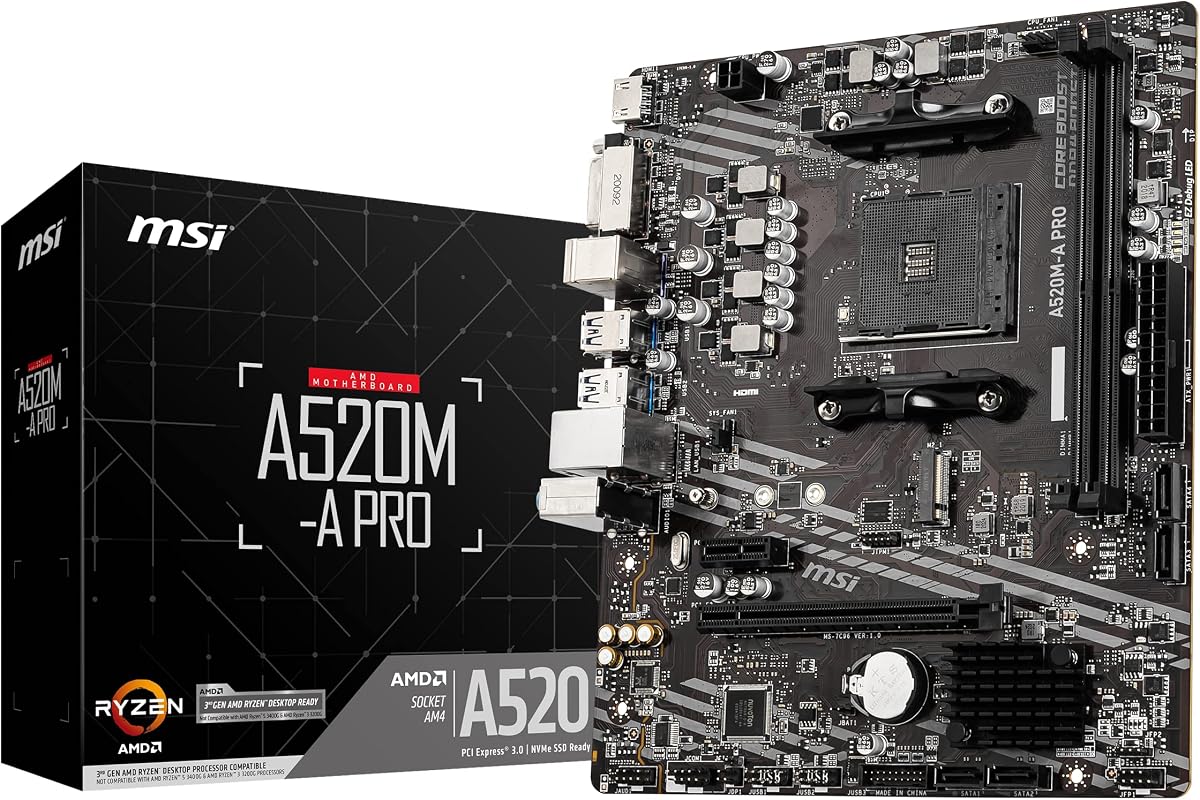
The MSI A520M-A PRO carries a 4.5 rating and is aimed at straightforward AM4 gaming or general-purpose builds. Its compact micro-ATX layout, DDR4 support, M.2 connectivity, and familiar MSI software features make it a sensible entry point when the processor and graphics card represent the main performance investments.
We may earn a commission when you buy through this link, at no additional cost to you.
The supplied specifications explicitly mention support for third-generation AMD Ryzen desktop processors and Ryzen 4000 G-Series desktop processors. Although the product title includes Ryzen 5000, buyers should verify the exact processor compatibility list and any required BIOS information rather than assuming every matching processor is covered.
Its main technical limitation is that the highlighted M.2 slot operates over PCI Express 3.0 x4. That remains fast enough for many affordable NVMe drives, especially in budget systems where the difference may be difficult to notice, but it does not offer the bandwidth of a PCIe 4.0 M.2 connection. The board also uses PCIe 3.0 for expansion and does not include wireless networking.
This board is a good match for a budget gaming build centered on a supported Ryzen processor, especially when the builder values a recognizable MSI platform and the included Audio Boost and Dragon Center utilities. It is less appealing when a PCIe 4.0 graphics card, modern high-speed NVMe storage, or the newest Ryzen processors are firm requirements.
The board includes the essentials commonly desired in an entry gaming PC: a full-length graphics slot, NVMe-capable M.2 storage, SATA connectivity, and USB 3.2 Gen 1. It focuses resources on the platform rather than wireless extras or elaborate lighting.
Compatibility language differs between the product title and the detailed specifications. Checking the manufacturer's supported-CPU list before buying can prevent an expensive mismatch, particularly for newer Ryzen 5000 processors.
We may earn a commission when you buy through this link, at no additional cost to you.
The ASRock B550M-HDV offers a balanced mix of platform capability, connectivity, and affordability, reflected in its 4.5 rating. It supports Ryzen 5000, 4000, and 3000 series processors and APUs, making it one of the stronger general-purpose choices for an affordable AM4 system.
We may earn a commission when you buy through this link, at no additional cost to you.
Its standout feature is broad display connectivity. HDMI can support 4K at 60Hz, while DVI-D and D-Sub provide alternatives for office, home, and legacy monitor setups. This flexibility is useful for a compact system that may use integrated graphics, although a discrete graphics card remains necessary when the selected processor does not support the desired display output.
Storage and expansion are also well considered. The primary PCIe x16 slot can operate at PCIe 4.0 speeds with compatible Ryzen processors, and the Hyper M.2 connector can accommodate PCIe Gen4 x4 NVMe or SATA3 storage. Four SATA3 ports, six USB 3.2 Gen1 ports, Gigabit LAN, and 7.1-channel audio cover the basics of a modern daily-use computer.
The trade-offs are modest but real. Two DDR4 DIMM slots limit memory expansion to a pair of modules, and the micro-ATX board may not fit every compact case. For a new build using a supported AM4 processor, especially one with integrated graphics, it remains a highly adaptable option with better practical coverage than many entry boards.
Three outputs make the board suitable for varied monitor arrangements, including older D-Sub equipment and modern digital displays. This is particularly valuable in office-style systems where integrated graphics can eliminate the need for a separate graphics card.
A Gen4-compatible M.2 slot, four SATA ports, and a PCIe 4.0 x16 slot provide a sensible mix of modern and conventional connections. The board can support fast storage, additional drives, and a current graphics card without a large feature premium.
We may earn a commission when you buy through this link, at no additional cost to you.
The MSI PRO B550M-P is a compact AM4 board designed to balance everyday performance, expandability, and cooling simplicity. Its 4.3 rating is slightly lower than several neighboring models, but the supplied specifications present a capable budget platform with Ryzen 5000 readiness and a useful storage layout.
We may earn a commission when you buy through this link, at no additional cost to you.
Four DDR4 DIMM slots offer more flexibility than the two-slot boards in this roundup. The board lists memory speeds up to 4400+ MT/s with overclocking under a 1DPC 1R configuration, which is relevant to builders who understand memory population rules and want to tune their system.
Its dual M.2 arrangement is a major strength. One connector supports M.2 Gen4 x4 at 64Gbps, while the second supports Gen3 x4 at 32Gbps, allowing a fast primary drive and a secondary SSD. The primary graphics slot also supports PCIe 4.0 x16 and uses Steel Armor, a useful structural improvement for a compact gaming system.
The board's chipset heatsink uses passive cooling, while MSI's Frozr AI cooling can adjust system fans according to CPU and GPU temperatures. The trade-offs are the lack of integrated Wi-Fi and a lower aggregate rating than the leading alternatives. It is best for a compact AM4 gaming or productivity build that values dual fast storage and four memory slots.
The Gen4 x4 and Gen3 x4 M.2 connectors allow the primary drive to exploit newer bandwidth while a second device can use the remaining M.2 position. This is more accommodating than boards that provide only one compact storage connector.
Passive chipset cooling avoids a constantly spinning fan in the storage and expansion area, while Frozr AI can adjust supported case and graphics fans in response to system temperatures. The result is a practical approach for a compact build.
We may earn a commission when you buy through this link, at no additional cost to you.
The MSI B550M PRO-VDH WiFi is the most connectivity-rich affordable AM4 board in this group, combining a 4.5 rating with built-in wireless networking. It is a strong option for a compact family, office, or gaming system where avoiding a separate Wi-Fi adapter and simplifying desk placement are important priorities.
We may earn a commission when you buy through this link, at no additional cost to you.
Memory support is particularly noteworthy, with dual-channel DDR4 capacity listed up to 128GB and speeds up to 4400MHz. The board also supports dual-channel configurations, PCIe 4.0 expansion, Lightning Gen4 M.2 storage with an M.2 Shield Frozr, and AMD Turbo USB 3.2 Gen2. These specifications make it more future-resistant within AM4 than a minimal two-slot board.
The flash BIOS button is particularly useful for initial setup or future compatibility updates because it allows BIOS flashing without a processor or memory installed. Core Boost power circuitry, a 7W/mk thermal pad, and a PCB with 2oz copper indicate attention to power delivery and thermal performance. D-SUB, HDMI, and DisplayPort outputs support flexible monitor arrangements.
Compatibility is not entirely plug-and-play for every processor. The board initially supports third-generation Ryzen processors, while later Ryzen processors may require a BIOS update. Those comfortable with a brief setup process will gain a notably convenient feature set. It is best for builders who want wireless connectivity and strong memory capacity without moving beyond AM4.
Built-in Wi-Fi and Bluetooth reduce the need for an external adapter and help keep a compact system visually uncluttered. For users in shared spaces or older homes without nearby Ethernet wiring, that convenience can outweigh several minor board limitations.
The dedicated flash BIOS button lets an owner update the firmware without a processor or memory installed. It is valuable during a new build, when compatibility with a later processor may depend on the newest BIOS release.
We may earn a commission when you buy through this link, at no additional cost to you.
The GIGABYTE B550 Gaming X V2 is the only full-size ATX board in this roundup, and it uses that larger layout to provide broader physical expansion options. Its 4.5 rating and strong AM4 compatibility make it attractive for builders who want a roomy motherboard without stepping into much more expensive enthusiast models.
We may earn a commission when you buy through this link, at no additional cost to you.
Power delivery is the main quality signal. A digital twin 10+3 power phase, premium chokes and capacitors, and an advanced VRM heatsink form a more substantial design than the modest power configurations seen in the lowest-cost boards. Four DDR4 slots, one PCIe 4.0 x16 slot, and two M.2 connectors also create a versatile foundation for gaming or productivity hardware.
The rear panel includes three USB 3.2 Gen2 Type-A ports, one USB 3.2 Gen1 Type-A port, and a front USB 3.2 Gen1 Type-C connection. Gigabit Ethernet and Bluetooth 5.3 are listed, while Q-Flash Plus permits BIOS upgrades without installing the processor, memory, or graphics card. An integrated I/O shield and refreshed BIOS interface make initial assembly more convenient.
The trade-off is physical size. ATX requires a larger chassis than the micro-ATX choices and may not suit a deliberately compact computer. RGB Fusion adds visible customization that some builders appreciate but others may ignore. For a standard-size gaming build with a supported Ryzen CPU, however, its extra space and mature feature set are compelling.
The ATX layout provides more room for expansion slots, storage hardware, and routing than the micro-ATX models here. It is a better fit for a conventional tower that may grow through multiple memory modules, drives, and add-in cards.
The 10+3 digital power design, VRM heatsink, reinforced graphics slot, and dual M.2 support create a more substantial gaming foundation. These features add usefulness when the system includes a powerful Ryzen processor and a modern graphics card.
We may earn a commission when you buy through this link, at no additional cost to you.
The GIGABYTE A520M K V2 is a straightforward, low-cost AM4 option with a 4.4 rating. Its micro-ATX format, two DDR4 memory slots, M.2 connector, and integrated display outputs cover the core needs of an entry-level computer without introducing the cost of higher-tier connectivity features.
We may earn a commission when you buy through this link, at no additional cost to you.
The board is designed for compact cabinets and medium-sized builds, giving buyers more placement flexibility than a full ATX model. DDR4 memory support allows a system to use widely available RAM rather than requiring DDR5, while the AM4 socket opens access to mature Ryzen processor options. Display connectivity includes HDMI and D-Sub for systems using compatible integrated graphics.
The published product information is limited compared with the other models, making the listing particularly important for confirming specifications. With only two memory slots, buyers should choose capacity and speed carefully because adding memory later may require replacing the installed modules. The M.2 connector is useful, but buyers should also verify its supported protocol and whether it shares bandwidth with other ports.
This motherboard makes sense for a basic office computer, a secondary PC, or a modest family system where a discrete graphics card and extensive upgrades are unnecessary. It is less compelling for a high-end gaming build, but it can be a sensible way to assemble a basic AM4 computer around an existing processor and memory.
The board avoids premium features and concentrates on the components needed for a functional PC. That restraint makes it potentially attractive when the processor, graphics card, and memory are already chosen and the motherboard simply needs to connect them.
Because there are only two DDR4 slots, the most efficient approach is to install a matched memory kit with the intended capacity. Avoid assuming another module can be added later without checking supported configurations.
We may earn a commission when you buy through this link, at no additional cost to you.
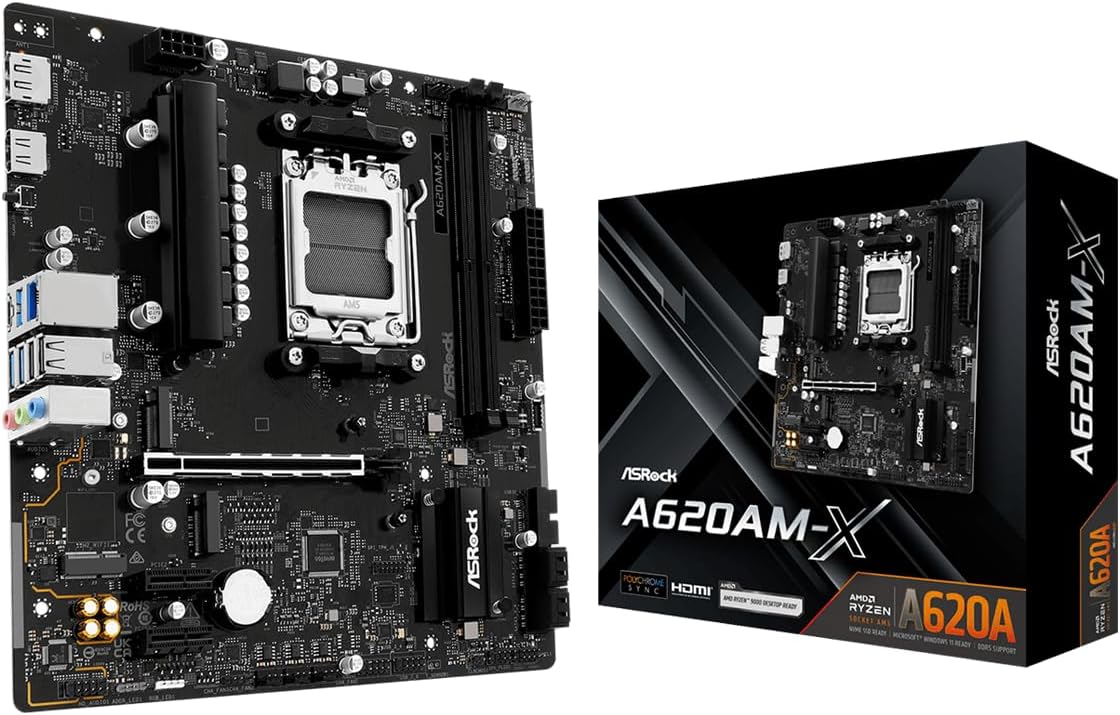
The ASRock A620AM-X provides the most current platform among the affordable options, supporting Ryzen 9000, 8000, and 7000 series processors through AMD's AM5 socket. Its 4.5 rating reflects a strong balance of modern compatibility, fast networking, and flexible storage in a compact micro-ATX design.
We may earn a commission when you buy through this link, at no additional cost to you.
The board's networking stands out. Realtek 2.5G Ethernet offers a meaningful upgrade over ordinary gigabit wired connections for large file transfers, busy networks, and compatible high-speed routers. This feature makes it particularly attractive for a modern workstation or gaming system where connectivity is not an afterthought.
Storage is equally flexible, with two Hyper M.2 slots that support PCIe Gen4 x4 devices and four SATA3 ports. Two DDR5 DIMM slots support dual-channel configurations and overclocked speeds listed up to 8000+, although actual memory speed depends on the processor, BIOS, and selected module. Front and rear USB 3.2 Gen1 Type-C connections add modern peripheral flexibility.
The trade-offs are the higher typical cost of DDR5 memory and the need to plan around only two RAM slots. A micro-ATX chassis is also required. Despite those constraints, this is the strongest choice here for a new AM5 build that wants current processor support, 2.5G networking, and dual high-speed storage without moving to a more costly motherboard class.
Supporting Ryzen 7000 through 9000 series processors gives this entry-level board a notably long platform outlook. It provides access to the latest socket while retaining a compact, affordable motherboard design.
The 2.5G Ethernet controller is a distinctive feature among these picks. It can take advantage of compatible network equipment and infrastructure to improve large transfers and reduce bottlenecks on busy wired networks.
We may earn a commission when you buy through this link, at no additional cost to you.
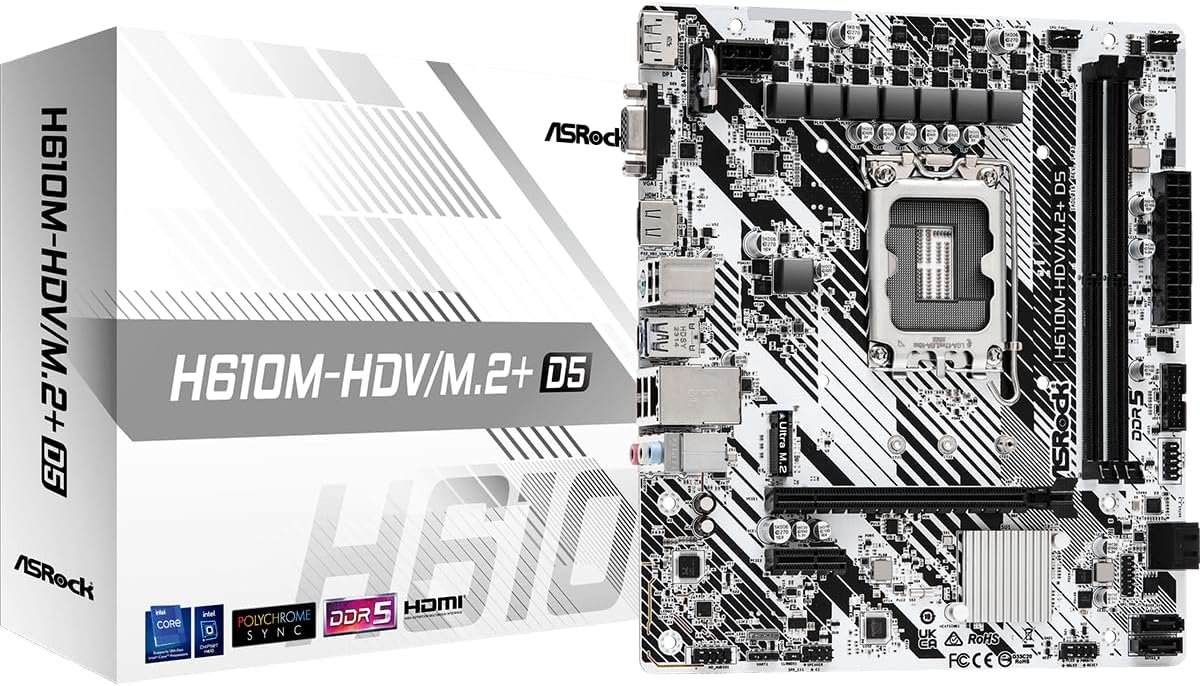
The ASRock H610M-HDV/M.2+ D5 is a compact Intel LGA 1700 option for builders seeking current-generation processor support in a small system. Its 4.4 rating and DDR5 memory support make it relevant for 12th-, 13th-, and 14th-generation Intel Core processor builds, subject to the final CPU support list.
We may earn a commission when you buy through this link, at no additional cost to you.
Its 6+1+1 power phase and support for DDR5 5600MHz provide a straightforward platform for mainstream components. A PCIe 4.0 x16 slot accommodates a modern discrete graphics card, while the smaller PCIe 3.0 x1 slot offers room for a low-bandwidth add-in card. SATA 6Gb/s connectivity and the M.2 designation in the model name indicate support for compact storage.
Three display outputs—HDMI, DisplayPort, and D-Sub—give the board flexibility for different monitor arrangements and older equipment. The M.2 connector and compact form factor are particularly useful for building a smaller office, media, or general-purpose computer with a discrete or supported integrated graphics solution.
As an H610-based design, it is better suited to sensible mainstream configurations than to advanced overclocking or feature-heavy enthusiast builds. The absence of listed wireless connectivity may also matter for some users. Nevertheless, it is a concise and potentially economical way to create a modern Intel system when a compatible processor and DDR5 memory are already available.
The micro-ATX format can reduce the space required for a modern Intel system without sacrificing the primary PCI Express graphics slot. It is a useful size for a dedicated office computer or a compact living-room PC.
HDMI and DisplayPort suit modern digital screens, while D-Sub preserves compatibility with older displays. The M.2 connector adds fast compact storage options, making the board more versatile than a barebones legacy platform.
We may earn a commission when you buy through this link, at no additional cost to you.
Choosing an affordable motherboard is primarily an exercise in matching the platform to the rest of a PC build. Processor socket, memory generation, case size, graphics support, and expected expansion needs matter more than decorative features or a long list of connector labels.
The socket determines which processors can physically and electrically work with the motherboard. The AM4 choices here support various Ryzen 3000, 4000, and 5000 families, with exact model coverage varying. The AM5 ASRock A620AM-X supports Ryzen 7000, 8000, and 9000 processors, while the ASRock H610M-HDV/M.2+ D5 targets LGA 1700 Intel Core generations. The older H61 board serves a different purpose by accepting second- and third-generation Intel processors. Always verify the manufacturer's CPU list, including whether a BIOS update is required for a desired processor.
Memory generation affects both motherboard choice and the rest of the build. Most affordable AM4 boards use DDR4, including the GIGABYTE B550M K, MSI PRO B550M-P, and ASRock B550M-HDV. The ASRock A620AM-X and H610M-HDV/M.2+ D5 require DDR5, while the legacy H61 model uses DDR3. DDR5 enables newer platforms and higher stated speeds, but it generally requires a separate memory purchase. DDR4 can reduce the cost of an AM4 build, especially if compatible modules are already owned. A board's listed maximum memory capacity and supported speed should be checked rather than inferred from its generation.
Motherboard size must match the computer case. Nine selections are micro-ATX, making them suitable for many compact and medium-size enclosures, while the GIGABYTE B550 Gaming X V2 is full ATX and needs a correspondingly larger chassis. Micro-ATX is often easier to accommodate and can reduce the overall footprint, but it has less expansion space than ATX. A smaller board does not automatically mean a smaller power supply or graphics card, so builders should also consider component dimensions, drive placement, and cooling clearance. The ASRock A620AM-X and B550M-HDV specifically note that their micro-ATX format may not fit every pre-built system or enclosure.
A gaming or graphics-intensive build generally needs a dedicated card and a full-length PCIe x16 slot, which all ten boards provide. Integrated-graphics users should check the selected processor because the motherboard's HDMI, DisplayPort, DVI, VGA, or D-Sub output may require processor-integrated graphics. The ASRock B550M-HDV stands out with three outputs, including HDMI, DVI-D, and D-Sub, while the H610M-HDV/M.2+ D5 offers HDMI, DisplayPort, and D-Sub. The legacy H61 board also includes VGA and HDMI-compatible interfaces. Output availability alone does not guarantee operation; compatibility with the chosen CPU is essential.
M.2 support allows a compact NVMe SSD to connect directly to the board, while SATA ports remain necessary for conventional 2.5-inch and 3.5-inch drives. The MSI PRO B550M-P, MSI B550M PRO-VDH WiFi, and GIGABYTE B550 Gaming X V2 each provide two M.2 connectors. The ASRock A620AM-X likewise includes two PCIe Gen4 x4 M.2 slots and four SATA3 ports. The MSI A520M-A PRO highlights a PCI Express 3.0 x4 M.2 slot, while the legacy H61 uses a convertible interface for NVMe or NGFF. Check slot protocol, lane sharing, physical mounting support, and the number of SATA connectors for the intended drive arrangement.
Full-length PCIe x16 slots are essential for desktop graphics cards, while shorter slots can support network cards, capture devices, storage controllers, and other accessories. The ATX GIGABYTE B550 Gaming X V2 offers the most physical room for a conventional expanded build, whereas the micro-ATX models trade some flexibility for a smaller footprint. Memory slot count is another important upgrade consideration. Two-DIMM boards can be perfectly adequate, but four-slot boards make it easier to start with a smaller kit and add modules later. Matching memory modules and supported speeds remain necessary even when extra slots are available.
Gigabit Ethernet is standard across most of the roundup, but the ASRock A620AM-X steps up to Realtek 2.5G LAN for compatible networks and large transfers. The MSI B550M PRO-VDH WiFi includes wireless connectivity and Bluetooth, while the GIGABYTE B550 Gaming X V2 lists Bluetooth 5.3. For desk placement, older buildings, and shared networks, integrated wireless can be more convenient than adding an adapter. USB selection also deserves attention: look for the number and type of rear ports, plus front-panel USB-C when the case offers a matching connector. Gaming peripherals may benefit from additional USB ports and optional headers.
Power delivery should be judged relative to the processor and intended workload rather than by a phase number alone. The GIGABYTE B550 Gaming X V2 has a digital twin 10+3 design, while the ASRock A620AM-X uses 6+1+1 with Dr.MOS. More modest designs can suit mainstream processors, but a stronger platform gives more confidence for higher-power CPUs and sustained workloads. Consider VRM heatsinks, case airflow, and fan headers as well. The MSI PRO B550M-P uses passive chipset cooling and offers automatic fan adjustment through Frozr AI, while the MSI B550M PRO-VDH WiFi lists a higher-conductivity thermal pad and thickened copper PCB.
Before assembly, verify that the processor, memory modules, cooler, graphics card, storage drives, and case all match the motherboard's supported standards. Install the processor and memory according to the manual, apply the correct thermal compound, and confirm that the CPU cooler or any included M.2 heat spreader is properly secured. Cables and connectors should be attached without forcing them, and every large power connector should be seated completely.
After the first boot, install the current operating system, chipset drivers, and the correct network or audio drivers for the board. Update the BIOS when processor support or stability requires it, using the supplied Q-Flash, Flash BIOS, or BIOS Flashback feature only after following the manufacturer's instructions. Check memory stability, storage detection, temperatures, and fan operation before installing demanding applications or beginning memory or processor overclocking.
Keep the board protected from static electricity, dust, moisture, and abrupt power loss. Good case airflow, periodic dust removal, and restrained thermal-paste replacement intervals help maintain stable temperatures. When upgrading, change one major component category at a time and return to the manufacturer's support pages for updated processor, memory, and BIOS compatibility information.
Yes, if its processor support, graphics slot, memory capacity, and power delivery match the rest of the build. Boards such as the GIGABYTE B550M K and MSI PRO B550M-P support Ryzen 5000 processors and PCIe 4.0 graphics, while the ASRock A620AM-X serves newer AM5 systems. The graphics card and processor usually have a greater effect on gaming performance than the motherboard.
No. The ASRock A620AM-X requires DDR5 memory and cannot use standard DDR4 modules. AM4 boards in this guide use DDR4, while the LGA 1700 H610 model uses DDR5. The legacy LGA 1155 H61 board uses DDR3. Match the memory notch and electrical specification exactly.
No, but a compatible processor with integrated graphics is required for onboard video output. The ASRock B550M-HDV, ASRock H610M-HDV/M.2+ D5, and the legacy H61 provide display connectors, yet the chosen CPU must support the relevant graphics function. Without integrated graphics, a discrete graphics card is necessary.
Micro-ATX is often easier to fit in a smaller case and can still provide the expansion and connectivity needed by a normal build. ATX offers more physical room for additional cards and storage. The best choice depends on the available case space, the number of expansion devices, and whether future physical growth matters more than a compact footprint.
Check the motherboard manufacturer's current CPU support list and confirm the processor socket, chipset generation, BIOS version, and any required memory type. The supplied information for several boards specifically recommends checking compatibility. A product title alone may not describe every BIOS limitation, especially for newer processors on older boards.
It can be worthwhile when the router, switch, computer, and service plan all support 2.5G networking. It benefits large transfers and busy networks, while gigabit Ethernet remains sufficient for ordinary web use. The ASRock A620AM-X is the only board here with listed 2.5G LAN, so higher-speed networking is one of its distinguishing features.
Verify the socket, supported processor generations, memory type, maximum RAM, M.2 protocol, display output, and included accessories. The LGA 1155 H61 listing, for example, notes that a user manual and CR2032L battery are not included. Check for physical damage, missing rear-panel parts, bent CPU socket pins, and signs of overheating before assembly.
The right amount depends on the task and the number of available slots. Two-slot boards can work with a single matched high-capacity kit, while four-slot models offer more upgrade flexibility. The MSI B550M PRO-VDH WiFi lists support for up to 128GB of DDR4, whereas the legacy H61 is limited to 16GB across two DDR3 slots.
The GIGABYTE B550M K stands out as the best budget foundation because it combines broad Ryzen support, two M.2 connectors, four DDR4 slots, and a compact format. The MSI PRO B550M-P delivers a balanced alternative with stronger dual high-speed storage, while the ASRock A620AM-X is the most modern selection, combining AM5 processor support, DDR5, dual Gen4 M.2 slots, and 2.5G networking.
The right decision ultimately depends on the rest of the build. Choose AM4 when mature Ryzen components and DDR4 economics matter, AM5 for current processor and memory standards, and LGA 1700 for a compact Intel configuration. Also consider the number of memory slots, graphics needs, case dimensions, storage plans, and whether wireless networking or a newer display connection justifies a higher-tier board.
Current prices and promotions can change, but platform compatibility remains the essential point. Review the live product listing, manufacturer support pages, and current BIOS information before ordering. By matching the motherboard to an existing processor and memory plan first, buyers can avoid costly mismatches and create a more dependable affordable computer.