
VersaCheck HP DeskJet 3755 MX
3.6Editor score
Magnetic black ink cartridge
Print copy and scan
Built-in wireless connectivity
VersaCheck Gold software included
Our best check printer with magnetic ink guide compares 10 secure printing options for bank compliance, check software, wireless printing, portability, and
A check printer with magnetic ink gives businesses and individuals a more secure way to create checks at the point of issue. Rather than ordering preprinted stock, users can print personalized checks on blank paper while a magnetic ink cartridge or MICR toner adds the machine-readable line required for bank processing.
This guide compares ten magnetic-ink check printer bundles based on their printing technology, included software, MICR supplies, connectivity, paper handling, portability, and intended business size. The list covers compact inkjet models, wireless all-in-ones, a portable printer package, and a higher-capacity laser option for work groups that print checks regularly.
Each review explains who benefits most from the particular package, along with the compromises that may affect a purchase decision. Ratings and product details reflect the supplied listings, while specifications and bundle contents can change. Current prices, availability, bank policies, and software compatibility should be checked before ordering.
3.6Editor score

3.5Editor score

5.0Editor score
The comparison below places all ten magnetic-ink check printer packages side by side, highlighting printing method, included software, connectivity, document functions, and the needs each model is designed to serve.


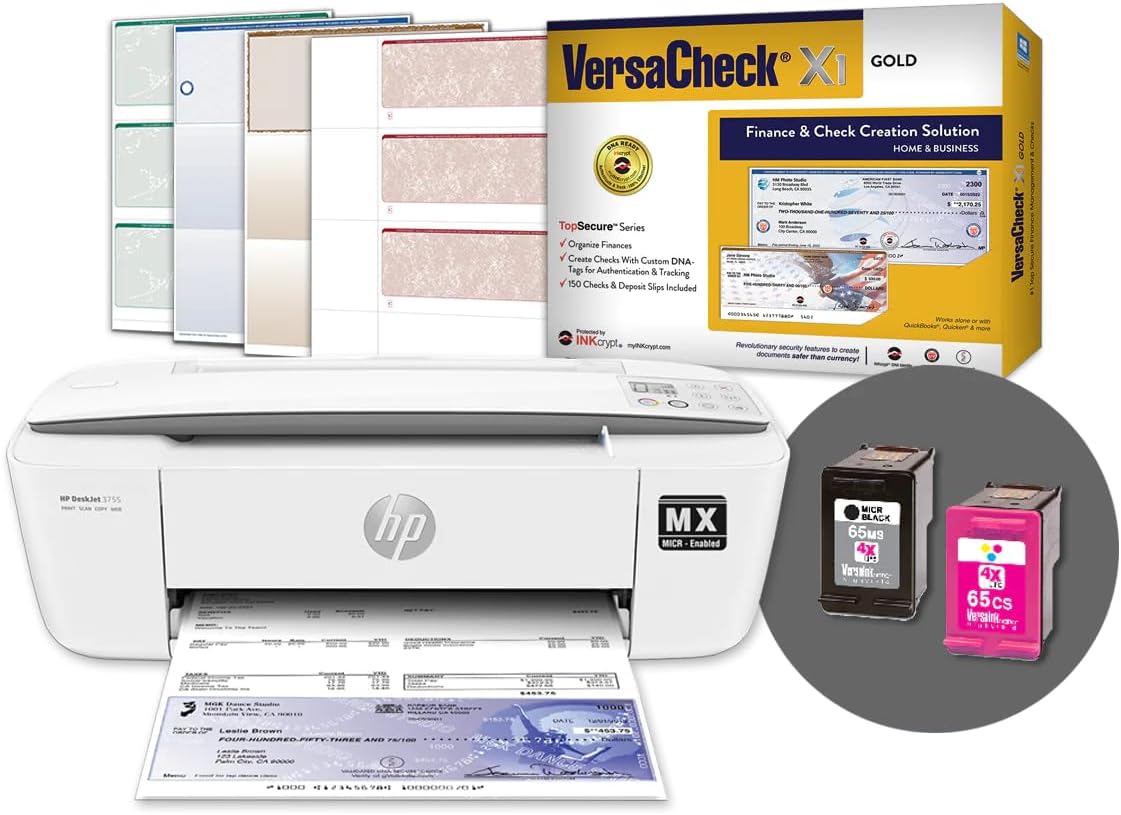

The VersaCheck HP DeskJet 3755 MX combines a compact HP-style all-in-one printer with a magnetic black ink cartridge, a color cartridge, check-design software, starter check paper, and a USB cable. Its 3.6 rating reflects a mixed customer record, but the bundle addresses the core needs of someone who wants to begin printing checks at the point of issue without assembling every component separately.
We may earn a commission when you buy through this link, at no additional cost to you.
The included VersaInk-nano HP 65MS black cartridge uses magnetic ink for bank-compliant check printing, while the HP 65CS color cartridge supports the non-MICR portions of a check layout. The printer can also copy and scan, handles paper up to 8.5 by 14 inches, and has built-in 802.11b/g/n wireless connectivity. At 5.13 pounds, it is easier to position in a home office or small workspace than a full-size desktop laser printer.
The central compromise is that this is an inkjet-based solution rather than a high-volume laser system. Inkjet convenience and compact dimensions come at the expense of the paper capacity and speed associated with laser printers. The supplied information also lists the rating at only 3.6, so buyers should not treat the bundle as a guarantee of flawless performance. Wireless setup, ink handling, and check alignment may demand a little more attention than a basic office printer.
This package is most appropriate for a household, sole proprietor, or small organization that wants the protective benefits of on-demand check printing at a comparatively accessible tier. It is also attractive for users who need scanning and copying in addition to checks. Those expecting continuous batches of checks should consider the M15 MXD or the Troy 3001DW, while this model remains a practical choice when compactness, wireless access, and a complete starter bundle matter most.
This package includes the printer, black MICR and color ink cartridges, VersaCheck Gold software, blank check paper, and a USB cable. That combination reduces the number of separate items a first-time check printer needs to source.
The 5.13-pound body and built-in wireless connection make the 3755MX convenient for a small office, home workspace, or shared area where a permanent printer location is not available.
We may earn a commission when you buy through this link, at no additional cost to you.
The VersaCheck M15 MXD is built for users who expect to print checks more consistently than a typical desktop inkjet can handle. It uses magnetic toner, supports both wireless Wi-Fi and USB, includes a 150-sheet input tray, and is listed at a 3.5 rating. Its supplied specifications also indicate a print speed of up to 19 pages per minute in black.
We may earn a commission when you buy through this link, at no additional cost to you.
The defining bundle feature is the VersaToner 125 magnetic cartridge, which is stated to support bank-compliant check printing and can produce as many as 4,800 three-up checks per cartridge. A Canon 125 starter black cartridge is also included. VersaCheck X1 Platinum software and check paper complete the package, making this an appealing option for a small organization that wants check creation, magnetic output, and physical supplies in one order.
Unlike the color inkjet bundles in this guide, the M15 MXD is built around black laser output. That focus can be advantageous for predictable monochrome document production, but users should confirm whether separate color printing is necessary for their workflow. Installation also requires an internet connection, and the 3.5 rating indicates some customer dissatisfaction despite the attractive speed and paper-capacity specifications.
The M15 MXD is a strong recommendation for small businesses, property managers, and work groups that already know they will print checks regularly. Its combination of laser speed, a substantial input tray, and a high-yield MICR cartridge makes it better aligned with ongoing volume than the lightweight inkjet packages. Choose it when secure check output and efficiency matter more than a multifunction color scanner.
A listed speed of up to 19 pages per minute helps make this model more appropriate for regular business use. It can produce up to three checks per sheet when three-up layouts are used.
The included VersaToner 125 magnetic cartridge is listed to deliver as many as 4,800 three-up checks. That capacity can reduce cartridge changes during heavier check-printing schedules.
We may earn a commission when you buy through this link, at no additional cost to you.
The Troy 3001DW is a dedicated MICR laser printer aimed at small teams, offices, and work groups that regularly produce checks at low to moderate volume. It has a 3.6 rating and a 250-sheet paper capacity. Its listed maximum speed of 35 pages per minute makes it one of the fastest options represented in this guide.
We may earn a commission when you buy through this link, at no additional cost to you.
Troy emphasizes the security advantages of producing checks on site. Its patented MICR toner is designed with strong adhesion and a robust machine-readable signal, while the printer can add the MICR line, payee, amount, and other information at the point of issue. The product is also positioned as a useful way to use one type of stock across multiple accounts without relying on a large inventory of preprinted checks.
The principal trade-off is bundle simplicity. Unlike many VersaCheck packages, the supplied information does not explicitly list check-design software, starter paper, or a MICR cartridge among the contents. Buyers may need to source those items separately. It is also a printer rather than an all-in-one, so the copy and scan functions found on several inkjet competitors are not part of its stated feature set.
This model fits an office with several people who need fast, reliable monochrome check output but do not need a multifunction device. The 250-sheet tray and 35-page-per-minute figure are especially useful for routine payroll, vendor, or reimbursement runs. Confirm the current package contents, required accessories, and software workflow before purchase, especially if a turnkey check-printing bundle is important.
The listed speed of up to 35 pages per minute and 250-sheet capacity make the 3001DW suited to offices that print checks in recurring batches rather than only occasional single payments.
Printing the MICR line and payment details at the point of issue can reduce the need to maintain, store, and reconcile multiple kinds of preprinted check stock.
We may earn a commission when you buy through this link, at no additional cost to you.
The VersaCheck 4255 MXE is a color-capable magnetic-ink all-in-one with printing, copying, and scanning functions. It includes check software and check paper according to the supplied listing, while built-in wireless connectivity allows access from a network, tablet, or smartphone. The package supports paper up to 8.5 by 14 inches.
We may earn a commission when you buy through this link, at no additional cost to you.
Its appeal lies in combining secure check production with the flexibility of a color multifunction printer. Users can place the device on a shared wireless network and handle checks alongside ordinary documents without maintaining a separate basic printer. The included software and paper make it easier to begin producing checks, while the all-in-one format can simplify a home office or small administrative workspace.
The listing has no available customer rating, so there is less direct feedback to evaluate than for many competitors in this roundup. It is also an inkjet rather than a laser device, which generally makes more sense for moderate or occasional check volumes than for continuous office-scale output. Users should verify the exact cartridge configurations and included supplies in the current listing before ordering.
The 4255 MXE is a sensible option for a home office or small business that wants color output, wireless access, and scanning in the same machine. It is particularly relevant when one printer must handle both checks and routine color documents. For a dedicated high-volume check operation, choose a laser model; for occasional check printing with multifunction convenience, this package is a more balanced fit.
Printing, copying, and scanning functions reduce the need to maintain separate devices. That versatility is useful in offices where check printing is only one part of the daily document workload.
Built-in wireless support lets compatible devices on the same network send print jobs. This can be particularly convenient when checks must be produced from a phone, tablet, or shared workstation.
We may earn a commission when you buy through this link, at no additional cost to you.
The VersaCheck HP DeskJet 2755 MX is a compact color all-in-one package for users who want wireless magnetic-ink check printing without purchasing separate software and starter paper. It supports printing, copying, and scanning, handles paper up to 8.5 by 14 inches, and carries a 3.0 customer rating in the supplied data.
We may earn a commission when you buy through this link, at no additional cost to you.
The package includes VersaCheck X1 Gold software and check paper, allowing buyers to create and print checks from a compatible Windows system. Wireless connectivity is useful for a home office, while the multifunction design provides familiar document features alongside check production. It is a more conventional color inkjet experience than a dedicated monochrome laser system.
Its 3.0 rating is the lowest among the products with numerical ratings in this guide, which warrants careful consideration. Setup requires a wireless internet connection, which could be inconvenient in a network with restricted access. As an inkjet, it is also less compelling for an office that needs to run a large number of checks each week. The low rating does not establish a specific defect, but it does signal a less consistently positive customer record.
This model is best for occasional check users, households, and home offices that value compact wireless printing and color output. It is more appropriate than a business laser printer when volume is modest and the printer will also handle scans or copies. Shoppers with a more demanding workflow should prioritize the M15 MXD or Troy 3001DW, while budget-conscious users who prioritize a stronger rating may consider the 3755 MX.
Wireless network printing avoids the need to run a direct cable from every device. The compact multifunction format also suits desks where a separate copier or scanner would be impractical.
The included X1 Gold software and check paper provide the core materials needed to begin a check-printing workflow, subject to compatible computer and bank requirements.
We may earn a commission when you buy through this link, at no additional cost to you.
The VersaCheck 4155 MXQ is a Windows-oriented magnetic-ink check printing bundle with color output, scanning, copying, and wireless connectivity. It includes VersaCheck X1 Gold software and check paper, and its paper handling extends to 8.5 by 14 inches. The supplied rating is 3.0.
We may earn a commission when you buy through this link, at no additional cost to you.
For organizations standardized on Windows, the included software creates a straightforward route from check design to printing. Wireless access expands placement flexibility and allows compatible tablets or smartphones to submit jobs. The all-in-one design means the same unit can handle routine records and check documents, which helps it fit into a home office or a small administrative area.
Like the other color inkjet packages, the 4155 MXQ is not the natural selection for a high-volume check department. Its 3.0 rating is among the lowest in the list, and the supplied details do not explain which issues customers encountered. Buyers should therefore review current customer feedback and confirm that the package's cartridges, software download, and blank paper align with their intended setup before making a final decision.
The 4155 MXQ is a reasonable option for a Windows user who wants a color multifunction printer and a complete check-software package. It suits a small business that prints checks periodically and values wireless flexibility over laser throughput. For daily volume, an office that requires broader platform support, or a buyer seeking a higher customer rating, the laser alternatives or the stronger-rated 3755 packages deserve closer comparison.
The bundled X1 Gold software is identified as Windows software, making this package most relevant to organizations whose check-design and document systems run on that operating system.
The printer handles color documents as well as checks and includes copying and scanning. This consolidates several common office functions into a single compact device.
We may earn a commission when you buy through this link, at no additional cost to you.
The VersaCheck 2855 MXE combines a color magnetic-ink printer with copying and scanning, wireless connectivity, check-design software, and starter check paper. It supports media up to 8.5 by 14 inches and has a 3.2 rating in the supplied product information. The emphasis is on a ready-to-use package for a small office.
We may earn a commission when you buy through this link, at no additional cost to you.
The bundle removes much of the setup friction associated with assembling a check-printing system independently. Users can design checks in the included software, print them on the supplied stock, and use the same device for ordinary color documents, copies, and scans. Wireless access adds flexibility, while the multifunction format limits the number of devices needed in a modest workspace.
The 3.2 rating suggests a mixed reception, although the available data does not identify the source of customer complaints. As an inkjet model, the 2855 MXE may also require more frequent attention to cartridges and may be less economical for sustained check volume than a laser printer. Buyers should treat the software, paper, and printer as a convenient combined system rather than as a high-throughput business appliance.
This package fits a small organization that wants a straightforward, color-capable check printer with wireless access and included essentials. It may be especially useful for a new business setting up its first point-of-issue check system. If the anticipated number of checks is large, compare the M15 MXD's 19-page-per-minute laser output or the Troy 3001DW's 35-page-per-minute specification before deciding.
Software, check paper, and the printer are supplied as one bundle, reducing the number of separate purchases required for a new on-site check-printing workflow.
Built-in wireless connectivity supports printing from a network, tablets, and smartphones. The printer also handles copies and scans for everyday administrative needs.
We may earn a commission when you buy through this link, at no additional cost to you.
The VersaCheck HP Officejet 200 MXE stands apart as a portable magnetic-ink check printer with a 5.0 rating. It includes a VersaInk magnetic black cartridge, VersaCheck X9 Platinum five-user software, paper forms, and a GoTest MICR and UV scanner for verifying payment documents. The printer can operate on battery power or through a plug-in connection.
We may earn a commission when you buy through this link, at no additional cost to you.
Portability is its defining advantage. A mobile professional, field-service company, property manager, or small team that must issue checks away from a fixed desk can print secure documents on location. Wireless setup is required, and the five-user software provides a notable collaboration benefit for a group that shares check templates and printing access across several users.
The tradeoff is the usual one associated with portable printers: a smaller paper capacity and less suitability for uninterrupted office-scale output than a desktop laser model. Battery operation also requires planning around charge level and compatible printing needs. Because the 5.0 rating is based on the supplied listing data rather than a personal test, buyers should still examine recent customer comments for details about runtime, setup, and software experience.
This is a compelling premium package for users whose work location changes or who value the included verification scanner and multi-user software. It is less appropriate for a back-office producing large daily batches of checks, where a laser printer with a larger input tray will be more practical. For mobile check issuance, however, the complete bundle is unusually focused and versatile.
Battery and plug-in options make the printer suitable for mobile work. Users can produce checks at a client site, in the field, or in another location where a conventional desktop printer is inconvenient.
The included GoTest MICR and UV scanner helps verify payment documents, while X9 Platinum software supports five users. These additions make the package especially relevant to collaborative mobile workflows.
We may earn a commission when you buy through this link, at no additional cost to you.
The VersaCheck HP DeskJet 3755 MXE combines the 3755 all-in-one format with magnetic-ink check printing and X1 Gold software. It has a 3.7 rating, the highest among the standard desktop bundles in the supplied results. The package includes a black MICR cartridge, a color cartridge, software, and a starter pack of check paper.
We may earn a commission when you buy through this link, at no additional cost to you.
The printer supports printing, copying, and scanning, while built-in wireless connectivity allows jobs from a network, tablet, or smartphone. The included X1 Gold download is identified as compatible with Windows 11, Windows 10, and Windows 8.1. That combination makes it a natural choice for a Windows-based home office or small business that wants to design and print checks without adding a separate all-in-one.
Its limitations are similar to those of the other inkjet alternatives. It is better suited to occasional or moderate check output than to a continuous high-volume laser workflow, and wireless setup requires internet access. The 3.7 rating is positive but not exceptionally high, so current reviews remain important. Buyers should also verify cartridge yields, paper handling, and any changes to the software download before finalizing the purchase.
The 3755 MXE is a strong all-around option for a small workspace that values wireless flexibility, color printing, and a complete bundle. It offers a better listed rating than several comparable VersaCheck inkjet packages while retaining the same core combination of MICR ink, check software, and starter paper. Choose it over a lower-rated model when customer feedback quality is an important part of the decision.
The bundle supplies the printer, black MICR cartridge, color cartridge, X1 Gold software, and blank check forms. It offers a more integrated starting point than a printer-only purchase.
The listed software compatibility covers Windows 11, Windows 10, and Windows 8.1. Wireless access also permits compatible tablets and smartphones to submit print jobs.
We may earn a commission when you buy through this link, at no additional cost to you.
The VersaCheck HP DeskJet 4155 MXE is a wireless MICR all-in-one bundle that combines printer, scanner, and copier functions with check-design software and a document-verification tool. It has a 3.7 rating and includes a black VersaInk-nano HP 67 MS magnetic cartridge, an HP 67 CS color cartridge, Presto software, check paper, and a GoTest MICR and UV scanner.
We may earn a commission when you buy through this link, at no additional cost to you.
The included verification scanner gives this package a practical advantage for users who want to inspect payment documents after printing. Meanwhile, the printer itself can handle checks, ordinary color documents, copies, and scans. Built-in wireless connectivity allows compatible network devices, tablets, and smartphones to send jobs, making the unit suitable for a flexible small-office setup.
The 4155 MXE remains an inkjet system, so it is not the strongest choice for a high-volume check operation. Setup requires a wireless internet connection, and buyers should confirm the exact software and cartridge details in the current listing. Although the bundled scanner adds value, users who do not need document verification may find similar packages without that tool more streamlined.
This model is a strong recommendation for small businesses that want both secure check printing and a way to verify payment documents. Its matching 3.7 rating and added scanner make it more compelling than many basic bundles for users handling bills or reimbursements. Choose a laser option for heavy daily volume, and choose this package when portability, wireless access, and verification are the priorities.
The GoTest MICR and UV scanner can verify payment documents, adding a useful quality-control step for offices that print checks and bills for later handling.
Wireless printing from a network, tablet, or smartphone provides placement flexibility. The all-in-one format also handles copies and scans, reducing the need for separate equipment.
We may earn a commission when you buy through this link, at no additional cost to you.
Choosing a magnetic-ink check printer requires balancing MICR capability, check software, print volume, connectivity, paper handling, and security workflow. The most important distinction is whether a household or small business needs occasional on-demand checks or an office needs a faster, higher-capacity system.
A check printer with magnetic ink must place a machine-readable magnetic line in the correct location so banks can process the finished document. Some ordinary printers can create visually accurate checks, but they do not necessarily include the specialized cartridge or toner required for magnetic encoding. Confirm that the package explicitly includes a MICR ink cartridge or magnetic toner rather than assuming that every included black supply is magnetic.
Look for wording such as magnetic ink, MICR toner, or bank-compliant check printing in the product details. The relevant supply should match the printer model, and the software layout must place the MICR line correctly on the form. Ultimately, bank acceptance and check-processing requirements should be confirmed with the issuing bank.
Inkjet models are generally more appropriate for occasional checks, home offices, and relatively low administrative volume. Their convenience and compact size come with the need to manage ink cartridges and potentially replace them more often. A laser printer is a stronger consideration when checks are produced regularly, especially if the office values predictable monochrome output, faster processing, and larger paper capacity.
The M15 MXD is listed at up to 19 pages per minute with a 150-sheet tray, while the Troy 3001DW is listed at up to 35 pages per minute with 250-sheet capacity. Compare those figures with your expected weekly and monthly volume. A high-volume user should also consider cartridge yield, paper replenishment frequency, and the time required to keep blank stock organized.
Check-printing software handles templates, recipient details, amounts, and the placement of the MICR line. Several bundles in this guide include VersaCheck Gold, X1 Gold, X1 Platinum, or Presto software, while the Officejet 200 MXE includes X9 Platinum for five users. These editions can differ in user count, supported operating systems, and check-layout options.
Before buying, confirm whether the software is a download and whether your computer meets the listed requirements. Some products identify Windows 11, Windows 10, or Windows 8.1 compatibility, while one M15 bundle notes that installation requires an internet connection. If your business uses a non-Windows workflow or needs centralized permissions, verify compatibility rather than relying on the product category alone.
Most desktop models in this guide provide built-in wireless printing, allowing compatible computers, tablets, and phones to submit jobs over a network. Wireless convenience can simplify placement, but setup requires compatible infrastructure and, for several listings, an active wireless internet connection. Wired USB support may still be useful during troubleshooting or initial configuration.
The M15 MXD and the Troy 3001DW are described as wireless check printers, while the Officejet 200 MXE is built for portable wireless use. Decide whether the device will serve one person, a shared office, or users across several locations. More users and more locations increase the importance of a stable network and software features that support the required number of people.
Paper capacity determines how often the tray must be refilled during a print run. The M15 MXD has a stated 150-sheet input tray, and the Troy 3001DW has a 250-sheet capacity. The all-in-one inkjet packages are described as supporting paper up to 8.5 by 14 inches, but their input capacities are not provided in the supplied details.
Check paper should be stored cleanly and flat, and the correct form size must align with the check template. Legal-size support can be useful when a check layout or document requires a longer sheet, but it does not necessarily imply a larger input tray. For heavy workloads, prioritize documented capacity and the time required to refill blank check stock.
Portability matters when checks must be printed away from a permanent desk, such as during field visits, property inspections, or mobile service appointments. The VersaCheck HP Officejet 200 MXE supports battery and plug-in operation and is bundled with a five-user software edition and a MICR and UV verification scanner. Its portability is the reason to accept its smaller office-paper-handling capabilities.
For a fixed office, a standard desktop model will usually be easier to manage because it can remain connected to power and a network. Portable printing also demands attention to battery readiness, compatible paper, signal coverage, and data handling. Choose mobility only when it directly supports a real field workflow rather than as a general convenience.
An all-in-one printer can print checks while also handling color documents, copies, and scans. That consolidation can be valuable in a home office or a small administrative environment with limited desk space. It is not automatically a better choice for a dedicated check room, where a laser printer's capacity and monochrome workflow may matter more than scanning.
The 3755 MX, 4255 MXE, 2755 MX, 4155 MXQ, 2855 MXE, 3755 MXE, and 4155 MXE all list print, copy, and scan functions. If regular color printing, photocopying, or document capture matters, an all-in-one offers useful flexibility. If those functions are irrelevant, concentrate the budget on MICR quality, speed, paper capacity, and supplies.
Some listings provide a printer, MICR cartridge, software, check paper, and a cable as one package. Others, such as the Troy 3001DW listing, do not clearly enumerate all of those items. A complete bundle is convenient, but it is not automatically the least expensive way to assemble a system if some components are available separately at better prices or with more suitable features.
Review the complete contents before checkout. Confirm the number of ink cartridges or toner cartridges, whether a color supply is included, whether paper is a starter pack, and whether a verification scanner or USB cable appears in the box. Also check that the software license and MICR cartridge are compatible with the exact printer model rather than a similarly named version.
Start by confirming that the computer, wireless network, software, and check stock are compatible with the printer model. Install the supplied check-printing software, complete the printer setup, and connect the device using its supported network or USB method. Several listings require wireless internet access during setup, so having reliable connectivity available before beginning can prevent delays.
Load the correct magnetic ink cartridge or MICR toner and install the corresponding color supply if color output is required. Use the blank check forms included with the bundle or approved forms that match the software template. Before running a full batch, print and inspect a test check to confirm that the payee, amount, MICR line, alignment, and page orientation are correct.
After printing, store unused check paper in a secure, dry location away from direct heat, moisture, and clutter. Clean the printer according to the manufacturer's instructions, avoid touching the magnetic line, and use the printer's check or MICR mode consistently. Periodically verify important documents with the supplied GoTest scanner where available, and keep software and driver versions updated through legitimate sources.
It is a printer or printer bundle that uses specialized magnetic ink or MICR toner to add the machine-readable line required for check processing. It often includes compatible check-design software and blank forms so users can create checks at the point of issue. The exact bank-acceptance requirements should always be confirmed with the issuing institution.
A regular printer may reproduce the visible elements of a check, but it does not necessarily provide the magnetic encoding required for bank processing. A check printer with magnetic ink uses a compatible MICR cartridge or toner to create the machine-readable line. The specialized supply and correctly positioned template are both important parts of the process.
A laser model is generally more suitable for frequent, high-volume monochrome check printing because it typically offers faster output and larger paper capacity. Inkjet bundles are often more compact, less expensive to acquire, and convenient for occasional use. The right choice depends on volume, paper handling, color needs, and the frequency of cartridge replacement.
The listed bundles include several editions of VersaCheck software, including Gold, X1 Gold, X1 Platinum, Presto, and X9 Platinum. The included editions vary in operating-system compatibility and, in the case of X9 Platinum, support for five users. Confirm the current software requirements and license details before installation.
Yes, a compatible blank MICR check form is needed to produce usable bank checks. Most of the listed bundles include a starter pack or paper forms, but the quantity may be limited. Users should buy additional forms from a compatible supplier and confirm that the form layout matches the selected software template.
Most of the listed models have built-in wireless connectivity and can accept print jobs from compatible tablets or smartphones. The Officejet 200 MXE adds portability through battery and plug-in operation. Wireless internet is required for setup on several products, so the network and operating system should be checked in advance.
The GoTest scanner included with some bundles is used to verify payment documents by checking magnetic and ultraviolet-related features. It can help users confirm that a printed check has the expected machine-readable signal. The tool is useful for quality control, but it does not replace confirmation of the issuing bank's document standards.
Keep unused check forms in a secure, dry location away from moisture, direct heat, and unauthorized access. Store them flat when possible and avoid creasing the paper because alignment can affect the printed MICR line. Only print complete checks when they are ready for authorized use, and follow the bank's procedures for unused or spoiled stock.
The VersaCheck HP Officejet 200 MXE is the standout premium option because it combines portable magnetic-ink printing, five-user software, and a MICR and UV verification scanner. The VersaCheck M15 MXD is a strong choice for regular business volume because of its laser speed, high-yield magnetic toner, and 150-sheet tray, while the VersaCheck HP DeskJet 3755 MX offers a compact, complete, and comparatively accessible entry point.
Prioritize the requirements that affect your actual workflow. A small business printing checks every week should focus on laser speed, input capacity, and cartridge yield. A household or occasional user may prefer a wireless inkjet all-in-one, while a mobile team may value battery operation and document verification above desktop paper capacity. Always confirm MICR supply, software compatibility, operating system, check forms, and bank requirements.
Product ratings, bundle contents, software terms, and prices can change, so the current listing should be reviewed before checkout. Compare the complete package rather than focusing on the printer name alone, and make sure the included software edition and check paper meet your needs. With those checks completed, the right magnetic-ink printer can provide a convenient and security-conscious way to produce checks at the point of issue.