
BNC to HDMI Converter
4.7Editor score
Automatic PAL and NTSC detection
Supports 720P and 1080P output
Includes separate audio input
Uses compact ABS enclosure
Designed for analog cameras
Explore the best Coax to HDMI Converter options, comparing legacy RF and BNC CCTV signals, supported video formats, device compatibility, and setup.
A coax to HDMI converter makes legacy video equipment usable with modern displays by translating older analog signals into a format an HDTV, monitor, or projector can present. Because RF and BNC coax connections serve different purposes, the right converter depends on the source, television standard, supported resolution, and required audio arrangement.
This guide compares ten converters distinguished by signal direction, connector type, television format, input resolution, device compatibility, and installation requirements. It covers genuine RF-to-HDMI models for vintage consoles and VCRs, BNC-to-HDMI adapters for surveillance equipment, and clearly identified HDMI-to-RF units for connecting modern sources to older televisions.
Each selection shows why it belongs on the list, where its capabilities stop, and which systems it suits best. Ratings reflect the supplied customer feedback, while availability and prices can change over time. Always confirm connector type and signal compatibility before ordering, especially because products sometimes use the words coax, coaxial, RF, and BNC interchangeably when their actual functions differ.
4.7Editor score

4.4Editor score

3.4Editor score
The comparison below separates true RF-to-HDMI and BNC-to-HDMI converters from HDMI-to-RF products that serve the opposite purpose. Pay particular attention to NTSC versus PAL support, connector type, supported input resolutions, and whether the product includes the necessary power or video cables.


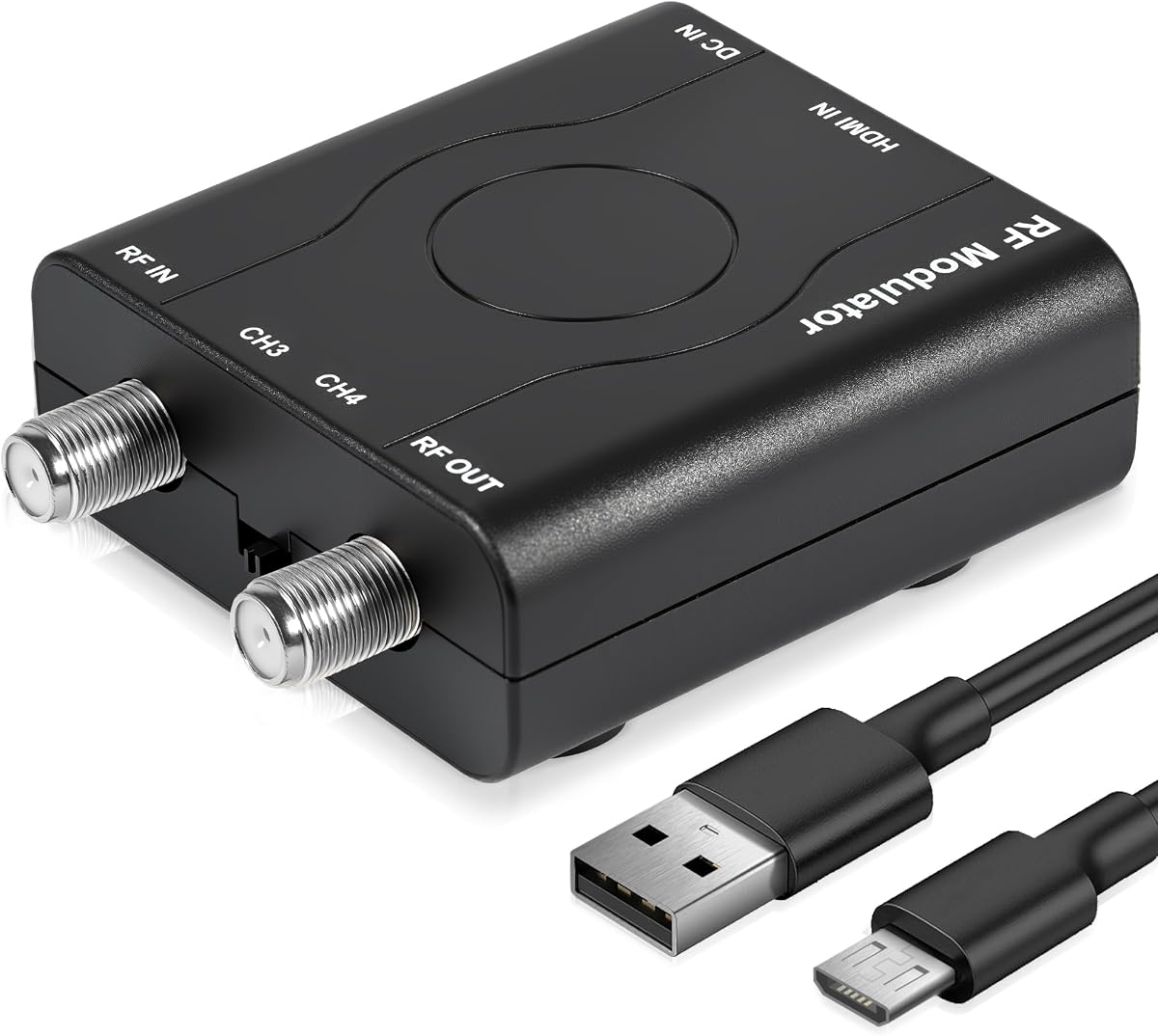

This HDMI to RF Modulator has a 4.3 rating and stands out for a clear, well-described package that includes a 1.2-meter HDMI cable, power adapter, power cable, and manual. Its strongest appeal is simple connectivity: it accepts HDMI sources and feeds them into an older television or RF-input display through CH3 or CH4 in an NTSC format.
We may earn a commission when you buy through this link, at no additional cost to you.
The product supports HDMI input resolutions including 1080P, 1080i, 720P, 576P, and 480P. PLL control is used to stabilize the VHF output, while the stated RF level is 80 ± 5 dBµV with NTSC-M audio at 4.5 MHz. Compatibility is listed for Fire TV Stick, Roku, PS5, PS4, Xbox One, Nintendo Switch, Switch 2, Apple TV, and Sony Blu-ray DVD players.
The main limitation is directional. Despite appearing in a coax to HDMI roundup because RF connections are central to the category, this device does the opposite: it converts HDMI into coax. It is NTSC-only, and its 1080P support describes the incoming HDMI signal rather than the final analog RF picture quality. It is also not listed as compatible with Mac Mini or laptops.
Choose it when an older RF television or antenna-style display needs access to a modern streaming device, console, disc player, or set-top box. The included cable and straightforward plug-and-play approach make it a practical general-purpose HDMI-to-RF choice, provided the direction of conversion and NTSC requirement match your system.
The included 1.2-meter HDMI cable, power supply, and power lead reduce the number of extra items needed for a basic installation. The manual is also included for setup guidance.
Listed compatibility covers major streaming platforms, current game consoles, disc players, and set-top devices, making the unit useful for bridging current media to an RF-only display.
We may earn a commission when you buy through this link, at no additional cost to you.
This RF Demodulator Coax to HDMI converter carries a 3.4 rating, making its customer feedback less favorable than that of the leading BNC models, but its stated function is unusually relevant to classic RF hardware. It translates analog VHF or UHF output from old consoles, VCRs, camcorders, videodisc machines, and other legacy sources into HDMI for a modern television or monitor.
We may earn a commission when you buy through this link, at no additional cost to you.
Compatibility descriptions cover Atari 2600 and 5200, Magnavox Odyssey, Intellivision, ColecoVision, NES, Sega Master System, Fairchild Channel F, Vectrex, Commodore 64 variants, RCA SelectaVision, JVC CED, Sony Betamax and U-Matic, Panasonic VHS, VCRs, Video8, 8mm, VHS-C camcorders, and older video CD players. The listed television support includes NTSC and PAL, VHF and UHF operation, and a full-band selector reaching 251 channels.
Its 3.4 rating suggests buyers may encounter meaningful installation or usability issues, although the supplied information does not identify specific complaints. Buyers should also note that this is an RF demodulator rather than a general BNC CCTV converter. The remote adds channel selection, power and timer shutdown, reminders, reservations, a calendar, and a child lock, but those extra functions do not compensate for an incompatible source format.
This is the most relevant choice in the list for a vintage console, VCR, Betamax deck, or similar device whose only video output is an antenna-style RF coax connector. Verify that the legacy equipment uses a supported analog format and that the appropriate cable is available before buying.
The unusually broad list of supported classic consoles and tape formats gives this converter a clear advantage for collectors restoring original hardware rather than modernizing it.
The included remote offers channel selection, shutdown timing, reminders, reservations, calendar functions, and child controls for direct management from a seating area.
We may earn a commission when you buy through this link, at no additional cost to you.
This BNC to HDMI Converter has a 4.7 rating, the highest customer score among the ten products. It is designed specifically for an analog camera signal arriving through a BNC coaxial connection and converted for viewing on an HDMI television, monitor, or projector. Automatic PAL or NTSC detection simplifies setup when the source standard is unknown.
We may earn a commission when you buy through this link, at no additional cost to you.
The converter accepts 480I NTSC or 576I PAL input and provides HDMI output at 720P 50/60Hz or 1080P 50/60Hz. It can switch between 4:3 and 16:9, includes an audio input, and uses motion, color, and noise-reduction processing. A 27.5-inch cable is included, although the product information specifically notes that the BNC adapter itself is not included.
Its limitations are important for surveillance buyers. It is compatible with analog cameras but not digital, AHD, TVI, or CVI models, and the BNC input is not a conventional RF interface. Consequently, it will not serve as a universal coax-to-HDMI solution for antenna-style television signals. The stated ability to operate stably for 24 hours is helpful for fixed monitoring installations.
Pick this model for a basic analog CCTV system whose camera or recorder provides a BNC composite video output and a separate audio connection. It is a strong choice for a straightforward camera-to-HDMI setup, provided the source stays within the compatible analog formats.
Automatically identifying PAL or NTSC reduces setup guesswork, while selectable 4:3 and 16:9 modes help fit the converted image to different displays.
The included audio port and 24-hour operating claim suit surveillance use, but digital and advanced CCTV formats remain outside the converter's stated support.
We may earn a commission when you buy through this link, at no additional cost to you.
The HDM61 HDMI RF Modulator earns a 4.3 rating and offers a familiar route for connecting current HDMI equipment to an NTSC television with a coax antenna input. It accepts PC, laptop, game console, camera, TV box, DVD player, CCTV, and DVR sources before converting the signal to CH3 or CH4 RF output.
We may earn a commission when you buy through this link, at no additional cost to you.
HDMI input can be 1080P, 1080i, 720P, 576P, 576i, or 480p. Its PLL-controlled VHF frequency is intended to produce a stable signal, while HDMI 1.4 and HDCP 1.4 support cover many current source devices. The unit is portable, requires no drivers, and is constructed from ABS material.
This product does not convert RF into HDMI, so it should not be selected for a vintage console that already produces coax video. The output is restricted to NTSC, and the listed 1080P capability applies to the input signal rather than an HDTV-quality RF result. Its stated compatibility with local CATV systems should also be understood in the context of controlled RF distribution.
It suits users who want to place a modern console, streaming box, or disc source on an older television with only antenna or coax input. Confirm the television uses NTSC and choose CH3 or CH4 appropriately before installation.
The listed device range spans entertainment, computing, camera, and video-recorder equipment, giving the modulator broad utility when the television only accepts RF.
Driver-free operation and PLL control reduce setup complexity and help maintain a consistent VHF output for the connected analog television.
We may earn a commission when you buy through this link, at no additional cost to you.
This HDMI to RF Modulator has a 5.0 rating and is presented as a flexible way to distribute HDMI content over existing coaxial wiring. It can serve homes, classrooms, hotels, and business environments where modern sources need to reach older televisions or displays with antenna and coax inputs.
We may earn a commission when you buy through this link, at no additional cost to you.
Compatibility is broad: streaming players, gaming consoles, Blu-ray and DVD players, cable and satellite receivers, computers, laptops, and cameras are all listed. The package includes a four-foot HDMI cable, power cable, power adapter, and a manual with step-by-step instructions. That arrangement supports a quick installation without necessarily requiring an additional HDMI lead.
The primary trade-off is again direction: this sends HDMI into coax and does not provide a path from an RF source to HDMI. The supplied information does not explicitly identify the output television standard or channel range, so buyers should verify those details for a specific legacy television. Its distribution claim is also more useful when the installation genuinely uses coax infrastructure.
Choose it when modern HDMI content must travel over coax to one or more RF displays, especially in a classroom, hospitality, or multi-display setting. The strong supplied rating, complete kit, and simple workflow make it an attractive option, provided the missing TV-standard details align with your equipment.
Using established coaxial runs can simplify installations where pulling new HDMI cables is inconvenient, particularly across multiple rooms or display areas.
The included four-foot HDMI lead, power components, and illustrated manual cover the essential connection steps and reduce the chance of missing an accessory.
We may earn a commission when you buy through this link, at no additional cost to you.
The HDM61 HDMI to Coax Adapter has a 5.0 rating and is tightly focused on NTSC-M environments. It accepts HDMI audio and video, then produces an analog RF coax signal on CH3 at 61.25 MHz or CH4 at 67.25 MHz. That makes it a practical bridge from current streaming or gaming hardware to an older NTSC television.
We may earn a commission when you buy through this link, at no additional cost to you.
The adapter uses 1080P PLL frequency control and supports HDMI 1.4 and HDCP 1.4. Its final RF output is listed as 480P, illustrating an important distinction between modern source compatibility and analog display capability. It needs no driver software, has a compact molded ABS shell, and is designed for steady daily use.
The product explicitly performs one-way conversion and cannot transform RF back into HDMI or AV. It also does not support PAL, so it should not be used with a PAL television even if the source itself has a compatible output. Buyers wanting true coax-to-HDMI conversion need an RF demodulator instead.
This is a good choice for a legacy NTSC-M television, hotel room, or other RF display that lacks HDMI. Verify the television's tuning standard and connect the source through the included power path before selecting a channel.
Clearly stating that the adapter only converts HDMI to RF helps prevent mismatched expectations, particularly for shoppers searching by the broader coax-to-HDMI keyword.
PLL frequency control and defined CH3 and CH4 frequencies give installers predictable channel behavior on compatible NTSC-M displays.
We may earn a commission when you buy through this link, at no additional cost to you.
This HDMI to RF Modulator holds a 4.5 rating and combines a broad source format range with a straightforward one-way design. It accepts 1080P, 1080i, 720P, 576P, and 480P HDMI input, then provides NTSC RF output on CH3 or CH4 through PLL-controlled VHF operation.
We may earn a commission when you buy through this link, at no additional cost to you.
Compatibility spans computers, laptops, game consoles, gaming switches, cameras, TV boxes, DVD players, CCTV equipment, and DVR systems. The adapter supports HDMI 1.4 and HDCP 1.4, uses an ABS housing, and is supplied with a USB power cable and user manual. It requires no driver installation, making setup appropriate for nontechnical users.
Despite the product keyword, it cannot convert an RF source into HDMI. Its USB power cable is not an HDMI signal cable, and an appropriate source lead may therefore need to be arranged separately. The output is also limited to NTSC rather than supporting PAL televisions.
Choose this product for connecting a broad range of HDMI sources to an older NTSC television or other RF-input display. It is particularly appealing when the source device is already known to meet HDMI 1.4 and HDCP 1.4 requirements.
Progressive and interlaced input options give modern source devices several ways to deliver their picture to the modulator before RF conversion.
Compatibility with consoles, computers, cameras, disc players, TV boxes, and recording equipment makes the adapter relevant to more than one media category.
We may earn a commission when you buy through this link, at no additional cost to you.
The HDMI to RF and RCA converter has a 4.2 rating and distinguishes itself by providing two analog output options. It can convert an HDMI source to RCA CVBS video and VHF RF at the same time, allowing one source to feed an old television and an RCA-based capture card or recording setup.
We may earn a commission when you buy through this link, at no additional cost to you.
Its RF path can extend a program over coaxial cable to another television or more distant room, while the RCA output serves local displays and capture devices. A separate F-type female antenna input accepts an antenna, HD tuner, satellite set-top box, or cable box, and a channel switch avoids interference with existing VCR equipment. The product is compatible with popular streaming devices, game consoles, disc players, and TV boxes.
This arrangement is more versatile than a single-output modulator but also requires more careful wiring. Its primary direction is still HDMI to analog video, not analog RF to HDMI. Although some PAL televisions may work in practice, the supplied information does not list PAL support, so buyers should not assume it.
It is a good match for a user who needs both coax distribution and an RCA recording or viewing path from a modern HDMI source. It also suits legacy CRT televisions and displays that lack HDMI.
Simultaneous RCA and VHF outputs let a modern source support local viewing and a separate capture or recording path without requiring two independent source devices.
The RF output can carry video across existing coax runs to additional televisions, making it useful in homes where a new HDMI cable route would be inconvenient.
We may earn a commission when you buy through this link, at no additional cost to you.
The Eyoyo TVI/CVI/AHD to HDMI Converter has a 4.4 rating and is the most capable option for a mixed or modern analog-style security camera system. It supports TVI, CVI, AHD, and CVBS, automatically detects the video format, and can preserve older camera infrastructure while adding an HDMI display.
We may earn a commission when you buy through this link, at no additional cost to you.
The converter accepts camera inputs from 720P through 8MP and recognizes both PAL and NTSC. Its HDMI output is specified at 1080P and 60FPS, while a BNC loop output allows the original coaxial signal to continue to a connected DVR. That loop is a meaningful convenience for installations where monitoring and recording happen simultaneously.
Its long-distance claim is substantial: coax transmission is stated to reach 500–700 meters without quality loss. The metal housing is designed for heat dissipation and continuous operation, making it more appropriate for retail spaces, offices, warehouses, farms, and other surveillance environments than casual living-room use. The connector is BNC, however, not the F-type connector used by many consumer RF televisions.
Choose this converter when preserving compatible CCTV cameras and DVR equipment is the priority. It is a better fit for professional or semi-professional monitoring than for retro game systems, and the signal format must match one of the four supported camera standards.
Supporting TVI, CVI, AHD, and CVBS allows mixed camera systems to remain in service instead of requiring immediate replacement when a new HDMI display is added.
The HDMI output provides a dedicated monitoring picture while the BNC loop continues the source signal toward a DVR, supporting a practical two-path surveillance workflow.
A stated 500–700-meter reach supports installations where cameras are separated from the monitor room by substantial distances.
We may earn a commission when you buy through this link, at no additional cost to you.
The HDMI61 Coax Adapter has a 5.0 rating and provides a focused HDMI-to-RF solution for NTSC televisions and coax displays. It accepts 1080P, 1080i, 720P, 576P, 576i, and 480p HDMI signals and converts them to CH3 or CH4 RF output using VHF PLL control.
We may earn a commission when you buy through this link, at no additional cost to you.
The listed source compatibility includes PCs, laptops, game consoles, gaming switches, cameras, TV boxes, DVD players, CCTV equipment, and DVRs. Support for HDMI 1.4 and HDCP 1.4 covers many mainstream sources, and no driver installation is required. Its portable form and ABS construction suit temporary displays as well as permanent installations.
As with several other products in this roundup, it is not an RF-to-HDMI converter. It also does not list PAL television support. The 1080P and 1080i labels refer to accepted HDMI input formats; the resulting RF picture is constrained by the analog television standard and the target display's capabilities.
Choose it for a modern HDMI source that needs to appear on an older NTSC television, particularly in a simple secondary-room setup. Confirm the source's HDMI and HDCP compatibility, then tune the television to the selected CH3 or CH4 channel.
Support for both progressive and interlaced formats lets the adapter accept signals from a wider selection of source equipment.
Driver-free operation and a compact ABS body make the adapter convenient for temporary events, secondary displays, or installations where space is limited.
We may earn a commission when you buy through this link, at no additional cost to you.
Choosing a coax to HDMI converter starts with identifying the exact connector and signal leaving your source. A useful purchase should match the direction of conversion, television standard, source resolution, and connector type while providing a practical connection to your display.
A true coax-to-HDMI converter accepts an analog RF or BNC video signal and produces HDMI for a modern display. Many products surfaced by the keyword do the opposite, accepting HDMI and outputting analog RF to an older television. The distinction is fundamental: check the input and output labels, and never assume a listing titled coax to HDMI performs the direction implied by the search phrase.
RF television equipment commonly uses an F-type female connector, while many surveillance cameras and DVRs use BNC. These are not interchangeable even though both carry coaxial signals. The RF Demodulator Coax to HDMI is intended for antenna-style VHF or UHF equipment, whereas the Eyoyo and budget BNC models are aimed at camera and recorder outputs. Check the socket on the source, not merely the cable type.
The source and destination television must agree on the analog broadcast standard. Several HDMI-to-RF options and the vintage RF demodulator support NTSC, while some also include PAL. The Eyoyo model recognizes PAL and NTSC CCTV sources, and the basic BNC converter automatically detects either standard. A mismatch can prevent a usable picture or require an unsupported workaround.
Source compatibility and output quality are separate issues. A modulator may accept a 1080P HDMI signal but convert it into a much lower-resolution analog RF picture. Security converters may accept 720P through 8MP camera input while outputting 1080P at 60FPS. Look for the actual input formats, output resolution, frame rate, and aspect-ratio controls instead of relying on a broad high-definition claim.
A satisfactory image is only part of the conversion. RF modulators commonly combine analog video and audio into the coax signal, while BNC camera adapters may need a separate audio input. The BNC to HDMI Converter includes an audio port, and the RF Demodulator is designed to carry legacy television audio. Confirm whether your source has audio and whether the converter exposes it through coax, RCA, or another connector.
A useful kit should include the power supply, power lead, relevant signal cable, and setup guide. The ranked HDMI-to-RF products vary: some include a 1.2-meter or four-foot HDMI cable, while others provide a USB power lead and manual but not an HDMI cable. The budget BNC converter includes a 27.5-inch cable, although it specifically says the BNC adapter is not included. Short HDMI-to-RF unit lists its converter and cables but does not state that an HDMI lead is included.
A basic converter serves one source and one display, but some products are designed for broader distribution. The HDMI to RF and RCA unit can send coax video to another television while providing a separate RCA output for a capture card. The Eyoyo converter offers HDMI viewing and a BNC loop toward a DVR, while the coax-distribution modulator is aimed at homes, classrooms, hotels, and business environments.
A compact ABS converter is sufficient for a temporary media setup, while continuous surveillance may justify a metal housing designed for heat dissipation. The Eyoyo model is explicitly described for 24/7 operation and long coax runs, and the basic BNC model also states stable continuous operation. Consider ventilation, cable distance, storage conditions, and whether the equipment will remain powered around the clock.
Begin by identifying every cable end and signal direction. For an RF-to-HDMI setup, connect the legacy source's F-type coax output to the converter's coax input, connect the converter's HDMI output to the modern television or monitor, and then apply power. For a BNC camera setup, connect the camera or recorder to the BNC input, attach separate audio if required, and connect HDMI to the display. For HDMI-to-RF use, reverse the relationship by connecting the HDMI source to the modulator and the coax output to the legacy television.
Select the correct television standard and channel after the cables are secure. On an NTSC-only modulator, use the appropriate CH3 or CH4 setting and tune the television to that channel. On a BNC converter, allow automatic PAL or NTSC detection to complete and choose the matching 4:3 or 16:9 aspect setting. On the RF demodulator, use the remote to locate the active channel and adjust any available display controls.
Keep the converter powered while the display is in use, avoid sharply bending the attached cables, and provide ventilation around the housing. For CCTV installations, secure connections, label both ends of each coax run, and retain the BNC loop to the DVR when recording is required. If the picture is absent, check the signal direction first, then confirm the source format, television standard, channel choice, power supply, and display input before changing equipment.
A coax-to-HDMI converter takes an older analog signal from a source such as an RF console output or BNC camera and creates HDMI for a modern display. An HDMI-to-RF modulator does the opposite: it receives HDMI from a modern device and creates a coax signal for an older television. Always verify the input and output direction on the product listing.
Yes, if the console has an RF coax output and the converter supports the relevant analog television standard. The RF Demodulator Coax to HDMI specifically lists the Atari 2600 and other classic systems. A native composite or HDMI output from the console would require a different type of adapter.
Usually not. A BNC converter expects a camera or recorder video signal, while an F-type antenna input expects an RF television signal. These connectors carry different kinds of coax signals. Use an RF demodulator for a VHF or UHF source and a BNC converter for compatible surveillance equipment.
CH3 and CH4 are alternative VHF output channels. CH3 operates at 61.25 MHz, while CH4 operates at 67.25 MHz, according to the supplied product information. Select the channel that the receiving television can tune and ensure that channel is not occupied by another local signal.
No. A converter changes the connection and output format, but it cannot restore detail that the source signal never contained. A compatible converter can provide a stable 1080P output and useful image adjustments, yet the underlying picture remains limited by the camera, recording system, cable, and analog format.
Some can be integrated into coax distribution setups, while others are intended for one source-to-one display use. The HDMI to RF and RCA model also offers a separate RCA path for capture equipment. The Eyoyo unit provides HDMI viewing plus a BNC loop toward a DVR, but the supplied information does not describe every model as a multi-television distribution hub.
The 1080P label generally describes the HDMI signal entering the converter. That high-definition source is encoded into an analog VHF or UHF RF signal for an NTSC television, which is limited by the television system and display hardware. A coax input does not turn an older television into a native HDTV.
The Eyoyo TVI/CVI/AHD to HDMI converter is the broadest choice in this list because it supports TVI, CVI, AHD, and CVBS, automatic format detection, and camera inputs up to 8MP. It also includes an HDMI output and BNC loop for continued recording. Compatibility must still be confirmed for each individual camera and recorder.
The Eyoyo TVI/CVI/AHD to HDMI converter is the strongest overall match for genuine coax-to-HDMI use because it supports several CCTV standards, high-resolution camera input, PAL and NTSC, and a BNC recording loop. The BNC to HDMI Converter is the best budget-oriented option for a simpler analog camera installation, while the RF Demodulator Coax to HDMI is the most relevant choice for vintage consoles, VCRs, and other RF-output hardware.
Before buying, prioritize the connector and signal direction above every other feature. A true RF source needs an RF demodulator, a BNC camera signal needs a BNC converter, and a modern HDMI source feeding an old television needs an HDMI-to-RF modulator. Then confirm PAL or NTSC support, output resolution, audio requirements, included cables, and whether the installation needs recording, loop-through, or multi-display distribution.
Ratings and product details offer a useful starting point, but prices, availability, and seller information can change. Review the current listing and manufacturer guidance before purchasing, particularly when using sensitive or high-value CCTV equipment or operating equipment continuously for long periods.
