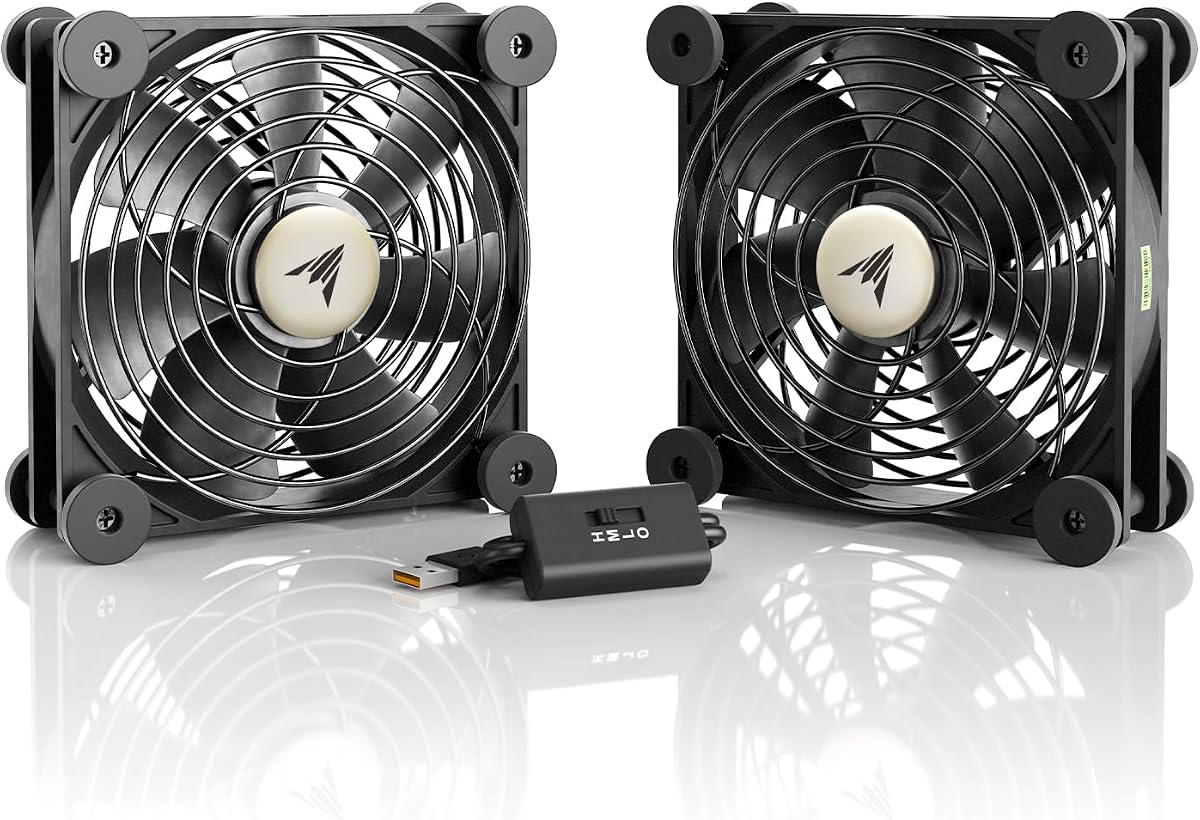
AC Infinity MULTIFAN S7
4.7Editor score
Dual 120mm USB fans
Multispeed external controller
Flexible flat or upright placement
Combined 104 CFM airflow
An AV receiver can generate considerable heat inside a closed entertainment cabinet, where slow-moving air may increase operating temperatures and limit long-term performance. A purpose-built cooling fan can improve circulation, move warm air toward an exhaust vent, and help protect the receiver and nearby electronics. The right choice depends on cabinet clearance, noise tolerance, power access, and the amount of airflow required.
This guide compares ten cooling fan systems for AV receivers, cabinet-mounted exhaust fans, USB-powered circulation fans, and multifan sets. We evaluated the stated airflow, noise level, bearing type, dimensions, speed controls, mounting approach, and power requirements. The comparison also distinguishes plug-and-play models from systems designed to ventilate an entire cabinet rather than sit directly on top of a receiver.
The recommendations range from a compact two-fan USB system to a larger top-exhaust unit, an aluminum cabinet fan, and a premium Noctua accessory set. Each review highlights the features most relevant to AV use, along with installation and compatibility trade-offs. Product prices and availability can change, so readers should verify current details before purchasing.
4.7Editor score

4.8Editor score

4.4Editor score
As an Amazon Associate we earn from qualifying purchases.
The table below compares all ten options by their core cooling design, power method, airflow, noise specification, and installation approach, making it easier to identify the right fan for a home theater cabinet or AV enclosure.
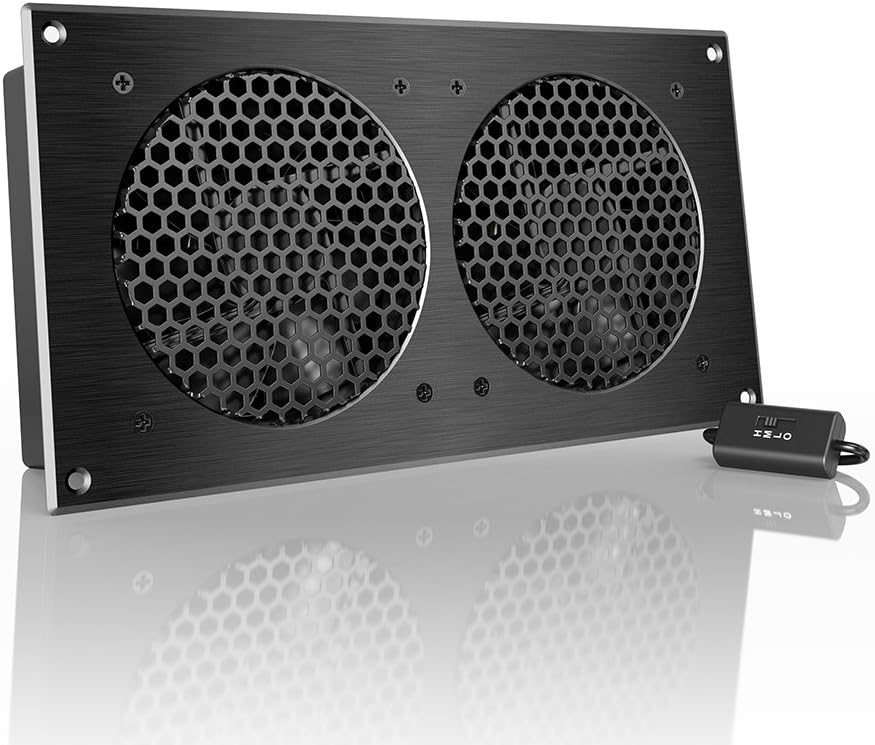


The AC Infinity AIRCOM S7 is a dedicated 12-inch top-exhaust cooling system for routers, modems, game consoles, and other AV components. Its 4.8 rating is the highest in this guide, and the product data emphasizes a combination of 140 CFM airflow, quiet 19 dBA operation, and programmable thermal control. It is built for situations where the receiver shares a cabinet with several heat-producing devices.
We may earn a commission when you buy through this link, at no additional cost to you.
Its strongest feature is the choice between two thermal trigger modes and four speed-control options. That gives users a way to match fan behavior to different cabinet conditions instead of relying on a single fixed speed. Two PWM-controlled dual-ball-bearing fans provide the airflow and motor life suited to continuous electronics cooling, while the top-exhaust format helps remove rising heat from a cabinet.
The main trade-off is physical scale. At 11.6 by 6.3 by 1.5 inches, it needs more room than a compact USB fan or a thin door-gap model. Its programming also adds complexity for buyers who only want a straightforward exhaust fan. Nevertheless, those features make sense for a cabinet that needs active, repeatable heat management rather than occasional circulation.
This is the strongest all-around recommendation for an AV receiver cabinet that generates sustained heat and has enough clearance for a larger system. It suits buyers who value a purpose-built solution, automatic thermal response, and low noise. Users with a very shallow cabinet should measure the available space and compare it with the slim no-drill models.
Two thermal trigger modes and four speed settings make the AIRCOM S7 adaptable to changing cabinet temperatures. The fan can respond automatically when heat rises, reducing the need to adjust it manually during a movie or gaming session.
The stated 140 CFM airflow and 19 dBA noise level are especially useful for AV use, where substantial ventilation matters but distracting sound does not. Dual-ball-bearing fans and PWM motor control support consistent operation.
We may earn a commission when you buy through this link, at no additional cost to you.
The AC Infinity MULTIFAN S7 pairs two compact 120mm USB fans with an external speed controller. It has a 4.7 rating and provides a combined 104 CFM airflow at a stated 19 dBA. Unlike a rigid cabinet exhaust unit, it can be laid flat, stood upright, or positioned near different pieces of AV equipment.
We may earn a commission when you buy through this link, at no additional cost to you.
This flexibility makes the MULTIFAN S7 useful in entertainment centers where one fan can pull air through a receiver cabinet while the other supports circulation near a console or router. USB power can come from ports on compatible AV electronics, while the controller lets the user select a quieter or stronger setting. Each fan measures 4.7 by 4.7 by 1 inch, which simplifies placement around larger components.
The system does not offer the AIRCOM S7's thermal programming, so it is a more hands-on cooling solution. It also depends on access to a suitable USB power source, and cable routing may require planning in a tightly organized cabinet. Even so, the dual-ball-bearing design, long stated bearing life, and low noise make it a credible option for continuous electronics use.
The MULTIFAN S7 is a strong value-oriented choice for users who want more than one fan and the freedom to position them independently. It works particularly well when a cabinet has multiple hot components or when a receiver can be accessed from different sides. It is less convenient for users who want a single self-contained top-exhaust unit.
Two independent 120mm fans can be aimed or oriented according to the cabinet's airflow path. This is more adaptable than a single fixed-format fan and can support cooling around both a receiver and another hot device.
The USB plug can use compatible USB ports found on AV electronics, reducing the need for a separate low-voltage power supply. A multispeed controller makes it easy to balance airflow and sound.
We may earn a commission when you buy through this link, at no additional cost to you.
The AC Infinity AIRPLATE S7 is a quiet cabinet cooling fan with a 4.7 rating, a 104 CFM airflow rating, and a 19 dBA noise specification. Its 12-inch format and brushed black aluminum frame give it a more integrated appearance than a basic computer fan, which can be important in a furniture-forward home theater installation.
We may earn a commission when you buy through this link, at no additional cost to you.
The included speed controller allows the user to balance airflow against sound. Power can come from a wall outlet or USB port, giving installers more freedom depending on the cabinet's outlets and nearby electronics. A Turbo Adapter is included and is stated to increase performance by 25%, adding another option for demanding heat conditions.
Its main limitation is that the system is manually controlled rather than thermostatic. The AIRPLATE also measures 11.69 by 6.3 by 1.3 inches, so it needs more depth than the thin door-gap fans in this guide. Its aluminum construction and modern finish help offset that larger footprint, particularly when the unit remains visible inside an entertainment center.
This fan is best for users who want a quiet, purpose-built cabinet system with a polished appearance and flexible power options. It is a particularly natural choice for a dedicated AV rack or display cabinet where the equipment remains visible. Those who require automatic temperature response should examine the AIRCOM S7 instead.
The CNC-machined aluminum frame and brushed black finish suit a home theater cabinet more closely than a bare PC fan. Its wide format also gives the system a deliberate, appliance-like appearance.
Wall outlet and USB power options simplify installation in different cabinet layouts. The included Turbo Adapter provides a stated 25% performance increase when greater cooling is desired.
We may earn a commission when you buy through this link, at no additional cost to you.
This 120mm AC computer cooling fan is built for immediate installation around an AV receiver, amplifier, router, or other electronic device. It has a 4.7 rating and distinguishes itself with direct 110V-240V wall-outlet power, eliminating the need for a separate USB adapter or low-voltage supply.
We may earn a commission when you buy through this link, at no additional cost to you.
The integrated speed controller lets the user move between gentle circulation and maximum cooling. The complete kit includes the fan, controller, protective metal finger guard, and five-foot power cord. Its slim 120mm by 25mm profile also allows mounting to a PC case vent, wire shelf, flat surface, greenhouse panel, or other suitable structure.
The main limitation is the need for access to a standard wall outlet, which may not exist inside a built-in entertainment center. A visible power cord can also be less tidy than USB power for a receiver cabinet. Although the product is marketed broadly rather than exclusively for AV equipment, its wall-powered design and adjustable output are relevant to any enclosed electronics setup.
This is a practical recommendation for users with an accessible outlet who want immediate, straightforward cooling without assembling a separate power system. It may be particularly effective for a home theater receiver that sits in a ventilated shelf or open cabinet. Buyers with no nearby outlet should favor a USB-powered model.
Direct wall power is the clearest advantage for quick setup. A compatible outlet is all that is required, and the stated 110V-240V range gives the fan broad electrical compatibility.
At only 25mm thick, the fan can fit spaces that reject bulkier cabinet units. The included finger guard adds safety when the fan is accessible in an open shelf or entertainment center.
We may earn a commission when you buy through this link, at no additional cost to you.
The No-Drill USB Cabinet Fan is designed to move air out of home theater cabinets, AV racks, network cabinets, and other enclosed electronics spaces. It has a 4.0 rating, a stated airflow of up to 77.12 CFM, and a door-gap format that avoids permanent modification of furniture.
We may earn a commission when you buy through this link, at no additional cost to you.
Its most attractive feature for AV users is the no-drill installation. The slim fan can use existing cabinet gaps or vents to establish an exhaust path without cutting openings. A built-in controller adjusts the cooling level, while USB 5V power allows use with a compatible AV receiver, wall charger, laptop, or power bank.
The lower rating and lower stated airflow make this system less compelling for a large, densely loaded cabinet. USB power also requires a suitable source, and the effectiveness depends on the quality of the cabinet's gaps and the path toward an exterior vent. These are meaningful limitations, but they do not outweigh the benefit for renters or owners of finished furniture.
This fan is best for a smaller entertainment cabinet where permanent drilling is undesirable. It offers a clear path to improving circulation with minimal installation work. Buyers managing several high-heat components should compare its 77.12 CFM output with the higher airflow of the AC Infinity systems.
The door-gap approach creates an exhaust route using spaces that already exist. It is particularly useful for finished cabinets, rented homes, and entertainment centers that should remain intact.
USB 5V power can come from several compatible sources, including the receiver itself or a nearby wall adapter. The included speed control makes airflow easier to tune for different temperatures.
We may earn a commission when you buy through this link, at no additional cost to you.
The Slim No-Drill Cabinet Fan is built for narrow AV cabinets, media consoles, and equipment enclosures where a conventional 120mm fan cannot fit comfortably. It holds a 4.4 rating and uses existing cabinet gaps or vents for mounting, avoiding permanent drilling in the furniture.
We may earn a commission when you buy through this link, at no additional cost to you.
Its defining advantage is the ultra-slim profile. The fan can cool around AV receivers, amplifiers, game consoles, routers, switches, and other electronics without consuming a large portion of the usable shelf space. USB 5V power provides simple operation through a computer, adapter, or other compatible powered device.
The supplied information describes efficient airflow and low operating noise but does not provide a numerical airflow or decibel rating. That makes direct performance comparison with the 140 CFM AIRCOM S7 or 104 CFM MULTIFAN S7 more difficult. A USB source and a cabinet with a viable exhaust path remain necessary for the intended setup.
This is the right choice when clearance matters more than having a published performance figure. It can add ventilation to a shallow media cabinet without requiring construction work. For users who need a quantified airflow target, one of the AC Infinity systems may be easier to evaluate.
The ultra-slim construction targets precisely the areas where standard 120mm fans can interfere with doors, shelves, or equipment. It is a practical choice for shallow built-in cabinets.
The fan is intended to reduce heat around receivers, amplifiers, consoles, and network equipment. Low-noise operation helps keep the background suitable for movies and gaming.
We may earn a commission when you buy through this link, at no additional cost to you.
The Noctua NV-FS2 is a multi-purpose fan set designed to cool electronic devices with ventilation holes, including AV receivers, stereo equipment, routers, game consoles, and storage solutions. Its 4.4 rating reflects a premium approach built around the NF-A12x25 PWM 120mm fan, a compact controller, and carefully finished mounting accessories.
We may earn a commission when you buy through this link, at no additional cost to you.
The set is unusually comprehensive for a device-cooling accessory. Soft silicone from the NV-MPG1 gasket and NV-MPP1 pads helps reduce vibration, while the offset design supports acoustics and ventilation. The NA-FC1 controller allows adjustment from maximum airflow to near-silent operation, and the included NA-FG1 grill adds protection. Mains power can use supplied EU, US, and UK adaptors.
The tradeoff is that this is a premium general-purpose set rather than a cabinet-specific exhaust system. Users must determine how to position the fan above, beside, or beneath the receiver and route the included cable. The 1-meter extension cable works with the power supply for a stated total cable length of 2.85 meters, which should be checked against the installation distance.
The NV-FS2 is best for a buyer who values acoustic refinement, vibration control, and a comprehensive accessory package. It can add airflow to a ventilated AV shelf without requiring permanent cabinet modifications. Buyers primarily seeking a fixed cabinet exhaust should compare it with the AIRCOM S7 or AIRPLATE S7.
Extra-soft silicone accessories help reduce vibration transfer into furniture or equipment surfaces. This is valuable when a fan operates close to a receiver during quiet listening or home viewing.
The included PWM fan, compact controller, grill, power supply, plug adaptors, and extension cable cover the major needs of a flexible placement. Direct mains power avoids reliance on a receiver's USB output.
We may earn a commission when you buy through this link, at no additional cost to you.
This cabinet cooling fan is designed to fit against the inner edge of cabinet doors and use existing gaps or ventilation slots as an exhaust path. It has a 4.2 rating and emphasizes quick, non-destructive installation for home theater cabinets, electronics enclosures, server racks, and other confined spaces.
We may earn a commission when you buy through this link, at no additional cost to you.
Included brackets allow tool-free attachment without drilling into furniture. The product's stated focus on AV receivers, game consoles, and server racks is relevant because those devices commonly produce heat inside closed cabinets. USB 5V power can be drawn from a receiver, computer, or wall adapter, and the product requires no assembly.
The supplied information does not include a numerical CFM or decibel rating, which limits the ability to compare its output directly with measured specifications from other products. Its performance also depends on cabinet construction. If the door has a tight seal, weak gaps may not allow meaningful airflow through the intended path.
This fan is a good fit for renters, DIY users, and anyone who does not want to alter expensive furniture. It is especially convenient when installation must be completed quickly. For precise capacity planning, choose a model with published airflow specifications.
The included mounting brackets let the fan use existing cabinet edges and gaps. This keeps the furniture intact and makes it easier to reposition the unit when the AV layout changes.
A tool-free process and USB power remove much of the setup involved with hardwired cabinet fans. The system is designed to move heat away from receivers, consoles, amplifiers, and routers.
We may earn a commission when you buy through this link, at no additional cost to you.
The Wathai 140mm x2 USB cooling system combines two large flat fans with three-speed control. It has a 4.3 rating and is suitable for routers, consoles, PCs, and AV cabinets. The stated 18 dBA noise level is the lowest numerical figure among the fans in this guide.
We may earn a commission when you buy through this link, at no additional cost to you.
Each fan measures 140mm, and the flat two-in-one design can be placed over or around equipment where vertical airflow space is limited. USB power makes the system compatible with AV receivers, routers, PS4, Xbox, and other USB-equipped devices. The product information also notes that multiple USB fans can be daisy-chained, offering a path to expanded circulation.
Its stated 57 CFM airflow is lower than the combined output of the dual 120mm AC Infinity MULTIFAN S7. The fans also use sleeve bearings rather than dual-ball bearings. Those specifications do not make the Wathai unsuitable, but buyers should consider whether its smaller air volume and bearing type align with their heat-management needs.
This system is best for users who prioritize low noise, broad USB compatibility, and a flat form factor. It works well near a receiver or console where a conventional tower fan would be inconvenient. For a tightly sealed cabinet requiring stronger exhaust, a higher-airflow dedicated cabinet system may be more effective.
Low, medium, and high settings let users choose between background circulation and stronger cooling. The 18 dBA specification makes this an appealing option for quiet rooms and uninterrupted viewing.
The paired 140mm format moves air across a broad area while remaining relatively shallow. It can sit over equipment or fit into crowded AV shelves where upright fans have limited clearance.
We may earn a commission when you buy through this link, at no additional cost to you.
The GDSTIME 240mm USB Fan Cooler is a broad-format cooling accessory for routers, modems, receivers, DVRs, amplifiers, consoles, computers, and other AV electronics. It has a 4.3 rating and provides low, medium, and high speed adjustment through an included USB extension cable and inline switch.
We may earn a commission when you buy through this link, at no additional cost to you.
Its 240mm size can cover a larger area than a standard 120mm fan, while the flat design makes it suitable for placing above or below equipment. USB power can come from Type-A ports on compatible electronics, a wall charger, or a portable power bank. No assembly is required, and the stated hydraulic-bearing motor is intended for durable, quiet operation.
Unlike several AC Infinity alternatives, the supplied information does not provide a numerical airflow or noise figure. That makes the cooling output harder to quantify and may be less attractive for users with a well-defined CFM requirement. A large fan can also move more air at a given operating speed, so low-speed suitability will depend on the resulting sound and system configuration.
This is a versatile choice for a mixed AV setup where a single flat fan format can cool several kinds of equipment. It is especially convenient for users already using USB power hubs or powered AV accessories. Those seeking published noise and airflow figures will find the comparisons easier with the AIRCOM S7 or MULTIFAN S7.
The 240mm surface offers broad coverage over receivers, network devices, and other equipment. Its low profile works well in crowded shelves, network racks, and AV cabinets.
The inline switch provides straightforward low, medium, and high adjustment. USB power keeps the installation straightforward across compatible AV electronics and wall adapters.
We may earn a commission when you buy through this link, at no additional cost to you.
The right AV receiver cooling fan depends on cabinet geometry, heat load, available power, and acceptable noise. Comparing airflow, mounting style, controls, and specifications helps prevent an installation that is either too large, too weak, or difficult to power.
Start by measuring the cabinet's width, depth, height, and available door clearance. A wide top-exhaust system such as the AIRCOM S7 or AIRPLATE S7 may work well in a dedicated rack, while a shallow entertainment center may only accommodate a flat 140mm or 240mm fan. Door-gap products are useful when the cabinet should remain undrilled, but they need a gap that permits air to pass through the intended exhaust route.
Airflow is a useful comparison point when the manufacturer provides a CFM figure. The AIRCOM S7 is rated at 140 CFM, while the MULTIFAN S7 and AIRPLATE S7 each provide 104 CFM, and the no-drill USB cabinet fan lists up to 77.12 CFM. Larger AV cabinets, amplifiers, game consoles, and network equipment can benefit from more circulation, although the required amount depends on the enclosure and heat load.
Home theaters and listening rooms make fan noise especially important. Published specifications range from 18 dBA for the Wathai dual-fan system to 19 dBA for the AIRCOM, MULTIFAN, and AIRPLATE models. Other cabinet fans are described as quiet or low-noise without a numerical level. Speed control remains important because the quietest setting and maximum cooling setting are rarely the same.
USB 5V is common among the compact models and allows power from a compatible receiver, computer, charger, or power bank. The 120mm AC fan instead plugs directly into a 110V-240V wall outlet, while the AIRPLATE S7 supports wall or USB power. The Noctua set includes a mains power supply. Control options range from inline low-medium-high switches to programmable thermal modes and four speed settings.
A receiver-top or side fan can move air through the receiver's own vents and across nearby equipment. A cabinet exhaust fan is more appropriate when warm air accumulates at the top of an enclosure and needs a path out. Dedicated cabinet systems offer a clearer exhaust arrangement, while compact flat or dual fans provide more freedom to position airflow around several devices.
No-drill products are ideal for renters, finished furniture, and entertainment centers that should not be altered. The 120mm AC fan includes a finger guard and can be mounted in several ways, while the GDSTIME and Wathai systems use straightforward flat placement. Dedicated cabinet systems may require more clearance and careful alignment with an existing vent or exterior opening.
Continuous cabinet cooling places different demands on a fan than occasional desk use. Dual-ball-bearing models appear in the AIRCOM, MULTIFAN, AIRPLATE, and Noctua products, while the Wathai system uses sleeve bearings and the GDSTIME system states that its motor uses a hydraulic bearing. Bearing construction can inform suitability for long operating periods, though the product's placement and ventilation also affect longevity.
Low-profile cabinets can make cable management as important as fan size. USB systems can be powered from nearby equipment, but a receiver's port may not support the load of multiple fans. Wall-powered systems avoid that concern but require an outlet and a visible cord. The Noctua set provides an extension cable and several plug adaptors, while the AC fan includes a five-foot cord. Route cables so they do not block airflow, doors, or component access.
Begin by identifying the receiver's intake and exhaust openings, the cabinet's warmest area, and the most practical power source. Place the fan where it can move air across or away from the receiver without covering vents. For a cabinet exhaust model, aim the fan toward an existing rear or upper vent so warm air can leave the enclosure instead of circulating back inside.
Start at a low or moderate speed and increase airflow if the receiver remains warm during extended use. Keep intake paths unobstructed, leave clearance around every fan, and make sure cables cannot contact moving blades. If the fan has programmable thermal controls, select a trigger mode that fits the room and a speed range that remains acceptable during movies, gaming, and quiet periods.
Inspect the fan periodically for dust, loose mounting hardware, cable damage, and unusual vibration. Unplug the unit before cleaning it, and use a soft brush or gentle compressed air without bending the blades. Replace damaged guards, brackets, or power cables, and follow the manufacturer's instructions for the specific model.
It depends on the installation and operating conditions. A receiver in an open, ventilated shelf may need little additional help, while one inside a closed cabinet can benefit from continuous airflow. The fan is most useful when hot air accumulates around the receiver or cannot escape the enclosure. Proper ventilation can help maintain performance and reduce heat-related stress on the equipment.
Only if the receiver's top surface, vents, and weight rating permit safe placement. Many receivers circulate air from the front or bottom and release it through the top, so a fan on top can block exhaust. A small clearance fan may work in some layouts, but cabinet-level or side-directed airflow is often safer. Always follow the receiver and fan manufacturers' placement guidance.
A compatible USB 5V source can power many compact cabinet fans, but the receiver or hub must support the fan's power draw. A receiver's front USB port may be reserved for media playback or may not provide enough current for multiple fans. For heavier systems or multiple fans, a dedicated wall adapter or powered USB hub is often more dependable.
A no-drill fan is better when modifying furniture is undesirable, the cabinet has usable door gaps, and the available space is tight. A top-exhaust system is generally better when a stable top surface is available and a stronger, clearly directed exhaust path is needed. The correct choice depends more on cabinet geometry than on a universal rule.
The right amount depends on cabinet size, receiver power, nearby equipment, and how well the enclosure vents heat. Published airflow can help compare fans, but no single CFM figure suits every cabinet. A larger cabinet containing an amplifier, game console, and receiver will generally benefit from stronger circulation than a small cabinet holding only the receiver.
Yes, if the airflow path reaches each heat-producing component. Dual-fan systems can be placed on opposite sides of a cabinet, while a larger flat fan can cover a receiver and nearby router or console. The components should not block each other's intake or exhaust openings, and every fan needs an appropriate power source.
A properly mounted fan should not interfere with remote signals, but placement can block infrared-sensitive components if a receiver or television uses an IR window in that area. Keep the fan away from IR sensors and avoid obscuring status displays or touch controls. Wireless or RF-based equipment generally does not present the same concern.
Inspection frequency depends on dust in the room and operating time. A quick visual check every few months is sensible, with more frequent cleaning if airflow drops or noise changes. Unplug the fan before removing dust, and avoid pushing debris into the motor housing. Replace damaged mounting parts rather than continuing to operate an unsafe installation.
The AC Infinity AIRCOM S7 stands out as the most complete option for a cabinet that can accommodate a 12-inch top-exhaust system, while the MULTIFAN S7 provides flexible dual-fan cooling at a more budget-conscious level. The AIRPLATE S7 adds a refined aluminum design and flexible power choices. For premium, quiet-oriented equipment cooling, the Noctua NV-FS2 includes an extensive set of controls, mounting accessories, and power options.
When choosing, prioritize an airflow path that matches the cabinet, a power method that fits the available outlets and USB ports, and controls that let you balance cooling with sound. No-drill models are ideal for preserving furniture, but narrow cabinet fans may offer less published performance data than dedicated AC Infinity systems. Larger systems generally provide stronger stated airflow and are better suited to cabinets with several heat sources.
Finally, verify the current product details, availability, and price before ordering, since both can change. Measure the installation area, identify the power source, and check compatibility with the receiver's ventilation design. With those details settled, the right cooling fan can improve cabinet airflow without compromising the appearance or enjoyment of a home theater setup.