
MWE 32 Inch Digital Signage Display
4.6Editor score
Wide 178-degree viewing angle
Remote CMS content publishing
Foldable mobile wheel design
A digital menu display can turn a static counter into a flexible information hub for changing menus, promotions, service notices, and branded content. The strongest options balance readable brightness, appropriate screen size, dependable playback, accessible content controls, and connectivity that suits a restaurant, café, salon, clinic, shop, or reception area.
This guide compares ten complete displays and media players according to screen dimensions, resolution, brightness, viewing angles, content-management options, connectivity, construction, and intended placement. It also distinguishes between all-in-one commercial panels, portable kiosks, compact touchscreens, and devices designed to drive an existing television, because each format suits a different kind of business environment.
The selections show which products are most practical for everyday menus, remote promotions, temporary events, and multi-screen installations. Ratings reflect the supplied customer feedback, while product features come from the listed descriptions. Prices and promotions can change, so readers should confirm current availability, specifications, warranty terms, and total ownership requirements before ordering.
4.6Editor score
5.0Editor score

4.1Editor score
As an Amazon Associate we earn from qualifying purchases.
This side-by-side comparison covers complete commercial panels and media players, highlighting the hardware format, screen performance, management method, and placement flexibility that distinguish each option.


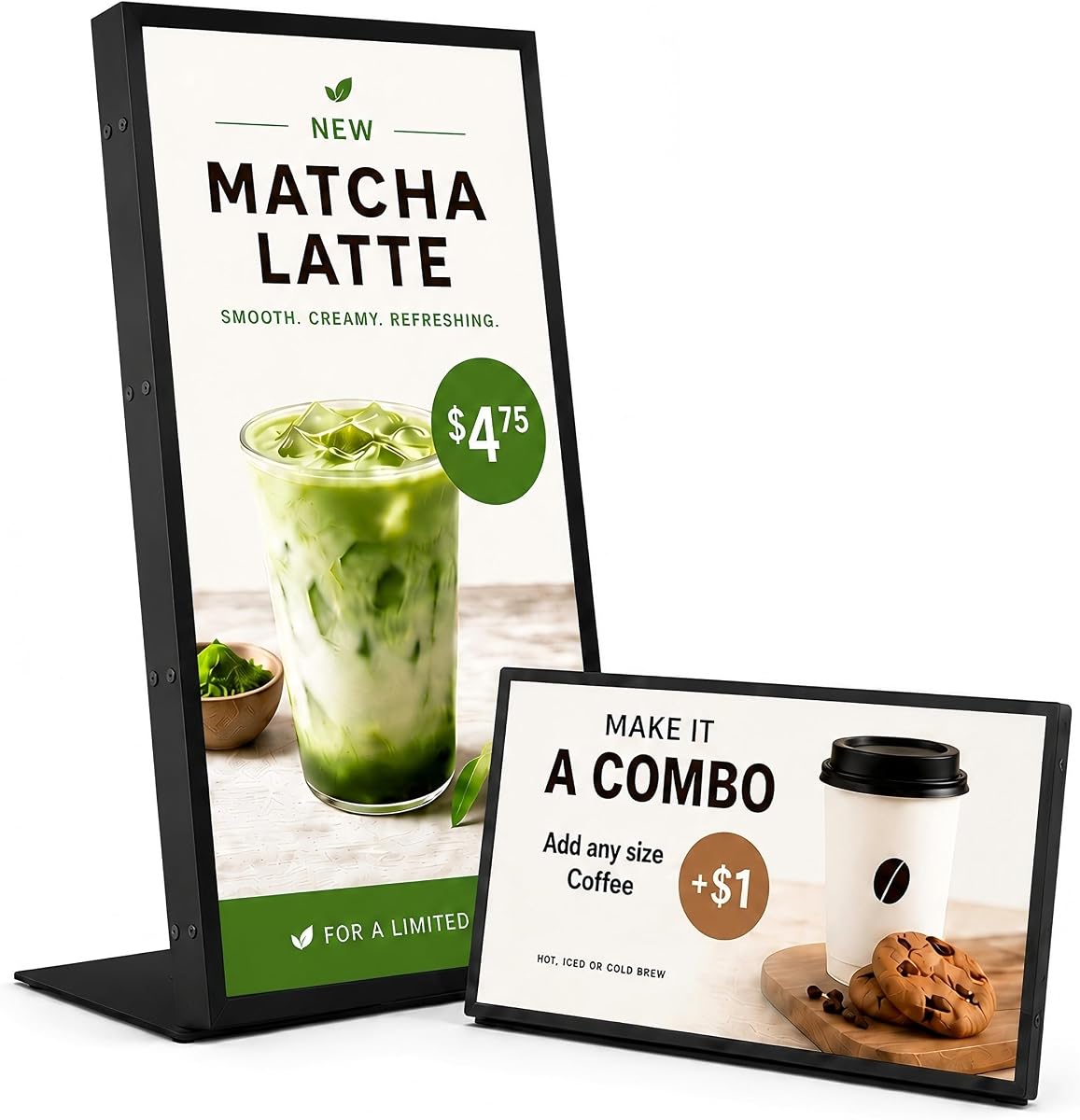


This 18.5-inch Android menu board is a balanced all-in-one option for cafés, bakeries, salons, reception areas, retail counters, and other indoor commercial spaces. Its 700-nit brightness, 720P HD panel, wide viewing angle, and included desktop stand make it particularly useful when customers view content from relatively close range but not always directly in front of the screen.
We may earn a commission when you buy through this link, at no additional cost to you.
The strongest feature is the built-in lifetime cloud CMS. It supports remote uploads, playlists, scheduled playback, multi-display management, split screens, and real-time promotional changes from a computer, tablet, or smartphone. USB plug-and-play provides a useful local alternative, while HDMI, LAN, USB 2.0, USB 3.0, and TF-card support broaden the available content workflows.
The tradeoff is resolution. A 720P panel can display menus, brand graphics, and promotional videos effectively, but it offers fewer pixels than the Full HD and 4K alternatives in this list. The Android 12 platform, 2GB RAM, and 32GB storage support normal commercial playback, while the landscape and portrait stand options make the display adaptable to counters of different shapes.
This is a sensible choice for a business that wants a ready-made countertop display and centralized updates without having to buy a separate media player. It is particularly appropriate for daily menus and rotating promotions in an indoor location. Buyers who need exceptionally fine text detail or maximum screen size should compare it with the higher-resolution models.
The included cloud CMS lets a business change menus, playlists, promotions, and multi-screen layouts from a PC, tablet, or smartphone. USB playback remains a practical fallback for local administration or a location with limited network access.
The sturdy stand supports both landscape and portrait presentation. That flexibility lets operators show a wide menu, a vertical list, a welcome message, or a product showcase without committing the counter to one fixed layout.
We may earn a commission when you buy through this link, at no additional cost to you.
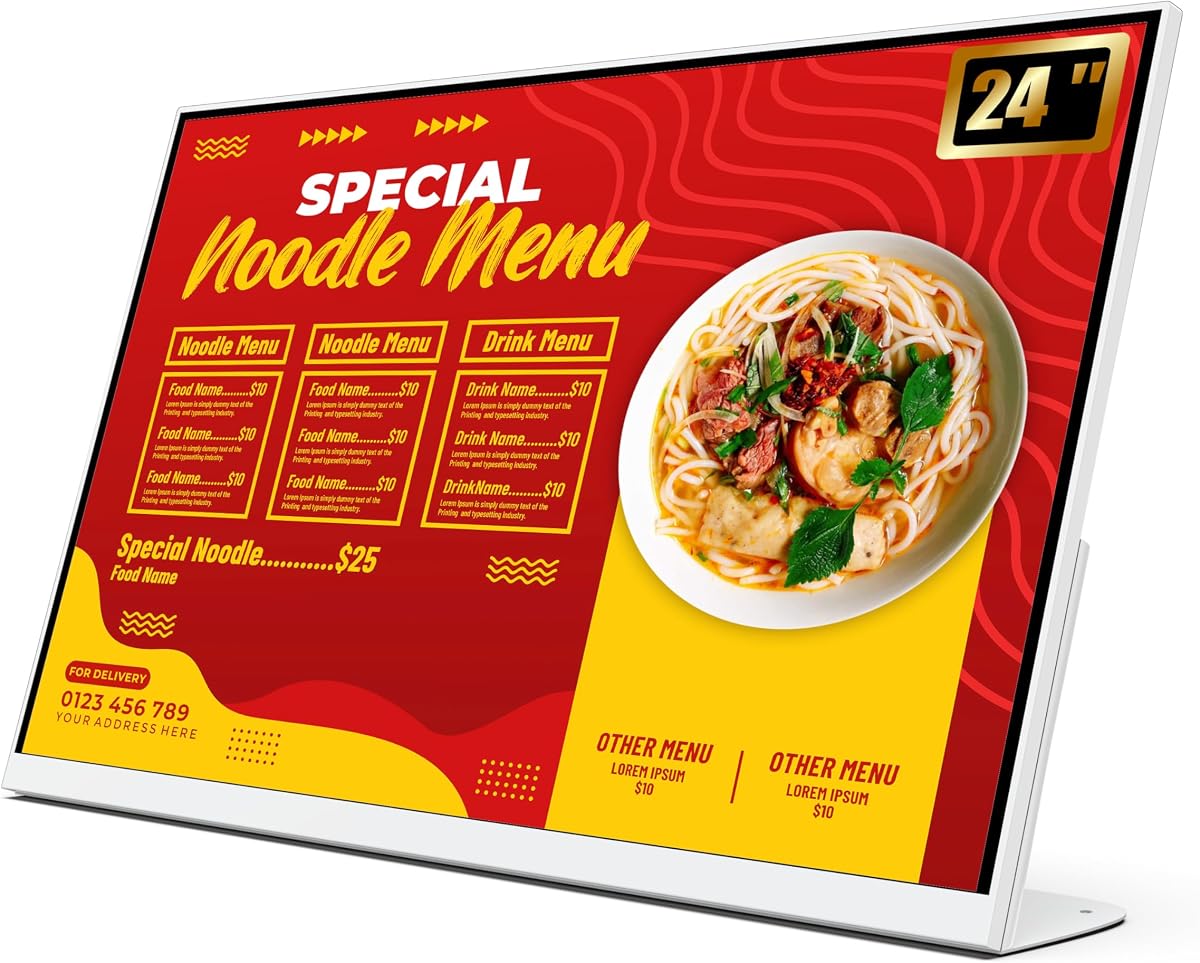
The 24 Inch Desktop Digital Menu Board stands out as the most balanced complete display in this guide. Its 1920×1080 Full HD panel, 16:9 aspect ratio, vivid color presentation, and wide viewing angle suit a milk tea shop, restaurant, retail counter, ordering desk, or front desk where clear text and efficient customer browsing are priorities.
We may earn a commission when you buy through this link, at no additional cost to you.
Content management is designed for real business use. The Android operating system and CMS support centrally managed menus, promotional videos, images, and remote updates. Content can be changed through USB, an app, or a connected PC, while WiFi and LAN options provide additional flexibility. Split-screen layouts, scheduled on and off times, and compatibility with multiple formats further improve daily operation.
Its commercial construction is another significant strength. The supplied information identifies materials and heat dissipation intended to support continuous 24-hour operation while reducing maintenance demands. A sturdy carton is included for transport protection, and the desktop format helps preserve valuable counter space. The product is not described as a waterproof outdoor unit, so it is best suited to protected indoor positions.
This recommendation is ideal for a business seeking sharp visuals, a practical 24-inch footprint, and several dependable content-update routes without a complicated installation. It can handle breakfast menus, ordering information, rotating product promotions, and customer-facing notices. For a portable event sign, a smaller player, or a much larger video wall, one of the other specialized options may be a closer match.
The 1920×1080 resolution provides a useful balance of clarity and manageable screen size for a countertop. It gives operators enough detail for item names, prices, and promotional graphics while remaining practical for milk tea shops, restaurants, and retail environments.
USB, app, and PC-based updating let the business choose the method that suits each location. Scheduled power controls and a central CMS add operational convenience for menus that change throughout the day.
We may earn a commission when you buy through this link, at no additional cost to you.
The MWE 32 Inch Indoor Digital Signage Display is the premium choice in this roundup because it combines a large IPS panel, wide-angle visibility, remote publishing, and a genuinely portable kiosk format. The 178-degree viewing angle is especially useful in restaurants, hotels, shopping centers, retail stores, exhibitions, and temporary promotional areas where viewers approach from different directions.
We may earn a commission when you buy through this link, at no additional cost to you.
Media can be loaded through USB or HDMI, and the automatic loop player continues showing content without repeated manual intervention. The MWE-QIXZOCV CMS adds synchronous remote publishing, allowing images and information to be changed from another location. Timed power controls and support for continuous seven-day operation help align the display with business hours and extended event schedules.
Unlike a permanently mounted wall panel, this model is foldable, movable, and equipped with built-in wheels. That design makes it practical for trade shows, exhibitions, hotel promotions, temporary menus, and seasonal campaigns. The trade-off is its larger physical footprint, particularly when the display is being transported or positioned in a tight passage.
Buyers should choose this model when presentation impact and deployment flexibility matter more than a minimal counter footprint. It is well suited to organizations that need one large sign to move among several locations or events. The included three-year warranty and online technical support add reassurance, while the supplied model designation helps with warranty and support questions.
The IPS panel and 178-degree viewing angle help preserve clarity when customers view the screen from the side or across a busy room. This is valuable in locations where one fixed viewing position cannot be guaranteed.
The foldable construction and built-in wheels simplify movement between restaurants, exhibitions, trade shows, or temporary promotional sites. A business can preserve one larger display without permanently dedicating a wall or counter to it.
We may earn a commission when you buy through this link, at no additional cost to you.
The EZ AD Digital Signage Display Player is an economical way to build a digital menu using an existing HD television. It supports 4K content and connects through HDMI, Ethernet, two USB Type-A ports, and a memory card reader. As a result, it offers a practical path for small businesses that already own suitable display hardware but lack a dedicated commercial screen.
We may earn a commission when you buy through this link, at no additional cost to you.
The free plan supports image and video formats, technical support, and as many as 50 slides per EZ-AD TV box. Users can create content with a template builder, video studio, and YouTube loader, while the mobile app supports management while away from the main screen. Premium plans add further features, but the core offering is enough for many straightforward menu and announcement needs.
Its screen layout controls are more versatile than a simple full-screen player. The device supports vertical display settings and can divide an image into several slideshows, including video above and images in the middle. Content can also be updated wirelessly through the cloud-based service, which is convenient for frequent menu changes.
This is the best budget-oriented pick for restaurants, offices, shops, and service businesses willing to use their own television. It is not a complete display, so buyers must already have a suitable screen and consider mounting, power, and cable placement. The tradeoff is reasonable: lower total complexity and a flexible software platform in exchange for separate hardware.
Because the player connects by HDMI to an HD television, a business can reuse compatible equipment instead of purchasing a complete panel. This approach is particularly attractive for temporary signage, offices, and smaller counters.
The template builder, video studio, and mobile app help teams create and update presentations without a specialized design workflow. The free plan also keeps the initial software requirements relatively accessible.
We may earn a commission when you buy through this link, at no additional cost to you.
The 10.1 Inch Android Digital Signage Display is a compact solution for businesses that want an interactive-looking counter display without installing a large panel. It can present text, images, and supported media at close range while taking up less space than a conventional desktop menu board.
We may earn a commission when you buy through this link, at no additional cost to you.
Android operation, WiFi, and USB support provide flexible ways to transfer compatible files and manage content locally. Simple update methods are designed for routine changes to menu pages, price lists, notices, and brand slides. The touchscreen also allows customers or staff to tap and swipe through on-screen information without relying solely on automatic playback.
Its primary limitation is screen area. A 10.1-inch panel works well for a focused price list, compact product showcase, service notice, or table information, but it presents fewer menu items at once than the 18.5-inch, 24-inch, or larger options. The product information also frames it for organized indoor presentation rather than weather-resistant exterior use.
This model is well suited to restaurant counters, café tables, retail shelves, reception desks, salon service areas, clinic notice zones, office front desks, hotel lobbies, trade show booths, and exhibition stands. It is a good fit for operators who value interactivity and compactness more than a large visual canvas or a permanently mounted commercial-screen design.
The compact tabletop structure keeps information close to the point of decision. It can display a selected menu section, current promotion, service notice, or brand story without dominating the counter.
Tap-and-swipe operation gives staff and customers a direct way to browse supported information. This interactive approach can complement automatic menu rotation or serve as a more focused product showcase.
We may earn a commission when you buy through this link, at no additional cost to you.
The 18.5-inch Countertop Digital Signage Display combines a sharp 1080P panel with a durable commercial design for checkout counters, service counters, reception desks, and waiting areas. Its 700-nit brightness is designed for close-range indoor visibility, where readable menus and product information matter more than extreme brightness.
We may earn a commission when you buy through this link, at no additional cost to you.
The metal housing and tempered-glass front panel give it a more finished commercial appearance. Two stands support both landscape and portrait placement, allowing operators to choose a wide menu layout or a vertical poster-style presentation. The screen is explicitly a display rather than a touchscreen tablet, point-of-sale terminal, self-ordering kiosk, or waterproof outdoor unit.
Content management covers the main operational needs. Android 10, 2GB RAM, 32GB storage, Ethernet, 2.4G WiFi, HDMI, two USB ports, and LAN support provide several connection options. CMS publishing allows remote changes, USB playback supports local management, loop playback keeps content moving, and scheduling can target messages to particular business hours.
This display is a strong choice for restaurants, cafés, bakeries, retail counters, salons, clinics, and front desks that want a polished information screen. The three-year warranty includes first-year replacement support according to the listed information. It is not a complete ordering solution, so businesses needing customer self-service should plan to add that function separately.
Metal housing and a tempered-glass front panel are well suited to daily indoor commercial use. The stable included stands help the screen maintain a deliberate counter presence in customer-facing areas.
CMS publishing supports changes from off-site, while USB playback offers a practical local method. Scheduling, looping, and multiple connection options help the display follow the rhythm of the business day.
We may earn a commission when you buy through this link, at no additional cost to you.
The 50-inch 4K UHD Commercial Screen is built for large menus, video walls, retail promotions, and high-traffic indoor locations. Its 4K resolution provides fine detail for text and product imagery, while 1000-nit brightness and a 178-degree viewing angle support visibility across larger commercial spaces.
We may earn a commission when you buy through this link, at no additional cost to you.
The narrow 6.8mm bezel and 3.5cm profile are particularly useful when multiple screens are tiled together. The display can be divided into two to six zones for videos, social feeds, countdowns, QR codes, and other information. This flexibility makes one panel useful as a multi-purpose communication hub rather than a single-purpose menu board.
An Android-based platform supports connected operation, while HDMI plug-and-play simplifies local setup. The Google Play Store is preinstalled, and complimentary CMS software supports automatic breakfast, lunch, and dinner menu switching, bulk editing, remote scheduling, and adjustment of brightness, volume, and power settings. Continuous loop playback and image rotation add further scheduling flexibility.
This model is best for a restaurant, retailer, hotel, exhibition space, or corporate interior that needs a large focal display and can accommodate the installation. It is not the simplest choice for a small counter, and the multi-zone features may exceed the needs of a modest menu. Buyers should plan mounting, power, and content organization carefully.
A 50-inch 4K panel gives menus, QR codes, promotions, and video much greater visual presence. The 1000-nit brightness and wide viewing angle suit large rooms where customers are farther from the screen.
The two-to-six-zone system allows different information types to remain visible at once. Operators can coordinate timed menu periods, social content, countdowns, and QR codes without relying on separate screens.
We may earn a commission when you buy through this link, at no additional cost to you.
The 29-inch 700-Nit Android Commercial Display is a broad-purpose signage option for restaurants, malls, hospitals, offices, churches, supermarkets, cafés, bakeries, gyms, hotels, stations, banks, airports, government halls, and stores. Its 29-inch size offers a middle ground between countertop panels and large video-wall screens.
We may earn a commission when you buy through this link, at no additional cost to you.
The 700-nit brightness, 2K support, 178-degree viewing angle, all-metal chassis, and intelligent heat dissipation are designed for stable commercial use. A 6.8mm bezel and 3.5cm profile support clean wall mounting and tiled configurations. The screen can also be divided into two to six zones for videos, social feeds, countdowns, and QR codes.
Android operation, preinstalled Google Play Store access, and complimentary CMS software make the display flexible. Remote scheduling, bulk editing, menu-period switching, and real-time brightness, volume, and power controls are particularly relevant to businesses that change messaging throughout the day. Local storage is listed at 32GB, with 2GB RAM supporting application use.
The main reason to pause is the 2.6 customer rating, the lowest among the listed products. It is important to consider that rating alongside the otherwise broad feature set and to review current customer feedback before buying. The display makes sense for buyers who prioritize connectivity, multi-zone layouts, and a slim commercial format over the highest resolution.
Splitting the panel into several zones allows menus, announcements, QR codes, social content, and timed countdowns to share the display. That versatility can reduce the need for separate fixed information panels.
CMS tools support bulk editing, remote scheduling, and automatic changes between breakfast, lunch, and dinner. This is valuable for operators whose signs need to follow predictable service periods.
We may earn a commission when you buy through this link, at no additional cost to you.
The Cloud-Controlled 4K Media Player is a straightforward option for businesses seeking digital-menu capability without a complete display. It connects through HDMI and power, then joins WiFi for cloud management. The setup process is designed to be approachable for users without advanced technical experience.
We may earn a commission when you buy through this link, at no additional cost to you.
LightningAds provides no-cost features for uploading and scheduling owned content. Remote tools allow operators to manage screens from elsewhere, change menus, and promote events. The integrated Canvas Designer supports creating menu boards without separate design software, while PowerPoint uploads can simplify the reuse of existing business presentations.
This player is a good fit for a restaurant, retail store, salon, office, or small event space with an available television or monitor. Its lower customer rating suggests buyers should review recent feedback and confirm compatibility with their intended display. Premium upgrades unlock additional tools such as the Template Builder and AI Enhancer, so the total feature set depends on the selected plan.
The main advantage is operational simplicity combined with cloud control. A business can move beyond a static printed menu, publish changes remotely, and build visual boards from one interface. It is less suitable when the requirement is a self-contained commercial panel with a guaranteed stand, enclosure, or countertop form factor.
After connecting the player through HDMI and power, the business can use its cloud service to upload and schedule content. This approach keeps day-to-day menu changes out of the physical location.
The Canvas Designer provides an integrated way to prepare menu boards. PowerPoint support also offers a familiar format for businesses that already build presentations for internal or sales use.
We may earn a commission when you buy through this link, at no additional cost to you.
The mediaDROID+ is a dedicated Android-based digital signage player rather than a complete monitor. It is built around a hexa-core ARM processor combining Cortex-A73 and Cortex-A53 cores, 4GB RAM, and 16GB storage. That dedicated configuration makes it suitable for businesses that want reliable media playback across an existing display.
We may earn a commission when you buy through this link, at no additional cost to you.
The player supports HDMI, WiFi, and Ethernet, along with HD video and cloud-based operation through DigitalSignage.com. It works in both vertical and horizontal screen modes, which broadens its usefulness for portrait menu boards, landscape advertising, directory-style displays, and vertically oriented promotional panels.
A custom-built Android operating system and integrated watchdog support consistent digital-signage behavior. The 16GB local storage cache provides space for locally cached content and is intended to prevent playback interruption. This is useful in a business where continuity matters, although network availability and the quality of the selected content should still be considered.
This model is a strong option for organizations with more demanding playback needs or a specific requirement for Android signage, 4GB RAM, and a sizable cache. It is not the right choice for someone seeking an all-in-one countertop display because the screen and enclosure are not included. Buyers should match the player to a compatible display and plan cable routing and mounting separately.
The Cortex-A73 and Cortex-A53 processor combination, paired with 4GB RAM, is built for a dedicated signage role. It provides a more specialized alternative to using a general-purpose computer as a media source.
The 16GB storage cache allows content to remain available locally within the device. That capacity supports the stated goal of uninterrupted playback and gives operators more flexibility during network interruptions.
We may earn a commission when you buy through this link, at no additional cost to you.
The right digital menu display depends on where it will sit, how close customers will stand, how quickly content changes, and whether the business needs a complete screen or only a media player. These factors should be evaluated before focusing on resolution or decorative features.
Complete digital signage displays include the screen, internal media system, and often a stand or wall-mounting design. They are convenient for businesses seeking one integrated purchase. Media players, by contrast, connect to an existing television or monitor and are useful when a business already owns suitable display hardware or needs an inexpensive way to convert a standard screen into a digital menu. Compact touchscreens, desktop panels, portable kiosks, and large commercial screens are further subcategories within the complete-display format.
Decide whether you need a self-contained product or only a playback device. A complete panel offers a more unified installation, while a player provides greater flexibility in screen size and placement.
Screen size should reflect the distance from which customers view the menu and the amount of information that must remain visible at once. A 10.1-inch touchscreen works well for compact lists and close-range browsing, while 18.5-inch and 24-inch desktop displays offer more room for item names, prices, photos, and promotions. A 29-inch screen balances larger menus with moderate space requirements, and a 32-inch portable kiosk or 50-inch commercial panel provides greater visual impact.
Choose the smallest screen that comfortably presents your content legibly. A larger panel is useful for high traffic, but it also demands more space, power, mounting support, and planning.
Brightness matters when a screen is exposed to indoor lighting or viewed across a room. The 700-nit options are positioned for close-range and commercial indoor visibility, while the 1000-nit 50-inch model is better suited to a large, bright environment. Resolution also affects perceived clarity: 720P is adequate for basic information, Full HD offers a stronger balance for menus, and 2K or 4K becomes more valuable when fine text or high-resolution media is central to the display.
Consider both brightness and resolution instead of treating either as the only quality measure. A bright screen with modest resolution may show a menu clearly at counter range, while a high-resolution panel makes dense text and product imagery look more polished.
A useful digital menu system should make routine changes straightforward. CMS platforms support remote publishing, playlists, scheduling, multi-display management, and split-screen layouts. USB and app-based updates can provide local or mobile alternatives, while a compatible PC workflow may suit an office with established presentation tools. If menus switch between breakfast, lunch, dinner, or special promotions, scheduled playback is particularly valuable.
Compare how content is uploaded, who can publish it, and whether offline playback is available. A business with several locations will benefit more from centralized management than one showing a nearly unchanging message.
WiFi and Ethernet support remote content management, but USB and HDMI inputs remain valuable for initial setup, local changes, and recovery when a network is unavailable. Android platforms may also support app installation or access to a Google Play Store, while dedicated cloud players depend on their own hosted services. Confirm which ports are included and whether the device supports automatic looping, scheduled power controls, or local file playback.
For reliable operation, plan a primary update method and a backup. Cloud publishing works well for routine remote changes, while USB playback is often the safer fallback for a network interruption.
A countertop display needs a stable base and the correct viewing orientation. Some products include both landscape and portrait stands, which is useful for vertical menus, welcome messages, and service lists. Portable kiosks add folding frames and wheels for events, exhibitions, and temporary promotions. Wall-mounted commercial screens need a slim profile and appropriate installation planning. Construction details such as metal housing, tempered glass, heat dissipation, and reinforced packaging can indicate suitability for demanding commercial environments.
Match the physical design to the location. A display intended for indoor counters should not be assumed to withstand rain, direct sunlight, or outdoor temperature changes unless the product information expressly confirms that protection.
Continuous or scheduled playback is important when a screen should run throughout service hours without intervention. Some models support seven-day operation, automatic loop playback, timed on and off behavior, and image rotation. Storage should be large enough for local media, but local caching does not replace a sound upload and organization routine. Cloud-managed players can simplify operations, while complete panels often provide both remote CMS access and local USB playback.
Ask how much content the system is designed to store, how files are organized, and what happens when the network is unavailable. These details help prevent interruptions during important service periods.
Commercial signage is used daily, so support and warranty terms are meaningful buying criteria. Several listed products include three-year warranties, and one countertop model also lists first-year replacement support. Other devices emphasize online technical support or access to a cloud service with assistance. Review the terms carefully, including what qualifies as a defect, what accessories are covered, and how support is accessed before making a final decision.
Choose the option with support that matches the complexity of your installation. A simple media player may be sufficient for technical staff, while a larger multi-screen system benefits from dependable commercial assistance.
Start by planning the installation before connecting the display. Measure the counter or wall area, confirm the orientation, ensure access to power and network connections, and decide whether a permanent stand, mobile frame, or wall mount is appropriate. For a media player, verify that the television or monitor supports the intended resolution and that the player will remain powered with the display. This preparation reduces avoidable movement, cable strain, and interruptions during setup.
Create a simple content library with clear file names, consistent dimensions, and organized folders for each menu period or campaign. Upload a test presentation through the CMS, app, USB, or PC workflow, then confirm that images are correctly cropped and text remains readable. Set scheduled playback, automatic on and off times, and looping behavior to match business hours. Test every connection and save a local USB copy as a backup for locations where network access may be interrupted.
For routine care, clean the screen with a soft, lint-free cloth and avoid spraying liquid directly onto the display. Keep vents unobstructed, avoid placing the unit near excessive heat, and use the specified power connection. Review the display periodically for outdated promotions, damaged media files, and unusual heat or vibration. Portable kiosks should be folded and moved according to the manufacturer’s guidance, while wall-mounted panels should be inspected for stable mounting and properly routed cables.
Yes, if you choose a digital signage media player rather than a complete display. The EZ AD player, Cloud-Controlled 4K player, and mediaDROID+ connect to external screens through HDMI. You must provide a compatible television or monitor, along with suitable power and mounting arrangements. A player is often a practical way to test digital menus while reusing display hardware the business already owns.
The right size depends on viewing distance and menu density. A 10.1-inch screen works well for focused lists and close interaction, while 18.5-inch and 24-inch models provide more room for item names, prices, and images. A 29-inch or 32-inch display can create greater impact but needs more space. Consider how many customers will view the screen and whether the content must be readable without scrolling or multiple pages.
Many can play locally stored content through USB, HDMI, or internal storage, although remote CMS functions require a network connection. Products that support both CMS publishing and USB playback give operators a useful primary and backup workflow. Test local playback before opening hours, and keep an updated copy of scheduled content on a USB drive or in approved local storage.
Yes. Several commercial displays support split-screen or multi-zone layouts that can combine menus, videos, QR codes, countdowns, social feeds, and announcements. The 50-inch and 29-inch models support two-to-six-zone arrangements, while the 24-inch model and EZ AD player also include split-screen capabilities. Effective layouts need clear visual hierarchy so too many simultaneous messages do not make the screen difficult to read.
The listed products are primarily designed for indoor commercial environments. Some descriptions explicitly describe indoor counter placement, and the featured products do not provide confirmed waterproof or outdoor weather protection. For exterior use, look for explicit outdoor ratings, weather resistance, temperature specifications, and suitable brightness. A sheltered entrance may also require a different mounting and power plan than a protected indoor counter.
The best schedule depends on how quickly items, prices, and promotions change. A restaurant may switch between breakfast, lunch, and dinner, while a retail store might rotate weekly campaigns or seasonal offers. CMS scheduling can automate those periods, while remote publishing allows urgent changes. Review the content regularly to remove expired promotions and keep the display focused on current information.
No. Many digital menu boards work as automatically playing displays and do not need touch interaction. Touchscreens can be useful for browsing categories, product details, or self-guided information, but they add another interaction model and may require more deliberate software support. Determine whether customers will actually use touch controls before choosing a compact touchscreen rather than a standard display.
Confirm the screen dimensions, orientation, power access, network availability, mounting method, and viewing distance. Also review brightness, resolution, supported media formats, CMS access, offline playback, and warranty coverage. For a complete display, verify the included stand or wall-mounting requirements; for a media player, confirm that the external screen is compatible and will remain connected to a reliable power source.
The 24 Inch Desktop Digital Menu Board is the strongest all-around choice because it combines Full HD clarity, a practical desktop format, several update methods, and CMS-based management. The MWE 32 Inch Digital Signage Display is the premium option for organizations that value wide-angle visibility, remote publishing, and portable event deployment, while the EZ AD player is the budget-friendly choice when an existing television can be used.
Before buying, prioritize the placement environment, viewing distance, amount of menu content, and frequency of updates. A complete display is more convenient when every component must arrive as one package. A media player offers flexibility and reuse, while a portable kiosk or large wall screen is better for events, multi-zone information, and high-impact indoor presentation. Remote CMS access and USB fallback are particularly useful for dependable daily operation.
Finally, confirm the current specifications, compatibility, warranty, and latest customer feedback before ordering. Product offerings, software plans, and promotions can change, and those changes may affect which model is the most practical value. Use this guide as a structured shortlist, then match the selected display to the actual counter, screen, content workflow, and operating schedule.