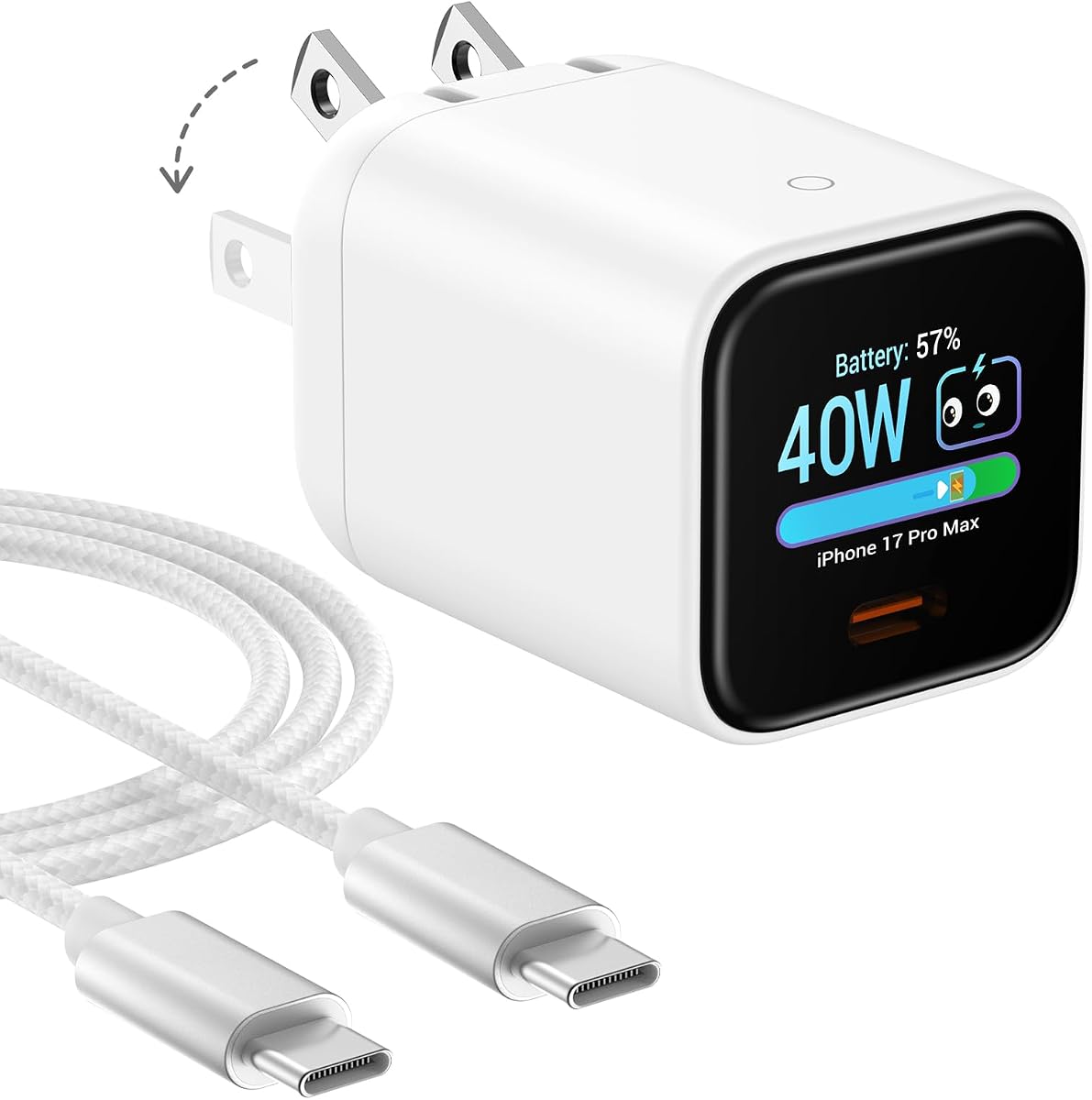
Smart Charging Butler
4.5Editor score
45W intelligent fast charging
Device-care charging mode
Pocket-sized foldable design
Explore the best Gan Charger with Display options, comparing charging power, ports, screens, portability, safety, features, and device compatibility in detail.
A Gan Charger with Display combines efficient USB-C charging with a screen that reveals real-time power, temperature, port, and device information. These chargers appeal to laptop users, frequent travelers, and anyone who wants greater visibility than a conventional wall adapter provides. The right model depends heavily on power capacity, port count, portability, and display controls.
We compared all ten products using the specifications and feature information supplied for this guide. The evaluation considers maximum output, multi-device charging, display detail, safety features, physical dimensions, included accessories, charging protocols, and compatibility with popular phones, tablets, and laptops. Both compact travel chargers and larger desktop charging stations are represented.
Each review explains the charger’s strongest qualities, practical trade-offs, and ideal buyer. The top recommendations include the UGREEN Nexode Pro for comprehensive five-port charging, the Smart Charging Butler for affordable 45W charging, and the Anker Prime for premium 160W performance. Product availability and prices can change, so confirm the latest listing before buying.
4.5Editor score

4.7Editor score

4.6Editor score
The table below compares maximum output, port configurations, display capabilities, and physical design across all ten chargers, making it easier to identify the right model for a laptop station, travel bag, or multi-device workspace.


The UGREEN Nexode Pro Charger is the most complete option in this guide, combining 160W total output, five ports, a rotatable touch display, and a surprisingly compact GaN body. Its 4.7 rating reflects a strong balance of charging capability, useful monitoring, and broad compatibility. It is particularly attractive to users who want to replace several separate adapters with one desktop or travel charger.
We may earn a commission when you buy through this link, at no additional cost to you.
Two USB-C ports can deliver up to 140W individually, providing enough power for demanding notebooks such as a 16-inch MacBook Pro. The remaining USB-C connections and one USB-A port let phones, tablets, earbuds, and accessories charge simultaneously. Intelligent power allocation manages the shared budget, while the supplied information says the charger is compatible with more than 1,000 device types across iOS, Android, and Windows ecosystems.
The display is a defining feature rather than a decorative addition. It reports total wattage, per-port power data, the active charging protocol, and internal temperature. Touch controls and a rotatable panel make the information easier to inspect depending on how the adapter is positioned. Safety circuitry addresses overheating, voltage irregularities, overcurrent, and short circuits, with two intelligent temperature-control modes.
This is the best choice for a mixed-device household, a frequent business traveler, or anyone who wants one charger to handle both a laptop and several smaller devices. It may be more elaborate than a basic 45W model, but the five-port layout, high laptop output, and unusually informative display justify that complexity. It is our overall recommendation for the category.
The five-port configuration is the Nexode Pro’s biggest advantage. It can serve a demanding laptop, phone, tablet, and smaller accessories without requiring a second wall adapter, while automatic allocation keeps the combined output within the charger’s limits.
The rotatable touch panel exposes more than a basic power indicator. Per-port wattage, charging protocol, total output, and temperature make it easier to confirm whether a cable or device is receiving the expected level of power.
We may earn a commission when you buy through this link, at no additional cost to you.
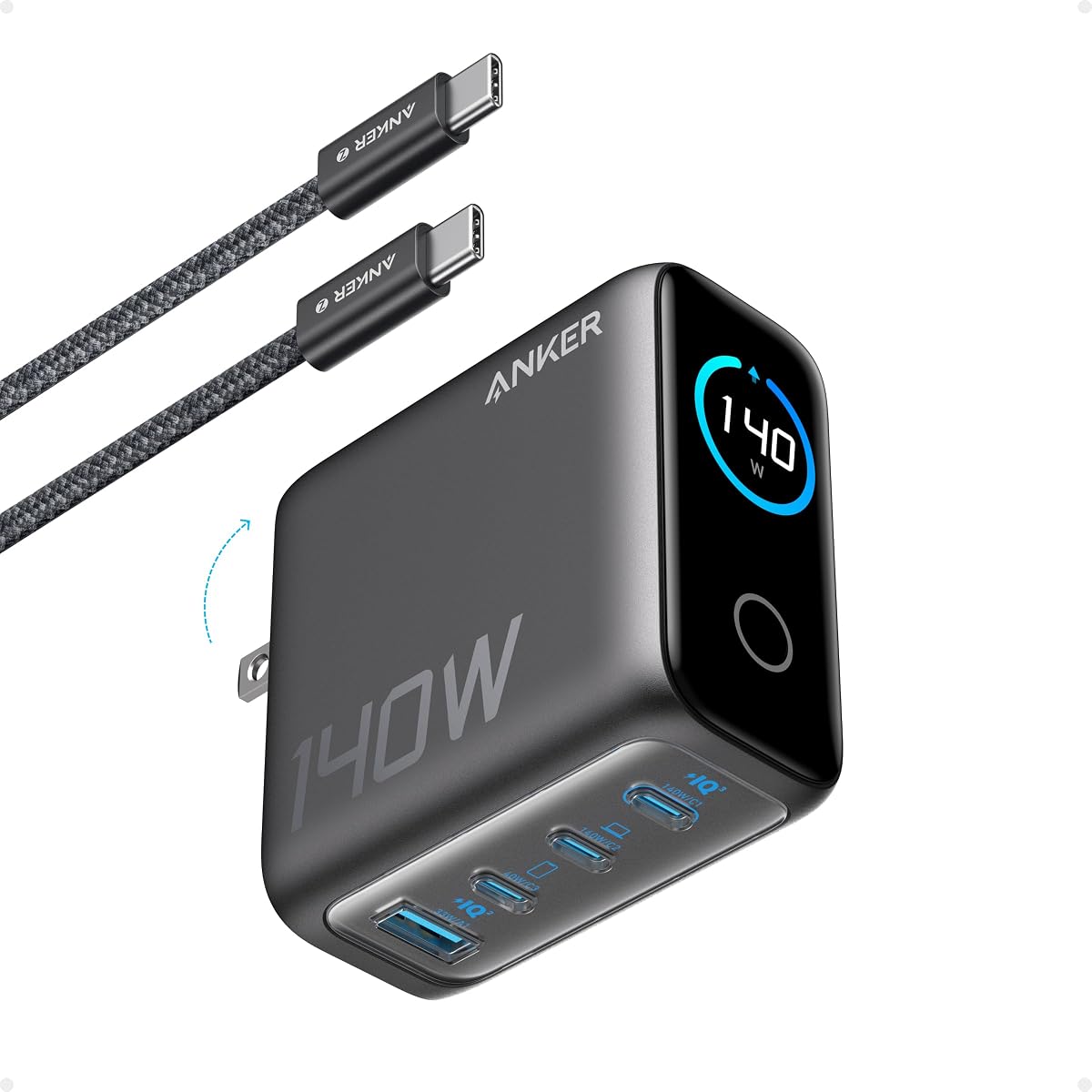
The Anker Prime Charger is a premium 160W GaN charger designed for users who want laptop-class performance in a compact three-port design. It carries a 4.6 rating and stands out for consistently high single-port output, intelligent power distribution, and the AnkerSense View display. It is a particularly strong fit for professionals carrying a MacBook Pro, phone, and tablet.
We may earn a commission when you buy through this link, at no additional cost to you.
One USB-C port supplies up to 140W without the output derating that can occur when a laptop shares power with other devices. According to the supplied product information, that performance can take a 16-inch MacBook Pro from zero to 50% in 25 minutes. PowerIQ 5.0 distributes a possible 140W, 35W, and 35W combination among a laptop, smartphone, and tablet.
AnkerSense View provides real-time power information directly on the charger, and Bluetooth app support adds custom modes and deeper control. The result is more than a passive status screen: users can monitor and adjust charging behavior without relying entirely on a phone or computer interface. Its stated power density of 1.35W per cubic centimeter supports the claim that the charger is unusually compact for its capacity.
The trade-off is port count. Models with four or five ports can accommodate more accessories simultaneously, while the Anker Prime focuses on three high-performance USB-C connections. App-dependent functionality may also feel unnecessary for casual users. Even so, it is the strongest premium pick for someone who values sustained output, polished monitoring, and a small footprint more than maximum physical connectivity.
The charger’s major technical strength is its ability to maintain up to 140W from one USB-C connection. That makes it better suited than many smaller adapters to large notebooks and sustained professional workloads.
AnkerSense View displays live charging information, while Bluetooth app access can unlock custom modes. This adds useful visibility and control for users who regularly monitor charging behavior.
We may earn a commission when you buy through this link, at no additional cost to you.
The Anker 140W Max 4-Port GaN Charger balances portability, capacity, and display functionality better than many larger desktop models. Its 4.4 rating reflects a versatile four-port design capable of handling a 15-inch MacBook Air alongside other connected devices. Two USB-C ports can each provide up to 140W, which offers useful flexibility when a high-power laptop is connected.
We may earn a commission when you buy through this link, at no additional cost to you.
The charger is specified at 2.72 by 2.72 by 1.42 inches and weighs 9.7 ounces. Those dimensions place it between a travel adapter and a permanent desktop charging hub, making it useful in offices, hotel rooms, and shared workspaces. The supplied information also notes that a five-foot 240W USB-C cable and an 18-month warranty are included.
Its high-definition color display presents charging status, temperature, and port details. That information is more legible and engaging than a simple LED, particularly when diagnosing whether one port or another is handling the primary load. Activeshield 4.0 is described as monitoring device temperatures more than 10 million times daily for additional safety.
Choose this model when you need more ports than a three-port premium charger but do not require the 160W maximum offered by the highest-output alternatives. Its capacity, 140W laptop support, and detailed screen make it a convincing all-rounder. It is less pocketable than the smallest adapters in the list, but its size is justified by the stronger port and power configuration.
The four-port layout reduces cable and outlet clutter when a phone, tablet, accessory, and notebook are all in use. Intelligent distribution keeps charging practical when more than one device draws power.
Charging status, port allocation, and temperature are clearly presented on the color display. The information makes the adapter easier to check at a glance and more useful for troubleshooting power distribution.
We may earn a commission when you buy through this link, at no additional cost to you.
The Anker 100W Max USB C Charger combines a useful 100W ceiling with a three-port layout and smart display in a body measuring 2.72 by 2.17 by 1.34 inches. Its 4.7 rating makes it one of the strongest general-purpose options for users who need more than a basic phone adapter but do not need the highest possible laptop output.
We may earn a commission when you buy through this link, at no additional cost to you.
The product information states that each USB-C connection can maintain a 100W output and that the adapter sustains peak performance longer than the average 100W charger. A smart display reports real-time charging status, temperature, and port performance, providing the core monitoring benefits sought by display-focused buyers without turning the adapter into a complex control device.
Automatic low-current mode is another useful feature. When output remains at or below 5W for one minute, USB-C2 or USB-A switches into a 95W plus 5W arrangement, helping accommodate earbuds and other low-power accessories safely. A foldable plug supports travel, and the package includes a 4.9-foot USB-C to USB-C cable along with an 18-month warranty.
This charger is ideal for a smaller notebook, tablet, phone, and earbuds combination. It may not be the right choice for demanding 16-inch notebooks that benefit from 140W or more, and the information does not describe a full touchscreen. Even so, it offers an excellent blend of compactness, useful display data, and flexible charging.
A 100W ceiling is sufficient for many mainstream laptops while remaining easier to carry than larger high-wattage bricks. The foldable plug and compact dimensions support use across a home desk, office, and travel bag.
The low-current mode helps protect smaller accessories when they do not demand substantial power. This reduces the need to manually switch modes whenever earbuds or other compact devices are connected.
We may earn a commission when you buy through this link, at no additional cost to you.
The Smart Charging Butler is a focused 45W GaN charger for phones, tablets, select Mac computers, and other USB-C devices that benefit from intelligent power adjustment. It earns a 4.5 rating because it combines a useful display, device recognition, and battery-care features in a highly portable form. For a buyer focused on a phone or tablet, it can be more practical than a much larger laptop charger.
We may earn a commission when you buy through this link, at no additional cost to you.
Its built-in AI system is described as monitoring battery temperature, power level, and health status, then adjusting charging speed. Care Mode is intended for overnight sessions and is said to keep the battery up to 9 degrees Fahrenheit cooler than standard 45W chargers. The charger supports PD 3.0, PPS, and QC 3.0, with a stated ability to charge an iPhone 17 Pro to 50% in 20 minutes under lab conditions.
The display can identify selected iPhone 15, 16, and 17-series models, iPad Pro models, eBook readers, and Mac computers. Some brands, including Samsung Galaxy and Google Pixel devices, may not have their model names shown even though the charger continues to adjust power intelligently. A tap changes modes, a two-second long press rotates the screen, and three taps change the language.
The main limitation is obvious: there is only one USB-C charging connection. It cannot replace a multiport adapter, and its 45W maximum output is not appropriate for high-power notebooks. For a single mobile device or a two-device setup where one charges at a time, however, it offers an attractive combination of display intelligence, care features, and pocketability.
Care Mode moderates charging when the battery is full and is intended to reduce heat during long sessions. That makes the charger more relevant to overnight charging than a basic fixed-output adapter.
A single tap switches information views, while longer presses rotate the display or change its language. The interface is easy to learn and does not require extensive menu navigation.
We may earn a commission when you buy through this link, at no additional cost to you.
The Anker Prime Charging Station is the high-capacity option in this guide, delivering up to 250W through six ports. It is designed for a permanent desk rather than a travel bag and suits households or offices that routinely connect a notebook, tablet, phone, and several accessories. Its 4.6 rating supports the appeal of a feature-rich station with extensive charging headroom.
We may earn a commission when you buy through this link, at no additional cost to you.
The port mix includes four USB-C connections and two USB-A ports. The first USB-C port can provide 140W and is stated to charge a 16-inch MacBook Pro to 50% in 25 minutes. Even with that headline capability, the remaining power allows numerous smaller devices to charge simultaneously, making the station useful for shared workspaces and multi-device homes.
A 2.26-inch LCD provides live charging status and speed, while the physical smart control dial enables immediate output adjustments. Registering with the Anker application unlocks the full connected feature set. This combination of screen, dial, and app support is more elaborate than the simple tap or press controls found on many compact display chargers.
The decisive trade-off is size. At 4.18 by 1.58 by 3.64 inches and 22.58 ounces, it is substantial, and the supplied information explicitly says it is not recommended for travel. It also supports only 2.4 GHz Wi-Fi rather than 5 GHz. For a dedicated charging station, however, the 250W capacity and six-port layout are unmatched in this list.
Four USB-C ports and two USB-A ports provide enough connectivity for a busy desk. The 250W aggregate budget offers comfortable headroom for high-power notebooks and numerous smaller devices.
Live information appears on the LCD, immediate changes can be made with the control dial, and the app adds deeper connected functionality. This is the most advanced display-and-control arrangement among the chargers reviewed.
We may earn a commission when you buy through this link, at no additional cost to you.
The MOKiN 70W Charger combines a three-port layout, interactive touchscreen, and enough output for smaller laptops in one of the most compact bodies in the guide. It measures 2.15 by 1.71 by 1.36 inches and carries a 4.4 rating. The 70W ceiling makes it a practical middle ground between a phone adapter and a full-size 140W or 160W laptop charger.
We may earn a commission when you buy through this link, at no additional cost to you.
Either USB-C port is described as capable of delivering up to 70W. The supplied information states that a 14-inch MacBook Pro from 2024 can reach 50% in 35 minutes, while an iPhone 17-series phone can reach 50% in 20 minutes. Smart power allocation automatically adjusts the output when a laptop, tablet, and phone are connected together.
The interactive HD display goes beyond basic status. It can show cable capability, total wattage, port-by-port details, temperature, iPhone charging status, and a charging summary. Users can tap to change views and long-press to rotate the orientation 90 degrees. A summary appears when the charger has been active for more than five minutes and a device is disconnected.
Its main inconvenience is that no USB charging cable is included. That means buyers should budget for a suitable cable if they do not already own one. The 70W limit also makes it less appropriate for large or performance-intensive notebooks. For mainstream laptops and travel, however, the port count, touchscreen, and compact size create a compelling combination.
Three ports and a 70W ceiling in a body only 2.15 inches long offer meaningful flexibility without the bulk of a high-wattage desktop brick. Foldable prongs also help it fit into smaller travel spaces.
The display can be tapped to cycle through live power, temperature, cable, and device information. A 90-degree rotation improves readability, and the post-session summary adds a useful record of charging behavior.
We may earn a commission when you buy through this link, at no additional cost to you.
The MOKiN 140W Charger offers a strong combination of high-power laptop support, four ports, and a color information display. Its 4.4 rating reflects a capable charger aimed at users who need more than 100W but may prefer four connections over the three-port layout of premium 160W alternatives. It is well suited to a desk where a notebook and several mobile devices coexist.
We may earn a commission when you buy through this link, at no additional cost to you.
Two of the three USB-C ports can each provide up to 140W, and the product information states that either can serve as a full-power laptop connection. The charger is compatible with PD 3.1, and the supplied details cite a MacBook Pro reaching 50% in approximately 25 minutes and an iPhone 17-series device reaching 50% in approximately 20 minutes. A 140W USB-C cable is included.
The built-in high-definition color display shows charging status, per-port power output, and temperature. This allows users to see how the charger divides its resources and provides a more informative experience than a basic indicator light. The safety system is described as monitoring temperatures millions of times per day to help protect connected devices.
A 140W ceiling limits how much power can be divided across four ports simultaneously, so the two high-output USB-C connections cannot always run at their individual maximum. Buyers who need a 160W aggregate budget may prefer the Anker Prime. For most demanding laptops, though, the MOKiN offers 140W, four-port flexibility, and a clear display in a well-rounded package.
Giving two USB-C connections full 140W capability reduces the need to identify a single privileged port. Users can choose the most convenient connection for a high-power notebook.
The color screen exposes per-port output and temperature, helping users understand how the charger is balancing a four-device setup. That visibility is valuable when many accessories are connected.
We may earn a commission when you buy through this link, at no additional cost to you.
The DJI Power 140W GaN Charging Combo stands apart because its visible digital readout is built into the included charging cable rather than the charger body. It carries the highest rating in this guide at 4.9, with a capable three-port charger, PD 3.1 support, and intelligent allocation that prioritizes DJI devices. It is an especially coherent choice for photographers, drone operators, and other users invested in the DJI ecosystem.
We may earn a commission when you buy through this link, at no additional cost to you.
The charger has two USB-C ports and one USB-A port, with up to 140W aggregate output. It can power laptops, phones, and DJI devices and is described as capable of quickly charging three batteries simultaneously. Dynamic power allocation directs priority toward compatible DJI equipment, while the GaN construction supports efficient, stable operation and temperature management.
The included one-meter DJI Power cable supports up to 7A and uses high-density braided material. Its digital display immediately reveals charging status, giving the user power information at the point where it is most visible. An integrated logo indicator provides a separate visual confirmation of connection status through solid and blinking patterns.
The main limitation is display placement. Users looking for a screen on the charger itself will not find one, and the inclusion of USB-A is less future-facing than an all-USB-C layout. Nevertheless, for DJI users, the specialized prioritization, fast battery charging, and readable cable display make this one of the most purpose-built options in the collection.
Putting the digital readout on the cable makes charging power visible while the cable is in use. The 7A rating and braided construction also make the included lead more than a simple viewing accessory.
Dynamic allocation prioritizes compatible DJI devices, and the charger can rapidly service multiple batteries. These details give it a clear advantage for users whose primary charging needs center on drones and related equipment.
We may earn a commission when you buy through this link, at no additional cost to you.
The Anker Nano Smart Display is designed for mobile-device charging where compactness matters more than multiport flexibility. It supplies up to 45W, recognizes several compatible iPhone and iPad models, and carries a 4.7 rating. The product measures approximately 47% smaller and 36% lighter than the original 30W charger, making it a strong choice for pockets, handbags, and travel organizers.
We may earn a commission when you buy through this link, at no additional cost to you.
Compatible devices include iPhone 17, 16, and 15 series phones, several 11-inch and 12.9-inch iPad Pro configurations, and the 13-inch iPad Pro from 2024. The iPhone 17e is excluded. The charger adjusts output according to battery level, and the supplied information states that an iPhone 17 Pro can reach 50% in 20 minutes under internal lab conditions.
The screen can be tapped once for live status, double-tapped to switch modes, or pressed for two seconds to rotate 180 degrees. It automatically turns off after a specified idle period. Unlike a true touchscreen, it does not support 90-degree rotation or touch navigation beyond those specified controls, so users should consult the manual for detailed operation.
Care Mode is TÜV-certified and is said to lower charging temperature by up to 9 degrees Fahrenheit compared with a standard 45W charger, making it useful overnight. Its sole USB-C port is the decisive limitation for anyone hoping to charge a phone and laptop at once. As a dedicated mobile charger, though, it is exceptionally small, capable, and thoughtfully featured.
The rotating screen makes live charging information visible even when the adapter is plugged into a difficult outlet angle. Automatic shutoff helps preserve the display while keeping the charger highly portable.
Automatic recognition and battery-level adjustment are focused on compatible Apple phones and tablets. The 45W output is sufficient for fast mobile charging without approaching the size of a laptop adapter.
We may earn a commission when you buy through this link, at no additional cost to you.
The most important starting point is the power your devices actually require, followed by port count, display usefulness, portability, and charging protocols. A display charger should simplify charging rather than introduce another complicated accessory.
Start with the highest-power device you expect to charge and how often you need to charge it. A compact 45W charger is well suited to phones, tablets, and smaller computers, while 70W covers many mainstream laptops. Models reaching 100W, 140W, 160W, or 250W offer progressively more headroom for demanding notebooks and simultaneous charging. Maximum output alone does not guarantee that every port can deliver that amount at the same time.
Choose based on the largest device, not the number of devices. A high aggregate rating can still be divided among several connections. Check the single-port maximum and the manufacturer’s multi-device power-allocation information before committing.
USB-C is essential for modern laptops, tablets, and many phones, while USB-A remains useful for older accessories and selected cameras or power products. Two USB-C ports may be more valuable than three mixed ports if every connected device uses USB-C. Consider whether you need simultaneous laptop and phone charging, or whether one-at-a-time charging is enough.
Port count and port type are separate considerations. A charger with one USB-C connection may be ideal for travel, while a six-port desktop station is better for a busy family or office. Also note whether a suitable cable is included.
A useful screen should reveal more than whether the charger is plugged in. Look for real-time wattage, per-port allocation, temperature, charging status, and recognized-device information. Some displays provide a post-charging summary, while others support touch navigation, orientation changes, languages, or app-based customization.
Control style matters as well. A simple rotating display may be ideal for passive monitoring, whereas a touchscreen or physical dial suits users who want to change settings. Read the navigation details carefully because button presses, taps, and long presses may perform different functions.
Power-sharing behavior determines whether a high-wattage charger remains effective when several devices are connected. Some products reserve a primary port for laptop-level output, while others let either USB-C port reach the maximum. A four-port 140W charger and a three-port 160W charger may behave very differently once a phone, tablet, and accessory are also attached.
Review example allocations when available, but treat them as guide-specific rather than universal. Cable capabilities, device requests, temperature, and the charger’s own controls can all affect the final distribution.
GaN technology can deliver high output in a smaller package, but display-equipped models still vary considerably. A charger under three inches long with foldable prongs is easier to carry than a desktop unit built around a control dial. Dimensions, weight, and the presence of a fixed or foldable plug should be checked against your usual outlets and packing space.
For travel, prioritize compact dimensions, short cable options, and broad device compatibility. For a permanent desk, a larger screen, more ports, and easier physical controls may be worth the added size.
Look for protection against overheating, overvoltage, overcurrent, and short-circuit conditions. Temperature monitoring is especially relevant because charging heat is a common concern with high-output GaN adapters. Some models add lower-temperature charging modes, automatic low-current behavior, or TÜV-certified care functions for overnight use.
Battery-care features are especially useful with phones and tablets, but they should complement—not replace—proper charger and cable quality. A charger requesting less power when a device is full is generally desirable.
PD 3.1, PD 3.0, PPS, and QC 3.0 are common standards among the chargers in this guide. Their usefulness depends on the devices and cables being charged. A modern USB-C endpoint may negotiate a lower speed if the attached cable lacks the necessary capability, so the charger and cable both matter.
Check the stated device list, especially when intelligent recognition or manufacturer-specific prioritization is important. DJI optimization, Apple device recognition, and broad MacBook, Galaxy, iPhone, and iPad support serve different user groups.
Some display chargers can connect to a phone app for deeper monitoring, custom modes, or connected features. This can be valuable for power users, although it adds setup and may make a charger less appealing as a self-contained purchase. A physical dial or button navigation can be preferable for a permanent desk where the phone is not always nearby.
Also verify wireless requirements and any stated network limitations. A feature that relies on a particular Wi-Fi band should be checked against the network where the charger will be used.
Begin by checking the charger’s power requirements against the devices you intend to connect. Insert the charger into a wall outlet, connect a compatible cable, and allow the display to present its initial status. The information shown may vary by model, so consult the included guide for the meaning of every icon, button sequence, and display mode.
When connecting several devices, observe the per-port output and temperature readings rather than assuming every port receives its maximum rating. Remove unnecessary accessories if charging speed changes unexpectedly, and use a cable rated for the output your device requests. For display orientation, rotation, language changes, or mode switching, follow the specific controls described by the manufacturer.
Keep the charger uncovered, away from direct heat, and positioned where the screen and ventilation areas remain unobstructed. Do not use a damaged cable or an outlet that causes the adapter to fit loosely. Clean the exterior with a dry or lightly damp cloth, avoid liquids near the prongs and display, and retain the original packaging for transport or warranty service when applicable.
The product rating describes the charger’s maximum available output, while the display usually shows the power currently negotiated and delivered to connected devices. A number may change according to the device, cable, number of connected accessories, temperature, and the charger’s power-allocation system. Seeing less than the headline maximum is often normal.
Yes, if the charger has enough ports and a sufficient aggregate power budget. The laptop will usually receive priority when it requests more power, while the phone receives a lower supported level. Multi-port chargers divide their capacity intelligently, so performance is strongest when the total demand remains within the advertised output.
The display itself is primarily a monitoring feature, but some chargers use the underlying monitoring system to adjust charging behavior. Models with Care Mode, automatic low-current operation, or battery-level-aware power delivery can reduce heat or avoid unnecessary high output. Protection also depends on using suitable cables and a charger compatible with the device.
No. Higher wattage is useful for demanding laptops and simultaneous charging, but it may add size, heat, and complexity. A compact 45W model may be better for a phone and tablet, while 100W to 160W models make more sense when a notebook is part of the charging mix.
The device, charger, and cable must support a common charging protocol and power level. A cable that handles basic charging but not high-current charging can limit speed, while several connected devices can reduce each port’s allocation. Check the display, temperature readings, and negotiated output to identify whether power sharing is the cause.
Only with the correct plug or region-specific adapter. The products listed primarily use folding US-style prongs, so international travelers may need a compatible plug converter that does not obstruct the display or folding mechanism. Voltage and protocol support should also be confirmed for the destination and devices.
A touchscreen provides direct access to multiple views and settings without relying on a sequence of button presses. A simpler display may rotate, cycle through information, or shut off automatically but offers less direct interaction. The appropriate choice depends on how much day-to-day control you actually need.
You will need a cable that matches both the charger and connected device. Some products include a USB-C to USB-C cable, while others do not. Check the package contents and choose a cable capable of carrying the power level and protocol required by your device.
The UGREEN Nexode Pro Charger is the strongest all-around recommendation because it combines 160W output, five ports, a rotatable touch display, and broad compatibility. The Smart Charging Butler serves budget-conscious mobile users with focused 45W charging and battery-care tools, while the Anker Prime Charger delivers premium 160W performance, app-enhanced monitoring, and compact three-port construction.
Prioritize the power required by your largest device, then choose enough ports for your typical setup. A meaningful display should show live power, temperature, and port allocation, but it should remain easy to use. After those essentials, consider cable support, travel dimensions, battery-care features, and whether an app or manufacturer-specific optimization actually benefits your devices.
Before making a final purchase, verify the current listing, package contents, compatibility details, and prices. Charging standards, included accessories, and firmware features can change, so the latest product page and manual are the best sources for confirming that a charger still meets your needs.