
GIGABYTE B650 Eagle AX
4.6Editor score
Triple M.2 slot support
AM5 processor compatibility
Wi-Fi 6E networking
Explore the best Gigabyte Motherboard options in this guide comparing AM5, AM4, and Intel models for features, connectivity, expansion, and build needs.
A Gigabyte motherboard can anchor a gaming, productivity, or compact PC, but the right model depends on processor compatibility, memory type, expansion needs, networking, and case size. The strongest choice balances power delivery, cooling, useful connectivity, and straightforward installation without adding features a particular build will never use.
We compared ten Gigabyte boards spanning AMD AM5 and AM4 platforms plus Intel LGA 1700 and LGA 1851. The comparison covers CPU support, VRM design, memory, M.2 and PCIe expansion, wired and wireless networking, USB connectivity, thermal features, and the practical advantages of ATX and Micro-ATX layouts.
Each pick highlights a different use case, from a feature-rich AM5 design to a value-oriented AM4 board and a compact Intel option. Ratings and specifications reflect the supplied product information, while availability and prices can change, so shoppers should verify current listings and confirm case and component compatibility before ordering.
4.6Editor score

4.4Editor score

4.4Editor score
The comparison below places all ten boards by processor platform, memory support, expansion, networking, and practical positioning, making it easier to identify the model that matches a planned system.



The GIGABYTE B650 AORUS Elite AX is a well-balanced AM5 motherboard for builders who want modern platform features without moving to one of the more elaborate X870E boards. It carries a 4.4 rating and supports Ryzen 9000, 8000, and 7000 series processors. Its combination of DDR5 memory, PCIe 5.0 storage, Wi-Fi 6E, and 2.5GbE makes it especially useful for a modern gaming system.
We may earn a commission when you buy through this link, at no additional cost to you.
Power delivery is a major strength. The board uses a twin 14+2+1 power design with 70A power stages, an eight-layer, two-ounce copper PCB, and a six-millimeter heatpipe. Fully covered MOSFET heatsinks, an M.2 Thermal Guard, and PCIe Ultra Durable Armor support stability and longevity. The practical benefits are particularly relevant when pairing the board with a power-hungry Ryzen processor or a high-performance graphics card.
Storage and connectivity are also well judged for an ATX board. It includes PCIe 5.0 NVMe support and a USB-C 3.2 Gen 2 connection, while the combination of Wi-Fi 6E and 2.5GbE provides flexible networking. Compared with the more expensive X870E AORUS PRO ICE, it offers fewer M.2 slots and less elaborate power hardware, but most gaming builds will not need that additional room.
This is the strongest general recommendation for an AM5 gaming or mixed-use PC. Choose it when you want current CPU support, fast networking, straightforward storage expansion, and a robust power system in a recognizable full-size format. It is less suitable for a very small case or a workstation that requires five or more M.2 drives, but for a typical high-performance build, the balance is difficult to question.
The twin 14+2+1 phase design and 70A power stages provide a substantial foundation for current Ryzen processors. Covered VRM heatsinks and the six-millimeter heatpipe help move heat away from the power circuitry during sustained workloads.
PCIe 5.0 NVMe support allows compatible solid-state drives to use the newest generation interface, while the M.2 Thermal Guard helps manage drive temperatures. Wi-Fi 6E and 2.5GbE cover both wireless convenience and high-speed wired transfers.
We may earn a commission when you buy through this link, at no additional cost to you.
The GIGABYTE X870 AORUS Elite WIFI7 is a feature-rich AM5 board for a new PC that may gain additional drives, accessories, or high-speed devices over time. Its 4.5 rating reflects a particularly strong balance of platform capabilities. It supports Ryzen 9000, 8000, and 7000 series processors, DDR5 memory, PCIe 5.0, and four M.2 storage positions.
We may earn a commission when you buy through this link, at no additional cost to you.
Its headline feature is expansion flexibility. Four M.2 slots make it possible to configure a PC with several NVMe drives without relying on add-in storage cards. Dual USB4 connections, front and rear USB-C, and a Sensor Panel Link extend the board's usefulness for modern desks, docking stations, and specialized accessories. The supplied information also identifies a 16+2+2 power design and dedicated VRM and M.2 thermal protection.
Compared with the B650 AORUS Elite AX, this model offers a more premium connection set, more storage positions, and a five-year warranty. Wi-Fi 7 is a forward-looking advantage, although users will need compatible hardware to benefit fully. Its larger feature set does not make it the right choice for a simple, compact system, and the ATX layout still requires a compatible enclosure.
Choose the X870 AORUS Elite WIFI7 for an enthusiast-oriented AM5 build with room for multiple fast SSDs. It is particularly well suited to a new system where USB4, Wi-Fi 7, and PCIe 5.0 may be used now or later. For a straightforward gaming PC on a tighter budget, the B650 AORUS Elite AX offers the essentials with less complexity.
Four M.2 slots provide considerable flexibility for separating operating systems, games, projects, and scratch data across dedicated NVMe drives. This makes the board useful for creators as well as gamers who want fast local storage.
Dual USB4, front and rear USB-C, and the Sensor Panel Link target a broader range of modern accessories. Wi-Fi 7 also positions the system for newer wireless routers and adapters, provided the rest of the network supports them.
We may earn a commission when you buy through this link, at no additional cost to you.
The GIGABYTE X870E AORUS PRO ICE is the premium choice in this group, bringing a 16+2+2 power design with 80A Smart Power Stages to the AM5 platform. It supports the same broad range of Ryzen 9000, 8000, and 7000 series processors as the other modern AMD boards, along with DDR5 memory, PCIe 5.0, four M.2 slots, and a five-year warranty.
We may earn a commission when you buy through this link, at no additional cost to you.
Its principal advantage is the combination of high-end power hardware and generous connectivity. The VRM and M.2 Thermal Guard support sustained performance, while dual USB4, front and rear USB-C, and a Sensor Panel Link provide a modern platform for demanding users. Wi-Fi 7 and 2.5GbE mean the board is prepared for both current high-speed networks and next-generation wireless equipment.
The tradeoff is straightforward: this model offers more than many mainstream gaming PCs need. It requires a full ATX case, DDR5 memory, and an AM5 processor, so buyers with older components cannot reuse the same platform. A simpler B650 board can provide the important performance basics without this level of expansion and power-stage sophistication.
Select the X870E AORUS PRO ICE for a high-end Ryzen build that benefits from robust power delivery and abundant I/O. It suits advanced gamers, content creators, and enthusiasts who expect to add storage or peripherals over time. For a first AM5 system with a more restrained feature requirement, the B650 AORUS Elite AX remains more efficient.
The 80A Smart Power Stages provide a substantial foundation for Ryzen 9000-class processors. Coupled with the 16+2+2 arrangement and thermal protection, the design is aimed at builds that may sustain demanding CPU workloads.
Dual USB4 and Wi-Fi 7 distinguish this board from many value-oriented alternatives. These interfaces are most useful when paired with compatible docks, monitors, storage enclosures, routers, and other modern peripherals.
We may earn a commission when you buy through this link, at no additional cost to you.
The GIGABYTE Z890 AORUS Master is designed for builders committed to Intel's latest platform and willing to take advantage of its extensive expansion options. It supports Intel Core Ultra Series 2 processors through LGA 1851 and carries a 4.2 rating. Five M.2 slots, dual Thunderbolt 4 connections, Wi-Fi 7, and 10GbE make it one of the most connectivity-focused boards here.
We may earn a commission when you buy through this link, at no additional cost to you.
Power delivery is handled by an 18+1+2 design with a 110A Smart Power Stage. VRM Thermal Armor and an M.2 Thermal Guard support thermal management, while the EZ-Latch system for M.2 and PCIe, Wi-Fi EZ-Plug, and EZ-Debug Zone simplify several installation tasks. The combination is particularly attractive to builders who value clear assembly features as much as raw specifications.
Its downside is platform rigidity. LGA 1851 requires a compatible Intel Core Ultra Series 2 processor, and the board also expects DDR5 memory. Five drive positions and 10GbE networking make it ideal for a heavily equipped system, but a conventional gaming PC with one or two SSDs may not use them. The full-size ATX format also demands adequate case clearance.
This is the most expandable Intel option in the guide. Choose it for a premium workstation-like build, a multi-SSD system, or a desk setup that benefits from Thunderbolt 4 and 10GbE. It is less compelling for a basic home PC, but for a high-end Intel build, the specialized connectivity gives it a clear purpose.
Five M.2 positions are unusual outside high-end boards and can support extensive local storage configurations. The M.2 EZ-Latch mechanism is also intended to reduce the physical difficulty of installing and securing drives.
10GbE wired networking is a major distinction for large file transfers and high-bandwidth local workflows. Dual Thunderbolt 4 ports broaden display, storage, and dock compatibility, while Wi-Fi 7 adds a fast wireless option.
We may earn a commission when you buy through this link, at no additional cost to you.
The GIGABYTE B650 Eagle AX delivers the core elements of an AM5 system without moving into premium board territory. It holds a 4.6 rating, the highest among the products supplied, and supports Ryzen 9000, 8000, and 7000 series processors. DDR5, three M.2 positions, Wi-Fi 6E, and a USB 3.2 Gen 2×2 Type-C connection make it capable for most modern builds.
We may earn a commission when you buy through this link, at no additional cost to you.
Storage is particularly flexible for a value-focused ATX board. One M.2 slot supports PCIe 5.0, while two additional slots support PCIe 4.0, allowing a mix of a high-speed system drive and secondary storage without adding a separate card. The 12+2+2 digital VRM, advanced thermal design, and M.2 Thermal Guard provide the essentials for stable operation.
Networking is the main point of restraint. Realtek gigabit Ethernet is perfectly adequate for common internet and local traffic, but it is slower than the 2.5GbE offered by several alternatives. The board also has a less elaborate power-stage specification and fewer premium I/O features, making it more appropriate for a straightforward gaming PC than an enthusiast showcase build.
Choose the B650 Eagle AX when you want current AM5 support, multiple NVMe drive options, and wireless networking without paying for premium extras. It is a strong fit for a new gaming system, a mixed productivity machine, or an upgrade from an older platform. Ensure the case supports ATX and check whether 2.5GbE is important to your workflow.
The combination of one PCIe 5.0 and two PCIe 4.0 M.2 slots gives builders a practical mix of speed and capacity. A fast boot drive can be paired with dedicated game libraries or project storage without requiring a PCIe add-in card.
Wi-Fi 6E removes the need for a separate wireless adapter in many installations. Gigabit Ethernet remains reliable for standard browsing, downloads, and gaming, although users moving very large files over a local network may want a faster wired alternative.
We may earn a commission when you buy through this link, at no additional cost to you.
The GIGABYTE B550 AORUS Elite AX V2 is a strong choice for a Ryzen 5000, 4000, or 3000 build using DDR4 memory. Its 4.5 rating reflects a mature design with useful features such as 2.5GbE, Wi-Fi 6, Q-Flash Plus, and a front USB-C connection. It is particularly attractive when upgrading an existing AM4 system rather than starting with entirely new components.
We may earn a commission when you buy through this link, at no additional cost to you.
The twin 12+2 digital power design uses premium chokes and capacitors to support stable power delivery. An advanced VRM heatsink and M.2 Thermal Guard handle heat around the most sensitive components, while the reinforced PCIe 4.0 x16 slot is appropriate for a modern discrete graphics card. An integrated I/O shield also simplifies initial assembly.
Storage consists of one PCIe 4.0 M.2 slot and one PCIe 3.0 M.2 slot, which is fewer than the three- and four-drive layouts available on several AM5 boards. DDR4 is also a long-term limitation, and the platform cannot use DDR5. These constraints are acceptable for value-focused AM4 builds but may disappoint someone planning long-term platform upgrades.
Choose the B550 AORUS Elite AX V2 for a well-equipped AM4 gaming PC or a sensible reuse of existing Ryzen and DDR4 components. Its faster 2.5GbE networking and convenient BIOS features add practical value. Builders starting from scratch with no existing AM4 parts should also compare newer AM5 options, which offer more expansion and newer interfaces.
Supporting Ryzen 5000, 4000, and 3000 families makes the board useful for several generations of AMD processors. Reusing a compatible CPU and DDR4 memory can reduce the number of new parts a builder needs to purchase.
The 2.5GbE connection offers more headroom than standard gigabit Ethernet for local transfers and busy networks. Q-Flash Plus allows BIOS maintenance without requiring the processor, memory, and graphics card to be installed.
We may earn a commission when you buy through this link, at no additional cost to you.
The GIGABYTE Z790 Eagle AX provides a balanced foundation for Intel LGA 1700 systems using 12th, 13th, or 14th generation Core processors. It supports DDR5 memory and carries a 4.4 rating. Three M.2 positions, PCIe 5.0 support, 2.5GbE, Wi-Fi 6E, and USB-C give it the connectivity expected in a modern gaming PC.
We may earn a commission when you buy through this link, at no additional cost to you.
Its twin 12+1+1 digital VRM, enlarged MOSFET heatsinks, and M.2 Thermal Guard form a practical thermal and power system. EZ-Latch reduces the effort associated with installing expansion cards and compatible M.2 drives, while Q-Flash provides a familiar route for firmware updates. The result is a board designed around accessible features rather than premium embellishment.
The important limitation is platform age. LGA 1700 does not support the newer LGA 1851 processors used by the Z890 AORUS Master, and the supplied specification does not include USB4. That makes this a sensible fit when a compatible processor, cooler, or other component already exists, but a less attractive long-term foundation for a completely new system in October 2026.
Choose the Z790 Eagle AX for a DDR5-based LGA 1700 gaming build that wants three storage positions and fast networking without a flagship Z790 model. It is also practical for upgrading an existing compatible PC. For a new high-end Intel system, compare the more advanced Z890 platform and its wider I/O selection.
A 12+1+1 phase design and enlarged MOSFET heatsinks provide a sensible foundation for compatible Core processors. The board is best viewed as a flexible platform for 12th through 14th generation systems rather than the newest Intel generation.
Three M.2 slots are enough for common gaming and productivity storage arrangements. USB-C, 2.5GbE, and Wi-Fi 6E cover everyday peripheral, wired-network, and wireless needs without moving to a top-tier board.
We may earn a commission when you buy through this link, at no additional cost to you.
The GIGABYTE Z790 AORUS Elite AX is a feature-rich Intel option for a LGA 1700 system. It supports 12th, 13th, and 14th generation Core processors with DDR5 memory and carries a 4.4 rating. Four M.2 slots, 2.5GbE, Wi-Fi 6E, and a USB 3.2 Gen 2×2 Type-C connection make it a strong all-round board for a high-end Intel gaming PC.
We may earn a commission when you buy through this link, at no additional cost to you.
The twin 16+1+2 digital VRM uses 70A power stages, while fully covered MOSFET heatsinks, a six-layer PCB, M.2 Thermal Guard III, and PCIe Ultra Durable Armor support component protection. The four M.2 positions offer meaningful storage flexibility, although the listed specifications identify them as PCIe 4.0 x4 rather than newer PCIe 5.0 drive connections.
Its main drawback is generational positioning. By October 2026, LGA 1851 boards are available with still newer connectivity, including USB4 and faster networking in some cases. A buyer with compatible LGA 1700 components can get strong value from this board, but a buyer starting fresh should carefully weigh whether the established platform still meets long-term upgrade goals.
Choose the Z790 AORUS Elite AX for a feature-complete Intel gaming PC with extensive NVMe storage and robust power delivery. It also works well for creators who want room for several drives on an established platform. New builders seeking the newest Intel ecosystem should compare LGA 1851 alternatives before finalizing.
Four M.2 slots let a system separate an operating system, applications, games, and active project files across dedicated drives. This makes the board more adaptable than a two-drive configuration without requiring extra expansion cards.
The 16+1+2 arrangement with 70A stages is backed by covered MOSFET heatsinks and reinforced PCIe armor. M.2 Thermal Guard III adds another layer of attention around high-speed solid-state drives.
We may earn a commission when you buy through this link, at no additional cost to you.
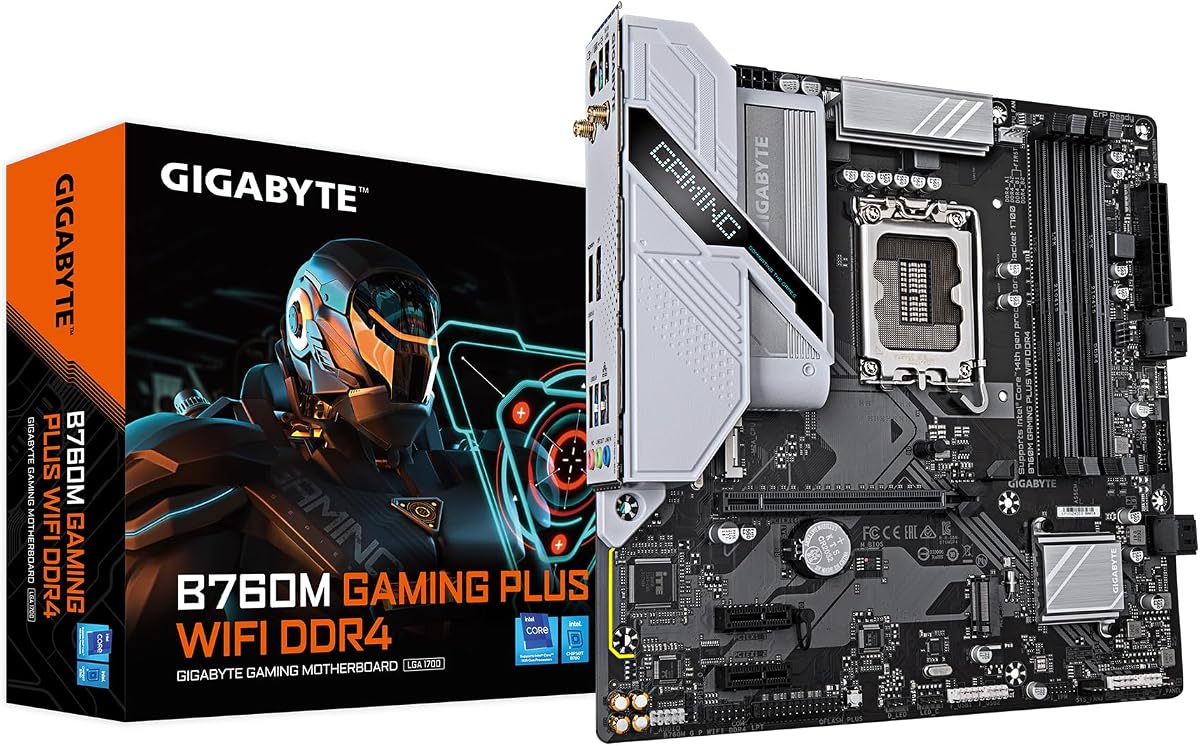
The GIGABYTE B760M Gaming Plus WiFi is the compact choice here, using a Micro-ATX layout for builders with a smaller case. It supports 12th, 13th, and 14th generation Intel Core processors with DDR4 memory. Its 4.3 rating and practical combination of two M.2 slots, PCIe 4.0, 6GbE, and wireless networking make it relevant for a smaller performance PC.
We may earn a commission when you buy through this link, at no additional cost to you.
The hybrid digital 4+1+1 power design uses premium chokes and capacitors, while enlarged MOSFET heatsinks support power stability. A reinforced PCIe 4.0 x16 slot can carry a modern graphics card, and two PCIe 4.0 M.2 slots provide a reasonable amount of local storage. Front USB-C, Q-Flash Plus, and EZ-Latch add everyday convenience.
Compactness comes with expected trade-offs. Two M.2 slots are fewer than the three- and four-drive options found on several ATX models, and Micro-ATX generally offers fewer expansion slots. The 4+1+1 power design is also less elaborate than the higher-phase configurations in this roundup, making processor choice and cooling important for demanding workloads.
Choose this board for a smaller DDR4-based gaming PC that prioritizes fast Ethernet, wireless convenience, and space efficiency. It is also useful when reusing existing LGA 1700 components. If a full-size case is available and more storage or expansion is expected, an ATX board will usually provide more flexibility.
The Micro-ATX design preserves the standard LGA 1700 processor and DDR4 platform while reducing the board footprint. That makes it useful for builders wanting a smaller system without moving to a proprietary compact ecosystem.
Six-gigabit Ethernet stands above ordinary gigabit networking and is well suited to large local transfers. Integrated Wi-Fi adds flexibility when running a cable to the system is inconvenient.
We may earn a commission when you buy through this link, at no additional cost to you.
The GIGABYTE B550 Gaming X V2 is an essential AM4 board for builders who want a straightforward Ryzen platform without premium expansion features. It supports Ryzen 5000, 4000, and 3000 processors with DDR4 memory and carries a 4.5 rating. Its ATX format, two M.2 positions, PCIe 4.0, front USB-C, and RGB Fusion cover the fundamentals of a mainstream gaming PC.
We may earn a commission when you buy through this link, at no additional cost to you.
The twin 10+3 digital VRM, premium chokes and capacitors, and advanced VRM heatsink provide a workable power and cooling foundation. Storage includes one PCIe 4.0 M.2 slot and one PCIe 3.0 M.2 slot. The integrated I/O shield simplifies assembly, while Q-Flash Plus allows firmware maintenance without installing the CPU, memory, or graphics card.
This is a no-frills option compared with the B550 AORUS Elite AX V2. It uses gigabit Ethernet rather than 2.5GbE, offers a smaller 10+3 power configuration, and has fewer advanced gaming-oriented features. However, those omissions may not matter in a modest system that does not require rapid high-speed storage or multi-gigabit transfers.
Choose the B550 Gaming X V2 for a cost-conscious AM4 build using compatible Ryzen and DDR4 components. It is especially appealing for reusing an existing processor or memory kit, and its Q-Flash Plus support simplifies early setup. New AM5 systems offer a more advanced path, but for AM4, this model covers the core requirements cleanly.
The B550 chipset and broad Ryzen processor support provide a familiar foundation for mainstream gaming and general-purpose systems. An Ultra Durable PCIe 4.0 x16 slot offers a suitable connection for a modern discrete graphics card.
Q-Flash Plus is valuable during initial assembly because firmware updates do not require the major components to be installed. The refreshed BIOS uses an Easy Mode interface, and the integrated I/O shield reduces one assembly step.
We may earn a commission when you buy through this link, at no additional cost to you.
The most important motherboard decision begins with the processor and memory already in your possession or firmly selected for the build. After that, power delivery, storage, networking, expansion, case dimensions, and installation features should guide the final comparison.
A motherboard socket is not interchangeable across CPU families. AMD AM4 supports Ryzen 3000, 4000, and 5000 processors, while AM5 supports Ryzen 7000, 8000, and 9000 series processors with DDR5 memory. Intel LGA 1700 supports 12th, 13th, and 14th generation Core processors, whereas LGA 1851 is designed for Core Ultra Series 2. The processor's socket and memory standard must both match the board.
Choose AM5 or LGA 1851 for a new platform with access to newer processor generations, and choose AM4 or LGA 1700 when reusing compatible parts. Always confirm the exact processor model rather than relying only on the chipset family.
AM5 and the Intel boards in this guide use DDR5, while the AM4 and B760M options use DDR4. These memory types are physically and electronically incompatible. Beyond the generation, check the number of DIMM slots, supported profiles such as AMD EXPO or Intel XMP, and the capacity limits stated in the board documentation. A four-slot arrangement can be useful for future expansion, although using all four slots can sometimes make memory configuration more demanding.
Match the board to a memory kit you already own, or select a kit whose speed, capacity, and profile are explicitly supported. Do not assume that installing a faster memory kit will always run at its rated speed without checking QVL information and BIOS behavior.
The phase count and amperage indicate the board's power-stage configuration, while the heatsink and heatpipe design determine how effectively that power can be used. The most elaborate boards in this guide use configurations such as 18+1+2 with a 110A stage, while simpler models use lower-phase designs. Higher-rated hardware provides additional headroom for demanding processors and sustained power loads.
Treat VRM specifications as one part of the decision rather than a standalone guarantee. Pair the motherboard with an appropriate cooler, maintain airflow around the heatsinks, and avoid assuming every high-end processor requires the most expensive board.
M.2 slot count determines how many compact NVMe drives can be installed directly. A one-drive system may be satisfied with a single slot, while gaming libraries and creative workflows benefit from two to four. Also check whether a slot supports PCIe 5.0 or PCIe 4.0, since drive and motherboard generations must match. The physical x16 slots matter for graphics cards, capture cards, and other add-in devices.
Count the drives and expansion cards you expect to install, then add a little future headroom. Pay attention to reinforced slots, M.2 Thermal Guards, and easier mounting mechanisms such as EZ-Latch when working in a cramped case.
Gigabit Ethernet is suitable for most everyday internet connections, while 2.5GbE offers more bandwidth for large local transfers and busy networks. The Z890 AORUS Master goes further with 10GbE, and several boards include Wi-Fi 6E or Wi-Fi 7. Wireless performance depends on the router, adapter, antenna placement, signal conditions, and the distance between devices.
Decide whether wired or wireless networking is your primary method. If the case location makes cabling difficult, integrated Wi-Fi is valuable. For maximum local-network speed, prioritize the appropriate Ethernet standard over the wireless generation.
USB-C, USB4, and Thunderbolt 4 can affect monitor support, docking, external storage, and peripheral compatibility. A front USB-C header is useful for a clean case connection, but the connector must be matched to the case's actual cable. Rear USB4 and Thunderbolt 4 ports provide broader compatibility with compatible docks and displays, while standard USB Type-A ports remain important for older accessories.
List the peripherals you already own and identify which need high bandwidth or display delivery. Do not purchase a board merely for a logo or port shape; verify the underlying interface and whether the included case cable and software support it.
Most products in this guide are ATX, while the B760M Gaming Plus WiFi is Micro-ATX. ATX provides more expansion slots and generally more room for large heatsinks and M.2 devices, while Micro-ATX can suit smaller enclosures. The board must match the case's supported form factors, and the case must also provide compatible standoffs for the chosen layout.
Check CPU-cooler height, M.2 clearance, GPU length, and the position of the power connectors before ordering. A smaller board does not guarantee a smaller system, and a full ATX board can still fit in a spacious case with good cable management.
EZ-Latch, integrated I/O shields, Q-Flash, and Q-Flash Plus can simplify installation or firmware maintenance. EZ-Latch is intended to secure compatible M.2 drives and expansion cards more easily, while Q-Flash Plus allows certain BIOS updates before the processor, memory, or graphics card are installed. These features are particularly useful during a first build, when components may not yet be ready to boot.
Prioritize features that solve a problem you are likely to encounter. Read the motherboard manual, install the correct standoffs, update the firmware when appropriate, and confirm that the chosen CPU is supported before assembling the system.
Begin by reading the motherboard manual, identifying the CPU socket, memory slots, M.2 positions, and rear-panel ports. Install the processor and cooler according to the manual's sequence, seat the memory in the recommended slots, and attach the case's matching power connectors. Confirm that every standoff aligns with a board mounting hole before tightening screws, as an incorrectly mounted standoff can damage the PCB.
Complete the first boot with the minimum essential components connected, then use Q-Flash or Q-Flash Plus as directed to update the firmware when appropriate. After the operating system is installed, enable EXPO or XMP if you selected a compatible memory profile. Install graphics, storage, and peripheral drivers afterward, and use the supplied monitoring or fan-control software to verify temperatures, fan curves, and stable operation.
Keep the board protected from electrostatic discharge by grounding yourself before handling components. Maintain airflow around the VRM heatsinks, M.2 areas, and expansion slots, and avoid placing the system near direct heat or moisture. Periodically check that critical cables remain firmly seated, clean dust from the case and heatsinks, and update the BIOS only when a clear need exists, following Gigabyte's documented procedure.
The GIGABYTE B650 AORUS Elite AX is the most balanced general choice because it combines AM5 and DDR5 support with a robust power design, PCIe 5.0 M.2 connectivity, Wi-Fi 6E, and 2.5GbE. Builders who need four M.2 slots, USB4, and Wi-Fi 7 can consider the X870 AORUS Elite WIFI7 instead. The B650 Eagle AX offers a more restrained, value-focused alternative.
No. AM4 and AM5 use different processor sockets and memory generations. AM4 boards generally use DDR4, while the AM5 boards listed here use DDR5, so neither the processor nor the memory can normally be moved between them. Confirm both socket and memory type before planning an upgrade.
Only if you plan to use a compatible PCIe 5.0 solid-state drive or want to leave room for one later. A PCIe 4.0 NVMe drive can deliver strong everyday performance on either generation, and a board with multiple PCIe 4.0 M.2 slots may be more useful than a single PCIe 5.0 position. Storage needs and device availability should guide the decision.
For most online games, standard gigabit Ethernet is sufficient, and Wi-Fi performance depends heavily on the router and signal. The faster 2.5GbE and 10GbE options are more useful for large local file transfers, NAS systems, media workflows, and busy networks. They are practical advantages rather than mandatory requirements for ordinary gaming.
EXPO is AMD's memory-profile system, while XMP is associated with Intel-compatible performance profiles. Enabling a supported profile lets compatible memory use its advertised speed and timings more easily, though the exact result depends on the kit, processor, and BIOS. Always use a profile supported by the board and check the memory QVL for best compatibility.
ATX is the better choice when you want more expansion slots, M.2 positions, or room for larger components. Micro-ATX can suit a smaller case and still support a strong gaming configuration, as demonstrated by the B760M Gaming Plus WiFi. Check case support, cooling clearance, graphics-card length, and planned expansion before deciding.
No. Some models in this guide include Wi-Fi 6E or Wi-Fi 7, while others provide only wired Ethernet or have different wireless capabilities. Confirm the exact model and inspect the rear-panel specifications if wireless connectivity is required. A USB Wi-Fi adapter can also be used when a board does not include wireless hardware.
Use Q-Flash or Q-Flash Plus as described in the manual, depending on the board and your current setup. Q-Flash Plus can update the BIOS without the CPU, memory, or graphics card installed on many systems. Use a stable power source, follow the screen instructions carefully, and never interrupt the process once firmware writing begins.
The GIGABYTE B650 Eagle AX stands out as the value-focused AM5 option, with three M.2 slots, PCIe 5.0 storage, Wi-Fi 6E, and a 4.6 rating. The B650 AORUS Elite AX is the most balanced all-rounder for a modern AMD gaming PC, while the X870E AORUS PRO ICE is the premium selection for high-end power delivery, USB4, Wi-Fi 7, and extensive M.2 expansion.
Compatibility should take priority over feature chasing. Confirm the processor socket, memory generation, motherboard form factor, case clearance, and storage layout before selecting a board. For Intel, the Z890 AORUS Master provides the most advanced expansion and networking, while the Z790 models suit compatible LGA 1700 components. The AM4 boards remain practical when reusing existing Ryzen and DDR4 hardware.
Finally, review current product listings, warranty details, and component compatibility immediately before purchasing. Inventory, firmware revisions, and prices can change, and a board that appears attractive on paper may not be the correct match for a particular case or component set. Use this guide to narrow the field, then verify the final specification and current listing for the exact model.
