
Zigbee Human Presence Sensor
4.0Editor score
Stationary-person detection
20-foot indoor detection range
Battery-powered wireless design
Home Assistant human presence sensor guide comparing 10 radar options for local automation, lighting control, range, compatibility, installation, and setup.
Home Assistant human presence sensors can keep lights, fans, climate controls, and other devices active while a room is occupied, even when the occupant is sitting still. Unlike conventional PIR sensors that react primarily to movement, radar-based presence models offer finer control by distinguishing motion, stationary occupancy, and sometimes subtle micro-movements.
This guide compares ten presence sensors based on their radar technology, detection range, connectivity, environmental sensing, power requirements, installation needs, and compatibility with Home Assistant. It covers Wi-Fi devices with pre-flashed ESPHome firmware, Zigbee models that require a coordinator, and a corded Matter option suited to flexible placement.
The entries show why each product may suit a particular household, room type, or automation setup, with the leading options highlighted as the top three picks. Ratings and availability can change, as can deal-driven prices, so readers should verify current product details and the final cost before purchasing.
4.0Editor score

4.4Editor score

3.6Editor score
The table below compares all ten sensors by detection technology, connectivity, power, and standout capabilities. The options include dedicated Home Assistant devices, multi-hub Zigbee models, and a Matter-over-Wi-Fi sensor with a flexible wall mount.




The Akamatis Litos v3 is a 4.4-rated presence and light sensor created specifically for Home Assistant installations. It combines 24GHz millimeter-wave radar with a VEML7700 ambient light sensor, giving it a more useful automation profile than a basic motion detector. Its ability to recognize stationary objects makes it particularly appropriate for desks, sofas, beds, and reading areas.
We may earn a commission when you buy through this link, at no additional cost to you.
The Litos v3 can detect movement and stationary objects at distances of up to 20 feet indoors. A Seeed XIAO ESP32-C3 controller and external antenna support 2.4GHz Wi-Fi connectivity, while the front panel permits light to reach the ambient sensor. Most importantly for Home Assistant users, it arrives pre-flashed with ESPHome firmware, eliminating the need for manual flashing.
The trade-off is its specific ecosystem. It requires an existing Home Assistant installation and basic familiarity with the platform, so it is not a convenient starting point for someone who has not yet built a local smart home system. Continuous power is also necessary, and the stated 20-foot range should be understood as a maximum indoor figure rather than a guarantee for every room layout or obstruction.
This is the strongest all-around recommendation for readers who already operate Home Assistant and want a single device to drive lighting and occupancy automations. The integrated light sensor reduces the need for a separate daylight detector, while radar-based occupancy can prevent lights from switching off while someone remains still. Choose it when a dedicated, directly integrated presence sensor is the priority.
The radar handles motion and stationary occupancy, while the VEML7700 adds the light-level context needed for practical automations. A single device can therefore distinguish an occupied dark room from an occupied bright one, reducing unnecessary lighting activation.
Pre-flashed ESPHome firmware removes the usual manual-flashing stage. That makes the sensor considerably more approachable for Home Assistant users who want radar occupancy data without maintaining custom firmware.
We may earn a commission when you buy through this link, at no additional cost to you.
The Akamatis Presence Sensor v2.2 is another 4.4-rated Home Assistant option, built around the HLK-LD2410B radar module and a Seeed C3 controller. It provides both movement and stationary-object detection up to 20 feet, supporting finer lighting control than a conventional PIR sensor while covering useful portions of a room with fewer units.
We may earn a commission when you buy through this link, at no additional cost to you.
Its external Wi-Fi antenna is designed to improve range and stability, while USB-C power removes battery replacement from the routine. The sensor comes with ready-to-use ESPHome firmware, so setup involves joining its hotspot and entering network credentials rather than compiling and flashing software. FCC certification for the main components adds confidence in their operational reliability.
Compared with the Litos v3, this model does not include an ambient light sensor. Users can still build powerful occupancy automations, but daylight-aware rules will require another entity or a compatible light-level sensor elsewhere in Home Assistant. It is also sold as a sensor-only unit, so buyers who need mounting hardware or a specific enclosure should confirm the package contents.
Choose the v2.2 when you want a compact, dedicated occupancy sensor with flexible sensitivity and a straightforward Home Assistant connection. It is well suited to wardrobes, hallways, bathrooms, and living spaces where a separate illuminance measurement is unnecessary. For users combining presence and daylight in one device, however, the Litos v3 is the more complete choice.
The LD2410B radar module is designed to distinguish movement from stationary occupancy. This makes the sensor useful for keeping lights active while someone reads, works at a desk, or rests on a sofa.
The external antenna can provide a more dependable connection than an internal antenna alone. Placement near walls or obstructions may still affect performance, so a central position is usually preferable when practical.
We may earn a commission when you buy through this link, at no additional cost to you.
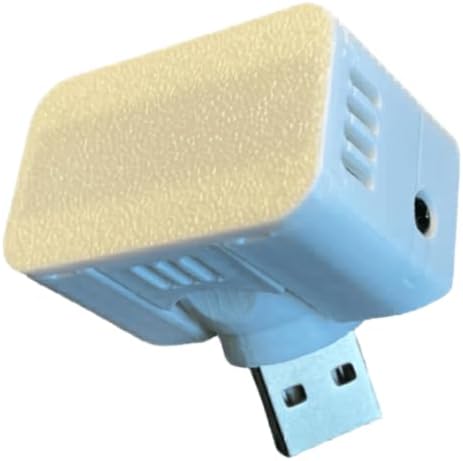
This 4.0-rated Zigbee sensor is an economical way to add stationary-person detection to a smart home. It uses 24GHz millimeter-wave radar and can detect people who are sitting still, sleeping, or reading, addressing the common weakness of PIR sensors that eventually turn lights off during quiet activities.
We may earn a commission when you buy through this link, at no additional cost to you.
It is designed for broad Zigbee use, including Home Assistant, SmartThings, Hubitat, and compatible Echo devices with built-in Zigbee hubs. Detection extends up to 20 feet indoors, and two AAA batteries are stated to last for as long as two years in typical use. The wireless format makes it particularly convenient for bedrooms, bathrooms, and other locations without nearby power outlets.
A Zigbee hub or coordinator remains necessary, and the range and battery figures depend on placement, activity, and operating conditions. The supplied information does not list an integrated light sensor, so lighting automations that need darkness detection must use another sensor. Compatibility with voice ecosystems also does not mean every advanced radar attribute is exposed identically in every platform.
This is the pick for budget-conscious Home Assistant users who already operate Zigbee and want reliable occupancy sensing without wiring. It is especially compelling for nightstands and reading areas, where a sensor that recognizes a motionless person is more useful than a simple motion detector. A more extensive sensor suite would require a different model.
The two-AAA battery design allows installation in convenient locations without running a cable. This is a major practical advantage for bedrooms, bathrooms, closets, and other retrofit projects.
Support for Home Assistant, SmartThings, Hubitat, and compatible Echo hardware makes the sensor less dependent on a single proprietary ecosystem. A functioning Zigbee coordinator remains a prerequisite.
We may earn a commission when you buy through this link, at no additional cost to you.
The Aqara FP300 is a 3.6-rated wireless multi-sensor that combines 60GHz mmWave radar, PIR, light, temperature, and humidity sensing in one enclosure. That breadth makes it the most feature-rich premium model in this group, particularly for homes that want occupancy data to inform lighting, climate, and security automations.
We may earn a commission when you buy through this link, at no additional cost to you.
Its AI-powered detection is designed to learn the environment and reduce false triggers while keeping devices active for stationary occupants. It supports Matter over Thread and Zigbee, with stated compatibility for Home Assistant, Apple Home, Alexa, Google Home, SmartThings, and Homey. Third-party Matter use requires a Thread Border Router and Matter Controller, while Aqara installations have their own hub and firmware requirements.
Two replaceable CR2450 batteries provide an estimated battery life of up to three years in Zigbee mode or two years in Thread mode. The sensor also has a 120-degree field of view, up to 20 feet of detection range, and a multi-axis mount for wall, ceiling, or corner placement. Optional deactivation of individual sensors can reduce energy use.
Despite its advanced capabilities, the FP300 has the lowest customer rating among these ten products, and its 3.6 score deserves attention. Buyers who value broad sensing, flexible mounting, and ecosystem choice may accept that trade-off. It is best for premium smart homes that already have or can add the appropriate Thread or Zigbee infrastructure.
Radar, PIR, light, temperature, and humidity data can inform automations that would otherwise require several separate devices. This reduces visual clutter and makes the FP300 attractive for comprehensive room intelligence.
Matter over Thread and Zigbee support offer different paths into Home Assistant. The required infrastructure changes with the chosen ecosystem, so buyers should confirm hub and router compatibility before installation.
We may earn a commission when you buy through this link, at no additional cost to you.
The SONOFF SNZB-06P24 is a 3.8-rated Zigbee presence sensor aimed at detailed room-level control. Its 24GHz radar can recognize subtle human micro-movements such as breathing, and an integrated ambient light sensor allows lighting rules to respond to both occupancy and darkness.
We may earn a commission when you buy through this link, at no additional cost to you.
Its standout feature is the configurable seven-zone detection area within a four-meter range and 110-degree field of view. Users can disable zones near corridors or windows and focus detection on a sofa, desk, or bed. Detection Calibration provides self-learning behavior intended to filter repetitive interference from appliances, pipes, and airflow.
The sensor works with Home Assistant, SmartThings, Alexa, and other Zigbee systems, while third-party configuration can be handled through BLE in the eWeLink app. A hub is required. USB-C power means it does not need batteries, but a nearby outlet or suitable cable is necessary, and a permanently installed cable may be less convenient than a battery model in a secluded spot.
This model is a strong choice for readers who want more control over where presence is detected rather than simply covering an entire room. It also serves well as a combined occupancy and daylight sensor. Those who only need a simple battery-powered detector may prefer a less complicated Zigbee option.
Seven independently configurable zones help prevent a nearby hallway or window from continually triggering room lighting. This focus can make occupancy automations more precise in open-plan homes.
The calibration function is designed to learn recurring interference and reduce false triggers. Users may still need to adjust placement and boundaries as a room and its contents change.
We may earn a commission when you buy through this link, at no additional cost to you.
The SONOFF SNZB-06P is a 4.0-rated Zigbee 3.0 presence sensor that uses 5.8GHz microwave radar. It detects movement and stationary occupants, allowing a connected light to remain on while someone sits or rests rather than switching off after a period of inactivity.
We may earn a commission when you buy through this link, at no additional cost to you.
A built-in light detector provides the context needed to activate lights only when presence is detected in darkness. The device supports listed SONOFF coordinators and bridges, including the NSPanel Pro, iHost, ZB Bridge Pro, and ZBDongle-E, as well as compatible third-party Zigbee systems.
One of its most useful features for Home Assistant is local scene linkage. It states that linked Zigbee device scenes can execute without an internet connection, supporting a more resilient local automation approach. Platform support also includes Alexa, Google Home, SmartThings, Alice, IFTTT, and Home Assistant, though advanced feature availability can vary by platform.
This sensor is a practical middle ground for users who want presence and light sensing in a widely supported Zigbee design. Its main requirement is a compatible hub or bridge, and its 5.8GHz microwave radar is not described in the same terms as the 24GHz or 60GHz mmWave alternatives. Nevertheless, it is a straightforward option for stable local lighting control.
The stated support for scene linkage without an internet connection is valuable in a local-first smart home. Home Assistant can therefore retain useful control when outside connectivity is unavailable.
The integrated light sensor prevents a room light from turning on simply because a person entered during daylight. It can also keep a dim night light active while the room remains occupied after dark.
We may earn a commission when you buy through this link, at no additional cost to you.
This 3.9-rated 3-in-1 sensor adds temperature, humidity, and illumination measurements to 24GHz radar presence detection. Its small 40 by 40 by 20 millimeter body is easy to conceal, while the combination of environmental readings can support fan, dehumidifier, and lighting automations alongside basic occupancy control.
We may earn a commission when you buy through this link, at no additional cost to you.
It is explicitly designed for Home Assistant through Zigbee and emphasizes local control with low latency. The radar is said to detect tiny movements such as breathing, helping the sensor maintain a presence state when someone sits still, reads, or works quietly at a desk.
Mounting options include an integrated magnetic base and included 3M tape for glass, tiles, or walls. A CR2450 battery is included, making the device wireless and suitable for locations without nearby outlets. The stated battery performance is measured in months rather than a precise year, so actual runtime will depend on reporting frequency, signal conditions, and use.
This sensor is ideal for small rooms and discreet installations where one compact device can report both occupancy and environmental conditions. It may be particularly useful in a nursery, home office, or bathroom. Buyers who need a more detailed environmental controller or longer stated battery duration may prefer a powered multi-sensor instead.
Presence, light, temperature, and humidity information can be combined into richer automations. For example, occupancy plus elevated humidity can trigger ventilation while a normal reading does not.
The compact enclosure, magnetic base, and included adhesive make it easier to position than a large wall unit. Placement still matters because walls and furniture can affect the radar field.
We may earn a commission when you buy through this link, at no additional cost to you.
The Akamatis Presence Sensor v1.3 has the highest listed rating in this comparison at 4.9. It uses the HLK-LD2410B radar module and an ESP32-C3-WROOM microcontroller to detect both movement and stationary objects up to 20 feet indoors, making it a simple dedicated radar option for Home Assistant.
We may earn a commission when you buy through this link, at no additional cost to you.
An external Wi-Fi antenna supports connection stability, while adjustable sensitivity provides room for tuning. The sensor is pre-flashed with ready-to-use ESPHome firmware, so the setup process involves connecting to its hotspot and entering Wi-Fi credentials rather than manually flashing it.
Power comes from a USB-A male connector attached to a two-axis joint. That gives the unit a useful range of angles, but it may be less convenient in locations with only USB-C power or no nearby outlet. Unlike the Litos v3, it has no documented integrated ambient light sensor.
Despite the v1.3 label, its rating, radar performance, and straightforward firmware make this a compelling recommendation for a dedicated Home Assistant installation. Choose it when dependable stationary detection and simple configuration matter more than a broad environmental sensor suite. Users seeking a more advanced contemporary package may prefer the Litos v3.
The 4.9 rating gives this model the strongest listed customer feedback among the ten options. The rating should still be considered alongside reviews and current product availability before a final decision.
Adjustable sensitivity allows users to balance reliable occupancy detection against unwanted triggers. This is useful in rooms with moving curtains, ceiling fans, or equipment that may complicate radar readings.
We may earn a commission when you buy through this link, at no additional cost to you.
The WenzhiIoT Presence Sensor is a 3.8-rated 5.8GHz radar sensor offering unusually detailed control over detection behavior. It can report human presence, static occupancy, micro-motion, and general movement, making it suitable for users who want more granular data than a simple occupied or vacant state.
We may earn a commission when you buy through this link, at no additional cost to you.
Sensitivity can be adjusted from 1 to 9, while the minimum detection distance can begin at 0.00 meters and the maximum extend to 9.5 meters. Detection and unmanned delays are also adjustable, helping suppress irrelevant activity and false alarms. Illuminance data supports automatic lighting and broader scene linkage through the Tuya Smart Life app.
Zigbee is the connection method, and a Tuya Zigbee gateway is strongly recommended for broader compatibility. The sensor supports configurable reporting intervals in Zigbee2MQTT, which can reduce unnecessary network traffic while retaining real-time synchronization when presence changes. Some Zigbee2MQTT installations may require a JavaScript conversion file obtained from the manufacturer or searchable on GitHub.
This model is a good fit for technically confident Home Assistant users who value fine-grained range, timing, and reporting controls. It is less convenient for a beginner because the ecosystem, gateway choice, and possible conversion file add setup complexity. Once configured, the network can be cleaner and the automations more precisely aligned with each room.
Separate controls for sensitivity, minimum and maximum range, and delay periods allow a sensor to ignore unwanted areas. These controls are valuable in open rooms where a full-room presence field would otherwise activate the wrong devices.
A configurable reporting interval can reduce the volume of routine messages sent through Zigbee2MQTT. Presence-state changes remain synchronized, so the feature targets network efficiency rather than intentionally delaying essential occupancy events.
We may earn a commission when you buy through this link, at no additional cost to you.
The meross Presence Sensor MS600 is a 3.8-rated wall sensor that combines radar, PIR, and light detection. Its radar can identify occupancy even without motion, while the integrated light sensor provides the environmental information needed for intelligent lighting automations.
We may earn a commission when you buy through this link, at no additional cost to you.
Matter over Wi-Fi gives the device broad support for Home Assistant, HomeKit, Alexa, Google Home, and the Meross app. It can operate without a hub for those listed connections, although Matter compatibility itself requires a hub. The product is corded and includes a 1.5-meter cable, so continuous power must be available at the installation point.
The adjustable base pivots 180 degrees and rotates 360 degrees, while integrated cable management helps keep the installation neat. Stated motion detection reaches 12 meters, with effective presence detection up to 6 meters. A pet-proof shield is included to reduce accidental triggers from pets or robot vacuums.
This is the most distinct option in the group because it prioritizes Matter and a flexible wall mount rather than Zigbee or a battery format. It is well suited to users seeking a broad ecosystem and precise directional placement, although a corded installation may not suit every room. Confirm local control behavior and hub requirements against the current Matter setup.
The pivoting and rotating base lets users direct the sensor toward a sofa, bed, or walkway without changing the mounting point. This helps focus presence detection and avoid unnecessary activations in adjoining areas.
Matter over Wi-Fi can simplify integration across Home Assistant, HomeKit, Alexa, Google Home, and Meross. Hub requirements differ by connection path, so users should confirm the exact ecosystem configuration before installation.
We may earn a commission when you buy through this link, at no additional cost to you.
The best sensor depends on how you already operate Home Assistant, where the unit will live, and how much automation detail you need. Radar performance, ecosystem support, power, mounting, and environmental sensing should be evaluated together rather than in isolation.
A useful presence sensor should detect a person who is sitting, reading, working, or sleeping, not only someone walking through a room. The products here use 5.8GHz radar, 24GHz mmWave radar, or 60GHz mmWave radar, and several explicitly claim support for stationary occupants or micro-movements. These capabilities make them better suited to keeping lights and fans active than basic PIR sensors, which generally need recurring movement to reset their timers.
The practical question is whether the sensor can distinguish the room you care about from nearby traffic. Zone controls, adjustable range, sensitivity settings, and directional mounting all help. Review the claimed range, but treat it as a maximum: walls, furniture, room geometry, and the orientation of the radar field can materially change real coverage.
Home Assistant can support several approaches, and the easiest option is usually the one matching your existing infrastructure. Dedicated Wi-Fi sensors with pre-flashed ESPHome firmware can connect directly without a separate Zigbee coordinator. Zigbee sensors require a functioning coordinator, radio, and appropriate integration configuration. Matter over Wi-Fi can also reach Home Assistant, but the required hub depends on how the device is connected and which ecosystems are in use.
Check the exact model carefully because similarly named products can use different radio modules or firmware. The supplied data lists different hub requirements across the range: some Zigbee devices explicitly support Home Assistant, while others recommend a Tuya gateway or require a compatible bridge. Make sure the device is exposed as the entity type and attributes you need before designing complex automations.
Power choice determines both installation convenience and operating upkeep. USB-powered models provide continuous operation and avoid battery monitoring, but they need a nearby outlet, suitable cable, or concealed power route. Battery-powered Zigbee sensors are easier to place in bedrooms, closets, and bathrooms, although their runtime varies with signal quality, reporting frequency, and use.
The meross MS600 takes a different approach with a supplied cord and an adjustable wall base. The SONOFF SNZB-06P24 and WenzhiIoT sensor use USB-C, while the Akamatis models use USB-C or USB-A depending on the version. Match the connector and cable length to your intended location, and avoid placing a powered sensor in a wet area unless its installation guidance explicitly permits it.
Ambient light, temperature, and humidity data can simplify automations by reducing the need for separate devices. A light sensor allows occupancy rules to distinguish a dark room from a bright one, while temperature and humidity can inform fan, heating, or dehumidifier behavior. Models with an integrated light sensor include the Litos v3, SNZB-06P24, SNZB-06P, the compact Zigbee environmental sensor, WenzhiIoT, and the meross MS600.
More data does not automatically mean a better fit. Additional entities can make an automation more complex, and some ecosystems expose only a subset of sensor attributes. Decide whether the extra measurements will drive real routines; if not, prioritize stable presence detection, reliable mounting, and compatibility over a longer feature list.
Whole-room presence is useful in some spaces but disruptive in others. A sensor covering an open-plan living area may activate a kitchen light every time someone walks past, while a tightly directional unit can focus on a sofa or desk. Zone configuration, sensitivity controls, delay periods, and adjustable mounting can prevent those unwanted activations.
The SONOFF SNZB-06P24 offers seven configurable zones, WenzhiIoT provides detailed sensitivity and range controls, and the meross uses a rotating and pivoting mount. Other models offer adjustable sensitivity but fewer placement controls. After installation, allow the sensor to learn the room if its calibration feature is activated, then test occupancy in seated, standing, and walking positions.
Radar presence sensing offers useful local-control possibilities, but the selected protocol still influences how automations operate. A local Zigbee network can support fast Home Assistant rules, and the SONOFF SNZB-06P specifically states that linked scenes can execute without an internet connection. Pre-flashed ESPHome devices also keep their setup focused on a local platform, while Matter is designed to support local control when the complete ecosystem is configured appropriately.
Consider which services your lights and other devices require. A presence sensor can publish local state while a cloud-dependent bulb remains dependent on its own connectivity. For privacy, place radar where it monitors the intended room rather than an unnecessary shared area, and use entity permissions and local routing to keep unnecessary exposure to a minimum.
A sensor's physical design affects placement as much as its specifications. Compact sensors can sit on a shelf, sideboard, or wall, while multi-axis mounts help control a ceiling or corner installation. Magnetic bases and included adhesive are convenient for movable or retrofit installations, but reliable placement still requires the sensor to face the occupied area.
Pay attention to cable length, connector type, and whether a power outlet is nearby. The WenzhiIoT model uses a small wall-mount design and USB-C, whereas the meross MS600 comes with a 1.5-meter cord and a directional wall base. Battery models avoid cable clutter but may not offer the same physical adjustment. Avoid enclosing a radar sensor behind thick metal or placing it directly beside large moving fans when testing reliability.
Customer ratings provide a useful signal, but they should be interpreted alongside the number and nature of reviews, firmware maturity, and support for the selected ecosystem. The Akamatis v1.3 has the highest listed rating at 4.9, while several multi-protocol or multi-sensor devices have lower scores. That does not make the lower-rated devices unusable; it may simply reflect a more complex setup or a less settled customer experience.
Check whether the seller and manufacturer provide clear setup documentation, supported integrations, and firmware updates. For Zigbee devices, confirm the required coordinator and whether the product is recognized directly by your integration. For Wi-Fi devices, verify that pre-flashed firmware is current and compatible with your Home Assistant configuration.
Begin by selecting the room and automation that matter most. A living room lamp that shuts off during reading is a useful first target, while a bathroom fan or bedroom night-light may offer even clearer value. Before permanent placement, power the sensor near the intended area, connect it using the appropriate Wi-Fi, Zigbee, or Matter path, and confirm that Home Assistant receives reliable occupancy changes.
Mount the unit where it can view the relevant occupied area without being blocked by large metal objects. Test movement, prolonged sitting, and the desired timeout period. Tune sensitivity, detection boundaries, or delays gradually, and use light or environmental readings to add conditions to the automation rather than making the presence trigger unnecessarily broad.
For care, keep the sensing area clean and dry, and avoid painting over or enclosing the front panel. Test the battery regularly in battery-powered models and replace it according to the manufacturer's guidance. Periodically review the Home Assistant log and automations, update hub or sensor firmware when appropriate, and reposition the unit if furniture changes alter its radar field.
A radar presence sensor is usually better when the goal is to keep devices on while someone remains still. Traditional PIR sensors generally respond to changes in infrared energy and often require movement to reset their timeout, while radar models can recognize stationary occupancy. PIR can still be useful for simple movement-only alerts, particularly where cost or battery priority is decisive.
No. The Akamatis models use 2.4GHz Wi-Fi and arrive with ESPHome firmware, while the meross MS600 uses Matter over Wi-Fi. The Zigbee options require a compatible coordinator or hub. The exact setup also depends on whether you pair the sensor through Home Assistant, a manufacturer application, or another ecosystem.
Yes, that is the central advantage of the radar models in this guide. They are designed to maintain presence when a person is reading, working, sleeping, or otherwise making only subtle movements. Real results vary with placement, room geometry, and device configuration, so stationary and empty-room testing is essential before finalizing automations.
Place the unit where it can view the area where people sit or move while avoiding direct obstruction by metal, cabinets, or large appliances. Wall, shelf, ceiling, and corner positions each change the radar field. After mounting, test the boundaries from several seats and adjust sensitivity, zones, delays, or the sensor angle to stop unwanted activation.
Only if the chosen presence sensor lacks illuminance data. The Litos v3, SONOFF SNZB-06P24, SNZB-06P, compact Zigbee environmental sensor, WenzhiIoT, and meross MS600 include light sensing. A separate sensor can still be useful when one room’s daylight level must influence several devices, but it adds complexity if the integrated readings already cover the room.
That depends on the complete automation path. The SONOFF SNZB-06P states that scene linkage can execute without an internet connection, and locally controlled Zigbee or ESPHome components can support local Home Assistant automations. Cloud-dependent lights, voice assistants, or external services may still lose functionality even when the presence sensor itself remains available.
You can use one as an input to security-related automations, but presence alone does not distinguish a resident from an intruder. Combining it with a door sensor, motion sensor, camera, or other contextual information produces more reliable alerts. It is generally most effective for lighting, energy management, and room-level comfort automations.
Start by improving placement, then use the available sensitivity, range, zone, and delay controls. Radar fields can react to moving curtains, ceiling fans, pipes, airflow, or appliances, especially when the sensor is too close to reflective surfaces. Test each automation during normal household activity, shorten unnecessary timeout periods, and use light or environmental conditions to narrow when devices should respond.
The Akamatis Litos v3 is the most complete dedicated Home Assistant pick because it combines 24GHz radar presence detection, an ambient light sensor, and pre-flashed ESPHome firmware. The budget-oriented Zigbee presence sensor offers simple stationary detection for homes with an existing coordinator, while the Aqara FP300 stands out as the premium multi-sensor with Matter, Zigbee, and several environmental measurements.
Prioritize the connection method you already use before comparing every feature. Choose direct Wi-Fi or pre-flashed ESPHome for the simplest dedicated setup, Zigbee when a reliable local network is already in place, and Matter when cross-ecosystem use is important. Then consider light sensing, zone controls, power availability, and the physical space where the sensor will operate.
Before purchasing, recheck the exact model, hub requirements, package contents, firmware support, and current customer feedback. Prices and availability change, so compare the final cost only after confirming that the device meets your Home Assistant setup and automation goals.
