
Brady M210-LAB Portable Label Printer
4.4Editor score
Laboratory-focused label templates
Six text size options
Ninety compatible cartridges
Compare the best Label Printer for Laboratory options across durability, connectivity, print quality, label compatibility, speed, portability, and ease of use
A laboratory label printer must create clear, durable identifiers that remain readable on equipment, containers, tubes, slides, and storage areas. The right model balances print clarity, media compatibility, speed, portability, and workflow connectivity, while features such as barcodes, mathematical symbols, and automatic cutting can simplify routine identification tasks.
This guide compares ten handheld, desktop, and connected label printers using the supplied product information. It evaluates intended labeling environments, print technology, resolution, supported media, cutting options, connectivity, display and editing capabilities, and special features relevant to laboratories, inventories, samples, reagents, and industrial assets.
The selections show that there is no single printer ideal for every laboratory. Compact thermal-transfer devices suit portable and sample-based work, while connected desktop models serve busy teams and repeated batch printing. Each pick identifies its strongest use cases, while current availability, compatibility, and prices should be confirmed before purchasing.
4.4Editor score

4.7Editor score

4.5Editor score
The comparison below places all ten printers side by side, highlighting their format, print technology, connectivity, resolution, media capabilities, and most relevant laboratory features.



The Brady M210-LAB earns a 4.4 rating and stands apart from general-purpose industrial labelers with its explicit focus on laboratory equipment and samples. It is designed to create fast, accurate labels for lab equipment, slides, tubes, beakers, and bottles, making it a natural choice for facilities where small containers must be identified quickly and consistently.
We may earn a commission when you buy through this link, at no additional cost to you.
Its built-in templates with mathematical symbols can reduce the effort required to prepare common laboratory identifiers. A backlit LCD graphics display improves visibility in dim workspaces, while six text sizes allow users to balance compact labels with readability. The printer also supports 90 compatible, easy-to-load cartridges across 12 material types, offering considerable flexibility for tubes, bottles, instruments, and other assets.
The principal limitation is that the stated feature set centers on single-color identification rather than high-speed batch production. It does not present itself as a connected desktop printer for inventory systems or a high-volume production machine. Buyers who need only clear, fast labels for laboratory objects may find that simplicity beneficial, while high-volume teams may need a model with faster throughput and computer integration.
Overall, the M210-LAB is a compelling selection for individual researchers, small laboratories, and mobile sample-labeling workflows. The combination of laboratory-specific templates, portable construction, a backlit screen, and extensive media options makes it especially practical when labels must be created near the bench, refrigerator, or sample location.
Built-in templates containing mathematical symbols directly address a common laboratory identification need. This helps users prepare informative labels for scientific containers without building every layout from a blank screen, although the supplied information does not list every available symbol or template.
Compatibility with 90 cartridges spanning 12 material types gives the printer more flexibility than a basic single-media label maker. That variety is useful when one laboratory labels delicate sample surfaces, tubes, beakers, bottles, and larger equipment with different durability requirements.
We may earn a commission when you buy through this link, at no additional cost to you.
The Brady M210 Portable Label Printer Kit holds a 4.7 rating, the highest among the listed models, and provides the strongest general-purpose balance for laboratory and technical labeling. Although its examples focus on wires, panels, and circuit boards, the same compact format and multi-line capability are well suited to instrument, container, and equipment identification.
We may earn a commission when you buy through this link, at no additional cost to you.
The keypad includes letters, numbers, and a backlit LCD graphics display, allowing users to compose labels in low-light areas. Six text sizes support a useful range of compact and prominent designs, while 90-plus cartridges across 12 material types offer considerable media flexibility. The package is also built for demanding environments, with molded rubber impact bumpers and a drop-tested construction.
Its main limitation is that the supplied specifications describe single-color output and do not identify a way to connect the printer directly to laboratory inventory software or a computer. It is therefore more appropriate for users who design labels on the device than for centralized teams that need database-driven printing and multi-user workflows.
This kit is an excellent choice for laboratory support staff, facilities teams, and technical users who need a rugged, portable labeler with a clear display and broad media support. Its strong rating, flexible text controls, and reinforced construction justify considering it as a general-purpose laboratory labeling solution.
The backlit graphics display and alphanumeric keypad make label composition practical in storage rooms, mechanical areas, and other poorly illuminated workspaces. Users can check text and layout directly on the device before producing a label.
Drop testing and molded rubber impact bumpers are meaningful advantages when a printer travels between benches, storage areas, and production zones. The portable form also makes the kit suitable for decentralized labeling rather than a single fixed station.
We may earn a commission when you buy through this link, at no additional cost to you.
The Brother PT-E510 carries a 4.5 rating and is the strongest premium choice for laboratories that design labels on a computer and need efficient production output. Its industrial capabilities extend beyond the bench, making it well suited to instrument inventories, cable identification, facilities assets, and repeated labeling projects.
We may earn a commission when you buy through this link, at no additional cost to you.
P-Touch Editor supports computer-based design, while quick application keys help users create cable wraps, cable flags, patch-panel labels, punch-block labels, and faceplate labels. QR codes and linear barcodes can be added, and templates can be stored for reuse. The dual auto-cutter produces strips of half-cut labels, simplifying application when many individual identifiers are needed.
USB-C handles both charging and PC connection according to the supplied details, reducing the need for separate device links. A dual cutter, however, may be more machinery than a small laboratory requires, and the printer is positioned as an industrial model rather than a compact sample-labeling device. The stated feature set also does not mention wireless connectivity.
Choose the PT-E510 when accurate computer-based layouts, barcodes, reusable templates, and efficient batch peeling matter more than minimum size. It is a strong fit for laboratory managers, shared technical facilities, and teams producing both equipment labels and organized cable or panel identifiers.
Half-cut output makes it easier to peel and apply a series of labels without trimming each one manually. This is particularly useful for large equipment inventories, specimen containers, and other jobs that require many individually placed identifiers.
Storing templates and adding QR codes or linear barcodes makes the printer appropriate for repeatable identification systems. P-Touch Editor also allows users to develop layouts on a PC rather than entering every item directly through a small handheld keypad.
We may earn a commission when you buy through this link, at no additional cost to you.
The Brother PT-D610BT has a 4.5 rating and serves users who want the convenience of a compact label maker with meaningful connected capabilities. It can create and print labels through Bluetooth or USB, allowing multiple users to develop custom labels from computers or mobile devices.
We may earn a commission when you buy through this link, at no additional cost to you.
Its design library includes 17 fonts, 17 styles, 160 frames, and 900 symbols, with labels up to 1 inch wide. A 20-character, two-line full-color LCD provides a clear preview before printing, and 90 frequently used labels can be stored for quick reprinting. The included business templates cover asset management and inventory tracking, while P-Touch Editor adds further customization.
The principal constraint is the one-inch maximum label width. Some bottles, instruments, and storage containers may need broader labels to remain readable at a distance. It also lacks the larger media support and industrial cutter features found in the PT-E510, so it is better suited to smaller standard labels than large-format identification.
The PT-D610BT is a strong option for shared offices, research-support areas, and small laboratories that need attractive labels for samples, supplies, or assets. Its visual preview, template library, and mobile connectivity make it particularly useful when a polished, consistent label is important.
Bluetooth allows compatible phone users to prepare labels away from a fixed workstation, while USB supports computer-based design. This flexibility is useful for distributed teams that need a common set of templates without returning to one desk for every label.
The large two-line display lets users inspect text and layout before committing media. That preview can help reduce wasted labels when recreating inventory identifiers or reproducing a saved design that contains several fields.
We may earn a commission when you buy through this link, at no additional cost to you.
The Brother QL-820NWB earns a 4.3 rating and is built for facilities that need fast, shared label production rather than portable bench labeling. It prints up to 110 standard address labels per minute at 300 dpi, giving it a compelling throughput advantage for busy laboratories and technical departments.
We may earn a commission when you buy through this link, at no additional cost to you.
Connectivity is unusually flexible: Bluetooth, Ethernet, and wireless 802.11b/g/N are supported, along with a USB host interface for a peripheral such as a scanner. A readable monochrome LCD also permits standalone operation, while compatible DK 2251 media enables black-and-red labels and label lengths of up to three feet.
Its shared-network design means it is less convenient for isolated mobile labeling than a handheld model. The maximum label length expands the range of suitable applications, but the supplied information does not identify an automatic cutter or describe a built-in label template library, so those needs should be checked against the intended workflow.
The QL-820NWB is a compelling choice for core facilities, central equipment rooms, and laboratories that create many standardized identifiers. It is especially appropriate when multiple users need network access, rapid output, and a mix of monochrome and two-color labels.
Ethernet and wireless connectivity allow the printer to serve multiple users without being tied directly to one computer. Bluetooth and USB host options add flexibility for local workflows and compatible peripherals.
A stated output of up to 110 standard address labels per minute makes this model useful when hundreds of equipment, cabinet, or inventory identifiers need to be produced in one session. The 300 dpi resolution also supports crisp text and scannable code.
We may earn a commission when you buy through this link, at no additional cost to you.
The Makeid D50 has a 4.2 rating and combines a two-inch print head, thermal-transfer technology, and automatic cutting in a desktop format. Its listed applications explicitly include laboratory labels, sample-related identification, safety marking, asset tracking, electrical labeling, and component identification.
We may earn a commission when you buy through this link, at no additional cost to you.
Thermal-transfer printing at 300 dpi supports clear, durable output, and the automatic cutter simplifies repetitive batch work. An integrated label-and-ribbon cartridge reportedly allows consumable changes in five seconds, while automatic template matching identifies compatible media and selects the appropriate layout. Mobile app and PC software options provide different levels of editing control.
The 2600mAh battery and stated standby time of up to 90 days make it possible to move the printer around when needed, but it remains primarily a desktop unit. Compared with the highly rated Brady models, the D50 has a lower customer rating, and buyers should confirm the precise media and ribbon combinations required for their own containers and environment.
The D50 is a practical option for a small laboratory that wants a two-inch format, high resolution, and automatic cutting without moving to a larger dedicated industrial printer. Its broad application list and rapid media changes make it appealing for mixed equipment, safety, and sample-labeling programs.
The printer identifies compatible label sizes and matches templates automatically, reducing manual configuration when rolls change. This is useful for users who alternate among container sizes and label formats during normal daily work.
A 300 dpi two-inch head creates a practical middle ground between compact handheld devices and larger fixed printers. The stated fade resistance also makes it a consideration for equipment identifiers that may remain in service for extended periods.
We may earn a commission when you buy through this link, at no additional cost to you.
The NIIMBOT M2 has a 4.4 rating and is a strong portable option for laboratories that require finer resolution and more material choices than a basic direct-thermal device. Its 300 dpi thermal-transfer output can produce small text, barcodes, QR codes, logos, and graphics for equipment and sample identification.
We may earn a commission when you buy through this link, at no additional cost to you.
The printer supports one- to two-inch labels up to nine inches long, making it useful for vials, centrifuge tubes, inventory tags, and equipment markers. It accepts synthetic paper, PET, PVC, transparent labels, and specialty materials. Multiple ribbon colors—including black, white, red, blue, green, and gold—can create stronger visual distinctions in color-coded systems.
Bluetooth serves up to ten paired devices, consisting of three iOS and seven Android connections, while USB supports desktop editing. The built-in 2000mAh battery can reportedly print up to 15 rolls on one charge. Unlike some competitors, the supplied information does not mention an automatic cutter, so individual labels may require manual separation.
The M2 is a compelling choice for mobile researchers, biotech teams, and shared labeling stations that want sharp thermal-transfer output in a compact format. Its broad media and ribbon support is particularly valuable where a laboratory uses visual coding alongside conventional text and machine-readable codes.
At 300 dpi, the M2 is well suited to small vials and tubes where text must remain legible in a restricted label area. It can also reproduce logos, barcodes, and QR codes as part of a unified identifier.
Support for synthetic paper, PET, PVC, transparent labels, and specialty media allows users to match the label to the container and exposure conditions. A broad ribbon selection adds another level of differentiation for departments, samples, or status categories.
We may earn a commission when you buy through this link, at no additional cost to you.
The BRADY M210 HANDHELD LABEL MAKER carries a 4.6 rating and offers a compact approach to laboratory and equipment labeling. Its handheld format is attractive for users who need to create identifiers away from a fixed desk, such as technicians working between instruments, storage cabinets, and work areas.
We may earn a commission when you buy through this link, at no additional cost to you.
The supplied listing provides very little detail beyond the product name, so the safest assessment is based on its stated handheld identity and rating. It appears aimed at straightforward, localized labeling rather than complex batch production. Buyers should verify display size, text options, supported media, connectivity, cutter behavior, and included accessories before relying on it for a specialized workflow.
Compared with the more fully specified M210-LAB and M210 Portable Kit, this listing offers less information about print technology and cartridge support. That makes direct feature comparisons difficult. It may nevertheless appeal to buyers who recognize the M210 family and want a simpler handheld unit for occasional equipment identification.
The Brady M210 Handheld is best considered a compact convenience option. It suits users who prioritize mobility and the strong listed rating over extensive disclosed specifications, while teams requiring laboratory symbols, particular materials, or computer integration should examine a better-documented model.
A handheld design lets technicians keep a labeler close to the instrument, cabinet, or sample location being identified. This can be more practical than repeatedly carrying containers to a fixed desktop printer.
Because the supplied listing provides only the product name, prospective buyers should confirm media width, text capacity, display, connectivity, and battery details. Those factors are especially important when labels include mathematical symbols, barcodes, or chemical-resistance requirements.
We may earn a commission when you buy through this link, at no additional cost to you.
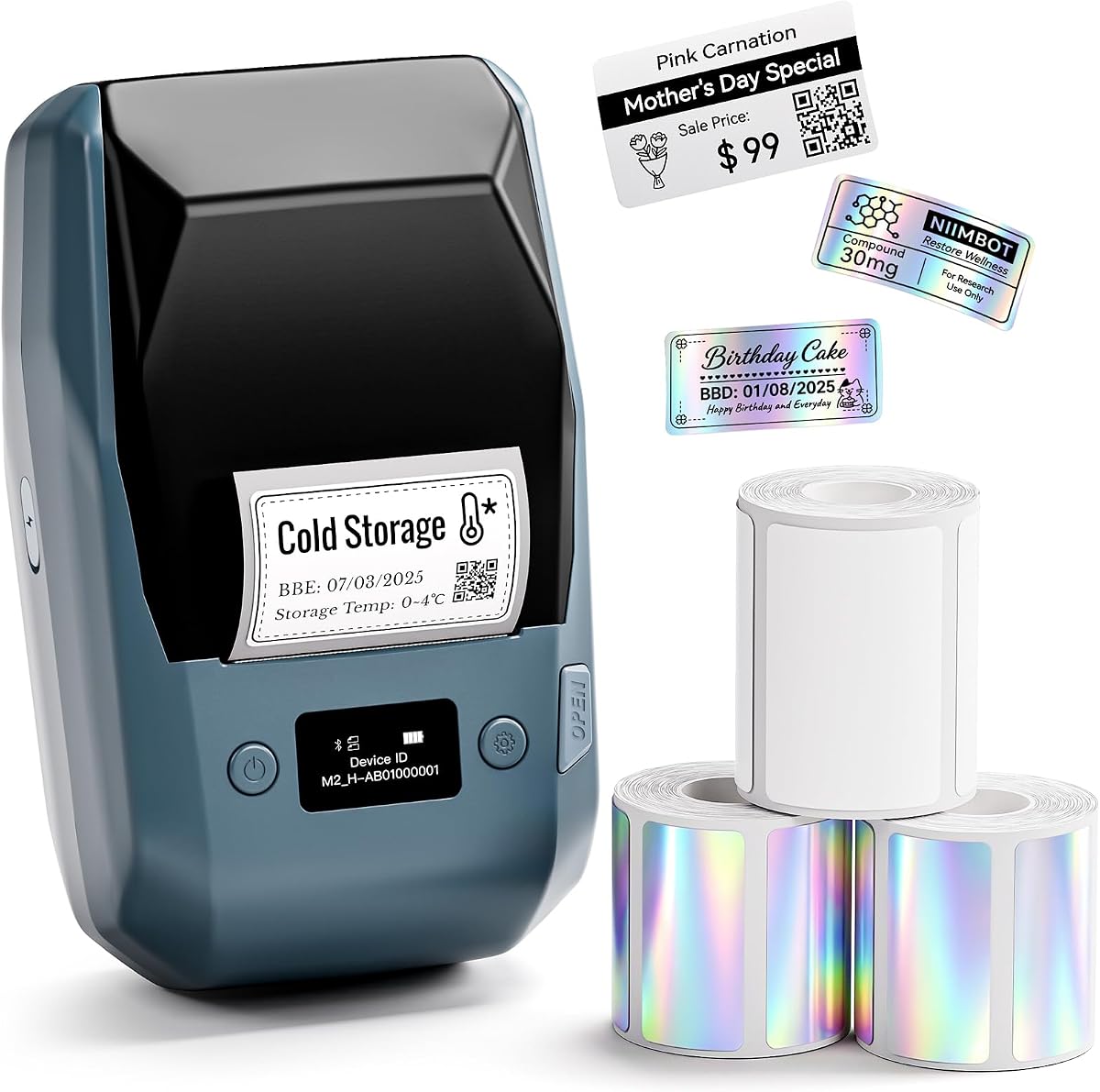
The NIIMBOT M2 Tape Bundle earns a 4.6 rating and is a convenient starting point for users who want a portable thermal-transfer printer with usable media included. The package combines the label maker with three rolls of laser-silver tape, allowing a new owner to begin labeling after setup rather than immediately sourcing every consumable.
We may earn a commission when you buy through this link, at no additional cost to you.
The printer provides 300 dpi output and supports label widths from 20 to 50 millimeters, with a maximum effective printable width of 48 millimeters. The included rolls are intended for network cables, telecom equipment, cold-storage assets, peptide sample tubes, and laboratory reagent vials. The supplied information also states that the labels resist water, oil, scratches, and chemicals.
Bluetooth supports up to ten paired mobile devices, and USB provides a route to PC-based editing. Automatic label identification, automatic paper retraction, adaptive print density, and a first-label saving function help reduce setup errors and material waste. The app includes templates, barcode and QR code generation, Excel import, and image printing.
This bundle is especially attractive to a laboratory that wants a ready-to-use portable system for sample vials, frozen-storage containers, and technical equipment. Its two-inch width is sufficient for many common identifiers, while the included silver rolls provide a consistent starting point for teams that later need other media or ribbon colors.
Three laser-silver rolls give users immediate material for everyday sample and equipment identifiers. This is useful for new laboratories or temporary field projects where sourcing compatible media would otherwise be the first obstacle.
Automatic identification and retraction features help the printer prepare for each media format, while adaptive print density adjusts to different materials. These features can improve consistency when a team alternates between containers and label types.
We may earn a commission when you buy through this link, at no additional cost to you.
The Brother QL-800 has a 4.3 rating and combines fast output with the useful ability to print black and red labels. Its stated performance of up to 93 labels per minute at 300 dpi makes it well suited to facilities that repeatedly label shelves, folders, instruments, supplies, or other assets.
We may earn a commission when you buy through this link, at no additional cost to you.
Brother Plug & Label technology supports direct printing from Microsoft Word, Excel, and Outlook on compatible Windows and Mac systems, reducing the need for a separate design interface in common office tasks. A built-in auto-cutter handles label finishing, while genuine DK pre-sized labels and continuous tape up to three feet provide flexible media options.
The supplied details emphasize USB rather than wireless or network connectivity, so the QL-800 is less flexible for distributed teams than the QL-820NWB. It also remains a desktop unit, making it less appropriate for field or bench-side labeling. Users should confirm compatibility with the required Brother media before selecting it for unusual containers.
The QL-800 is a solid choice for high-volume laboratory support offices that value speed, simple document-based printing, and two-color identifiers. It is particularly suitable for mixed administrative labeling where color adds emphasis without requiring a full color printer.
Black-and-red printing can emphasize warnings, status information, or asset categories while keeping the rest of a label monochrome. This makes the QL-800 useful for laboratories that want stronger visual distinction than a single-color printer provides.
Plug & Label integration allows common spreadsheet and word-processing content to become labels without a separate workflow for every task. The included USB cable and built-in cutter keep the setup straightforward for fixed workstations.
We may earn a commission when you buy through this link, at no additional cost to you.
The most suitable laboratory label printer depends on where labels will be created, which containers must be identified, how much information each label contains, and whether the output must connect to inventory or sample-tracking systems.
A handheld printer is most useful when labels are created near instruments, refrigerators, cabinets, or sample containers. It offers mobility and quick setup but may have narrower media support and less editing capacity than a desktop model. A desktop printer is better when one central station serves an entire department, produces batches, or needs to remain connected to a computer and inventory database.
Thermal-transfer printers use a ribbon to create labels that are generally well suited to moisture, oils, scratches, handling, and temperature exposure. That makes thermal transfer attractive for tubes, bottles, equipment, and storage containers. The included NIIMBOT M2 models specifically state resistance to water, oil, scratches, chemicals, and broad temperature conditions, while the Makeid D50 emphasizes long-lasting clarity.
Small vials and tubes often need short text, barcodes, or QR codes in a confined area. A 300 dpi model offers a useful margin for fine characters and machine-readable content. The NIIMBOT M2, Brother QL-800, Brother QL-820NWB, and Makeid D50 all advertise 300 dpi, while the Brady M210 models use six text sizes for more straightforward identifiers.
Label width should match the smallest container that must be identified. The PT-D610BT supports labels up to 1 inch wide, the NIIMBOT M2 supports 1- to 2-inch media, and the Makeid D50 uses a two-inch print head. The Brady M210 family supports 90 or more cartridges across 12 material types, which is useful when containers and exposure conditions vary.
Direct device control suits occasional or portable labeling, but connected printers support richer fonts, graphics, stored templates, and data-driven layouts. Bluetooth options appear on the PT-D610BT, QL-820NWB, and NIIMBOT M2 models. USB-C is listed for the Brother PT-E510, while the QL-800 emphasizes USB. Inventory teams should also verify that their software can communicate with the chosen printer.
Laboratory identifiers may contain more than a name. Mathematical symbols, specimen codes, dates, warnings, QR codes, and linear barcodes can all improve organization. The Brady M210-LAB and M210 Portable Kit provide built-in templates with mathematical symbols, while the PT-E510 and NIIMBOT models support barcode and QR code creation.
Automatic cutting can save considerable time when labels are produced in quantity. The Brother PT-E510 uses a dual cutter for half-cut output, the QL-800 has a built-in auto-cutter, and the Makeid D50 includes automatic cutting. Compact thermal-transfer makers such as the NIIMBOT M2 do not list an automatic cutter, so users should confirm how individual labels are separated.
Laboratory printers may travel between rooms or face repeated handling. The Brady M210 Portable Kit is described as drop-tested with molded rubber impact bumpers, making it a strong choice for mobile technical work. The Brother PT-E510 includes an ambidextrous hand strap and utility ring for convenience and drop protection, while the Brother QL-800 remains better suited to a fixed station.
Begin by confirming that the installed media matches the printer's supported width, material, and ribbon system. Load the roll according to the manufacturer's instructions, allow the machine to recognize or calibrate the media, and run a test label before preparing a batch. For research applications, confirm that the text, mathematical symbols, barcode, or QR code is correctly oriented and readable before applying the label.
Design labels for their actual container rather than relying on a generic layout. Leave enough surface area for handling, and consider the viewing distance and expected wear. For sample tracking, use consistent naming conventions and include only the information required by the laboratory's protocol. When using a connected printer, save templates for repeated designs and confirm that imported data populates every required field.
Keep the print mechanism, platen, and cutter clean, and follow the instructions for the printer's cleaning method. Store compatible media in a dry, clean location and avoid exposing unprinted stock to excessive heat, moisture, or direct sunlight. Remove batteries from a portable unit during long periods of nonuse, keep firmware and design software updated when applicable, and address print-quality changes before they lead to unreadable or unscannable identifiers.
A compact thermal-transfer printer is often a strong choice because it produces durable text and codes while supporting narrow media. The NIIMBOT M2 supports one- to two-inch labels at 300 dpi, which can work well for centrifuge tubes and sample vials. Confirm the exact vial dimensions, required content, and compatible ribbon before purchasing.
They can be well suited to environments where labels face moisture, oils, scratches, chemicals, or frequent handling. The NIIMBOT M2 listings specifically describe water, oil, scratch, chemical, and temperature resistance for supported label materials. Environmental suitability still depends on the exact stock, ribbon, adhesive, and container, so compatibility should be verified.
A connected printer is useful when labels must be generated from spreadsheets, databases, or shared templates. Bluetooth and USB options appear on several Brother and NIIMBOT models, while the QL-820NWB supports wired and wireless network access. Handheld models remain appropriate when labels are simple and created near the sample.
It is especially helpful when the label is narrow or contains small text, a barcode, or a QR code. A 300 dpi printer gives the design more detail within a confined area, which can improve legibility and scanning. Larger equipment tags with short names may not need that level of resolution, making a lower-resolution model potentially sufficient.
A model with a backlit display has a clear advantage. The Brady M210-LAB and M210 Portable Kit both include a backlit LCD graphics display for easier operation in low-lit areas. Portable construction also matters if the printer will be used inside cabinets, storage rooms, or other spaces away from a workstation.
Choose a handheld printer for mobility, decentralized labeling, and occasional use near the sample or equipment. Choose a desktop printer for high-volume output, repeated templates, complex computer editing, and shared team access. A hybrid approach can also work well, with a portable unit for bench tasks and a faster desktop model for batch production.
It is convenient for high-volume work because it removes the need to trim or separate labels manually. The PT-E510, QL-800, and Makeid D50 include cutter functionality. For occasional labeling, manual separation may be sufficient, but confirm how the compact thermal-transfer models prepare individual labels before choosing.
Use compatible media and ribbons, print a test after every major media change, and clean the printer according to its instructions. Store media away from moisture, heat, and direct sunlight, and periodically verify that labels remain readable and codes scan correctly. Replacing consumables promptly can prevent smudging, fading, or inconsistent output.
The Brady M210 Portable Printer Kit is the most versatile all-around choice, offering a strong rating, backlit display, multi-line output, broad media support, and rugged construction. The Brady M210-LAB is the more explicitly laboratory-focused budget selection, while the Brother PT-E510 is the premium pick for computer-designed labels, barcodes, reusable templates, and efficient half-cut output.
Prioritize the workflow over features alone. Narrow sample containers favor 300 dpi thermal-transfer models, busy shared facilities benefit from fast desktop output and network connectivity, and mobile technicians may prefer a rugged handheld printer with a backlit screen. Label width, media compatibility, symbol support, and the method of separating printed labels should be confirmed before making a final selection.
Product configurations, compatible accessories, and prices can change, so check the current listing and manufacturer requirements before ordering. Selecting the correct media and testing a complete label with the actual characters, codes, and container will help ensure the chosen printer delivers dependable laboratory identification.