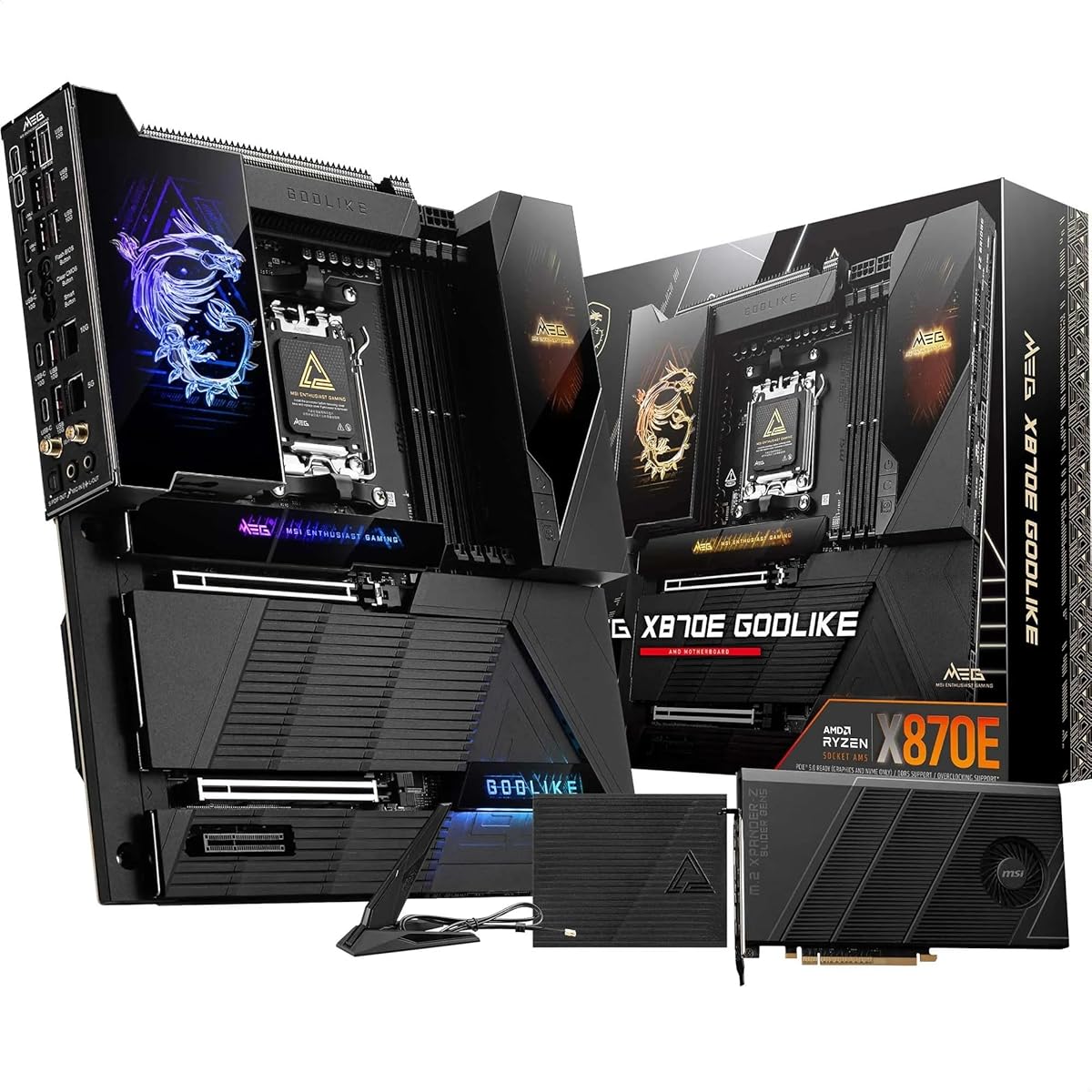
MSI MEG X870E GODLIKE
3.2Editor score
110A SPS chipset power
Seven M.2 connectors
Onboard 3.99-inch LCD
10Gbps and 5Gbps networking
Explore the best MSI motherboards for AM5, AM4, and LGA 1700 builds, comparing performance, features, networking, expansion, and overall value for modern
A motherboard determines which processors, memory, graphics cards, and storage devices can work together in a new PC. MSI offers models for modern AM5 gaming systems, DDR4 and DDR5 builds, compact cases, and high-end enthusiast platforms. The right board balances expansion, networking, power delivery, thermals, and practical installation features.
We compared these 10 MSI motherboards by examining processor compatibility, memory support, PCIe generation, M.2 storage, networking, audio, cooling features, form factor, and onboard conveniences. The list includes premium X870E and X870 boards, mainstream AM5 models, Intel B760 options, and AM4 boards that remain useful for value-focused upgrades.
Each recommendation highlights a different kind of strength, from high-end power delivery and extensive storage to balanced gaming features, compact layouts, and convenient DIY systems. Ratings and specifications reflect the supplied product information, while availability and pricing change regularly, so readers should verify current listing details before purchasing.
3.2Editor score

5.0Editor score

4.6Editor score
The comparison below places all 10 boards by platform, memory type, expansion capabilities, and networking. It makes it easier to identify the most appropriate MSI motherboard for a new Ryzen, Intel, AM4 upgrade, or compact gaming system.


The MSI MPG X870E Carbon WiFi is an AM5 motherboard aimed at gamers and performance builders who want the newest platform capabilities without moving to the extreme enthusiast end of MSI's range. It carries a 4.4 rating in the supplied data and supports AMD Ryzen 9000, 8000, and 7000 series desktop processors. The board combines DDR5 memory, PCIe 5.0 expansion, Gen5 M.2 storage, USB 40Gbps connectivity, Wi-Fi 7, Bluetooth 5.4, and 5Gbps wired networking in a conventional ATX package.
We may earn a commission when you buy through this link, at no additional cost to you.
Its standout feature is the combination of current-generation I/O and a practical premium thermal design. The heavy plated MOSFET heatsink uses a heat pipe, 7W/mK thermal pads, additional choke thermal pads, and an M.2 Shield Frozr. The EZ PCIe Release button is also useful during initial assembly because it removes the need to manipulate a retention mechanism manually when a card needs to be removed or repositioned. PCIe 5.0 bandwidth gives compatible graphics cards and NVMe drives more headroom than the older PCIe 4.0 standard.
Dual LAN is the networking feature that distinguishes this board from many alternatives. Rather than offering a single wired connection, it provides a premium network solution for both intranet and internet use. Wi-Fi 7 and Bluetooth 5.4 cover wireless peripherals and local transfers, while 5Gbps LAN is particularly relevant to users who move very large files or maintain a high-throughput home network. USB 40Gbps also creates room for current high-speed external storage and docking solutions.
The principal trade-off is that X870E is a premium chipset platform, and buyers should only pursue it when their processor, graphics card, storage, and expansion plans justify that level of investment. A more modest X870 or B650 board may be sufficient for many gaming systems. Even so, the Carbon WiFi is a strong all-around recommendation for builders who want a visually substantial, thermally considered board with very fast networking and effortless installation features.
PCIe 5.0 and Gen5 M.2 support make this board suitable for high-speed components that benefit from additional bandwidth. The EZ PCIe Release button adds a practical installation advantage that can be especially helpful while configuring a new system.
Dual LAN, 5Gbps wired networking, Wi-Fi 7, and Bluetooth 5.4 provide unusually flexible connectivity. This mix supports high-speed local networks, wireless accessories, and modern peripherals without requiring additional add-in cards.
We may earn a commission when you buy through this link, at no additional cost to you.
The MSI MAG X870 Tomahawk WiFi is a well-rounded AM5 board for gamers who want a current platform with high-speed storage, fast graphics expansion, modern networking, and useful rear connections. Its supplied rating is 4.3. It supports Ryzen 9000, 8000, and 7000 series processors, uses DDR5 memory, and includes PCIe 5.0, M.2 Gen5, SATA 6Gb/s, USB 40Gbps, HDMI and DisplayPort output, Wi-Fi 7, Bluetooth 5.4, and 5Gbps LAN.
We may earn a commission when you buy through this link, at no additional cost to you.
The board's most important everyday feature is its built-in USB4 port, which delivers 40Gbps transfer speeds through a modern high-speed interface. That capability is useful for external NVMe storage, docks, and displays while remaining more convenient than relying exclusively on internal add-in cards. M.2 Gen5 and PCIe 5.0 support also make it ready for current high-speed graphics and storage hardware, while 5Gbps LAN offers a notable step above a conventional gigabit connection for network-heavy users.
Thermal provisions are designed for sustained gaming and higher-power processors. The extended PWM heatsink and enhanced circuit design are specifically intended to help compatible Ryzen chips maintain performance. Audio Boost 5 adds isolated audio and a dedicated audio processor, a meaningful advantage for competitive players who use headsets, speakers, or a gaming microphone. Wi-Fi 7 and Bluetooth 5.4 complete the wireless feature set for compatible devices.
This Tomahawk is less elaborate than the Carbon in networking because it does not offer the same dual-LAN arrangement, and it also omits some of the enthusiast conveniences found higher in MSI's range. However, the essential gaming and connectivity features are all present. It is a persuasive choice for a new Ryzen system that needs PCIe 5.0, USB4, fast storage, and wireless networking without moving to an E-ATX flagship design.
A built-in USB4 port provides 40Gbps transfer capability for compatible storage, docks, and displays. It makes the board more versatile for modern peripherals than a configuration that relies only on conventional USB ports.
Audio Boost 5 uses isolated audio and a dedicated processor to support clear gaming sound. The extended PWM heatsink and enhanced circuit design complement the board's thermal accessories for sustained processor workloads.
We may earn a commission when you buy through this link, at no additional cost to you.
The MSI PRO B760-P WiFi DDR4 is a sensible foundation for an Intel gaming or productivity system that uses LGA 1700. It supports 12th, 13th, and 14th generation Intel Core processors, along with compatible Pentium Gold and Celeron chips, and pairs that platform with DDR4 memory. The supplied 4.6 rating reflects a well-regarded option, while 2.5Gbps LAN, Wi-Fi 6E, and Bluetooth 5.3 provide networking that feels more modern than the bare essentials.
We may earn a commission when you buy through this link, at no additional cost to you.
Its power and thermal design is more substantial than the word ProSeries might suggest to a casual buyer. A 12+1 Duet Rail power system uses P-PAK components and accepts power through both 8-pin and 4-pin CPU connectors. The extended heatsink, 7W/mK MOSFET thermal pads, extra choke thermal pads, and M.2 Shield Frozr cover several of the areas most likely to need attention in a sustained system. Core Boost and Memory Boost are also included to help optimize power delivery and memory behavior.
The six-layer PCB uses two-ounce thickened copper and server-grade-level material, according to the supplied specifications. That construction is particularly welcome for a board intended for long gaming sessions and repeated system use. Display connectivity includes both HDMI and DisplayPort, while the M.2 Shield Frozr helps manage the temperature of compatible NVMe drives. USB 3.2 Gen2 and 2.5Gbps LAN cover the essentials without adding premium flagship features that may remain unused.
The main limitations are clear: PCIe remains at version 4.0, and there is no USB4 port. Neither issue prevents a strong general-purpose build, but they make the board less attractive when a system specifically requires the newest graphics expansion or external I/O standard. For users who already own compatible DDR4 memory, this is a cost-conscious way to build on LGA 1700 while retaining robust networking, sensible power delivery, and a useful set of thermal features.
Using DDR4 rather than DDR5 can reduce the cost of assembling a complete LGA 1700 system, especially for builders who can reuse compatible memory. Support for dual-channel DDR4 at 5333+ MHz provides a capable gaming platform without requiring the latest memory standard.
The 12+1 Duet Rail design, eight-pin and four-pin CPU power inputs, extended heatsink, and high-conductivity thermal pads provide a solid foundation for sustained workloads. M.2 Shield Frozr extends the same cooling attention to a compatible solid-state drive.
We may earn a commission when you buy through this link, at no additional cost to you.
The MSI MAG B650 Tomahawk WiFi remains a relevant AM5 choice for builders who want broad Ryzen compatibility, fast DDR5 memory, and modern networking without requiring PCIe 5.0. Its supplied rating is 4.5. The motherboard supports Ryzen 7000 series processors and is listed for Ryzen 9000 and 8000 series compatibility, while DDR4 is not an option because the board requires DDR5 memory.
We may earn a commission when you buy through this link, at no additional cost to you.
Memory support extends to 6400+ MHz when overclocking, giving the board room for high-speed kits. Its primary graphics slot operates at PCIe 4.0, and the M.2 storage connection likewise uses PCIe Gen4. That may not suit someone who wants the newest graphics bandwidth or Gen5 SSDs, but those components can still operate on the board, and many gaming systems do not need the latest PCIe generation to deliver excellent results.
Networking is a major strength. The 2.5Gbps LAN connection provides more throughput than a standard gigabit port, while Intel Wi-Fi 6E and Bluetooth 5.3 add flexible wireless connectivity. HDMI and DisplayPort outputs support integrated graphics when a compatible Ryzen processor is installed. USB 3.2 Gen2, SATA 6Gb/s, and an M.2 slot cover the normal peripheral and storage needs of a modern desktop.
Thermally, the extended heatsink design and M.2 Shield Frozr provide a more considered foundation than a barebones board. The main reason to choose this model over an X870 or X870E option is platform maturity and a more moderate feature target. Conversely, buyers who specifically need Gen5 storage, PCIe 5.0 graphics, or USB4 should move up the MSI range. For a conventional AM5 gaming build, the Tomahawk offers a balanced and approachable set of features.
Support for DDR5 speeds up to 6400+ MHz gives enthusiasts room to use high-performance memory. Compatibility across Ryzen 7000, 8000, and 9000 families also makes the board relevant to several generations of AM5 components.
Wi-Fi 6E and 2.5Gbps LAN provide two useful forms of fast connectivity. The combination handles wireless peripherals and local network transfers well without requiring an add-in network card.
We may earn a commission when you buy through this link, at no additional cost to you.
The MSI MAG X870E Tomahawk MAX WiFi V1 combines a 5.0 supplied rating with a strong set of enthusiast specifications. It supports Ryzen 9000, 8000, and 7000 processors, DDR5 memory up to 8400+ MT/s when overclocked, a PCIe 5.0 x16 slot, and Gen5 M.2 storage. Wi-Fi 7, 5G LAN, USB4, and Audio Boost 5 round out a modern feature set designed for high-performance Ryzen builds.
We may earn a commission when you buy through this link, at no additional cost to you.
Its standout specification is the 14+2+1 Duet Rail power system using 80A SPS components, dual 8-pin CPU power connectors, Core Boost, and Memory Boost. The eight-layer PCB uses two-ounce thickened copper and server-grade-level material. These details make the board especially relevant to users running powerful Ryzen 9000 processors or plans to tune memory and other system settings. The Frozr Guard cooling system adds extended heatsinks, 7W/mK MOSFET thermal pads, choke thermal pads, and the EZ M.2 Shield Frozr II.
Installation conveniences distinguish it from many alternatives. EZ M.2 Shield Frozr II, EZ M.2 Clip II, EZ PCIe Release, and EZ Antenna make common assembly tasks easier. The release button simplifies graphics card removal, the clip system assists with SSD installation, and the antenna feature reduces the need to wrestle with threaded connectors in a tight case. These are practical benefits that can matter more than a headline specification during a first build.
The board is not an entry-level choice, and its performance potential still depends on the chosen processor, memory, cooling, and firmware settings. Nevertheless, it delivers an unusually balanced mix of power delivery, fast interfaces, networking, audio, and DIY tooling while retaining the standard ATX form factor. It is our premium recommendation for a high-end AM5 system that wants flagship capability without moving to the larger and more elaborate GODLIKE design.
The 14+2+1 Duet Rail system and 80A SPS components create a strong foundation for power-hungry Ryzen processors. Dual 8-pin CPU power connectors and an eight-layer, thickened-copper PCB reinforce that capability for sustained high-performance workloads.
EZ PCIe Release, EZ M.2 Clip II, EZ M.2 Shield Frozr II, and EZ Antenna address recurring installation tasks. These features make component handling and reassembly more approachable, particularly for first-time builders.
We may earn a commission when you buy through this link, at no additional cost to you.
The MSI MEG X870E GODLIKE is the most elaborate motherboard in this guide and is intended for builders who intend to use many of the features an enthusiast platform can offer. It supports Ryzen 9000, 8000, and 7000 processors on AM5, DDR5 memory up to 9200+ MT/s when overclocked, PCIe 5.0 expansion, Gen5 storage, USB4, Wi-Fi 7, and unusually fast wired networking. Its 3.2 supplied rating should be considered alongside those extensive capabilities rather than as the only selection criterion.
We may earn a commission when you buy through this link, at no additional cost to you.
Storage is a defining strength. The board has two onboard M.2 Gen5 x4 connectors and three M.2 Gen4 x4 connectors, all protected by double-sided Shield Frozr solutions. The M.2 XPANDER-Z SLIDER Gen5 adds two more Gen5 slots, bringing the stated total to seven M.2 connectors. For a creator who wants numerous high-speed SSDs without relying on add-in storage cards, this is one of the most capable configurations available.
Power delivery and monitoring are equally ambitious. The 24 DRPS design uses 110A SPS components for the X870E chipset, while the onboard 3.99-inch LCD provides hardware monitoring and personalization. Frozr Guard includes a wavy-fin design, direct-touch cross heat pipe, 9W/mK MOSFET thermal pads, extra choke thermal pads, double-sided M.2 cooling, and a combo-fan header for pumps and system fans.
Its downsides are tied to scale and complexity. E-ATX requires a suitably large case, and a board this elaborate is not ideal for a compact build. The supplied rating is also lower than those of the other listed products, and buyers should examine recent customer feedback for the exact model and firmware version. For a large showcase workstation or enthusiast gaming PC, however, the GODLIKE delivers storage, power, monitoring, networking, and installation features that few conventional ATX boards combine.
Two onboard Gen5 x4 slots, three Gen4 x4 slots, and two Gen5 slots from the XPANDER-Z slider create an exceptional storage platform. Shield Frozr cooling on all listed positions helps keep high-performance SSDs thermally controlled.
The onboard 3.99-inch LCD presents system monitoring and personalization directly on the motherboard. Dynamic Dashboard III and the extensive Frozr Guard cooling system support the board's enthusiast positioning.
We may earn a commission when you buy through this link, at no additional cost to you.
The MSI PRO B550M-VC WiFi is a compact AM4 option with a 4.6 supplied rating, making it well suited to building a smaller system around a compatible Ryzen 5000, 3000, or supported Ryzen 4000 G-series processor. It uses DDR4 memory and a micro-ATX form factor. This combination can serve gamers, general-purpose home systems, and compact workstation builds that do not need the very newest platform interfaces.
We may earn a commission when you buy through this link, at no additional cost to you.
Its most attractive feature is the balance between physical size and hardware capability. The board includes a PCIe 4.0 graphics slot, Gen4 x4 M.2 storage with M.2 Shield Frozr, SATA 6Gb/s, and USB 3.2 Gen2. It also offers HDMI and DisplayPort for processors with integrated graphics. Wi-Fi 6E and Bluetooth 5.2 cover wireless connectivity, making it possible to build a clean system without an add-in network card.
Thermal and structural features add confidence for sustained use. The board includes a 7W/mK thermal pad, additional choke thermal pads, and M.2 Shield Frozr. A digital PWM IC, two-ounce thickened copper PCB, DDR4 Boost, and Creator Genie support power delivery, memory operation, and system configuration. These details make the board more than a basic mATX option.
Compatibility is the main limitation. It is not designed for Ryzen 9000 processors, and its PCIe and M.2 interfaces remain on Gen4. Users choosing it should confirm that a supported processor and available DDR4 memory meet their needs. For a compact AM4 build, however, it provides a stronger feature set than many similarly sized alternatives and avoids the space demands of a full ATX board.
The micro-ATX format reduces case-space requirements while retaining PCIe 4.0 graphics, a protected Gen4 M.2 slot, SATA connections, and integrated wireless hardware. That makes it efficient for smaller builds without being functionally bare.
Support for compatible Ryzen 5000 and 3000 series processors and DDR4 memory allows builders to reuse established components. The platform is most appropriate for users who value the compact design and AM4 compatibility rather than the newest CPU generation.
We may earn a commission when you buy through this link, at no additional cost to you.
The MSI B550M PRO-VDH WiFi is a straightforward AM4 motherboard that focuses on useful fundamentals rather than premium features. Its supplied rating is 4.5, and it supports 3rd generation AMD Ryzen processors as well as future AMD Ryzen processors that become compatible through a BIOS update. DDR4 memory is supported in a dual-channel configuration up to 128GB, with listed speeds reaching 4400 MHz.
We may earn a commission when you buy through this link, at no additional cost to you.
One particularly useful feature is the Flash BIOS button, which allows the BIOS to be updated without a processor or memory installed. This can simplify initial setup, troubleshooting, or preparing a system before the main components are available. PCIe 4.0 graphics and Gen4 M.2 storage provide a modern enough foundation for many gaming systems, while M.2 Shield Frozr helps manage compatible SSD temperatures.
The board includes D-SUB, HDMI, and DisplayPort outputs, giving users flexibility with different processors and displays. Wi-Fi and Bluetooth are integrated, and USB 3.2 Gen1 provides the stated high-speed USB feature set. Core Boost combines optimized circuit layouts with digital power regulation for steadier CPU current delivery, while the heatsink uses a 7W/mK thermal pad and a two-ounce thickened-copper PCB.
Its limitations reflect its position in the range. USB 3.2 Gen1 is less advanced than the Gen2 or Gen4 networking and peripheral standards found elsewhere in this guide, and the AM4 platform is not compatible with the newest Ryzen families. Even so, the board can be an excellent foundation for a compact or conventional system built around a supported Ryzen processor, especially when the Flash BIOS button and broad display outputs are priorities.
The Flash BIOS button makes firmware maintenance possible before a compatible processor and memory are installed. This reduces setup friction and is useful for builders assembling a system in stages.
D-SUB, HDMI, and DisplayPort cover several generations of displays and compatible integrated graphics. That flexibility can simplify reusing an existing monitor or selecting a display before the graphics card is installed.
We may earn a commission when you buy through this link, at no additional cost to you.
The MSI B850 Gaming Plus WiFi bundle is distinctive because it includes a 16GB TEAMGROUP T-Force Delta DDR5 6000MHz module along with the motherboard. That makes it a convenient starting point for a new AM5 system because the bundle provides at least one bootable memory module and leaves an open DIMM slot for a future upgrade. The supplied rating for the complete bundle is 4.6.
We may earn a commission when you buy through this link, at no additional cost to you.
The motherboard supports AMD Ryzen 9000 through 7000 processors, DDR5 memory up to 8200+ MT/s when overclocked, a PCIe 5.0 x16 slot, a secondary PCIe 4.0 x16 slot, M.2 Gen5 storage, Wi-Fi 7, and 5G LAN. Its networking and expansion layout is well suited to a modern gaming system, and the included memory takes much of the uncertainty out of choosing a compatible DDR5 kit for a first build.
The bundled TEAMGROUP module is specified at 6000MHz, or PC5-48000, with CL38 timings. It is designed for gaming, content creation, streaming, and multitasking. The package also includes the information needed to use Intel XMP 3.0 or AMD EXPO in the motherboard BIOS, allowing the full rated 6000MHz speed without manually entering detailed timing values.
A single 16GB module can handle many mainstream tasks, but users should consider the memory configuration carefully. A single DIMM does not provide the full dual-channel bandwidth of a matched two-module kit, so adding the same module in the appropriate slot later can improve gaming performance and general responsiveness. The product is best recommended to first-time builders who value a simpler initial package, while experienced users may prefer to select their own matched memory immediately.
The bundle pairs the board with a 16GB TEAMGROUP T-Force Delta DDR5 module rated at 6000MHz and CL38. It removes the need to order a separate initial memory kit and leaves another DIMM slot available.
Ryzen 7000 through 9000 support, DDR5 capability, PCIe 5.0, Gen5 M.2 storage, Wi-Fi 7, and 5G LAN make this a forward-looking foundation. A second PCIe 4.0 x16 slot adds options for additional cards.
We may earn a commission when you buy through this link, at no additional cost to you.
The MSI PRO B760M-P DDR4 is a compact LGA 1700 option for builders who want Intel processor support and DDR4 memory in a micro-ATX system. It supports 12th, 13th, and 14th generation Intel Core processors as well as compatible Pentium Gold and Celeron processors. Its supplied rating is 4.4, and the core feature set focuses on practical performance rather than premium connectivity or the newest interface standards.
We may earn a commission when you buy through this link, at no additional cost to you.
DDR4 memory support reaches 4800+ MHz when overclocked and uses a dual-channel configuration. Core Boost provides a premium layout and digital power design intended to support additional processor cores, while Memory Boost focuses on clean data signals, performance, stability, and compatibility. These features make the board appropriate for mainstream gaming, home computing, and productivity systems.
Storage and display support are straightforward but useful. A PCIe 4.0 graphics slot and Lightning Gen4 x4 M.2 connection are joined by M.2 Shield Frozr thermal protection. HDMI and DisplayPort outputs support compatible integrated graphics, and USB 3.2 Gen2 covers the stated high-speed peripheral standard. The small mATX layout can make system planning and installation easier in cases that cannot accommodate a full-size ATX board.
One notable limitation is the absence of built-in Wi-Fi and Bluetooth, requiring a separate adapter if a wireless connection is needed. The product data also identifies a single 2.5Gbps Ethernet connection rather than a dual-network arrangement. These omissions may not matter to a wired desktop, but they are important for a compact entertainment or office build. For an Intel system centered on reusable DDR4 memory, this board provides a concise and capable platform.
Supporting dual-channel DDR4 at 4800+ MHz gives builders access to a familiar memory platform. This can be particularly helpful when compatible memory can be reused from an earlier LGA 1700 system.
The micro-ATX footprint makes the board easier to accommodate in compact cases. Despite its size, it retains a full-length PCIe 4.0 graphics slot, protected Gen4 M.2 storage, and both HDMI and DisplayPort.
We may earn a commission when you buy through this link, at no additional cost to you.
The best MSI motherboard is the one that matches the processor, memory, case, graphics card, and expansion needs of the intended build. Socket support and platform generation establish the foundation, while power delivery, cooling, networking, storage, and installation features determine how comfortably the system will operate.
Begin with the processor family because motherboard sockets are not interchangeable. The X870E Carbon, X870 Tomahawk, X870E Tomahawk MAX, GODLIKE, and B850 Gaming Plus use AM5 and support the Ryzen generations listed in their product information. The B760-P and B760M-P use LGA 1700 for compatible 12th, 13th, and 14th generation Intel Core processors. The B550 models use AM4 and are intended for supported Ryzen 3000, 5000, and select 4000 G-series processors.
Choose a board that supports the exact processor being used, then check whether a BIOS update is required. A board can have the correct socket and still need updated firmware for a later processor release. Also verify that integrated graphics output is available if the chosen CPU lacks integrated graphics.
Memory type is one of the most consequential compatibility decisions. The X870, X870E, and B850 boards in this guide use DDR5, while the LGA 1700 PRO boards and both AM4 boards use DDR4. These formats are physically and electronically different, and a DDR4 module cannot be used in a DDR5 slot or the other way around. The bundle included with the B850 Gaming Plus includes a single 16GB DDR5 module, while the other boards require separate memory.
Think about the size of the complete system, not just the processor. Two matched modules generally provide a more balanced memory configuration than one module, so builders should check the number of available DIMM slots. High advertised speeds such as 8400+ and 9200+ are overclocked figures and remain dependent on the processor, memory controller, board, BIOS, and other installed hardware.
PCIe generation determines the bandwidth available to compatible graphics cards, storage, and expansion devices. The X870E Carbon, X870 Tomahawk, X870E Tomahawk MAX, and B850 Gaming Plus offer PCIe 5.0 expansion, while the B650 Tomahawk, Intel PRO boards, and AM4 boards use PCIe 4.0. A PCIe 5.0 slot can accommodate a compatible Gen5 graphics card, although the graphics card itself does not always need that bandwidth to deliver excellent gaming performance.
Check the physical slot layout as well as the generation. A full-length x16 slot is appropriate for a large graphics card, but case clearance and the number of available expansion slots also matter. The B850 Gaming Plus includes both PCIe 5.0 x16 and PCIe 4.0 x16 positions, giving it flexibility for a primary graphics card and compatible secondary hardware.
M.2 support is essential for compact, high-performance builds because NVMe drives avoid cable clutter and connect directly to the motherboard. Most of the featured boards include at least one M.2 position, while the GODLIKE goes much further with two onboard Gen5 x4 slots, three Gen4 x4 slots, and two additional Gen5 slots through the XPANDER-Z slider. Its double-sided Shield Frozr cooling is a meaningful benefit for densely equipped storage systems.
Thermal management should be considered alongside slot count. M.2 Shield Frozr appears across several AM4 and AM5 models and helps dissipate heat from a compatible drive. High-speed SSDs generate more heat, so a board with substantial M.2 cooling is a better match for heavily used scratch drives, game libraries, and workstation workloads than a bare slot on a minimal board.
Power delivery should be judged in relation to the processor. Higher-end Ryzen 9000 chips benefit from robust VRMs, large heatsinks, and effective thermal pads, while mainstream processors generally need less. The GODLIKE uses a 24 DRPS design with 110A SPS components, the X870E Tomahawk MAX uses a 14+2+1 Duet Rail system with 80A SPS, and the B760-P uses a 12+1 Duet Rail design. These figures should be considered alongside heatsink size and case airflow.
A strong specification cannot compensate for poor chassis ventilation. Users should use the motherboard VRM heatsink with the airflow provided by the case and CPU cooler. For quieter systems, large case fans operating at moderate speeds often provide a better balance than relying on aggressive small fans mounted directly over the board.
Networking selection depends on the router, local network, and whether the build needs wireless access. The X870E Carbon offers dual LAN, while the X870 Tomahawk, X870E Tomahawk MAX, and B850 Gaming Plus provide 5Gbps LAN. The B650 Tomahawk, B760-P, and B550M-VC use 2.5Gbps LAN, which remains a useful upgrade over gigabit networking. The GODLIKE goes further with 10Gbps and 5Gbps LAN.
Wireless coverage ranges from Wi-Fi 6E with Bluetooth 5.2 or 5.3 to Wi-Fi 7 with Bluetooth 5.4 on the newest boards. The B760M-P does not include wireless hardware, so a USB or PCIe adapter is necessary. Always verify router support, available ports, and antenna placement because faster wireless standards require compatible equipment at both ends of the connection.
Motherboard size affects the entire build. ATX boards such as the Carbon, X870 Tomahawk, B760-P, B650 Tomahawk, Tomahawk MAX, and B850 Gaming Plus offer broad expansion but require a case that accepts ATX. The B550M-VC, B550M PRO-VDH, and B760M-P are micro-ATX boards that can suit smaller cases. The GODLIKE uses E-ATX and needs a substantially larger enclosure.
Beyond the board dimensions, check GPU width, M.2 heatsink clearance, memory height, and CPU-cooler overhang. Even a standard ATX board can be difficult to install if a large graphics card or tower-style cooler obstructs the slots or sockets. Planning the physical layout before selecting components avoids a mismatch that no software setting can correct.
Features such as EZ PCIe Release, EZ M.2 Clip II, EZ M.2 Shield Frozr II, EZ Antenna, and the Flash BIOS button can make assembly and maintenance easier. Audio Boost 5 appears on several performance boards and supports users who care about headset clarity, speaker output, or a dedicated gaming microphone. These conveniences do not determine raw performance, but they improve the experience of building and using the PC.
The GODLIKE adds the most visible hardware, including Dynamic Dashboard III and a 3.99-inch LCD for monitoring and personalization. Such displays are appealing for showcase systems, while simpler boards may be better for users who prefer a clean, functional interior. Choose based on how often the system will be opened and how much value you place on visual customization.
Before assembly, confirm the processor socket, supported memory type, case form factor, operating system, graphics output needs, and M.2 drive compatibility. Read the motherboard manual and install the correct CPU power connectors. Install the CPU and cooler before the graphics card when access is tight, and avoid applying unnecessary force to the processor socket or memory slots.
For a new AM5, AM4, or LGA 1700 system, update the BIOS before installing operating-system software and transfer important data to the new drive. A board that supports the processor through a later BIOS revision may require an initial update. The B550M PRO-VDH's Flash BIOS button can facilitate that process, but compatible hardware and the correct procedure are still required.
After boot, enter the BIOS to confirm the detected processor and memory speed, enable the intended memory profile such as EXPO or XMP, and check storage and fan recognition. Monitor temperatures under a realistic workload, update the chipset, network, and graphics drivers, and periodically clean dust from heatsinks and filters. Stable settings matter more than manually pushing every component to its advertised limit.
The choice depends on the Ryzen generation and the features a builder values. For the newest platform capabilities, the X870E Tomahawk MAX offers strong power delivery, PCIe 5.0, Gen5 M.2, Wi-Fi 7, and 5G LAN, while the X870 Tomahawk is a balanced alternative. The B650 Tomahawk provides a more mature AM5 foundation with DDR5 and PCIe 4.0.
X870E boards tend to emphasize higher-end power delivery, extensive connectivity, and premium features, while X870 can still provide modern PCIe and networking in a more moderate design. B850 targets a different balance of features and platform cost. The right choice depends on the processor, graphics card, storage, networking, and expansion plans rather than chipset naming alone.
No. Each motherboard supports one memory generation. The AM5 models listed here require DDR5, while the LGA 1700 and AM4 models require DDR4. The physically different slots are designed to prevent incorrect installation, and mixing the standards is not possible.
A micro-ATX board can be ideal when the case cannot accommodate ATX. The B550M-VC, B550M PRO-VDH, and B760M-P retain full-length graphics slots and essential storage options, but buyers should check GPU width, cooling clearance, and the number of expansion slots. Smaller does not automatically mean weaker, but fewer slots and less room can limit future expansion.
A PCIe 5.0 slot is useful for compatible future graphics cards and storage, but many current systems perform excellently with PCIe 4.0. The graphics bandwidth available is only one part of system performance. Processor power, memory configuration, cooling, software, and the graphics card all have a major influence on real-world gaming results.
These labels describe maximum wired-network throughput. 2.5G is suitable for many modern homes and offices, 5G offers additional headroom for large transfers and advanced networks, and 10G is aimed at specialized high-speed environments. Actual performance depends on the router, switches, storage devices, and network configuration on both ends.
Wi-Fi 7 is most valuable when the user has a compatible router and network infrastructure. It can improve wireless throughput and responsiveness in the right environment, but it cannot make an older router or congested network equally fast. Some systems also benefit more from a stable wired connection, particularly when gaming or transferring large files.
The number varies considerably by model. Several mainstream boards provide one M.2 slot, while the MEG X870E GODLIKE provides two onboard Gen5 x4 slots, three Gen4 x4 slots, and two more Gen5 slots through its XPANDER-Z slider. Always check the manual and physical layout because connector positions can affect access to other expansion slots.
Yes, if the memory kit includes a supported profile and the board's BIOS offers it. Enabling EXPO on AMD systems or XMP on compatible Intel systems applies the kit's rated speed and timings more easily than manual configuration. The result remains a hardware overclock, so adequate memory and CPU support is still required.
The MSI MAG X870E Tomahawk MAX WiFi V1 stands out as the strongest all-around premium recommendation because it combines 80A SPS power delivery, DDR5 8400+ support, PCIe 5.0, Gen5 M.2, Wi-Fi 7, 5G LAN, and thoughtful EZ installation features. The MSI MEG X870E GODLIKE takes the enthusiast route with seven M.2 connectors, a hardware display, exceptional networking, and 110A power components, while the MSI PRO B760-P WiFi DDR4 delivers a practical Intel platform with strong ratings and useful features.
Prioritize the processor and memory decision first, because those choices determine which boards can enter the build at all. Next, match PCIe and M.2 capabilities to the graphics card and storage, then assess VRM capability, thermal design, networking, case clearance, and the number of expansion slots. A slightly simpler board is often the smarter choice when a more advanced chipset would add little to the intended use.
Current availability and pricing can change, and promotions may shift the balance between closely related models. Before purchasing, verify the exact board revision, processor support, BIOS requirements, memory configuration, display outputs, and included accessories on the current listing. A careful compatibility check remains the most reliable way to choose the right MSI motherboard for a build that works as intended.