
TP-Link TL-SG105
4.7Editor score
Five Gigabit Ethernet ports
Plug-and-play unmanaged operation
Fanless metal desktop design
Best network switch for Starlink comparisons cover ports, speeds, PoE, compatibility, features, and setup to help you choose confidently for modern networks.
A network switch can turn a single Starlink connection into a more flexible wired setup, especially when you need to connect a router, personal computer, game console, television, or network storage device. A suitable switch should provide enough ports, negotiate supported connection speeds automatically, and work reliably with the Ethernet equipment in your home or office.
We compared all ten products by examining port count, supported speeds, PoE capability, management features, installation requirements, physical design, and relevance to common Starlink configurations. The list includes basic unmanaged switches, multi-gigabit options, PoE models, a dedicated Starlink adapter, and a compact one-to-four splitter.
Each review explains the strongest use case, practical limitations, and ideal buyer for every model, while the comparison table offers a faster overview of the most important specifications. Ratings and availability can change over time, and current prices should always be checked before making a purchase.
4.7Editor score

4.7Editor score

4.2Editor score
This side-by-side comparison highlights each model's port count, connection speed, PoE support, management level, and most relevant Starlink use case.




The TP-Link TL-SG105 is a five-port Gigabit unmanaged switch with a 4.7 customer rating. It offers an unusually useful combination of simple operation and practical traffic features for a basic network switch, making it a sensible centerpiece for a modest Starlink installation that needs several wired connections.
We may earn a commission when you buy through this link, at no additional cost to you.
All five RJ45 ports support 10, 100, and 1000Mbps speeds, automatic negotiation, and automatic MDI/MDIX handling. That means you can connect the switch to a Starlink-compatible router or adapter and add computers, consoles, televisions, and printers without manually configuring cable pairs. Port-based 802.1p and DSCP quality of service can prioritize important traffic, while IGMP Snooping can help direct multicast content more efficiently.
The main limitation is the five-port total, which leaves four downstream connections when one port is used for the uplink. It is also unmanaged, so there is no interface for VLANs, port monitoring, or detailed traffic control. Despite those limitations, the fanless metal enclosure, shielded ports, energy-efficient operation, and three-year warranty make it an uncomplicated way to expand a home network.
Choose the TL-SG105 when your Starlink system needs a modest number of wired devices and you prefer a familiar, durable switch that works immediately. It is particularly suitable for a home office, media area, or single-room setup where reliability and simple installation matter more than advanced management or multi-gigabit headroom.
Once the uplink is connected, each remaining port becomes an accessible Ethernet connection for a wired device. Automatic speed negotiation and MDI/MDIX support remove the need for crossover cables or manual link configuration, which makes the TL-SG105 approachable for first-time Starlink users.
Although the switch is unmanaged, QoS and IGMP Snooping add useful handling for voice, video, and multicast traffic. These features are particularly helpful when Starlink is carrying several simultaneous streaming or communication sessions across a local wired network.
We may earn a commission when you buy through this link, at no additional cost to you.
The TP-Link TL-SG108 is an eight-port Gigabit unmanaged switch with a 4.7 rating. It is a natural choice for Starlink users who need more device connections than a compact five-port model can offer, while retaining the simple behavior expected from a plug-and-play network switch.
We may earn a commission when you buy through this link, at no additional cost to you.
Each of its eight RJ45 ports supports 10, 100, and 1000Mbps, giving every connected device access to a Gigabit link when the other end of the connection supports that speed. IEEE 802.3x flow control helps maintain reliable transfers, and the switch's traffic optimization technology is designed to reduce bottlenecks within the local network.
Its sturdy metal housing, shielded ports, and fanless construction make it appropriate for a home office, living room, or small business area where silent operation and durability are valuable. The trade-off is that it remains an unmanaged device, so advanced functions such as VLAN segmentation, detailed port monitoring, and application-specific traffic policies are not part of its feature set.
Buy the TL-SG108 when the priority is simply adding a larger number of reliable Ethernet connections to a Starlink-backed network. It gives you room to connect multiple computers, printers, game systems, and smart displays without moving to a more complex managed model or a higher-bandwidth multi-gigabit design.
Eight ports allow one uplink to the Starlink equipment or router while preserving seven additional connections. That makes the model more accommodating for busy households and small workspaces that already have several wired peripherals.
The shielded metal housing and fanless operation reduce noise and provide a stable platform for placement beside a router or network cabinet. Energy-conscious behavior also adjusts power use according to link status and cable length.
We may earn a commission when you buy through this link, at no additional cost to you.
The TP-Link LS1005G is a compact five-port Gigabit unmanaged switch with a 4.7 rating. Its exceptionally small body makes it especially useful where a larger metal switch would be inconvenient, such as a tight shelf, media console, travel setup, or concealed network location.
We may earn a commission when you buy through this link, at no additional cost to you.
The switch provides one uplink connection and four output connections, with every port supporting 10, 100, and 1000Mbps. Automatic negotiation and MDI/MDIX support simplify connection to a router or other switch. It can also serve as an Ethernet splitter for a laptop, gaming console, printer, and other wired equipment without requiring software installation.
Compared with the similarly sized TL-SG105, the Litewave model is notably smaller and weighs only 2.8 ounces. That portability is valuable, but it comes with fewer of the TL-SG105's traffic-management features. The LS1005G focuses on straightforward, energy-efficient Gigabit connectivity rather than QoS, IGMP Snooping, or a broader feature set.
This is a strong selection for a compact Starlink network that needs a few extra wired endpoints and prioritizes low visual footprint. It is less suitable if you anticipate rapid expansion, need advanced network policy controls, or want to use multi-gigabit devices at speeds above one gigabit.
At 2.8 by 3.5 by 0.9 inches, the Litewave can be tucked behind entertainment equipment or placed where a conventional switch would be inconvenient. Its low weight also makes it easier to reposition as the network changes.
Four downstream ports make it easy to divide a router's Ethernet connection among several devices. Automatic negotiation and MDI/MDIX reduce setup friction, while the fanless construction keeps operation silent.
We may earn a commission when you buy through this link, at no additional cost to you.
The TP-Link TL-SG105S-M2 is a five-port 2.5G unmanaged switch with a 4.7 rating. It stands out as the leading multi-gigabit option in this guide because it combines a useful number of ports with up to 25 Gbps of switching capacity, giving modern Starlink-adjacent networks room to use faster wired endpoints.
We may earn a commission when you buy through this link, at no additional cost to you.
Every port supports 2.5Gbps and uses automatic negotiation among 100Mbps, 1Gbps, and 2.5Gbps. That makes the switch compatible with 2.5G Wi-Fi 6 access points, network-attached storage, PCIe adapters, servers, gaming computers, and 4K video equipment. You can upgrade an existing network to 2.5Gbps without replacing Cat6 cabling, which reduces installation effort and cost.
The switch is still unmanaged, so it does not provide the VLAN and monitoring tools associated with a managed model. Its five-port limit also means one connection is generally reserved for the uplink, leaving four endpoints. Those are meaningful constraints, but they are reasonable for a focused home or small-office network that benefits more from link speed than extensive port count or administrative control.
Choose the TL-SG105S-M2 when you already own or plan to add 2.5G devices. It is especially compelling for fast local file transfers, high-performance storage access, and modern wireless access points, while remaining simple enough for users who want the switch to work without configuration.
Two-and-a-half-gigabit links can remove the one-gigabit ceiling encountered by compatible network storage, servers, and high-speed access points. Automatic speed matching lets slower devices operate at their supported rate without separate configuration.
The switch can deliver 2.5G performance over existing Cat5 wiring. This makes it easier to improve a wired Starlink network incrementally rather than replacing an entire cable run before upgrading connected equipment.
We may earn a commission when you buy through this link, at no additional cost to you.
The Multi Ports Starlink Ethernet Adapter is a dedicated four-port adapter for Starlink Standard 4X, Gen 3, and Mini equipment, and it carries a 4.2 rating. Unlike a conventional switch, its design and included connection cable are specifically oriented toward installing a wired Starlink network.
We may earn a commission when you buy through this link, at no additional cost to you.
Four RJ45 ports allow up to four wired devices to connect simultaneously, making the adapter useful for a home office or entertainment setup that includes a personal computer, game console, television, and another Ethernet-enabled endpoint. The manufacturer describes the wired approach as a more reliable alternative to Wi-Fi for videoconferencing and online gaming scenarios.
Compatibility is the central issue. The product is not compatible with the Starlink Router Mini, and the listing also explicitly excludes Starlink Mini X. A buyer must confirm the exact hardware generation before ordering. It is also a specialized adapter rather than a universal managed switch, so it lacks the broader traffic controls and multi-gigabit flexibility found in some alternatives.
Choose this model if your Starlink equipment is supported and your priority is a purpose-built adapter with four wired outputs. For users with other router generations, a standard unmanaged switch may be the safer and more flexible choice.
The four-port layout replaces the need for several separate one-device adapters. It is a straightforward way to establish wired connectivity around a Starlink installation with multiple computers or entertainment components.
Compatibility depends on the precise Starlink system and router. Standard 4X, Gen 3, and Mini are listed as supported, while Router Mini and Mini X are excluded, making model verification essential.
We may earn a commission when you buy through this link, at no additional cost to you.
The THXCDBID Ethernet Splitter is a powered one-to-four network splitter with a 4.6 rating. It is designed to expand a single Ethernet run into four simultaneous connections and explicitly lists Starlink among compatible devices, making it relevant when port count is more important than independent switching performance.
We may earn a commission when you buy through this link, at no additional cost to you.
The splitter supports connections up to 1000Mbps and works with Cat5, Cat5e, Cat6, Cat7, and Cat8 cables, with Cat6 recommended. Installation is plug-and-play, requiring no reboot, driver, or software configuration. It also includes a USB power cable, because the unit cannot operate without an external power source.
The important technical limitation is shared bandwidth. Although each computer can connect at up to 1000Mbps, all four devices together share the single upstream 1000Mbps network connection. That aggregate limit makes the splitter different from a conventional five-port switch, where local traffic can move through dedicated switching capacity between ports.
Buy the THXCDBID when you have limited cabling and need several basic Ethernet endpoints. It is best suited to light use such as browsing, office applications, and ordinary media access rather than demanding local transfers that would benefit from a multi-gigabit switch.
The one-to-four design avoids replacing several long cable runs when the goal is simply to provide more connection points. Its broad cable support also makes it easier to use existing wiring in a home or office.
A single one-gigabit uplink serves all four outputs, so simultaneous traffic is divided. A conventional switch is the better choice when local device-to-device transfers or independent full-speed links are important.
We may earn a commission when you buy through this link, at no additional cost to you.
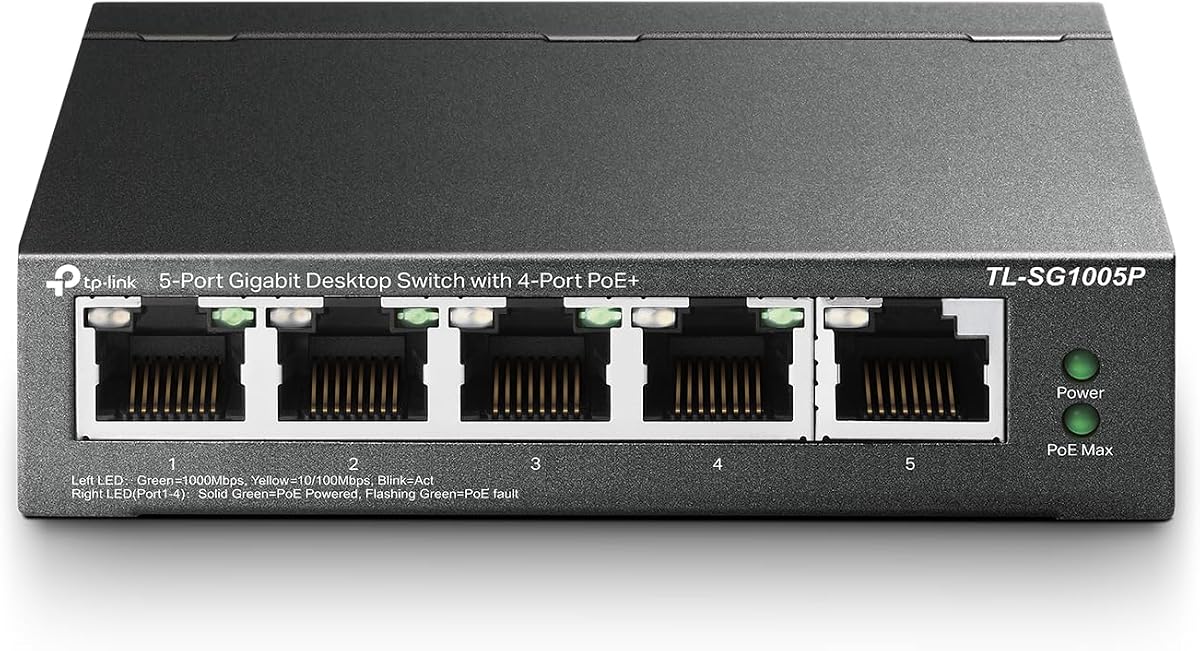
The TP-Link TL-SG1005P is a five-port Gigabit PoE switch with a 4.7 rating. It combines four PoE+ ports and one conventional Gigabit port, making it a practical option when a Starlink network also needs to power and connect network hardware such as cameras, access points, or other PoE-compatible devices.
We may earn a commission when you buy through this link, at no additional cost to you.
Each PoE+ port can deliver up to 30 watts, with a total PoE budget of 65 watts. The remaining Gigabit port can handle the uplink or another standard Ethernet device. Because the model also supports 802.1p and DSCP quality of service and IGMP Snooping, it can prioritize voice or video traffic and improve multicast handling across the local network.
PoE is only useful when the connected equipment supports it, and the total power budget must cover the combined requirements of every powered port. The switch also has only five ports and remains unmanaged, so it does not offer remote monitoring or VLAN configuration. These are acceptable constraints for a focused installation that needs power delivery more than enterprise controls.
Choose the TL-SG1005P when your Starlink network must support PoE devices or run a cable to a powered access point or camera. For ordinary computers and entertainment devices, a non-PoE switch may offer more ports for the same installation area.
PoE+ combines network data and power over a single Ethernet connection. This can simplify placement where a nearby outlet is inconvenient, especially for access points and compatible surveillance equipment.
Port-based QoS can help keep selected voice or video flows ahead of less sensitive traffic. IGMP Snooping supports more efficient multicast delivery when several devices receive the same streaming content.
We may earn a commission when you buy through this link, at no additional cost to you.
The Ubiquiti 8-Port PoE Switch is a fanless Layer 2 switch with a 4.6 rating. Its eight PoE connections make it a strong candidate for Starlink installations that need to expand a wired network while also supplying power to compatible infrastructure such as access points, cameras, or other network devices.
We may earn a commission when you buy through this link, at no additional cost to you.
The supplied external 60-watt power adapter provides 52 watts of total PoE capacity. The unit uses silent fanless cooling, which is useful in a home office, living room, or workspace where continuous mechanical noise would be undesirable. Its Layer 2 designation also places it within the category of switches commonly used for local traffic delivery and VLAN-aware infrastructure.
The shared 52-watt budget means it cannot power every port at the maximum PoE level simultaneously. Detailed capabilities are also limited in the supplied product information, so buyers may need to examine the manufacturer's specifications and confirm compatibility with their exact equipment. It is less compelling for a simple two-device household than a basic unmanaged switch.
Choose the Ubiquiti model when a larger, PoE-focused Layer 2 network is the goal and you are already familiar with its ecosystem. It offers a more specialized path than the basic five-port models, making it most appropriate for powered access points and professional-style network expansion.
The full port allocation is dedicated to PoE operation, allowing multiple compatible devices to receive both network connectivity and electrical power. This is useful when a Starlink router must feed several powered endpoints.
Fanless cooling keeps the switch silent during continuous use. Its Layer 2 role makes it a natural fit for local switching needs and broader managed network infrastructure, particularly when paired with compatible network software and access equipment.
We may earn a commission when you buy through this link, at no additional cost to you.
The NETGEAR GS308EP is an Easy Smart Managed eight-port PoE Gigabit switch with a 4.8 rating, the highest customer score among the products in this guide. It is the most complete option for Starlink users who want device segmentation, traffic prioritization, port visibility, and centralized power management in a compact enclosure.
We may earn a commission when you buy through this link, at no additional cost to you.
All eight Ethernet ports operate at up to 1.0Gbps and support PoE+, with a total power budget of 62 watts. The intuitive management software can configure VLANs, prioritize traffic through QoS, monitor ports, and manage network-security functions. Per-port PoE controls and uninterrupted PoE delivery add operational flexibility for businesses and advanced home installations.
The metal housing supports desktop or wall placement, and the fanless design provides quiet operation. Energy-Efficient Ethernet is included to reduce power consumption. The trade-offs are complexity and cost: a user with only one or two devices may not need VLANs or monitoring, while the shared PoE budget still limits how much power can be delivered simultaneously.
Choose the GS308EP when a small business, shared office, or sophisticated home network needs more than basic plug-and-play switching. It is particularly appropriate when Starlink provides the internet uplink but several wired departments, access points, cameras, or user devices require organized traffic policies and manageable power delivery.
VLAN support can separate users, devices, or functions into logical networks while retaining one physical Starlink-backed infrastructure. This improves control and can reduce unnecessary traffic exposure compared with a completely flat unmanaged network.
Eight PoE+ ports and per-port controls are useful for powered access points, cameras, and other compatible devices. The 62-watt budget provides meaningful capacity, though it should be checked against each device's power requirements.
We may earn a commission when you buy through this link, at no additional cost to you.
The D-Link 5-Port 2.5G switch is an unmanaged multi-gigabit model with a 4.7 rating. It provides five 2.5Gbps connections, up to 25 Gbps switching capacity, and a useful collection of traffic-handling features, making it an appealing choice for Starlink networks that also serve high-performance media or gaming equipment.
We may earn a commission when you buy through this link, at no additional cost to you.
Automatic negotiation supports 100Mbps, 1Gbps, and 2.5Gbps, so devices with different capabilities can share the same switch. It is designed for 2.5G Wi-Fi 6 access points, network storage, servers, PCIe adapters, gaming computers, 8K video, and IPTV. QoS classifies traffic into eight priority levels, flow control helps reduce dropped packets, and IGMP Snooping improves multicast efficiency.
Despite those traffic features, the switch is unmanaged and offers no browser-based configuration for VLANs or detailed port administration. It also has five total ports, so one usually becomes the Starlink or router uplink. Existing Cat5 and Cat6 wiring is supported, but realizing the full 2.5Gbps benefit still requires compatible devices and network infrastructure at both ends.
Choose the D-Link model when you want faster ports and better multicast handling without moving to a fully managed switch. It is well suited to a modern home office, media room, or gaming setup where high-bandwidth devices coexist with ordinary Gigabit clients.
Three-speed automatic negotiation allows older and newer devices to connect without manual reconfiguration. A Starlink router or adapter can operate at one gigabit while a compatible storage or gaming endpoint uses a 2.5G link.
IGMP Snooping and eight-level QoS are valuable in homes where several devices receive IPTV or other multicast streams. These features help direct and prioritize traffic while retaining the simplicity of an unmanaged device.
We may earn a commission when you buy through this link, at no additional cost to you.
The right Starlink network switch depends on the number of wired endpoints, local traffic demands, power requirements, management expectations, and compatibility with your existing Starlink hardware and cabling.
Choose a model explicitly compatible with your complete Starlink setup.
Also plan for how Starlink will connect to the network, because the switch must have a suitable uplink and the Starlink equipment must be able to output Ethernet.
Reserve one port for the uplink and allow room for expansion.
Choose a larger model when several entertainment devices, computers, printers, and access points may be added.
Choose Gigabit for standard wired access.
Choose 2.5G when local device-to-device traffic or future high-speed equipment justifies the additional investment.
Use PoE only when connected equipment needs it.
Check both per-port and total power limits before installing powered network hardware.
Choose unmanaged for simplicity and limited administration.
Choose managed features for segmentation, monitoring, and more deliberate traffic policies.
Match the enclosure and mounting options to the available space.
Prefer a fanless design for quiet living areas and an appropriate power source for compact powered splitters.
Use a splitter mainly to overcome limited physical cabling.
Choose a conventional switch when independent performance and local traffic matter.
Confirm cable category, power requirements, and connector layout.
Planning these details prevents a new switch from creating installation delays or an underused network.
Begin by identifying the intended uplink and the devices that need wired connections. Connect the Starlink-compatible router or Ethernet adapter to the designated uplink port, then attach each local device to a remaining RJ45 port. Allow the automatic negotiation process to establish each link, and consult the equipment indicators to confirm that the connected cables are active.
Arrange the switch in a dry, ventilated location with room around its vents and power connection. Avoid stacking it beneath heavy equipment or placing it where cables may be pulled sharply. If the product requires an external power source, use the supplied adapter and connect it securely before powering the network. Keep the uplink and downstream cables organized to make future troubleshooting and expansion easier.
For routine care, disconnect power before moving the unit or changing substantial cabling. Dust the exterior with a dry cloth, inspect connectors for debris, and check that ventilation openings remain clear. Review speed indicators after a router, adapter, or cable change, and update any smart-switch management software when compatibility guidance recommends it. If a link fails, test the cable on another port before suspecting the switch itself.
A switch is helpful when your Starlink setup has more wired devices than the available Ethernet ports. It lets one compatible Starlink internet connection feed several computers, consoles, televisions, or access points through separate local connections. If you use only Wi-Fi or have one wired device, the original router may already provide enough ports and a switch would add little value.
You generally need a Starlink-compatible router or Ethernet adapter between the satellite service and a standard switch. The switch then connects to that router or adapter as its uplink and provides additional Ethernet ports. A dedicated Starlink adapter can simplify this arrangement, but you should confirm compatibility with your exact dish and router generation before purchasing one.
It will not increase the internet speed delivered by your Starlink subscription or local equipment. It can, however, remove one-gigabit bottlenecks on high-speed local connections involving compatible storage, servers, gaming computers, or access points. The benefit appears mainly between devices on your network rather than in Starlink's internet download or upload performance.
For most homes, an unmanaged switch is sufficient because it automatically negotiates connection speeds and begins working after the cables are connected. A managed or smart managed model becomes more useful when you need VLANs, port monitoring, granular traffic priorities, or detailed security controls. Those features are less important when the switch simply adds a few basic Ethernet ports.
A conventional Ethernet switch provides multiple network ports backed by internal switching capacity, allowing devices to communicate locally and share an uplink. A one-to-four splitter usually divides one upstream connection among four outputs, and the combined traffic may be constrained by that shared link. Choose a switch for more independent performance and use a splitter mainly to overcome limited physical cabling.
Only if you intend to connect PoE-compatible network hardware. PoE can simplify access-point or camera installations by supplying power and data through one Ethernet cable, but ordinary computers, game consoles, and televisions do not need it. If no connected device uses PoE, a standard Gigabit or multi-gigabit switch is a more direct choice.
Most Gigabit switches work with common Cat5e or Cat6 Ethernet cables, while multi-gigabit products may support Cat5 or Cat6 depending on the exact model and distance. The dedicated splitter lists Cat5, Cat5e, Cat6, Cat7, and Cat8 support. For new installations, Cat6 is a practical choice that provides comfortable headroom for current multi-gigabit networks.
It depends on the model's port count and how the ports are used. A five-port switch connected to a router or adapter usually leaves four ports for devices, while an eight-port switch generally leaves seven. A one-to-four splitter offers four outputs but divides a shared uplink, so the number of physical connections is higher than the number of independent high-speed paths.
The TP-Link TL-SG105 is the most balanced budget-oriented choice for a small Starlink network, while the TL-SG105S-M2 is the leading choice for modern multi-gigabit equipment. The dedicated four-port Starlink adapter provides the most focused solution, provided that your exact dish and router generation are supported.
Prioritize verified hardware compatibility, the number of downstream connections, and the type of local traffic your network will carry. Gigabit models are appropriate for standard use, 2.5G switches help with faster local transfers, and PoE models are relevant only when compatible powered equipment needs a single-cable installation. Managed controls are valuable when segmentation or monitoring justify them.
Product ratings, specifications, and prices can change, so check the current listing and compatibility notes before ordering. Confirm the switch's uplink arrangement, power requirements, supported cable categories, and exact Starlink hardware to avoid an installation that falls short of your needs.