
Epson Workforce ES-50
4.3Editor score
Portable USB-powered operation
Searchable PDF and OCR output
Long-page scanning support
Automatic multi-page file creation
Newspaper scanning requires more than a basic flatbed because broad pages, fragile bindings, mixed layouts, and dense text can challenge conventional document scanners. A useful model must balance capture area, resolution, page handling, OCR, and the ability to preserve fine print without creating unwieldy files.
This guide compares ten newspaper scanners spanning overhead book scanners, A3 flatbeds, automatic document feeders, mobile sheet-fed models, and a photo-focused duplex scanner. The evaluation considers format support, image quality, automation, compatibility, speed, and practical limitations rather than treating every scanner as the same type of device.
Each review identifies the strongest use case for its product and explains who should consider it. Ratings and product details reflect the supplied listings, while availability and pricing can change, so readers should confirm current specifications and costs before making a purchase.
4.3Editor score

4.3Editor score
4.1Editor score
As an Amazon Associate we earn from qualifying purchases.
This side-by-side comparison organizes the selections by scanner format and intended workflow, helping readers distinguish overhead capture, flatbed imaging, automatic sheet feeding, mobile scanning, and photo-focused options.


The VIISAN S21 is an overhead document camera built for large-format capture, with a maximum scanning area of 594 by 420 millimeters. Its 4.1 rating reflects a capable and unusually flexible tool for newspapers, journals, manuscripts, maps, books, and three-dimensional objects. The adjustable A2/A3 frame and foldable hinge make it the most adaptable option in this guide for mixed archival work.
We may earn a commission when you buy through this link, at no additional cost to you.
Image quality comes from a 26MP sensor producing images as large as 5888 by 4522 pixels. When paired with the bundled VIISAN software, the scanner also supports software-enhanced 600 DPI output. More important for bound material, its page-processing tools automatically flatten curved pages, repair damaged edges, remove fingers from the frame, and split double-page spreads into separate files. Embedded OCR converts scans into searchable PDF, Word, Excel, Epub, and text files.
There are important trade-offs. The software supports x86 and x64 Windows PCs and macOS, but not ARM-based devices such as the Surface Pro X. The built-in LED is intended for darker settings, while bright ambient light and highly glossy paper can reduce consistency. A camera-based scanner also depends on steady positioning, although the included scan pad and adjustable height help create repeatable results.
This is a strong recommendation for a home office, classroom, library, or small archive that needs one device for both full newspaper pages and bound material. It is less suitable for organizations that require a physical automatic document feeder, extensive standalone operation, or flawless capture of reflective paper. For those needs, one of the sheet-fed or professional flatbed alternatives may be more appropriate.
The A2 capture area accommodates broad newspaper sheets while the foldable, height-adjustable design also works for books and journals. Automatic flattening and spread splitting reduce the manual editing normally required for curved pages.
Multi-language OCR turns captured pages into searchable PDF and editable office or publishing formats. This makes the scanner useful for building searchable research collections rather than merely creating page images.
We may earn a commission when you buy through this link, at no additional cost to you.
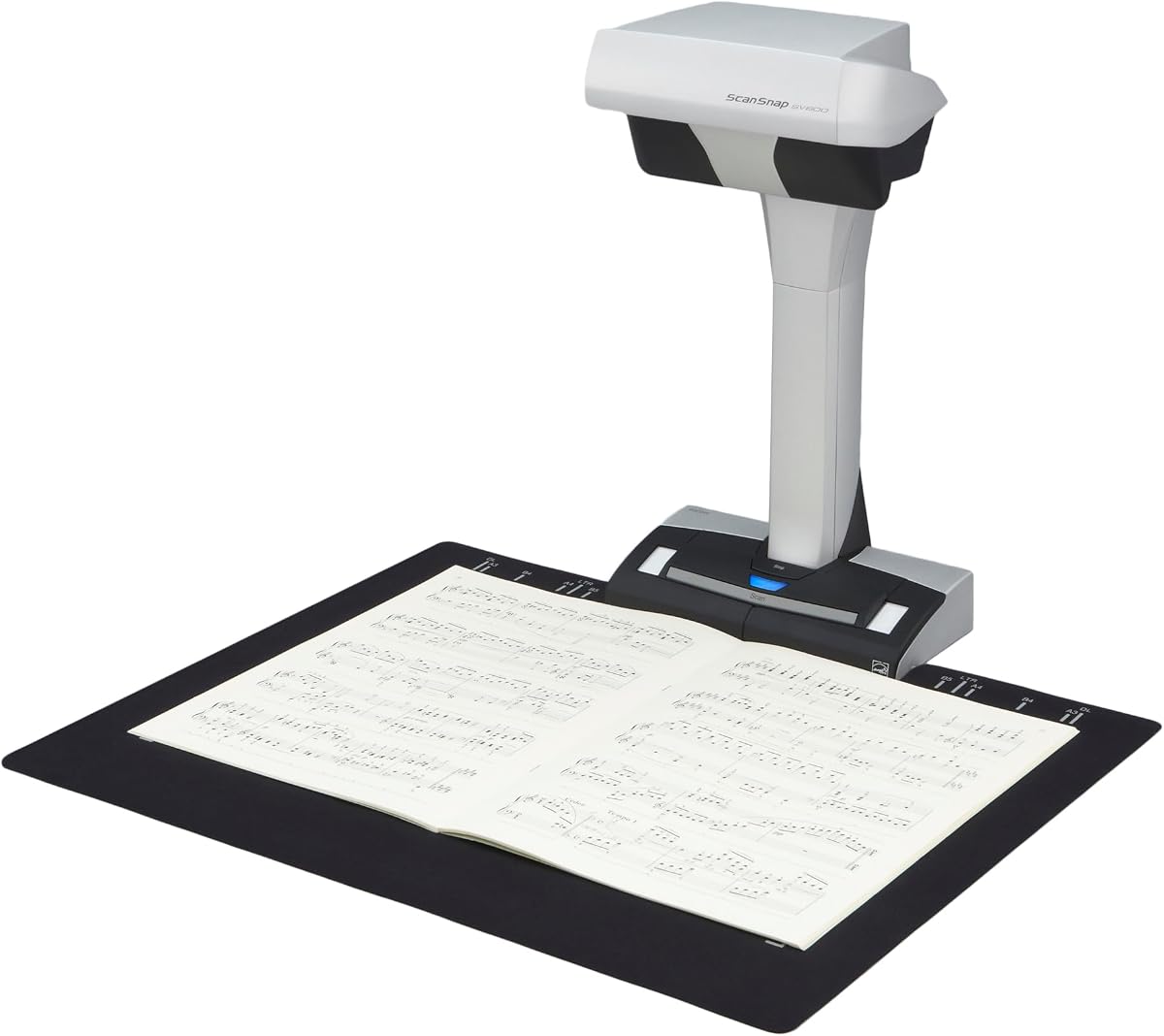
The ScanSnap SV600 is a dedicated overhead book and document scanner rated 4.1 stars. It directly addresses a problem common to newspaper and magazine digitization: preserving the original item without cutting, flattening destructively, or damaging its binding. Its main appeal is a refined capture workflow for books, clippings, business cards, photographs, and other documents placed beneath the camera.
We may earn a commission when you buy through this link, at no additional cost to you.
Automatic Book Correction flattens pages and corrects curve distortion, while the Point Retouch function removes fingers that enter the captured area. Multi Document Detection can identify several business cards, photos, or newspaper clippings in one session, automatically cropping and rotating the individual images. Page Turning Detection starts a capture when a page is turned, while Time Mode can scan continuously at a selected interval.
The trade-off is that this is an overhead camera system rather than a compact feeder. It needs sufficient desk space and a compatible computer, and capturing each page still requires positioning and the appropriate software command. It may not fit a mobile workflow, but it offers a more specialized and polished experience for bound collections than general-purpose sheet-fed scanners.
Choose the SV600 when preserving a book, magazine, or fragile newspaper is central to the task and the available workspace can accommodate an overhead unit. It is particularly compelling for collectors, researchers, and archivists who value automatic page correction and targeted retouching. Those who need fast automatic sheet feeding should instead examine the iX2500 or iX1300.
The overhead approach captures books and broad pages without passing them through rollers or requiring removal from their bindings. It is well suited to fragile material and unusually large sheets.
Curve correction, page-turn detection, multi-document cropping, and point retouching make the captured results more consistent. These features reduce repetitive editing after each session.
We may earn a commission when you buy through this link, at no additional cost to you.
The ScanSnap iX2500 is a high-speed automatic document scanner with a 4.3 rating and a 100-sheet feeder. It is an upgraded replacement for the discontinued iX1600 and focuses on a modern, connected workflow rather than book-page photography. For stacks of loose newspaper pages, forms, receipts, and business documents, it offers one of the most efficient setups in this roundup.
We may earn a commission when you buy through this link, at no additional cost to you.
Its large touchscreen lets users select personalized profiles, and the Quick Menu supports scan-drag-drop delivery into preferred computer applications. Wi-Fi 6 allows connection to computers, mobile devices, or cloud services, while USB-C provides a wired alternative. Files can be automatically optimized, named, and sorted, reducing administrative work after a batch has been scanned.
The iX2500 is not an overhead newspaper scanner and is not intended to solve curved pages in bound books. Broad sheets may also exceed the feeder’s supported width, so a fold or trimming decision could be required for oversized material. Even so, its 45-page-per-minute duplex speed and anti-jam systems make it compelling for high-volume loose-page digitization.
This is the most practical recommendation for offices that digitize large batches of single sheets and want direct delivery to cloud or mobile workflows. Choose it for speed, feeder capacity, and connectivity. Opt for the SV600 or a VIISAN overhead model when non-destructive capture, broad-format support, or bound publications are the priority.
Wi-Fi 6 lets the scanner send documents directly to compatible mobile devices or cloud services. The touchscreen profiles simplify recurring destinations and settings without repeated computer navigation.
A brake roller feeds sheets smoothly, while a multi-feed sensor detects stuck pages and skew detection helps prevent damage. These safeguards support unattended or large-volume workflows.
We may earn a commission when you buy through this link, at no additional cost to you.
The Epson Workforce ES-50 is a compact mobile document scanner with a 4.3 rating. It offers a practical lower-cost route into newspaper clipping, receipt, and document digitization, particularly for Windows or Mac users who need a portable scanner without a large automatic feeder. Its streamlined design emphasizes portability and simple operation rather than maximum sheet capacity.
We may earn a commission when you buy through this link, at no additional cost to you.
The scanner can process a single page in as little as 5.5 seconds, and Epson ScanSmart supports review and saving through an intuitive interface. Documents can measure up to 8.5 by 72 inches, allowing long receipts and unusually tall pages to be captured. Nuance OCR produces searchable PDFs and editable Word and Excel files, while cloud scanning and TWAIN compatibility broaden the available software options.
Compared with the iX2500 and iX1300, the ES-50 requires more hands-on feeding and cannot scan a bound book without separating its pages. It must also remain tethered to a computer and draws power through USB, so “mobile” means portable between desks rather than independent operation. These are meaningful limitations for larger archives, but they help explain the ES-50’s accessible positioning.
The ES-50 is best for students, travelers, home researchers, and small businesses that occasionally scan clippings, receipts, and records. It is a sensible choice when portability, OCR, and long-page support matter more than automated batch handling. For frequent bulk scanning, an automatic feeder will be faster, while fragile bound material deserves an overhead scanner.
The scanner is USB-powered and needs no batteries or external power supply. Its compact body is easier to carry between a home, classroom, or client location than a desktop flatbed.
Nuance OCR supports searchable PDFs and editable Word and Excel documents. ScanSmart can also send files to online storage accounts, making remote filing straightforward.
We may earn a commission when you buy through this link, at no additional cost to you.
The professionally refurbished VIISAN 3120 is an A3 flatbed scanner listed with a perfect 5.0 rating. It is aimed at libraries, schools, offices, creative professionals, and small publishing operations that need detailed scans of broad, flat materials. Its headline appeal is 1200 DPI optical resolution combined with a scanning bed large enough for books, magazines, newspapers, photographs, artwork, and CAD drawings.
We may earn a commission when you buy through this link, at no additional cost to you.
Color depth reaches 48 bits, supporting accurate reproduction of photographs, illustrations, and mixed-color pages. At 200 DPI, an A3 color document can be scanned in approximately eight seconds, making the unit suitable for daily and routine batch work. The frameless design reduces the obstructive border around the glass, while Auto-Scan starts a capture when the lid is closed. An LED source requires no warm-up time.
As a refurbished model, it may carry minor cosmetic signs of previous use, although the listing says each unit is inspected, cleaned, and function-tested against original factory specifications. It is a flatbed with a CIS sensor, so it is best for flat paper rather than deeply textured, three-dimensional, or dramatically curved material. Native 1200 DPI output on macOS requires the supplied VIISAN software.
The 3120 is an attractive option for institutions wanting an A3 workhorse without moving to a professional overhead system. Its rating is especially appealing, although buyers should evaluate the value of a refurbished unit against current availability and warranty terms. It is less suitable for mobile use or for automated stacks of loose pages.
The 1200 DPI optical sensor and 48-bit color depth suit detailed originals such as photographs, illustrations, and printed pages. A3 capacity reduces the need to split large documents into smaller sections.
Auto-Scan starts when the lid closes, and the LED source needs no warm-up. These details support a smoother sequence when processing many flat items in succession.
We may earn a commission when you buy through this link, at no additional cost to you.
The VIISAN VF3240 is an A3 flatbed with a 4.0 rating, aimed at users who require more detail than a standard office scanner can provide. It is particularly relevant to CAD drawings, architectural blueprints, legal documents, large newspapers, magazines, and painting albums. Its maximum 2400 by 2400 DPI optical resolution and 48-bit color depth make it the most finely specified flatbed in this selection.
We may earn a commission when you buy through this link, at no additional cost to you.
At 200 DPI in color, the scanner can complete an A3 page in as little as four seconds under the stated conditions. Actual times vary with document size and settings. The frameless glass provides a broad edge-to-edge area, and Auto-Scan starts the operation when the lid closes. Four front-panel buttons provide direct access to Scan, Email, Print, and PDF workflows.
The specifications require careful interpretation. Full A3 output at 2400 DPI is available through native macOS ICA support, while Windows users reach 1200 DPI for A3 through ViiScan. Windows WIA is limited to 600 DPI by Microsoft restrictions. The CIS sensor is designed for flat paper and is not recommended for clothing, discs, acrylic sleeves, or other three-dimensional objects.
Choose the VF3240 when fine linework, dense publication pages, or large graphics justify the investment. It is a strong professional flatbed for studios, libraries, technical offices, and publishers. It is not a bound-book scanner, and buyers relying on WIA should account for its resolution ceiling. The VF3240 should therefore be chosen for maximum image detail rather than book handling or feeder convenience.
The 2400 DPI maximum is useful for technical drawings, small publication text, and detailed images. The practical maximum differs by driver, so the intended computer system should be confirmed before purchase.
The frameless A3 bed and one-touch controls streamline the capture of newspapers, blueprints, and oversized paperwork. These benefits depend on originals remaining flat and outside the sensor’s recommended material types.
We may earn a commission when you buy through this link, at no additional cost to you.
The ScanSnap iX1300 is a compact automatic document scanner rated 4.2 stars. It is designed for offices that want fast, unattended capture of loose paperwork without occupying much desk space. A vertical form factor, 30-page-per-minute duplex operation, and both wireless and wired connections make it a versatile alternative to the more advanced iX2500.
We may earn a commission when you buy through this link, at no additional cost to you.
A single touch begins scanning, and automatic deskew, color optimization, and blank-page removal help produce consistent results without extensive driver configuration. The scanner supports documents, photographs, cards, and thicker items. Its 100-sheet feeder handles routine batches, while Wi-Fi can send scans to a Mac, PC, mobile device, cloud service, or Chromebook without a directly connected computer.
The iX1300 does not capture curved pages in a bound volume, and a wide newspaper sheet may need special handling. It also lacks some of the iX2500’s larger touchscreen, faster throughput, and Wi-Fi 6 capability. Nevertheless, the core package is efficient, and ScanSnap Home combines editing, organization, OCR-related workflow functions, and destination management in one application.
This is a good recommendation for small offices, clinics, classrooms, and home users who regularly scan loose documents and value a small footprint. It is also practical for photo and card capture. Readers creating a large searchable newspaper archive should consider the iX2500 for speed or an overhead model for broad, fragile pages.
The compact vertical body is designed to remain out of the way on a working desk. Automatic duplex capture, deskew, and blank-page removal streamline routine document processing.
Wi-Fi and USB provide multiple connection paths. The scanner can operate without a computer and send results to mobile devices, cloud services, Chromebooks, or desktop systems.
We may earn a commission when you buy through this link, at no additional cost to you.
The VIISAN S21 Pro is an upgraded overhead document camera with a 4.0 rating. It combines A2 and A3 coverage, 26MP imaging, page correction, fingerprint removal, OCR, and remote-presentation functions in a folding design. Its defining addition is integration with Google Gemini through the VisualCam Lite web interface, allowing users to request translations, summaries, reading guidance, or visual analysis of captured material.
We may earn a commission when you buy through this link, at no additional cost to you.
The 26MP sensor records images up to 5888 by 4522 pixels, while software-enhanced 600 DPI output supports archival-style workflows. Automatic tools flatten curved pages, remove finger marks, repair damaged edges, and divide double-page spreads into separate images. OCR supports more than 180 languages and outputs PDF, Word, Excel, Epub, and TXT files. A three-level LED helps in dim conditions, and the camera can also record video or appear in conferencing applications.
The AI feature depends on connecting through Chrome and the VisualCam Lite web interface, so it is an extension of the scanning workflow rather than a replacement for local capture software. Compatibility is limited to x86 and x64 Windows systems and macOS version 10.15 or later; ARM-based devices such as the Surface Pro X are unsupported. Glossy and highly reflective papers are also discouraged.
The S21 Pro is well suited to educators, researchers, remote presenters, and collectors who value a broad capture area alongside modern AI assistance. It overlaps heavily with the standard S21 but adds Gemini integration and a refined lightweight construction. Choose it when visual analysis and translation are meaningful; otherwise, the standard model may deliver the more essential scanning experience.
Gemini can translate visible text, summarize pages, guide reading, or help troubleshoot visual material through the browser interface. These tools add value to live demonstrations and research sessions without changing the basic scanner.
A 90-degree hinge, telescopic height adjustment, and low-center-of-gravity body create a compact and stable camera stand. The folding format makes it easier to move between rooms than a rigid desktop unit.
We may earn a commission when you buy through this link, at no additional cost to you.
The Brother DS-640 is a compact mobile document scanner with a 4.3 rating. At less than one foot long and approximately 1.5 pounds, it is built for people who need to digitize documents while traveling or working away from a dedicated office. It can handle color and black-and-white pages at up to 16 pages per minute, with the same stated speed for both modes.
We may earn a commission when you buy through this link, at no additional cost to you.
The included micro USB 3.0 cable provides both power and computer connectivity, allowing operation in locations without an available outlet. Brother’s iPrint&Scan desktop app supports scanning to a PC, network location, cloud service, email, and OCR destinations. The scanner also works with Windows, Mac, and Linux, as well as TWAIN, WIA, ICA, and SANE drivers.
Image cleanup features include automatic color detection and adjustment, rotation on PC, bleed-through prevention, background removal, text enhancement, and color-drop processing. Despite these useful automatic controls, the DS-640 is a manual single-sheet device and does not provide a large feeder or independent wireless workflow. Broad newspaper pages may also exceed comfortable feeding dimensions.
The DS-640 is a good fit for mobile professionals, students, and home users who need a lightweight scanner for receipts, forms, letters, and newspaper clippings. It stands out for portability and operating-system flexibility. Buyers handling hundreds of loose pages daily should choose an automatic feeder, while those with fragile broadsheets should choose an overhead scanner.
The short, lightweight enclosure can fit into a bag or purse without the bulk of a desktop scanner. USB power removes the need to search for an outlet when mobile capture is the priority.
Windows, Mac, and Linux support combines with TWAIN, WIA, ICA, and SANE drivers. Multiple scan-to destinations make the device adaptable to existing document-management routines.
We may earn a commission when you buy through this link, at no additional cost to you.
The Epson FastFoto FF-680W is a photo and document scanner with a 4.5 rating, making it one of the strongest-rated products in this guide. Its core strength is high-speed preservation of printed photographs: it can scan as many as 36 photos in one batch and process a photo in as little as one second at 300 DPI. It also handles ordinary documents and records up to 240 inches long.
We may earn a commission when you buy through this link, at no additional cost to you.
The Precise Picture Imaging System provides automatic enhancement, color restoration, red-eye reduction, deskewing, cropping, and rotation. Single-Step Technology captures an image and handwritten notes on its reverse in one operation. Output options include 300-DPI JPEG for sharing, 600-DPI TIFF for archiving, and 1200-DPI files for enlargement, while mobile JPEG capture is supported up to 600 DPI.
The FastFoto is a specialist rather than a broad newspaper-scanning solution. Its feeder and photo orientation are optimized for smaller prints, and it lacks the large bed or overhead coverage found in the A3 flatbeds and book scanners. Its strong photo restoration and batch speed nevertheless make it valuable for projects that combine newspaper clippings with family photographs, illustrations, or magazine images.
Choose the FF-680W when preserving and restoring a large photographic collection is central to the project. It is also a fast, duplex document scanner for receipts, pages, and smaller records. For full-size newspaper pages or bound publications, the overhead and A3 models in this guide are more appropriate, while the faster iX2500 is better for large document batches.
A one-photo-per-second rate at 300 DPI and a 36-photo batch capacity support rapid collection processing. This makes the scanner particularly effective for albums, envelopes, and mixed print batches.
Automatic color restoration and red-eye reduction help revive aged prints. Sharing, archival, and enlargement formats give users control over file size and intended use.
We may earn a commission when you buy through this link, at no additional cost to you.
The best newspaper scanner depends on whether you are capturing loose broadsheets, fragile bound issues, long records, or mixed visual material. Format, automation, image processing, OCR, and connection options should be matched to the size and condition of your collection.
There is no single best newspaper scanner because the products use fundamentally different capture methods. An overhead scanner can photograph an entire open newspaper, bound volume, or map without pulling fragile material through rollers. An A3 flatbed provides stable, high-resolution imaging for flat pages, while an automatic document feeder is much faster for loose sheets. Portable sheet-fed scanners suit occasional clippings, and photo scanners specialize in prints rather than broadsheets.
Match the format to the source material. Use an overhead model for bound issues or oversized pages, a flatbed for detailed flat originals, and an automatic feeder for high-volume loose pages. Avoid choosing solely by marketing claims about resolution.
Newspapers frequently exceed the width of ordinary document feeders. A2 capture provides 594 by 420 millimeters, while A3 provides 420 by 297 millimeters, making the former more appropriate for broad single sheets. Portable scanners may accept only conventional letter-size widths, and automatic feeders can accept only what fits within their guides. Long-page support is also relevant when capturing an entire strip from a rolled newspaper.
Measure the widest page and longest continuous section in your collection before buying. Check not just the stated maximum but also the software crop area, feeder width, and image output dimensions. Inability to capture a full page without folding can compromise both readability and archival accuracy.
More resolution improves the visibility of small type, halftone dots, photographs, and fine illustrations, but it also produces larger files and longer processing times. The products here range from 1200 DPI flatbed output to 26MP camera images and software-enhanced 600 DPI captures. These figures are not directly interchangeable, so compare actual pixel dimensions and the resolution mode used for a full newspaper page.
Choose enough detail to preserve the source without automatically selecting the highest setting for every page. For searchable text, moderate resolution may be sufficient; for fine newsprint, photographs, or research references, higher resolution can be valuable. Always include a zoomed preview before processing a large collection.
Bound newspapers and magazines create shadows, curved page geometry, and finger obstructions. Overhead scanners can address these issues with automatic flattening, curve correction, edge repair, and point-retouch tools. The ScanSnap SV600 provides Auto Book Correction and Point Retouch, while the VIISAN S21 models add automatic flattening, fingerprint removal, and double-page splitting. Flatbeds do not automatically solve these problems.
If your collection is mostly bound, prioritize correction software over feeder speed. If pages are loose and already flat, automatic deskew and blank-page removal may offer more practical value. Test a representative spread before committing to a large digitization project.
OCR converts scanned words into searchable text and may also generate editable Word, Excel, Epub, or TXT files. This is important for researchers, journalists, students, and anyone building a searchable archive. The VIISAN S21 Pro supports 180-plus languages, while the Epson ES-50 uses Nuance OCR, and the Epson FastFoto includes OCR through ScanSmart. Automatic feeders may also route scans to cloud services where text can be recognized.
Consider both recognition quality and the formats your existing software can open. Check whether OCR is included, whether it requires a bundled application, and whether it works in wireless mode. A searchable PDF is often the most practical archival format, but editable output can be valuable for transcription and analysis.
Throughput matters when a collection contains hundreds or thousands of loose pages. The ScanSnap iX2500 is rated at up to 45 pages per minute with a 100-sheet feeder, while the iX1300 reaches 30 pages per minute and the Brother DS-640 up to 16 pages per minute. Flatbeds and overhead cameras are generally better for careful, one-page-at-a-time work. Photo scanners can lead when the source is thousands of small prints.
Estimate the number of pages and how much post-processing each requires. A faster feeder can still be inefficient if it produces skewed images, missed pages, or poorly separated files. For larger jobs, sensor-based page detection and automatic optimization can save more time than raw speed alone.
A scanner’s hardware is only one part of the workflow. Check the operating systems, drivers, bundled applications, cloud accounts, and mobile devices you intend to use. The VIISAN S21 and S21 Pro support x86 and x64 Windows systems and macOS, but not ARM-based devices such as the Surface Pro X. The VF3240 also has different maximum resolution behavior on Windows and macOS. The ES-50 supports Windows and Mac, while the DS-640 extends to Linux.
Make a compatibility checklist before ordering. Verify the connector, required driver, OCR application, cloud destination, and whether the scanner can operate without a computer. This is especially important for older systems, managed workplaces, and institutional networks with restricted software installation.
Large-format scans require substantial storage, and OCR creates additional text files. Plan a folder structure, naming convention, backup strategy, and editing software before beginning. Overhead camera models also need controlled lighting. The VIISAN S21 includes a three-level LED lamp, but its listing advises against bright ambient light and very glossy paper. Flatbeds provide more consistent illumination and physical page guidance.
Use an A2 or A3 format only when the source requires it. Test at a moderate resolution, inspect fine print and photographs, and adjust lighting or page position before committing to an entire run. Include backup copies in more than one location, particularly for fragile or irreplaceable newspapers.
Begin by preparing the workspace, scanner, and software before placing valuable material beneath the lens or into the feeder. Clean the glass or camera surface with an appropriate soft cloth, confirm the correct power and connection, and install the specified driver and application. Review the maximum paper dimensions, supported material types, and output location. For an overhead model, position the camera squarely over the page and use even lighting with minimal glare.
For flatbed scanning, place one page or open book face down, align the content with the glass edges, and close the lid or use automatic scan mode when supported. For automatic feeders, straighten loose pages, remove clips and fasteners, load the feeder within its limit, and avoid forcing brittle folds. For overhead capture, keep the page flat, allow Auto Book Correction time to analyze the spread, and use finger removal only after checking that nearby text was not altered.
After capture, inspect the preview at full-page and magnified views. Confirm that the entire page is visible, text is sharp, colors look natural, and the page is not cropped or skewed. Then apply OCR and naming rules, save a master file, and create a convenient access copy if necessary. Keep originals clean, dry, and properly supported, and follow the manufacturer’s cleaning guidance without using liquids that could damage the sensor or optics.
An overhead book scanner is usually best for fragile, bound, or unusually broad newspaper pages because it captures the material without feeding it through rollers. An A3 flatbed is also suitable for loose, flat issues, while an automatic document feeder is most efficient for large quantities of unfolded, undamaged pages.
Only if the sheet fits within the scanner’s maximum width and length. Many compact document scanners cannot accommodate a full broadsheet without folding, which can interrupt columns and create uneven edges. A3 or A2 models, overhead scanners, and some long-page portable scanners are better suited to complete pages.
OCR is not required to create a digital image, but it makes the page searchable and can produce editable Word, Excel, Epub, or TXT files. It is especially useful for research, transcription, accessibility, and archive discovery. Accuracy varies with print quality, skew, contrast, language support, and scan resolution.
A higher resolution generally improves the visibility of small type and halftone details, but it also increases file size and processing time. Begin with a moderate setting, zoom in on the smallest columns, and increase resolution if characters remain unclear. Newspaper archives often need a balance between legibility and storage efficiency.
Overhead models such as the ScanSnap SV600 and VIISAN S21 series are designed to capture bound material and correct some page curvature. Flatbeds can photograph open books but may leave shadows near the spine, while automatic feeders cannot safely accept a bound volume without separating pages.
An overhead scanner photographs the page from above, accommodating broad sheets, books, maps, and three-dimensional objects with minimal contact. A flatbed scans a stationary page against a glass surface, offering controlled illumination and precise placement but requiring the material to remain flat and within the bed’s dimensions.
Glossy pages can create reflections under overhead lighting, and strongly curled sheets can produce uneven focus and shadows. Use diffuse, indirect illumination, flatten pages carefully, and capture a test preview at high magnification. If reflections persist, a flatbed or controlled scanning environment may produce more consistent results.
Use a consistent naming system that includes publication, date, issue or page number, and any relevant section. Preserve original-resolution masters, store OCR text or searchable PDFs for access, and maintain backups in at least two separate locations. Consistent metadata and folder structures make the archive easier to search later.
The ScanSnap iX2500 stands out for fast connected batch scanning, the ScanSnap SV600 for polished overhead capture, and the Epson Workforce ES-50 for portable, budget-conscious digitization. The VIISAN S21 family offers the broadest large-format overhead feature sets, including A2 support, page correction, fingerprint removal, and extensive OCR.
Prioritize the source material before comparing fine specifications. Choose an overhead scanner for fragile, bound, or broad pages; an A3 flatbed for detailed flat originals; and an automatic feeder for high-volume loose sheets. Resolution, OCR, storage, lighting, and software compatibility matter only after the scanner can accept the material safely and capture the entire page.
Finally, check current pricing, availability, warranty terms, and computer compatibility before ordering. Product configurations and promotions can change, and a scanner that appears expensive may be less economical if it lacks the format or workflow you need. Confirm the full-page dimensions and test a representative newspaper before launching a large archive project.