
Robot Arm Kits Robotics for Kids
4.2Editor score
Wooden mechanical construction
Motorized multi-axis movement
No soldering required
Explore the best Robotic Arm Kits for kids, teens, and adults, comparing axes, controls, programming, construction, and educational value in this expert guide
Robotic arm kits combine mechanical construction, electronics, programming, and hands-on problem-solving in a format that can entertain beginners while introducing increasingly sophisticated engineering ideas. A worthwhile kit should offer meaningful movement, understandable controls, a challenging but achievable build, and educational features that suit the builder’s age and experience.
This guide compares ten kits spanning wooden introductory designs, hydraulic models, programmable desktop arms, tracked robots, and advanced artificial intelligence platforms. The comparison considers the number of axes, control methods, included electronics, construction style, programming capabilities, attachment options, and the learning value offered by each product.
Each review explains who the kit is best suited for, along with its most notable strengths and practical limitations. Ratings reflect the supplied customer feedback, while product details come from the available product information. Availability and prices can change, so compare the current listing and package contents before making a final purchase.
4.2Editor score

4.8Editor score
4.3Editor score
This side-by-side overview compares the most important design, control, programming, and construction features across all ten robotic arm kits, helping buyers identify the right level of complexity for children, teens, adults, and technical hobbyists.


The TEACH TECH Hydrobot Arm is a mechanical building kit that introduces hydraulic power without requiring electronics or batteries. Its 4.5 rating reflects a generally favorable response, and its most distinctive feature is the way water pressure produces controlled movement across six axes. The arm can rotate as far as 270 degrees, giving builders a clear connection between valve control, pressure, and mechanical motion.
We may earn a commission when you buy through this link, at no additional cost to you.
Its educational appeal comes from the assembly process rather than digital programming. The kit asks users to build a working robot from individual components, follow detailed instructions, and then experiment with levers and the gripper. A particularly useful feature is the possibility of replacing the gripping mechanism with suction components, allowing the same model to approach objects in two different ways.
The main trade-off is that this is not a conventional programmable robotics kit. There is no app, coding environment, remote control, or electronic sensor package mentioned in the supplied information. The hydraulic system also introduces practical care requirements because water remains part of the operating mechanism. Nevertheless, those traits make the kit more mechanically authentic than many entry-level electronic arms.
This is a strong choice for builders aged 12 and older who want to understand hydraulic systems, enjoy detailed construction, and prefer experimenting with physical cause and effect. It works particularly well as a parent-child project, classroom demonstration, or gift for someone interested in mechanical engineering rather than coding. It is less suitable for younger children or those expecting electronic programmability.
The water-powered mechanism offers a more tangible introduction to engineering than a fully automated arm. By operating the controls and observing how the arm responds, builders can explore pressure, leverage, resistance, and mechanical advantage without first needing to understand software.
The movable gripper provides a conventional way to pick up items, while the included suction option broadens the challenge. This makes the finished model useful for simple experiments involving different object shapes, sizes, and surfaces.
We may earn a commission when you buy through this link, at no additional cost to you.
This wooden robot arm kit is a budget-friendly introduction to robotics for children, teens, adults, and families seeking a first electronics project. It holds a 4.2 rating and combines a 3D wooden construction puzzle with motors, circuit boards, wires, and a microcontroller. That combination helps explain how electronic commands can produce coordinated physical movement.
We may earn a commission when you buy through this link, at no additional cost to you.
The build appears intended to be challenging without overwhelming. Detailed assembly guidance supports the experience, and the wooden components give the arm a distinctive look that separates it from plastic electronic kits. Once assembled, the model provides a more meaningful introduction to robotics than a fixed-action toy because builders must understand the relationship between the circuit, motor, and moving arm.
Its limitations should be considered carefully. Six AA batteries are required, but they are not included, so a buyer should add them to the purchase plan. The kit also does not offer the broad selection of app-based or advanced programming interfaces seen in premium desktop robotic arms. Its value rests on mechanical assembly and introductory circuitry rather than advanced autonomous behavior.
This kit is well suited to older children who can manage detailed building, younger teens looking for a first STEM project, and adults who want a low-commitment way to explore small robotic arms. It also works for school science activities, summer learning, or family projects. Choose it when accessibility, affordability, and a satisfying build matter more than sophisticated programming.
Motors, wiring, and a microcontroller are placed within a familiar wooden construction format. That combination gives new builders a practical reason to care about circuits while keeping the project approachable and visually engaging.
The step-by-step structure makes the kit suitable for collaborative construction between an adult and child. It can also serve as an entertaining project for teens, with the completed arm providing a tangible demonstration of what they assembled.
We may earn a commission when you buy through this link, at no additional cost to you.
The VANLINNY 4DOF Robot Arm combines a programmable robotic arm with a mobile robot platform, giving it more interactive scope than a stationary introductory kit. Its 4.6 rating is among the stronger results in this group. The metal construction and four axes create a durable, mechanically interesting model intended for children who want to move beyond a one-time assembly.
We may earn a commission when you buy through this link, at no additional cost to you.
Programming is one of the main attractions. Builders can create movement sequences while the arm rises, falls, and changes position, and the package includes simulation sound effects for added realism. A remote control supports direct operation, while the stated range of 30 to 50 meters allows the mobile robot to be driven beyond the immediate tabletop area.
The supplied information contains some inconsistent age references, so buyers should rely on the packaging and manufacturer guidance rather than the long product title alone. It is also more involved than a simple wooden or hydraulic model and requires greater attention to wiring, controls, and programming. Buyers who want only an uncomplicated arm may find the combined car-and-arm format unnecessarily elaborate.
This kit is a compelling option for a child or teen who wants both construction and programming in one project. It can support home STEM sessions, classroom demonstrations, and gift projects where interactive movement matters. It is less appropriate for very young children or builders who want a simple mechanical model without electronics.
Simple programming turns the robot into more than a remote-controlled toy. Users can coordinate arm and vehicle functions, making the finished model useful for demonstrating sequencing, automation, and cause-and-effect relationships.
The durable metal structure supports a more substantial feel than lightweight wooden kits. It is a better fit for extended experimentation, provided builders follow the assembly instructions carefully and handle the electronic components properly.
We may earn a commission when you buy through this link, at no additional cost to you.
The 3 in 1 Technical Robotic Arm Building Kit stands out with a 4.8 rating, a 975-piece tracked build, and three interchangeable working attachments. It is the most feature-rich option in this guide and is especially suitable for builders who want a completed model that can grip, scoop, and simulate drilling rather than merely rotate through preset positions.
We may earn a commission when you buy through this link, at no additional cost to you.
Control options broaden its appeal. The included 2.4GHz remote provides immediate manual operation, while the companion app adds drag-and-drop programming, gyroscope steering, and path drawing. Four motors independently support tracked driving, arm lifting, and attachment movement, creating a more interactive experience than a single-axis remote-control mechanism.
The commitment level is significant. A 975-piece build can be lengthy and demanding, especially for younger children or first-time builders. Users also need patience when learning the app, aligning interchangeable parts, and troubleshooting their construction. The approximate finished dimensions of 15 by 7.9 by 12 inches mean that adequate assembly space is necessary, but the result should provide a visually impressive display once complete.
This is the most balanced recommendation for older children, teens, adults, and family STEM projects seeking a large number of features without moving into research-level hardware. It supports conventional play, programming practice, and task-based building. Buyers who want a small beginner arm or a deeply advanced artificial intelligence platform should choose one of the more specialized alternatives instead.
The gripper, bucket, and drill attachment turn the same core model into three different tools. Swapping components helps builders understand how changing an end effector alters the task without requiring a completely new robot.
Drag-and-drop sequences, gyroscope control, and drawn paths expose users to several foundational ideas. Even beginners can experiment with movement order, while more experienced builders can focus on coordinate control and repeatable routes.
We may earn a commission when you buy through this link, at no additional cost to you.
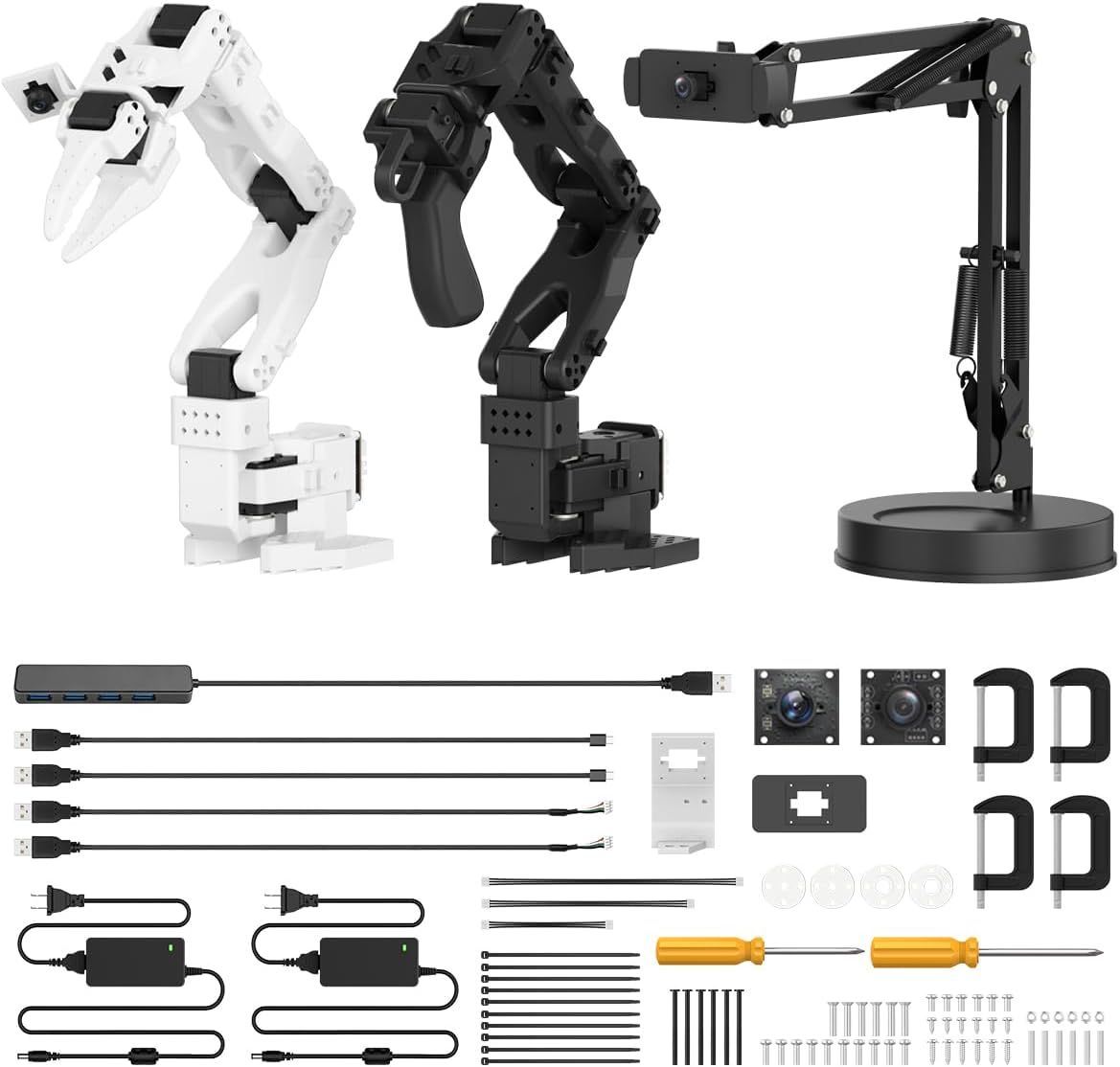
The Hiwonder SO-ARM101 is an advanced robotic arm platform designed around embodied imitation learning, computer vision, and open-source experimentation. Its 4.3 rating reflects a smaller but technically focused customer base, while the six-axis design, twelve high-torque bus servos, and dual-camera system place it firmly beyond typical classroom toys.
We may earn a commission when you buy through this link, at no additional cost to you.
The hardware is designed for smooth, stable motion, with magnetic feedback helping address jitter and power-related movement issues. A gripper-mounted camera supports close manipulation tasks, while an external camera adds environmental awareness. The included BusLinker V3.0 board and PC software provide servo scanning, status monitoring, trajectory control, calibration, and debugging capabilities.
Its compatibility with the LeRobot open-source framework is the key reason to choose it. Users can work with shared code, templates, and pre-trained models rather than treating the arm as a closed ecosystem. That makes the kit relevant to developers, researchers, educators, and serious hobbyists. The tradeoff is complexity: the specialized software and hardware demand greater technical comfort than a simple app-controlled kit.
This is the premium choice for buyers who want to explore modern artificial intelligence and imitation learning with a capable desktop arm. It suits graduate-level experimentation, robotics development, and advanced STEM mentoring rather than casual play. Because it arrives with an assembled 3D printed part and specialized electronics, buyers should confirm their software, computer, and project goals before purchasing.
The dual-camera arrangement gives the system both a close view of the gripper and a wider view of its surroundings. That perspective is essential for projects in which the robot must recognize objects, learn demonstrated movements, or respond to changing conditions.
LeRobot compatibility opens the platform to shared code, templates, and pre-trained models. It is a more flexible foundation for experimentation than a closed mobile app, although users must be comfortable learning a technical workflow.
We may earn a commission when you buy through this link, at no additional cost to you.
The Arduino miniArm is a five-axis educational robot arm that combines open-source programming with meaningful physical control. Its 4.6 rating places it among the most well-regarded kits in the group. Built on the Atmega328 platform and compatible with Arduino programming, it offers a practical path from assembling a model to writing or modifying its behavior.
We may earn a commission when you buy through this link, at no additional cost to you.
The supplied hardware includes high-precision digital servos, a six-channel knob controller, a Bluetooth module, and several expansion ports. These controls make it possible to manipulate the arm directly, edit actions offline, or explore the supplied app. Expansion options mentioned include an ESP32 camera module, accelerometer, touch sensor, and glowing ultrasonic sensor, allowing the project to grow beyond simple arm positioning.
Package configuration is the most important consideration. The starter kit does not include the glowing ultrasonic, touch, acceleration, or ESP32 camera modules, while the standard kit adds those accessories, a Type-C data cable, and a four-pin wire. Buyers should compare the configuration carefully rather than assuming every sensor is present. Programming also requires more active participation than operating a remote-controlled toy.
This is an excellent fit for students, educators, and hobbyists who want to learn Arduino while retaining access to open-source examples and tutorials. It is especially useful for users planning sensor experiments, secondary development, or custom projects. Casual buyers seeking a plug-and-play arm may find the general-purpose programming approach demanding.
Arduino compatibility and open-source miniArm programs let learners inspect the logic that governs the arm. This creates a stronger bridge between assembly and computer science than a model controlled entirely through preset buttons.
Dedicated expansion ports make it possible to add new sensing capabilities over time. Users can progress from basic movement experiments to projects involving range, orientation, touch, or visual information, depending on the purchased configuration.
We may earn a commission when you buy through this link, at no additional cost to you.
The LewanSoul LeArm is a six-degree-of-freedom desktop robotic arm that sits between educational toys and higher-end programmable platforms. It carries a 4.2 rating and supports remote-control grasping, object transportation, custom actions, and graphical programming. Its six digital servos provide articulated movement, while the mechanical claw gives the arm a clear practical purpose.
We may earn a commission when you buy through this link, at no additional cost to you.
One of its strongest features is the range of control methods. Users can operate it through PC software, an app, a mouse, or the included wireless handle. That variety makes the model approachable for immediate experimentation while still allowing more structured programming work. Tutorials and straightforward programming software are included to support the assembly and learning process.
The metal bracket construction, reinforced base, high-torque base servo, and industrial-grade bearings are intended to improve stability. Anti-blocking servos with gear clutches are also included at the arm end to reduce strain when movement is obstructed. As a desktop machine, however, it requires enough space for a full swing, and users should operate it on a stable surface.
The LeArm suits students, engineers, university learners, and adult hobbyists who want a capable desktop arm without the complexity of an advanced artificial intelligence platform. It is a good choice for learning robot structures, demonstrating movement sequences, and experimenting with custom actions. Beginners should allow extra time for the technical setup and programming workflow.
App, mouse, PC software, and handle control support both casual and more deliberate use. A new builder can begin with direct commands, while a student can transition to graphical sequences and custom actions.
Metal brackets, strengthened base components, and anti-stall mechanisms support controlled movement. These features make the arm suitable for repeated demonstrations, provided it is placed on a level surface and operated with reasonable loads.
We may earn a commission when you buy through this link, at no additional cost to you.
This wooden robot arm kit offers a distinctive alternative to the many plastic construction kits on the market. Its 4.2 rating and combination of natural wooden parts, motors, a microcontroller, and circuit boards make it appealing to older children, teens, and adults who want a hands-on introduction to electronics without starting with a complex desktop robot.
We may earn a commission when you buy through this link, at no additional cost to you.
The completed arm supports lifting, steering, and rotation across 270 degrees, giving users a broad range of motion. Clear step-by-step instructions organize the wooden construction, while the electronics illustrate how commands become physical movement. The result is more educational than a preassembled model because each structural and electrical relationship must be built and understood.
As with other wooden kits, careful assembly is important. Misaligned pieces or strained connections can affect movement, and the arm may not provide the rigidity of a full metal platform. The product information does not identify advanced visual programming or artificial intelligence functions, so buyers should view it as a fundamentals-focused engineering kit rather than a programmable research arm.
This model is a good fit for family STEM nights, school projects, and older children developing an interest in circuits and mechanics. It can also appeal to adults who prefer a construction challenge with a visible mechanical result. Choose it over a metal or app-controlled model when the tactile build process and distinctive appearance matter most.
Natural wooden parts give users a more hands-on relationship with the mechanism than snap-fit plastic. The process encourages attention to joint alignment, structure, and the way each piece supports the final movement.
Full 270-degree rotation, lifting, and steering provide enough movement for varied demonstrations. The arm can serve as a simple platform for experimenting with control direction, object placement, and basic cause-and-effect relationships.
We may earn a commission when you buy through this link, at no additional cost to you.
The ACEBOTT 4 in 1 Smart Robot is a modular platform that can become a robot car, a tracked tank, a robotic arm vehicle, or a combined robotic arm tank. Its 4.1 rating reflects a versatile educational design, while the inclusion of a base car, tank-track expansion, and robotic arm kit makes it unusually flexible for a STEM project.
We may earn a commission when you buy through this link, at no additional cost to you.
The five-degree-of-freedom arm is powered by an ESP32 controller and can be programmed to grab, lift, and place objects. Sixteen guided tutorials and HD assembly videos help users move from construction to coding, while compatibility with Arduino and Scratch supports both text-based and block-oriented learning. An infrared remote and smartphone app provide additional ways to operate the robot.
The tracked chassis is designed to handle grass, gravel, slopes, and carpet, expanding play beyond a tabletop. It is not entirely a desktop arm, however, and users must account for assembly time, the different module combinations, and the space required to test the larger tank form. The supplied information does not state which mobile operating systems are supported beyond naming iOS and Android, so current compatibility should be confirmed.
This is a strong choice for children aged 12 to 16 who want coding, mechanical assembly, and multiple robot forms in one package. It suits home learning, classrooms, STEM programs, and science-fair projects. Buyers seeking a simple fixed arm should choose a less complex model, while serious developers should examine whether the platform offers the API depth they need.
The included car, track, and arm modules let builders compare different movement systems. This makes it possible to explore the same controller and programming concepts through several distinct robot designs.
Sixteen story-based tutorials and assembly videos create a clear progression from setup to programming. Arduino and Scratch compatibility also lets learners choose between more visual introductory workflows and more technical code development.
We may earn a commission when you buy through this link, at no additional cost to you.
The Hiwonder xArm1S is a full-metal, six-axis desktop robotic arm intended for education, coding, and serious demonstration work. Its 4.0 rating is the lowest among the selected products, but the core specification is extensive: six intelligent serial bus servos, an aluminum alloy bracket structure, reinforced base components, and a stated grasping capacity of up to 500 grams.
We may earn a commission when you buy through this link, at no additional cost to you.
The servos provide position, voltage, and temperature feedback, giving users more information than a basic servo setup. Control options include a phone app, mouse, personal computer, and wireless PS2 controller. Action editing is available through PC, app, and offline manual methods, allowing users to create custom sequences and move beyond direct remote operation.
The sophisticated hardware does not eliminate the usual practical constraints. Desktop arms require stable placement and sufficient clearance, and a full-metal articulated structure can be challenging to assemble. The variety of controls also creates a steeper learning curve for someone who has never programmed a robotic arm. As with all high-capacity models, users should operate it within the stated load limits.
This kit is best for students, educators, engineers, and experienced hobbyists who want a durable six-axis platform with multiple interfaces. It can support grasping, transport, custom actions, and bionic robotics demonstrations. It is less appropriate for a young child seeking a simple build or a buyer who wants a basic model without programming complexity.
The aluminum alloy bracket design creates a rigid structure for a desktop arm. A reinforced base and industrial-grade bearings support stability, which is particularly useful during repeated grasping and transport demonstrations.
Position, voltage, and temperature information make the intelligent servos more informative than basic controllers. Those readings can help users understand operating conditions and keep movements within appropriate limits.
We may earn a commission when you buy through this link, at no additional cost to you.
The right robotic arm kit depends on the builder, the available workspace, and the desired balance between mechanical construction, electronics, and programming. These factors help distinguish an approachable educational toy from a serious desktop robotics platform.
Age guidance should be treated as a starting point because assembly difficulty, supervision needs, and reading ability vary. Kits aimed at children around eight years old generally use clearer instructions and approachable construction, while models for teens and adults may require finer motor control, larger assemblies, or more advanced software. A child can often use a kit rated for a younger age with adult guidance, particularly when patience and careful handling are strengths.
Choose a model that matches the builder’s current skills, not simply the highest age printed on the box. Complex programming is better introduced gradually, while an experienced hobbyist may find a basic kit understimulating.
Axes determine how freely the arm can move. Three-axis systems often cover basic turning, lifting, and gripping, while four- and five-axis designs add orientation control. Six-axis platforms offer a greater range of positioning and are more appropriate for desktop robotics, object transport, and advanced programming tasks. More axes can improve versatility, but they also increase construction and calibration complexity.
Match the axis count to your intended tasks. Beginners usually benefit from fewer degrees of freedom, while users building repeatable workflows or imitation-learning experiments may need the freedom of a full six-axis arm.
The power source affects convenience, runtime, and the character of the experience. Water-powered hydraulic kits require no batteries but introduce fluid handling and drying. Motorized electronic kits need batteries, charging, or a wired connection. Remote control offers immediate operation, whereas app or PC control tends to provide deeper programming and action editing. Some advanced systems use USB-connected control boards for development work.
Decide whether direct play or programmable behavior is the priority, and check which power accessories are included. A listing that requires batteries but does not include them will need a small additional purchase before the project can begin.
Wood, plastic, and metal construction each create a different learning environment. Wooden kits emphasize careful joint assembly and can offer a warm, distinctive appearance. Plastic systems provide accessible construction with extensive detail. Metal arms tend to feel more rigid and precise, making them common in desktop robotics. Regardless of material, hundreds of small parts demand organization and a clear work area.
Review the number of pieces, whether tools are included, and the expected assembly duration. A complex build can be rewarding, but it is not automatically better for every recipient.
Graphical programming is approachable for younger learners, while Arduino and open-source frameworks support deeper code modification. App-based interfaces can make saving and replaying actions convenient, but their technical depth varies widely. Advanced AI kits may provide shared code, templates, pre-trained models, and professional debugging tools. Always confirm that the software is suitable for the builder’s operating system and experience level.
Look for a platform that allows meaningful customization rather than only preset commands. Tutorials, sample code, and active documentation can be more valuable than a long list of advertised features.
A gripper is common, but interchangeable buckets, suction parts, and simulated drilling tools create more varied tasks. Modular systems let users compare how different end effectors approach the same object. Mobile bases add another layer by allowing the arm to transport items across a room or outdoor surface. Evaluate whether those functions match your planned demonstrations or experiments.
More attachments are useful only when the control system can operate them effectively. Confirm that each attachment is included and compatible with the completed model.
Desktop arms need clearance above, below, and around their joints. Moving parts can pinch fingers or strike nearby objects, so a stable work surface and responsible operation are important. Hydraulic kits require attention to water, seals, and drying. Electronic kits require correct battery installation, safe power connections, and reasonable loading. Advanced arms may also generate heat or draw considerable current during repeated motion.
Choose a kit that fits the intended workspace and follow its assembly and operating guidance. A larger model is not automatically better if it cannot be operated safely in the available area.
Package contents vary significantly, particularly among kits sold as starter or standard configurations. Some include a microcontroller, remote, charging cable, tools, sensors, and data cable, while others require batteries or computer equipment separately. Tutorials and downloadable resources can extend the value of the kit, but they should be available for the relevant model and configuration.
Compare the package checklist rather than relying on broad terms such as starter kit or advanced kit. Also verify the manufacturer support policy and whether replacement parts are available before beginning a complex build.
Begin by sorting the parts, reading the complete assembly instructions, and identifying every required tool before constructing the frame. Build on a clear, level surface and keep small components in labeled groups. Assemble mechanical sections in the order recommended by the manual, checking alignment and clearance before tightening components or connecting the electronics. A digital arm should be powered only after the build and initial joint checks are complete.
Start with slow, controlled movements and modest loads. For programmable models, create short action sequences before attempting complex routes or repetitive tasks. Check that each joint moves in the expected direction, and stop if a servo stalls, a joint strains, or the arm collides with its base. Hydraulic models should be checked for leaks and residual moisture, while mobile robots need unobstructed space and safe test surfaces.
Store the kit dry, clean, and protected from dust when it is not in use. Remove batteries from models that will remain idle for long periods, and keep charging equipment away from liquids. Wooden components should be kept dry and checked for loose joints. Electronic arms benefit from periodic inspection of wiring and servo mounts, while advanced vision or sensing systems should have their lenses and sensors protected from scratches. Always follow the manufacturer’s care instructions.
Suitability depends on the specific model and the builder’s confidence with detailed construction. Basic kits listed for ages eight and up can work well for older children with adult help, while hydraulic and metal desktop arms are generally better for teens and adults. Choose based on the difficulty of assembly, reading level, motor control, and software experience rather than age alone.
Yes, because many kits support remote or app control before advanced programming is required. New builders can operate the arm manually, learn the controls, and then move into graphical programming. Models based on Arduino, Scratch, or open-source artificial intelligence frameworks offer more growth potential, but they also require a greater willingness to troubleshoot software and hardware.
A four-axis arm has fewer independent movement directions, usually making it easier to assemble and control. A six-axis arm can position its end tool through a wider range of orientations, making it better for grasping, transport, and desktop demonstration tasks. Six-axis systems are usually more complex, expensive, and sensitive to calibration requirements.
No. The TEACH TECH Hydrobot uses water pressure, while many electronic models use batteries, USB power, or included rechargeable components. Some listings require batteries that are not supplied, so buyers should check the package notes and have the correct power source available before assembly.
Capacity depends on the servos, structure, joint positioning, and manufacturer specifications. The Hiwonder xArm1S is stated to grasp objects weighing up to 500 grams, while the other supplied product information does not give comparable load ratings. Keep loads modest, keep the arm balanced, and stop if a joint strains or the mechanism stalls.
A practical robotic arm introduces mechanical assembly, electrical circuits, motor control, cause and effect, and problem-solving. More advanced models add concepts such as coordinate systems, sequencing, sensor integration, and machine vision. The most educational approach is to let the builder troubleshoot construction errors, test movements, and modify the program rather than only use preset actions.
Durability depends on construction quality, joint reinforcement, and care. Wooden kits can be suitable for educational projects if pieces are aligned correctly and kept dry, while metal arms generally offer greater rigidity for precise desktop work. Neither material is automatically better, and either can suffer damage if overloaded or handled roughly.
A mobile base is useful when the arm must transport objects, navigate different surfaces, or demonstrate programmable routes. It adds assembly complexity, consumes more space, and requires careful attention to traction and balance. A stationary arm is simpler for learning joint control and precise manipulation, while a tracked platform is more useful for mobile experiments.
The best overall experience in this guide is the 3 in 1 Technical Robotic Arm because it combines a large construction project, three interchangeable tools, tracked mobility, remote operation, and several app-based programming modes. For a lower-cost introduction, the wooden Robot Arm Kits Robotics for Kids provides a satisfying combination of mechanical building and basic circuits, while the Hiwonder SO-ARM101 leads advanced buyers into vision-based imitation learning.
Most buyers should prioritize age-appropriate complexity, clear control options, reliable instructions, and accessories they will actually use. Younger builders benefit from approachable construction and direct control, while teens and adults can consider six-axis hardware, open-source programming, sensor expansion, and specialized artificial intelligence platforms. A modular system is especially useful when the long-term goal includes several robot configurations.
Before purchasing, confirm the exact package contents, required batteries or tools, software compatibility, assembly space, and included support resources. Customer ratings provide a useful snapshot, but the final decision should reflect the recipient’s interests and skill level. Prices and availability can change, so check the current listing and compare the complete package before ordering.