
Lenovo USB-C Dual Display Travel Dock
4.2Editor score
Dual 4K display support
Up to 100W power delivery
Seven-port integrated-cable design
This guide compares the best docking station for Lenovo Yoga Laptop options, covering displays, power delivery, ports, portability, and compatibility for work
A docking station can transform a Lenovo Yoga laptop into a more capable workstation by adding external displays, faster networking, additional USB connections, and a cleaner way to manage power. The right model depends on the Yoga generation, available USB-C capabilities, monitor arrangement, and whether portability matters as much as desk performance.
We compared these docks using the specifications and feature information provided for each product. The list covers Lenovo travel docks, ThinkPad workstation docks, compact hubs, and third-party USB-C and Thunderbolt options for people who want more than a simple adapter.
Each review identifies the strongest use case and the compromises that may matter to a particular buyer. Ratings and specifications can change over time, and current prices also fluctuate, so confirm the latest listing details and laptop compatibility before purchasing.
4.2Editor score
4.6Editor score

4.4Editor score
The comparison below highlights display capabilities, laptop charging, port selection, and the most practical role for each dock, helping you narrow the field according to your Lenovo Yoga setup.




The Lenovo USB-C Dual Display Travel Dock combines seven ports, two high-resolution display connections, wired networking, and substantial power delivery in a relatively travel-conscious design. Its 4.2 rating reflects a broadly capable option, but the real appeal is how it balances desktop functionality with an integrated cable and compact footprint.
We may earn a commission when you buy through this link, at no additional cost to you.
DisplayPort 1.4 and HDMI 2.0 support allow the dock to drive two 4K displays, making it useful for a Lenovo Yoga user who regularly moves between a home office and a shared workspace. A 10 Gbps USB-C connection, 10 Gbps USB-A port, and Gigabit Ethernet add useful speed and connectivity. The always-on USB port can continue charging a phone even when the notebook is disconnected.
Power delivery depends on the included configuration. The described version includes a 100W USB-C charger that provides 65W to the laptop, while an optional 135W adapter can provide 100W. That distinction matters for demanding Yoga configurations, so buyers should read the package details carefully rather than assuming every listing includes the same power capability.
This is the strongest general recommendation for a Yoga owner who wants meaningful display expansion without moving to a large permanent workstation dock. It suits professionals, students, and hybrid workers who need a dependable wired connection and two screens. Buyers using an older or less capable Yoga should first verify USB-C display and power-delivery support.
The combination of DisplayPort 1.4 and HDMI 2.0 is especially valuable when a user wants one display for documents and another for communication or creative work. The dock's stated dual-4K support is intended to make a Lenovo Yoga feel much more like a fixed-office workstation when plugged in.
Integrated USB-C cabling and up to 100W laptop power with the higher-output adapter configuration reduce cable clutter. The always-on charging port is also convenient for keeping a phone or accessory charged while the main laptop connection is inactive.
We may earn a commission when you buy through this link, at no additional cost to you.
The ThinkPad Thunderbolt 3 Dock Gen 2 is a substantial workstation-style dock aimed at users who need broad peripheral support. Its 4.1 rating is complemented by an extensive port selection that includes two HDMI connections, two DisplayPort connections, multiple high-speed USB ports, Gigabit Ethernet, and audio.
We may earn a commission when you buy through this link, at no additional cost to you.
The included 135W power adapter makes this a strong choice for demanding Lenovo Yoga notebooks or an expanded desk setup where power reliability is important. A Thunderbolt 3 cable is also included, and the dock's native Thunderbolt connection is designed for a high-bandwidth link to compatible USB-C laptops.
The main drawback is portability. Unlike the integrated-cable travel docks in this list, this model is designed to remain on a desk and serve several monitors and peripherals. Its listed operating-system support references Windows 7 and Windows 10, so buyers using a newer version should verify present-day behavior and current Yoga compatibility.
Choose it when a fixed desk needs more display flexibility and a generous power budget. It can serve a creative professional, analyst, or office user better than a basic hub, while the many outputs offer room to grow. It is less appealing for frequent travel or for someone who only needs a single portable adapter.
Two HDMI and two DisplayPort outputs give this dock exceptional flexibility for arranging multiple displays. Seven USB connections, Ethernet, audio, and a security-lock slot create the foundation of a permanent workstation rather than a minimal travel setup.
The included 135W adapter is a notable feature for users who regularly connect demanding displays and peripherals. It can provide more charging headroom than many compact docks, although the exact charging result still depends on the connected Lenovo Yoga and the host's power-delivery behavior.
We may earn a commission when you buy through this link, at no additional cost to you.
The Lenovo USB-C 7-in-1 Hub is a compact travel accessory with a 4.5 rating, the highest listed among these selections. It combines one 4K HDMI output, three USB-A ports, SD and TF card readers, and USB-C power pass-through behind a single connection to the laptop.
We may earn a commission when you buy through this link, at no additional cost to you.
Its strongest differentiator is the pair of removable-card readers. Photographers, content creators, and users who regularly move media from a camera can transfer files without carrying a separate reader. The three USB-A connections remain useful for keyboards, mice, storage, and other legacy peripherals.
The limitation is display scale. This is a single-screen hub rather than a multi-monitor workstation, and charging requires a suitable 45W or 65W USB-C power adapter, which is not included in the supplied information. It also offers no Ethernet connection, so remote workers dependent on a wired network should choose another model.
It is an excellent fit for a light travel kit or a single-monitor desk where card access matters. The 4.5 rating and plug-and-play design are encouraging, but the single-display limit and need for a separate charger should shape the decision.
The built-in SD and TF readers make this hub especially relevant to photographers and video editors. Cards can be accessed through the dock without carrying a separate reader, while the USB-A ports support drives and conventional accessories.
Plug-and-play operation means there are no stated driver requirements for supported USB-C systems. Video, data transfer, and power delivery become available through one laptop connection, which simplifies temporary desk arrangements.
We may earn a commission when you buy through this link, at no additional cost to you.
The Lenovo USB-C Slim Travel Dock delivers eight ports in a compact enclosure while maintaining a 4.4 rating. Its integrated USB-C cable, single 4K display connection, and support for USB-C laptops up to 65W make it an approachable choice for a simple mobile desk.
We may earn a commission when you buy through this link, at no additional cost to you.
Two USB-A 3.2 Gen 2 and three USB-C 3.2 Gen 2 ports provide 10 Gbps data connections, with one USB-C port designated for power only. HDMI 2.1 supports 4K at 60 Hz. This combination is well suited to one external monitor, a keyboard, a mouse, and fast storage without carrying a full workstation.
Its main restriction is the single video output. Users who need two independent displays cannot get that from this model, even though the port count may initially look generous. The 65W power ceiling is also important for higher-performance Yoga laptops that may require more substantial charging under load.
For a value-oriented buyer who wants a polished Lenovo travel accessory, this is easier to recommend than an overspecified workstation dock. It also includes a 66% post-consumer recycled-content exterior, combining portability with a sustainability-oriented design statement.
Eight ports, including several 10 Gbps USB-C and USB-A connections, provide room for everyday accessories. That makes the slim dock useful when a single display and multiple peripherals are all part of the mobile setup.
The integrated cable and 4K at 60 Hz support make setup straightforward. It is an effective middle ground for users who need more connectivity than a bare hub but do not require multiple external displays.
We may earn a commission when you buy through this link, at no additional cost to you.
The 40AY0090US ThinkPad Thunderbolt 4 Workstation Dock has a 4.6 rating, making it the highest-rated option in this group. It combines Thunderbolt 4 connectivity, dual 4K support, a 90W adapter, and four display outputs in a format aimed at a permanent desk.
We may earn a commission when you buy through this link, at no additional cost to you.
The package includes the dock, a USB-C cable, an HDMI cable, a DisplayPort cable, and a microfiber cloth. Having the principal video cables included reduces the chance of discovering that the dock supports a monitor mode but the necessary cable is missing.
Its caveats are predictable for a workstation dock: it needs a compatible USB-C or Thunderbolt host, and firmware updates may be required for full compatibility. The 90W adapter is ample for many Yoga models, but it should be compared with the laptop's charging requirements, especially when several displays and powered accessories are connected.
This is a compelling choice for a fixed home or office setup because of its strong rating, broad video options, and useful included accessories. It is less appropriate for frequent travel, but for a Lenovo Yoga that regularly spends most of its time at one desk, it offers a balanced and polished expansion.
Four display outputs provide room to use more than one monitor and to choose between HDMI and DisplayPort arrangements. The included 4K cables help users make the most of those connections without making separate purchases.
A modern Thunderbolt 4 connection is a good match for compatible Yoga models that support high-speed docking. Firmware management is the main setup consideration, so checking the product guidance and keeping the dock firmware current can improve reliability.
We may earn a commission when you buy through this link, at no additional cost to you.
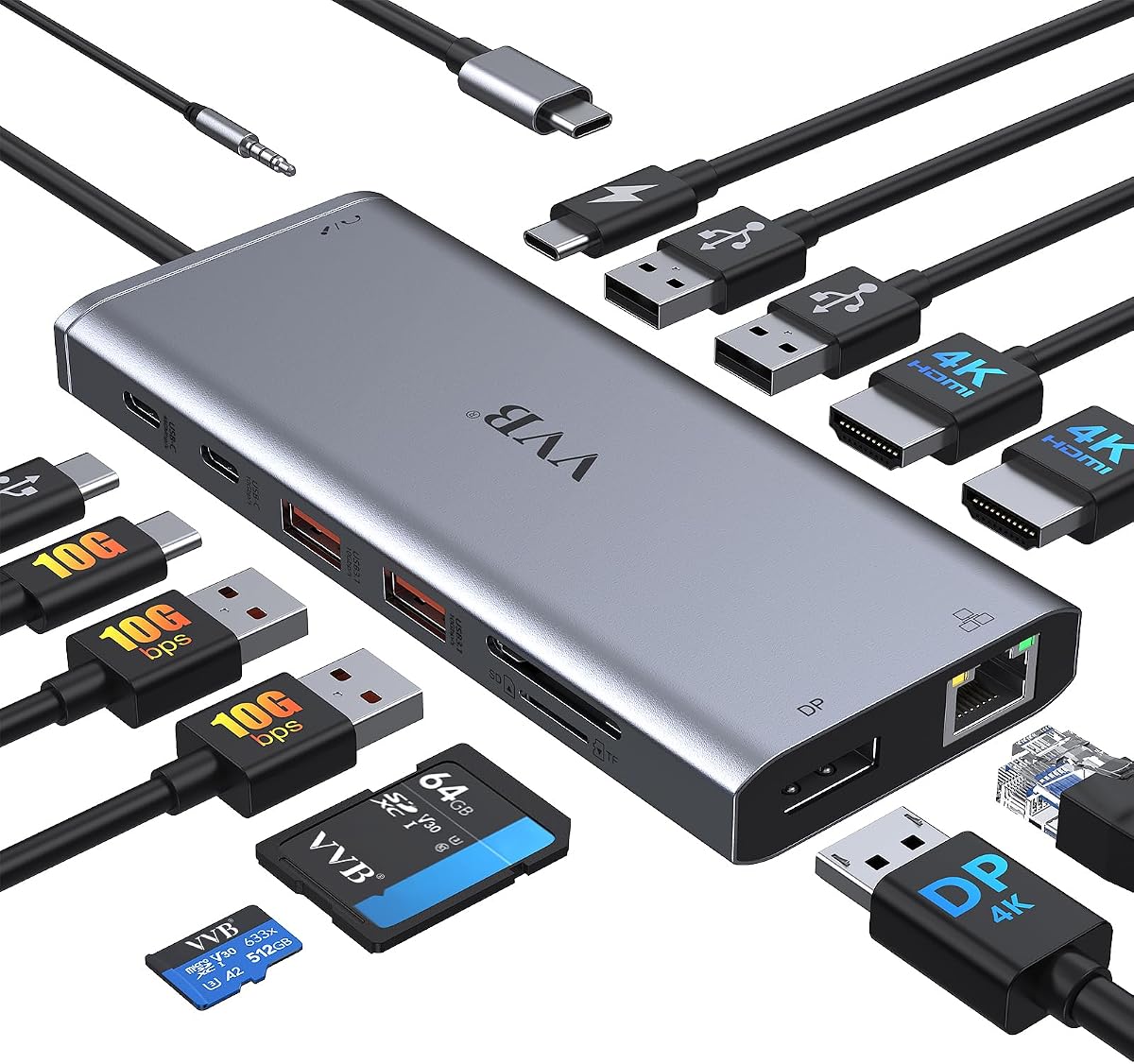
This 14-in-1 USB-C docking station is built for users who want as many connection types as possible in one accessory. Its 4.3 rating reflects a versatile design offering two HDMI ports, DisplayPort, USB-C, multiple USB-A connections, Ethernet, a card reader, audio, and power input.
We may earn a commission when you buy through this link, at no additional cost to you.
Display output is its standout feature. On Windows, the dock supports dual and triple-display arrangements, with specific resolution and refresh-rate limits for each configuration. One HDMI port can reach 4K at 60 Hz, while the supplied information notes that the second HDMI port reaches 4K at 30 Hz.
Power delivery accepts up to 100W at the input and limits safe charging output to 87W. Neither a charging cable nor a power adapter is included, so this dock may require additional accessories. The long and detailed compatibility language also makes checking the exact Yoga model essential before purchase.
It makes the most sense for a desk where many accessories, media cards, wired networking, and several displays are needed at once. If a buyer values flexibility over a compact design and is willing to verify compatibility, this third-party option can be exceptionally capable.
The mixture of high-speed USB-A, lower-speed USB-A, USB-C, card reader, Ethernet, and audio connections allows several device classes to coexist. A dedicated mouse-oriented USB 2.0 port and separate high-speed connections provide more placement options than many basic hubs.
The listed multi-display modes are not uniformly 4K at 60 Hz. Dual-monitor operation can involve 4K at 30 Hz and 1080p at 60 Hz, while triple-monitor operation is listed at 1080p. MacBook users are also warned that external monitor support differs.
We may earn a commission when you buy through this link, at no additional cost to you.
The Anker Nano Docking Station uses a two-piece approach: a 13-in-1 desktop dock and a detachable six-in-1 portable hub. This 4.2-rated model is aimed at people who alternate between a full desk and travel, giving them the option to leave part of the setup at home.
We may earn a commission when you buy through this link, at no additional cost to you.
The desktop dock supports up to three monitors through two HDMI outputs and one DisplayPort. Listed modes include 4K at 60 Hz for a single display, dual 2K at 60 Hz, and triple 1080p at 60 Hz. It also provides 100W laptop charging, Gigabit Ethernet, card slots, audio, and several USB connections.
The detachable hub is the reason this product differs from a conventional desk dock, but it also means users must pack and reconnect two pieces. On macOS, multiple external displays are limited to mirrored mode, so the product is more compelling for Windows-based Yoga configurations.
This is a strong all-around option for hybrid workers who want a serious desktop station without giving up a compact travel accessory. The included 140W adapter and 10 Gbps USB-C cable support a straightforward workstation setup, while the detachable design reduces the need to carry every desk peripheral.
The detachable hub provides a streamlined way to take a few essential connectors on the road. Leaving the larger dock at a desk avoids packing a full multi-display station for every trip.
Up to 100W laptop power delivery and an included 140W power adapter support demanding accessory setups. The dedicated 10 Gbps USB-C data port also provides a fast path for large file transfers and high-bandwidth storage.
We may earn a commission when you buy through this link, at no additional cost to you.
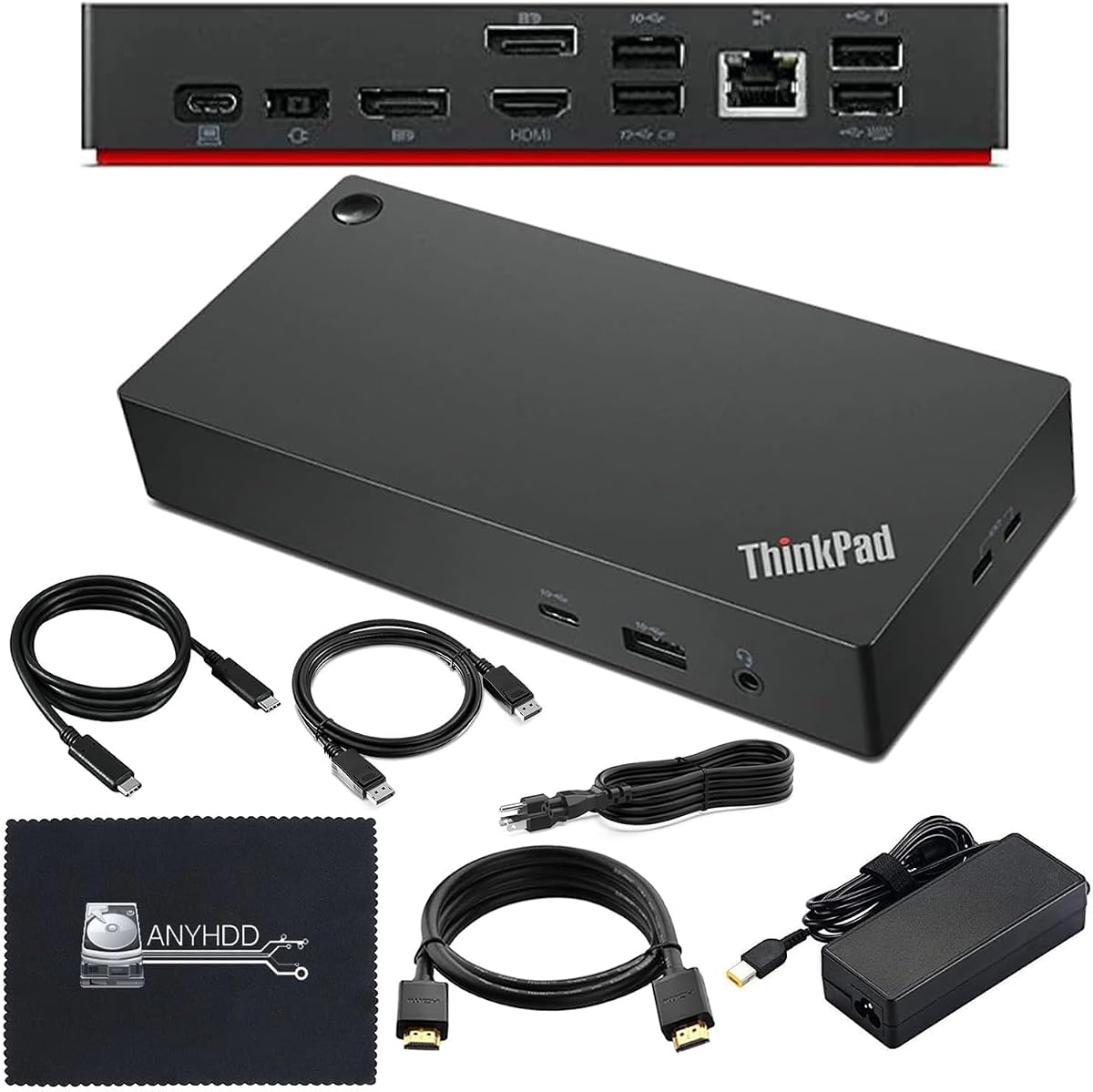
The ThinkPad USB-C Dock Gen 2 offers a balanced fixed-desk option with a 4.3 rating. It combines one HDMI connection, two DisplayPort outputs, Gigabit Ethernet, seven USB ports, and a combo audio jack in a familiar ThinkPad docking-station format.
We may earn a commission when you buy through this link, at no additional cost to you.
Its maximum capability is three external monitors, subject to the host system's actual output. The dock supports DisplayPort 1.4 and HDMI 2.0 for one 4K display at 60 Hz, but the final resolution and refresh rates depend on the connected Lenovo Yoga. This distinction is essential when comparing the dock with docks that specify exact multi-screen modes.
The included 90W power adapter, power cord, and USB-C cable make it a self-contained desktop solution. Seven USB connections support numerous peripherals, and Gigabit Ethernet is useful for offices where stable wired networking is preferred over Wi-Fi.
Choose it for a multi-monitor office setup that favors traditional video outputs and generous USB capacity. It may be less attractive for travel and requires more desk verification than a modern Thunderbolt dock, but it remains a balanced choice for compatible ThinkPad and Yoga systems.
Two DisplayPort and one HDMI output create more display options than a typical travel hub. That makes the dock useful for combining different monitor types or arranging a three-screen workspace.
The included power adapter and host cable cover the main connection needs. Ethernet, audio, and several USB-A ports also make it easier to keep daily desk peripherals connected permanently.
We may earn a commission when you buy through this link, at no additional cost to you.
The 40AF0135US ThinkPad Hybrid USB-C Dock is a renewed workstation model with a 4.1 rating. It retains the broad connectivity associated with larger ThinkPad docks, including two DisplayPort and two HDMI connections, USB-A expansion, and wired Ethernet.
We may earn a commission when you buy through this link, at no additional cost to you.
A 135W power adapter is included, offering a generous power budget for a connected Lenovo Yoga and attached peripherals. The package also includes a USB-C cable, HDMI cable, DisplayPort cable, and microfiber cloth, providing most of the physical connections needed for a multi-monitor desk.
As a renewed product, its condition and history should be considered carefully. The supplied compatibility guidance notes that changes to notebook hardware or software can change functionality. Buyers should therefore review the exact product condition, included accessories, and return information rather than assuming it is equivalent to a new unit.
The dock is a practical option for a value-conscious buyer who wants ThinkPad-style display breadth and has a compatible Lenovo Yoga. Its renewed status makes condition verification more important, but the four video outputs and 135W adapter create a capable permanent-workstation foundation.
Two DisplayPort and two HDMI ports allow flexible monitor arrangements, including dual 4K use. The included HDMI and DisplayPort cables simplify the initial connection to compatible external displays.
A renewed dock can provide substantial workstation features, but users should check cosmetic condition, port integrity, accessories, and warranty coverage. Firmware and host compatibility can also affect how every output behaves.
We may earn a commission when you buy through this link, at no additional cost to you.
The Anker 8-in-1 USB-C Hub combines a 4.5 rating with a useful mix of connectivity in a compact format. It offers two HDMI ports, two USB-A data ports, a USB-C charging input, Gigabit Ethernet, and an SD card reader through one host connection.
We may earn a commission when you buy through this link, at no additional cost to you.
One connected display can stream or mirror at 4K and 60 Hz. Two displays can use both HDMI outputs at up to 4K and 30 Hz, according to the supplied information. That makes it a capable compact choice, although users who require two 4K screens at 60 Hz should select a dock with different stated specifications.
Power Delivery pass-through reaches up to 85W, but a 100W PD wall charger and USB-C-to-C cable are required and are not included in the stated package. Compatibility covers USB-C, USB4, Thunderbolt connections, Windows 10 and 11, ChromeOS, and DP Alt Mode systems, while Linux is explicitly unsupported.
It is a good option for users who want dual displays, wired networking, card access, and moderate charging in one small hub. The high rating and broad everyday connectivity make it appealing, but monitor refresh-rate requirements and the need for a separate charger are the two details to resolve first.
Two HDMI outputs make it easier to connect a pair of displays without relying on DisplayPort adapters. Single-screen 4K at 60 Hz is possible, while dual-screen 4K operation is limited to a lower refresh rate.
Ethernet, USB-A data ports, and an SD reader cover common desk and media tasks. The separate charging-input path supports pass-through power, though users must supply a compatible 100W charger and USB-C-to-C cable.
We may earn a commission when you buy through this link, at no additional cost to you.
The right dock depends on your Yoga model's USB-C capabilities, display needs, power requirements, and the balance between home-office performance and travel convenience. Review the following factors before choosing a product.
A USB-C connector does not automatically guarantee that every dock function will work. For video output, the Lenovo Yoga must support the required DisplayPort Alternate Mode or Thunderbolt functionality, while charging requires USB-C Power Delivery. Older Yoga generations may support data and power but not one or more external video modes. The host laptop also determines whether dual or triple displays are possible, even when the dock has enough physical video outputs.
Check the exact Yoga model and its manufacturer specifications before buying. Match those requirements to the dock's stated display modes and operating-system guidance.
A dock can support 4K resolution without supporting 4K at 60 Hz in every multi-monitor configuration. Single-display output, dual-display output, and triple-display output often have different limits. Some HDMI ports support 4K at 60 Hz, while others reach 4K only at 30 Hz. Mixed dual-monitor setups may combine 4K at 30 Hz with 1080p at 60 Hz, and three-screen modes may be limited to 1080p.
Choose based on the resolution and refresh rate of the monitors you already own, not just the number of ports. This avoids paying for extra outputs that do not improve your actual workspace.
A compact travel dock may support 65W pass-through, while workstation docks may include 90W or 135W adapters. Higher wattage is useful for demanding Yoga configurations, especially when monitors and powered peripherals are connected simultaneously. Input capacity and safe output capacity can differ, as illustrated by the 14-in-1 model's 100W input and 87W safe charging output. Some products also require a separate USB-C charger and cable.
Compare the dock's charging specification with your laptop's requirements. If you are unsure, choose a dock with a higher-output included adapter and confirm the host supports the relevant Power Delivery profile.
A high port count does not guarantee that every connector is useful. Frequent photographers may prioritize SD and TF readers, while office users may need USB-A for existing keyboards and mice. Creative desks often benefit from fast USB-C storage, and fixed installations may require Gigabit Ethernet. The Lenovo 7-in-1 Hub specializes in card readers, whereas the 14-in-1 model covers a broader mixture of display, data, network, and audio connections.
List the peripherals you use every day, then prioritize those categories. Choose a model with sufficient speed for your storage and networking needs rather than one that merely has the largest number of ports.
Travel docks emphasize integrated cables, compact dimensions, and simple single-monitor setups. Workstation docks provide more display outputs, full-size power adapters, and larger port arrays. The Anker Nano goes further by separating a desktop dock from a detachable portable hub. Integrated-cable models reduce packing and desk clutter, while fixed docks are easier to leave permanently populated with peripherals.
Choose the design that matches where you work. A frequent traveler benefits from a slim travel dock, while someone using a fixed desk should prioritize power, monitor flexibility, and permanent peripheral support.
HDMI and DisplayPort serve different monitor ecosystems. HDMI is common on televisions and many mainstream office monitors, while DisplayPort is frequently preferred for high-refresh computer displays and works well with adaptive-sync configurations. Docks with both options can make installation easier, and including the necessary cables is an important convenience. The ThinkPad Thunderbolt 4 dock includes both HDMI and DisplayPort cables for this reason.
Check which inputs your monitors use and whether the dock includes compatible cables. Avoid converters unless necessary, because the 14-in-1 listing specifically notes that its multi-monitor modes do not support converter use.
Gigabit Ethernet can offer a stable connection in offices where Wi-Fi is crowded or unreliable. Audio support matters for calls, music, and conference-room equipment. Card readers are valuable for photographers and filmmakers but unnecessary for many office users. The relevant accessories differ sharply among these docks, so a good port budget should reflect your actual routine rather than a universal checklist.
Prioritize the secondary features that you will genuinely use. A wired network port, card reader, or headset jack can be decisive, while unused features merely make the dock appear more complex.
Some modern docks may need firmware updates for full compatibility with particular host laptops. The 40AY0090US listing specifically advises buyers to update the dock firmware if connection issues occur. Older ThinkPad models may have more limited operating-system guidance. Warranty length, accessory inclusion, and whether a model is renewed also affect the ownership experience.
Review setup documentation, warranty terms, and return coverage before ordering. Keeping firmware current and retaining all included cables will make long-term use smoother.
Begin by confirming that the Lenovo Yoga supports the dock's required video and power-delivery functions. Connect the dock's host cable to the appropriate USB-C or Thunderbolt port, attach the power adapter when the model includes or requires one, and wait for the operating system to recognize the new display and accessories. For models with updateable firmware, check the manufacturer's guidance before troubleshooting a connection.
Arrange monitors according to the dock's stated output limits. Connect the preferred HDMI or DisplayPort cable, select the desired display mode in the operating system, and adjust scaling, resolution, and refresh rate for each screen. Avoid adding an unnecessary converter because it can prevent supported multi-monitor configurations from operating as intended. Once displays are stable, connect storage, keyboards, mice, Ethernet, and audio equipment.
For travel, disconnect accessories before unplugging the host cable and coil any integrated lead loosely rather than wrapping it tightly around the dock. Keep the device dry, away from direct heat, and clear of dust or objects that could block vents. Treat renewed models carefully, inspect ports for wear, and use the included microfiber cloth to wipe the enclosure.
Not every USB-C dock supports every function on every Yoga model. Data connections may work even when external video or charging does not, so the laptop's support for DisplayPort Alternate Mode, Thunderbolt, and USB-C Power Delivery must be checked. The exact Yoga generation and port configuration are essential when selecting a dock.
Many universal USB-C docks can work with non-Lenovo notebooks because their functions rely on standard USB-C, DisplayPort, HDMI, and Power Delivery protocols. Compatibility still depends on whether the host laptop supports the required protocols and whether macOS or another operating system supports the dock's multi-monitor modes. ThinkPad-specific models may list narrower compatibility.
The Lenovo USB-C Dual Display Travel Dock and the ThinkPad Thunderbolt 4 Workstation Dock are strong candidates because both advertise dual 4K support. The available ThinkPad Hybrid USB-C Dock also offers two DisplayPort and two HDMI connections. Resolution and refresh rate can vary by output and operating system, so verify the exact mode before purchasing.
It depends on the model. The ThinkPad docks listed here include their respective power adapters, while the Lenovo 7-in-1 Hub requires a suitable 45W or 65W USB-C adapter, and the 14-in-1 dock does not include a charger. The Anker 8-in-1 requires a 100W PD wall charger and a USB-C-to-C cable, while the Anker Nano includes a 140W adapter.
It can be, provided the connected USB-C port and cable support the advertised transfer rate. The Lenovo Dual Display Travel Dock and Slim Travel Dock include 10 Gbps USB connections, as does the Anker Nano. Actual performance also depends on the SSD, source device, file sizes, and operating-system behavior.
Charging and video output depend on different aspects of the USB-C connection. The laptop may support Power Delivery while its DisplayPort Alternate Mode configuration allows only one external display, or the installed graphics and driver configuration may limit the total output. Checking the Yoga model's official specifications is the most reliable way to determine the limit.
A renewed dock can be reasonable for a value-conscious buyer who accepts possible cosmetic wear and verifies the condition. The 40AF0135US option includes a 135W adapter and four display outputs, but buyers should inspect the unit, confirm included cables, review warranty terms, and ensure it is compatible with the selected Lenovo Yoga.
A dock with Gigabit Ethernet can provide a fast and often more stable wired connection, but it does not increase the available bandwidth of the internet service. The main benefits are reduced wireless congestion, consistent latency, and simple one-cable desk connectivity. The exact benefit depends on the network, router, and office infrastructure.
The Lenovo USB-C Dual Display Travel Dock is the strongest all-around recommendation because it balances dual 4K display support, wired Ethernet, useful USB connections, substantial charging options, and an integrated cable. For a fixed desk, the ThinkPad Thunderbolt 4 Workstation Dock stands out with its strong rating, included video cables, and 90W adapter, while the Lenovo Slim Travel Dock is the most approachable value choice for one-screen mobile setups.
Prioritize the features that affect daily work rather than the largest port count. Display resolution, laptop power, the number of monitors, and required peripheral types should guide the decision. A travel user may value the Anker Nano's detachable design, while a photographer may favor the Lenovo 7-in-1 Hub's card readers and a creative professional may need the broader I/O of the 14-in-1 dock.
Before ordering, confirm USB-C video support, Power Delivery, operating-system behavior, monitor refresh rates, and included accessories. Current prices, ratings, firmware, and listing details can change, so check the latest product information to ensure the selected docking station remains the right fit for your Lenovo Yoga laptop.