
ASUS B760M-AYW WiFi D4 II
4.4Editor score
Compact microATX design
PCIe 5.0 x16 support
Two M.2 storage slots
Wi-Fi 6 networking
Our guide compares the 10 best Motherboards with Pci Express 5.0, covering AM5 and LGA 1700 models, M.2 support, networking, power delivery, and expansion.
PCI Express 5.0 motherboards are built for the newest graphics cards and high-speed solid-state drives, while also providing the power, networking, and connectivity needed for a modern desktop. A good board should suit your processor, case, expansion plans, and cooling setup rather than simply carrying the latest interface specification.
We compared the included boards by examining processor support, PCIe 5.0 expansion and M.2 capabilities, memory type, VRM design, cooling provisions, wired and wireless networking, USB connectivity, form factors, and practical feature sets. The list covers both AMD AM5 and Intel LGA 1700 platforms, with a mix of ATX and microATX options.
Each review explains where a particular motherboard fits best and where its compromises may matter. The top selections highlight the strongest combinations of features, while the remaining recommendations offer alternatives for compact builds, gaming, productivity, or future-focused upgrades. Product ratings and availability can change, and current prices should be checked before purchasing.
4.4Editor score

4.4Editor score

4.4Editor score
This side-by-side comparison highlights the processor platform, form factor, memory support, PCIe 5.0 features, storage capacity, and networking capabilities of all 10 motherboards.




The GIGABYTE B650 AORUS Elite AX is a well-balanced AM5 motherboard for gamers and general-purpose builders who want PCIe 5.0 storage without moving to the newest chipset. It carries a 4.4 rating and supports Ryzen 9000, 8000, and 7000-series processors, giving buyers a broad range of processor choices on the AM5 platform.
We may earn a commission when you buy through this link, at no additional cost to you.
Its twin 14+2+1 power arrangement uses 70A power stages on an eight-layer, two-ounce copper PCB. The VRM includes a six-millimeter heatpipe and fully covered MOSFET heatsinks, while an M.2 Thermal Guard helps protect high-performance storage. Front and rear USB-C connectivity, Wi-Fi 6E, and 2.5GbE make the board suitably equipped for current desktops.
The main compromise is its B650 foundation. Although the included PCIe 5.0 NVMe x4 M.2 support delivers the headline high-speed interface, the board does not offer the newest chipset-level feature set of the B850 and X870E alternatives. Its RGB Fusion integration and broad enthusiast styling may also be unnecessary for a restrained workstation.
It remains a strong recommendation for a Ryzen gaming system that emphasizes storage speed, dependable power delivery, and modern networking. Choose it when you want a mature AM5 foundation, a full-size ATX layout, and PCIe 5.0 support without relying on the most advanced platform features.
The PCIe 5.0 NVMe x4 M.2 interface provides a direct path for compatible high-speed SSDs, while the ATX board offers room for a full-size graphics card and other expansion devices. Additional storage can be added through the board's other supported M.2 and conventional expansion options.
Wi-Fi 6E and 2.5GbE cover both wireless and wired networking, and USB-C 3.2 Gen 2 is useful for modern peripherals and front-panel access. EZ-Latch and Q-Flash further improve the installation and maintenance experience.
We may earn a commission when you buy through this link, at no additional cost to you.
The ASUS TUF Gaming B850-PLUS WiFi is our Editor's Choice because it combines a current AMD chipset, strong power delivery, extensive PCIe 5.0 support, and flexible high-speed connectivity. Its 4.4 rating reflects a broadly capable design, while the AI Ready positioning and support for Ryzen 9000, 8000, and 7000 processors make it well suited to a new AM5 build.
We may earn a commission when you buy through this link, at no additional cost to you.
The board uses a 14+2+1 configuration of 80A DrMOS stages, an eight-layer PCB, dual 8+8-pin ProCool connectors, alloy chokes, and durable capacitors. Storage includes one PCIe 5.0 M.2 slot and two PCIe 4.0 M.2 slots, all supplied with heatsinks. A PCIe 5.0 x16 slot handles the graphics card, and display outputs provide additional flexibility.
Connectivity is a major strength. Wi-Fi 7, Realtek 2.5Gb Ethernet, a rear USB 20Gbps Type-C port, a front USB 10Gbps Type-C connector, and Thunderbolt support through the USB4 header create several paths for fast peripherals. The trade-offs are the board's premium position within the B850 range and a standard four-DIMM layout rather than more unusual memory configurations.
This is the most complete recommendation for a new Ryzen desktop that needs a PCIe 5.0 graphics slot, a PCIe 5.0 SSD, fast wired networking, and current wireless standards. It is particularly attractive to builders who want a feature-rich AM5 foundation without moving directly to an enthusiast-focused flagship.
The primary graphics slot and onboard high-speed M.2 connector both support PCIe 5.0, allowing the system to take advantage of the newest interface generation in both major expansion areas. Two additional M.2 positions make room for a more substantial storage configuration.
Wi-Fi 7 and 2.5Gb Ethernet provide fast local and wireless options, while rear and front Type-C connectors simplify high-speed device placement. BIOS Flashback also makes firmware updating more convenient without requiring a fully operational operating system.
We may earn a commission when you buy through this link, at no additional cost to you.
The GIGABYTE B850 AORUS Elite WIFI7 combines a current AM5 chipset with three M.2 positions and Wi-Fi 7. Its 4.4 rating places it alongside the strongest products in this guide, and compatibility with Ryzen 9000, 8000, and 7000 desktop processors gives it useful processor flexibility.
We may earn a commission when you buy through this link, at no additional cost to you.
A 14+2+2 power design supports the board's enthusiast positioning, while VRM and M.2 Thermal Guard provide the essential cooling elements. PCIe 5.0 support, USB-C, 2.5GbE, EZ-Latch, and a Sensor Panel Link make it convenient for a modern build that may expand beyond a basic gaming configuration.
Compared with the ASUS TUF Gaming B850-PLUS WiFi, GIGABYTE's product lists fewer detailed power-stage and rear I/O specifications, so buyers wanting maximum connectivity may find the ASUS option more expansive. This is still a full-size ATX board, which can be a limitation for anyone planning a very small case. The included five-year warranty is a reassuring ownership detail.
Choose this motherboard when you want B850, three M.2 slots, modern wireless networking, and PCIe 5.0 in a full ATX package. It is a particularly solid option for a Ryzen system balancing contemporary platform features with a broad selection of storage drives.
Three M.2 slots offer more flexibility than many compact and entry-level boards. A fast drive can occupy the PCIe 5.0-equipped position, leaving the remaining connections for additional storage, caching, or specialized workloads.
The B850 platform, Wi-Fi 7 radio, 2.5GbE, USB-C, and EZ-Latch installation system cover the features most likely to matter in a new desktop. Broad Ryzen support helps simplify processor selection as well.
We may earn a commission when you buy through this link, at no additional cost to you.
The ASUS B760M-AYW WiFi D4 II is the Best Budget pick because it delivers the key parts of a PCIe 5.0 build in a compact microATX design. It has a 4.4 rating, supports Intel 12th, 13th, and 14th-generation Core processors as well as Pentium Gold and Celeron options, and includes both Wi-Fi 6 and 2.5Gb Ethernet.
We may earn a commission when you buy through this link, at no additional cost to you.
Its most important feature is the PCIe 5.0 x16 slot, which offers a path for a compatible modern graphics card even though the board otherwise focuses on practical essentials. Two M.2 slots provide solid-state storage options, while VRM and chipset heatsinks, hybrid fan headers, and Fan Xpert 2+ support sensible thermal management.
The principal limitation is DDR4 rather than DDR5. This can help preserve the overall cost of a build, but it may become less attractive if upgrading memory or taking advantage of future memory capabilities matters. The two-M.2 layout is also more limited than several ATX alternatives, and the board's small size restricts expansion-card room.
Buyers who want a smaller Intel gaming or general-purpose system with PCIe 5.0 graphics support should give this board serious consideration. It is especially practical when case size, existing DDR4 memory, or overall build cost matters more than having five M.2 slots or the newest chipset.
The PCIe 5.0 x16 slot makes this board relevant even though it is a B760 design. It can accept a graphics card that uses the newest PCIe generation while remaining suitable for microATX cases that cannot accommodate a full ATX motherboard.
Realtek 2.5Gb Ethernet supports fast wired connections, and built-in Wi-Fi 6 provides a convenient wireless option. Including both can simplify a compact build where adding separate network adapters would be inconvenient.
We may earn a commission when you buy through this link, at no additional cost to you.
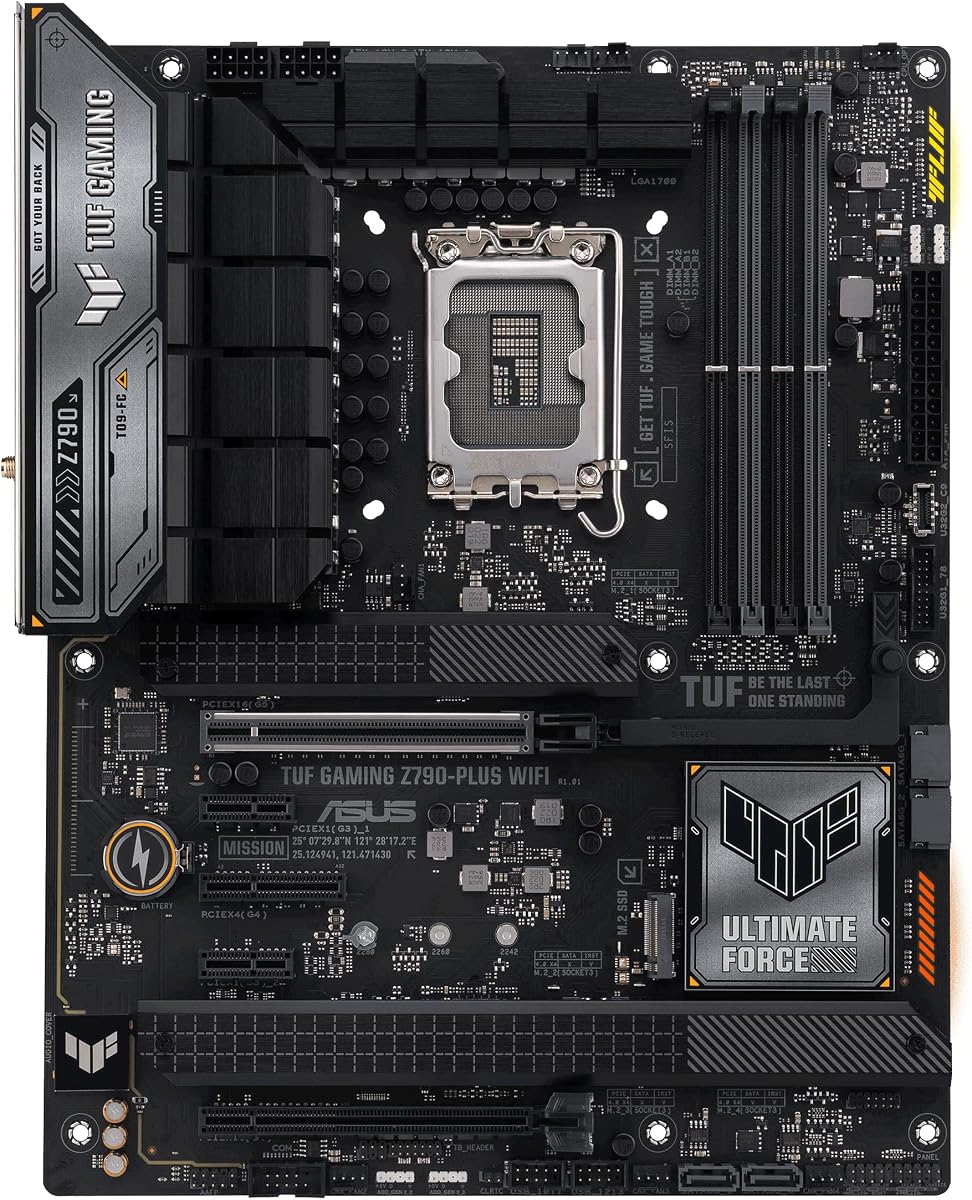
The ASUS TUF Gaming Z790-Plus WiFi is a high-feature Intel LGA 1700 option with a 4.5 rating. It supports 12th, 13th, and 14th-generation Intel Core processors, DDR5 memory, and Windows 11, while four M.2 slots offer unusually strong storage expansion for an ATX board.
We may earn a commission when you buy through this link, at no additional cost to you.
A 16+1 DrMOS arrangement, ProCool sockets, TUF components, and Digi+ VRM form a robust power section. Cooling includes a VRM heatsink, fanless PCH heatsink, M.2 heatsink, hybrid fan headers, and Fan Xpert 4. The board also supports PCIe 5.0, allowing it to meet the main criteria of this guide without being restricted to a basic feature set.
Network connectivity is strong, with Wi-Fi 6 AX201 and an Intel I225-V 2.5Gb LAN controller, backed by TUF LANGuard and TurboLAN. Storage and peripheral options include four M.2 or NVMe SSD positions, a front USB Type-C header, USB Gen 2×2 Type-C, and Thunderbolt 4 support through a header. Its main platform limitation is that LGA 1700 does not provide a newer CPU upgrade path beyond the supported generations.
This motherboard is a good match for an enthusiast Intel system that already uses or plans to use DDR5 and needs extensive storage. It is less attractive for buyers seeking an open-ended processor roadmap, but it remains a capable, well-cooled, and richly connected board for a high-performance desktop.
Four M.2 slots distinguish this board from most compact alternatives and make it appropriate for multi-drive systems. PCIe 5.0 support, dedicated M.2 cooling, and extensive power delivery help create a stable foundation for fast solid-state storage.
The combination of Wi-Fi 6, Intel 2.5Gb Ethernet, TUF LANGuard, and TurboLAN is aimed at online gaming and fast local transfers. It also includes useful controls for monitoring and tuning the network through ASUS software.
We may earn a commission when you buy through this link, at no additional cost to you.
The GIGABYTE B850M AORUS Elite WIFI6E ICE earns the highest listed rating in this roundup at 4.6. It brings that consistency to a compact AMD B850 board supporting Ryzen 9000, 8000, and 7000 processors, with DDR5 memory, PCIe 5.0, USB-C, and both Wi-Fi 6E and 2.5GbE networking.
We may earn a commission when you buy through this link, at no additional cost to you.
The 12+2+2 power design, four DIMM slots, VRM and M.2 Thermal Guard, and EZ-Latch system cover the essentials for a small but powerful desktop. Its two-M.2 configuration is adequate for a focused gaming or productivity system, although it does not match the three- and four-drive flexibility of several ATX alternatives.
The main trade-off is power capacity relative to more heavily equipped boards in the guide. The 12+2+2 design may be less ideal for sustained maximum-power configurations, and limited DIMM and storage options can make future expansion less convenient. The microATX format itself is an advantage when compactness is the priority, but it inevitably reduces expansion slots.
This is a strong recommendation for a compact AMD build that wants a current chipset and PCIe 5.0 without accepting a full-size board. It is particularly compelling for a smaller gaming system or a tidy workstation that values its 4.6 rating, clean platform features, and flexible networking.
The microATX format can make a Ryzen system easier to fit and transport while still preserving PCIe 5.0 and current B850 features. It is a sensible middle ground for builders who want a smaller footprint but do not need the extreme compactness of a mini-ITX board.
Wi-Fi 6E, 2.5GbE, USB-C, and EZ-Latch provide a useful mix of networking and installation conveniences. A five-year warranty adds further confidence for buyers planning to keep the board for several system upgrades.
We may earn a commission when you buy through this link, at no additional cost to you.
The ASUS TUF Gaming B760-Plus WiFi offers a balanced mix of ATX expansion, DDR5 support, and modern connections. It has a 4.5 rating and works with 12th, 13th, and 14th-generation Intel Core processors, as well as Pentium Gold and Celeron processors, giving buyers a useful range of compatible CPUs.
We may earn a commission when you buy through this link, at no additional cost to you.
Its 12+1+1 DrMOS design, six-layer PCB, 8+4 ProCool socket, alloy chokes, and durable capacitors form a solid power foundation. The board includes a PCIe 5.0 graphics slot, three M.2 positions using PCIe 4.0, enlarged VRM heatsinks, M.2 and PCH heatsinks, hybrid fan headers, and Fan Xpert 4.
The peripheral and network features are particularly versatile. Rear USB 3.2 Gen 2×2 Type-C, a front Type-C header, Thunderbolt and USB4 support, Intel Wi-Fi 6, and Realtek 2.5Gb Ethernet cover several modern connection standards. Two-way AI Noise Cancelation is also included for clearer game and video-call audio. Its B760 chipset and moderate power design trail newer or more heavily equipped models.
Choose this board for a DDR5-based Intel system that needs three storage positions, a PCIe 5.0 graphics slot, and front and rear Type-C connectivity. It is well suited to a gaming desktop that wants TUF styling and strong networking without moving to the cost or complexity of a flagship.
Three M.2 slots make it easier to combine an operating system drive, a games library, and a separate high-speed working drive. Although these connectors are listed as PCIe 4.0, they still provide a strong foundation for a modern gaming system.
The rear Gen 2×2 Type-C port, front-panel Type-C header, and Thunderbolt or USB4 header support make the board adaptable to docks, displays, and fast storage enclosures. Intel Wi-Fi 6 and 2.5Gb Ethernet round out the connectivity.
We may earn a commission when you buy through this link, at no additional cost to you.
The ASUS TUF Gaming B650-Plus WiFi is a proven AM5 platform with a 4.5 rating and support for the broad Ryzen 9000, 8000, and 7000 families. DDR5 memory, PCIe 5.0 M.2 support, Wi-Fi 6, 2.5Gb Ethernet, USB4 support, and Aura Sync give it a well-rounded feature set.
We may earn a commission when you buy through this link, at no additional cost to you.
Power comes from 12+2 teamed power stages, 8+4 ProCool sockets, alloy chokes, and durable capacitors. Enlarged VRM and PCH heatsinks, M.2 heatsinks, hybrid fan headers, and Fan Xpert 2+ provide the necessary thermal controls. TUF LANGuard and two-way AI Noise Cancelation are useful additions for gaming and communication.
This board's strength is a mature combination of features rather than the newest chipset. Compared with B850 or X870E alternatives, it does not present the same platform-level feature set, and buyers who value a PCIe 5.0 graphics slot may need to verify the exact slot configuration. Aura Sync lighting may also be more elaborate than necessary for a work-focused system.
It remains an excellent recommendation for a Ryzen AM5 build that needs a PCIe 5.0 SSD, reliable networking, and comprehensive cooling. The combination of strong customer feedback, broad processor support, and a mature design makes it a practical choice for a gaming system expected to run for several years.
The PCIe 5.0 M.2 connection supports the latest generation of high-speed NVMe storage. Heatsinks and the board's broader thermal design help maintain stable drive operation when a high-end SSD is installed.
Wi-Fi 6, Realtek 2.5Gb Ethernet, and TUF LANGuard cover fast network access, while two-way AI Noise Cancelation targets clearer voice communication. Front and rear Type-C options support modern peripherals.
We may earn a commission when you buy through this link, at no additional cost to you.
The ASUS ROG Crosshair X870E Hero is the Best Premium option for builders who want a comprehensive flagship AM5 foundation. It carries a 4.4 rating, supports Ryzen 9000, 8000, and 7000 processors, and combines the X870E chipset, five M.2 positions, PCIe 5.0, DDR5, Wi-Fi 7, and USB4 support.
We may earn a commission when you buy through this link, at no additional cost to you.
Its most distinctive hardware is the 18+2+2 power design with 110A stages, ProCool II connectors, MicroFine alloy chokes, and premium metallic capacitors. ASUS also provides AI Overclocking, AI Cooling II, AI Networking, AEMP, Dynamic OC Switcher, Core Flex, asynchronous clocking, and PBO Enhancement. The PCIe Slot Q-Release Slim mechanism simplifies access to expansion hardware.
These capabilities create a premium trade-off. A board with this much power delivery, storage support, and tuning functionality requires careful case sizing, cooling, and component planning. It may also be more than a basic gaming PC needs, and simpler models can provide the main PCIe 5.0 benefits with less complexity. Premium also does not automatically make every application faster.
Choose the Crosshair X870E Hero for an enthusiast Ryzen system with extensive storage, high-end power demands, and an interest in tuning. It is ideal for advanced builders, high-core-count processors, compact multi-drive workstations, and premium gaming systems where the full ROG feature set has a clear purpose.
Five M.2 slots offer exceptional storage flexibility for a desktop that may use separate drives for operating systems, games, creative work, and high-speed caches. This is one of the clearest reasons to choose a premium board when several PCIe 5.0 and high-speed PCIe 4.0 drives are planned.
Dynamic OC Switcher, Core Flex, asynchronous clocking, and PBO Enhancement give experienced users several approaches to processor tuning. AI Overclocking, AI Cooling II, AI Networking, and AEMP are designed to make advanced features more approachable.
We may earn a commission when you buy through this link, at no additional cost to you.
The ASUS ROG Strix B650-A Gaming WiFi is a 4.5-rated AM5 board that combines three M.2 positions with a strong power section and extensive processor compatibility. It supports Ryzen 9000, 8000, and 7000 desktop processors, although the supplied information notes that a BIOS update may be required for the newer 9000 and 8000 families.
We may earn a commission when you buy through this link, at no additional cost to you.
Its 12+2 power stages, 8+4-pin ProCool connectors, alloy chokes, and durable capacitors are designed for stable multicore support. Massive VRM heatsinks with airflow channels and high-conductivity thermal pads improve cooling. Storage consists of one PCIe 5.0 M.2 slot and two PCIe 4.0 slots, each covered by a heatsink.
The main limitation is that the primary graphics slot is listed as PCIe 4.0, so the board's PCIe 5.0 advantage is concentrated in storage rather than expansion. The possible BIOS requirement should also be considered, particularly when assembling the system from components. On the positive side, 2.5Gb LAN, Wi-Fi 6E, USB 3.2 Gen 2×2 Type-C, and Aura Sync provide a modern feature set.
This motherboard makes sense for an AM5 gaming build that prioritizes multiple NVMe drives, strong VRM cooling, and ROG styling over PCIe 5.0 graphics support. It is a well-regarded alternative for builders whose fastest planned device is an SSD rather than a top-tier graphics card.
One PCIe 5.0 M.2 position supports a leading-edge solid-state drive, while two PCIe 4.0 M.2 positions make it practical to install several NVMe drives. Heatsinks on all three help manage thermals under sustained storage workloads.
Massive VRM heatsinks use strategically shaped airflow channels and high-conductivity pads to move heat away from the power stages. This is a useful feature in a gaming system where the processor and graphics card can create a substantial combined heat load.
We may earn a commission when you buy through this link, at no additional cost to you.
The right PCIe 5.0 motherboard depends on processor compatibility, case size, memory, expansion plans, and how the system will be used. These factors help narrow the field before comparing individual boards.
Begin with the CPU you own or intend to buy. The AMD options in this guide use AM5 and support multiple Ryzen 7000, 8000, and 9000 families, while the Intel models use LGA 1700 for supported 12th, 13th, and 14th-generation Core processors. The chipset affects secondary features such as networking, USB, storage, and firmware support, but it must still be physically and electrically compatible with the chosen processor.
PCIe 5.0 can appear on the main graphics slot, an M.2 connector, or both. A PCIe 5.0 x16 slot is useful for a compatible graphics card and may provide headroom for future hardware, while a PCIe 5.0 M.2 slot lets a high-speed NVMe drive use the full interface. Boards such as the ROG Crosshair X870E Hero support both, whereas the ROG Strix B650-A concentrates PCIe 5.0 on storage.
ATX boards provide more expansion slots, memory clearance, and storage options, while microATX boards can suit smaller cases and visually compact builds. The ASUS B760M-AYW WiFi D4 II and GIGABYTE B850M AORUS Elite WIFI6E ICE are microATX alternatives to the full-size models. Check the case's motherboard support, GPU length, cooler height, drive positions, and I/O clearance before finalizing a selection.
DDR5 and DDR4 are not interchangeable, and a board supports only the generation printed in its specifications. DDR5 is standard across most of the newer models here, while the ASUS B760M-AYW WiFi D4 II uses DDR4. Most selections provide four DIMM slots. Consider future memory capacity, the speed profile you need, and whether your existing modules can be reused before choosing.
M.2 slot count determines how many compact NVMe drives can be installed without relying on SATA drives. The guide ranges from two slots on the ASUS B760M-AYW WiFi D4 II and GIGABYTE B850M AORUS Elite WIFI6E ICE to five on the ASUS ROG Crosshair X870E Hero. Heatsinks are valuable for sustained drive performance, and ATX boards usually provide more conventional expansion slots and rear ports.
A robust VRM provides stable power to the CPU, particularly with high-core-count chips, fast memory, and demanding workloads. The strongest options specify higher-amperage stages, an eight-layer PCB, and substantial VRM heatsinks. More modest designs may still suit mainstream processors, but their specifications deserve close comparison. Chipset and M.2 cooling are also important because storage and networking components generate heat in a closed case.
Fast networking is increasingly important for downloads, large game files, remote work, and local transfers. The guide includes boards with 2.5Gb Ethernet and Wi-Fi 6, 6E, or 7. USB-C connectivity varies by placement and speed, so check whether a front-panel header or rear port is required. Thunderbolt or USB4 support, BIOS Flashback, and front Type-C headers can further simplify a finished system.
RGB lighting, onboard switches, audio features, AI utilities, overclocking controls, and software ecosystems are not equally relevant to every system. The ASUS ROG Crosshair X870E Hero offers the deepest tuning and storage feature set, while simpler boards may satisfy users who only need fast networking, a PCIe 5.0 slot, and clean everyday operation. Prioritize foundational hardware before decorative or specialized features.
Install the processor, memory, M.2 storage, and graphics card according to the motherboard manual. A PCIe 5.0 M.2 drive may need a specific heatsink or a particular slot for full speed, so identify the correct connector before installation. Keep protective covers on unused ports, install the I/O shield before the board goes into the case, and route cables so they do not obstruct the GPU or cooling hardware.
Update the BIOS before relying on features that require newer firmware, especially when pairing an AM5 board with Ryzen 9000 or 8000-series processors. The ROG Strix B650-A listing specifically notes that a BIOS update may be required. Use the board's supported update method, maintain stable power throughout the process, and follow the prompts rather than interrupting a firmware flash.
After assembly, update the chipset, networking, and graphics software, then confirm that memory, storage, temperatures, and network speeds are working as expected. Keep airflow unobstructed, clean dust from heatsinks and fans periodically, and check that the operating system and motherboard drivers remain current. For long-term storage reliability, enable the appropriate S.M.A.R.T. monitoring and maintain adequate free capacity.
A PCIe 5.0 graphics card can operate on a motherboard with an older PCIe slot because the devices are designed to negotiate a compatible link speed. A PCIe 5.0 board does not automatically make the card run faster in every application. The benefit is primarily future-proofing and making use of any workloads that genuinely benefit from the newer interface.
Yes, PCIe 5.0 M.2 slots generally support PCIe 4.0 and older compatible NVMe drives. The older SSD will operate at its supported link speed rather than gaining a meaningful speed increase from the newer connector. Check the manual and product specifications for any lane-sharing or installation restrictions.
The decision should begin with your processor, because the two platforms use different sockets and memory platforms. AM5 models here support several Ryzen generations, while LGA 1700 boards support specified Intel Core generations. Compare CPU performance, upgrade path, memory, graphics, and the features each chipset provides rather than choosing from the socket label alone.
ATX boards are larger and usually provide more expansion slots, rear ports, storage connections, and physical spacing. MicroATX boards are smaller and can make compact builds easier while still supporting PCIe 5.0 and modern networking. The ASUS B760M-AYW WiFi D4 II is a notable compact option, but it has fewer storage and expansion choices than most ATX models here.
They do not require a special power-supply standard solely because of PCIe 5.0, but processor choice and board design determine the connectors and wattage needed. High-end boards may use multiple 8-pin power connectors, while some require a 12VHPWR or 12V-2×6 cable for the graphics card. Follow the manual's power guidance and use the correct modular cables.
The best choice depends on the connection and local environment. A 2.5Gb Ethernet connection can offer consistent low-latency performance when the router and network infrastructure support it, while Wi-Fi 7 is convenient when cabling is impractical. Some of the boards include both, allowing the builder to use the most appropriate network option.
Two slots are often enough for a Windows drive and one large game or working drive, while three or more provide more room for a growing library, separate applications, and high-speed scratch storage. The ASUS ROG Crosshair X870E Hero offers five positions for demanding multi-drive configurations. Actual value depends on whether you use NVMe SSDs exclusively or also rely on SATA storage.
A BIOS update may be needed before certain processors will work, and compatible memory can also benefit from current firmware. The exact procedure varies by board, so consult its manual. If the motherboard is already assembled and operational, use the listed built-in update method, keep power connected, and do not interrupt the process.
The ASUS TUF Gaming B850-PLUS WiFi is the most balanced overall recommendation because it combines a current AM5 chipset, PCIe 5.0 graphics and storage, three M.2 slots, robust power delivery, Wi-Fi 7, and 2.5Gb Ethernet. The ASUS B760M-AYW WiFi D4 II serves compact and cost-conscious Intel builders, while the ASUS ROG Crosshair X870E Hero is the clear flagship choice for extensive storage and advanced tuning.
For most buyers, prioritize CPU compatibility, adequate VRM cooling, the right memory type, and the PCIe 5.0 connection you actually need. Form factor should follow the case, M.2 count should follow the number of SSDs, and networking should reflect how the computer will be used. A simpler board can be the smarter choice when a high-end interface is not essential.
Ratings, component configurations, and product availability can change, so review the current listing and motherboard manual before buying. Current prices also vary between retailers and over time. Comparing the final board with the processor, graphics card, case, memory, and planned storage configuration is the most reliable way to make a well-informed purchase.