
JOTO 4 Pack Cable Management Sleeve
4.6Editor score
Four 19-20-inch sleeves
Eight to ten cable capacity
Flexible zippered neoprene
Cable sleeves turn a tangled desktop-PC setup into a cleaner, safer workspace by grouping power cords, USB leads, display cables, and speaker wires into one manageable run. A good sleeve balances usable length, adequate diameter, easy access, and a closure that remains secure without making cable changes frustrating.
We compared the 10 options using their stated dimensions, capacity, closure methods, materials, installation needs, and suitability for desktop-computer areas. The list covers zippered neoprene sleeves, split woven tubing, self-closing protective loom, and a comprehensive management kit for buyers with different routing needs.
Each product review explains its strongest benefits, limitations, and ideal use so you can choose by setup rather than by product name alone. Ratings and specifications reflect the supplied product information, while prices and availability can change, so compare the current listing details before purchasing.
4.6Editor score

4.7Editor score

4.2Editor score
As an Amazon Associate we earn from qualifying purchases.
This side-by-side comparison shows how the sleeves differ in length, diameter, closure design, capacity, and included accessories, helping you match each option to a specific desktop-PC cable-routing job.
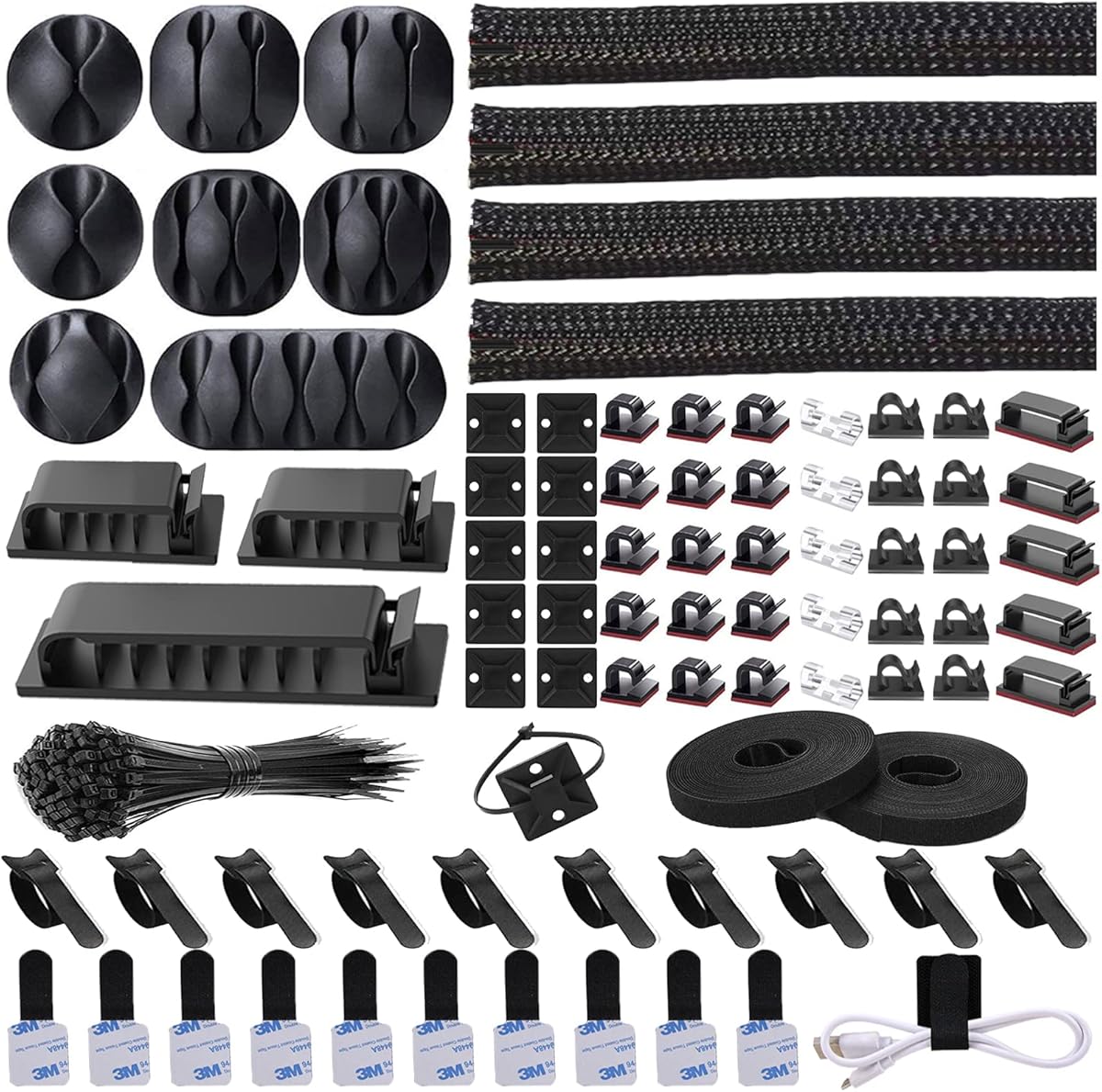


The N NOROCME 192-piece cable management kit is a 4.6-rated solution for desktop-PC builders who want more than a single sleeve. It combines four 20-inch split sleeves with reusable ties, adhesive clips, cord holders, self-adhesive rolls, mounting pieces, and fastening ties, giving a PC owner several ways to control cables around a desk.
We may earn a commission when you buy through this link, at no additional cost to you.
Its strongest quality is versatility. The four sleeves can consolidate the main cable bundle under or behind a desk, while the 35 cable clips and 11 cord holders can route individual USB, display, audio, and power leads along a desktop or wall. The adhesive components are described as working on clean surfaces such as desks, walls, baseboards, cabinets, wood, and ceramics.
The trade-off is obvious quantity. A buyer with only two loose cables may find the assortment excessive, and the four sleeves measure 20 inches each, making them better for segmented routes than for one long run spanning an entire entertainment center. Some clips may also be less suitable for dusty or uneven surfaces, where adhesive performance can vary.
This is the most complete option for a new PC setup, office desk, gaming station, or shared workspace. Choose it when you want a coordinated collection of sleeves and fasteners rather than a single narrow tube, especially when you expect to add or reroute several kinds of desktop cables.
The included sleeves, ties, clips, holders, rolls, mounts, and fastening ties cover nearly every common desktop cable-management task. It is a practical one-kit solution for turning several loose leads into a coherent, repeatable routing system.
The sleeve opens for cable loading and closes around the bundle without requiring tape, nails, or drilling. Its reusable construction also makes it easier to move a sleeve when equipment or cable positions change.
We may earn a commission when you buy through this link, at no additional cost to you.
The JOTO four-pack is a 4.6-rated, uncomplicated way to organize the main cable run behind a desktop-PC setup. Each flexible neoprene sleeve measures 19-20 inches long and expands to approximately 1.2 inches in diameter when closed, making the set practical for grouping several monitor, power, charging, and peripheral leads.
We may earn a commission when you buy through this link, at no additional cost to you.
Capacity is the central benefit. Each sleeve is stated to hold up to eight to ten cables, and two sleeves can be connected to create a longer run when a desk has a wide cable path. The zipper closure keeps the bundle together while allowing a user to reopen the sleeve whenever a cable must be added, replaced, or disconnected.
The fixed length is the main limitation. Unlike cut-to-fit woven or split tubing, these sleeves cannot be trimmed to match an unusual desk configuration without changing the product. The black exterior also blends well with dark components and cable bundles, although it may make accumulated dust more apparent than a lighter alternative.
This set is a strong fit for buyers who want a simple four-piece solution without assembling a large toolkit. It is particularly effective for the space behind a monitor, under a compact desk, or along a standard entertainment center where several similarly routed cables need one tidy cover.
The stated capacity of eight to ten cables per sleeve is well suited to desktop systems that include display leads, speakers, USB devices, and power connections. That makes a single sleeve more useful than a thin protector intended for only one or two cords.
Gather the cords, wrap the sleeve around them, and close the zipper. Because the product can be reopened, it offers better service access than permanently fastened spiral wrap when a PC component is replaced.
We may earn a commission when you buy through this link, at no additional cost to you.
The Wrap-It Storage four-pack is a 4.6-rated option centered on convenient zipper access. Its four 24-inch black sleeves measure 4 inches across, providing a roomy cover for desktop power cords, HDMI cables, charger leads, and speaker wire. The design is aimed at turning a loose cluster behind a desk or computer into one clean visual run.
We may earn a commission when you buy through this link, at no additional cost to you.
Installation is particularly approachable. The sleeve wraps around an existing bundle and pulls closed, with no cutting, tools, or unplugging specified as requirements. That matters in a working PC setup because it reduces the need to shut down equipment simply to tidy the cable path, and the zipper can reopen for later changes.
The main trade-off is bulk. A four-inch-wide sleeve is generous for a handful of thin USB leads and may feel oversized compared with compact one-inch tubing. Because each sleeve has a fixed 24-inch length, the four-piece format also works best when a desk can be divided into several manageable routes rather than one long, uninterrupted span.
Choose this set for a gaming desk, multi-monitor workstation, or media console that needs broad, concealable coverage with frequent access. It is especially attractive when visual tidiness matters more than minimizing the physical bulk of the cable-management solution.
The 4-inch width distinguishes this option from narrower sleeves and split tubing. It can conceal a more substantial collection of cords, creating a smoother line behind a tower, desk, television, or media cabinet.
The zipper keeps the cover closed while making the bundle accessible for adjustments. That balance is useful for active workstations where components are frequently connected, disconnected, or replaced.
We may earn a commission when you buy through this link, at no additional cost to you.
The CableGeeker sleeve is a 4.5-rated long-run solution for desktop-PC installations that need more routing distance than a standard four-foot sleeve provides. At 10 feet long and 1.5 inches in diameter, it can cover a substantial bundle of power, networking, display, and peripheral cables behind a desk or entertainment center.
We may earn a commission when you buy through this link, at no additional cost to you.
Customization distinguishes it from simpler zippered products. The sleeve can be cut with scissors to fit a precise route, and the user can create custom holes wherever a cable needs to exit. Its reversible black-and-white design allows the darker face to conceal dirt in high-traffic areas or the white face to create a brighter appearance.
The hook-and-loop backing provides a secure closure, but the customization process requires planning. Cutting the sleeve too short removes flexibility, while poorly positioned holes can weaken the cover or interfere with a cable’s bend. Buyers should also measure the route before trimming and avoid making unnecessary cuts.
This is an excellent match for a large desk, long wall-mounted PC area, or shared workstation where a single continuous sleeve is preferable to several fixed segments. It is the strongest recommendation here for buyers who prioritize maximum length and exact routing over a zipper-based closure.
A 10-foot length can follow a desk edge, wall, or media-console route without frequent joints. Cutting the product to the measured path also helps it sit more closely against a corner than a series of short sleeves.
The black and white faces serve different practical priorities. Choose the darker side near busy areas where dirt is more likely to show, or the white side when a brighter, cleaner visual treatment is preferred.
We may earn a commission when you buy through this link, at no additional cost to you.
The AGPTEK two-pack is a 4.6-rated self-closing sleeve for desktop-PC cable runs and other wiring locations that may be exposed to heat. Each sleeve is five feet long with a 1.2-inch diameter, offering enough space for a grouped collection of computer, power, and peripheral leads.
We may earn a commission when you buy through this link, at no additional cost to you.
The split, self-closing construction is the key convenience. A user opens the sleeve, places wires inside, and allows the material to wrap around them. This avoids a separate strap during initial installation, while the product can still be cut with scissors when a shorter segment is needed. The instructions recommend treating the cut edge with flame after trimming to prevent fraying.
Thermal performance adds a differentiator. The stated temperature range is minus 50°C to plus 150°C, with a UL94 V-2 flame-protection class and a flame-retardant construction. It is also described as non-toxic and useful for protecting cables from pets, making it relevant to a home office where animals might investigate loose wires.
This product is a good choice for buyers who want quick bundling and stronger heat-related specifications than a basic fabric sleeve. It is less convenient for frequent cable access than a zippered option, but it offers a neat white appearance and a straightforward way to cover long desktop wiring.
The split design wraps around the cables after they are loaded, reducing the need for a separate fastener during routine setup. It is especially convenient for permanently routed desktop cable groups.
The flame-retardant material and broad temperature tolerance make the sleeve suitable for more demanding wiring environments. Its protective layer can also reduce exposure to dust, abrasion, and curious pets.
We may earn a commission when you buy through this link, at no additional cost to you.
The StangH two-piece set is a 4.6-rated office-focused solution with 39-inch sleeves measuring 3.5 inches wide. Designed for TV, PC, theater, and general home-entertainment wiring, it offers a neat fabric-covered route for desktop cables that would otherwise remain exposed behind a desk.
We may earn a commission when you buy through this link, at no additional cost to you.
The zipper makes installation and removal straightforward, while the stated reusable, cleanable design supports long-term use. Each section can be used independently, and the two pieces can be joined to create a longer continuous cover. The blackout fabric is described as helping block light and heat, with durability intended to limit wear and pet-related damage.
The white finish and fabric construction may collect visible dust in a busy room, requiring occasional care. Its 3.5-inch width is also more substantial than necessary for only a few thin leads, so the best results come from grouping a meaningful bundle of power, network, display, and peripheral cables.
Choose StangH for an office, reception desk, home office, or entertainment center that benefits from a light-colored, fabric-finished cover. Its long sections and reusable zipper make it a practical middle ground between compact braided tubing and extra-wide zippered sleeves.
Two 39-inch sections offer more route length than most conventional four-packs, and combining them supports even longer runs. The zipper also allows the cover to be removed when cables need adjustment.
The white fabric and blackout construction provide a less industrial look than black plastic loom. At the same time, the covered profile helps reduce exposed wire, trip hazards, and direct contact with children or pets.
We may earn a commission when you buy through this link, at no additional cost to you.
The Alex Tech cord protector is a 4.7-rated ten-foot split sleeve designed to organize and insulate individual or small groups of wires. Its half-inch diameter suits USB leads, power cords, audio cables, video cables, speaker wiring, and other desktop connections that do not require the bulk of a large zippered sleeve.
We may earn a commission when you buy through this link, at no additional cost to you.
Installation is based on a split, self-wrapping structure. The sleeve opens enough to admit a cable, then closes around the wire for a snug wrap. Its 10-foot length provides ample material for a desktop, monitor arm, entertainment center, or automotive-style cable path, and the stated insulation adds protection beyond appearance.
The narrow diameter is the main constraint for conventional PC cable consolidation. It is less suitable for a large bundle of monitor, Ethernet, speaker, and power leads, and threading several cables into a small opening can take more time than wrapping a wide zippered sleeve. The product is best for longer individual runs rather than one thick desktop trunk.
This is the top choice for buyers who want a long, flexible, protective sleeve that can follow tight bends and separate vulnerable cords. Use it around exposed USB or power wiring, particularly where pets may chew, and reserve larger sleeves for the main desktop bundle.
Because the sleeve is split and self-wrapping, it can follow curved or confined paths around a desk frame or monitor support. That flexibility makes it useful where a rigid zippered cover would be awkward.
The insulating construction helps shield cords from wear and direct contact. For households with cats, dogs, rabbits, hamsters, or other curious animals, the extra barrier can reduce opportunities for chewing and scratching.
We may earn a commission when you buy through this link, at no additional cost to you.
The 1 Inch 8ft cable loom earns a 4.8 rating and stands out for a combination of protective material, useful diameter, and straightforward split construction. At eight feet long and one inch in diameter, it is well suited to grouping desktop USB, audio, video, speaker, and power leads without requiring a very wide sleeve.
We may earn a commission when you buy through this link, at no additional cost to you.
The sleeve is made from flexible, flame-retardant PET and is specified for a minus 58 to 302°F operating range, with a 464°F melting temperature and UL94 V-2 flame-protection class. It is also described as odorless, non-toxic, and non-fading, which supports use around people, pets, household equipment, and computer wiring.
Access is less convenient than with a zippered cover. The split sleeve must be opened to place or remove cables, and the material is intended to self-wrap once loaded. Cutting with scissors is possible, but the product offers no built-in way to reopen it around a specific cable without spreading the sleeve.
Choose this option for a home office, gaming setup, vehicle, appliance area, or AV system where heat resistance, a wider protective barrier, and an inconspicuous woven appearance are priorities. It is a particularly strong choice for protecting cables that must pass through a shared or active environment.
At one inch, the sleeve is wider and more protective than half-inch loom while remaining less bulky than the broadest fabric sleeves. That middle ground works well for several slim desktop leads.
The specified temperature tolerance and flame-protection class set this sleeve apart from ordinary fabric organizers. These characteristics are useful where cable protection matters as much as visual neatness.
We may earn a commission when you buy through this link, at no additional cost to you.
The StarTech 39.4-inch neoprene sleeve is a 4.2-rated professional-style organizer built for office, home-office, and desktop-workstation cable concealment. Its soft neoprene construction, 1.2-inch diameter, and zipper closure combine a polished appearance with a practical way to cover and access desktop wiring.
We may earn a commission when you buy through this link, at no additional cost to you.
Its most useful feature is the set of 11 evenly spaced cable and wire exit holes. Rather than cutting custom openings, the user can route individual leads through predefined positions along the sleeve. Built-in connector buckles at the ends also allow multiple sleeves to be daisy-chained for longer runs, making the product adaptable to different desk dimensions.
Durability and serviceability are further strengths. The 0.12-inch-thick neoprene is described as rugged, flexible, and resistant to wear, foot traffic, and pet damage. Installation requires only wrapping the sleeve around existing cords and fastening the zipper, without unplugging connections. The fixed length and 4.2 rating are the main drawbacks, as the product has the lowest rating in this comparison despite its extensive feature set.
This sleeve is best for users who value structured routing, visible exit points, and an expandable professional setup. Choose it for an office desk with numerous monitor and peripheral leads, especially when a future hardware change may make additional sleeve sections or dedicated access points important.
The 11 evenly spaced holes let individual cords leave the covered bundle at controlled locations. This is more predictable than making ad hoc cuts and helps prevent branches from being pinched.
Connector buckles at both ends make it possible to connect another sleeve when a longer route is needed. The included warranty also adds reassurance for a product intended for regular workstation use.
We may earn a commission when you buy through this link, at no additional cost to you.
The 25-foot split cable sleeve is a 4.6-rated long-roll option for desktop-PC owners who want to cover a substantial cable path with one continuous piece. Its three-quarter-inch inner diameter is narrower than wide zippered sleeves but more accommodating than very thin split tubing, making it suitable for small-to-medium cable groups.
We may earn a commission when you buy through this link, at no additional cost to you.
The durable, flexible polyethylene construction resists abrasion and heat up to 302°F. Its split design permits additional wires to be added later, while the tight curl helps keep cables from slipping out. The white finish can provide a clean appearance beneath a light-colored desk or along a pale wall, although it may show dust more readily than black.
The main practical issue is the 25-foot length. A compact workstation may not have a continuous route that uses the full roll, and leftover material must be stored carefully. The sleeve also lacks a zipper, so adding a single cable later requires spreading the woven opening rather than opening a dedicated closure.
This product is a strong value-oriented choice for a large desk, long wall run, workshop-style computer area, or setup with many separated connection points. It is best when the priority is extended protective coverage and future expandability rather than quick, repeated zipper access.
Twenty-five feet provides ample material for extended desk runs, wall-mounted systems, and larger office installations. One long sleeve can also reduce the number of joints visible in the final cable path.
The material is specified to resist abrasion and heat while retaining flexibility. Its split structure allows future additions, making the sleeve useful in setups that will evolve as peripherals and desktop components change.
We may earn a commission when you buy through this link, at no additional cost to you.
The right desktop-PC sleeve depends on the number of cables, the length and shape of the route, the need for frequent access, and the level of heat or pet protection required. Measure before shopping and compare closure styles as carefully as dimensions.
Trace the intended path with a tape measure before choosing a sleeve, especially if the route passes around desk legs, through a monitor stand, or beneath a computer tower. Fixed sleeves are convenient for standard segments, while cut-to-fit and long-roll products can follow irregular paths with fewer visible joins. Include enough length to account for bends rather than measuring only the straight distance between endpoints.
Choose a sleeve that matches the measured route without creating an unnecessarily large unused coil.
A sleeve that is too narrow can flatten connectors, restrict cable bending, or make loading difficult. A sleeve that is unnecessarily wide can look bulky and may be difficult to fit into a narrow gap. Half-inch options suit individual leads, three-quarter-inch and 1.2-inch sleeves work for modest bundles, and wider options can conceal substantial collections of power, display, network, and audio cables.
Match diameter to the bundle, not simply to the number of cords.
Zippered sleeves provide the easiest repeated access and are useful for active setups that are regularly reconfigured. Split woven or self-closing sleeves are faster to install and often create a tighter protective wrap, but they can be harder to reopen for a single cable. Hook-and-loop closures offer flexible, reusable fastening, while custom-cut sleeves favor a fixed final route.
Prioritize frequent access for a movable PC and rapid installation for a permanent setup.
Some products state a specific cable count, while others are described by diameter and intended use. Capacity figures are best treated as general guidance because cable thickness, connector size, and how tightly the sleeve closes can change the result. Thick monitor plugs, large power adapters, and wide Ethernet connectors occupy more space than slim USB leads and may require a wider sleeve than expected.
Lay out the largest connectors before selecting a bundle capacity.
Neoprene is flexible, durable, and comfortable for frequently handled sleeves, while braided polyethylene or PET tubing offers abrasion protection and a more textured finish. Products that specify flame-retardant materials and defined temperature ranges may be preferable near computer power supplies, audiovisual equipment, automotive wiring, or other locations where heat management matters.
For ordinary desk routing, prioritize flexibility; for demanding environments, review temperature ratings.
Desktop setups often change when a monitor is upgraded, a new peripheral is added, or a component is replaced. A split sleeve that can accept additional wires is useful for future expansion, while a zipper allows a cable to be removed without disturbing the rest of the bundle. Very short, tightly sealed sleeves can be less convenient when a new thick connector must pass through the opening.
Allow enough closure room for the next likely upgrade.
A sleeve handles the main bundle, but individual branches still need control. Clips, adhesive holders, reusable ties, mounting points, and cord holders can guide separate leads along a desktop edge or wall. The N NOROCME kit includes the broadest assortment, while single-sleeve products may suit an already orderly setup or work well with existing clips.
Choose a comprehensive kit when starting from scratch; choose a sleeve alone for a focused correction.
Black sleeves blend with most computer cases, monitor arms, and shadowed desk areas, while white sleeves create a brighter appearance and are easier to see. Fabric covers may require occasional cleaning, while plastic or woven sleeves can collect dust in their texture. Consider where the product will sit, whether it will be visible, and how often you intend to wipe or replace it.
Match the finish to the workspace and choose a material you are willing to maintain.
Begin by unplugging the desktop system if electrical work or substantial repositioning is involved, then identify the main cable group and disconnect any oversized connector that cannot pass through the sleeve opening. Arrange the cables in the order you want them to remain inside the cover, and test the route before fastening anything. This prevents pulling a tight bundle around a sharp desk corner.
For a zipper sleeve, wrap the neoprene around the bundle and close the zipper gradually from one end to the other. For split or woven tubing, open the self-wrapping edge, feed in the cords, and allow the sleeve to close around them. Route each branch through an existing exit hole or a carefully made custom opening, leaving enough slack for the device to be moved slightly.
Inspect the sleeve periodically for dust, crushed connectors, sharp edges, or a strained closure. Clean removable fabric sleeves according to their care information, and avoid exposing any product to conditions beyond its stated temperature range. When a cable is replaced, open or loosen the sleeve rather than forcing the connector through, and periodically confirm that ventilation openings and desktop equipment remain unobstructed.
Most desktop-PC cable groups benefit from a sleeve measuring approximately three-quarter-inch to 1.2 inches in diameter. Narrow half-inch options are best for individual USB, audio, or power leads, while wider sleeves better accommodate monitor connectors, power bricks, and several cables together. Measure the largest connector and the finished bundle before choosing.
Zippered sleeves are usually better when you need frequent access to individual cables because they can be opened and closed without disturbing the entire cover. Split woven sleeves are generally quicker for permanent installations and create a tighter protective wrap. The better choice depends on whether your desktop setup changes regularly.
Several sleeves add a physical barrier that can reduce chewing and scratching by pets. The Alex Tech, AGPTEK, 1 Inch 8ft Cable Loom, StangH, and 25-foot split products all include pet-related protection in their stated features. No sleeve makes chewed wiring safe, so damaged cables should still be replaced promptly.
Capacity depends on cable thickness and sleeve diameter. Products such as the JOTO and CableGeeker sleeves are stated to hold roughly eight to ten cables, but large monitor plugs and power adapters may reduce that number. Wider zippered sleeves are better for broad bundles, while narrow loom is intended for a few slim wires.
A sleeve is enough when one main bundle is the only problem. A kit becomes more useful when several individual cords branch away from a monitor, tower, or desk edge. Clips, reusable ties, and adhesive holders can guide those branches, while the sleeve conceals and protects the main group.
Cut-to-fit products such as the CableGeeker and 1 Inch 8ft Cable Loom are designed to be trimmed with scissors. Some other sleeves can also be shortened, but the manufacturer may recommend treating a cut edge to prevent fraying. Measure carefully and make a clean cut in one motion to avoid weakening the sleeve.
A sleeve can affect heat dissipation if it covers a power adapter or blocks a ventilation opening. Keep the cover away from fans, vents, and heat-producing components, and select products with suitable temperature ratings for demanding locations. Properly routed sleeves should organize external cords without enclosing the PC itself.
A sleeve gathers multiple cables into one protected, concealed bundle, while clips or holders secure individual cables to a desk, wall, cabinet, or baseboard. The two products are complementary: sleeves manage the main route, and clips control the branches. Using both usually creates the cleanest desktop-PC cable path.
The N NOROCME kit is the most complete choice for a new or cluttered workstation, while the JOTO four-pack offers a focused, economical way to conceal several cables. The Alex Tech split loom and 1 Inch 8ft Cable Loom are strong picks for protective, flexible routing, with the latter standing out for its high rating and heat-related specifications.
Prioritize route length, bundle diameter, and access frequency before appearance. Zippered sleeves suit active setups, long split products suit extensive routes, and clip-rich kits solve broader desk-routing problems. Also verify that the sleeve will not obstruct fans, connectors, cable movement, or access to frequently serviced components.
Ratings and dimensions provide a useful starting point, but prices, availability, and listing details can change. Check the current product information and customer feedback before making a final purchase, then choose the sleeve that best matches the actual number, thickness, and path of your desktop-PC cables.