
Behringer WING
4.2Editor score
48-channel, 28-bus design
Three configurable fader sections
AES50 remote I/O support
Our expert guide compares 10 leading digital mixing consoles, evaluating inputs, outputs, effects, recording capabilities, control options, and overall
Digital mixing consoles combine physical controls, signal routing, built-in processing, and recording features into a central hub for live performance and studio production. A capable console can simplify complex mixes while preserving the hands-on control engineers and performers expect from a dedicated mixing desk.
We compared ten models according to input and output capacity, preamp availability, bus flexibility, effects, automation, recording options, physical controls, and monitoring features. The list covers rack-mounted, desktop, compact, tablet-controlled, and touring-oriented consoles for different production environments.
Each review highlights the strongest use case, important trade-offs, and the types of users most likely to benefit from a particular model. Product configurations and availability can change, so readers should verify current specifications and prices with the retailer before making a final purchase.
4.2Editor score

4.7Editor score

4.6Editor score
The table below compares all ten consoles by input capacity, output and bus flexibility, recording features, and control style, making it easier to identify the right model for a studio, live venue, mobile production, or hybrid workflow.




The Behringer X32 earns its place as the most balanced console in this guide, combining a substantial 40-input, 25-bus architecture with a polished motorized-fader control surface. Its 4.7 rating reflects the value and versatility it brings to engineers who divide their time between live reinforcement, studio recording, fixed installations, and rehearsals.
We may earn a commission when you buy through this link, at no additional cost to you.
Its standout feature is the combination of 32 fully programmable MIDAS-designed microphone preamps and 25 automated 100 mm faders. Sixteen XLR outputs, additional line connections, headphone outputs, and talkback expand the practical I/O beyond the raw input count. Individual and dynamic LCD scribble strips make it easier to identify active channels and buses while working quickly during a show or session.
The trade-offs come mainly from its size and the density of its control surface. A new operator may need time to learn channel banks, assignment menus, and the relationship between the physical faders and the display. Its footprint can also be less convenient than that of a compact desktop model or a tablet-based system, particularly for mobile rigs and rehearsal rooms with limited table space.
The X32 is most appropriate for users who want extensive routing without moving to a larger touring console. It suits engineers who value tactile faders, fast scene recall, and direct hardware operation over touch-only control. For a broad mix of studio and live applications, it offers one of the strongest combinations of capability, recognizable control layout, and operational scale in the group.
The full X32 provides enough faders and buses for larger ensembles without expanding to the scale of a flagship touring desk. Its 100 mm motorized controls support precise level work, while scene recall can restore channel states, effects, mixes, and routing for recurring shows. This makes the console useful both as a primary live board and as a dependable studio centerpiece.
For studio use, the X32's 40 inputs and 25 buses provide room to manage instruments, vocals, playback, and separate monitor mixes. Its motorized controls and DAW-oriented workflow make it particularly useful for users who move between mixing at the console and editing in software, provided they confirm the current software and connection requirements before purchasing.
We may earn a commission when you buy through this link, at no additional cost to you.
The Yamaha DM3 is a compact digital console designed for small ensembles, rehearsal spaces, podcast production, and mobile recording. Its 4.4 rating and feature-rich touchscreen approach make it appealing to users who want a modern, uncluttered surface without carrying a full-size fader console.
We may earn a commission when you buy through this link, at no additional cost to you.
The defining element is the 9-inch touchscreen, which places channel control, routing, and setup options in a single display. The console includes 22 channels, 16 Yamaha preamps, six mono or three stereo mixes, two matrix outputs, and a stereo bus. At 96 kHz, it also supports a high-resolution workflow for compatible recordings and playback.
Its main limitation is the balance between screen-led operation and physical control. With a smaller channel count and fewer dedicated controls than the Behringer X32 family, it may not satisfy a large theater, busy church, or touring production that depends on many motorized faders and extensive hardware scene navigation.
The DM3 is best for small venues, rehearsal rooms, mobile creators, and project studios that value portability, recording access, and a clear display. It is especially attractive for an operator comfortable navigating menus and touch controls. Buyers should evaluate the full routing workflow and ensure its channel count matches every source that must remain available at once.
The DM3 concentrates numerous functions behind a large capacitive display, reducing the amount of desk space consumed by channel strips. This is advantageous for small control surfaces, compact studio rooms, and temporary event setups where mobility and fast access to software-like controls matter more than a full bank of motor faders.
An 18-by-18 USB audio interface and two-by-two USB recorder support playback and recording workflows directly from the console. These features make the DM3 attractive for creators who want to capture a rehearsal or small performance while maintaining a manageable signal path, although storage and software compatibility should be verified beforehand.
We may earn a commission when you buy through this link, at no additional cost to you.
The Behringer WING is built for users who need a console capable of growing with a production. Its 48-channel, 28-bus design, full stereo architecture, and remote I/O potential make it especially relevant to live sound engineers working across large stages, complex installations, or multi-room events.
We may earn a commission when you buy through this link, at no additional cost to you.
Eight award-winning Midas PRO microphone preamps and eight Midas PRO outputs are available onboard, while three AES50 ports can expand the system to as many as 144 input and output signals. The plug-and-play remote I/O concept, supported by SuperMAC technology, gives the WING a clear advantage in distributed systems where stage boxes and distance are important considerations.
Its 24 motorized 100 mm faders are divided into three configurable sections, allowing the layout to reflect different production roles. The large capacitive main display and a dedicated touch-sensitive editing area with 11 rotary controls and a color TFT provide useful visual feedback, although new users may need time to adapt to the dense interface.
The WING is a strong option for touring professionals, production engineers, and technically demanding users who expect to use remote I/O. Its only onboard preamps are modest compared with its total input potential, so many professional deployments will depend on external preamp converters. That limitation is understandable for a flexible system, but it should be considered when budgeting the complete rig.
The three AES50 ports are the defining feature for distributed live sound. Remote stage boxes, console I/O, and output options can be placed according to venue needs instead of forcing every source through the physical desk. This makes the WING a natural fit for audiences, worship spaces, theaters, and productions that separate stage and control positions.
Three independent fader sections let users change the physical relationship between inputs, mixes, and returns. Operators can organize the surface around their preferred workflow rather than accepting a fixed layout. For experienced engineers, that flexibility can reduce repetitive menu navigation and improve speed during rehearsals and live changes.
We may earn a commission when you buy through this link, at no additional cost to you.
The Yamaha MGX12 is the most approachable option for musicians, podcasters, streamers, and small project-studio users in this roundup. Its perfect 5.0 rating reflects a package aimed at making digital mixing, recording, monitoring, and content creation accessible without requiring a large infrastructure.
We may earn a commission when you buy through this link, at no additional cost to you.
Its 4.3-inch touchscreen and five control knobs provide a manageable control surface, while tactile faders help users retain a familiar sense of operation. Versatile connectivity includes MGX preamps with an 86 dB gain range, Bluetooth audio input, a microSD card slot, and a USB-HDMI interface capable of 4K video capture and pass-through.
Assistive features such as Simple and Standard modes, Auto Gain, Clip Safe, and Scene Recall are valuable for users who are new to live mixing. The built-in DSP processor and latency-free monitoring can also streamline a creator workflow. However, the 18-channel configuration and more modest I/O make it less appropriate for a large band, a permanent touring rig, or a venue requiring numerous independent output feeds.
This console is best for bedroom studios, mobile creators, rehearsal rooms, and small events where integrated USB recording and simple setup are priorities. Users should examine the included software and current operating requirements, especially if their work depends on a particular DAW or advanced video workflow. Within that context, the MGX12 offers a remarkably approachable package.
Auto Gain, Clip Safe, Simple mode, and Standard mode help reduce the learning curve when signals are inconsistent. These tools are particularly useful for podcasters and live streamers who may need repeatable results without navigating a deep manual for every session. They remain tools, however, so experienced engineers can take fuller control when needed.
The USB-HDMI interface adds 4K video capture and pass-through, giving the MGX12 relevance to creators who mix sound alongside camera imagery. Bluetooth input and microSD recording add further ways to move source material into and out of the console, making it a more versatile desktop hub than a basic live mixer.
We may earn a commission when you buy through this link, at no additional cost to you.
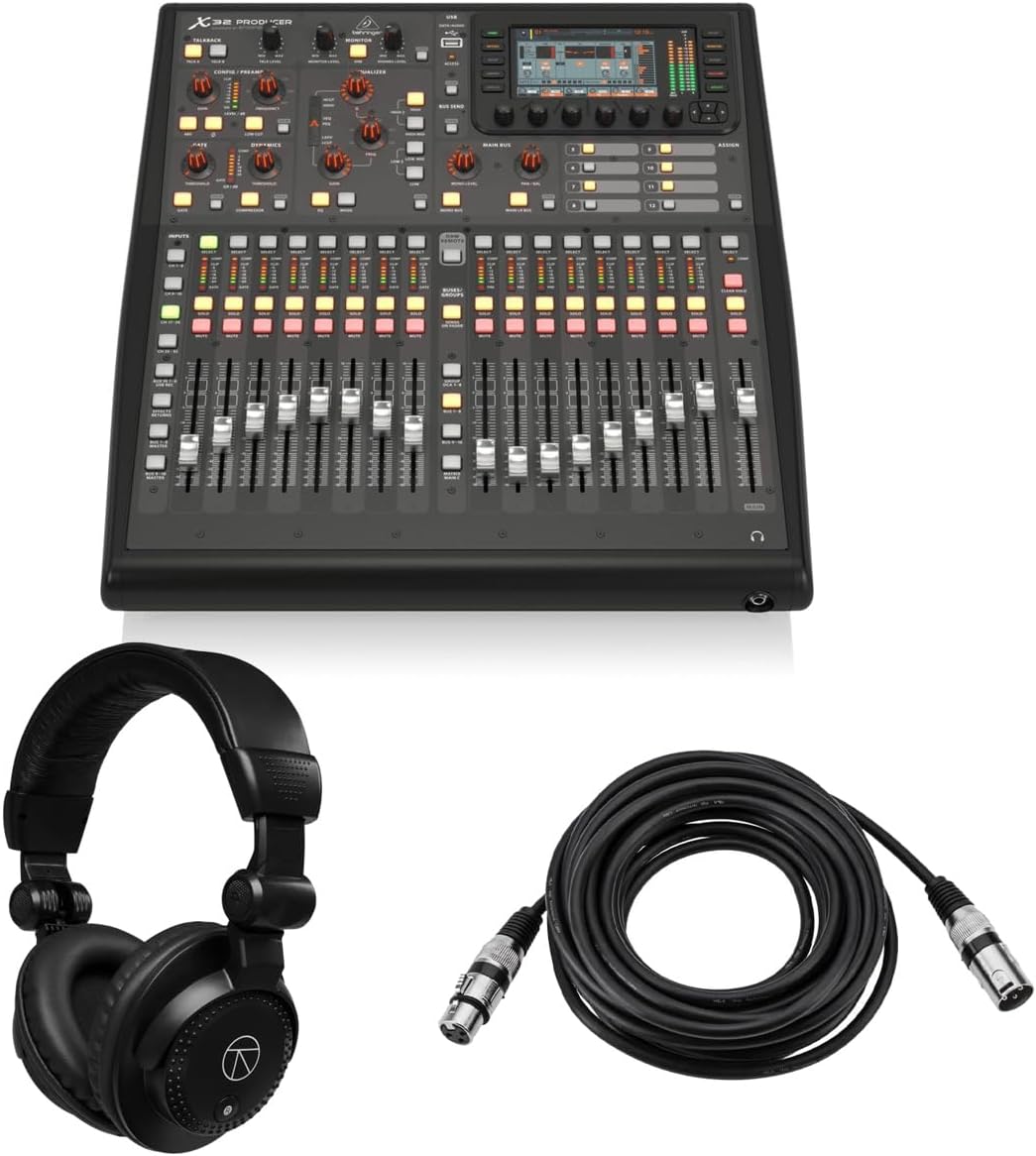
The Behringer X32 Producer is a rack-oriented member of the X32 family, bringing a 40-input, 25-bus platform into a form suited to studio racks and equipment rooms. Its 5.0 rating, bundled headphones, and included 25-foot XLR cable make it an appealing package for recording and production users.
We may earn a commission when you buy through this link, at no additional cost to you.
Signal quality is supported by 16 programmable MIDAS preamps and 24-bit/48 kHz conversion, with a listed dynamic range of 114 dB. Seventeen motorized faders, a high-resolution 5-inch color TFT, and 100 recall scenes allow a technical director or engineer to manage the console from a dedicated rack position rather than continuously handling a large desktop surface.
The channel and bus processing is extensive. The main LCR, six matrix buses, and all 16 mix buses have inserts, six-band parametric EQ, and full dynamics processing, while eight DCA groups and six mute groups help organize larger sessions. The virtual effects rack provides eight true-stereo slots and includes simulations associated with classic Lexicon, EMT, and Quantec equipment.
The bundle is especially useful for a new studio that needs more than a console, though buyers should confirm that the supplied headphones and cable meet their own standards. The Producer format is best for users comfortable operating through a display or companion control device. It is less appealing to engineers who need every input represented by its own continuously visible fader.
A rack-mounted console can free valuable desk space and keep the control surface close to outboard gear, network equipment, and storage. The Producer's dedicated display and motorized controls make it possible to treat the mixer as a central studio hub rather than a device that must remain directly in front of the operator at all times.
Six-band parametric EQ, full dynamics, inserts, matrix buses, DCA groups, mute groups, and numerous scene memories allow a studio to standardize mixes across sessions. The large scene library is especially practical for recurring projects, rehearsed shows, or multiple rooms that need repeatable routing and processing configurations.
We may earn a commission when you buy through this link, at no additional cost to you.
The Behringer X32 Compact preserves the broad 40-input, 25-bus architecture of the full-size X32 while using a smaller physical control surface. Its 4.7 rating makes it a compelling choice for small-to-medium events, rehearsal rooms, project studios, and engineers who want the familiarity of motor faders without a full-width desk.
We may earn a commission when you buy through this link, at no additional cost to you.
The console includes 17 automated 100 mm faders, 16 fully programmable MIDAS-designed microphone preamps, and eight XLR outputs. Additional line inputs and outputs, two headphone connections, and talkback support make it more versatile than the compact dimensions may initially suggest. Individual and dynamic LCD scribble strips improve channel identification throughout the performance.
Compared with the full X32, the main compromise is that not every one of the 40 channels has a permanent physical fader. Operators must move through channel banks and use the display to reach some functions. That is manageable for an experienced engineer, but it may slow newcomers who depend on seeing the complete mix at once.
The X32 Compact is ideal for users who value the routing, processing, and recall capabilities of the X32 platform but need to save desk space. It works particularly well for churches, community theaters, small bands, and studios with a limited mixing area. Buyers should account for the extra interface navigation when working with many simultaneous sources.
The compact chassis does not mean a simplified mix architecture. With 40 input channels and 25 buses, it can handle more sources and destinations than its footprint suggests. That makes it a useful middle ground for users who need more capability than a small desktop mixer but do not want to operate a full touring console.
The 17 motorized 100 mm faders provide a direct, repeatable way to manage levels, and scene recall can restore complete show states. For operators accustomed to digital desks, this familiar physical workflow can feel more efficient than moving every adjustment through a touchscreen.
We may earn a commission when you buy through this link, at no additional cost to you.
The PreSonus StudioLive Classic 16.0.2 is a 16-channel digital console with a pronounced focus on recording and integrated software. Its 3.9 rating is the lowest among the rated products here, but the console remains a distinctive option for musicians who want direct USB capture and a broad PreSonus ecosystem.
We may earn a commission when you buy through this link, at no additional cost to you.
The 18-in, 16-out USB 2.0 interface records all channels and the main stereo mix at 24-bit/44.1 kHz or 48 kHz. Two stereo 32-bit effects processors, four pre/post-fader auxiliary buses, and Fat Channel processing provide a capable live and studio foundation. Every channel and bus receives three-band semi-parametric EQ, compression, downward expansion, and limiting.
Its physical layout includes 12 faders for eight mono and four stereo channel inputs, so the console does not expose every input through an individual fader. The lower rating may reflect limitations in perceived value, age, or competition from newer models, and buyers should carefully compare current software support and accessory availability.
The StudioLive is best for bands and project studios that want a direct path from live mixing to multitrack recording. Bundled Studio One Artist, Capture, UC Surface, and QMix-UC software expands its usefulness, while iPad and mobile aux control can help performers handle monitor mixes. It remains most attractive when that integrated recording path is central to the user's work.
The USB interface can capture all input channels and the main L/R mix, reducing the need for a separate interface during basic tracking. At 24-bit/44.1 kHz or 48 kHz, it provides conventional project resolutions and fits naturally into a DAW-based workflow for compatible software and computers.
Studio One Artist, Capture, UC Surface, and QMix-UC extend the console beyond live mixing. The mobile aux-control software is particularly relevant to performers who need independent monitor control, while the desktop applications support recording, editing, and remote console operation across major computing platforms.
We may earn a commission when you buy through this link, at no additional cost to you.
The Behringer XR18 is the leading budget-oriented choice in this guide for musicians and small production teams seeking a capable digital mixer without a large physical console. Its 4.6 rating, 18 input channels, 12 buses, and tablet-based operation offer a practical entry into networked live mixing.
We may earn a commission when you buy through this link, at no additional cost to you.
Sixteen award-winning MIDAS-designed, fully programmable microphone preamps provide a solid foundation for live vocal and instrument capture. The built-in tri-mode Wi-Fi router allows direct tablet control without requiring an external router, while an 18-by-18 bidirectional USB interface enables direct recording to a compatible tablet or computer.
The main compromise is the reliance on an iPad or Android tablet and the associated software workflow. Users must own or acquire a compatible device, account for charging and screen size, and accept that some physical functions are less direct than on a console with dedicated knobs and faders. Any future-feature references should be verified against the console's current firmware and documentation.
The XR18 is best for rehearsals, small clubs, teaching environments, podcast production, and musicians who already prefer tablet workflows. It offers the most accessible way to gain professional mixing features, including programmable preamps, bus routing, effects, scene storage, and multitrack recording, in a compact package without external networking hardware.
The integrated tri-mode Wi-Fi router removes one common obstacle to tablet-controlled mixing. Users can establish a direct connection between the console and their device without first building a separate wireless network, which simplifies setup for rehearsals, classrooms, and temporary venues.
The bidirectional 18-by-18 USB interface allows the mixer to act as a multichannel recording hub for compatible devices. Combined with 16 programmable preamps, this gives a small ensemble access to a disciplined live signal chain and individual track capture without requiring a separate digital mixer.
We may earn a commission when you buy through this link, at no additional cost to you.
The Allen & Heath Qu-5 is a modern digital mixer centered on 96 kHz XCVI FPGA processing, low latency, and flexible production routing. The supplied data does not include a customer rating, so this recommendation is based on its documented specifications rather than a reported user score.
We may earn a commission when you buy through this link, at no additional cost to you.
Its architecture supports up to 38 inputs to mix, 12 configurable mixes, four matrix outputs, and customizable channel layers. Connectivity includes 16 XLR/TRS combi inputs, 12 XLR outputs, AES3 digital output, a 128-by-128 SLink expansion port, and a USB-C 32-by-32 multichannel interface. This gives it a credible foundation for live sound, recording, and installed audio.
Integrated recording options include six multi-FX engines and dedicated returns, USB-A stereo recording and playback, USB-C multitrack recording, and SD card capture for up to 32 channels. The console also offers a 7-inch capacitive touchscreen, 17 motorized faders, eight programmable SoftKeys, chromatic metering, and remote-control apps for major desktop and mobile platforms.
The Qu-5 is best for advanced users who prioritize high-resolution processing, expansion potential, and a modern touchscreen-and-motor-fader combination. Its extensive routing and connectivity can be intimidating for a first-time console owner, while the lack of a listed rating makes real-world feedback harder to weigh. Confirming workflow requirements and expansion costs is sensible before purchase.
The XCVI FPGA platform operates at 96 kHz and is designed for low-latency, real-time processing. That focus can benefit users working with high-resolution capture, demanding live environments, or projects where they want additional headroom in the internal processing path, provided the complete signal chain supports the selected resolution.
USB-C multitrack recording, 32-channel SD capture, USB-A stereo handling, and a 128-by-128 SLink port create several avenues for expansion. Remote apps for Windows, macOS, iOS, and Android also allow the physical console to be supported from compatible control devices, which is useful in distributed production environments.
We may earn a commission when you buy through this link, at no additional cost to you.
The QSC TouchMix-16 is a compact digital mixer aimed at live performers, mobile engineers, and small production teams. Its 4.4 rating and included carrying bag make it especially practical for users who need a complete console that can move between rehearsal rooms, clubs, houses of worship, and small stages.
We may earn a commission when you buy through this link, at no additional cost to you.
Twenty full-function inputs include 12 microphone connections, four XLR/TRS combo mic-line inputs, two stereo TRS line inputs, an XLR talkback channel, and USB two-track connectivity. The output section includes six XLR auxiliary outputs, two stereo TRS outputs, XLR main left and right outputs, and TRS cue and monitor connections.
A particularly useful feature is the ability for the TRS auxiliary outputs to drive wired in-ear monitors directly. Every input channel includes four-band full parametric EQ, variable high-pass and low-pass filters, a gate, and a compressor. This makes the console practical for performers who need dependable monitor control without adding separate hardware.
The TouchMix-16 is best for mobile live work where compact dimensions, useful built-in processing, and straightforward I/O matter more than maximum channel count or advanced expansion. Users should verify that the workflow and connection requirements suit their current production setup. The included bag adds portability, although it does not replace a proper road case for demanding travel.
Six auxiliary outputs and direct TRS in-ear monitor feeds allow performers to receive personal mixes without a separate monitor controller. This focus is practical for singers, guitarists, keyboardists, and other players who need independent levels during rehearsals, worship services, and small live shows.
Four-band parametric EQ, adjustable filters, gating, and compression provide a capable standard processing chain on every input. Having these tools built into each channel reduces the need for outboard processors in straightforward live rigs, while the talkback and monitor connections support common rehearsal and performance tasks.
We may earn a commission when you buy through this link, at no additional cost to you.
Choosing a digital mixing console means balancing channel count, routing flexibility, recording needs, physical controls, expansion options, and the environments where the console will be used. The most feature-rich model is not automatically the easiest or most appropriate choice, so the following factors deserve careful consideration.
Begin by counting the sources that must be connected simultaneously rather than relying on the largest headline number. Include microphones, instruments, playback devices, talkback, and any remote inputs, then add enough outputs for the main mix, stage monitors, auxiliaries, cue, recording, and external processing. A console with 40 input channels may still need more outputs than another model, and multi-channel audio interfaces can expand recording destinations without adding physical console inputs.
A large input count is only useful when the console can route those sources to the right destinations. Look for enough main, auxiliary, matrix, monitor, and effect-return buses to support the production. Also consider inserts, direct outs, groups, mute groups, and the ability to customize channel layouts. Live shows and studios both benefit from clear grouping, because groups make it easier to manage a shared vocal, drum, or instrument section without touching every individual channel.
Microphone preamps shape the usable gain, noise performance, and character of the input stage. Built-in preamps reduce the need for external equipment during small productions, while remote systems may rely on high-quality converters. Check the number of onboard preamps, gain range, phantom-power support, and whether channels use shared or dedicated gain controls. More preamps are useful for acoustic instruments and direct microphone capture, but signal quality and controllability are often more important than the raw count.
The best interface is the one an operator can use accurately under pressure. Motorized faders provide tactile level changes and reliable scene recall, while touchscreens can expose deeper settings and flexible layouts. Tablet operation can reduce cost and weight, but it depends on device compatibility, battery life, wireless reliability, and the operator's comfort with on-screen controls. Consider both the physical layout and the software behind it, because either can determine how quickly a mix is adjusted during a live event.
For studio work, examine the console's native recording path carefully. USB, network audio, SD-card recording, and multichannel interfaces affect track count, sample rate, latency, and software compatibility. A direct interface can make rehearsal capture simple, but buyers should confirm operating-system support, channel routing, file formats, and whether the console can serve as the sole recording interface. Separate or expanded digital connections may be necessary for larger sessions and higher channel counts.
Equalization, compression, gating, limiting, expansion, and effects can shorten setup time and reduce rack requirements. Look for processing on both channels and buses, not just a small selection of effects returns. Parametric EQ is valuable for corrective work, while dynamics can control problem sources and protect a mix. The number and quality of the effects engines matter for live sound, but studio users may prefer their favored plug-ins. External insert points remain important for accessing third-party processing.
A permanent installation has different physical needs from a touring rig, home studio, or temporary event. Rackmount models can save desk space, compact units can fit into small control areas, and included bags make transport easier. At the same time, consider weight, ventilation, screen visibility, power requirements, and the availability of remote I/O. Expansion ports can be valuable, but they should solve a realistic need rather than add complexity that will never be used.
Recurring productions benefit greatly from reliable scene recall and automation. Check how many scenes can be stored, which parameters they cover, and whether motor faders physically move to recalled positions. Remote-control apps can allow performers to adjust wedges or in-ear mixes, while networked control can place the console away from a crowded stage. Secure the network, test wireless coverage, and create backups of important show files before relying on any remote workflow in a live event.
Begin with a clear source and output plan. List every microphone, instrument, playback device, monitor feed, and recording destination, then assign them to inputs and outputs before raising the faders. Confirm phantom power only where it is required, verify gain settings, mute uncertain channels, and build the mix from the most stable sources. Learning the console's channel page, routing screen, scene system, and local controls before show day prevents avoidable mistakes.
Protect the console by placing it on a stable surface or securing it properly in a rack. Keep liquids, food, dust, and direct sunlight away from the control surface, and maintain ventilation around the chassis. Use quality cables appropriate for the connection type, strain-relieve connectors, and avoid repeatedly hanging heavy adapters from ports. When moving a rack-mounted unit, support the chassis rather than pulling it by attached cables or controls.
Save important scenes, routing, and show files to reliable storage and keep a separate backup. Update firmware and control software only after reviewing release notes and backing up existing settings. Clean the surface with a soft dry or lightly dampened cloth, avoiding sprays and abrasive materials. For touring use, protect displays and faders with an appropriate case and regularly inspect cables, connectors, ventilation paths, and storage conditions.
A digital mixer routes and processes signals digitally while providing controls, displays, recall, and often USB or network connectivity. An analog mixer passes audio through physical signal paths, which can feel immediate and straightforward but generally offers less automation and scene recall. Digital consoles are particularly useful when a project needs repeatable mixes, extensive routing, synchronized recording, or remote control.
The right count depends on the number of simultaneous sources and destinations, not just the number of performers. Count microphones, direct instrument inputs, playback channels, talkback, main outputs, monitors, effects returns, and recording feeds. If those requirements are close to a console's limits, choose the next larger model or plan to use remote I/O and external preamps.
Yes, especially for singers, guitarists, podcasters, producers, and small ensembles that want repeatable routing and multitrack recording. Compact models can provide a complete signal chain in a small room, while larger consoles suit more complex sessions. Choose a unit whose channel count, preamps, recording interface, software support, and monitoring features match the project rather than paying for unused capacity.
Many digital consoles can do so through USB, network audio, or an SD-card recorder. The available track count and resolution vary by model, and some devices record stereo or two-track files rather than every channel. Confirm the interface class, operating-system support, sample-rate options, routing, latency, and included software before purchasing the console for recording.
Motor faders are often faster for live level changes because they provide tactile feedback and can move automatically when a scene is recalled. Touchscreens are better for detailed routing, labeling, processing, and visual feedback. The ideal console often combines both, so the decision should reflect the operator's experience and the kind of adjustments required most often.
Not always. Small and mid-sized consoles often include enough onboard preamps for the intended number of microphones. Larger touring systems may rely on remote I/O containing high-quality preamps because that provides greater channel count and placement flexibility. If external preamps are unnecessary for the project, the console's onboard count can simplify the rig and reduce cable clutter.
Check the power requirements, weight, ventilation, case protection, and whether every necessary connection is accessible. Test wireless control in the actual venue, back up show files, and carry suitable adapters and backup cables. A dedicated road case or appropriately padded enclosure offers much better protection than a basic carrying bag during transport and setup.
No. A higher sample rate can provide more processing headroom and benefit compatible high-resolution workflows, but the entire chain must support it. Many practical live and studio applications work well at standard project resolutions, and higher rates can increase storage use and data demands. Choose resolution based on the recording standard, source material, workflow, and available equipment.
The Behringer X32 stands out as the strongest all-around choice, pairing 40 inputs, 25 buses, extensive recording features, and a large motorized-fader surface. The Behringer WING is the stronger option for expandable live systems, while the Yamaha DM3 and Behringer XR18 provide focused alternatives for compact and tablet-based workflows.
Prioritize the details that directly affect your work: simultaneous channel needs, bus count, preamp availability, recording format, control style, and expansion plans. A feature-rich console is only valuable when its workflow matches the operator, and a smaller model may serve a focused project better than a larger desk loaded with unnecessary capacity.
Product bundles, software access, and configurations can change over time, and retailer pricing also varies. Before buying, verify the current specifications, included accessories, compatibility requirements, warranty terms, and latest seller information. The most suitable console is the one that supports the production reliably today and leaves room for the next one.