
Lian Li V100-ATX Mid-Tower PC Case
4.8Editor score
Four preinstalled ARGB PWM fans
Supports 360mm top radiators
Tool-less side panel access
Compare 10 high airflow PC cases for cooling capacity, fan support, radiator clearance, cable management, build quality, and ease of use.
High airflow PC cases give demanding processors and graphics cards the breathing room they need by moving cool air toward heat-producing components and carrying warm air out of the enclosure. The most effective designs combine open ventilation, sensible fan placement, radiator support, and enough interior space for modern hardware without making assembly unnecessarily difficult.
The cases in this guide were compared using the supplied specifications, with particular attention to front and rear ventilation, included fans, radiator mounting locations, motherboard compatibility, graphics card clearance, cable-management provisions, and practical construction details. The list covers compact ATX mid-towers, roomy E-ATX models, panoramic cases, and large airflow-focused designs.
Each review identifies the reason a case earned its place while acknowledging relevant trade-offs. The selections show that the right high airflow enclosure may emphasize a strong fan package, extensive radiator capacity, flexible modular construction, accessible installation, or generous room for powerful components. Product listings and configurations can change over time.
4.8Editor score

4.8Editor score

4.8Editor score
This side-by-side comparison highlights the included cooling hardware, radiator options, motherboard support, and practical advantages that distinguish each high airflow PC case.



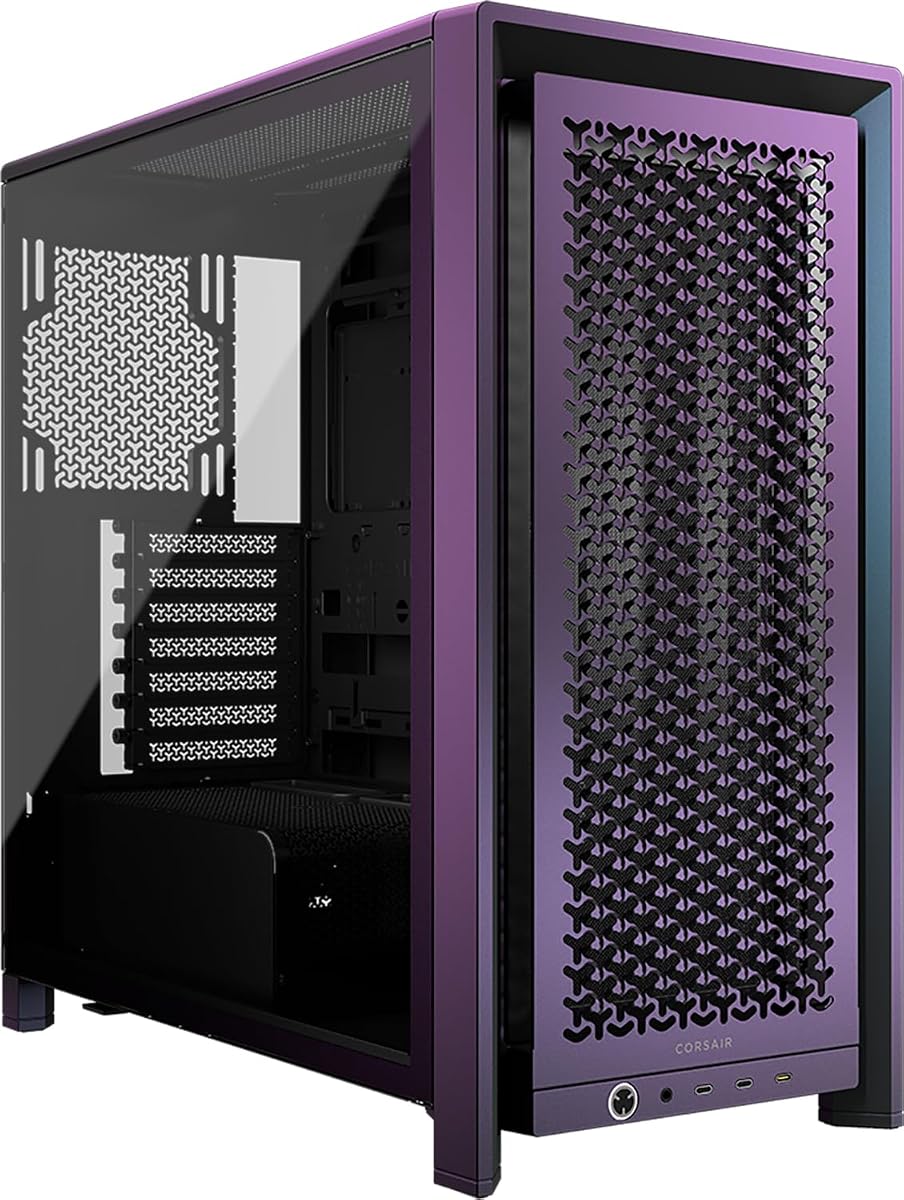
The CORSAIR 4000D RS ARGB combines a high airflow mid-tower format with the company's increasingly popular FRAME modular concept. It carries a 4.7 rating, and its defining strengths are an open 3D Y-pattern front panel, three preinstalled CORSAIR RS ARGB PWM fans, and unusually flexible fan positioning through the InfiniRail mounting system. It is a particularly compelling option for builders who expect to change the case layout as their system evolves.
We may earn a commission when you buy through this link, at no additional cost to you.
Airflow is supported by a deliberately low-obstruction steel front panel. The included fans sit at the front, where they can draw air toward the processor, memory, and graphics card, while the InfiniRail system allows fans up to 200mm at the front and 140mm in the roof to be positioned where they are most useful. The side panel near the motherboard tray can remain in place as a cable cover or be removed to accommodate additional fans, giving the builder another path for improving intake and component cooling.
The case also supports the FRAME modular system, which allows future changes to the motherboard tray or front I/O configuration. That flexibility is a meaningful advantage over a conventional fixed-layout chassis, although it comes with more complexity than a straightforward case. The three installed fans provide a functional beginning, but enthusiasts with sustained heavy workloads may eventually want more fans or a larger liquid-cooling configuration.
This is a strong general recommendation for builders who want substantial airflow, attractive ARGB lighting, clean cable routing, and a case that can evolve. It suits ATX systems using a powerful CPU and graphics card, particularly when the owner values both immediate cooling performance and long-term modularity over the smallest possible footprint.
The InfiniRail system lets the builder shift fan positions along the mounting rail rather than accepting fixed openings. That flexibility helps direct cooling toward components that generate the most heat and can make better use of unusual front or roof mounting areas.
FRAME construction allows the motherboard tray and front I/O arrangement to evolve with the build. For buyers who expect to replace components or reorganize the interior, this provides a more adaptable foundation than a fixed steel mid-tower.
We may earn a commission when you buy through this link, at no additional cost to you.
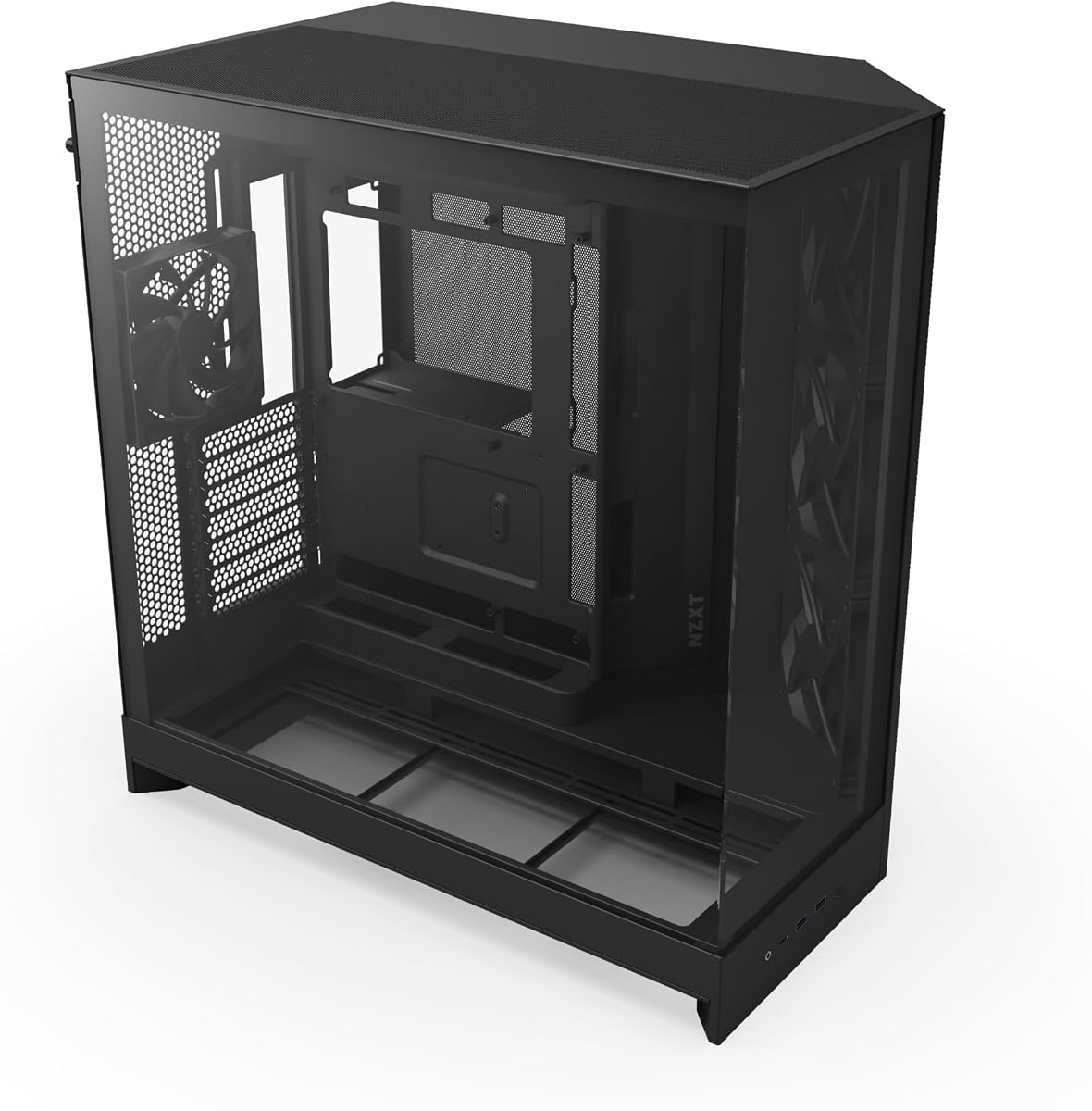
The NZXT H5 Flow is a compact ATX mid-tower built around a simple goal: provide dependable airflow without the visual bulk of many large gaming cases. Its 4.7 rating reflects a well-balanced package, and the supplied specifications show ultra-fine mesh on the top, front, and side panels, two preinstalled 120mm Quiet Airflow fans, and support for sizable radiators.
We may earn a commission when you buy through this link, at no additional cost to you.
One of its strongest features is the perforated PSU shroud. Air can enter through both its side and bottom sections, helping cool the power supply while also feeding fresh air into the lower portion of the chassis. The front can accept a radiator up to 360mm, while the roof supports up to 240mm. Two included fans provide a front intake and rear exhaust arrangement, creating a sensible initial airflow path.
The trade-off is that this is a compact chassis with only two fans supplied. Builders planning a 360mm front liquid cooler may need to add a third fan, while the 240mm roof limit rules out a 360mm top radiator. Nevertheless, the broad mesh surfaces, orderly cable channels, hooks, and straps make the case appealing to anyone who values a neat build and straightforward layout.
The H5 Flow is best recommended for ATX builders seeking a smaller, tidier case with meaningful radiator options and good baseline ventilation. It is especially appropriate when the graphics card is not extremely long, the system does not require maximum fan density, and visual simplicity is a priority.
One front intake and one rear exhaust create a straightforward starting point. This arrangement establishes a clear path through the chassis without requiring a large collection of extra fans before the build can operate effectively.
Although the H5 Flow is smaller than many mid-towers, it supports a 360mm front radiator and a 240mm top radiator. That gives builders useful liquid-cooling options while retaining a comparatively restrained external footprint.
We may earn a commission when you buy through this link, at no additional cost to you.
The MONTECH AIR 903 MAX is an airflow-first E-ATX mid-tower with a 4.8 rating. It is notable for arriving with four 140mm fans, including three ARGB PWM front fans and one rear PWM fan. That substantial cooling package, combined with a ventilated mesh front and room for demanding components, makes it one of the most complete high airflow cases in this guide.
We may earn a commission when you buy through this link, at no additional cost to you.
Its dimensions leave enough interior space for graphics cards up to 400mm and motherboards from E-ATX down through Mini-ITX. Front and top mounting positions support radiators up to 360mm, allowing a builder to create a substantial liquid-cooling setup without the chassis dictating the layout. The three front 140mm fans and rear fan already form a strong airflow arrangement before additional cooling hardware is considered.
The main consideration is that four 140mm fans create a considerable amount of moving equipment. A carefully configured fan curve can keep noise under control, but builders sensitive to low-load sound may tune them aggressively. The case also leaves room for demanding hardware, so an enthusiast system could eventually justify additional fans, which increases both power use and heat generated by the fans themselves.
The AIR 903 MAX is an excellent recommendation for builders who want the strongest immediate cooling package among conventional mid-towers. It is well suited to powerful graphics cards, E-ATX platforms, and systems that may use 360mm radiators. Buyers prioritizing a ready-to-cool foundation will find its included hardware unusually complete.
Most cases require buyers to add at least one or two fans after purchase. This model includes four 140mm units positioned at the front and rear, reducing the need for immediate additions and providing a coordinated basis for airflow.
Support for E-ATX motherboards and graphics cards up to 400mm accommodates a wide range of powerful components. The roomy interior also gives builders freedom to consider larger radiators without immediately exceeding chassis limits.
We may earn a commission when you buy through this link, at no additional cost to you.
The LIAN LI LANCOOL 216 RGB blends a relatively restrained exterior with a serious cooling foundation. It has a 4.7 rating and includes two 160mm ARGB front fans plus a 140mm rear fan. Fine mesh on the front, top, and side of the PSU shroud promotes airflow, while the steel frame and tempered glass panel give the chassis a robust appearance.
We may earn a commission when you buy through this link, at no additional cost to you.
A useful feature is the modular motherboard I/O, which allows the tray to be moved higher or lower depending on whether the system is primarily air-cooled or water-cooled. This can help reserve appropriate space for radiators and improve the internal layout. The removable top radiator bracket, fan cable grooves, rear PCIe fan bracket, Velcro straps, and small routing clips also support straightforward assembly.
Its main limitation is that only three fans are included, which is fewer than the MONTECH AIR 903 MAX and several other cases in the list. The 160mm front fans are powerful, but the chassis would benefit from additional intake if the graphics card is especially demanding. The removable top bracket adds another assembly step, though it creates valuable flexibility for radiators and fans.
The LANCOOL 216 RGB is a strong choice for builders who want large front fans, polished ARGB styling, and useful cable-management provisions without moving to a full tower. It works well for ATX or E-ATX builds, particularly when the owner values a balanced mix of airflow, aesthetics, and accessible component placement.
The pair of 160mm ARGB intake fans gives the case a meaningful cooling advantage over designs that begin with smaller 120mm units. Their larger blades can move substantial air while leaving additional mounting flexibility.
Moving the motherboard tray to a higher or lower position allows the builder to create space for air or liquid cooling. This makes the chassis more adaptable to different cooler heights and radiator arrangements.
We may earn a commission when you buy through this link, at no additional cost to you.
The Antec Flux Pro takes the high airflow concept into a full-tower format, offering 4.7 stars and an extensive selection of cooling locations. Six PWM fans are preinstalled, and the chassis can accommodate as many as 12 fans at once. Unlike many mid-towers, it is intended for builders who want room for a broad collection of cooling hardware and full-size components.
We may earn a commission when you buy through this link, at no additional cost to you.
The multi-directional vent design is complemented by removable cooling brackets at the top, front, and PSU shroud. It can support a 420mm radiator and a 360mm radiator simultaneously, which is useful for custom liquid-cooling loops. The PSU shroud also provides room for additional fans, making it possible to direct air toward the power supply and lower chamber rather than treating that area as dead space.
The full-tower dimensions are the main trade-off for anyone hoping to save desk space. The additional volume also brings more surfaces and structural complexity, and some buyers may find the included temperature display and specialized 90-degree PSU mount more specialized than necessary. Even so, the fan capacity and cooling flexibility are substantial for demanding workstation-style or enthusiast systems.
The Flux Pro is best for builders who prioritize maximum cooling expansion, large radiators, and roomy full-tower proportions. It may be less attractive for compact builds, but for a high-power system that could use multiple fan zones and advanced liquid cooling, its support makes it a strong specialist option.
Removable brackets at the top, front, and PSU shroud make it possible to establish separate cooling paths. This is valuable for builders who want to cool the processor, graphics card, power supply, and memory as independently as practical.
The ability to install both a 420mm radiator and a 360mm radiator expands the scope for custom liquid cooling. Few conventional mid-towers offer that degree of simultaneous radiator capacity.
We may earn a commission when you buy through this link, at no additional cost to you.
The CORSAIR 3500X RS ARGB is a panoramic mid-tower for builders who want a visually open system with more fan mounting options than the factory setup. Its 4.6 rating is supported by three included RS120-R ARGB fans, compatibility from Mini-ITX through E-ATX, and a chassis that can accept as many as 10 120mm fans.
We may earn a commission when you buy through this link, at no additional cost to you.
Cooling is not restricted to the front. Side, roof, and PSU fan mounting points create several possible directions for airflow, allowing the builder to place a fan near the graphics card or direct cool air into particular areas. Three ARGB fans illuminate the interior, and removable front and tempered-glass side panels make the chassis easier to access during assembly and later maintenance.
The panoramic glass treatment creates one practical consideration: cable routing and component presentation must be tidy. Only three fans are supplied, despite the case's ten-position capacity, so a fully populated high-airflow configuration will require additional purchases. The case also prioritizes 120mm mounting positions, which provide flexibility but may not deliver the same airflow-per-position as several larger 140mm or 160mm fans.
The 3500X RS ARGB is most appropriate for builders seeking a polished display case that does not surrender cooling potential. It works well for showpiece systems where the internal layout matters, particularly if the owner plans to add side, roof, and lower intake fans beyond the three provided.
Side, roof, and PSU mounting points make it possible to supplement the front intake with fans elsewhere in the chassis. This is especially useful for large graphics cards that benefit from a dedicated flow of cooler air.
Wraparound tempered glass gives the build a prominent display area, while removable panels simplify access. Builders should plan cable paths carefully so the open view remains visually tidy.
We may earn a commission when you buy through this link, at no additional cost to you.
The Lian Li V100-ATX combines a 4.8 rating with one of the most useful standard configurations in this guide: four preinstalled 120mm PWM-controlled ARGB fans. It also includes an integrated 26-LED ARGB strip, broad motherboard compatibility, and a top radiator position up to 360mm, making it an appealing high airflow option for builders who want both cooling and lighting immediately.
We may earn a commission when you buy through this link, at no additional cost to you.
The included fans support daisy-chain connectivity, which can simplify wiring compared with individually routed fan leads. The integrated lighting strip can synchronize with motherboard software, producing a coordinated appearance without requiring another separate lighting controller. The case supports ATX, Micro-ATX, Mini-ITX, and back-connect versions of ATX or Micro-ATX motherboards, giving buyers room to plan a clean rear-cable layout.
The case accommodates graphics cards up to 420mm and CPU coolers up to 178mm, which are generous limits for a mid-tower. Its 120mm fans move less air per position than the 140mm and 160mm fans used by some rivals, but having four installed from the outset offsets some of that limitation. Buyers should also check the exact fan details for the selected variant, as the listed maximum values differ slightly across the range.
The V100-ATX is a strong recommendation for a first high-performance build or an upgrade that needs a lot of cooling hardware without complicated setup. Tool-less side panels help with assembly and maintenance, while broad clearance reduces the chance that a powerful component will not fit.
A complete four-fan package creates an immediate airflow foundation and reduces the number of separate purchases required for a balanced build. Daisy-chain support further reduces the complexity of fan wiring.
Tool-less side panels make it easier to reach internal components, while support for 420mm graphics cards and 178mm CPU coolers covers a wide range of common performance hardware.
We may earn a commission when you buy through this link, at no additional cost to you.
The Cooler Master HAF II 500 is an ATX case designed around the idea that fewer, larger fans can deliver formidable airflow. It carries a 4.8 rating and includes two 220 x 40mm front intake fans and one 180 x 40mm rear exhaust fan. The oversized Mighty40 cooling system is paired with large front and rear openings designed to reduce airflow resistance.
We may earn a commission when you buy through this link, at no additional cost to you.
MasterRail mounting supports multiple fan and radiator sizes at the front and top, providing a high degree of layout freedom. Split-level cable management creates room behind the motherboard tray while accommodating the substantial rear exhaust fan. The dual-mode GPU holder can secure a single graphics card or support two cards up to 3.6 slots thick, at 72mm each, and a flexible storage cage accommodates both 3.5-inch and 2.5-inch drives.
This is clearly a large case, and buyers should account for that before committing to it. Large fans can move plenty of air, but they may require a thoughtful fan curve to remain quiet during idle or light workloads. The 420mm front radiator capability makes the chassis particularly interesting for custom liquid cooling, where broad radiator options can improve heat-transfer surface area.
The HAF II 500 is an excellent choice for enthusiasts who want standout cooling hardware and can accommodate a full-size chassis. It is best suited to powerful systems with large graphics cards, extensive cooling demands, and a preference for a visually and physically imposing enclosure.
The 220mm front fans and matching vent openings create a broad intake area with fewer obstacles than a panel filled with small perforated holes. That approach favors high-volume airflow through the front of the chassis.
MasterRail accepts several fan and radiator sizes, while the dual-mode graphics card holder supports either one card or two suitably sized cards. These features give the case unusual flexibility for an enthusiast platform.
We may earn a commission when you buy through this link, at no additional cost to you.
The NZXT H9 Flow uses a dual-chamber design to separate the main components from the power supply and drives. It has a 4.7 rating, and the arrangement supports improved thermal performance and cleaner cable management. Perforated steel panels, angled front-right fans, and a panoramic tempered-glass panel combine functional airflow with a polished display-oriented appearance.
We may earn a commission when you buy through this link, at no additional cost to you.
The included package consists of three F140Q case fans in the front-right position and one F120Q case fan at the rear. These are three-pin DC case versions, and the case can ultimately hold nine 140mm fans plus one 120mm rear fan. A 420mm radiator can be installed at the top or in the front-right position, offering useful flexibility for high-capacity liquid cooling.
The biggest consideration is the fan-control format. The included three-pin DC fans simplify basic operation, but modern boards often provide more control and convenience for four-pin PWM fans. Builders should plan their fan hub and motherboard headers accordingly rather than assuming every preinstalled fan will support the same control features. The size also needs to be checked against a crowded desk or entertainment center.
The H9 Flow is a good recommendation for builders who value organized internals, clear airflow paths, and the potential for large radiators. It fits particularly well with high-performance ATX systems where storage and power supplies should remain visually and thermally separate from the main cooling zone.
Separating the power supply and storage from the main component chamber keeps the primary interior open and makes cables easier to conceal. It can also reduce the amount of equipment competing for air in the central chamber.
The top and front-right positions can each accept a 420mm radiator. Buyers should plan mounting and tubing paths carefully, but the case offers more than one route for a substantial liquid-cooling system.
We may earn a commission when you buy through this link, at no additional cost to you.
The CORSAIR FRAME 4000D Vault Series adds a limited-edition identity to the modular FRAME platform. Its 4.4 rating is the lowest among the listed cases, but the specification set remains impressive. The Galaxy finish is individually numbered and restricted to 1,337 units, giving the enclosure a collectible dimension beyond its practical cooling features.
We may earn a commission when you buy through this link, at no additional cost to you.
Airflow is driven by the same 3D Y-pattern perforated steel front panel found on the wider FRAME 4000D concept. InfiniRail mounting permits fans up to 200mm in the front and 140mm in the roof to slide into targeted positions. More unusually, the case offers three locations for 360mm radiators: the front, roof, and side. It can also support up to 12 120mm fans.
The primary trade-off is availability and a more specialized design. A limited run will be harder to replace, and buyers who prioritize the plain availability of standard components may prefer a more conventional case. The three radiator positions also demand careful planning, because fitting a radiator on the side can alter the visual presentation and access to the motherboard area.
This Vault Series model is best for collectors and modular-case enthusiasts who value distinctive design and the extensive cooling flexibility of the FRAME system. It is a less obvious choice for buyers seeking a straightforward, widely available mid-tower, but it delivers a rare combination of a collectible finish and serious high-airflow capacity.
Front, roof, and side mounting areas allow 360mm radiators to be used in multiple combinations. This is exceptional for a mid-tower and gives advanced liquid-cooling builders several possible routes.
The Galaxy colorway is individually numbered within a strictly limited production run. It appeals to buyers who want a case to stand apart visually and retain a collectible character.
We may earn a commission when you buy through this link, at no additional cost to you.
The right high airflow PC case balances open ventilation, fan and radiator capacity, component clearance, build convenience, and physical size. Reviewing these factors before buying helps prevent a well-ventilated design from becoming difficult to assemble or incompatible with the hardware inside it.
The front panel is the primary entry point for outside air, so its design strongly influences how easily cool air reaches the interior. Perforated steel, expanded metal, wire mesh, and tightly woven fabric each offer different compromises. The CORSAIR 4000D RS ARGB and FRAME 4000D Vault use a three-dimensional Y-pattern steel panel designed to minimize obstruction, while the NZXT H5 Flow and H9 Flow rely on fine mesh or perforated steel. A case that is described as high airflow should provide an open, unobstructed path rather than a solid decorative panel with a small intake area.
Choose the front panel that best matches your cooling plan, not simply the one with the most visible openings.
Included fans determine how much airflow the case can deliver before any additions are made. The MONTECH AIR 903 MAX supplies four 140mm fans, the Lian Li V100-ATX includes four 120mm fans, and the Antec Flux Pro arrives with six PWM fans. The Cooler Master HAF II 500 goes further by using two unusually large 220mm front fans and a 180mm rear fan. Compare fan position as well as quantity, because front intake and rear exhaust fans serve different parts of the chassis.
More included fans can be convenient, but fan size, direction, speed control, and noise behavior are equally important.
Liquid-cooling builders should count the number and location of radiator mounts rather than looking only at case dimensions. The MONTECH AIR 903 MAX and NZXT H5 Flow support a 360mm front radiator, while the NZXT H9 Flow can accept 420mm units at both the top and front-right. The CORSAIR FRAME 4000D Vault offers three 360mm positions, and the Cooler Master HAF II 500 supports a 420mm front radiator. Also check the listed thickness, fan-clearance, and tubing-clearance requirements for the exact configuration.
Match radiator size to mounting area, then verify that fans, tubing, and the rest of the hardware can coexist without conflict.
A high airflow case is only useful if it accepts the hardware in the planned system. Most models in this guide support ATX and smaller boards, but the MONTECH AIR 903 MAX, LIAN LI LANCOOL 216 RGB, CORSAIR 3500X RS ARGB, and Antec Flux Pro extend into E-ATX territory. Graphics card clearance ranges from more restrained compact designs to 420mm in the Lian Li V100-ATX. Measure unusually long or thick cards, including any power connector clearance they require, rather than relying only on the case's published maximum.
Confirm the board format, card dimensions, and cooler height before ordering the enclosure.
Airflow capacity often comes with a larger enclosure, and the practical consequences extend beyond the footprint itself. The NZXT H5 Flow targets buyers who want a more compact ATX mid-tower, whereas the Antec Flux Pro and Cooler Master HAF II 500 occupy substantially more space. A full tower may also restrict access to components and create longer cable paths. Consider the location of the case, nearby walls, and the depth needed to fit power, data, and video connectors behind it.
Choose the smallest chassis that comfortably holds the components and cooling hardware you actually need.
Airflow can suffer when cables obstruct intake paths or sit directly in front of fans, so a proper cable-management system matters. The CORSAIR 4000D RS ARGB can use its side panel as a cover, the LIAN LI LANCOOL 216 RGB includes a grommet bar, straps, and clips, and the NZXT H9 Flow separates storage and power supplies in a second chamber. Tool-less panels, removable fan brackets, and accessible radiator mounts can also make installation easier. These features reduce the risk of accidentally blocking a vent or blocking a component during assembly.
Prioritize dedicated routing space and easy panel access if you want a clean, efficient build rather than a crowded interior.
Preinstalled fans still need to be connected to the build's power and control systems. PWM-compatible four-pin fans offer more detailed control, while three-pin DC case fans may provide simpler operation but fewer options on some motherboards. The NZXT H9 Flow specifically includes three-pin DC case versions, which is worth considering when planning headers and fan hubs. ARGB lighting should also be checked for synchronization, connector requirements, and whether a separate controller or lighting hub is included. Cabling should be planned so lighting leads do not interfere with cooling leads or airflow.
Verify connector types before assembly and keep fan, lighting, and power wiring organized from the start.
A case with many mounting positions is not automatically a good cooling solution if the fans face the wrong direction or cannot be installed without blocking a radiator. The CORSAIR InfiniRail system allows front and roof fans to slide into more useful positions, the NZXT H5 Flow offers front and top radiator locations, and the Antec Flux Pro divides cooling across the top, front, and PSU shroud. Look for removable brackets, modular motherboard trays, and alternate side-fan mounting that allow the layout to change as the hardware changes.
Plan the complete airflow path, including radiators, fans, and cable clearance, before deciding that a case has enough capacity.
Begin with the airflow path in mind. Identify which panels are intended to draw in air and which are intended to exhaust it, then install the included fans in the specified directions. Front and lower fans generally act as intakes, while rear and roof fans remove rising heat. If radiator fans are added later, confirm that their orientation supports the intended loop and that the tubing can enter and leave the radiator without tight bends.
During assembly, route power, data, and fan cables behind the motherboard tray or through the provided grommets. Secure loose leads with the supplied straps, hooks, clips, or Velcro bands. Keep cables clear of intake vents and fan frames, and check that the side panels, removable brackets, and radiator supports sit flush after the build is complete. Secure the graphics card with the supplied supports or retention hardware, especially in cases designed for large or heavy cards.
For routine care, power down the system and disconnect the power cable before removing panels or cleaning fans. Use a soft brush or gentle compressed air to remove dust from fan blades, vents, radiators, filters, and removable dust screens. Hold fan hubs so the blades do not spin freely from airflow, because back-powered fans can generate voltage. Periodically inspect cable connections and make sure the airflow path has not become obstructed as components or storage arrangements change.
Not always, because fan size and placement matter as much as the number of fans. A case with two large front fans may move more air than one containing several small 120mm units. The best configuration creates a clear intake path toward the components and a separate exhaust path for rising heat, while also respecting radiator thickness and cable clearance.
A genuinely open mesh or perforated front panel usually supports stronger airflow than a solid or heavily filtered panel. The degree of restriction depends on the material, weave, and opening pattern, however. It is important to balance airflow with dust protection, noise, and visual design rather than assuming every mesh surface performs identically.
A full tower generally offers more fan and radiator positions, but it also takes up more space and does not automatically cool components better. A well-ventilated mid-tower with a strong included fan package may be more appropriate for most systems. Choose a full tower when the hardware, liquid-cooling layout, or future expansion genuinely requires the additional volume.
No. Radiator compatibility depends on the exact mounting location, supported length, thickness with fans attached, and nearby component clearance. Cases such as the MONTECH AIR 903 MAX support a 360mm front radiator, while the NZXT H5 Flow limits the top position to 240mm. Always check the case specification for the intended mounting position.
PWM fans use a four-pin connection and can have their speed controlled by varying the duty cycle. Three-pin DC case fans are commonly controlled through voltage rather than dedicated pulse-width modulation. Both types can cool a system effectively, but the motherboard headers, fan hub, and control software must be compatible with the fans being installed.
Front fans usually act as intakes, drawing outside air toward the motherboard and graphics card, while rear fans generally exhaust warm air. Builders using liquid cooling should confirm that radiator fans pull cool air through the radiator rather than pushing air toward it. A balanced arrangement reduces recirculation and helps keep the intake and exhaust paths separate.
The side panel itself may be tempered glass, but a high airflow design normally relies on the front, top, rear, and lower vents for its main cooling path. Glass does add some visual and weight considerations, and the interior should be kept tidy. It does not inherently prevent good cooling if the primary vent openings and fan configuration are sound.
Inspection every few months is sensible, with cleaning more often in dusty environments. Disconnect power before opening the case, and gently clear dust from fan blades, radiator fins, vents, and any removable filter. Do not allow the fan blades to spin rapidly from compressed air, because power-generating fan modes can produce a small voltage that may harm computer components.
The strongest overall choices depend on how each system is assembled. The CORSAIR 4000D RS ARGB stands out for flexible modular construction and adjustable fan placement, the MONTECH AIR 903 MAX offers an unusually complete four-fan foundation, and the Lian Li V100-ATX combines four preinstalled ARGB fans with accessible panels and generous clearance. Each serves a different balance of modularity, ready-made cooling, and straightforward installation.
Buyers should prioritize the complete cooling path rather than fan count alone. Check the front panel, available radiator locations, included fan directions, motherboard format, graphics card dimensions, and cable routes before making a decision. Large cases provide more room for expansion, while compact mid-towers can be easier to accommodate and may still deliver excellent cooling when their mesh panels and fan positions are well designed.
Finally, confirm the current listing details, included accessories, connector types, and available finish for the exact model before ordering. Product configurations can change, and the best high airflow PC case is the one that fits the planned hardware, supports the intended cooling arrangement, and remains convenient to build and maintain.