
Creative Sound Blaster AE-X
4.4Editor score
32-bit/384kHz playback
130 dB signal-to-noise ratio
350mW headphone amplifier
ASIO 2.3 and DSD256
Our expert guide compares the best PC sound cards for audio recording, covering fidelity, connectivity, latency, compatibility, and creator features for
A PC sound card can improve the route between your microphone, instrument, and recording software, but the most useful model depends on your source and workflow. Musicians may need high-headroom inputs, while streamers often prioritize mixing controls, voice effects, and convenient monitoring.
This guide compares ten sound cards and audio interfaces across resolution, channel flexibility, input types, monitoring options, platform compatibility, and creator-focused features. It includes internal PCIe cards, external USB adapters, mobile-friendly interfaces, podcast mixers, and compact solutions for instruments.
Each pick reveals what that product is best equipped to handle, from basic microphone capture to high-resolution playback and multi-channel output. Product ratings and listed specifications provide a useful starting point, while current prices and availability can change at any time.
4.4Editor score
4.6Editor score

4.4Editor score
The table below places all ten options side by side, highlighting their form factor, recording capability, connectivity, and strongest use case. It is a quick way to distinguish dedicated recording interfaces from simple adapters and feature-rich creator mixers.


The Creative Sound Blaster Audigy Fx Pro combines high-resolution playback with a notably broad set of connections. Its 32-bit/384kHz support, 120 dB signal-to-noise ratio, and discrete 7.1-channel analog output make it a strong match for a desktop built around multiple speakers or a more elaborate listening and recording setup.
We may earn a commission when you buy through this link, at no additional cost to you.
Connectivity is one of its greatest strengths. The card supports multi-channel speaker systems, SPDIF output, headset connections, microphone input, and line-in sources. That variety makes it easier to combine a dedicated recording chain with high-quality monitoring, although users should confirm that their particular cables and preamp requirements match the available ports.
Creative Nexus adds value through AutoEq customization, allowing the sound card to simulate the frequency response of different headphones and tailor the listening experience. The half-height bracket and 10.5 cm length also make installation more manageable than a full-size expansion card, though any PCIe solution still requires opening the computer case and checking slot clearance.
This is a good choice for someone who wants better internal PC audio without limiting the system to headphones and microphones. It is less direct for a singer who simply needs one clean XLR input and less convenient for users who need a portable device. For a desktop recording enthusiast who values expansive I/O and detailed playback, the Audigy Fx Pro offers an unusually flexible feature set.
The combination of analog, headset, line-in, and SPDIF connections gives this card more room to grow than a basic USB adapter. It can serve a multichannel speaker arrangement while still accepting recording sources and providing headphone monitoring.
Support for 32-bit/384kHz playback targets high-resolution listening, while Creative Nexus and AutoEq provide control over how headphones are presented. The result is especially relevant to users who want a single internal card to support both media playback and recording duties.
We may earn a commission when you buy through this link, at no additional cost to you.
The PUPGSIS Gaming Audio Mixer is designed primarily for streamers, podcasters, and gamers who want more control over a live broadcast than a basic capture adapter provides. Its 4.4 rating reflects an attractive package of effects, while the hardware-oriented control panel distinguishes it from a simple USB audio dongle.
We may earn a commission when you buy through this link, at no additional cost to you.
The central input is a 1/4-inch TRS connection for XLR microphones, with the required TRS-to-XLR cable noted as a promotional addition that must be selected separately. The mixer also includes four programmable sound-effect pads, a voice changer, adjustable reverb, and noise-reduction technology. These features let a creator add accents, trigger clips, shape vocals, and reduce distracting background sound without relying entirely on software.
The limitations are significant for some recording tasks. It does not support 48V dynamic microphones or USB microphones, and Bluetooth is input only, meaning phones or computers can send background tracks into the mixer but cannot receive its audio through Bluetooth headphones. Zero-latency listening still requires the wired monitoring connection.
For a creator who already uses an XLR microphone and wants an approachable live-streaming mixer, this product is unusually feature-rich. It is less suitable for acoustic singers, guitarists, or conventional multitrack recording. Its strongest case is live production, where pads, voice effects, and adjustable ambience can be controlled quickly and visibly during a broadcast.
Four programmable pads make frequently used clips easy to trigger during a stream. Adjustable reverb and a dedicated voice changer provide additional real-time control, making the mixer useful for hosts who want hands-on operation while broadcasting.
This is designed around an XLR microphone connected through a TRS adapter, not around USB or 48V dynamic microphones. Bluetooth handles incoming background audio only, and creators who need dependable headphone monitoring should use the wired output.
We may earn a commission when you buy through this link, at no additional cost to you.
The Optimal Shop 6-Channel external sound card is aimed at users who need more analog and digital connections than a typical laptop or basic desktop provides. It supports six-channel 5.1 analog playback, optical S/PDIF input and output, and USB connectivity, giving it a useful role in older systems or multichannel installations.
We may earn a commission when you buy through this link, at no additional cost to you.
Its digital recording path can accept an S/PDIF source and send it to the PC through USB. The product information lists 32kHz and 44.1kHz digital recording rates along with 48kHz for analog recording. Analog playback can use all six channels, while digital playback through the optical output is constrained by the source and configuration.
The 5.1 optical output is not automatically a full six-channel experience. The source must carry compatible multichannel content, and suitable player passthrough settings are required. An external AC3 or DTS decoder or amplifier may also be necessary. These dependencies make the card less convenient than modern all-in-one creator devices.
At a 3.7 rating, this product is the least uniformly favored option in the list, but it may still fit a specific need. Choose it when an inexpensive external card, optical input, and analog 5.1 output matter more than a simple setup. For straightforward voice recording or headphone-based music capture, a dedicated USB audio interface will usually be easier to configure.
Optical S/PDIF input allows compatible sources to be recorded digitally, while the six-channel analog codec supports 5.1 playback. These paths can be useful in a fixed desktop installation, provided the computer and software recognize the selected mode correctly.
A DTS 5.1 source, compatible passthrough settings, and a capable decoder or amplifier are needed for the full optical multichannel experience. Ordinary stereo music and video will not automatically become 5.1 output.
We may earn a commission when you buy through this link, at no additional cost to you.
The Guitar Pocket Audio Interface is built for mobile musicians who want to capture an electric guitar or bass and send the result to a phone, tablet, or computer. Its 24-bit/48kHz specification and low-latency processing make it a direct, uncomplicated solution for live streaming and portable recording.
We may earn a commission when you buy through this link, at no additional cost to you.
The supplied connection options are a key advantage. A Type-C cable supports compatible Android devices and laptops, while a Lightning-to-Type-C adapter is included for iPhone and iPad. A 1/4-inch jack accepts an electric guitar or bass, and a 3.5mm headphone output provides monitoring. Volume buttons and a green-to-red indicator make it easier to avoid excessive monitoring levels.
This is intentionally a simple interface. It routes the original audio directly for recording and does not provide editing, mixing, or multitrack functions. As a result, it works best with apps that handle those tasks on the connected device. Its compact back-clip design also makes it easier to use during rehearsals, lessons, or mobile performances.
Choose this product if your priority is fast instrument capture rather than studio expansion. It is particularly useful for one-guitar streaming, practice recording, and demonstrations across mobile platforms. Users needing microphone preamps, balanced professional connections, or several simultaneous inputs should look toward a fuller desktop interface instead.
Type-C connectivity covers compatible Android devices and PCs, while the included adapter adds support for Lightning-based iPhones and iPads. That makes the same compact interface useful across a wider mobile recording setup.
Low-latency monitoring helps performers hear their instrument while recording, and the illuminated level control gives quick feedback. Direct capture keeps the workflow simple, with editing and mixing left to the connected software.
We may earn a commission when you buy through this link, at no additional cost to you.
The SABRENT USB External Stereo Sound Card Adapter is a straightforward solution for adding audio ports to a computer that lacks them or no longer recognizes its built-in jacks. It uses a USB Type-A connection, a 3.5mm stereo output, and a separate 3.5mm mono microphone input.
We may earn a commission when you buy through this link, at no additional cost to you.
The adapter requires no driver installation, software, or external power. It is recognized as a standard USB audio device, so the main setup step is selecting it as the preferred output and input within the operating system. Listed compatibility includes older and current Windows systems, Linux, and Mac OS X.
It is important not to mistake this device for a full recording interface. The separate jacks do not support a four-pole gaming headset on a single combo connection, and the output does not energize passive speakers. The microphone side is mono, so it is better suited to a basic voice recorder than a stereo microphone or multi-instrument session.
This is a compelling option for restoring basic audio on a laptop, mini PC, or older desktop. The 4.3 rating and plug-and-play design reflect its narrow but clear purpose. People recording vocals should still consider phantom power, balanced connections, and monitoring quality, while basic voice-chat and podcast users can get a dependable improvement with very little setup.
The separate green headphone output and pink microphone input restore familiar connections to systems with damaged or missing jacks. Because the device is bus-powered, it also travels easily between computers.
The mono input and lack of headset-combination support keep this product below dedicated music interfaces. It is most useful for straightforward voice recording, online communication, and adding a headphone output.
We may earn a commission when you buy through this link, at no additional cost to you.
The Biaze USB Audio Adapter is a simple but well-rounded way to add wired audio to PCs, laptops, consoles, and other compatible devices. It offers a 3.5mm speaker or headphone output and a 3.5mm mono microphone input, with support for CTIA standards and Android earphones.
We may earn a commission when you buy through this link, at no additional cost to you.
Its 4.6 rating is the highest among the ten products in the supplied data. The listed 16-bit/48kHz output, built-in DAC, and noise-reduction function make it a more advanced alternative to the simplest stereo adapters, while the driver-free design keeps setup relatively painless.
Platform support includes modern and older Windows editions, Mac OS X, Linux, Chromebook, Raspberry Pi, Surface systems, and PlayStation consoles. If sound does not appear immediately, the product guidance recommends choosing USB Audio in Windows Sound Settings and updating the audio driver when necessary, especially on older systems.
This adapter is well suited to online meetings, classes, voice chat, game streaming, and basic recording where separate headphone and microphone plugs are desired. It does not match a professional interface for high-resolution music capture, balanced inputs, or phantom power, but its combination of compatibility, portability, and a strong rating makes it a practical general-purpose choice.
Compatibility with desktop systems, Chromebooks, Raspberry Pi, and PS4 or PS5 models expands the adapter's use beyond conventional music production. A single compact device can solve several audio-port needs.
Most users only need to plug the adapter in and select USB Audio as the active device. The included troubleshooting steps help when an older operating system does not immediately recognize the connection.
We may earn a commission when you buy through this link, at no additional cost to you.
The Creative Sound Blaster AE-X is the premium internal-audio choice in this guide. Its ESS ES9039Q2M DAC, 130 dB signal-to-noise ratio, and 32-bit/384kHz playback capability target users who care about the quality and precision of a desktop audio chain.
We may earn a commission when you buy through this link, at no additional cost to you.
The integrated headphone amplifier is especially notable, delivering up to 350mW at 32 ohms. That gives the card more authority with demanding headphones than a basic onboard or USB adapter. Low-latency operation through ASIO 2.3 and support for DSD256 also suit serious playback, gaming, and PC audio workflows.
Creative Nexus adds a 10-band parametric equalizer and AutoEq personalization. Coaxial output and optical input broaden compatibility with external desktop equipment. This is a more specialized proposition than a generic sound card because it focuses on internal installation, high-end conversion, and headphone performance.
The AE-X makes the most sense for a desktop user who already values a careful analog and digital setup and wants a capable headphone amplifier in the PC. It is less convenient for laptops, portable recording, or users who need several microphone preamps. Within internal high-resolution audio, though, its specifications and controls form a particularly compelling package.
The 350mW output at 32 ohms provides considerably more power than a typical basic sound card. Headphone users can therefore drive more demanding models while keeping the signal path inside the computer.
The ES9039Q2M converter, 130 dB signal-to-noise ratio, and 32-bit/384kHz playback target a clean desktop listening experience. ASIO 2.3 support and DSD256 compatibility add appeal for low-latency and high-resolution workflows.
We may earn a commission when you buy through this link, at no additional cost to you.
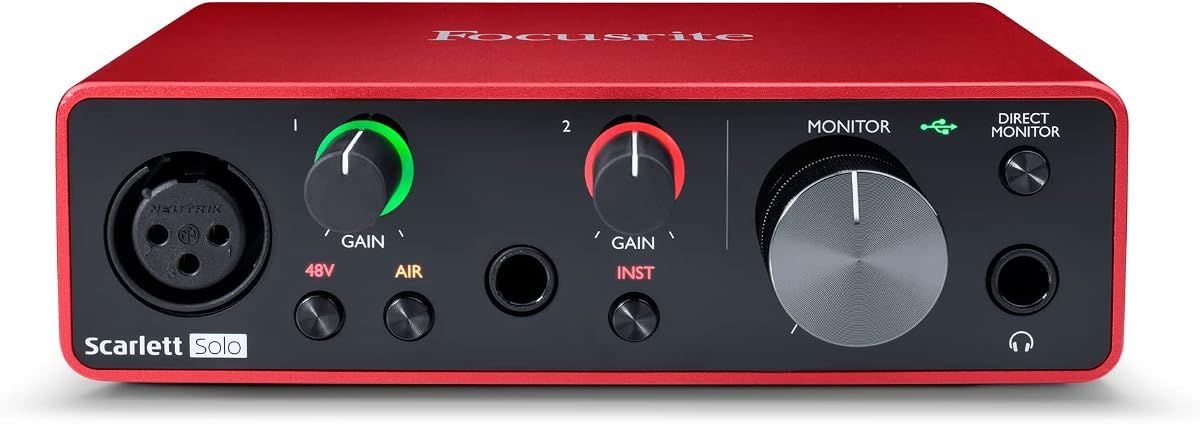
The Focusrite Scarlett Solo 3rd Gen is a focused audio interface for recording one singer, one guitar, or another primary source at a time. It carries a 4.6 rating and combines high-performance microphone preamps, two high-headroom instrument inputs, and conversion up to 24-bit/192kHz.
We may earn a commission when you buy through this link, at no additional cost to you.
The gain controls use illuminated rings to make level management more intuitive and help prevent clipping. A switchable Air mode adds brightness and presence to acoustic recordings, while the balanced outputs provide clean monitoring through compatible headphones or studio monitors. A solo performer can therefore capture and monitor a take without assembling a larger interface.
The package is unusually helpful for beginners. It includes Pro Tools Intro+, Ableton Live Lite, Cubase LE, and the Hitmaker Expansion, providing recording software, instruments, effects, and mastering tools. That software cannot replace good technique or an appropriate microphone, but it removes the need to assemble a starter production package immediately.
The main limitation is its single-channel recording format. It is excellent for focused music, voice-over, podcast, and one-instrument work, but it does not offer the multiple inputs needed for a band. For a creator seeking one dependable USB-C recording interface with strong conversion and bundled tools, the Scarlett Solo 3rd Gen remains a particularly well-balanced recommendation.
Two instrument inputs, high-headroom preamps, and straightforward gain controls support the common workflow of recording a vocal or instrument at a time. The format is ideal for home studios that do not need several simultaneous performers.
Bundled applications cover core recording, arrangement, effects, and mastering tasks. New users can begin building a track without immediately sourcing separate software, while experienced users can connect the interface to their preferred production environment.
We may earn a commission when you buy through this link, at no additional cost to you.
The UGREEN USB Sound Card Adapter is a budget-oriented solution for improving basic PC audio and adding a wired microphone and headphone connection. It combines a high-resolution DAC with up to 16-bit/48kHz output, a 3.5mm headphone jack, and a separate microphone input.
We may earn a commission when you buy through this link, at no additional cost to you.
Setup requires no drivers, software, or external power. After connecting the USB adapter, the computer should recognize it as a standard USB audio device, allowing the user to select it for playback and recording. Its compact ABS construction makes it easy to carry between a desktop and laptop.
Compatibility is broad, covering numerous Windows versions, Linux, Mac OS X, Chromebook, Surface Pro 3, Raspberry Pi, PS4, and PS5. The product is not compatible with PS3, and corporate policy on managed computers may prevent a new USB audio device from being used.
This adapter is a sensible budget choice for online meetings, remote classes, voice chat, simple podcasting, and basic headphone playback. Its limitations are the same ones associated with compact stereo adapters: the microphone input is basic, there is no professional phantom power, and it cannot provide the input flexibility of a music interface. Within that category, its 4.4 rating, wide compatibility, and easy setup are strong advantages.
The broad operating system and device list makes this useful for a shared workstation or a mixed collection of computers. It is particularly handy when a laptop's built-in jack has become unreliable.
Separate headphone and microphone connections support basic calls, classes, and voice recording with minimal setup. Musicians needing balanced inputs, multiple tracks, or studio-level microphone support should move to a dedicated interface.
We may earn a commission when you buy through this link, at no additional cost to you.
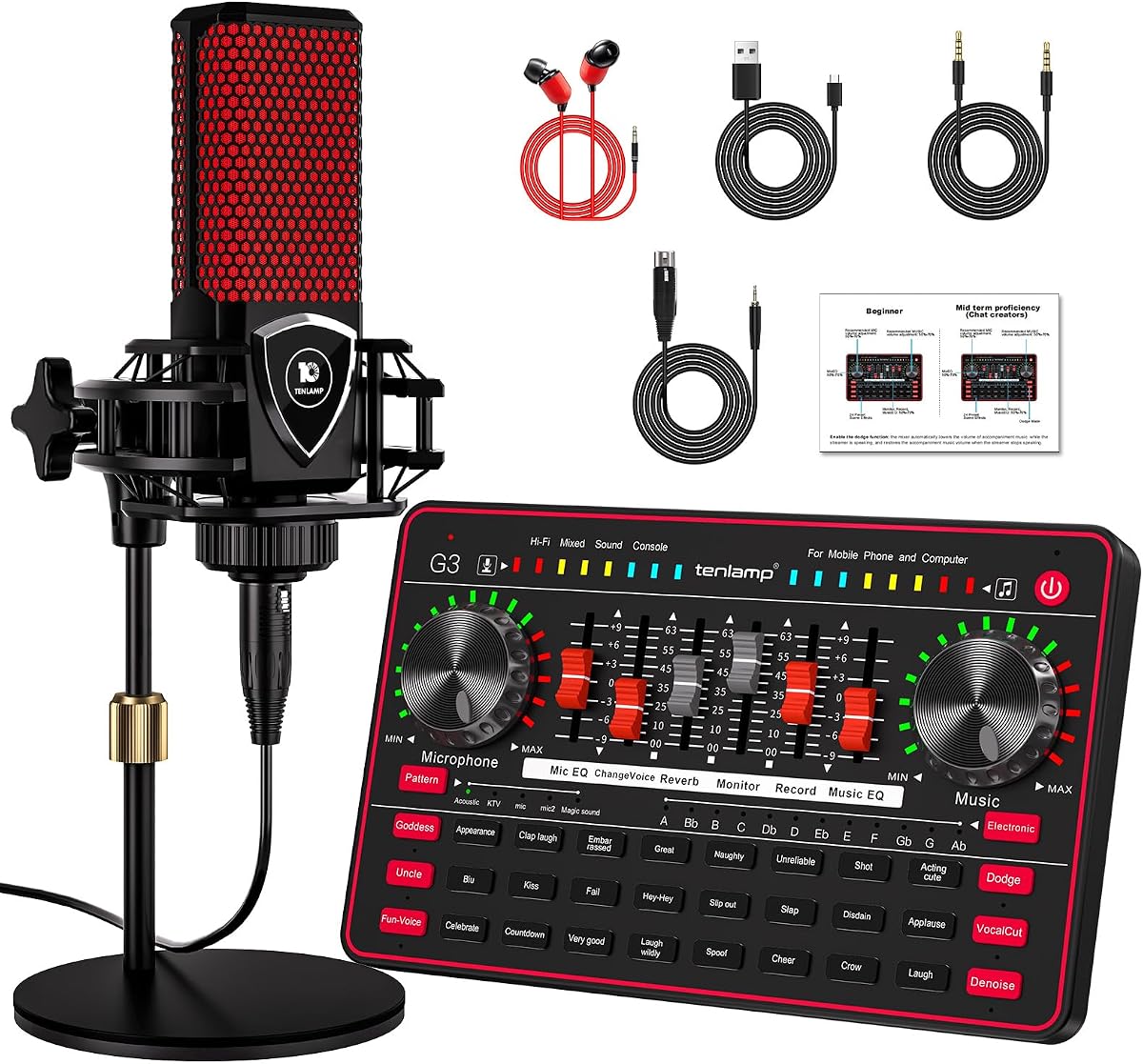
The TENLAMP G3 Creator Audio Mixer Bundle is aimed at podcasters, streamers, and casual content creators who want a ready-made starting point. It combines a sound board, a 3.5mm condenser microphone, and a round base stand in one package with a 4.1 rating.
We may earn a commission when you buy through this link, at no additional cost to you.
Its control set includes bass, treble, reverb, pitch, and voice-changing functions. Twenty-four built-in effects, including applause and laughter, make it easy to add reactions and transitions during a stream. Five reverb modes offer quick starting points, while advanced noise reduction is intended to make voices clearer in imperfect rooms.
The included 3.5mm condenser microphone and stand make the bundle approachable for first-time creators. However, a bundled microphone also limits flexibility for users who already own a preferred microphone or need a balanced professional connection. This product prioritizes accessible podcast and streaming functions over the preamp, converter, and input specifications associated with dedicated music interfaces.
A 1000mAh internal battery adds genuine portability for outdoor or remote sessions. Choose the G3 when you want a complete creator package, physical sound effects, and mobile use. It is less appropriate for multitrack music, demanding acoustic recordings, or a setup that will eventually require balanced XLR and instrument inputs.
The mixer, condenser microphone, and base stand provide the essential pieces for a basic podcast or stream. This reduces the number of separate purchases required to begin recording spoken content.
The internal battery supports use away from a power outlet, while 24 effects, five reverb presets, and voice controls provide live-production tools. These features favor entertainment and convenience over studio-grade signal flexibility.
We may earn a commission when you buy through this link, at no additional cost to you.
The right PC sound card depends on the sources you record, the software you use, and the level of control you need. Start with microphone and instrument requirements, then consider monitoring, resolution, latency, physical design, and compatibility.
Begin by listing every source you expect to record. A vocalist may need an XLR microphone, a guitar player may require a 1/4-inch instrument input, and a streamer may simply need a 3.5mm microphone and headphone connection. Dedicated music interfaces such as the Focusrite Scarlett Solo provide instrument inputs and preamps, while compact adapters prioritize one headphone output and one microphone jack. The PUPGSIS mixer requires an XLR microphone connected through a TRS adapter and does not support USB microphones or 48V dynamic microphones.
Match the connector before considering other features. A jack shape does not guarantee that a microphone's power, signal format, and impedance requirements are supported.
Sample rate describes how many digital audio samples represent each second, while bit depth influences the amount of dynamic range available in the recording. The Audigy Fx Pro and AE-X support playback up to 32-bit/384kHz, the Scarlett Solo reaches 24-bit/192kHz, and several smaller adapters list 16-bit/48kHz support. Higher figures can be useful with compatible source material and software, but the input path matters as much as the advertised converter specification.
Choose a resolution that your applications and workflow can use effectively rather than focusing on the largest printed number. A simple voice adapter may be entirely adequate for online calls and podcasts.
A recording interface must provide enough clean gain and headroom for the microphone without introducing unwanted distortion. The Scarlett Solo emphasizes high-performing preamps and illuminated gain controls, making it a stronger fit for vocals and instruments than a basic adapter with a fixed-level input. The AE-X focuses more on high-resolution conversion and headphone amplification than on a broad set of recording preamps.
Read the input description carefully. The TENLAMP bundle includes a condenser microphone, while the PUPGSIS has a specific XLR-oriented input arrangement. Neither should be assumed to match every professional microphone without checking the required connection and power.
Low-latency monitoring helps performers hear themselves without an obvious delay, which is important during live streaming and instrument tracking. The Guitar Pocket interface advertises low-latency digital processing and direct output, while the AE-X supports ASIO 2.3 for low-latency PC workflows. The PUPGSIS mixer provides wired monitoring because its Bluetooth function receives background audio only and cannot send audio to wireless headphones.
For recording, favor a wired headphone connection and the lowest practical monitoring latency. Latency also depends on the operating system, driver, sample rate, and recording application, so hardware support is only one part of the result.
A sound board can be more useful than a plain interface when the task is live broadcasting. The PUPGSIS offers four programmable pads, a voice changer, adjustable reverb, and noise reduction. The TENLAMP G3 includes 24 sound effects, five reverb presets, pitch controls, a bundled microphone, and a battery. These tools can make a stream more engaging, but they do not replace careful gain control or a suitable room treatment.
Choose creative controls when convenience and live effects are priorities. Choose a conventional audio interface when accurate, repeatable multitrack capture is the primary goal.
Internal PCIe cards can reduce dependence on external enclosures and offer extensive analog or digital connections, but they require compatible free slots, case clearance, driver installation, and physical installation. The Audigy Fx Pro includes a half-height bracket and has a compact 10.5 cm length, which helps in smaller cases. The AE-X is also an internal solution for users building a dedicated desktop.
External USB devices are easier to move between systems and generally require less case work. They are the better choice for laptops, temporary recording stations, and creators who want a flexible setup. Check whether the computer's USB port and operating system support the required class, bandwidth, and driver behavior.
Compatibility extends beyond the familiar Windows desktop. The UGREEN adapter lists support across numerous Windows versions, Linux, Mac OS X, Chromebook, Raspberry Pi, PS4, and PS5, while the SABRENT supports Windows, Linux, and Mac OS X. The Biaze adapter likewise covers desktop systems and consoles. The Guitar Pocket interface extends into Android and Apple mobile devices through Type-C and Lightning connections.
Verify the exact device, operating-system version, port type, and any policy restrictions before buying. Managed workplace computers may block new USB audio devices, and console compatibility does not guarantee identical recording features across every platform.
A portable interface can be valuable for rehearsals, lessons, field recordings, and remote broadcasts. The Guitar Pocket clips to a device or clothing and does not require batteries, while the TENLAMP G3 includes a 1000mAh battery for use away from mains power. Full-size internal cards and larger studio interfaces generally remain tied to a fixed workstation.
Portability should be balanced against connection quality and monitoring. A creator who records on the move may prefer a compact device, while a producer building around guitars, vocals, and studio monitors may prioritize balanced inputs, robust gain control, and flexible monitoring.
Install the hardware according to its form before opening recording software. For an internal PCIe card, power down the computer, install the card in a compatible slot, secure the bracket, connect the relevant audio cables, and boot into Windows or the applicable operating system. External USB devices should be connected directly to the computer first, then selected as the default playback or recording device in the system sound settings.
After the device is recognized, set input and output levels conservatively. In the recording application, choose the correct sound card, select mono or stereo as appropriate, set the desired sample rate, and perform a short test recording. Raise gain only as needed, watch the level meter, and use headphones for latency-conscious monitoring. For creator mixers, assign sound pads and test the microphone, noise reduction, voice effects, and reverb at safe levels.
Protect the hardware and the recorded signal by keeping connectors clean, avoiding repeated bending of cables, and closing unused inputs. Save important recordings in more than one location, maintain reasonable storage space, and update relevant software or drivers when the manufacturer provides a stable release. Do not increase input or headphone levels merely to make a quiet source sound louder, because that also raises the risk of clipping and unwanted noise.
A PCIe card can be useful in a fixed desktop with ample connectivity and a desire to keep the audio hardware inside the computer. A USB interface is generally easier to install, more portable, and often better suited to laptops and home recording. The right choice depends more on your required inputs, preamps, monitoring, and workflow than on the connection alone.
Many computers include onboard audio that can handle basic voice recording, but a dedicated interface may offer cleaner preamps, better control, more reliable connections, and lower-latency monitoring. If your goal is occasional calls or simple voice memos, a basic USB adapter may be enough. For repeated vocal recording, an interface with adjustable gain and balanced connections is usually more practical.
The Scarlett Solo 3rd Gen is a strong fit for a single guitar because it provides two high-headroom instrument inputs, 24-bit/192kHz conversion, and switchable Air mode. The Guitar Pocket interface is the more portable option and directly supports electric guitars and basses. Choose based on whether you value a full desktop recording setup or a lightweight mobile workflow.
It depends on whether the microphone uses a self-powered USB design or an analog 3.5mm connection. An analog condenser microphone normally requires phantom power, which many basic adapters do not provide. The TENLAMP G3 bundle includes a 3.5mm condenser microphone designed for its mixer, while dedicated music interfaces often provide proper microphone preamps and power.
24-bit recording provides a generous dynamic range for editing, and 48kHz is a widely supported practical rate for music, voice, and online video. Higher rates such as 96kHz or 192kHz can help with particular workflows but require compatible hardware, software, storage, and processing capacity. Choose settings your complete chain can support consistently.
Most do not. The SABRENT is explicitly a stereo adapter and cannot add surround processing, while the Optimal Shop model supports a six-channel analog path and optical S/PDIF functionality. Multichannel output also requires compatible source material, correct passthrough settings, and suitable speakers or a decoder.
A basic sound card or USB adapter mainly converts digital computer audio to analog output and accepts a simple analog input. An audio interface is designed more specifically for recording, often adding microphone preamps, instrument inputs, balanced connections, monitoring controls, and low-latency driver support. The products in this guide span both categories.
That depends on the specific device. The PUPGSIS mixer explicitly supports Bluetooth only as an input for background audio and cannot transmit monitoring to Bluetooth headphones. Its zero-latency monitoring path requires a wired connection. Other products in this guide use USB or analog connections rather than offering Bluetooth monitoring.
The Focusrite Scarlett Solo 3rd Gen is the most balanced choice for focused vocal, guitar, and podcast recording, while the Creative Sound Blaster AE-X stands out for premium internal high-resolution playback and headphone amplification. The UGREEN USB Sound Card Adapter is the straightforward budget option for basic voice capture and adding ports to a compatible computer.
Prioritize the source and workflow before comparing specifications. A solo musician needs clean preamps, an instrument input, and dependable monitoring; a streamer may value sound pads, voice effects, and noise reduction more; a desktop enthusiast may prioritize multichannel output, optical connections, and an internal installation. Basic adapters are valuable when the requirement is simply a reliable headphone output and microphone input.
Check the current listing and price before purchasing, since product details, ratings, bundle contents, and availability can change. Also verify connector type, operating-system support, microphone power requirements, and room or computer-policy restrictions. Those final checks will ensure that the selected PC sound card fits the actual recording setup.
