
MINISFORUM M1-1390
4.5Editor score
24-core hybrid processor
32GB expandable DDR4 memory
Triple 4K display support
Our Intel Core i9 Mini PC guide compares ten compact desktops for processing power, memory, networking, display support, cooling, and upgradeability options.
An Intel Core i9 Mini PC combines desktop-class processing with a compact enclosure that suits offices, studios, editing desks, home labs, and multi-monitor workspaces. The best model is not simply the one with the highest specification: cooling, memory expansion, networking, graphics, storage, and usable ports can make a larger difference in everyday practice.
This guide compares ten Core i9 and closely related Intel systems using the supplied processor, memory, storage, display, network, and expansion specifications. It covers both complete configurations and a barebone workstation, separating general-purpose compact PCs from models intended for specialist networking, storage, or graphics tasks.
The picks show why processor generation alone cannot determine the right choice. Some models favor raw multi-core throughput, others emphasize connectivity and upgradeability, and newer platforms add local AI features. Ratings and product details reflect the supplied listings, while prices and availability can change, so confirm current listings before purchasing.
4.5Editor score

4.6Editor score

4.5Editor score
This side-by-side overview highlights processor design, included memory and storage, networking, display capabilities, and major expansion options across all ten mini PCs.


The MINISFORUM M1-1390 is a strong all-round compact PC built around the Intel Core i9-13900HX, a 24-core, 32-thread processor that can reach 5.4GHz. Its supplied 4.5 rating reflects a generally favorable customer reception, while the combination of 32GB DDR4 memory and a 1TB PCIe 4.0 SSD makes it suitable for demanding office, creative, and development workloads.
We may earn a commission when you buy through this link, at no additional cost to you.
Its hybrid processor architecture combines eight performance cores with 16 energy-efficient cores, giving it substantial throughput for compiling, rendering, media processing, and heavy multitasking. Memory can be expanded to 96GB, while the storage arrangement supports dual NVMe drives and capacity of up to 8TB according to the product information. That flexibility is unusually useful for a mini PC.
Display support includes HDMI 2.1, DisplayPort 1.4, and a USB-C connection with video output, with support stated for up to three 4K displays. Networking covers 2.5GbE, WiFi 6E, and Bluetooth 5.2, while five USB ports cover common peripherals. The trade-off is that this system uses DDR4 rather than newer DDR5 memory, so it does not offer the highest possible memory bandwidth.
The M1-1390 is a compelling recommendation for users who want substantial Core i9 performance without moving into a specialist workstation. It suits creators, developers, analysts, and office power users who value a compact body, strong processor, and practical expansion. Choose it when balanced capability, triple-display support, and flexible memory capacity matter more than enterprise networking or dedicated GPU expansion.
The 24-core i9-13900HX is particularly suitable for multitasking across demanding applications. Its performance and efficiency cores divide heavy and lighter tasks intelligently, which makes it more versatile than a conventional lower-tier mini PC for compiling, 4K editing, and complex office workflows.
Supporting up to 96GB of DDR4 RAM and two NVMe storage positions gives the system room to grow. Users can begin with the included 32GB and 1TB configuration, then add capacity as project files, virtual machines, and media libraries expand.
We may earn a commission when you buy through this link, at no additional cost to you.
The Beelink GTi13 combines an Intel Core i9-13900HK with 32GB DDR5 memory and a 1TB SSD, making it one of the most well-rounded performance mini PCs in the group. Its 4.6 rating is the highest among the listed products, and the feature set extends beyond the usual small PC with fingerprint login, dual 2.5G Ethernet, an SD card slot, and Thunderbolt 4.
We may earn a commission when you buy through this link, at no additional cost to you.
The 14-core, 20-thread processor uses six performance cores and eight efficiency cores, with a maximum clock of 5.4GHz and a 65W design. It is described as capable of handling gaming, live broadcasting, 3D modeling, AI-oriented tasks, programming, and video editing concurrently, making it a sensible choice for a creator who wants a compact but highly connected workstation.
Its 32GB DDR5 configuration operates at a stated 5200MHz base frequency and can expand to 96GB. The system also supports multiple SSD slots, with the supplied information describing substantial storage expansion. Thunderbolt 4 offers 40Gbps data transfer, 100W power delivery, and video output, while the PCIe slot can be used with the compatible Beelink EX docking station for added graphics or data throughput.
The GTi13 is our top overall pick because it balances processor performance, modern memory, fast storage, flexible displays, network options, and convenient security features. It is particularly suitable for a creative desk, compact developer station, or multi-display office. Buyers who need 24 CPU cores or enterprise SFP+ networking should choose a more specialized alternative.
Thunderbolt 4, dual 2.5G Ethernet, WiFi 6, and five 10Gbps USB ports provide more ways to connect displays, storage, network equipment, and everyday peripherals. This makes the GTi13 easier to integrate into an existing professional workspace than a basic mini PC.
DDR5 memory and a high-speed NVMe SSD provide a responsive foundation for media applications, compilation, and multitask-heavy workflows. Expansion to 96GB of memory and additional SSD capacity helps the system accommodate growing project requirements.
We may earn a commission when you buy through this link, at no additional cost to you.
The KAMRUI Hyper H2 is built around the 14th-generation Intel Core i9-14900HX, offering 24 cores, 32 threads, a 36MB cache, and a maximum turbo frequency of 5.8GHz. That is the highest clock figure in this roundup, and with 32GB of dual-channel DDR4 and a 1TB PCIe 4.0 SSD, it is a strong candidate for performance-sensitive compact computers.
We may earn a commission when you buy through this link, at no additional cost to you.
The processor is specifically positioned for demanding multitasking, creative work, and high-load applications. Storage can be expanded across two M.2 2280 positions, and the included memory can rise to 64GB. HDMI 2.0, DisplayPort 1.4, and a 10Gbps USB-C port support a three-monitor arrangement with 4K 60Hz output, useful for editing timelines, engineering work, and trading layouts.
Thermal design receives considerable attention, with a centrifugal fan, dual copper heat pipes, a dual-fin module, and an aluminum heatsink. The product information states that this design improves airflow and heat dissipation while supporting sustained processor performance. The body measures 5.04 by 5.04 by 1.63 inches and includes a VESA mount for placement behind a display.
The Hyper H2 is ideal for a compact gaming or creative setup that values peak CPU frequency, modern processor architecture, and minimal desk clutter. Its main compromises are older DDR4 memory and a single 1Gbps network port. Users needing faster memory or dual wired networking should examine the Beelink or MINISFORUM M1-1390 instead.
A 55W processor in a compact enclosure makes cooling essential. The H2's centrifugal fan, copper heat pipes, and aluminum heatsink are designed to move heat away from both the CPU and SSD, helping preserve responsiveness during extended workloads.
HDMI, DisplayPort, and USB-C video outputs make it straightforward to build a three-screen workspace. The included VESA mount also allows the system to sit behind a compatible display, making it especially convenient where desk space is limited.
We may earn a commission when you buy through this link, at no additional cost to you.
The MINISFORUM NAB9S pairs a 14-core, 20-thread Intel Core i9-13900HK with 16GB of DDR4 memory and a 500GB PCIe 4.0 SSD. Its 4.5 rating indicates favorable customer feedback, but the most distinctive feature is connectivity: two 2.5G Ethernet ports and support for as many as four independent displays.
We may earn a commission when you buy through this link, at no additional cost to you.
This makes the NAB9S unusually practical for network aggregation, firewall work, file services, or a desk that needs more screens than a conventional mini PC normally offers. Dual HDMI and dual USB-C video outputs support 4K 60Hz playback, while WiFi 6 and Bluetooth 5.2 provide convenient wireless alternatives.
The tool-free removable top cover makes memory and storage upgrades more approachable. Two DDR4 SO-DIMM slots support up to 32GB, and storage can include an M.2 PCIe 4.0 NVMe SSD plus a 2.5-inch SATA drive. A redesigned cooling system uses dual heat pipes, dual airflow channels, active SSD cooling, and dual-side ventilation.
Choose the NAB9S for a space-constrained office, compact server use, or a multi-screen productivity setup that needs two fast Ethernet connections. The included 16GB and 500GB are more modest than the configurations of many competitors, so buyers with intensive memory or storage needs should plan an upgrade from the outset.
Dual 2.5GbE ports create opportunities for link aggregation, separating network traffic, or connecting a compact PC to more demanding infrastructure. Few similarly small systems offer this much wired connectivity as standard.
Two HDMI and two USB-C outputs allow up to four independent screens, making the NAB9S useful for finance, engineering, monitoring, and creative workflows that benefit from keeping several applications visible at once.
We may earn a commission when you buy through this link, at no additional cost to you.
The MINISFORUM MS-01 S1390 is designed as a mini workstation rather than a conventional office computer. It combines the 14-core, 20-thread Intel Core i9-13900H with 32GB DDR5 memory, 1TB NVMe storage, four network interfaces, and a standard PCIe 4.0 x16 slot, making it one of the most expandable systems in the roundup.
We may earn a commission when you buy through this link, at no additional cost to you.
Its networking is especially substantial. Two 10Gbps SFP+ ports, two 2.5GbE RJ45 ports, and two USB4 connections provide multiple paths for NAS access, high-speed LAN traffic, and professional peripherals. The product information describes aggregate transfer capability of up to 65Gbps, subject to the connected equipment and configuration.
Storage is equally flexible. The workstation supports three M.2 NVMe SSDs, U.2 storage, and RAID 0 or RAID 1 arrangements. The PCIe x16 slot can accept a high-performance graphics card, network card, or storage controller, expanding the system well beyond ordinary integrated-graphics use. HDMI 2.0 and two USB4 ports support multiple high-resolution displays.
This is the best choice for a homelab operator, network specialist, content studio, or advanced user who needs SFP+ connectivity and full-size expansion in a compact chassis. Buyers should consider physical dimensions, operating system, cooling, and the peripherals required for their network, because the MS-01 is more specialized than a simple desktop replacement.
SFP+ interfaces support high-speed fiber or suitable copper transceivers, while dual RJ45 ports provide flexible wired access. This makes the MS-01 a natural candidate for network experimentation, compact server duties, and high-speed NAS workflows.
Multiple NVMe and U.2 positions allow storage to be tailored to capacity, redundancy, or speed. The full-length PCIe slot adds an entirely separate path for a discrete GPU, accelerator, network interface, or controller.
We may earn a commission when you buy through this link, at no additional cost to you.
The GEEKOM IT13 MAX uses the Intel Core Ultra 9 185H rather than a conventional Core i9, but it deserves attention because the platform combines 65W processing, dedicated AI acceleration, modern connectivity, and a quiet cooling design. It holds a 4.6 rating and includes 16GB of DDR5 memory plus a 1TB SSD.
We may earn a commission when you buy through this link, at no additional cost to you.
The main attraction is local AI capability. Intel's NPU and processor platform are presented as suitable for local large language models, computer vision, machine-learning workloads, and privacy-conscious document processing. The product information also promotes faster graphics, greater AI performance, and improved video-editing performance relative to earlier Core i9 systems.
For general work, dual Ethernet and support for up to four displays are notable. One USB-C output can handle 8K while HDMI supports 4K, allowing expansive multi-monitor arrangements. Quiet cooling and a 3-year warranty also suit offices, schools, clinics, and studios where noise and reliability matter.
The IT13 MAX is a strong recommendation for developers, engineers, scientists, and privacy-conscious creators interested in local AI tools. It is not a strict Intel Core i9 selection, and 16GB of memory may constrain larger local models or heavy virtualized work. Confirm application and model support before committing to an AI-focused configuration.
A local AI accelerator can reduce dependence on cloud processing for compatible tasks. Keeping documents, prompts, and inference on the machine may improve data control and reduce network latency for supported workloads.
The cooling system is designed to sustain 65W performance at reduced noise, according to the supplied information. That makes the system more practical in a classroom, nurse station, studio, or late-night home office than a louder, less disciplined compact system.
We may earn a commission when you buy through this link, at no additional cost to you.
The barebone MINISFORUM MS-01 is a configurable version of the Core i9-13900H mini workstation. It includes the processor and chassis but no RAM, SSD, or operating system, allowing buyers to choose components around their workload and budget. Its 4.5 rating applies to the listing, although the product experience depends heavily on the selected configuration.
We may earn a commission when you buy through this link, at no additional cost to you.
The platform provides two 10Gbps SFP+ ports, two 2.5Gbps RJ45 ports, two USB4 connections, and an HDMI output. It also offers a PCIe 4.0 x16 slot, described as compatible with PCIe 4.0 x8 devices, for adding a discrete graphics card. The supplied material references an RTX 3050 as a tested expansion example.
Two DDR5-5200 memory slots and several M.2 2280 positions provide a flexible foundation. The system also supports 22110 enterprise-style SSDs, U.2 drives, RAID 0, and RAID 1. Display options include one HDMI connection and two USB4 outputs capable of high resolutions and refresh rates according to the listed specifications.
This barebone model is ideal for an experienced builder who wants a specific memory kit, enterprise storage arrangement, discrete GPU, or network card. It is less suitable for a first-time PC buyer or anyone wanting a ready-to-use office computer. Confirm operating system licensing, thermal expectations, and component dimensions before purchasing components.
Choosing RAM and storage separately can prevent buyers from paying for capabilities they will not use. It also allows deliberate selection of memory speed, SSD endurance, capacity, and RAID arrangement after the workstation's intended role is established.
The MS-01's SFP+, RJ45, USB4, and full-size PCIe interfaces create a flexible foundation for professional add-ons. A discrete GPU, high-speed NIC, or storage controller can transform the compact enclosure into a task-specific workstation.
We may earn a commission when you buy through this link, at no additional cost to you.
The GEEKOM XT13 Pro is defined by generous included components: 32GB of RAM and a 2TB PCIe 4.0 SSD accompany the Intel Core i9-13900H. Its 4.1 rating is the lowest among the ten listings, but the specification remains attractive for users who want a ready-to-use compact system with substantial storage from the outset.
We may earn a commission when you buy through this link, at no additional cost to you.
The processor offers 14 cores and 20 threads with speeds up to 5.4GHz, while Intel Iris Xe graphics with AV1 encoding and decoding support multimedia workflows. The supplied information positions the system for AI-assisted productivity, browser-heavy multitasking, 4K multi-track editing, 3D rendering, and gaming.
Memory can be expanded to 96GB, and storage can reach 4TB according to the product details. WiFi 6E operates across 2.4GHz, 5GHz, and 6GHz bands, with Bluetooth 5.3 for peripherals. A three-year hardware warranty and local repair support are additional advantages for a compact PC intended for long-term work.
The XT13 Pro makes sense for a creator or developer who wants large local storage without immediately adding drives, or for a family computer expected to hold extensive media. It is less compelling for buyers whose priority is specialist networking, four-screen operation, or dedicated GPU expansion. The lower rating also warrants checking recent customer feedback.
A 2TB SSD reduces the need for immediate storage upgrades when working with video, project archives, game libraries, or virtual machines. The fast PCIe 4.0 interface also provides a responsive environment for loading large assets and launching applications.
Intel Iris Xe graphics and AV1 support make the system relevant to modern video workflows. Integrated graphics cannot replace a discrete GPU, but they can be adequate for media playback, general creative applications, and lighter graphical work.
We may earn a commission when you buy through this link, at no additional cost to you.
The GEEKOM GT13 MAX combines the Intel Core Ultra 9 185H with 16GB of DDR5 memory and a 1TB SSD. Its 4.4 rating reflects a favorable but not perfect reception. The system stands out through an 11 TOPS Intel AI Boost NPU, Intel Arc graphics, WiFi 7, and support for up to four displays.
We may earn a commission when you buy through this link, at no additional cost to you.
The local AI platform is positioned for lightweight large language models, private document question answering, retrieval search, OCR, meeting summaries, transcription, image processing, noise reduction, subtitles, and coding assistance. Sensitive files can remain on the device for appropriate workloads, while cloud services remain available for deeper tasks.
Intel Arc graphics provide eight Xe cores, ray tracing, and AV1 decoding for AAA gaming, 4K editing, and creative work. Dual USB4, dual HDMI 2.0, and Mini DisplayPort 1.4 provide the four-display arrangement. Dual 2.5G Ethernet, WiFi 7, and Bluetooth 5.4 create a modern network foundation.
The GT13 MAX is well suited to professionals building local AI tools, trading stations, engineering desks, and multi-screen offices. Memory can rise to 96GB and storage to 6TB, making an immediate upgrade realistic for demanding users. Check supported software and model sizes before choosing it for a specialized local AI project.
The NPU can handle compatible inference tasks while reducing pressure on the CPU. Local processing may help organizations keep sensitive documents closer to the system and support low-latency tools such as transcription, OCR, and document search.
Four display outputs are joined by dual 2.5G Ethernet and WiFi 7. This combination suits professional workspaces where several high-resolution panels, stable wired connections, and current wireless standards are all valuable.
We may earn a commission when you buy through this link, at no additional cost to you.
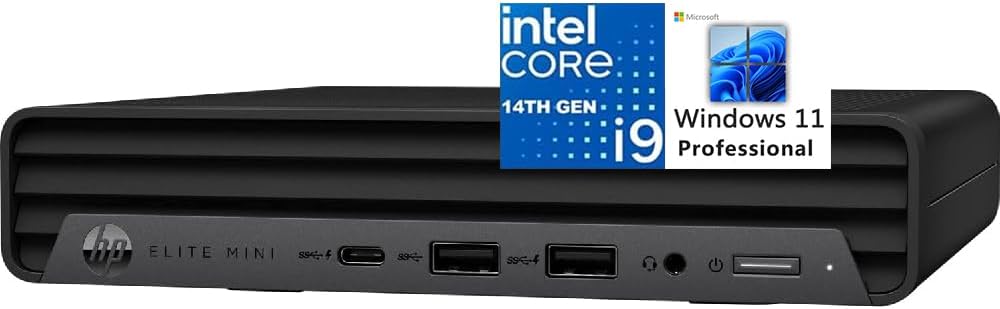
The HP Elite Mini 800 G9 is a business-oriented Core i9 mini PC that arrives with Windows 11 Pro, a full-size wired keyboard, and a mouse. Its 4.6 rating places it among the most favorably reviewed options, and the complete package reduces the setup work associated with assembling a compact office workstation.
We may earn a commission when you buy through this link, at no additional cost to you.
At the heart is the Intel Core i9-14900T, a 24-core, 32-thread processor with eight performance cores, 16 efficiency cores, 32MB of cache, and a maximum turbo of 5.5GHz. The T-series design is intended to balance strong performance with lower sustained power requirements than many unrestricted desktop processors.
The system includes 16GB of DDR5 memory and a 1TB PCIe NVMe M.2 SSD. Display connectivity consists of two DisplayPort 1.4 connections, HDMI 2.1, and a 20Gbps USB-C port, allowing up to four 4K 60Hz displays. There are also five USB-A ports, a 1Gbps RJ45 port, WiFi 6, Bluetooth, and a combined audio jack.
The Elite Mini 800 G9 is a strong choice for offices, reception areas, classrooms, and home users who want a recognized business platform with Windows already configured. Compared with enthusiast mini PCs, it offers less exotic networking and fewer visible upgrade details, but its included operating system, peripherals, quiet design, and broad display support simplify deployment.
Windows 11 Pro, a keyboard, and a mouse make this one of the most straightforward systems in the list. It can move from unboxing to a working multi-monitor office station without requiring buyers to source several basic accessories first.
The i9-14900T retains a high core and thread count while using a power-conscious processor family. It is well matched to office fleets, developer desks, and professional workspaces that need strong multitasking without the footprint of a tower.
We may earn a commission when you buy through this link, at no additional cost to you.
The right compact PC depends on processor generation, sustained cooling, memory type, graphics needs, display count, networking, and the kind of expansion your work requires.
A Core i9 processor provides substantial performance for demanding office applications, code compilation, video editing, 3D work, and multitasking, but core count is only part of the story. The M1-1390 and Hyper H2 use 24-core, 32-thread HX processors, while the Beelink GTi13, NAB9S, and the MS-01 models use 14-core, 20-thread HK or H processors. The newer Core Ultra 9 systems also provide 16 cores and 22 threads alongside dedicated AI hardware.
Choose by workload rather than processor label alone. High-thread-count HX chips suit heavily parallel tasks, while H and HK chips can offer a favorable balance of performance, power, acoustics, and thermals. Always check the complete platform and cooling design rather than assuming every i9 delivers equivalent sustained performance.
Memory capacity determines how comfortably the system can hold large project files, browser sessions, virtual machines, and creative applications. Configurations in this guide range from 16GB to 32GB, with maximum supported capacity varying from 32GB on the NAB9S to 96GB on several Beelink and GEEKOM models and 64GB on the Hyper H2.
DDR5 generally offers higher bandwidth and improved efficiency, while DDR4 remains a practical choice when affordability and straightforward compatibility matter. The MS-01 barebone is particularly attractive to buyers who want to install a preferred memory kit. Match capacity to the workload and confirm the maximum supported module size and configuration.
Fast NVMe storage improves application loading, file access, and project responsiveness, but capacity can become the limiting factor sooner than processor speed. The included configurations span 500GB, 1TB, and 2TB. Dual M.2 positions appear on several models, while the MS-01 supports M.2, 22110, and U.2 enterprise storage, along with RAID arrangements.
Choose enough space for your operating system, applications, active media, and backups. Consider whether you need a second internal drive, an external high-speed volume, or RAID redundancy. The barebone option gives complete control, while a ready-made 2TB configuration is more convenient for users who expect substantial local storage.
Display support determines whether a mini PC can replace a multi-screen desktop setup. The NAB9S, GEEKOM IT13 MAX, GT13 MAX, and HP Elite Mini support as many as four displays. The M1-1390, Hyper H2, and Beelink GTi13 support three, while the MS-01 configurations provide a smaller but still useful multi-output arrangement.
Check the output interfaces your monitors require. HDMI, DisplayPort, and USB-C are not interchangeable in every respect, particularly regarding maximum resolution, refresh rate, daisy chaining, and docking support. A USB-C port with DisplayPort Alternate Mode may allow a single-cable setup, but monitor compatibility must be verified.
Network capability can be as important as raw CPU speed for a compact workstation. Options in this guide range from one 1Gbps RJ45 port to dual 2.5G Ethernet and dedicated 10Gbps SFP+ connections. WiFi 6, WiFi 6E, and WiFi 7 offer flexible wireless access, while Bluetooth simplifies peripheral connections.
Standard office and home use rarely needs more than one Ethernet port, but dual connections can support aggregation, separate management and data paths, or a wired NAS workflow. SFP+ models are better suited to administrators, homelab users, and creative studios with existing fiber or high-speed switch infrastructure.
Compact systems must move processor heat into a much smaller space than conventional towers. Dedicated fans, heat pipes, aluminum or copper heatsinks, and carefully designed airflow paths help prevent throttling. The Hyper H2 uses a centrifugal fan, dual copper heat pipes, and a dual-fin module, while the NAB9S combines dual heat pipes with active SSD cooling and dual-side ventilation.
A peak turbo frequency alone does not guarantee sustained performance. Consider the manufacturer's cooling claims, processor power limits, noise requirements, and ambient temperature. Quiet operation is especially important in offices, classrooms, clinics, studios, and shared homes, while heavily loaded systems may prioritize airflow and acoustics more aggressively.
Integrated Intel graphics can handle office work, video playback, light content creation, and mainstream games, but demanding 3D rendering or GPU-accelerated AI may require more. The MS-01's full-length PCIe slot can accept a discrete graphics card, making it the most obvious choice in this list for a major graphics upgrade.
Other systems provide Thunderbolt 4, M.2 storage positions, card readers, or docking compatibility. Check whether an external GPU enclosure is supported by the USB-C or Thunderbolt implementation, and verify physical clearance, power delivery, and monitor support. A PCIe slot offers greater flexibility than a compact external enclosure when space and power allow.
A complete system can save time, while a barebone gives more control over components and software. The HP Elite Mini 800 G9 includes Windows 11 Pro, a wired keyboard, and a mouse. The MS-01 barebone includes neither memory, storage, nor an operating system, and the GT13 MAX is described as arriving with Windows 11 preinstalled.
Decide whether you need Windows immediately, prefer Linux, or already have a licensed operating system. A barebone is often best for builders who know their exact requirements. A complete business package is generally more convenient for offices, classroom deployment, and users who do not want to configure memory, storage, and software themselves.
Begin by placing the system on a hard, stable surface with open space around its vents. Connect the display, keyboard, mouse, network, and power connections, then power it on and complete the operating system setup. For a mounted system, follow the supplied mounting instructions and ensure cables do not restrict airflow or strain the rear ports.
Update the operating system, chipset and graphics drivers, firmware, and security software before beginning intensive work. Confirm that the memory, storage, network interfaces, displays, audio, and USB accessories are recognized. For a barebone, install memory in the recommended channel arrangement, secure the SSD correctly, and verify storage temperatures after prolonged transfers.
Keep intake and exhaust openings clear, clean dust from vents periodically, and avoid placing the computer inside a closed cabinet without airflow. Monitor temperatures and noise during sustained workloads, back up important data, and use surge protection or reliable power delivery. When adding storage, memory, or a graphics card, power down, disconnect the power source, and follow the manufacturer's installation guidance.
An Intel Core i9 mini PC can provide strong CPU performance and handle mainstream games well when paired with suitable integrated or discrete graphics. A high core count also helps games that rely on background simulation. For demanding modern titles, high settings, ray tracing, or 4K gaming, check the graphics capability carefully and consider the MS-01 with a compatible discrete GPU.
The 24-core models in this guide have eight performance cores and 16 efficiency cores, while the 14-core models have six performance cores and eight efficiency cores. More cores can improve heavily parallel workloads, but sustained results also depend on processor power, memory, storage, and cooling. The simpler distinction is not always the best one for every user.
Thirty-two gigabytes is a comfortable starting point for heavy multitasking, video editing, 3D applications, and development environments, especially when the memory is upgradeable. Sixteen gigabytes may be sufficient for office work and lighter applications. Check whether the system supports more memory and whether your chosen applications benefit from additional capacity.
Yes, for many office, creative, development, and general computing tasks, a compact Core i9 system can replace a tower. The most important limitations are graphics capability, port selection, expandability, and cooling under sustained load. Models such as the MS-01 address expansion more aggressively, while simpler mini PCs are best for general productivity.
A barebone model is worthwhile when you want specific memory, storage, operating system, or add-in hardware and can comfortably configure the system yourself. It can also be more economical when you already own compatible components. First-time computer buyers will generally have an easier experience with a complete configuration.
A 2.5GbE connection offers a higher theoretical ceiling than standard gigabit Ethernet and is useful for large file transfers and modern switches. A 10G SFP+ connection is substantially faster and generally requires compatible infrastructure, transceivers, cabling, storage, and a receiving device. Choose 10G for specialized network workloads rather than ordinary browsing.
Newer Core Ultra 9 platforms can provide better efficiency, improved integrated graphics, and dedicated AI acceleration, so they are not automatically slower. However, compatibility and the nature of the workload matter. Classic CPU-heavy applications may favor a mature Core i9 platform, while AI acceleration, media work, and newer multi-core efficiency can make Core Ultra a stronger choice.
Choose enough space for the operating system, applications, active project files, and a sensible backup strategy. A 1TB drive suits many general users, while editors, developers, and gamers with large libraries may prefer 2TB or more. Multiple M.2 or U.2 positions on certain models make it easier to expand after installation.
The MINISFORUM M1-1390 is the most balanced general recommendation, combining a 24-core processor, 32GB of expandable memory, fast storage, and triple-display support. The Beelink GTi13 stands out for modern connectivity, DDR5 memory, Thunderbolt 4, fingerprint login, and dual 2.5G networking, while the KAMRUI Hyper H2 offers the highest listed clock speed in a remarkably small body.
For specialized systems, prioritize the feature that directly supports your work. The MINISFORUM MS-01 is the strongest option for SFP+ networking, enterprise storage, and full-length PCIe expansion, while the GEEKOM IT13 MAX and GT13 MAX make more sense when local AI acceleration and modern wireless connectivity are central. The HP Elite Mini 800 G9 is the simplest complete business package.
Before buying, verify the exact display outputs, memory limits, included components, operating system, cooling expectations, and peripheral compatibility. Product ratings, configurations, availability, and especially prices can change over time, so review the current listing and confirm that the selected configuration still matches your workload.